
NovaStar MCTRL600 LED Display Controller: Specs, Manual, Software and Price
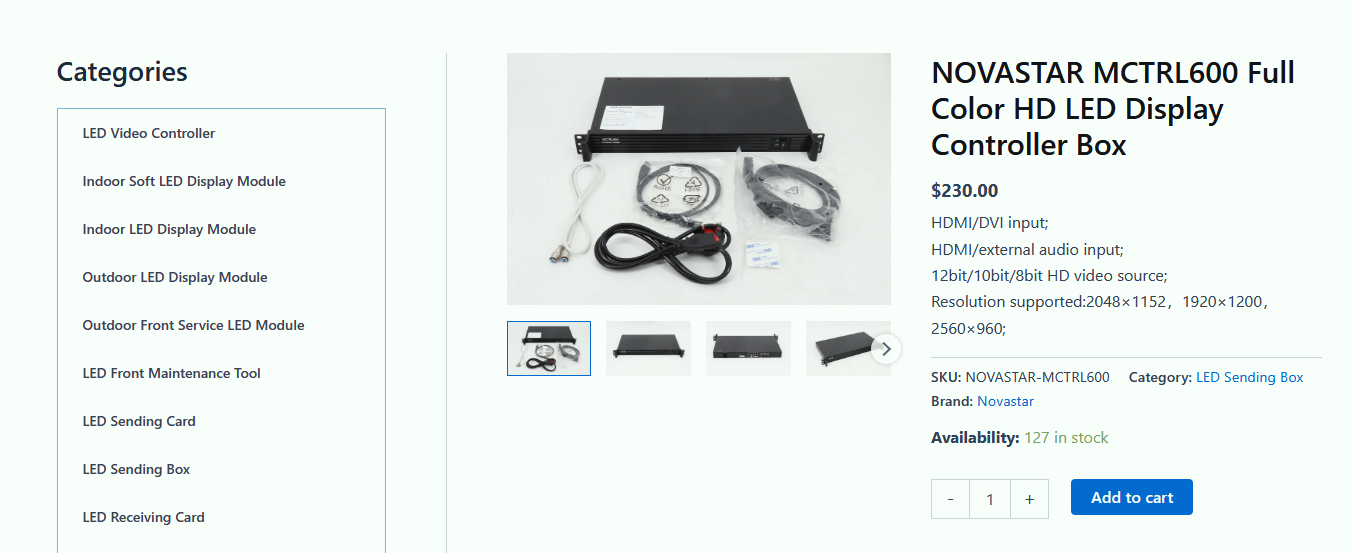
The NovaStar MCTRL600 is a standalone LED display controller, also called a sending box, that accepts one DVI, one HDMI 1.3 and one audio input and distributes the picture to LED panels through four Gigabit Ethernet outputs, each rated for up to 650,000 pixels. A single unit accepts input resolutions up to 1920×1200@60Hz, is configured from a PC with NovaStar NovaLCT software over a USB Type-B cable, and can be cascaded with up to 20 controllers over UART.
This page is the practical part of the MCTRL600 manual: verified specifications, indicator-light meanings, NovaLCT setup steps, manual and firmware downloads, what drives the price and the fixes for the most common setup problems. The specification figures come from NovaStar’s MCTRL600 LED Display Controller Specifications V2.3.4 (released 2025-06-05) and from NovaStar’s MCTRL600 product page.
In short: the MCTRL600 suits screens that run from a single 1920×1200@60Hz source and stay within 650,000 pixels per Ethernet output (2.6 million pixels across the four outputs, calculated from that per-port rating). It has no built-in media player, no multi-window switching, no 4K input and no network control port. If you need any of those, read section 9 before you buy.
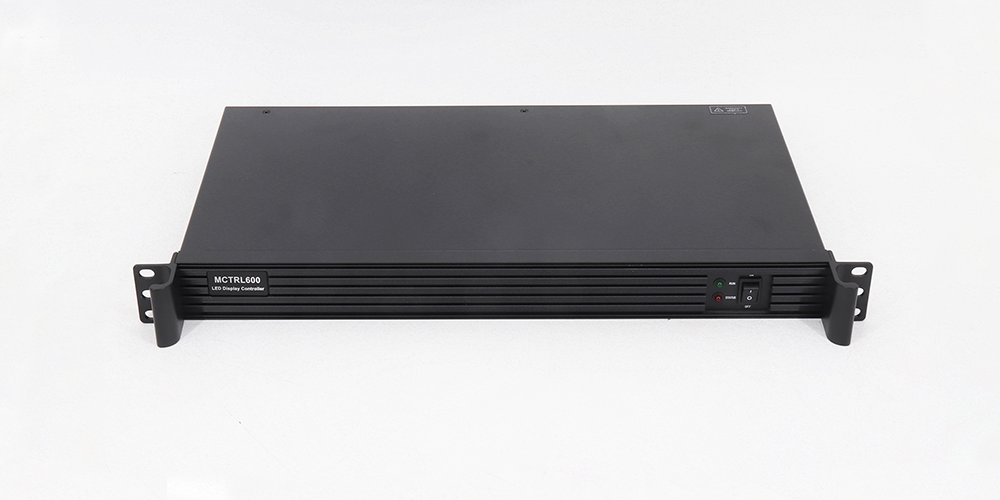
Table of Contents
1. What is the NovaStar MCTRL600?
2. MCTRL600 specifications
3. Video input and resolution limits
4. Front and rear panel: indicators and ports
5. MCTRL600 manual, NovaLCT software and USB driver
6. Step-by-step MCTRL600 setup with NovaLCT
7. MCTRL600 troubleshooting
8. MCTRL600 price: what actually drives the cost
9. Is the MCTRL600 the right controller for your screen?
10. FAQs about the NovaStar MCTRL600
11. Conclusion
1. What is the NovaStar MCTRL600?
The MCTRL600 is an LED display controller developed by Xi’an NovaStar Tech Co., Ltd. It is a controller rather than an all-in-one video processor: it converts a video signal into the data that LED receiving cards need and sends that data to the screen over Ethernet. NovaStar lists rental and fixed installations as its main applications, including concerts, live events, security monitoring centres and sports venues.
MCTRL600 key features
- Inputs: 1× SL-DVI, 1× HDMI 1.3 and 1× audio connector. The HDMI input is HDCP 1.4 compliant.
- Outputs: 4× RJ45 Gigabit Ethernet, up to 650,000 pixels per port, with redundancy between the Ethernet ports.
- Control: 1× Type-B USB 2.0 port for communication with a PC running NovaLCT.
- Cascading: 2× UART ports (IN/OUT) so that up to 20 MCTRL600 units can be linked and controlled together.
- Ambient light: a light sensor connector allows automatic screen brightness adjustment.
- Calibration: pixel-level brightness and chroma calibration when the controller works with NovaLCT and a calibration platform.
- Signal formats: RGB, YCrCb 4:2:2 and YCrCb 4:4:4.
2. MCTRL600 specifications
Every value in the table below comes from NovaStar’s MCTRL600 LED Display Controller Specifications, document version V2.3.4, released on 2025-06-05. Where a second official source states a different figure, both values are listed underneath the table instead of being averaged.
| Specification | MCTRL600 |
|---|---|
| Device type | LED display controller (sending box) |
| Video input | 1× SL-DVI, 1× HDMI 1.3, 1× audio |
| Maximum input resolution | 1920×1200@60Hz (8-bit), custom resolutions supported |
| 10-bit / 12-bit input | 1440×900@60Hz |
| Maximum custom width and height | 3840 pixels wide (3840×600@60Hz) and 3840 pixels high (548×3840@60Hz) |
| Interlaced signals | Not supported |
| Ethernet outputs | 4× RJ45 Gigabit Ethernet, up to 650,000 pixels per port (2.6 million pixels per controller, calculated) |
| Receiving cards per Ethernet port | Up to 512 |
| Ethernet redundancy | Supported between the output ports |
| Control port | 1× Type-B USB 2.0, to connect a PC |
| Cascading | 2× UART (IN/OUT), up to 20 devices cascaded |
| Light sensor | 1× connector for automatic brightness adjustment |
| Power input | AC 100-240V~50/60Hz |
| Rated power consumption | 6.6 W (see the source note below) |
| Operating temperature | –20°C to +60°C |
| Operating humidity | 10% RH to 90% RH, non-condensing |
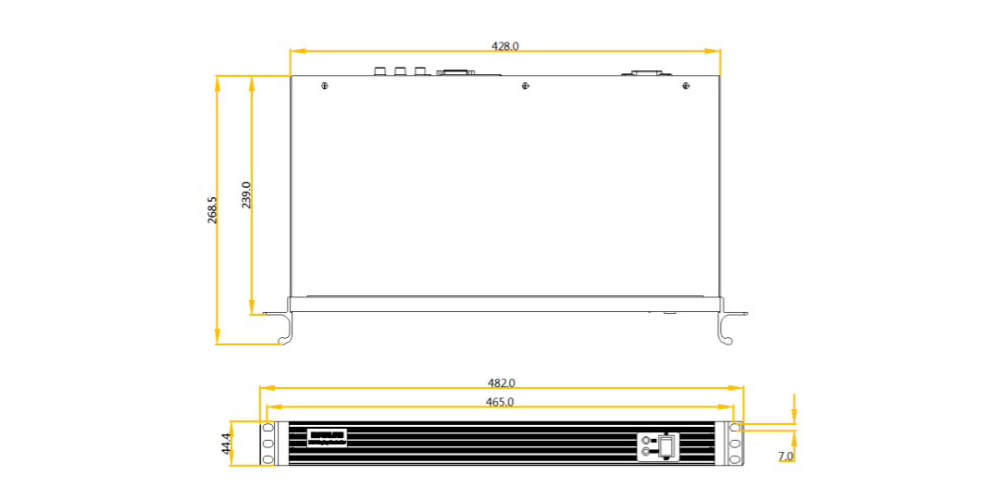
| Dimensions (W × H × D) | 482.0 mm × 268.5 mm × 44.4 mm |
| Net weight | 2.5 kg for a single device |
| Certifications | CE, FCC, IC, CB, PSE |
| Packing box | 586 mm × 465 mm × 353 mm, up to 5 devices per box |
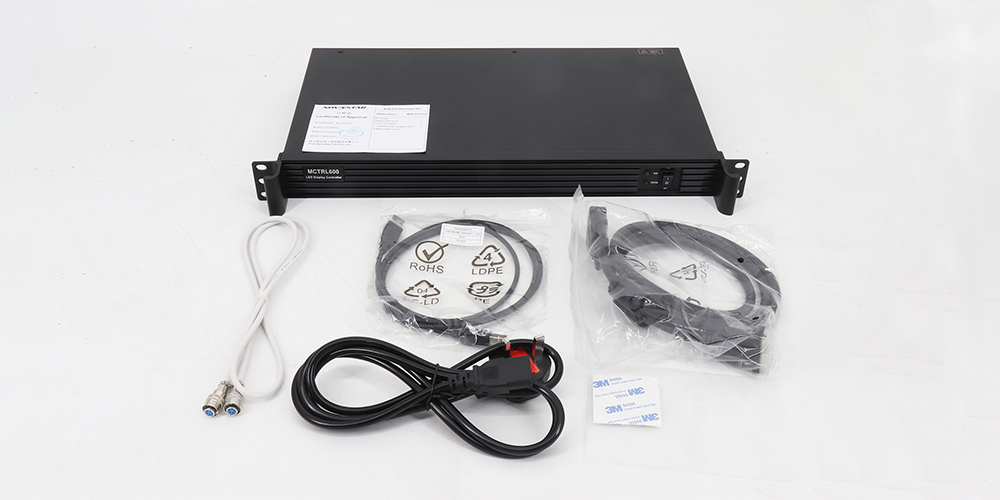
| Accessories | 1× power cord, 1× cascading cable (1 m), 1× USB cable, 1× DVI cable |
Source note – where the two official documents differ. NovaStar’s specification PDF (V2.3.4, 2025-06-05) and the electrical/labelling table on NovaStar’s MCTRL600 product page do not agree on every value. The product page states a rated power consumption of 16 W, a weight of 2.9 kg, humidity from 0% RH to 90% RH, a 1U space requirement and certifications of FCC, RoHS, EAC, IC, PFOS, LVD and EMC; the PDF states 6.6 W, 2.5 kg, 10% RH to 90% RH and CE, FCC, IC, CB and PSE. The two documents also give different packing-box dimensions. Before you specify or ship a unit, confirm the value against the label on the controller you receive and against the hardware revision datasheet, because a change of revision can change the certification set.
3. Video input and resolution limits
The MCTRL600 has two video inputs, and each one has its own resolution ceiling that depends on the bit depth of the source. This is the part of the MCTRL600 specification that most often decides whether the controller fits a project.
| Input connector | Bit depth | Sampling format | Maximum input resolution |
|---|---|---|---|
| Single-link DVI | 8-bit | RGB 4:4:4, YCrCb 4:4:4, YCrCb 4:2:2 | 1920×1200@60Hz |
| Single-link DVI | 10-bit / 12-bit | RGB 4:4:4, YCrCb 4:4:4, YCrCb 4:2:2 | 1440×900@60Hz |
| HDMI 1.3 | 8-bit | RGB 4:4:4, YCrCb 4:4:4, YCrCb 4:2:2 | 1920×1200@60Hz |
| HDMI 1.3 | 10-bit / 12-bit | RGB 4:4:4, YCrCb 4:4:4, YCrCb 4:2:2 | 1440×900@60Hz |
Three further limits follow from the same document and are worth checking before a show:
- Interlaced sources are not supported on either input. Set the source to a progressive format before you connect it.
- Custom resolutions are supported up to 3840 pixels wide (3840×600@60Hz) or 3840 pixels high (548×3840@60Hz). LED walls that are wider or higher than 1920 or 1200 pixels therefore use a custom timing rather than a standard 16:9 one.
- 10-bit and 12-bit sources top out at 1440×900@60Hz. If your project needs both deep colour and full 1920×1200, the input cannot deliver both at 60Hz.
4. Front and rear panel: indicators and ports
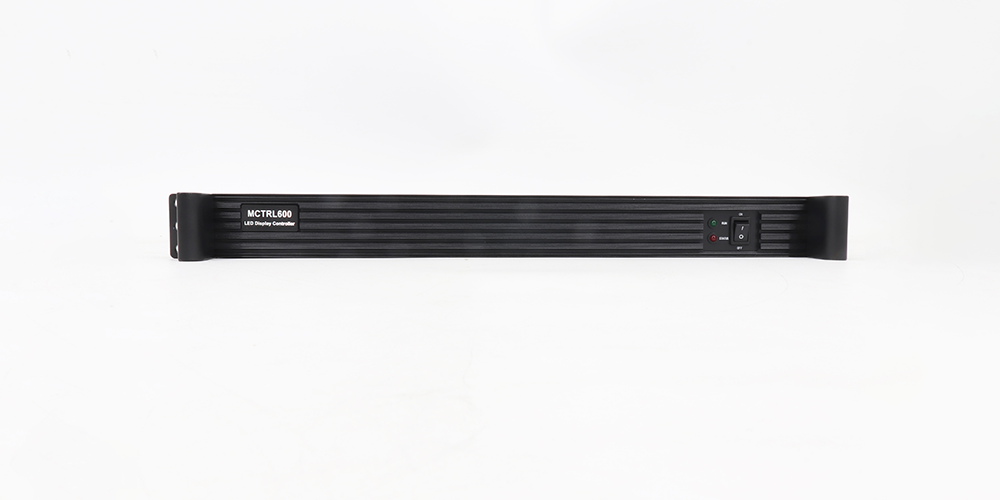
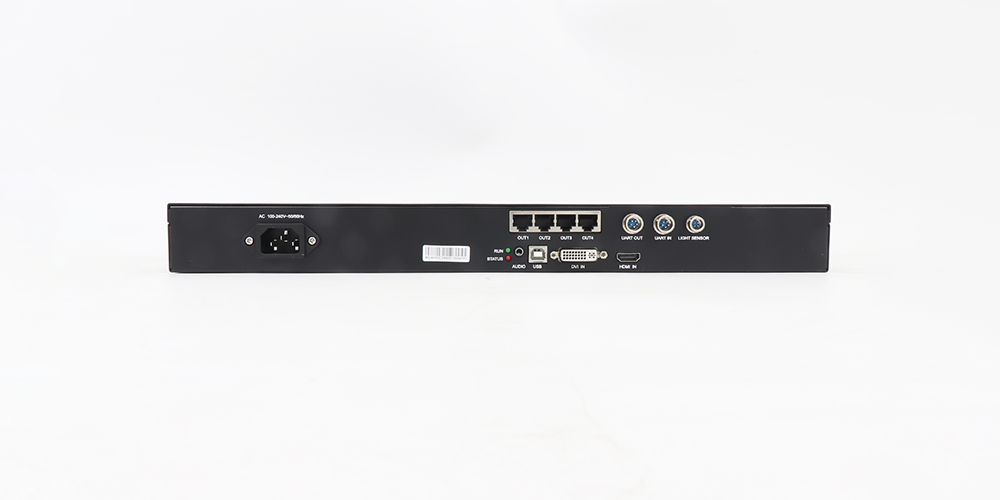
The front panel carries two indicator lights, and their flashing pattern tells you what the controller is doing. The descriptions below are the ones printed in NovaStar’s specification document.
| Indicator | Status | Meaning |
|---|---|---|
| RUN (green) | Slow flashing (once in 2 s) | No video input is available |
| RUN (green) | Normal flashing (4 times in 1 s) | The video input is available |
| RUN (green) | Fast flashing (30 times in 1 s) | The screen is displaying the startup image |
| RUN (green) | Breathing | Ethernet port redundancy has taken effect |
| STA (red) | Always on | The power supply is normal |
| STA (red) | Off | The power is not supplied, or the power supply is abnormal |
Rear panel connectors
- Input: DVI IN (SL-DVI), HDMI IN and AUDIO.
- Output: 4× RJ45 Gigabit Ethernet ports for data to the receiving cards, with redundancy between the ports.
- Functionality: the light sensor connector for automatic brightness adjustment.
- Control: the Type-B USB 2.0 port for the control PC.
- Cascading: UART IN and UART OUT for linking up to 20 controllers.
- Power: AC 100-240V~50/60Hz. The controller must be placed horizontally and is not designed for vertical or upside-down mounting.
5. MCTRL600 manual, NovaLCT software and USB driver
The MCTRL600 has no screen or buttons for configuration. Everything – screen size, receiving-card layout, input resolution and brightness – is set from a Windows PC through NovaStar’s NovaLCT software, using the USB Type-B port on the rear panel. The light sensor and the pixel-level brightness and chroma calibration are also handled inside that workflow, together with NovaStar’s calibration platform.
Documents and files for the MCTRL600
- MCTRL600 LED Display Controller Specifications, V2.3.2 (PDF) – the version hosted on this site. NovaStar has since released V2.3.4 (2025-06-05), which updates certification information and the video source specifications, so treat the V2.3.4 figures in section 2 above as the current ones.
- MCTRL600 firmware package V4.8.0.0 (ZIP) – a stored firmware build for the controller. NovaStar’s MCTRL600 product page currently lists firmware V4.9.3.0.STD, so check the release notes for the build your unit needs before you flash anything.
- Complete NovaLCT software download list – NovaLCT builds and their user manuals, including the LED configuration tool for synchronous control systems used with the MCTRL600.
- NovaStar LED software download page – the main software hub for NovaLCT, NovaStudio and the related NovaStar utilities.
Do you need a USB driver for the MCTRL600?
If the control PC does not detect the controller after you connect the USB cable, install the USB driver that ships with the NovaLCT installation package, then reconnect the cable and check the device in Windows Device Manager. A missing or outdated driver is the usual cause of a “controller not found” message, followed by a charge-only USB cable and the wrong USB port on the PC.
6. Step-by-step MCTRL600 setup with NovaLCT
This sequence follows the order used in NovaStar’s controller documentation, and it applies to a single MCTRL600 working with NovaLCT on a Windows PC.
Step 1 – Install NovaLCT on the control PC
Download and install NovaLCT from the NovaLCT download list, then restart the PC so that the USB driver is registered before you connect the controller.
Step 2 – Connect power, video and Ethernet outputs
Connect the power cord, the DVI or HDMI source and the RJ45 cables that run to the receiving cards. Check that the source is set to a progressive format no higher than 1920×1200@60Hz, because interlaced signals are not accepted.
Step 3 – Connect the USB cable and confirm detection
Use the Type-B USB port. The RUN indicator should start flashing once a valid video input is present, and NovaLCT should list the controller. If it does not appear, see the driver note in section 5.
Step 4 – Create the screen and configure the receiving cards
In NovaLCT, create a screen with the real width and height of the LED wall, then map the receiving cards to the four Ethernet outputs. Each output is rated for up to 650,000 pixels and up to 512 receiving cards, so plan the cabinet layout inside those two limits.
Step 5 – Set the input resolution and check the picture
Set the wall output resolution and then confirm the incoming timing. If part of the picture is missing, reduce the source resolution or switch to a custom resolution that fits inside the width and height limits given in section 3.
Step 6 – Adjust brightness and run calibration
Set the screen brightness and use the light sensor connector if the installation should follow ambient light. For colour uniformity across cabinets, run the pixel-level brightness and chroma calibration with the calibration platform.
Step 7 – Save and back up the configuration
Send the configuration to the controller, then save a copy of the NovaLCT project file on the control PC and on a second drive. If a controller is replaced on site, the saved file is what makes a fast swap possible.
7. MCTRL600 troubleshooting
Most MCTRL600 faults show up in the indicator lights, in NovaLCT or in part of the picture. The table below links each symptom to the check that resolves it most often.
| Symptom | Likely cause | What to check |
|---|---|---|
| RUN flashes slowly, no picture | No valid video input | Cable, source output format, and whether the source is interlaced or above 1920×1200@60Hz |
| RUN is breathing | Ethernet redundancy is active | Normally expected behaviour when hot backup is configured; confirm the backup port is the one you intended |
| RUN flashes fast | The controller is showing the startup image | Check the source signal reaching the controller; the wall is not receiving live video yet |
| STA is off | No power or abnormal power supply | Power cord, socket and input voltage within AC 100-240V~50/60Hz |
| NovaLCT cannot find the controller | Missing USB driver, wrong cable or wrong port | Install the driver bundled with NovaLCT, use the Type-B USB port, try a data cable and a second PC |
| Part of the wall is black | Screen map or port capacity limit | Check the cabinet map and that no Ethernet output exceeds 650,000 pixels or 512 receiving cards |
| Picture appears but is shifted or cut | Timing outside the supported range | Use a standard 1920×1200@60Hz or a custom resolution inside the 3840-pixel width/height limits |
| Cabinets differ in colour or brightness | No calibration applied to the screen | Run the pixel-level brightness and chroma calibration with NovaLCT and the calibration platform |
If a controller has to be replaced during an event, keep the saved NovaLCT configuration file and a spare unit with matching firmware so that the wall can be restored without rebuilding the screen map from scratch.
8. MCTRL600 price: what actually drives the cost
The MCTRL600 is normally quoted as part of a control system rather than as a single fixed list price, and the figure you see online often refers to a different configuration. These are the factors that move the price of a genuine NovaStar MCTRL600:
- What is included. A device-only controller, a complete set with carrying case, power cord, USB cable, DVI cable and cascading cable, and a full control package with receiving cards are three different quotations.
- Certification and market. The certification set differs between NovaStar’s documents (CE, FCC, IC, CB, PSE in the specification PDF; FCC, RoHS, EAC, IC, PFOS, LVD and EMC on the product page). If a project needs a specific approval, confirm it before you order.
- Quantity and spares. Events usually buy controllers in pairs or with a spare, which changes the per-unit price.
- Shipping, duty and lead time. Air freight, import duty and the delivery date for a project all sit on top of the unit price.
- Warranty and technical support. A warranty period, spare parts supply and configuration support from the supplier are part of the value, especially for rental companies.
- Software and documentation. NovaLCT, the firmware build and the calibration workflow should come with the controller; paying extra for the software that is required to configure the unit is a warning sign.
Because prices change with the market and the exchange rate, ask for a current quotation for the exact configuration you need: number of controllers, receiving cards, cables, certification and delivery date.
9. Is the MCTRL600 the right controller for your screen?
Decide this from the source resolution and the pixel count of the wall, not from the size of the cabinet. The comparison below uses the figures published for each controller.
| Item | MCTRL600 | MCTRL300 |
|---|---|---|
| Video input | 1× SL-DVI, 1× HDMI 1.3, 1× audio | 1× SL-DVI, 1× audio |
| Maximum input resolution | 1920×1200@60Hz | 1920×1200@60Hz |
| Ethernet outputs | 4× RJ45 Gigabit Ethernet | 2× RJ45 Gigabit Ethernet |
| Capacity per controller | 650,000 pixels per port, 2.6 million pixels calculated across four ports | 650,000 pixels per port, 1.3 million pixels per controller |
| Cascading | Up to 20 devices over UART | Up to 20 devices over UART |
Choose the MCTRL600 when
- The wall runs from one source at up to 1920×1200@60Hz and stays inside 650,000 pixels per Ethernet output.
- You want both DVI and HDMI available, for example a media player plus a laptop.
- The installation needs automatic brightness from a light sensor, or pixel-level calibration for a fixed installation.
- The screen is a rental or fixed wall that will be set up and re-used with a saved NovaLCT configuration.
Look at another NovaStar controller when
- The wall is smaller and two Ethernet outputs are enough: read the NovaStar MCTRL300 user manual, specs and NovaLCT setup guide.
- You need 4K input, several windows or scaled video: the Novastar MCTRL4K LED display controller guide covers that class of controller.
- You need more ports or a different capacity step: compare the Novastar MCTRL500 and the NovaStar MCTRL1600, and the MCTRL660 guide if the MCTRL660 family is also under consideration.
- Long cable runs between the control position and the wall are a concern: a fibre converter such as the Novastar CVT10 is added in front of the controller.
If you are still at the stage of choosing the wall itself, start with the LED screen buying guide and the rental LED display guide, then return to the controller choice.
10. FAQs about the NovaStar MCTRL600
1920×1200@60Hz on both the DVI and HDMI inputs when the source is 8-bit. Sources at 10-bit or 12-bit are limited to 1440×900@60Hz, and custom resolutions can go up to 3840 pixels wide (3840×600@60Hz) or 3840 pixels high (548×3840@60Hz). Interlaced input is not supported.
How many pixels can one MCTRL600 drive?
Each of the four RJ45 Gigabit Ethernet outputs is rated for up to 650,000 pixels, so a single controller carries 2.6 million pixels when all four ports are used (calculated from NovaStar’s per-port figure). Each port also supports up to 512 receiving cards.
Which software do I need to set up the MCTRL600?
NovaStar NovaLCT, connected to the controller from a Windows PC through the Type-B USB port. NovaLCT is where you create the screen, map the receiving cards, set the input resolution and control the brightness. Pixel-level brightness and chroma calibration uses the same workflow together with the calibration platform.
Do I need a USB driver for the MCTRL600?
Yes – if the PC does not detect the controller. The USB driver is included with the NovaLCT installation package. Install NovaLCT first, restart the PC, then connect the controller. If it is still not detected, change the USB cable (charge-only cables do not work) and try another USB port on the PC.
How many MCTRL600 controllers can be cascaded?
Up to 20 devices can be cascaded. The UART IN and UART OUT ports on the rear panel link the controllers, and the group is then managed from one NovaLCT session.
Does the MCTRL600 support interlaced video input?
No. NovaStar’s specification document states that interlaced signal input is not supported on the DVI or the HDMI input, so the source must output a progressive format.
What is included with a NovaStar MCTRL600?
The controller itself, plus the accessories listed in the specification document: one power cord, one cascading cable (1 metre), one USB cable and one DVI cable. Packing information differs between NovaStar’s specification PDF and the product page, so confirm the packing configuration with your supplier for larger orders.
How much does a NovaStar MCTRL600 cost?
There is no single worldwide price. The quotation depends on whether you buy the controller alone or as a complete set, the certification required for your market, the quantity including spares, shipping and duty, and the warranty and support package. Ask your supplier for a current quotation for the configuration you need, and treat any fixed online price as a reference only.
Is the MCTRL600 still a current NovaStar controller?
NovaStar keeps the MCTRL600 specifications document in a version history that was updated on 2025-06-05 (V2.3.4), and lists firmware V4.9.3.0.STD for the model on its product page, so the controller is still documented and supported. Confirm current stock and the firmware build with your supplier before a project deadline.
Is the MCTRL600 still a current NovaStar controller?
They are different controllers with different capacity and input specifications, so compare the official figures for the wall you plan to build. Start with the resolution and pixel count: if the wall fits inside 1920×1200@60Hz input and four Ethernet outputs, the MCTRL600 is usually the simpler choice. For anything beyond that, read the MCTRL660 guide and the MCTRL4K guide before you specify.
11. Conclusion
The NovaStar MCTRL600 is a straightforward, well-documented controller: one DVI input, one HDMI 1.3 input, one audio input, four Gigabit Ethernet outputs at up to 650,000 pixels each, up to 20 cascaded units over UART, and configuration from a PC with NovaLCT. Its limits are just as clear – no 4K input, no interlaced signals, no built-in media player and no network control port.
If the wall you are planning fits those limits, the next step is to confirm the source resolution against section 3, plan the receiving-card map against the 650,000-pixel and 512-card limits per output, and keep a saved NovaLCT configuration with the spare controller. For the screens that the MCTRL600 typically drives, see the stage LED display, LED advertising screen and conference LED screen pages, or send us your wall size and source format and we will confirm the controller and the receiving-card plan.
Related Posts
NovaStar TU40 Pro: Specifications, Setup & LED Display Guide
The NovaStar TU40 Pro combines media playback, video processing and…
Novastar MX2000 Pro Controller: Specs, Price, Manual and Review
The Novastar MX2000 Pro is a state-of-the-art 8K LED display controller, designed…
NovaStar MX40 Pro: User Manual, Specs and Price
NovaStar MX40 Pro, the flagship 4K independent controller in the…

No Comments