
Novastar MX2000 Pro Controller: Specs, Price, Manual and Review
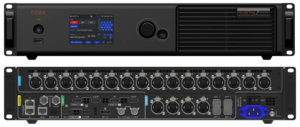
The Novastar MX2000 Pro is a state-of-the-art 8K LED display controller, designed as part of the COEX control system series from Xi’an NovaStar Tech Co., Ltd. (NovaStar). With its remarkable features, including 12-bit color depth, 480 Hz capability, real-time multi-screen scaling, and HDR supportability, the MX2000 Pro delivers precise brightness control, true-to-life color fidelity, and exceptional image quality. Its modular card-based design ensures flexibility, stability, and ease of maintenance, making it an ideal solution for large-scale LED display configurations.
In this review, we’ll explore the Novastar MX2000 Pro Controller in detail, covering its advanced features, specifications, applications, and more to help you understand why it stands out in the market.
Novastar MX2000 Pro at a Glance
Short answer: the Novastar MX2000 Pro is NovaStar’s 2U 8K all-in-one LED display controller in the COEX series. It drives up to 35.38 million pixels, accepts up to 10 different input cards (8K, 4K and VoIP), and reaches 480 Hz at 12-bit colour depth, with 0-frame latency and hardware backup inside a single chassis.
| Specification | Novastar MX2000 Pro |
|---|---|
| Product type | 2U all-in-one 8K LED display controller (NovaStar COEX series) |
| Maximum load capacity | 35.38 million pixels |
| Colour depth | 12-bit (8-bit and 10-bit also supported) |
| Maximum frame rate | 480 Hz |
| Processing latency | 0-frame (under 1 ms) |
| Video inputs | Up to 10 input cards, including HDMI 2.0, HDMI 2.1, DP 1.2/1.4, 12G-SDI and ST 2110 (25G/100G) |
| Input capacity | Up to 8× 4K@60Hz or 4× 8K@30Hz |
| Output cards | 2 slots: 4× 10G fiber or 1× 40G fiber |
| Ethernet port load (1G, 60 Hz) | 659,722 pixels (8-bit) |
| Ethernet port load (5G, 60 Hz) | 2,951,200 pixels (8-bit) |
| Control | 5-inch LCD touchscreen plus VMP (Vision Management Platform) software |
| Power | 100-240V~, 50/60Hz, max 260 W (varies with installed cards) |
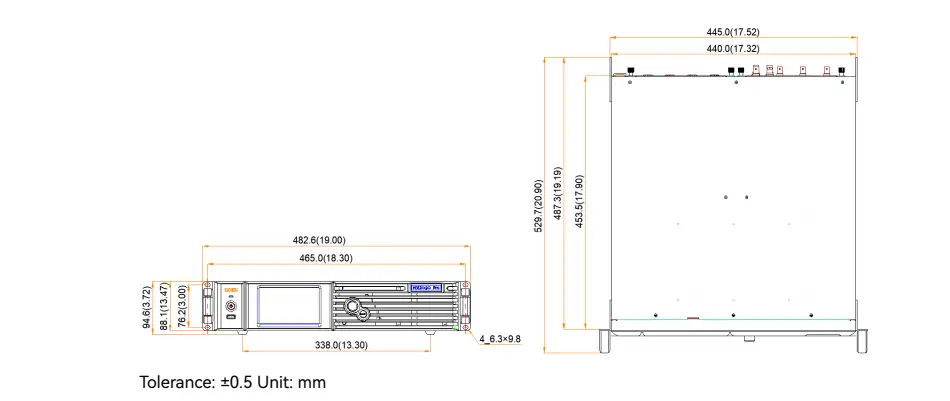
| Dimensions | 482.6 mm × 94.6 mm × 529.7 mm (foot pads included) |
| Weight | 11.1 kg chassis; 12.0 kg with accessories and packaging |
| Operating environment | -5°C to +45°C, 0% to 80% RH (non-condensing) |
| Ingress protection | IP20 |
Best for: rental and stage work, xR / virtual production studios, TV production, esports events, exhibition halls and large fixed installations.
Figures above are taken from the official NovaStar MX2000 Pro specification V1.5.0, which is linked in the download section below.
1.Key Features of the Novastar MX2000 Pro Video Processor
2.Applications of the MX2000 Pro All-in-One Controller
3.Specifications of the Novastar MX2000 Pro
4.Why Choose the Novastar MX2000 Pro?
5.Novastar MX2000 Pro Price
6.Novastar MX2000 Pro Resource Access
7.FAQs
8.Conclusion
1. Key Features of the Novastar MX2000 Pro Video Processor
1.1 Input and Output Flexibility
The MX2000 Pro offers unparalleled flexibility with its input and output options:
- Input Card Slots:
- Supports up to 10 different types of input cards, including HDMI 2.0, DP 1.2/1.4, 12G-SDI, and ST 2110 (25G/100G).
- Capable of handling resolutions up to 8K@60Hz and frame rates ranging from 23.98 Hz to 480 Hz.
- Authentic 12-bit video input ensures superior color accuracy and depth.
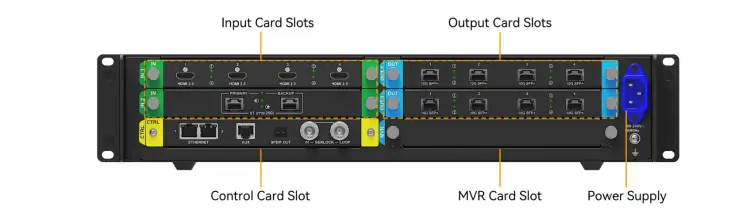
- Output Card Slots:
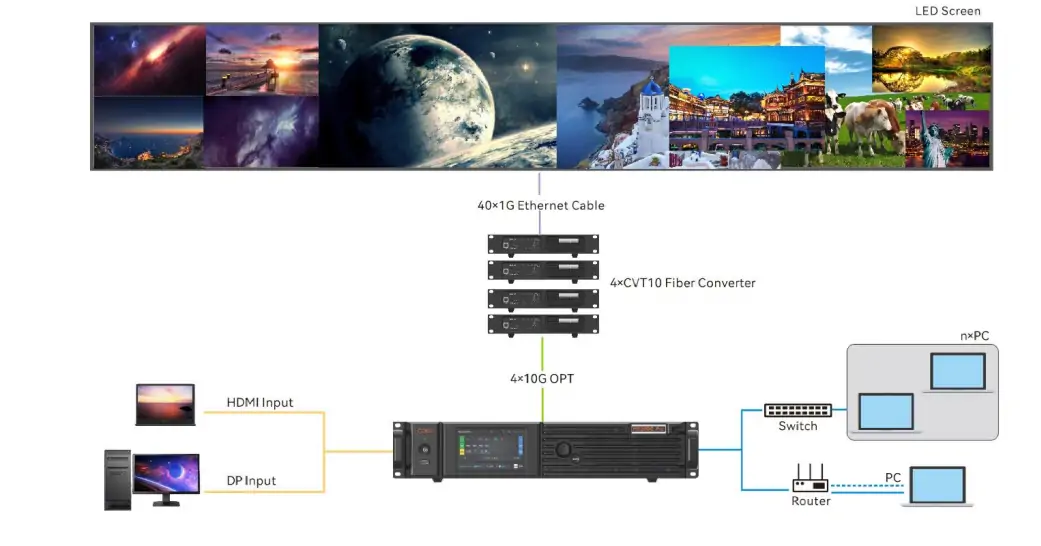
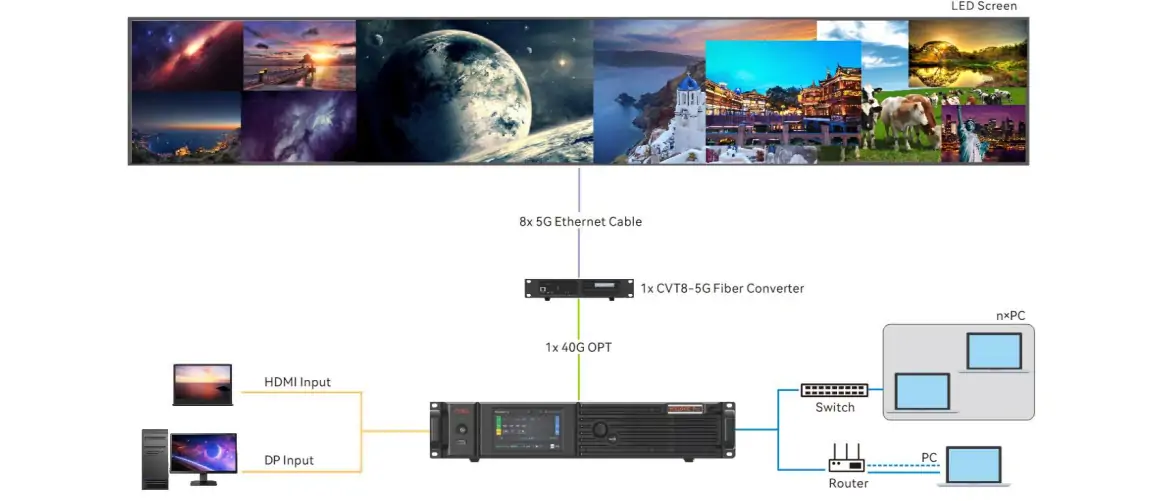
- Two output card slots allow users to configure 4x10G fiber or 1x40G fiber output cards.
- The 1G solution supports up to 659,722 pixels per Ethernet cable, while the 5G solution handles 2,951,200 pixels per Ethernet cable at 8-bit, 60 Hz (full table in section 3.4).
- Seamlessly integrates with NovaStar’s CVT10 and CVT8-5G fiber converters for optimal performance.
1.2 Advanced Screen Management
- Card-Based Screen Configuration: Each output card can be customized to support different screen resolutions, enabling flexible multi-screen setups.
- Synchronized Output Splicing: Ensures smooth playback without issues like picture stutter, frame loss, or image tearing.
- No Rectangle Restriction: Ideal for irregularly shaped screens, as blank pixels don’t count toward the total load capacity.
- Preset Management: Save up to 128 customizable presets for quick adjustments to brightness, color temperature, gamma, and other parameters.
1.3 Cutting-Edge Performance Enhancements
- Multi-Layer Support: A single output card supports up to 4 layers, while the entire controller can handle 8x 4K layers.
- Image Scaling: Offers four scaling modes—custom, pixel-to-pixel, snap-to-canvas, and fill screen—for versatile content presentation.
- Layer Roaming: Enables cross-card layer output within the same screen.
- Color Replacement: Replace specific colors in an image without affecting others, ideal for creative visual effects.
- 14-Channel Color Correction: Fine-tune hue, saturation, and brightness for black, white, and the 12 standard RGB-derived colors.
- 3D LUT: Use .cube files with precision levels of 17x17x17, 33x33x33, or 65x65x65 for advanced color calibration.
- Full-Grayscale Calibration: Works with NovaStar’s CC3 calibration system and scientific-grade cameras like CC60 and C3200 to ensure uniformity across all grayscales.
1.4 Enhanced Control and Monitoring
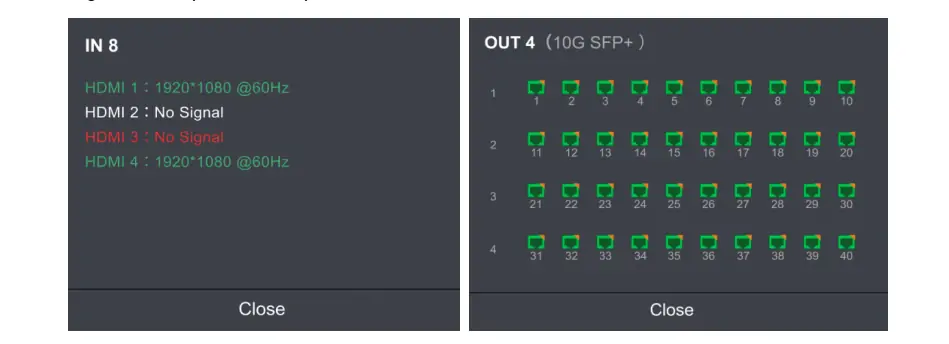
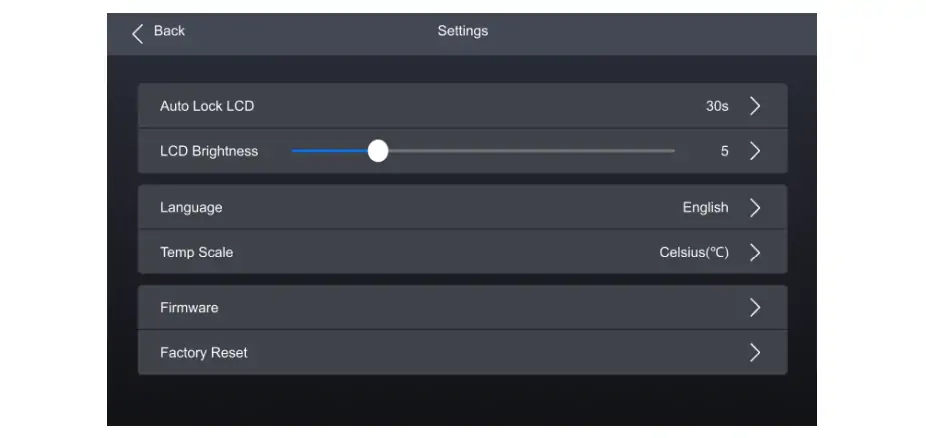
- LCD Touchscreen: A responsive 5-inch touchscreen provides effortless access to device status, settings, and commands.
- VMP Software Integration: The Vision Management Platform (VMP) enhances control and management capabilities, offering features like project management, screen calibration, and real-time monitoring.
- Seamless Backup: Hot backup between devices, cards, and Ethernet ports ensures uninterrupted operation during malfunctions.
- Automated System Monitoring: Monitors fan speed, module temperatures, voltage levels, and operational status, issuing alerts for any anomalies.
2. Applications of the MX2000 Pro All-in-One Controller
The Novastar MX2000 Pro is widely used in a variety of professional settings, thanks to its versatility and robust performance:
- Rental Services: Perfect for large events requiring high-resolution displays.
- xR/VP Studios: Delivers immersive visuals for virtual production and extended reality environments.
- TV Production: Ensures accurate color reproduction and low latency for live broadcasts.
- E-Sports Events: Provides smooth, high-refresh-rate visuals for competitive gaming.
- Exhibition Halls: Supports large fixed installations with intricate designs and irregular shapes.
3. Specifications of the Novastar MX2000 Pro
3.1 Electrical Specifications
- Power Supply: 100-240V~, 50/60Hz
- Max Power Consumption: 260W (varies based on installed cards)
- Operating Environment: –5°C to +45°C, 0% RH to 80% RH (non-condensing)
3.2 Physical Specifications
- Dimensions: 482.6 mm × 94.6 mm × 529.7 mm (including foot pads)
- Weight:
- Net weight: 11.1 kg (chassis only)
- Total weight: 12.0 kg (including accessories and packaging)
- IP Rating: IP20 (water intrusion protection required)
3.3 Input Resolutions and Frame Rates
The MX2000 Pro supports a wide range of resolutions and frame rates, ensuring compatibility with diverse video sources:
- HDMI 2.0: Up to 4K@60Hz with YCbCr 4:2:0 color sampling.
- HDMI 2.1: Supports 8K@30Hz and 4K@120Hz.
- DP 1.4 (8K@60Hz): Handles resolutions up to 7680×4320@60Hz.
- ST 2110 (100G): Capable of managing 8K@60Hz with multiple video streams.

3.4 Ethernet Port Load Capacity
Load capacity is quoted per Ethernet port, not per controller, and it changes with the receiving card series, the bit depth and the frame rate. The figures below are the official NovaStar MX2000 Pro specification V1.5.0 values at 60 Hz:
| Solution | Receiving cards | 8-bit | 10-bit | 12-bit |
|---|---|---|---|---|
| 1G — 4× 10G fiber output card | A10s Pro / A8s Pro and derivative receiving cards | 659,722 | 494,792 | 329,861 |
| 5G — 1× 40G fiber output card | XA50 Pro / CA50E receiving cards | 2,951,200 | 2,291,312 | 1,475,600 |
Two further notes from the same document: one 10G optical port carries the same load as 10× 1G Ethernet ports (a single 4× 10G card can drive up to 40 Ethernet ports), and one 40G optical port equals 8× 5G Ethernet ports. A port only reaches its maximum when the load width is 128 pixels or more, and blank pixels in irregular screens do not count toward the total load.
For detailed information, refer to the MX2000 Pro User Manual available on NovaStar’s official website.
4. Why Choose the Novastar MX2000 Pro?
4.1 Premium Image Quality
With 12-bit color depth and support for HDR10 and HLG, the MX2000 Pro ensures vibrant, lifelike visuals. Whether you’re working with 8K resolution or lower resolutions at higher frame rates, this controller delivers consistent brightness and color fidelity.
4.2 High Performance and Reliability
- Zero-Frame Latency: Achieves processing latency of less than 1 ms, making it ideal for real-time applications.
- Frame Rate Adaptation: Automatically adjusts display effects for frame rates ranging from 23.98 Hz to 480 Hz, ensuring consistent brightness and color temperature.
- Shutter Fit: Optimizes driver IC parameters for camera shooting, eliminating issues like black lines and grayscale loss in xR scenarios.
4.3 Scalability and Versatility
The MX2000 Pro supports both 1G and 5G solutions, catering to different bandwidth requirements. Its modular design allows users to mix and match input/output cards to suit their specific needs, whether for small-scale setups or massive LED installations.
5. Novastar MX2000 Pro Price
NovaStar does not publish a list price for the MX2000 Pro, so any single “MX2000 Pro price” figure you find online describes one specific build rather than a standard unit price. On this controller the quote is driven mainly by three things:
- Input cards. An 8K card such as DP 1.4 (8K@60Hz) or HDMI 2.1 costs considerably more than a standard HDMI 2.0 or 4K card, and the chassis accepts up to 10 input cards.
- Output cards. A 4× 10G fiber card (1G bandwidth, up to 40 Ethernet ports) and a 1× 40G fiber card (5G bandwidth) are different builds with different load capacities.
- Region, warranty and support. Local distribution, spare cards and on-site support terms are set by the reseller rather than by NovaStar.
That is why a price request without a card list is not comparable. To receive quotes you can put side by side, state the input and output cards you need, the total pixel load, the target frame rate and the bit depth you intend to run — for example “1× 40G fiber output card, 5G solution, 8-bit at 60 Hz, 20 million pixels”. You can send those details through the quote form on this page.
6. Novastar MX2000 Pro Resource Access
| Resource | What it covers |
|---|---|
| MX2000 Pro user manual (V1.5.0, PDF) | Full operation and configuration guide: menu structure, screen configuration, presets and backup setup |
| MX2000 Pro specifications (V1.5.0, PDF) | Input and output card list, Ethernet port load tables for 1G and 5G, power and physical data |
| NovaStar control software | VMP and NovaLCT downloads used to configure, calibrate and monitor the controller |
| NovaStar MX40 Pro guide, MX6000 Pro video wall controller, VX2000 Pro review | Other NovaStar controllers in the same family, useful when the MX2000 Pro is more capacity than a project needs |
Both PDFs are copies of the official NovaStar documentation (specification V1.5.0) and are hosted here for convenience.
7. FAQs
– What is the maximum pixel load of MX2000 Pro?
The official specification V1.5.0 lists a maximum load of 35.38 million pixels across the output cards.
– Does it support 8K resolution?
Yes, it can handle 8K video input and output.
– What kind of input signals does it support?
It supports HDMI 2.0, DP 1.4, 12G-SDI, and other professional inputs.
– Is the MX2000 Pro suitable for virtual production?
Yes, its low latency makes it ideal for XR and virtual studios.
– Does Novastar MX2000 Pro support fiber output?
Yes, it supports 10G and 40G fiber output cards.
– How much power does the MX2000 Pro use?
Maximum power consumption is 260 W on a 100-240V~, 50/60Hz supply. Real-world draw varies with the number and type of installed input and output cards.
– Where can I download the MX2000 Pro manual and software?
The full MX2000 Pro user manual (V1.5.0, PDF) and the specification (V1.5.0, PDF) are linked in the download section above. Configuration software (VMP and NovaLCT) is collected on the NovaStar control software page.
– How much does the Novastar MX2000 Pro cost?
NovaStar does not publish a list price. The quote depends on the card configuration (especially the 8K input cards and whether you choose the 1G 4× 10G fiber or 5G 1× 40G fiber output card), plus the region, warranty and support terms. Ask for a price with your card list, pixel load, frame rate and bit depth included so quotes are comparable.
8. Conclusion
The Novastar MX2000 Pro Controller is a game-changer in the world of LED display technology. Its combination of high pixel load capacity, advanced color processing, and intuitive controls makes it a top choice for professionals in rental services, studios, and large-scale installations. Paired with the Vision Management Platform (VMP), it offers unmatched ease of use and management capabilities.
Whether you’re looking for a reliable all-in-one controller or a scalable solution for complex LED setups, the MX2000 Pro is a worthy investment. Explore its full potential by downloading the MX2000 Pro User Manual and discovering how it can elevate your projects to the next level.
Related NovaStar controllers and comparisons
- NovaStar MX40 Pro guide — the other all-in-one controller in the MX family
- NovaStar MX6000 Pro video wall controller — MX series, larger chassis
- NovaStar VX2000 Pro review — VX series all-in-one controller
- NovaStar H Series vs VX Series — how NovaStar splits its video splicing processors
- NovaStar LED control software download — VMP and NovaLCT
Related Posts
NovaStar TU40 Pro: Specifications, Setup & LED Display Guide
The NovaStar TU40 Pro combines media playback, video processing and…
NovaStar MCTRL600 LED Display Controller: Specs, Manual, Software and Price
The NovaStar MCTRL600 is a standalone LED display controller, also…
NovaStar MX40 Pro: User Manual, Specs and Price
NovaStar MX40 Pro, the flagship 4K independent controller in the…

No Comments