
NovaStar TB50 Multimedia Player: Specs, Setup and Software
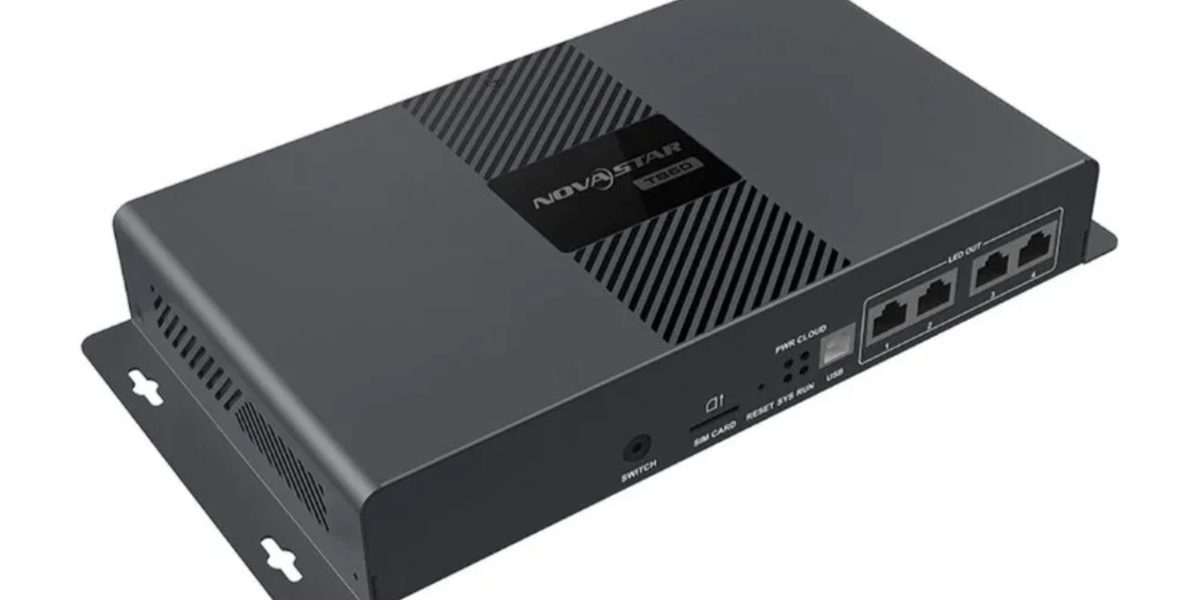
The NovaStar TB50 multimedia player is an all-in-one Taurus-series controller for full-color LED displays. It stores media locally, plays it on a schedule, publishes content over LAN, Wi-Fi or 4G, and switches to a live HDMI 1.3 source when real-time video is required. This guide covers the verified TB50 specifications, the software used to manage it, setup steps, how it compares with the TB30 and TB60, and the checks to complete before you order.
Quick answer: the NovaStar TB50 loads up to 1,300,000 pixels through two Gigabit Ethernet outputs, stores content on 32 GB of internal storage, decodes 4K H.264/H.265 media, and works in both asynchronous (scheduled) and synchronous (live HDMI) modes. It is the right Taurus player for medium-size LED signage that needs scheduled playback plus occasional live video. Step up to the TB60 when the mapped canvas exceeds 1.3 million pixels or when four LED output ports make cabinet routing simpler.
Table of Contents
1. What Is the NovaStar TB50 Multimedia Player?
2. NovaStar TB50 Specifications
3. Key Features Explained
4. Software and Configuration Tools
5. How to Set Up the NovaStar TB50
6. TB30 vs TB50 vs TB60: Which Taurus Player Fits?
7. Applications and Project Fit
8. Common Installation Mistakes
9. Frequently Asked Questions
10. Conclusion
1. What Is the NovaStar TB50 Multimedia Player?
The NovaStar TB50 multimedia player belongs to NovaStar’s Taurus series of LED display controllers. It combines two roles that are usually separate: a media player that stores and schedules content, and a sending controller that transmits the mapped image to the receiving cards inside the screen cabinets. Because both functions live in one box, a computer does not have to stay connected beside the display.
Content is published over Ethernet, Wi-Fi, a USB drive or an optional 4G module, and the player then follows its own schedule. When live video is needed, the HDMI input takes over and the screen shows an external source in real time.
1.1 What the TB50 Is Designed For
The TB50 is a mid-range Taurus player. It suits fixed commercial installations that run unattended for long periods: retail promotions, chain-store signage, lamp-post and door-head displays, shelf and mirror displays, building facades, transport information and multi-site networks that are managed from a central location.
1.2 What the TB50 Is Not
Three limits are worth understanding before purchase:
- It is not a video processor. Canvas creation, scaling and switching across multiple inputs belong to a processor such as the NovaStar H series. The TB50 handles stored and HDMI content, not multi-source live switching.
- It is not a 4K LED canvas controller. It decodes 4K source files, but its LED loading capacity is 1,300,000 pixels, which is far below a full 3840 x 2160 canvas.
- It does not accept third-party Android apps. The player runs Android 11 with NovaStar’s own terminal application, and the system software is supplied by NovaStar.
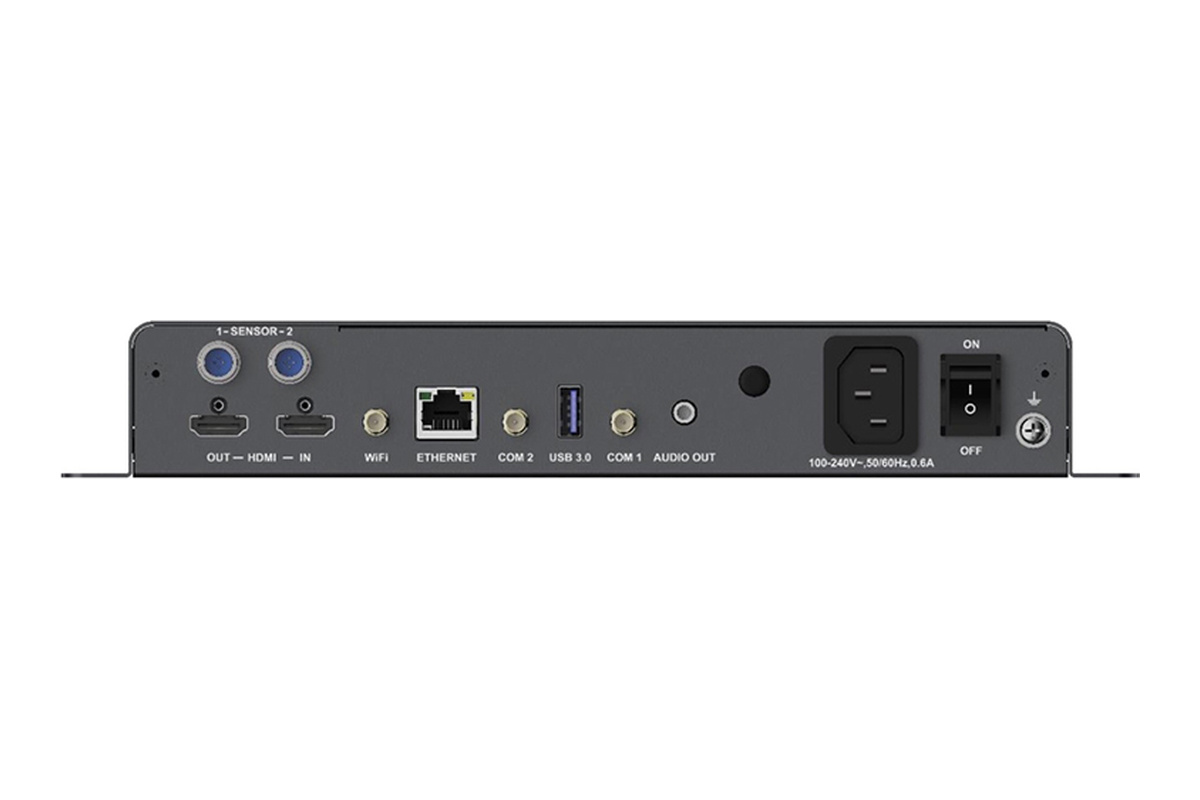
2. NovaStar TB50 Specifications
The table below lists the TB50 parameters that affect system design. Values are quoted from NovaStar’s Taurus Series Multimedia Player TB50 specification document, revision V1.2.5 dated August 31, 2026, with the earlier V1.0.0 revision noted where a value changed.
| Specification | NovaStar TB50 (V1.2.5) |
|---|---|
| Product type | Asynchronous LED multimedia player with synchronous HDMI input |
| Maximum loading capacity | 1,300,000 pixels |
| Maximum canvas size | 4,096 x 4,096 pixels maximum width and height, within the total capacity |
| Ultra-long screen support | Up to 23,040 pixels wide by 4,096 pixels high in an ultra-long screen configuration |
| LED outputs | 2 x Gigabit Ethernet; both primary by default, or one primary with one backup |
| Live HDMI input | 1 x HDMI 1.3 input, with automatic full-screen scaling in synchronous mode |
| HDMI loop output | 1 x HDMI 1.3 output, maximum 1920 x 1200 at 60 Hz, with HDMI loop |
| Processor | Quad-core ARM A55 at 1.8 GHz |
| Memory | 1 GB RAM |
| Internal storage | 32 GB (the 2021 V1.0.0 document listed 16 GB) |
| Video decoding | H.264/H.265 up to 4096 x 2304 at 60 fps under supported conditions |
| Playback performance | 1 x 4K, 2 x 1080p, 5 x 720p, 6 x 480p or 6 x 360p videos; synchronous playback halves these counts |
| Local ports | USB 3.0 Type-A for media playback, firmware upgrade and storage expansion; USB Type-B to a control computer |
| Supported USB drives | 2 GB to 128 GB, Ext4 or FAT32 (exFAT and FAT16 are not supported) |
| Network options | Gigabit Ethernet for publishing and control, 2.4 GHz Wi-Fi AP and STA at the same time, optional 4G module |
| Network priority | Wired network, then Wi-Fi, then 4G |
| Multi-screen synchronisation | NTP time synchronisation, or GPS time synchronisation when the specified 4G module is installed |
| Sensors | 2 x sensor connectors for brightness, or temperature and humidity sensors |
| Audio | 3.5 mm audio output with a fixed 48 kHz sampling rate |
| Operating system | Android 11, with NovaStar’s terminal application and FPGA program |
| Input power | 100-240 V AC, 50/60 Hz, 0.6 A |
| Power consumption | 18 W maximum; 25 W recommended supply power |
| Operating environment | -20 C to +60 C, 0% to 80% RH non-condensing |
| Dimensions and weight | 274.3 x 139.0 x 40.0 mm, 1234.0 g net |
| Ingress protection | IP20, indoor use in a protected enclosure |
Specification source: NovaStar Taurus Series Multimedia Player TB50 Specifications, revision V1.2.5 (August 31, 2026), revision V1.2.4 (July 31, 2026) and revision V1.0.0 (July 30, 2021). Verified September 22, 2026. NovaStar updates these documents without notice, so confirm the revision that applies to the unit you receive.
3. Key Features Explained
3.1 1.3 Million-Pixel Loading Capacity
The TB50 can load up to 1,300,000 pixels through its two primary Gigabit Ethernet outputs. Width and height may each reach 4,096 pixels as long as the total stays inside the loading limit, and an ultra-long screen configuration extends the permitted width to 23,040 pixels.
Pixel count, not physical size, decides whether the controller is large enough:
- A 1536 x 640 canvas needs 983,040 pixels and fits with headroom for late changes.
- A 1920 x 640 canvas needs 1,228,800 pixels and fits, but leaves little reserve.
- A 1920 x 720 canvas needs 1,382,400 pixels and exceeds the TB50 limit, even though the screen may not look large.
Always calculate the final mapped canvas, including overscan and any area reserved for future cabinets, before ordering.
3.2 Asynchronous and Synchronous Playback in One Player
In asynchronous mode the player uses its internal source: content is published to the TB50 and played from local storage on a schedule, with no computer attached. In synchronous mode the HDMI input becomes the source, automatically scaled to fit the screen, which suits conference content, live camera feeds, broadcast sources and temporary events. A front-panel switch changes between the two modes.
3.3 Video Decoding and Playback Performance
The quad-core ARM A55 processor decodes H.264 and H.265 material up to 4096 x 2304 at 60 fps in supported conditions, and the player is rated for 1 x 4K, 2 x 1080p, 5 x 720p, 6 x 480p or 6 x 360p videos played at the same time. Synchronous playback across screens halves those counts, so a multi-screen programme should be planned around fewer, well-encoded files rather than maximum resolution.
3.4 Storage, USB Media and Firmware
Internal storage is 32 GB in the current revision, and a USB 3.0 Type-A port allows additional playback and storage expansion from drives between 2 GB and 128 GB. Those drives must be formatted as Ext4 or FAT32, because exFAT and FAT16 are not supported, and the same port is used for firmware upgrades. A USB Type-B port connects the player directly to a control computer for publishing and screen control.
3.5 Connectivity, Sensors and Remote Management
Two Gigabit Ethernet ports carry LED data, and a separate Gigabit Ethernet port connects the player to a LAN, the public network or a control computer. Wi-Fi access point and station modes can run at the same time on 2.4 GHz, so a phone or tablet can commission the player while the player itself is joined to the site network. A 4G module is optional and purchased separately; when several networks are available, the player prefers wired, then Wi-Fi, then 4G.
Two sensor connectors accept brightness sensors or temperature and humidity sensors, and the 3.5 mm audio output runs at a fixed 48 kHz sample rate. Across multiple screens, playback can be kept in step using NTP time synchronisation or GPS time synchronisation when the specified 4G module is installed.
4G control walkthrough. HonghaiLED’s own video demonstrates controlling an LED screen through a NovaStar Taurus TB-series player over a 4G connection, the workflow the optional TB50 module enables.
3.6 Designed for Unattended Operation
Scheduled start-up, shutdown and playback reduce routine site visits, and the player can be monitored remotely through NovaStar’s cloud platform. For mission-critical signage, pair it with stable power, surge protection, ventilation, grounded network cabling and a documented recovery procedure; a reliable controller cannot compensate for an unstable supply or a poorly ventilated cabinet.
4. Software and Configuration Tools
The TB50 is configured and operated with NovaStar’s own software. The combination used depends on the project:
- ViPlex Express is the computer application used to publish content, build programmes and manage players from a Windows PC.
- ViPlex Handy is the mobile application used for local commissioning and day-to-day content changes from a phone or tablet.
- VNNOX is NovaStar’s cloud publishing and monitoring platform for fleet management across many screens and sites.
- NovaLCT is used with the receiving cards for screen configuration, mapping and parameter adjustment.
Third-party Android applications cannot be installed on the player. Plan content workflow, user permissions and cloud accounts before commissioning rather than after the screen goes live.
HonghaiLED maintains separate guides for these tools: the ViPlex Express software guide explains the publishing workflow, the NovaStar LED control software downloads page collects the current installers, and the NovaLCT download list covers receiving-card configuration versions.
5. How to Set Up the NovaStar TB50
The sequence below reflects the order that prevents most commissioning problems. It applies to a new TB50 installed with a fixed LED screen.
- Confirm the canvas and cabinet routing. Calculate the final pixel count, decide how the cabinets are divided between the two LED outputs, and keep both chains reasonably balanced.
- Mount and power the player. The TB50 is IP20, so it belongs inside a protected cabinet or rack with ventilation. Allow for the 18 W maximum consumption and a 25 W recommended supply.
- Connect the LED outputs. Cable the receiving-card chains to the two Gigabit Ethernet outputs, then confirm the correct data map before powering the screen.
- Configure the screen. Use NovaLCT to map cabinets, set the receiving-card parameters and verify the picture on the actual screen rather than a simulator.
- Join the network. Connect the control Ethernet port to the site LAN. Use the Wi-Fi access point for local commissioning, and change the default access point password at this point.
- Publish content and schedules. Publish from ViPlex Express, ViPlex Handy or the cloud platform, then check the schedule, the fallback content and the offline behaviour.
- Test synchronous mode and recovery. Switch to HDMI, confirm scaling and the loop output if used, then reboot the player and verify that the programme returns without intervention.
For rental or staged cabinets, the same steps apply once the panels are assembled; the Taurus media player connection guide covers the cabling order for a rental LED panel.
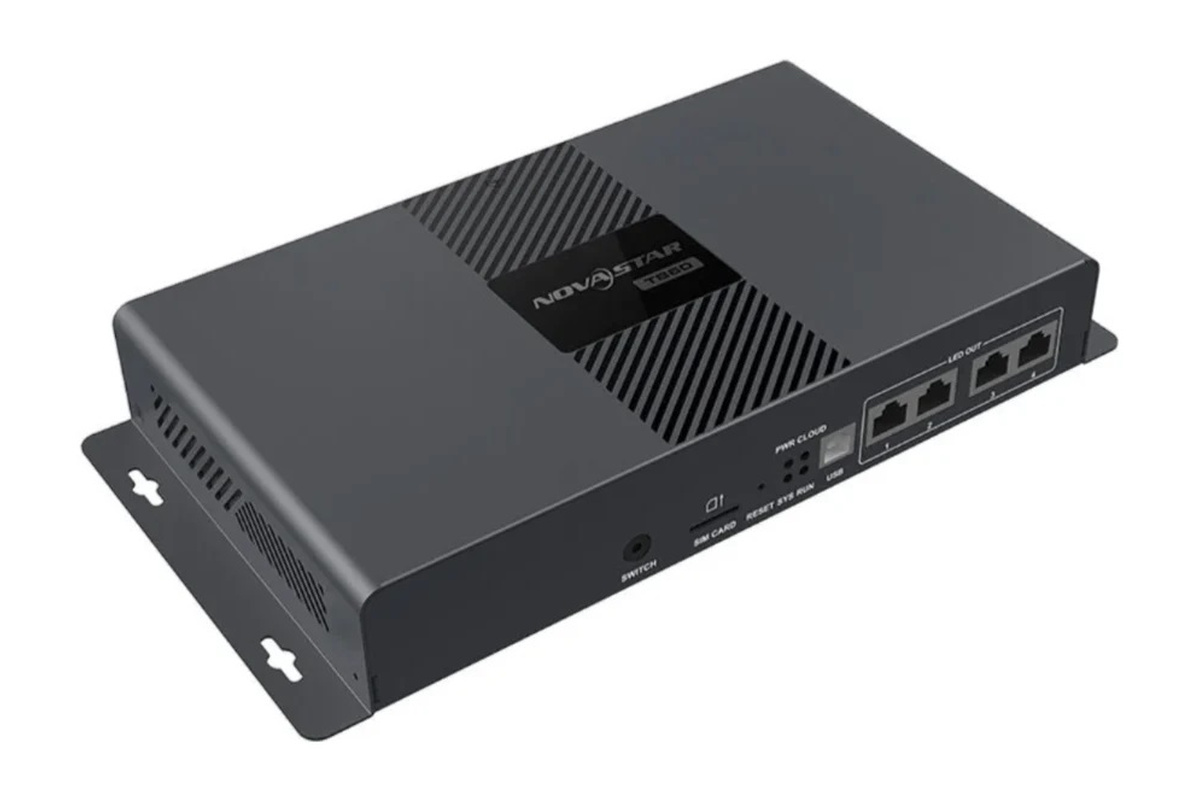
6. TB30 vs TB50 vs TB60: Which Taurus Player Fits?
Start with the mapped pixel count and the number of output paths you need, not with price. The three Taurus players share a processor class and management software, so capacity and output topology separate them.
| Item | TB30 | TB50 | TB60 |
|---|---|---|---|
| Maximum loading capacity | 1,300,000 pixels in the V1.2.4 document | 1,300,000 pixels | 2,300,000 pixels |
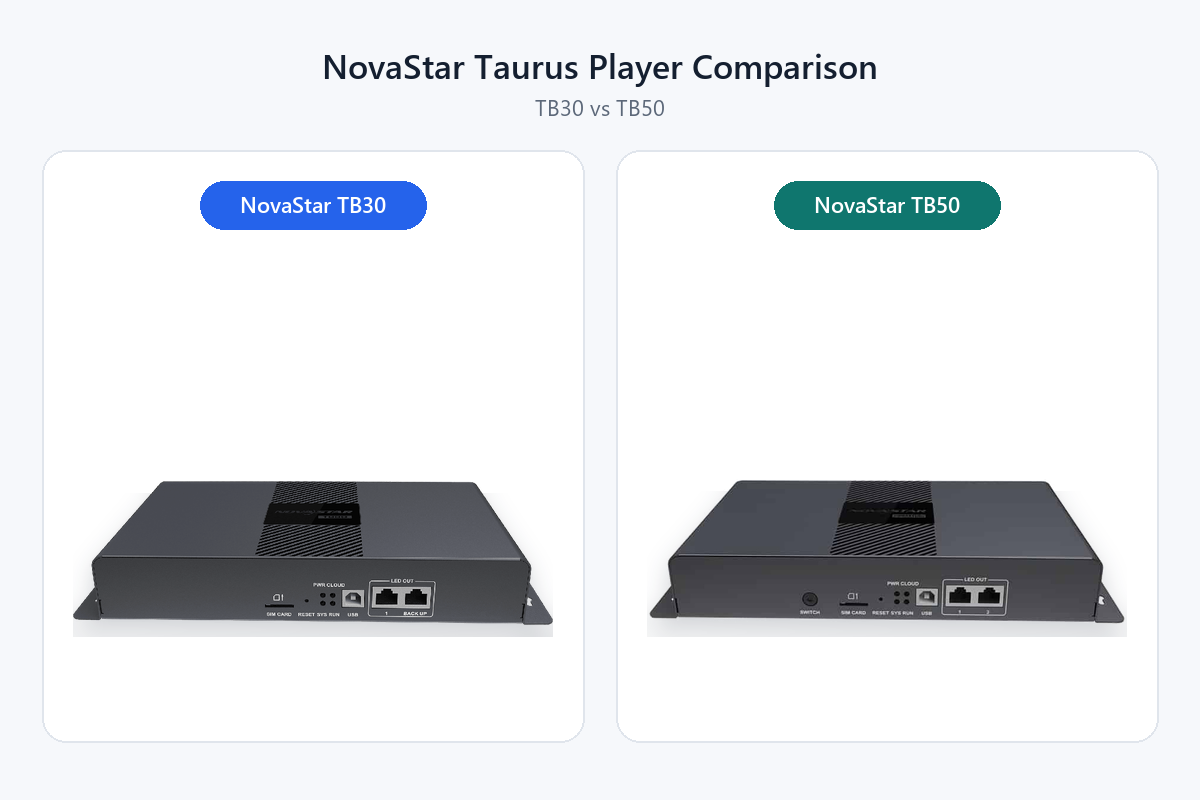
| Gigabit Ethernet LED outputs | 2, primary by default or 1 primary plus 1 backup | 2, primary by default or 1 primary plus 1 backup | 4 |
| Maximum canvas size | 4,096 x 4,096 pixels | 4,096 x 4,096 pixels | 4,096 x 4,096 pixels |
| Ultra-long screen width | 23,040 pixels | 23,040 pixels | 23,040 pixels |
| HDMI live input | No | Yes, HDMI 1.3 | Yes, HDMI 1.3 |
| Internal storage | 32 GB | 32 GB | 32 GB |
| Best fit | Uploaded, scheduled content where live video is never needed | Medium displays that need two active data paths and occasional live video | Larger canvases and more complex output distribution |
Official-data warning: NovaStar’s TB30 specification (V1.2.4, July 31, 2026) states a loading capacity of 1,300,000 pixels, while the live NovaStar Taurus comparison table still shows 650,000 pixels for the TB30. Both statements come from NovaStar, so treat the TB30 figure as revision-dependent and confirm the revision of the unit you are buying. The reliable functional difference is the HDMI live input, which the TB30 does not have.
If scheduled content is enough, the TB30 remains the economical choice, and the TB30 guide covers its setup. When you need to switch between scheduled advertising and live video, the TB50 is the version that adds HDMI. The TB30 vs TB50 comparison works through the two models line by line, and the NovaStar TB60 is the next step up when the canvas exceeds 1.3 million pixels or four output ports simplify the cabinet layout.
7. Applications and Project Fit
Retail and shopping centres. Storefront screens, promotional walls and mall directories benefit from scheduled playlists and central updates, and local storage keeps the display running if the management network drops.
Outdoor advertising and building signage. Billboards, facades, pole signs and roadside screens often run unattended for long hours. The TB50 automates playback without an on-site computer; the enclosure, heat management, lightning protection and network availability remain part of the display design, as covered in HonghaiLED’s outdoor LED display guide.
Corporate, education and hospitality. Reception walls, campus notices, hotel information boards and conference-area displays can run branded content on a schedule and switch to a live presentation or camera feed through HDMI.
Transport and multi-site networks. Stations, parking facilities and distributed branches need consistent information across locations, where cloud grouping, permissions and offline behaviour should be tested at representative sites. For projects still defining the screen itself, review the LED video wall planning guide before fixing the resolution and control capacity.
8. Common Installation Mistakes
- Buying by screen dimensions. A small fine-pitch display can need more capacity than a large coarse-pitch sign, so always convert the screen to pixels first.
- Assuming the second port is automatic backup. Both TB50 LED outputs are primary by default; redundancy is a deliberate setting and a deliberate system design.
- Skipping firmware and software checks. Match the ViPlex version, receiving-card firmware and player firmware before commissioning.
- Relying on Wi-Fi alone. Metal cabinets, distance and interference weaken service access, so keep wired or local recovery available.
- Ignoring power and heat. Use ventilation, surge protection, grounding and a controlled shutdown procedure inside the enclosure.
- Using the wrong USB drive format. Only Ext4 and FAT32 are supported; exFAT and FAT16 drives will not be recognised.
- Publishing untested media. Validate aspect ratio, codec, frame rate, text size and colour on the real screen before scheduling a campaign.
- Running at the capacity limit. A modest reserve protects the project from later cabinet additions or resolution changes.
9. Frequently Asked Questions
9.1 What are the main specifications of the NovaStar TB50?
The TB50 is an asynchronous LED multimedia player with synchronous HDMI input. It loads up to 1,300,000 pixels, offers two Gigabit Ethernet LED outputs, includes 32 GB of internal storage and 1 GB RAM, decodes H.264 and H.265 up to 4096 x 2304 at 60 fps, and supports 4,096 x 4,096 canvases plus ultra-long screens up to 23,040 pixels wide.
9.2 Does the NovaStar TB50 need a computer?
No computer is required for continuous playback once content and the screen configuration have been published. A computer or mobile device is still used for setup, content creation, maintenance and updates, and synchronous HDMI content needs an external source.
9.3 Can the TB50 play content without internet access?
Yes. Content stored on the player continues to run to its schedule without an active connection. Network access is needed for remote publishing, monitoring, cloud functions and dynamic data such as weather widgets, so test those behaviours offline before relying on them.
9.4 Can the TB50 drive a 4K LED screen?
It decodes 4K-class source video, but the LED output canvas must stay at or below 1,300,000 pixels, so a full 3840 x 2160 canvas of more than 8.2 million pixels is not possible. Source decoding and LED loading capacity are different specifications, and confusing them is a common buying error.
9.5 What software is used with the TB50?
ViPlex Express is used on a computer, ViPlex Handy on a mobile device, and NovaStar’s VNNOX cloud platform for remote fleet management. NovaLCT is used with the receiving cards for screen configuration and mapping. Third-party Android applications are not supported on the player.
9.6 What is the default Wi-Fi password of the NovaStar TB50?
In the current specification the default access point SSID is formed from the model name plus the last eight digits of the serial number, and the default password is printed on the SSID label of the unit. Older TB50 documentation listed 12345678 as the initial access point password, so check the label first and change the password during commissioning.
9.7 How many pixels can the TB50 load, and which resolutions fit?
The limit is 1,300,000 pixels. A 1536 x 640 canvas uses 983,040 pixels and leaves headroom; a 1920 x 640 canvas uses 1,228,800 pixels and fits with little reserve; a 1920 x 720 canvas uses 1,382,400 pixels and needs a more capable player such as the TB60.
9.8 When should I choose the TB60 instead of the TB50?
Choose the TB60 when the mapped canvas exceeds 1,300,000 pixels, when four LED output ports simplify the cabinet routing, or when planned expansion would leave the TB50 at its ceiling. The TB60 loads up to 2,300,000 pixels; the TB60 multimedia player guide covers its configuration.
9.9 Where can I find the TB50 manual and specification document?
NovaStar publishes the Taurus Series Multimedia Player TB50 Specifications document, which contains the full port list, indicator table, media decoding matrix and electrical parameters. The current revision reviewed for this guide is V1.2.5, dated August 31, 2026. Because these documents are revised without notice, always match the manual to the revision printed on the unit you receive.
9.10 How much does a NovaStar TB50 cost, and how do I buy one?
Pricing depends on the configuration, the optional 4G module and antennas, the quantity and the destination, so no single list price is meaningful. Send the canvas resolution, pixel pitch, cabinet layout and project location to HonghaiLED through our contact page, and we will confirm whether the TB50 fits the load and quote the configured player with the display.
10. Conclusion
The NovaStar TB50 multimedia player is the middle option in the Taurus range and the first of the three that adds live HDMI input. With 1,300,000 pixels of loading capacity, two primary Gigabit Ethernet outputs, 32 GB of storage, 4K decoding and cloud-oriented management, it fits medium LED signage that needs scheduled local playback plus occasional live video.
Confirm four things before ordering: the mapped pixel count, the output routing, the software versions you will standardise on, and the network plan for the site. If the canvas approaches 1.3 million pixels or four output paths would simplify the cabinets, move to the TB60 instead.
HonghaiLED supplies NovaStar control systems with LED displays and verifies the controller against the final canvas before shipment. Share your screen plan with us and we will check the loading, mapping and network design for the project.
Related Posts
How to Back Up and Restore NovaLCT Configuration Files
To back up NovaLCT configuration files, read the working settings…
LED Display Redundancy: A Buyer’s Failover Test Guide
LED display redundancy is a planned alternative path that keeps…
NovaStar H Series vs VX Series: Which Controller Is Right for You?
NovaStar H Series vs VX Series comes down to architecture…

No Comments