
Colorlight VX20 4K Video Processor: Specs, Modes and Pixel Capacity
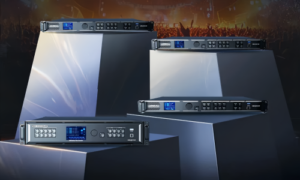
Colorlight VX20 is a 4K video processor with integrated LED sending, built for rental stages, broadcast and virtual production studios, control rooms and fine-pitch LED walls. It accepts up to 10 video inputs, drives up to 13.1 million pixels through 20 Gigabit Ethernet ports, and switches between three operating modes: Video Processor, Bypass and Fiber Transceiver.
This guide collects the published Colorlight VX20 specifications, the input and output layout, the pixel capacity limits at 8-bit and 10-bit output, the three operating modes, the redundancy options and a practical integration checklist. The figures below follow the manufacturer document Colorlight VX20 Specification V1.0 (Colorlight Cloud Tech Ltd, 2024). Confirm the firmware revision of the actual unit before final commissioning.
Colorlight VX20 at a glance
- Product type: 4K video processor with LED sending, successor to the VX10 in Colorlight’s VX series.
- Load capacity: 13.1 million pixels at 8-bit/60Hz output, split across 20 Gigabit Ethernet ports (650,000 pixels per port at 8-bit/60Hz).
- Video inputs: 2 × HDMI 2.0, 2 × DP 1.2, 2 × 12G-SDI and 4 × HDMI 1.4, with HDMI 2.0, HDMI 1.4 and 12G-SDI loop outputs.
- Video outputs: 20 × 1G Ethernet for receiving cards, 4 × 10G fiber (Fiber 1/2 primary, Fiber 3/4 backup or copy) and 1 × HDMI 2.0 monitoring output.
- Image processing: true 4K 4096 × 2160 @60Hz, HDR10 and HLG, 8/10/12-bit input, 8/10-bit output, frame rates up to 240Hz.
- Latency: 0 frames in Bypass mode, 1 frame in Video Processor mode.
- Chassis: 19-inch 2U rack mount, 482.6 × 88.0 × 412.1 mm, 5.65 kg net weight, 92W rated power.
On this page
- Colorlight VX20 specifications
- Inputs and outputs
- Pixel capacity and load planning
- Three operating modes
- Control and configuration
- Redundancy and reliability
- Typical applications
- How to choose the right processor
- Integration checklist and quote
- FAQs
Colorlight VX20 specifications
The table below lists the published VX20 specifications that matter when you size a wall or specify a rental kit. Where a limit depends on the output bit depth or frame rate, both figures are shown instead of a single headline number.
| Category | Published specification |
| Product | Colorlight VX20 — 4K video processor with integrated LED sending |
| Chassis | 19-inch rack, 2U; 482.6 × 88.0 × 412.1 mm (without rubber feet) |
| Weight | 5.65 kg net (12.45 lbs); 9.10 kg gross (20.06 lbs) |
| Power | AC 100–240V, 50/60Hz; rated power 92W |
| Total load capacity | 13.1 million pixels (maximum, 8-bit @60Hz output) |
| Capacity by output setting | 8-bit @60Hz: 13.1M pixels • 10-bit @60Hz: 9.8M • 8-bit @120Hz: 6.55M • 10-bit @120Hz: 4.9M • 8-bit @240Hz: 3.27M • 10-bit @240Hz: 2.45M |
| Load per Ethernet port | 650,000 pixels (8-bit @60Hz); 490,000 (10-bit @60Hz); 320,000 (8-bit @120Hz); 240,000 (10-bit @120Hz); 160,000 (8-bit @240Hz); 120,000 (10-bit @240Hz) |
| Maximum canvas | 16,384 pixels wide × 8,192 pixels high (independent limits; the total pixel budget still applies) |
| Video inputs | 2 × HDMI 2.0, 2 × DP 1.2, 2 × 12G-SDI, 4 × HDMI 1.4 (10 inputs) |
| Loop outputs | 2 × HDMI 2.0, 4 × HDMI 1.4, 2 × 12G-SDI |
| Maximum input resolution | 4096 × 2160 @60Hz (true 4K) |
| Input color depth | 8/10/12-bit on HDMI 2.0, DP 1.2 and 12G-SDI; 8-bit on HDMI 1.4 |
| Output color depth | 8/10-bit |
| Dynamic range | HDR10 (SMPTE ST 2086/2084) and HLG on HDMI 2.0 and DP 1.2 |
| Frame rate | Up to 240Hz on HDMI 2.0 and DP 1.2; up to 120Hz on HDMI 1.4 |
| LED outputs | 20 × Gigabit Ethernet (RJ45); maximum CAT5e cable run 100 m |
| Fiber ports | 4 × 10G SFP+ (optical module optional; transmission distance depends on the module) |
| Monitoring output | 1 × HDMI 2.0 for PVW, PGM and input monitoring |
| Layers | 3 layers at 4K (Main, PIP 1, PIP 2) with splicing, picture-in-picture, scaling, cropping, opacity and fade in/out |
| Operating modes | Video Processor (1-frame delay), Bypass (0-frame delay), Fiber Transceiver |
| Control ports | LAN 1/2 (RJ45), RS-232 (RJ11, 6P6C), USB IN (type B), USB OUT (type A), GENLOCK input and loop (BNC) |
| Presets | Up to 1,000 saved presets; single or dual canvas interface |
| Graphics library | 1GB image storage (PNG/JPG): 4 background images, 10 logo images (max 512 × 512), up to 4 OSD text items |
| Redundancy | Input hot backup, Ethernet loop redundancy, fiber backup (Fiber 3/4), processor redundancy, configuration backup |
| Environment | Operating −20°C to 50°C, 0–90% RH non-condensing; storage −30°C to 80°C |
One sizing habit pays off immediately: the 13.1 million figure is the 8-bit/60Hz maximum, not a universal limit. Moving to 10-bit output or 120Hz output lowers the ceiling, which is why the 4K LED screen guide recommends planning the wall resolution first and the processor second.
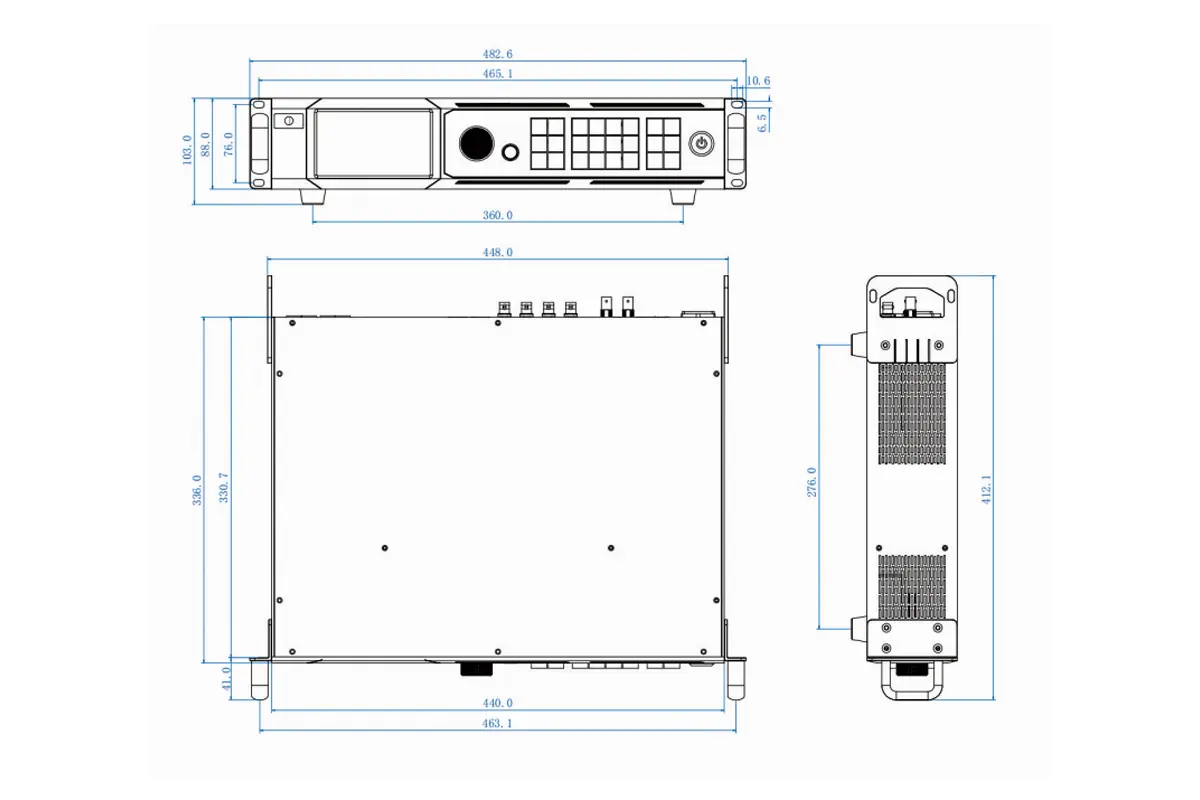
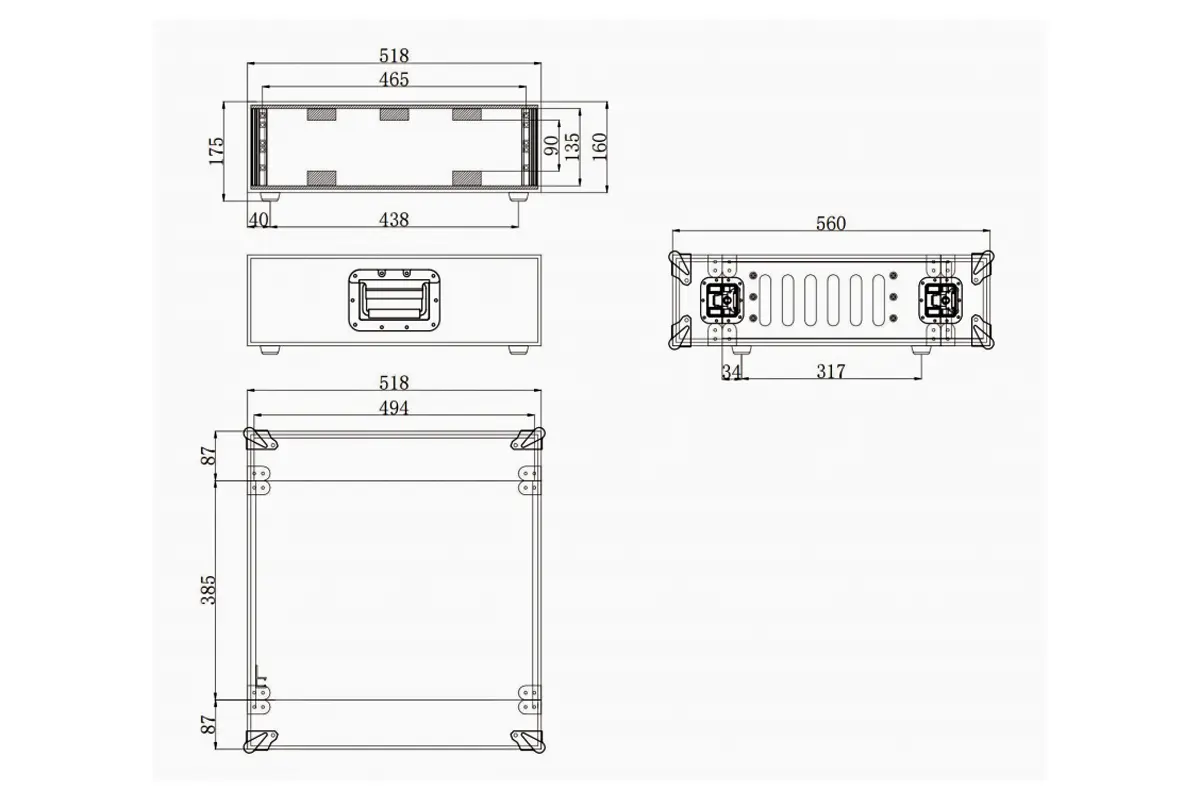
Colorlight VX20 reference dimensions: 2U chassis, 482.6 mm wide, 88.0 mm high and 412.1 mm deep without rubber feet.
Colorlight VX20 inputs and outputs
The VX20 accepts ten video inputs across four interface types, and every interface keeps a loop output so a source can be shared with a second processor, a monitor or a backup chain. Input capability is not uniform, so check the table below against your source list before you commit.
| Input | What the published specification supports |
| 2 × HDMI 2.0 | 600MHz pixel clock; up to 4096 × 2160 @60Hz or 8192 × 1080 @60Hz; 8/10/12-bit; HDR10 and HLG; HDCP 2.2 and 1.4; embedded audio; no interlaced input; custom EDID up to 4096 pixels wide or high |
| 2 × DP 1.2 | Compatible with DP 1.1; 600MHz pixel clock; up to 4096 × 2160 @60Hz or 8192 × 1080 @60Hz; 8/10/12-bit; HDR10 and HLG; HDCP 2.2 and 1.4; embedded audio; frame rates 23.98–240Hz; no interlaced input |
| 2 × 12G-SDI | Up to 4096 × 2160 @60Hz per port; 8/10-bit; YCbCr 4:2:2; 23.98Hz and 60Hz sources; interlace processing available on 12G-SDI 1; custom EDID not supported; compatible with 6G-SDI, 3G-SDI (Level A/B) and HD-SDI |
| 4 × HDMI 1.4 | 330MHz pixel clock; 4096 × 1080 @60Hz or 4096 × 2160 @30Hz; minimum 800 × 600 @60Hz; 8-bit; HDCP 1.4; no HDR; audio input on HDMI 3 only; only 2 × HDMI 1.4 or 4 × HDMI 1.3 inputs can be used at the same time |
On the output side the VX20 behaves as one device with three parallel paths:
- 20 × Gigabit Ethernet for LED receiving cards, with loop redundancy and a maximum 100 m CAT5e run per port.
- 4 × 10G fiber ports. Fiber 1 and Fiber 2 are the primary fiber outputs, replacing Ethernet ports 1–10 and 11–20 respectively; fiber takes precedence when both are connected. Fiber 3 and Fiber 4 copy or back up the data on Fiber 1 and Fiber 2 (copy mode by default, backup mode selectable).
- 1 × HDMI 2.0 monitoring output for PVW and PGM images and any input signal, so the operator sees exactly what the screen shows.
A U-DISK port lets you import and save receiving card parameters without a laptop, and the rear panel adds GENLOCK input and loop (BNC, supporting Black Burst, Bi-level and Tri-level sync at 23.98Hz and 60Hz) plus LAN 1/2 for control and a bridge function that links two VX20 units into a virtual LAN.
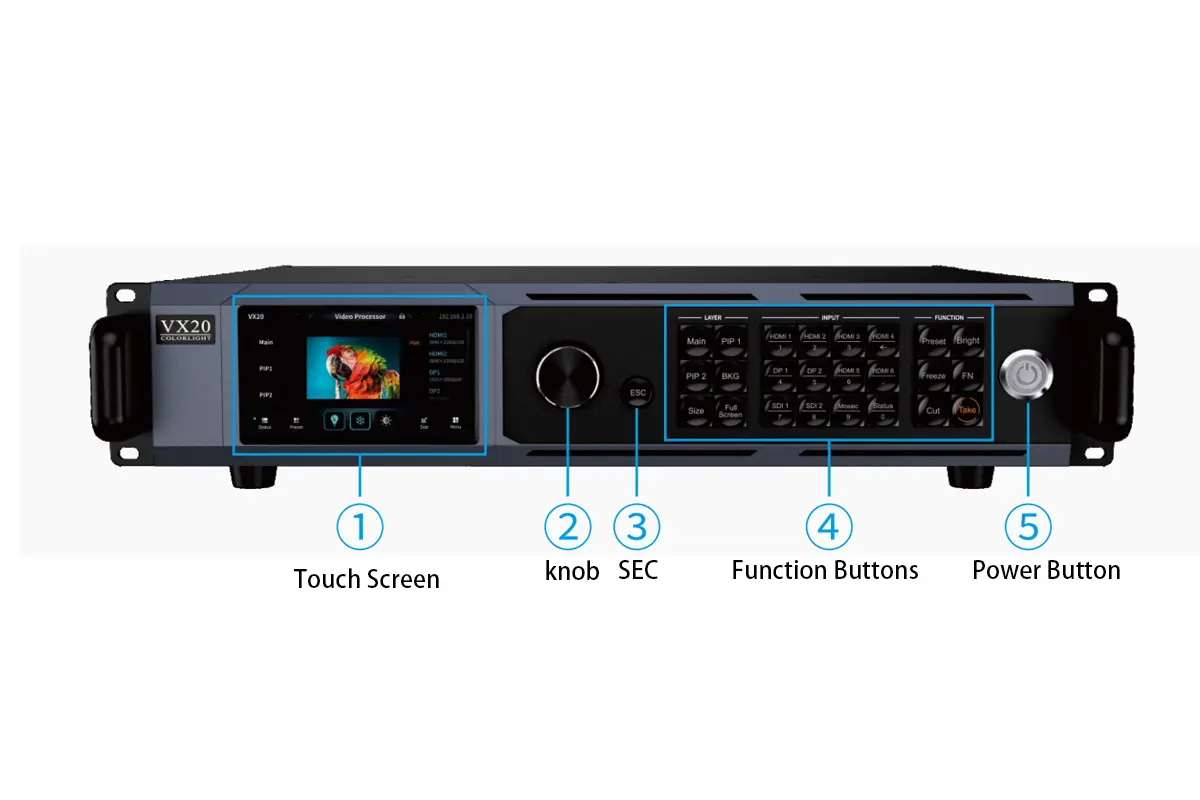
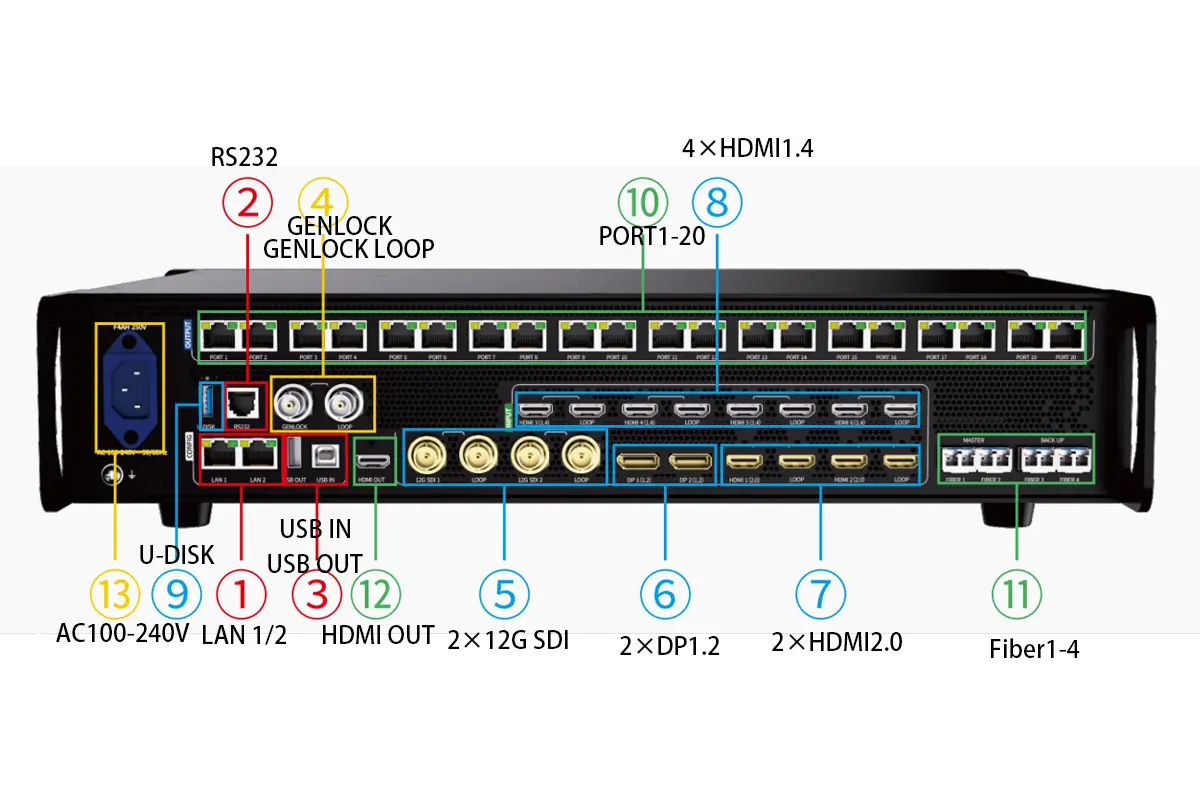
Colorlight VX20 front panel with touch screen, knob and function keys, and the rear panel with 20 Gigabit Ethernet ports and four 10G fiber slots.
How many pixels can the Colorlight VX20 drive?
Short answer: 13.1 million pixels at 8-bit and 60Hz output, 9.8 million pixels at 10-bit and 60Hz, and less at higher refresh rates. The VX20 also caps the canvas at 16,384 pixels wide and 8,192 pixels high, and each Gigabit Ethernet port carries 650,000 pixels at 8-bit/60Hz.
| Output setting | Total load capacity | Load per Ethernet port |
| 8-bit @60Hz | 13.1 million pixels | 650,000 pixels |
| 10-bit @60Hz | 9.8 million pixels | 490,000 pixels |
| 8-bit @120Hz | 6.55 million pixels | 320,000 pixels |
| 10-bit @120Hz | 4.9 million pixels | 240,000 pixels |
| 8-bit @240Hz | 3.27 million pixels | 160,000 pixels |
| 10-bit @240Hz | 2.45 million pixels | 120,000 pixels |
Worked example: a 3840 × 2160 wall contains 8.29 million pixels. That fits at 8-bit/60Hz and at 10-bit/60Hz, but it exceeds the 6.55 million limit at 8-bit/120Hz, so the same wall needs either a lower refresh rate, a lower output bit depth, or a second processor. Always check the cabinet map as well: eight million pixels spread over 20 ports is comfortable, while the same load pushed through fewer ports will collide with the 650,000-pixel-per-port ceiling.
For walls that go past the published limits, splitting the canvas into zones driven by two or more processors, or using the VX20 for the high-priority area and a companion controller for the remainder, keeps each unit inside its rated load. Our engineers can run that calculation for your cabinet layout — see the LED screen buying guide for the information worth having ready.
Three operating modes, three different jobs
The VX20 runs in one mode at a time, and the mode you choose changes the signal path, the latency and the direction of the fiber ports. Choose the mode from the job the processor has to do, not from the feature list.
Video Processor mode: composition and layers
This is the default mode. The VX20 receives multiple video sources, and three of them can be selected and sent to the receiving cards with one frame of delay. Main, PIP 1 and PIP 2 layers support splicing, picture-in-picture, scaling, cropping, opacity and fade in/out, so a show can blend a media server canvas, a camera feed and a graphics layer without an external switcher. Each layer runs at 4K resolution, and the Ethernet ports keep the full 13.1 million pixel budget in both PVW&PGM and PGM-only canvas views.
Typical use: live events, broadcast studios, control rooms and any wall that mixes several sources.
Bypass mode: zero-frame pass-through
In Bypass mode, one selected source is sent straight to the screen with 0-frame delay and no scaling or processing. It preserves the original timing of the signal, which is what camera returns, image magnification and esports feeds need. The trade-off is composition: Bypass mode does not layer or blend sources.
Typical use: IMAG camera paths, virtual production camera feeds and latency-critical monitoring.
Fiber Transceiver mode: long-distance transport
In Fiber Transceiver mode the VX20 changes direction: Fiber 1 and Fiber 2 become the input ports, receiving display data over 10G optical fiber from another VX-series device, and the 20 Ethernet ports drive the receiving cards at the screen. This is how a processor at the control position feeds cabinets 100 m or more away without a long run of Ethernet.
Typical use: stadiums, arenas, large venues and any installation where the control room sits far from the LED wall.
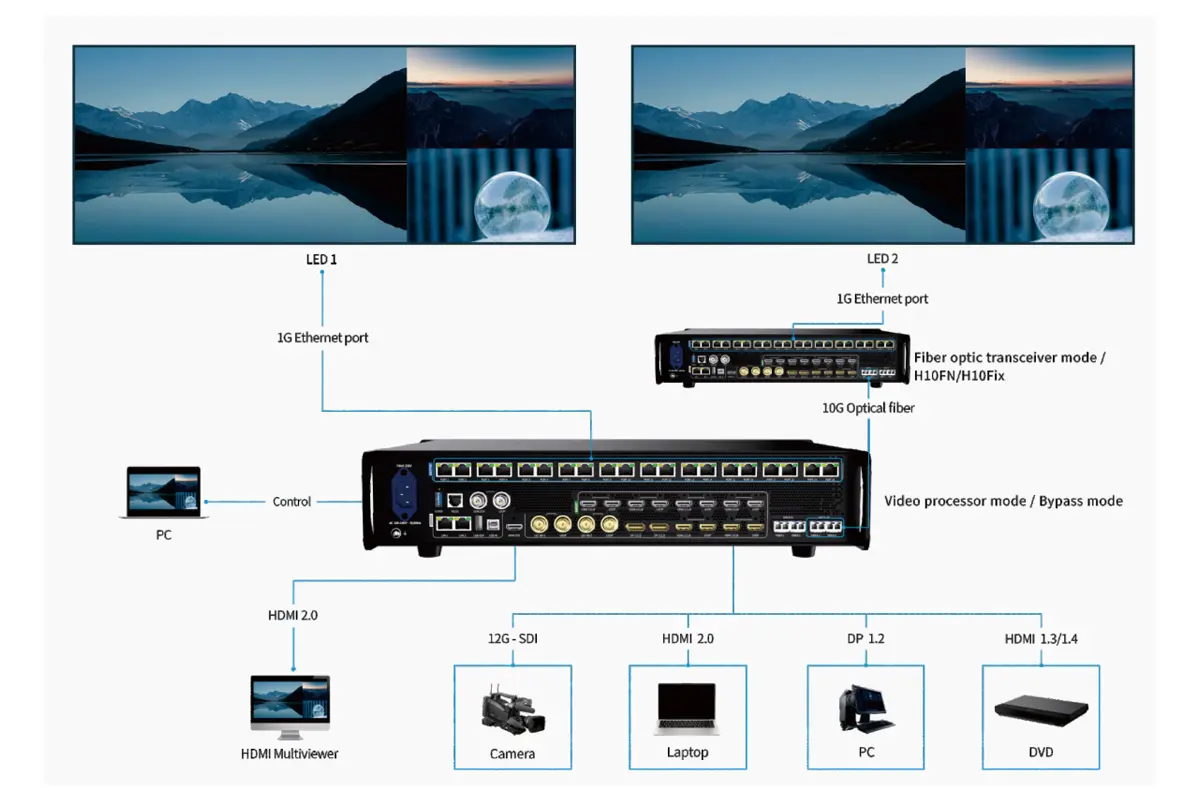
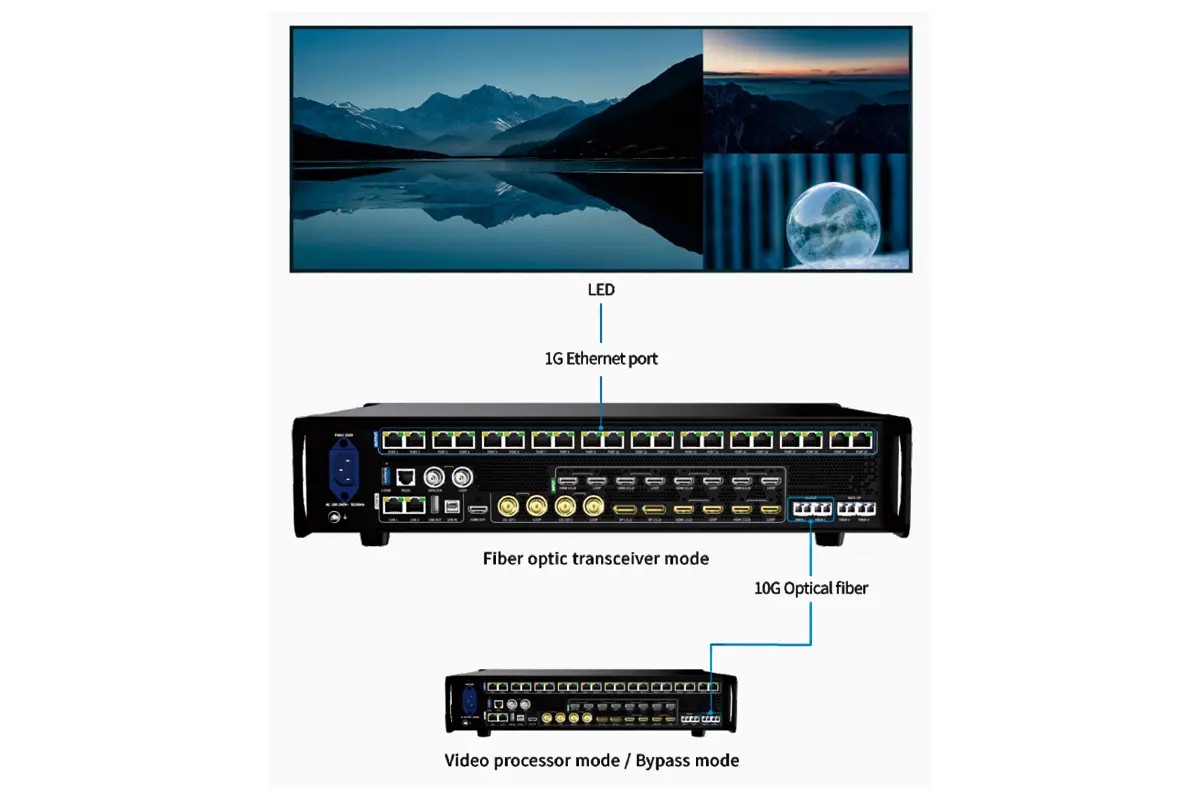
Video Processor and Bypass mode keep the VX20 in the active signal path, while Fiber Transceiver mode receives over Fiber 1/2 and outputs to the screen through the 20 Ethernet ports.
Control and configuration
Web UI and iSet software
A single network cable is enough to control the processor and manage the display. The web interface runs in a browser on Windows, macOS or Linux, so an operator can adjust sources, layers, output mapping and brightness from a laptop backstage or a tablet in the control booth. Colorlight’s iSet software adds deeper layout design, EDID handling and batch device work, and the platform stores up to 1,000 presets for fast show recall.
Read the address actually configured on the device instead of assuming a factory default, and keep control-network access limited to the production team.
Front panel and central control
The front panel carries a touch screen with an HD PVW preview plus a knob, ESC key, layer keys (Main, PIP 1, PIP 2, BKG, SIZE, Full Screen), source keys, and function keys such as Preset, Brightness, Freeze, Cut and Take. That matters in rack installations where nobody wants to open a laptop for a source change. For fixed installations, RS-232 on the RJ11 port and the network interface both accept central control commands, and USB IN/OUT allows cascading between units.
Graphics, background and OSD
The 1GB image library accepts PNG and JPG files for backgrounds and logos. Four background presets, ten logo presets (up to 512 × 512) and up to four OSD text items can be applied without consuming the three video layers, and OSD text supports scrolling with adjustable direction, speed and style. A 15-pattern test utility helps verify cabinet mapping before content is loaded.
Redundancy and reliability
The VX20 includes several independent protection layers. Each one covers a different failure, so they should be configured and tested individually rather than assumed:
- Input hot backup — switches to a backup signal if the primary video source fails.
- Ethernet loop redundancy — manually configured protection for the data path to the cabinets.
- Fiber backup — Fiber 3 and Fiber 4 copy or back up the data carried on Fiber 1 and Fiber 2.
- Processor redundancy — automatic switchover to a backup processor if the primary unit fails.
- Configuration backup — parameters can be exported and re-imported, which shortens recovery after a swap.
Redundancy protects the signal chain, not the power design of the venue. Document which fault each path covers, photograph the cable labels, and rehearse a switchover with the show’s real sources before the event.
Typical applications for the Colorlight VX20
The VX20 fits projects where resolution, load capacity and operating flexibility all matter at the same time. The four scenarios below are where the specification does the most work.
Stage rental and live events
Rental companies value the combination of ten inputs, three processing layers, 1,000 presets and a 2U chassis that travels in a standard rack. Bypass mode covers latency-critical camera paths, while Video Processor mode handles media server output and graphics. Pair it with a rental LED screen and the same processor can serve several shows in a season.
Broadcast and virtual production
12G-SDI inputs, GENLOCK in and loop, HDR10/HLG handling and precise color management make the VX20 usable in LED volume stages and studios, where camera tracking and render timing leave no room for variable latency.
Command and control rooms
Twenty synchronized output ports and multi-source layering suit control rooms that display CCTV, dashboards and mapping data side by side. Network control keeps operators out of the rack, and the monitoring output gives a second verification point for what the wall is showing.
Fine-pitch and commercial LED walls
At 13.1 million pixels the VX20 covers most fine-pitch, COB and commercial video walls in a single unit, and the fiber ports let the processor sit where the operators are while the cabinets stay in the field. See COB LED display modules and commercial LED display screens for the display side of the same project.
How to choose the right processor
The VX20 is a processing device: it scales, layers and maps video before sending it to the cabinets. That matters when a project mixes sources or needs pixel-accurate scaling. If a wall runs a single pre-composed canvas and simply needs more ports at a lower cost, a dedicated sending controller can be enough, and if the wall grows past 13.1 million pixels or needs more than three layers, the answer is usually a larger processor or two units working in zones.
Three comparisons come up most often in LED control projects:
- VX20 versus a sending controller such as the Colorlight X8M: choose the controller when the signal is already composed and only needs distribution; choose the VX20 when the source needs scaling, cropping or layering.
- VX20 versus a playground-style processor such as the Colorlight Z5: compare input counts, layer count and load capacity against the show’s actual sources rather than the model number.
- VX20 versus a NovaStar platform such as the NovaStar VX2000 Pro: the deciding factors are usually ecosystem preference, receiving card compatibility, service network and price, because both classes cover 4K processing with redundancy.
You can also read the Colorlight X20 setup guide and the Colorlight software download page for the tools and firmware used to commission Colorlight systems.
Integration checklist and quote request
Before ordering, confirm the following items. They cover almost every mismatch we see between a processor specification and a real LED wall:
- Wall resolution in physical pixels (columns × cabinet pixel width, rows × cabinet pixel height) and the total pixel count.
- Cabinet and module model, plus the receiving card model, firmware version and approved parameter files.
- Source list with resolution, frame rate, color depth and connector type for each input.
- Required output bit depth and refresh rate, because both reduce the available pixel budget.
- Layers needed: single canvas, or video plus picture-in-picture and graphics.
- Cable distances from the control position to the first cabinet, and whether fiber is required.
- Redundancy expectations: which fault must not interrupt the picture, and how switchover will be tested.
- Optical modules, flight case, spare receiving cards and spare cables for rental use.
Send those details to our team and we will confirm the port map, the optical modules and the pixel load per output. You can reach us through the contact page, or review our rental LED screens, indoor LED screens and commercial LED display ranges for a complete system quote.
Colorlight VX20 FAQs
What is the Colorlight VX20?
The Colorlight VX20 is a 4K video processor with integrated LED sending, and the successor to the VX10 in Colorlight’s VX series. It combines video switching, scaling, three 4K layers and LED output in one 2U chassis, supports ten video inputs (HDMI 2.0, DP 1.2, 12G-SDI and HDMI 1.4) and drives up to 13.1 million pixels through 20 Gigabit Ethernet and four 10G fiber ports.
How many pixels can the Colorlight VX20 drive?
The published maximum is 13.1 million pixels at 8-bit and 60Hz output. It falls to 9.8 million pixels at 10-bit/60Hz, 6.55 million at 8-bit/120Hz and 3.27 million at 8-bit/240Hz, and each Gigabit Ethernet port carries 650,000 pixels at 8-bit/60Hz. The canvas is also limited to 16,384 pixels wide and 8,192 pixels high.
Does the Colorlight VX20 support 4K and HDR?
Yes. HDMI 2.0 and DP 1.2 inputs accept true 4K up to 4096 × 2160 @60Hz with HDR10 (SMPTE ST 2086/2084) and HLG, in 8/10/12-bit and with frame rates up to 240Hz. Output is 8-bit or 10-bit. The four HDMI 1.4 inputs are 8-bit and do not support HDR, and interlaced signals are not accepted on HDMI or DP inputs.
Can the VX20 show more than one input at the same time?
Yes, in Video Processor mode. Three sources can be selected and output as Main, PIP 1 and PIP 2 layers with one frame of delay, using splicing, picture-in-picture, scaling, cropping, opacity and fade in/out. In Bypass mode a single source passes through with zero frames of delay, and in Fiber Transceiver mode Fiber 1 and Fiber 2 are used as inputs.
Do I need a second device to use the VX20 fiber ports?
Yes. The 10G fiber ports transport display data, so the far end needs a compatible receiver: for example a Colorlight fiber transceiver such as the H10FN or H10Fix to convert 10G optical back to Gigabit Ethernet for the receiving cards, or a second VX-series processor running in Fiber Transceiver mode, which receives on Fiber 1/2 and drives its own Ethernet outputs. The 10G SFP+ module is optional and the maximum distance depends on the module you install.
Can I control the Colorlight VX20 without installing software?
Yes. Connect a PC to LAN 1 or LAN 2 and open the built-in web interface in a browser; it is cross-platform and needs no proprietary client. The front panel offers a touch screen with HD preview, a knob and function keys for on-site operation, and iSet software or RS-232 central control can be added for advanced workflows.
Is the Colorlight VX20 suitable for fine-pitch LED walls?
Yes, as long as the wall stays inside the published load. A 3840 × 2160 wall is 8.29 million pixels, which fits at 8-bit/60Hz and 10-bit/60Hz but not at 120Hz. Very large fine-pitch walls should be split into zones or driven by two processors once they pass the load or canvas limits.
How much does the Colorlight VX20 cost?
Pricing depends on the configuration and the market: optical modules, flight case, receiving cards and support terms all change the delivered cost. Contact us with your wall resolution and source list and we will quote the correct configuration for your project.
Conclusion
The Colorlight VX20 earns its place when a project needs real 4K processing, three layers, ten inputs and a large pixel budget in a single 2U device, with the option of zero-frame bypass or fiber transport when the signal path demands it. Confirm the wall’s pixel count, output bit depth and refresh rate first, then match the mode, the port map and the redundancy plan to the show.
Specifications in this article follow the manufacturer document Colorlight VX20 Specification V1.0 (Colorlight Cloud Tech Ltd, 2024) and the official Colorlight VX20 product page. Colorlight may revise firmware and documentation without notice, so verify critical figures against the documentation supplied with your unit, or ask our team to confirm them for your project.
Related Posts
Colorlight X20 Manual & Full Setup Guide (2026)
Quick answer: The Colorlight X20 is a 4K LED video…
How to Back Up and Restore NovaLCT Configuration Files
To back up NovaLCT configuration files, read the working settings…
LED Display Redundancy: A Buyer’s Failover Test Guide
LED display redundancy is a planned alternative path that keeps…

No Comments