
LED Display Size: LED Screen Size Charts and Calculations
LED display size is the active screen width and height. Also called LED screen size, it should match your audience, content, available space, and cabinet layout. A larger surface makes content physically bigger; a finer pixel pitch adds detail within that surface. Both decisions matter when specifying a direct-view LED wall for a meeting room, retail store, event, church, or outdoor advertising site.
This guide explains how to calculate LED display size in meters, feet, and pixels, compare useful configurations, and turn an approximate requirement into a buildable screen. The examples are planning calculations, not promises that every product supports every dimension. Start with the information viewers must read, then confirm the exact cabinet grid, native resolution, installation envelope, and operating requirements before ordering.
1. What LED Display Size Actually Means
01. Physical LED Display Size vs Resolution
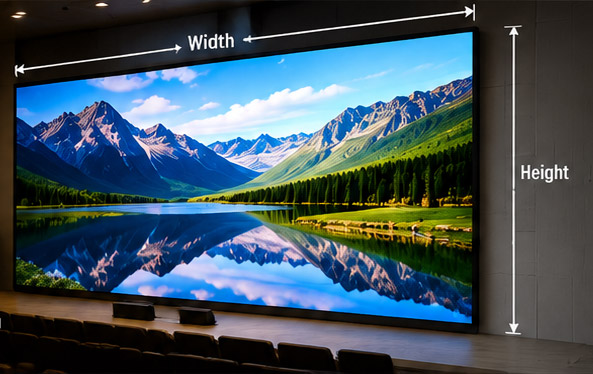
Specify LED display size as width × height, with units and orientation. For example, 4.8 m × 2.7 m describes a landscape screen with 12.96 m² of active area. Resolution describes its horizontal and vertical pixel counts. The same physical wall can have very different resolutions depending on pixel pitch, the distance between adjacent pixel centers.
For a rectangular display with equal horizontal and vertical pitch, horizontal pixels = active width in millimeters ÷ pitch in millimeters. Apply the same calculation to height. At an exact 2.5 mm pitch, 4,800 × 2,700 mm gives 1,920 × 1,080 pixels. Multiplying the two pixel counts gives 2,073,600 total pixels.
02. Active Area, Diagonal, and Installed Dimensions
The active area excludes decorative trim and supporting steel. The installed envelope also includes mounting depth, cable routing, ventilation, and service access. Ask for both dimensions on the drawing: an LED display size that fits visually can still exceed the available installation space.
Diagonal measurements are useful for comparing a wall with a television, but they do not replace width and height. Calculate diagonal as √(width² + height²), using consistent units. Multiply meters by 39.3701 for diagonal inches or by 3.28084 for feet. Always identify whether an advertised diagonal describes the active picture or the overall enclosure.
2. Common LED Display Sizes and Where They Fit
There is no universal standard LED display size for a particular room type. The configurations below illustrate scale and unit conversions. They are starting points for discussion, subject to cabinet compatibility and a viewing assessment; a venue label alone cannot determine the correct pitch or screen dimensions.
| Width × height, meters | Width × height, feet | Diagonal, inches | Area | Possible application |
|---|---|---|---|---|
| 2.4 × 1.35 | 7.87 × 4.43 | 108.4 | 3.24 m² | Small meeting room or retail feature |
| 3.6 × 2.025 | 11.81 × 6.64 | 162.6 | 7.29 m² | Presentation room or lobby |
| 4.8 × 2.7 | 15.75 × 8.86 | 216.8 | 12.96 m² | Conference space or auditorium |
| 6 × 3.375 | 19.69 × 11.07 | 271.0 | 20.25 m² | Larger presentation or worship space |
| 8 × 4.5 | 26.25 × 14.76 | 361.4 | 36 m² | Event backdrop or large venue |
01. Small and Medium Indoor Screens
In a compact room, text size often matters more than visual impact. Test the smallest spreadsheet label, presentation footer, and video-conference tile before selecting an LED display size. If several windows share the wall, each window uses only part of its height. A large overall canvas does not automatically make every item readable.
Compare appropriate indoor LED screen options after establishing the content requirement. Keep the screen bottom visible above furniture and seated occupants, while checking that viewers near the front can see the top comfortably.
02. Large Event and Outdoor Screens
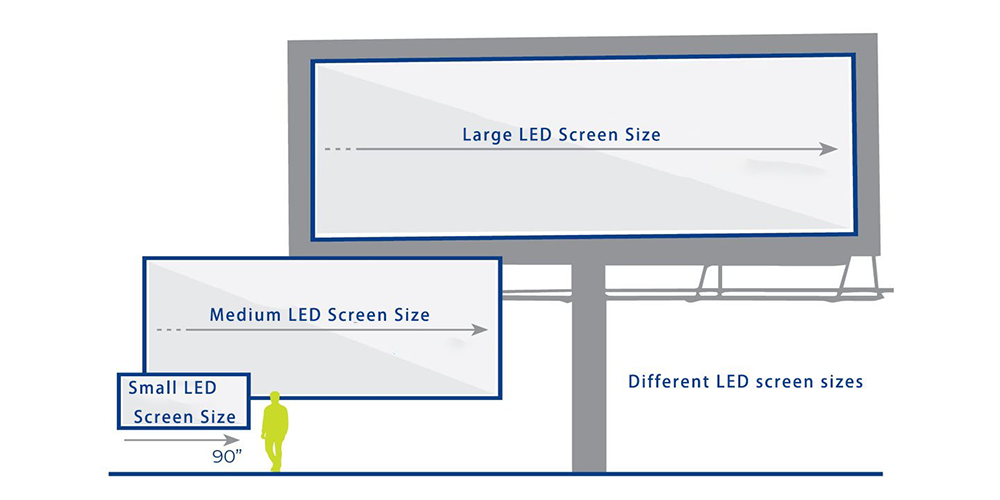
For events, size the principal image for the audience area and check side seats separately. Outdoor advertising also depends on approach direction, viewing time, obstructions, and message simplicity. Enlarging the entire display helps only when the actual message grows with it; adding more text can erase that benefit.
3. Main Factors That Affect LED Display Size
01. Viewing Distance and Content Readability
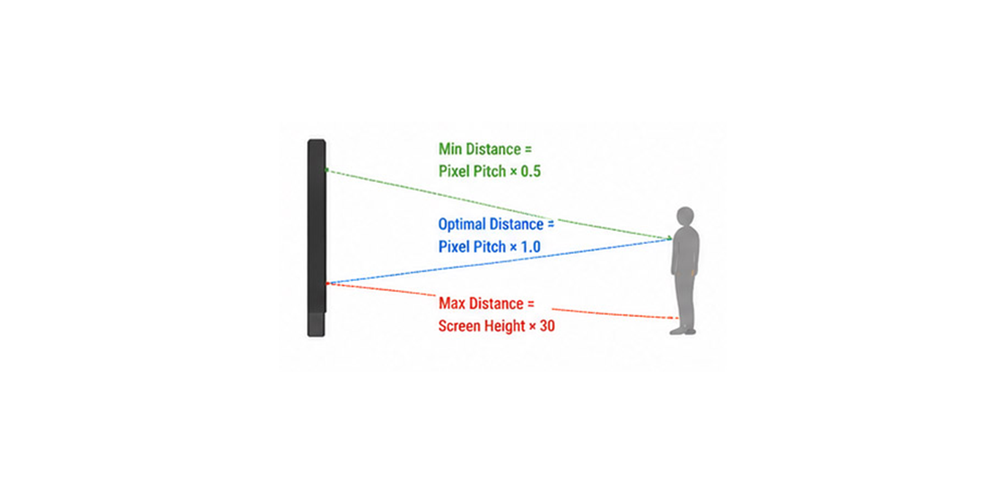
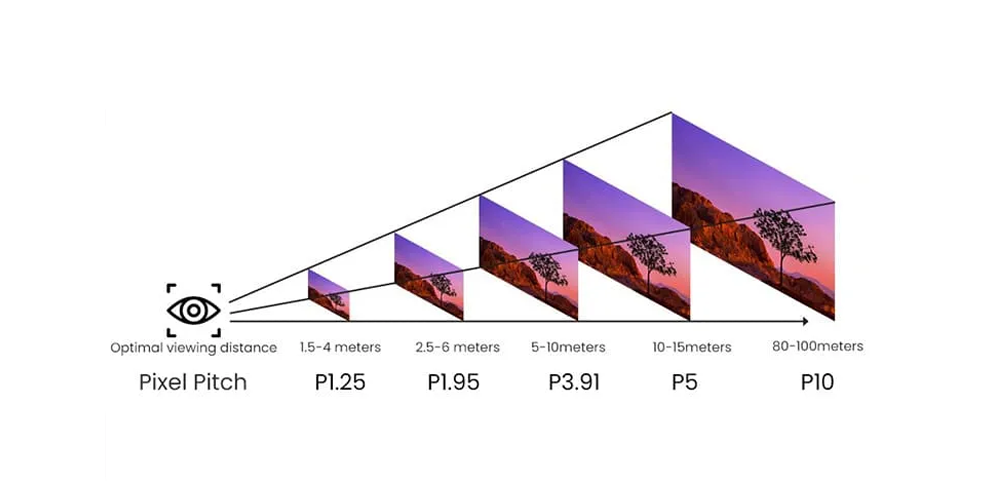
Choose LED display size using both the nearest and farthest audience positions. Nearby viewers help determine acceptable pixel visibility; distant viewers help determine the physical size of letters and important details. Neither distance produces a universal answer without knowing the content, sightlines, and expected visual task.
AVIXA’s display image size guidance relates viewing distance to image height and the size of information elements. Its Basic Decision Making table indicates that a viewing ratio of five to six requires an element height of at least 3% of the image height. For a 3 m-high image and an 18 m viewer distance, that is a 90 mm-high element. This illustrates content sizing; it is not a complete conformity assessment.
Pixel pitch in millimeters approximately matching viewing distance in meters is sometimes used to shortlist products. Treat it as a rough screening convention, not a guarantee of seamless imagery or readable text. Show representative content on a sample at the actual distance before deciding.
02. Space, Budget, and Operating Conditions
Available wall dimensions set an upper boundary for LED display size, but service access and installation tolerances reduce usable space. Confirm cabinet weight, mounting requirements, heat output, and electrical demand for the selected model. Generic kilograms-per-square-meter figures cannot replace the project’s equipment schedule and structural design.
Compare complete installed quotations. Include processing, mounting, distribution, cabling, commissioning, spare modules, freight, and maintenance. For a fixed LED display size, finer pitch increases pixel count, but the price difference depends on packaging technology, electronics, brightness, redundancy, and commercial terms. Avoid universal price multipliers between pitch classes.
Document the priority when requirements conflict. If a wide meeting room has poor side-seat visibility, a second display may solve the problem more effectively than enlarging the front wall. If detailed content is unreadable, simplifying the layout or increasing text size may help before changing hardware. Evaluate alternatives against the same real viewing task.
4. Standard vs Custom LED Display Sizes
01. Standard LED Screen Sizes and Cabinet Grids
A standard LED display size normally means a configuration assembled from an established cabinet family. It does not mean that all manufacturers supply identical finished walls. Regular grids simplify drawings, replacement planning, and content mapping, especially when the chosen cabinet proportions align with the required image ratio.
For example, cabinets measuring 600 × 337.5 mm form a 16:9 wall when the number across equals the number high. Eight across and eight high produce 4.8 × 2.7 m. Square 500 mm cabinets need a different grid: sixteen across and nine high produce 8 × 4.5 m.
02. When Custom Dimensions Are Useful
A custom LED display size can suit a narrow retail fascia, portrait advertising space, or architectural feature. The design still follows the available module and cabinet increments. Do not assume a finished dimension can be specified to any millimeter or that standard panels can be cut on site.
Ask the supplier to show the nearest buildable options, any inactive borders, and the actual content canvas. Curved or angled installations also need compatible mechanics and a defined radius or angle. Custom geometry may add design and support work; its cost must be quoted for the specific system.
For example, a 4.9 m-wide opening cannot accept ten 500 mm-wide cabinets: their nominal combined width is 5 m before allowances. Nine cabinets provide 4.5 m of active width, leaving space that must be resolved in the architectural design. Another cabinet family may fit better. Confirm dimensions before building the recess or ordering supporting steel.
5. Common LED Display Size Ratios for Various Applications
Aspect ratio is width divided by height. Select it alongside LED display size so your content team knows the shape of the canvas. A 16:9 source fits a matching screen, but stretching it across a different ratio distorts faces, logos, and text.
| Ratio | Example width × height | Useful for | Content consideration |
|---|---|---|---|
| 16:9 | 4.8 × 2.7 m | Presentations and conventional video | Match source ratio; verify native pixels |
| 4:3 | 4 × 3 m | Existing media or a specific layout | Widescreen video needs cropping or bars |
| 1:1 | 3 × 3 m | Square brand displays | Create square compositions |
| 9:16 | 1.8 × 3.2 m | Portrait signage | Use portrait assets and readable text |
| 32:9 | 8 × 2.25 m | Wide dashboards or stage compositions | Plan multiple zones or custom media |
01. Calculating Width and Height
For 16:9, height = width × 9 ÷ 16. A 4 m-wide image therefore needs 2.25 m of height. For any width-to-height ratio a:b, height = width × b ÷ a. These are geometry calculations; the cabinet layout determines whether the result is buildable.
02. Handling Nonmatching Content
Agree on scaling before approving the LED display size. Letterboxing preserves the full picture with unused borders; cropping fills the surface while removing edges. A custom canvas can reserve separate zones for video, captions, and branding. Ask for a pixel map showing each zone rather than relying on an approximate marketing ratio such as “ultrawide.”
6. Indoor and Outdoor LED Display Size Differences
01. Indoor Requirements
Indoor LED display size is often limited by the room’s geometry, viewing comfort, and the detail viewers need. Brightness must suit ambient light and remain comfortable during prolonged use. A screen near a sunny window may require a different solution from one in a controlled meeting room, even at identical dimensions.
Service method also affects the usable space. Front-service products require room to remove components and work safely; they do not imply zero access requirements. Confirm clearances, ventilation, and wall flatness using the manufacturer’s installation documentation rather than a fixed generic allowance.
02. Outdoor Requirements
Outdoor LED display size interacts with wind exposure, support design, daytime contrast, drainage, and maintenance access. Check the specified ingress protection separately for the front and rear. A front-face rating does not automatically protect an exposed rear service area, connectors, or the complete installed assembly.
Brightness requirements depend on sunlight, orientation, and operating hours; use dimming appropriate to nighttime conditions. Review a relevant outdoor advertising LED screen specification and obtain a project-specific installation design. A small outdoor screen can still require substantial structural and electrical work.
7. How LED Module and Cabinet Size Affect the Final Screen Size
01. Turning Cabinet Dimensions into a Screen
Modules carry the LED pixels; cabinets organize modules and associated components into installable units. Review the relevant LED module specifications because similar-looking modules can differ in dimensions, pixel matrix, connectors, and compatibility. Cabinet dimensions alone do not identify pixel pitch.
For a regular rectangular grid, LED display size equals cabinet width × columns by cabinet height × rows. Multiply columns by rows for cabinet quantity. Use the manufacturer’s active dimensions when enclosure dimensions include borders or other non-image features.
| Cabinet width × height | Columns × rows | Quantity | Resulting screen | Ratio |
|---|---|---|---|---|
| 500 × 500 mm | 8 × 5 | 40 | 4 × 2.5 m | 8:5 |
| 500 × 500 mm | 16 × 9 | 144 | 8 × 4.5 m | 16:9 |
| 500 × 1,000 mm | 12 × 3 | 36 | 6 × 3 m | 2:1 |
| 600 × 337.5 mm | 8 × 8 | 64 | 4.8 × 2.7 m | 16:9 |
| 640 × 480 mm | 6 × 4 | 24 | 3.84 × 1.92 m | 2:1 |
02. Using Exact Pixel Matrices
Nominal pitch names can be rounded. A 500 mm-wide cabinet with 128 pixels has an exact horizontal pitch of 3.90625 mm, often described as P3.91. Dividing by the rounded label introduces small errors. For the final LED display size specification, calculate resolution from cabinet pixel matrix × cabinet count.
That 128 × 128-pixel cabinet in a sixteen-by-nine grid produces 2,048 × 1,152 pixels. It has a 16:9 shape but is not a native 1,920 × 1,080 wall. The processor and media workflow must accommodate the actual matrix.
For mixed cabinet heights, draw each row and total its dimensions individually. Do not multiply one cabinet’s height by the number of rows if the rows contain different formats. Also confirm mechanical and electrical compatibility within the proposed family; matching external dimensions do not establish that cabinets can share a wall.
8. How to Choose the Right LED Display Size
01. Build a Measurable Project Brief
Record usable width, height, depth, nearest and farthest viewers, seating layout, ambient light, and the smallest information that must be read. Include service access and obstructions. For rental projects, provide the rigging or ground-support arrangement and setup constraints when comparing rental LED display systems.
Next, shortlist LED display size and pitch combinations using actual content. A dense dashboard may need more physical image height, larger interface elements, finer pitch, or a combination. Adding pixels alone will not make a physically tiny label readable from the back row.
02. Calculate Resolution and Confirm the Grid
If native Full HD is a project requirement, multiply 1,920 and 1,080 by the exact pitch, then divide by 1,000 to obtain meters. UHD uses 3,840 × 2,160 pixels. The table shows the resulting LED display size mathematically; a compatible cabinet arrangement must still be confirmed.
| Exact pitch | Full HD: 1,920 × 1,080 | UHD: 3,840 × 2,160 |
|---|---|---|
| 1.25 mm | 2.4 × 1.35 m | 4.8 × 2.7 m |
| 1.5625 mm | 3 × 1.6875 m | 6 × 3.375 m |
| 1.875 mm | 3.6 × 2.025 m | 7.2 × 4.05 m |
| 2.5 mm | 4.8 × 2.7 m | 9.6 × 5.4 m |
Consider a proposed 4.8 × 2.7 m wall using 600 × 337.5 mm cabinets. An eight-by-eight arrangement needs 64 cabinets. If each cabinet contains 240 × 135 pixels, the wall is 1,920 × 1,080. Confirm those cabinet specifications in writing; the same enclosure may support other pitch options with different pixel counts.
03. Check the Complete System
Verify processor input and output limits, supported frame rate and bit depth, total loading, and per-port loading. A device accepting a 4K input does not make the wall physically 4K. Require a connection diagram showing how the actual pixel canvas is distributed across receiving cards and output ports.
Check operating implications of LED display size too. For illustration only, a 12.96 m² screen averaging 200 W/m² would draw about 2.592 kW. Eight daily operating hours would use 20.736 kWh before auxiliary equipment. Replace that assumed consumption with product-specific measured or declared figures. Electrical distribution must be designed for the specified maximum demand and local requirements, not this average-energy example.
Before acceptance, play the planned content at the intended operating brightness. Check the nearest seat, back row, and extreme side positions. Include small text, moving video, dark scenes, and bright presentation backgrounds. If the screen will appear on camera, test the intended camera settings and shooting positions for artifacts rather than relying only on a refresh-rate specification.
Finally, record the approved screen dimensions and pixel map in the handover documents. Give the content team the exact export canvas, intended scaling behavior, and any reserved zones. Keep a copy of controller configuration and calibration information with the cabinet layout. These details make later content changes, troubleshooting, and replacement work more predictable.
9. Common LED Display Size Mistakes
Specifying area without shape. Twelve square meters could mean 4 × 3 m or 6 × 2 m. Those dimensions suit different content and installation spaces. Put width, height, and orientation on every LED display size quotation.
Confusing input support with native resolution. “4K compatible” may describe signal processing. Ask for the physical horizontal and vertical pixel counts, cabinet matrix, and mapping diagram.
Rounding the screen before selecting cabinets. A desired 5 × 3 m surface may not match a particular product family. Compare the nearest valid grids and check how the difference affects active area, borders, and content.
Using one distance multiplier for every project. A logo, financial table, and live camera feed impose different requirements. Test the most demanding content instead of treating an approximate pitch rule as proof.
Ignoring service and replacement planning. Confirm how failed modules, power supplies, and receiving cards are reached. Include compatible spares and calibration records in the handover. A correct LED display size should remain practical to maintain after installation.
10. FAQs
01. What is the best LED display size?
The best LED display size lets the farthest intended viewers read essential content while fitting the installation space and serving nearby viewers comfortably. Define those conditions first, then select a cabinet grid and pitch. No single dimension works for every boardroom, church, retail store, or outdoor location.
02. How do I calculate LED screen size in feet?
Multiply cabinet width by the number of columns and cabinet height by the number of rows. Convert millimeters to feet by dividing by 304.8. A 4,800 × 2,700 mm screen is approximately 15.75 × 8.86 ft. Keep exact millimeter dimensions for manufacturing drawings.
03. What are standard LED display panel sizes?
Examples include 500 × 500 mm, 500 × 1,000 mm, 600 × 337.5 mm, and 640 × 480 mm. Availability depends on the product family. Panel dimensions do not establish pitch, resolution, brightness, or suitability for outdoor use; check the complete model specification.
04. What is the size of a 9 × 12 LED wall?
Confirm the units and dimension order. If this means 9 ft high by 12 ft wide, the wall is approximately 3.6576 m wide × 2.7432 m high, with a 4:3 ratio. If it means nine by twelve cabinets, the physical size depends on each cabinet’s dimensions.
05. Does a larger LED display size mean higher resolution?
Only if pitch stays constant. Doubling both width and height at the same pitch quadruples total pixels. Enlarging the wall while increasing pitch may leave resolution unchanged. Evaluate LED display size and pixel matrix separately rather than assuming a bigger surface necessarily provides more detail.
06. What LED display size is needed for 1080p?
At an exact 2.5 mm pitch, native 1,920 × 1,080 requires 4.8 × 2.7 m. At 1.25 mm, it requires 2.4 × 1.35 m. These are mathematical dimensions; confirm compatible cabinet and module matrices before placing an order.
07. Can LED display size be customized?
Yes, within the available modules, cabinets, and mounting system. Custom shapes can require different mechanics and content mapping. Request a drawing with exact active dimensions, enclosure dimensions, cabinet quantity, and native resolution so “custom size” has a precise, reviewable meaning.
11. Conclusion
The right LED display size connects audience needs to a buildable cabinet layout. Establish readable content at the farthest position, check image quality nearby, select a suitable aspect ratio, and verify exact pixels from the cabinet matrix. Then confirm the installed envelope, processing, electrical provision, access, and complete project cost.
To discuss your LED display size, send HonghaiLED your project requirements: available dimensions, viewer distances, installation environment, sample content, and target budget. Request a proposal showing active size, cabinet grid, native resolution, and service clearances together so you can compare alternatives on the same basis.
Related Posts
Front Desk LED Display Guide: Costs, Specs and Buying Tips
A front desk LED display is a direct-view LED screen…
Huidu HD-B8H vs B6L vs B8L: Which LED Poster Controller Should You Choose?
Choosing between the Huidu HD-B8H, B6L and B8L is easier…
Huidu B6L (HD-B6L): Specs, Setup and LED Poster Guide
The Huidu B6L, officially identified as HD-B6L, is a multimedia…

No Comments