
Front Desk LED Display Guide: Costs, Specs and Buying Tips
A front desk LED display is a direct-view LED screen integrated into a reception counter or installed nearby to present welcome messages, branding, and visitor information. The right system must work at the distance where people actually stand, fit the available space, and remain easy for staff to operate. A striking demonstration video alone cannot tell you whether a screen will make small text readable or suit a quiet hotel lobby.
This guide explains how to choose a front desk LED display for an office, hotel, showroom, or exhibition. It covers pixel pitch, LED versus LCD, practical applications, installation, running costs, maintenance, and the HonghaiLED EA-FD. Use the comparison tables and purchasing checks to prepare a clear specification before requesting a price. Product features vary by configuration; confirm the final drawing, controller, electrical requirements, and warranty in your written quotation.
1. What Is a Front Desk LED Display?
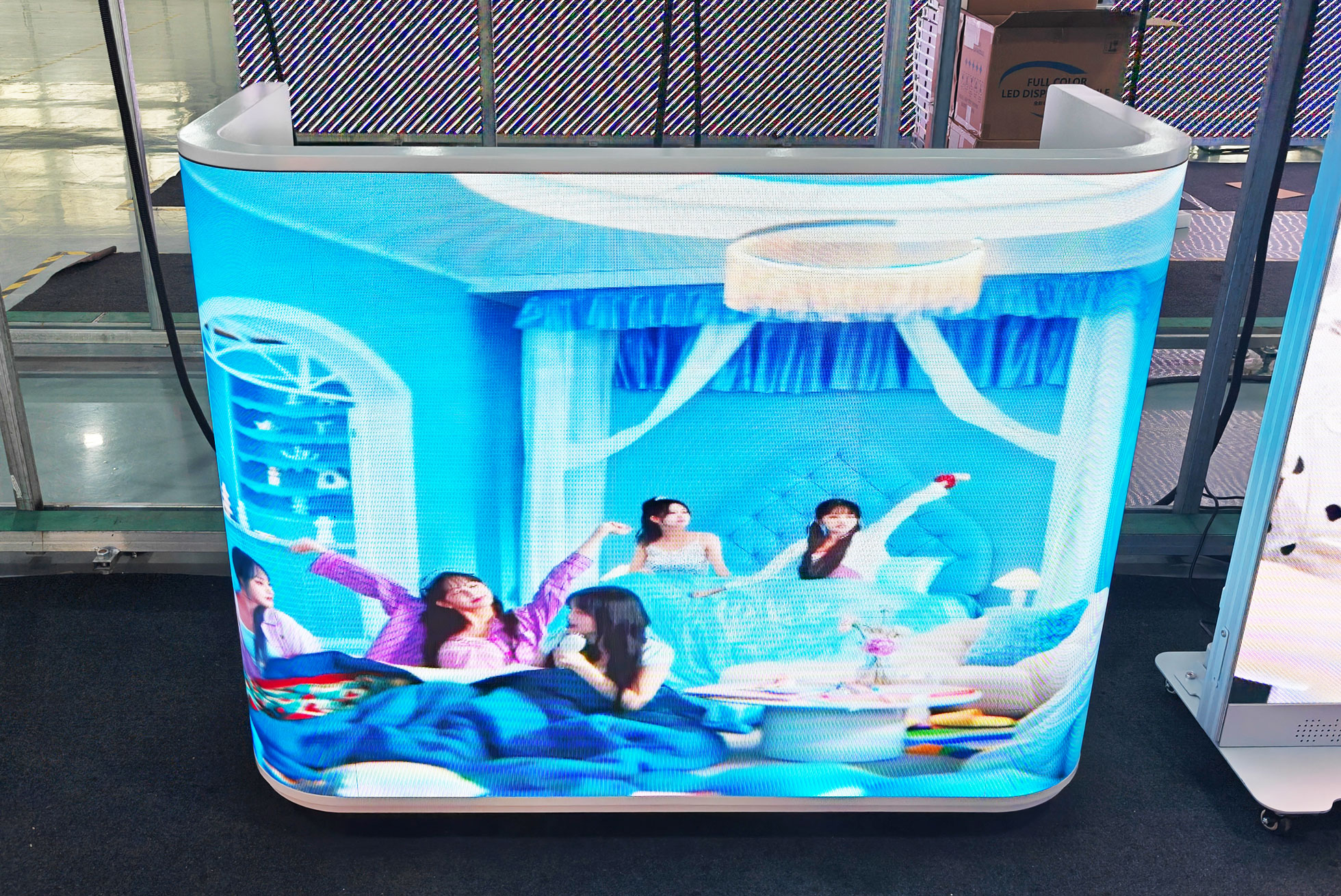
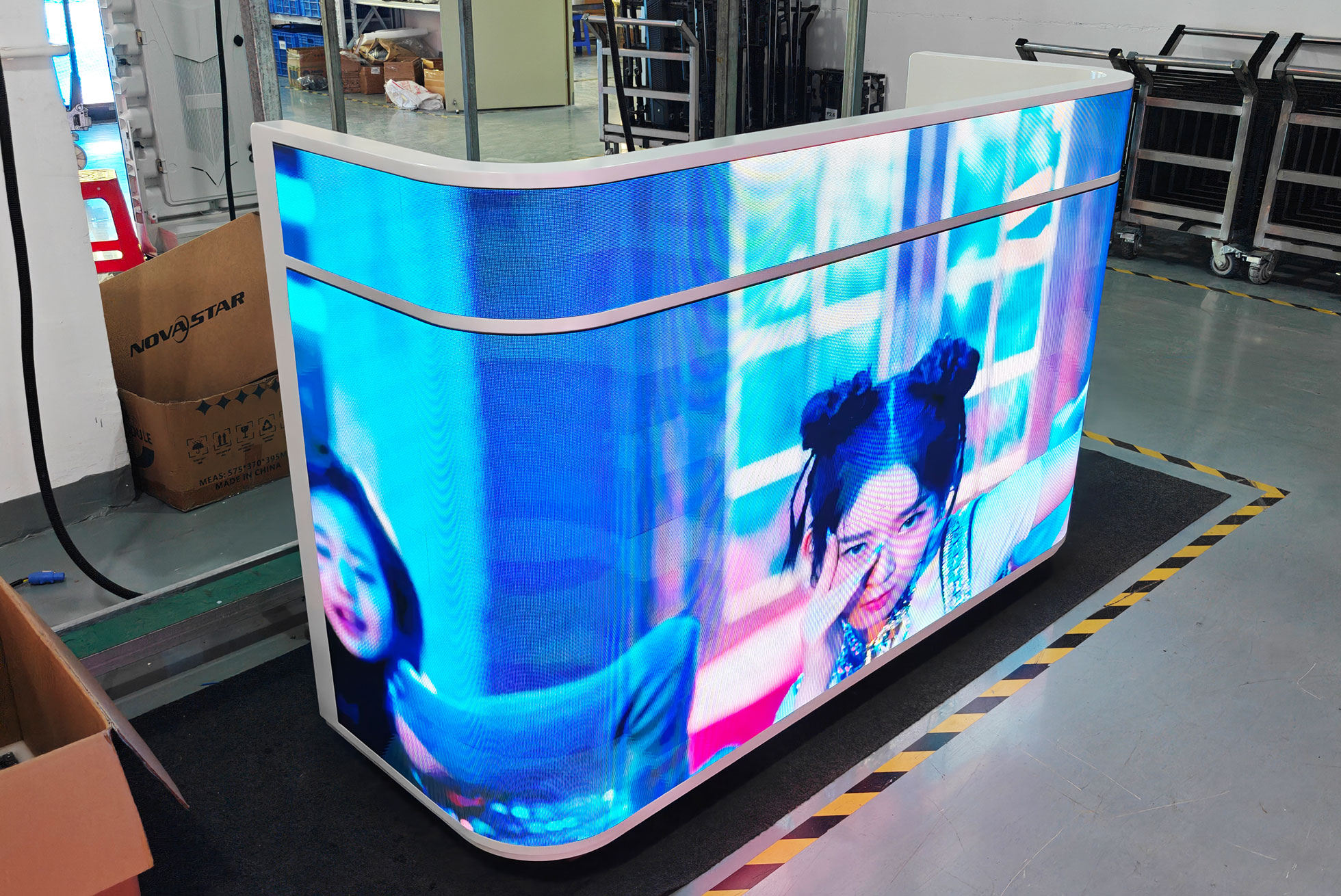
A front desk LED display creates an image using an array of light-emitting pixels. A player or video source supplies content, a controller maps that content to the screen, receiving electronics distribute the signal, and power supplies feed the modules. The visible surface can be flat or curved, depending on the module and cabinet design.
Three different products are sometimes described as an LED reception desk: a counter with a video screen on its front, a separate LED video wall behind reception, and furniture illuminated by LED strips. Only the first two display changing images. A backlit logo or decorative light strip cannot play a video, so clarify which system a supplier is quoting.
A desk-integrated screen places branding close to arriving visitors. A rear reception LED screen can be easier to see across a large lobby because people and luggage do not block its lower edge. The two approaches also have different installation requirements: a mobile counter needs a suitable floor and cable route, while a wall display needs an engineered support structure.
Choose the format by defining its main job. If visitors must read detailed directions, prioritize letter size and sightlines. If the goal is ambient branding, prioritize color consistency, gentle movement, and integration with the room. A front desk LED display should support the reception process without distracting staff or making conversation uncomfortable.
2. Why Businesses Choose Front Desk LED Displays
01. Flexible communication and measurable value
A front desk LED display lets a team replace a welcome message or promotion without reprinting a panel. Hotels can schedule different messages for conference groups, while offices can switch between visitor information and brand content. These benefits depend on a usable workflow: someone must own the playlist, approve messages, and remove expired information.
Define success before buying. Useful measures include how often staff can update content, whether visitors find the correct service point, and whether campaigns remain current. Do not assume that adding a screen automatically increases sales or reduces queues. Compare the operating effort with the communication problem the display is intended to solve.
02. Front desk LED display versus LCD and static signage
Direct-view LED offers flexible geometry and a continuous image across modular sections. A commercial LCD can be a practical choice for a small rectangular sign requiring fine text. Static signage remains useful for permanent information. The best option depends on the task, viewing distance, space, and support resources.
| Option | Best suited to | Check before purchase |
|---|---|---|
| Desk-integrated direct-view LED | Curved counters, distinctive branding, custom proportions | Close-viewing pixels, service access, cabinet footprint, surface protection |
| LED wall behind reception | Large welcome visuals visible across a lobby | Wall support, sightlines, installation labor, maintenance clearance |
| Commercial LCD signage | Compact rectangular displays and detailed information | Panel size, reflections, duty rating, bezels if several panels are tiled |
| Printed or illuminated signage | Permanent logos and essential fixed directions | Replacement costs when information changes; no video or scheduling |
Compare systems using the same content and installation scope. A high-resolution LCD and a low-resolution curved LED counter are not interchangeable simply because both show video. Conversely, an LCD cannot follow every counter shape. For a separate wall installation, review HonghaiLED’s indoor LED screen options alongside the furniture design.
A front desk LED display also creates ongoing responsibilities. Allow for content production, cleaning, software access, and spare parts. A modest screen with a dependable operating plan can be more useful than a larger screen that repeatedly shows outdated information.
3. Front Desk LED Display Applications
01. Hotels and corporate reception
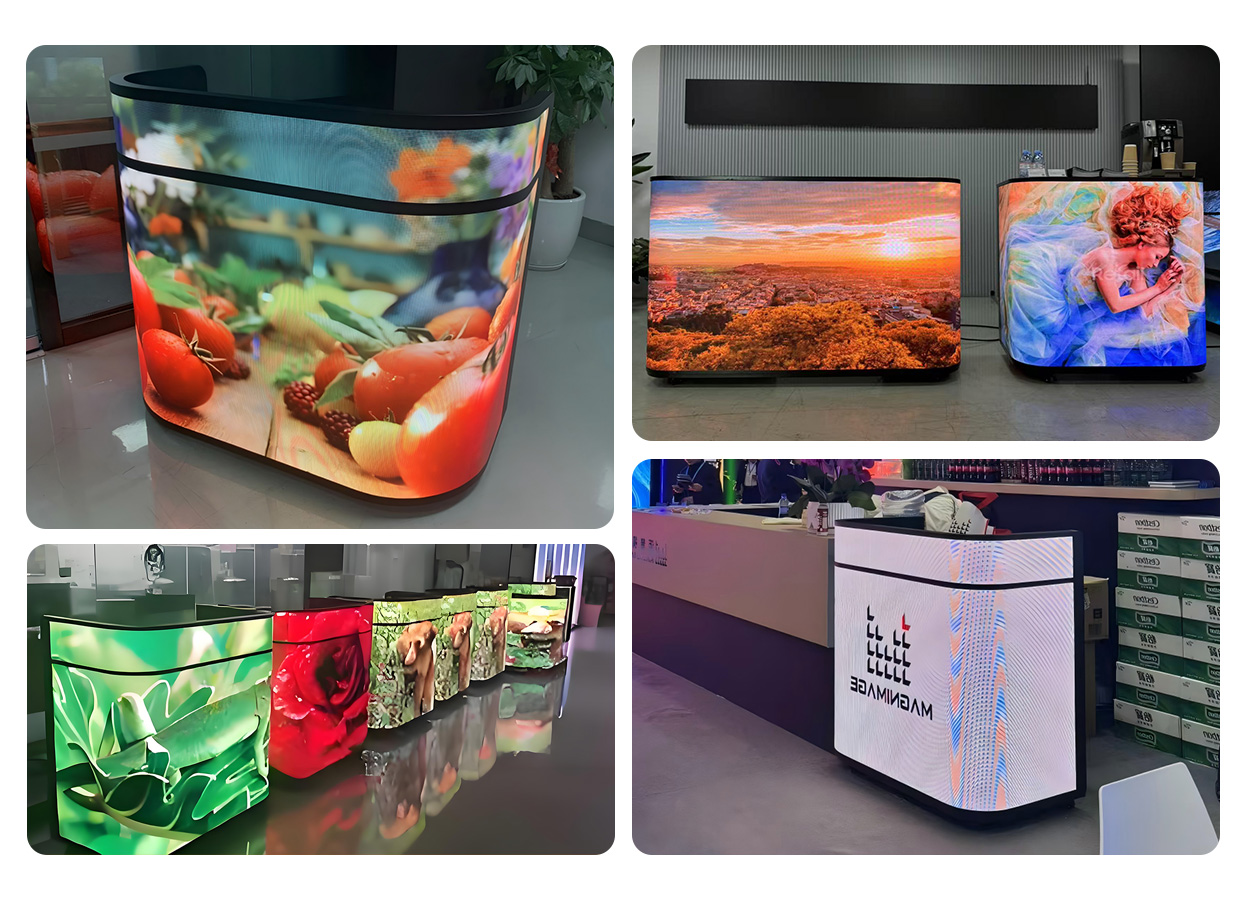
A hotel front desk LED display can show check-in guidance, event names, dining hours, or a restrained welcome animation. Test the display during both bright daytime conditions and quiet evening operation. Avoid placing essential information so low that a queue blocks it, and keep private booking information off public screens.
For corporate reception, use a short welcome sequence, meeting directions, and approved company information. Obtain permission before displaying a visitor’s name or photograph. An office reception LED screen should complement the interior rather than compete with the receptionist; sound is usually unnecessary for a visual welcome message.
02. Retail counters, exhibitions, and temporary events
Retail teams can use a front desk LED display to explain a current offer or direct customers to a service area. Keep prices and conditions readable, and give time-limited campaigns an expiry date. Avoid filling a low-height screen with a full advertising poster designed for a different format.
A portable LED reception desk can combine a registration counter with event branding. Check the packed dimensions, case weight, doorway width, loading route, and available power before choosing a model. Casters help with repositioning on suitable floors; they do not make a heavy cabinet safe to move down stairs or across uneven surfaces without handling equipment.
03. Clinics and public-service buildings
In clinics and public buildings, prioritize clear instructions and a calm presentation. A front desk LED display may carry department names, opening hours, or general service information. Queue numbers require a compatible data source and integration; a screen alone does not provide a queue-management system.
Keep required emergency signs and accessible service arrangements independent of promotional content. Use plain language and test messages with people viewing from seated and standing positions. A useful reception display is one visitors can understand quickly, including when the area is busy or the main playlist is unavailable.
4. Key Features of a Front Desk LED Display
01. Pixel pitch, viewing distance, and readable text
Pixel pitch is the center-to-center spacing between adjacent pixels, measured in millimeters. At the same physical size, a smaller pitch gives more pixels. For a front desk LED display, measure the nearest normal viewing position as well as the distance across the lobby. The nearest visitor often determines whether a logo or small lettering looks acceptable.
Pitch-to-distance rules are only screening tools. Visibility also depends on eyesight, content, contrast, letter size, and tolerance for visible pixels. Compare samples using your smallest planned text at the actual distance. Ask to see both a moving video and a static information slide; video can hide weaknesses that become obvious in a stationary logo.
| Viewing situation | Options to compare | Acceptance check |
|---|---|---|
| Visitors stand very close, around 1–2 m | Fine pitches such as P1.53; compare finer alternatives if needed | Read the smallest text at full scale; visible pixel structure may remain |
| Typical reception viewing, around 2–3 m | P1.53 and P1.86 | Compare logo edges, text clarity, and price using identical content |
| Branding viewed farther away, around 3–5 m | P1.86 and P2.5 | Ensure letters remain readable; avoid choosing pitch from distance alone |
| Detailed directories at any distance | More native pixels, larger text, or a separate information screen | Test the complete layout rather than a supplier’s demonstration loop |
02. Brightness, grayscale, and camera performance
A front desk LED display should remain clear without overwhelming the room. Ask for adjustable brightness and inspect color gradients at the level you will actually use. A screen that looks excellent at maximum brightness may show different shadow detail when dimmed. Assess reflections from glazing and overhead lighting at the installation position.
Refresh rate describes how frequently the LEDs are driven; it is different from the video’s frame rate. A quoted 3,840 Hz value alone does not guarantee clean camera footage. Camera shutter settings, scan behavior, brightness, and controller configuration also matter. If guests regularly film the counter, test representative phones and cameras before acceptance.
03. Protection, serviceability, and counter construction
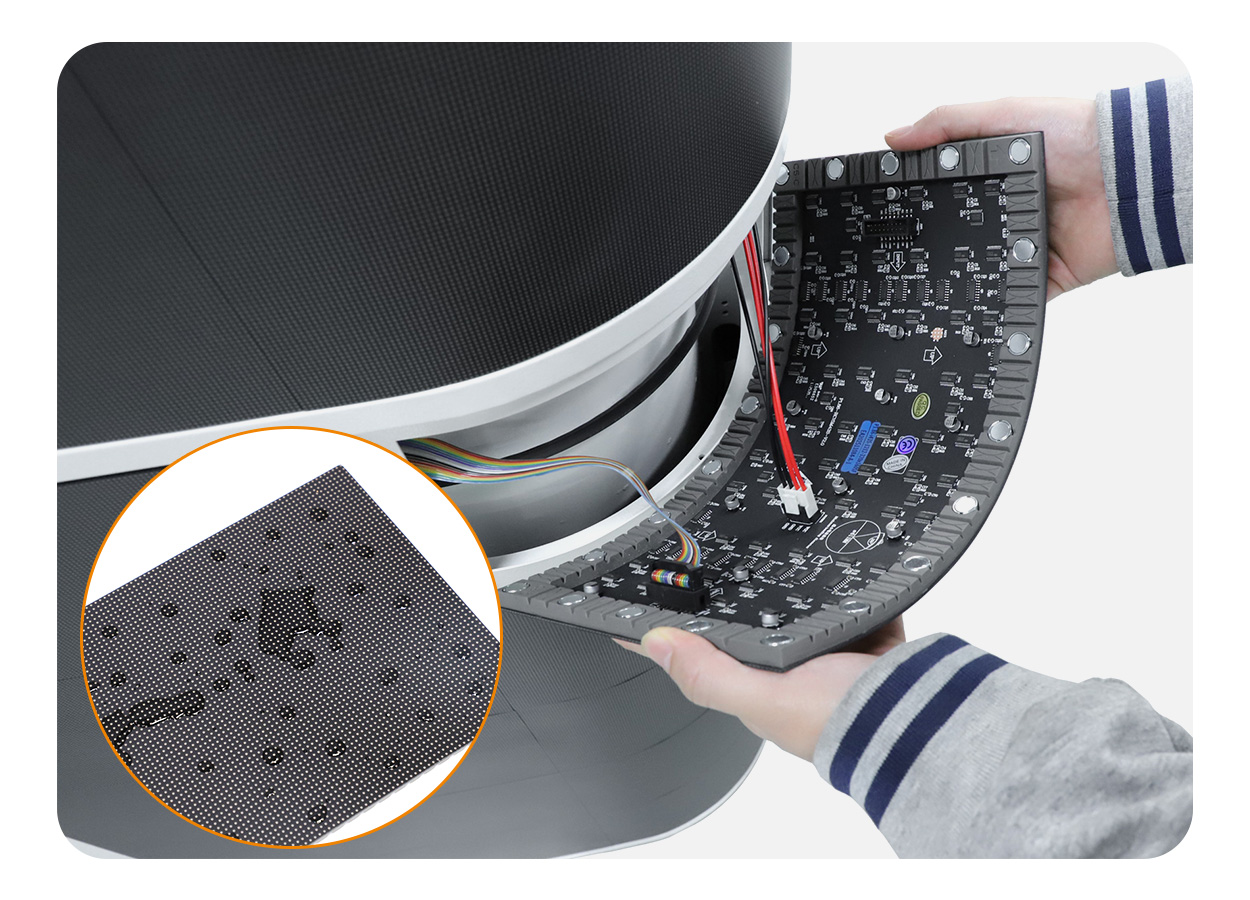
GOB means glue-on-board: a protective coating covers the LED surface. It can help reduce damage from incidental contact, but it does not make every front desk LED display waterproof, scratchproof, or suitable for disinfectant chemicals. Ask for the model’s cleaning instructions and protection documentation rather than inferring performance from the GOB label.
Front-service access can simplify module replacement, but confirm whether power supplies, receiving cards, and cables are equally accessible. Check the permitted removal tool and procedure. The desk should also provide a practical work surface, stable support, ventilation, and organized storage without placing heavy objects against the LED face.
04. Content control and day-to-day usability
Ask which controller and player are included with the front desk LED display. HDMI input, USB file transfer, local network updates, Wi-Fi, and cloud scheduling are different capabilities, not universal features. Confirm supported file formats, maximum canvas resolution, offline playback, subscription charges, and who will hold administrator access.
Have a staff member demonstrate a normal update before sign-off: upload a file, schedule it, correct a mistake, and restore a fallback image. Save the configuration and mapping files with the handover documents. A straightforward recovery process matters more than a long feature list that nobody on site understands.
5. Front Desk LED Display Technical Specifications
01. Calculate native resolution and prepare the content canvas
The physical dimensions of a front desk LED display do not tell you its resolution. Approximate horizontal pixels equal active width in millimeters divided by pitch; vertical pixels follow the same calculation. The final values must come from the actual module matrix because pitch names are often rounded.
For example, a hypothetical 1,920 × 960 mm active surface at an exact 2.5 mm pitch contains 768 × 384 pixels. Sending a 1,920 × 1,080 video to that screen does not create Full HD detail. The controller must scale, crop, or letterbox the source. Request a native-resolution template and keep logos away from curved edges or cabinet transitions.
Build content around a simple hierarchy: one main message, a readable supporting line, and an optional action. Check the full loop on the installed screen, not only a laptop. Keep essential information on screen long enough to read, avoid rapid flashing, and provide a fallback slide for disconnected data feeds.
02. Compare complete quotes and running costs
A front desk LED display price is meaningful only when the scope is clear. Request the same pitch, active dimensions, cabinet design, controller, spares, delivery terms, and installation responsibilities from every bidder. A lower hardware price may exclude the flight case, commissioning, freight, taxes, or content preparation.
| Item | Request in writing | Why it matters |
|---|---|---|
| Display and cabinet size | Active area, overall footprint, weight, and packed dimensions | The visible screen area differs from the space required for the furniture |
| Image system | Exact pitch, module matrix, total native pixels, brightness adjustment | Determines content detail and usable performance in the room |
| Control package | Player, controller, inputs, software licenses, network requirements | Prevents unexpected equipment or subscription costs |
| Electrical load | Maximum input, representative average consumption, supply requirements | Supports circuit planning and operating-cost estimates |
| Delivery and setup | Packing, freight, unloading, installation, commissioning, training | Defines the complete delivered and working cost |
| Service and warranty | Spare modules, response process, labor, shipping, exclusions | Shows what happens when the screen needs repair |
Estimate electricity from representative average power, not maximum power alone. Daily energy in kWh equals average watts divided by 1,000, multiplied by operating hours. An illustrative 250 W average load used for 12 hours consumes 3 kWh per day, or 1,095 kWh over 365 days. This is a calculation example, not an EA-FD power rating; multiply by your electricity tariff.
Actual consumption changes with brightness, content, and operating schedule. Use maximum load and the supplier’s electrical documentation for circuit planning, with a qualified installer where required. Add content labor, software, preventive service, and replacement parts when estimating ownership cost.
03. Plan installation, acceptance, and maintenance
Before delivery, record the access route, floor conditions, outlet location, ventilation clearance, and staff working space. Route cables away from public walkways and protect connections from accidental pulling. A custom wall or built-in counter may need structural and electrical work that an all-in-one mobile unit does not.
Accept a front desk LED display against written checks: cabinet condition, uniform color, module alignment, agreed pixel-defect criteria, correct mapping, brightness adjustment, and restart behavior. Run your intended content for the agreed test period. Photograph the accepted settings and record component models so later replacements can be matched.
For routine care, follow the manufacturer’s approved cleaning method, keep ventilation unobstructed, and inspect cable condition. Isolate power before service unless the documented procedure explicitly allows otherwise. Keep compatible spare modules and configuration backups, and confirm how replacement modules will be calibrated to the existing screen.
6. HonghaiLED HH-FD: A Complete Front Desk LED Display Solution
The HonghaiLED EA-FD indoor front desk LED display combines a reception counter with a curved digital surface. HonghaiLED’s product page lists P1.53, P1.86, and P2.5 options, flexible 320 × 160 mm GOB modules, front-access maintenance, storage drawers, and base-mounted casters.
01. Choose the configuration around the room
The listed active display sizes are 1,920 × 960, 2,240 × 960, and 2,560 × 960 mm, with two cabinet designs. Active display size is not the cabinet footprint. Obtain the overall drawing before approving the layout, including working depth, staff access, cable exits, and the route from unloading point to reception.
Use the EA-FD front desk LED display as a shortlist candidate, then compare the available pitches with your actual content. Request the exact module resolution and complete pixel map for the chosen size. This helps the designer build a correctly proportioned playlist without stretching a standard widescreen video across the curved counter.
02. Verify the complete operating package
HonghaiLED describes plug-and-play operation, customizable power sockets, and an optional custom flight case. Confirm what is included in your order, which destination socket standard is supplied, and what initial software setup remains. Ask for the controller model, supported update methods, brightness specification, maximum input power, protection rating, and warranty for the exact configuration.
For a front desk LED display that will travel between events, include packing and handling in the purchase decision. For a permanent reception, prioritize quiet operation, convenient service access, and staff training. The LED screen supplier factory checklist provides additional questions for checking documentation and production quality.
7. FAQs
01. What pixel pitch is best for a front desk LED display?
Choose according to the nearest normal viewer, the smallest text, and the active screen size. Compare fine pitches such as P1.53 and P1.86 for close reception viewing; P2.5 may suit larger graphics viewed farther away. Confirm with a full-size sample. No single pitch guarantees an invisible pixel structure at every distance.
02. How much does a front desk LED display cost?
There is no reliable universal price without a configuration and delivery scope. Request an itemized quote covering the cabinet, modules, controller, software, spare parts, packing, freight, and setup. Include viewing distance and content requirements so the supplier can explain why a particular pitch and size are appropriate.
03. Is a front desk LED display better than LCD?
Direct-view LED is useful for curved shapes, custom proportions, and modular display surfaces. A commercial LCD can suit a smaller rectangular information screen with detailed text. Compare the installed result, native resolution, viewing distance, and support costs. Select the format that meets the communication task and fits the space.
04. Does GOB make an LED reception desk waterproof?
No. GOB describes a protective surface treatment, while ingress protection applies to a tested enclosure or component under specified conditions. Ask which surfaces and components a rating covers. Do not expose an indoor front desk LED display to outdoor weather or liquid cleaning based only on a GOB description.
05. Can a front desk LED display run 24/7?
Only operate continuously when the specific system is rated and supported for that duty. Confirm ventilation, ambient conditions, power requirements, and warranty terms. A quoted LED lifetime is not a guarantee for the complete counter, power supplies, or electronics. Use a suitable brightness schedule and planned maintenance.
06. Can staff install and update the screen themselves?
A preconfigured mobile counter may need only positioning, approved power connection, and player setup, but check its instructions and handling requirements. Custom installations can require professional structural and electrical work. Content updates depend on the supplied controller; request training and test an ordinary update before accepting the system.
07. How do you maintain a front desk LED display?
Use the approved surface-cleaning method, keep air paths clear, and check connections during scheduled service. Have trained personnel investigate faults and replace modules following the documented procedure. Keep matching spares, mapping files, and calibration records. Confirm warranty coverage before attempting repairs that could affect the coating or electronics.
08. What should I send when requesting a quotation?
Provide the installation location, available footprint, nearest viewing distance, photos of the room, daily operating hours, content examples, quantity, and delivery destination. State whether the front desk LED display will move between venues and whether you need a flight case, network management, or installation support. These details make quotations more comparable.
8. Conclusion
A successful front desk LED display begins with a clear purpose and a realistic view of the room. Choose the format first, test pixel pitch with actual content, confirm the native resolution, and plan power, access, and maintenance. Treat brightness, protection, and operating-hour claims as configuration-specific details that need written confirmation.
Before ordering a front desk LED display, compare complete quotations and agree on acceptance checks. Keep the staff workflow simple and the content readable. To discuss an EA-FD configuration, contact HonghaiLED with your space measurements, viewing distance, content examples, and delivery requirements. Those inputs are more useful than choosing a screen from a promotional image alone.
Related Posts
LED Display Size: LED Screen Size Charts and Calculations
LED display size is the active screen width and height.…
Huidu HD-B8H vs B6L vs B8L: Which LED Poster Controller Should You Choose?
Choosing between the Huidu HD-B8H, B6L and B8L is easier…
Huidu B6L (HD-B6L): Specs, Setup and LED Poster Guide
The Huidu B6L, officially identified as HD-B6L, is a multimedia…

No Comments