
NovaStar MCTRL4K 4K LED Display Controller: Specs, Manual and Price
The NovaStar MCTRL4K is a 4K LED display controller (video processor) from Xi’an NovaStar Tech Co., Ltd. One unit accepts real 4K input at 4096×2160@60Hz over DP 1.2 or HDMI 2.0 (or 2× dual-link DVI), loads up to 8,800,000 pixels from DP/HDMI sources, and outputs to 16 Neutrik Gigabit Ethernet ports plus 4 × 10G optical ports. HDR10 and HLG, individual RGB gamma adjustment, 3D (with the EMT200 emitter) and low-latency processing are built in, and up to 10 MCTRL4K units can be cascaded for ultra-large or ultra-wide LED screens.
Quick answer: what you get with one MCTRL4K
| Item | MCTRL4K |
| Product type | 4K LED display controller / video processor (Xi’an NovaStar Tech Co., Ltd.) |
| Maximum input resolution | 4096×2160@60Hz (DP 1.2 and HDMI 2.0); 3840×1080@60Hz per dual-link DVI input |
| Loading capacity | 8,800,000 pixels via DP/HDMI, 8,300,000 pixels via DVI |
| Maximum width / height | 7680 pixels (for example 7680×1080@60Hz or 1080×7680@60Hz) |
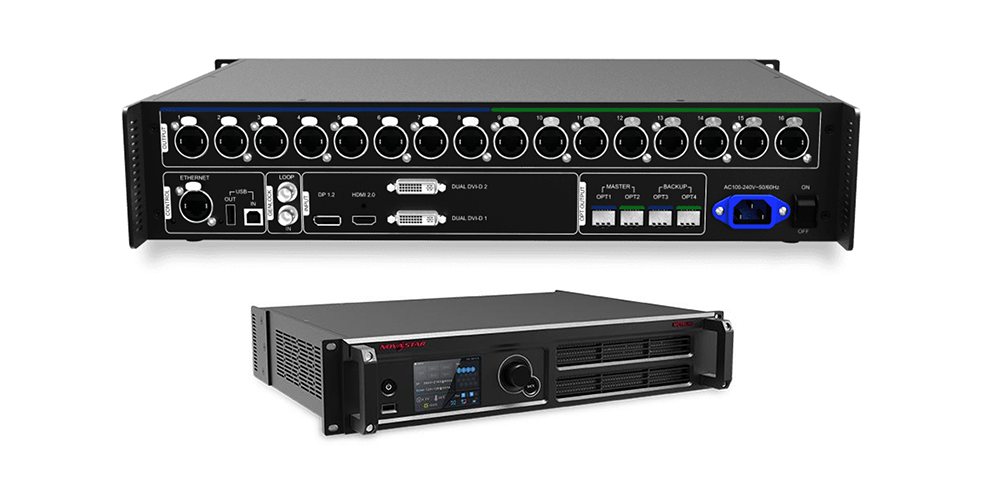
| Outputs | 16 × Neutrik (NE8FBH) Gigabit Ethernet ports + 4 × 10G optical ports (OPT1–OPT4) |
| HDR | HDR10 and HLG (10-bit HDMI input, HDR-capable receiving cards) |
| Latency | Low latency mode below 1 ms (image start position 0); one frame with input sync and vertically loaded cabinets |
| Cascading | Up to 10 MCTRL4K units |
| Power | AC 100–240 V, 50/60 Hz, rated power consumption 30 W |
| Dimensions / weight | 482.6 × 372.0 × 88.1 mm / 4.6 kg |
| Official documents | MCTRL4K Specifications V1.2.2 (31 October 2025); MCTRL4K User Manual V1.2.0 (1 April 2022) |
Looking for the MCTRL4K manual or a MCTRL4K price? Section 5 explains which NovaStar document covers which task and how to check your firmware version, and Section 7 shows how to compare quotations for a genuine unit instead of relying on online “average price” figures.
Specifications on this page were verified on 20 September 2026 against NovaStar’s official MCTRL4K LED Display Controller Specifications V1.2.2 and MCTRL4K User Manual V1.2.0. NovaStar document versions change over time — if a newer version has been published, that version is authoritative.
Table of Contents
1. What is the NovaStar MCTRL4K?
2. MCTRL4K technical specifications
3. MCTRL4K manual, software and firmware
4. Key features and their limits
5. Typical applications
6. MCTRL4K vs MCTRL660, MCTRL660 Pro and MCTRL R5
7. MCTRL4K price: how to compare quotes
8. MCTRL4K FAQs
9. Conclusion and sources
1. What is the NovaStar MCTRL4K?
The NovaStar MCTRL4K is an independent 4K LED display controller with an ultra-large loading capacity. NovaStar defines it as a controller that delivers a loading capacity of up to 4096×2160@60Hz from a single unit, and that supports custom resolutions with a width or height of up to 7680 pixels, so integrators can build ultra-long or ultra-wide LED walls instead of being limited to standard 16:9 video formats.
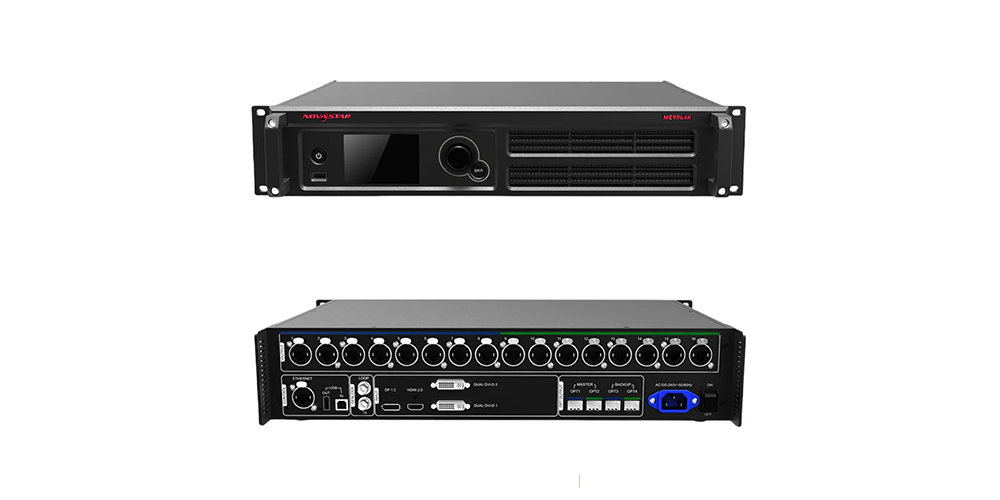
Key highlights:
- Real 4K input: 4096×2160@60Hz on DP 1.2 and HDMI 2.0, plus 2 × dual-link DVI inputs at 3840×1080@60Hz each.
- 8.8 million pixel loading: 8,800,000 pixels with DP/HDMI input and 8,300,000 pixels with DVI input.
- Custom canvas: widths or heights up to 7680 pixels, which suits ultra-wide banners, stadium ribbons and long façade screens.
- High bit depth: 8-bit, 10-bit and 12-bit input sources, with individual gamma adjustment for R, G and B on 10-bit/12-bit signals.
- HDR: HDR10 and HLG standards, for more convincing highlights and shadow detail on HDR-capable receiving cards.
- 16 Ethernet + 4 optical outputs: Neutrik (NE8FBH) Gigabit Ethernet ports with port redundancy, plus 10G optical ports for long-distance runs.
- Ultra-low latency: low latency mode below 1 ms when the image start position is 0.
- 3D: works with the 3D emitter EMT200 and 3D glasses.
- Scalable: cascade up to 10 MCTRL4K units, or run the unit in multi-card mode as two controllers for dual-source screens.
Who the MCTRL4K is designed for
The MCTRL4K suits projects where one processor must handle 4K source material and a large pixel budget: rental stages and touring productions, fixed installations such as stadium perimeters and scoreboards, broadcast and virtual-production studios, and control rooms that display several high-resolution sources on ultra-wide video walls. If your project needs 8K input, a distributed architecture or a video-wall splicer instead, compare the NovaStar H series and VX series processors before ordering.
2. MCTRL4K technical specifications
The table below follows NovaStar’s official MCTRL4K specification sheet V1.2.2. Only the most useful lines are shown; the full document also lists every standard resolution and timing the unit accepts.
| Category | Specification |
| DP 1.2 input | Maximum 4096×2160@60Hz, minimum 640×480@24Hz; pixel capacity 8,800,000; HDCP 1.3; custom resolution limit 7680×1080@60Hz (width) or 1080×7680@60Hz (height) |
| HDMI 2.0 input | Maximum 4096×2160@60Hz, minimum 800×600@30Hz; pixel capacity 8,800,000; HDCP 1.4 and 2.2; custom resolution limit 7680×1080@60Hz (width) or 1080×7680@60Hz (height) |
| Dual-link DVI inputs | 2 inputs, each maximum 3840×1080@60Hz, minimum 800×600@30Hz; pixel capacity 8,300,000; custom resolution limit 3840×2160@60Hz or 2160×3840@60Hz |
| Interlaced sources | Not supported on DP, HDMI or DVI inputs |
| Ethernet outputs | 16 × Neutrik (NE8FBH) Gigabit Ethernet ports; 650,000 pixels per port with 8-bit sources; 320,000 pixels per port with 10-bit/12-bit sources; redundancy between ports supported; no audio output |
| Optical outputs | 4 × 10G optical ports: OPT1 carries Ethernet ports 1–8, OPT2 carries ports 9–16, OPT3 mirrors OPT1 and OPT4 mirrors OPT2; single-mode twin-core fibre at 1310 nm up to 10 km (OS1/OS2), multi-mode at 850 nm up to 300 m (OM3/OM4) |
| Control ports | Ethernet (PC connection); USB 2.0 Type-B IN for cascading or PC debugging; USB 2.0 Type-A OUT for cascading; Genlock IN and LOOP (Bi-level, Tri-level, Blackburst) |
| Cascading | Up to 10 MCTRL4K units |
| Bit depth and HDR | 8-bit / 10-bit / 12-bit input, HDR10 and HLG (10-bit HDMI input required, per-port loading halves with HDR enabled) |
| 3D | Supported with the EMT200 3D emitter and 3D glasses; per-port loading halves with 3D enabled |
| Gamma and calibration | Individual R, G, B gamma adjustment for 10-bit/12-bit inputs; RGB limited-to-full conversion; pixel-level brightness and chroma calibration with NovaStar’s calibration system |
| Power supply | AC 100 V–240 V, 50/60 Hz |
| Rated power consumption | 30 W |
| Operating environment | −20 °C to +60 °C; 10% to 90% RH, non-condensing |
| Storage environment | −20 °C to +70 °C; 10% to 90% RH, non-condensing |
| Dimensions | 482.6 mm × 372.0 mm × 88.1 mm (tolerance ±0.3 mm) |
| Weight | 4.6 kg |
| Packing | Packing box 555 × 445 × 220 mm; carrying case 535 × 430 × 199 mm |
| Included accessories | 1 × power cord, 1 × Ethernet cable, 1 × USB cable, 1 × HDMI cable, 1 × DP cable |
| Certifications | FCC, CE, RoHS, IC, UL&CUL, CB, RCM, NTRA, PSE |
| Mounting note | The controller must be placed horizontally; do not mount it vertically or upside down |
How to work out the number of ports you need
Divide the total pixel count of your screen by the per-port capacity that matches your source: 650,000 pixels per port for 8-bit sources, or 320,000 pixels per port for 10-bit/12-bit sources, HDR and 3D modes. A 6.5 million pixel 10-bit screen, for example, needs at least 21 ports of capacity, so it is driven by two cascaded processors or a partitioned layout rather than one unit. Send us your screen size, pixel pitch, cabinet layout and receiving-card model and we will confirm whether one MCTRL4K is enough.
3. MCTRL4K manual, software and firmware
Use the current NovaStar documents rather than older PDFs that are still circulating online. Here is what each file is for, and what version was current when this page was last checked.
| Document or tool | What it covers |
| MCTRL4K Specifications V1.2.2 (31 October 2025) | Connector list, supported resolutions and timings, per-port loading, optical distances, power, environment, dimensions, packing and certifications |
| MCTRL4K User Manual V1.2.0 (1 April 2022) | Front and rear panel, home-screen menus, screen configuration, 3D settings, Genlock, hardware version, PC operation and low-latency setup |
| NovaLCT software | Screen configuration, sending-card settings, low latency, input source bit depth, system configuration files and firmware updates |
| RCFG / RCFGx configuration files | Saved screen configurations that can be reloaded or shared between controllers and computers |
Where to get the official MCTRL4K manual
NovaStar publishes the specification sheet and user manual in its own download centre (Downloads → LED Control System → Processors → MCTRL 4K). Older revisions such as Specification V1.2.1 and manual Rev 1.0.1 are still hosted on rental and reseller websites, so always check the version number on page one before you rely on a setting description — HDR, low latency, 3D, phase offset and RGB limited-to-full behaviour were added across V1.1.0, V1.1.1, V1.2.0 and V1.2.2.
Software, firmware and configuration files
The MCTRL4K is configured from a PC with NovaStar’s NovaLCT software: connect the controller over Ethernet or USB, run the sending-card configuration, then save the system configuration file. You can download the current NovaLCT build and related utilities from our own download pages:
- NovaStar LED control software download — current NovaLCT and helper tools.
- Complete NovaLCT download list — version history in one place if you must match a specific release.
- RCFG and RCFGx files — screen configuration files for repeat installations.
MCTRL4K setup checklist
- Check the firmware first. On the controller, open the menu and read Hardware Version; if a newer program exists, update through NovaLCT before you configure the screen.
- Connect the source. Use DP 1.2 or HDMI 2.0 for full 4K at 60Hz; dual-link DVI is limited to 3840×1080@60Hz per port and to 8,300,000 pixels overall.
- Open NovaLCT and detect the device over Ethernet (or USB), then go to Screen Configuration → Sending Card.
- Map the cabinets. Enter the real receiver layout, then set the output resolution to match your canvas, including custom widths up to 7680 pixels.
- Choose the input mode. If you need HDR, use a 10-bit HDMI source; if you need 3D, plan for the EMT200 emitter; low latency and Genlock cannot run at the same time.
- Enable low latency only when the layout allows it. Low latency requires DP or HDMI input and cabinets loaded vertically on each Ethernet port.
- Save the system configuration file to the PC and back it up with an RCFG/RCFGx copy, so a replacement controller can be restored in minutes.
- Verify with a test pattern — grayscale steps, colour bars and moving footage — before load-in or handover.
4. Key features and their limits
The MCTRL4K looks strong on a specification sheet, and it is — but each advanced mode has a condition attached. This is what NovaStar’s own documentation says about those conditions, so you can plan capacity correctly.
4.1 Real 4K input and ultra-wide output
Unlike controllers that accept 4K input but downsample it, the MCTRL4K takes 4096×2160@60Hz over DP 1.2 and HDMI 2.0 (via an NVIDIA graphics card for the 4096-pixel width), and it accepts custom canvases up to 7680 pixels wide or high. That is what makes it suitable for long sports ribbons, curved façades and stages where the screen is far wider than a standard 16:9 frame.
4.2 HDR and high colour depth
With HDR10 or HLG enabled, the MCTRL4K expands dynamic range and preserves shadow detail on HDR-capable receiving cards, and individual RGB gamma adjustment removes low-grayscale non-uniformity and white-balance drift on 10-bit and 12-bit sources. Two conditions matter for planning: HDR works only with 10-bit HDMI input sources, and the loading capacity of every Ethernet port is halved while HDR is on.
4.3 Low latency
In live environments the delay between camera and screen is critical. NovaStar quotes a low latency of less than 1 ms when the image start position is 0, and states that with low latency and input source sync enabled — and cabinets connected vertically on each port — the delay between source and receiving card can be reduced to one frame. Low latency needs DP or HDMI input, cannot be combined with 3D or Genlock, and cannot be used with an image offset larger than the input source.
4.4 3D with the EMT200
The MCTRL4K supports 3D when it works with the EMT200 3D emitter and 3D glasses, with the emitter connected either behind the last receiving card or between the controller and the receiving card. When 3D is enabled, port loading halves, calibration cannot be performed, low latency and Genlock are unavailable, and advanced screen configuration is not supported.
4.5 Output capacity and scalability
Sixteen Neutrik EtherCON ports with redundancy, four 10G optical ports for runs up to 10 km over single-mode fibre, and cascading of up to ten units give the MCTRL4K headroom for stadiums, transport hubs and large outdoor venues. Optical ports are not extra capacity on top of the Ethernet ports: OPT1 carries ports 1–8 and OPT2 carries ports 9–16, while OPT3 and OPT4 duplicate them as backup channels.
4.6 Modes, environment and installation
In multi-card mode the MCTRL4K behaves as two controllers so that two input sources can drive one screen — useful for dual-source stages and picture-in-picture layouts — while the screen configuration can also be managed from a web page. The unit runs from −20 °C to +60 °C at 10–90% RH, measures 482.6 × 372.0 × 88.1 mm at 4.6 kg, and must be placed horizontally in a rack or flight case, never mounted vertically or upside down.
5. Typical applications
The MCTRL4K is designed for fixed and rental applications where one processor has to deliver 4K source quality across a large pixel budget. The most common deployments are below.
(1) Concerts, festivals and touring stages
For touring productions the controller’s low-latency mode keeps IMAG close to the live action, while 16 Ethernet ports and cascading let one rack drive very large stage backdrops. Port redundancy and quick RCFG reloads reduce changeover risk between venues.
(2) Stadiums and sports venues
Ribbons, perimeter boards and scoreboards are often far wider than 16:9, and the MCTRL4K’s 7680-pixel custom canvas plus optical transmission over hundreds of metres or several kilometres suits that geometry. Genlock keeps multiple controllers synchronised when several displays must refresh together.
(3) Broadcast studios and virtual production
Broadcast and XR stages need accurate colour and predictable timing. HDR10/HLG support, 12-bit input handling, individual RGB gamma and Genlock make the MCTRL4K a practical choice for studio walls, with the caveat that HDR requires a 10-bit HDMI source and halved per-port loading.
(4) Control rooms and security monitoring
Command centres frequently show several high-resolution sources on one ultra-wide wall. Custom resolutions, multi-card mode and the option of fibre runs make it straightforward to spread controllers across a building while keeping the video wall pixel-exact.
(5) Rental inventory and system integration
For rental companies and integrators, the MCTRL4K is a long-life, 19-inch-class (482.6 mm) rack unit with standard Neutrik connectors, a carrying case option and published specifications that make it easy to specify in tenders. Pair it with the NovaStar MCTRL R5 when you need 5G-SDI input, or with the VX series when the project needs an all-in-one processor.
6. MCTRL4K vs MCTRL660, MCTRL660 Pro and MCTRL R5
The comparison below places the MCTRL4K next to the NovaStar controllers buyers most often consider instead. Each model has its own official datasheet — check the latest revision for the model you shortlist, and read our dedicated guides for the MCTRL660 and the MCTRL R5 before you decide.
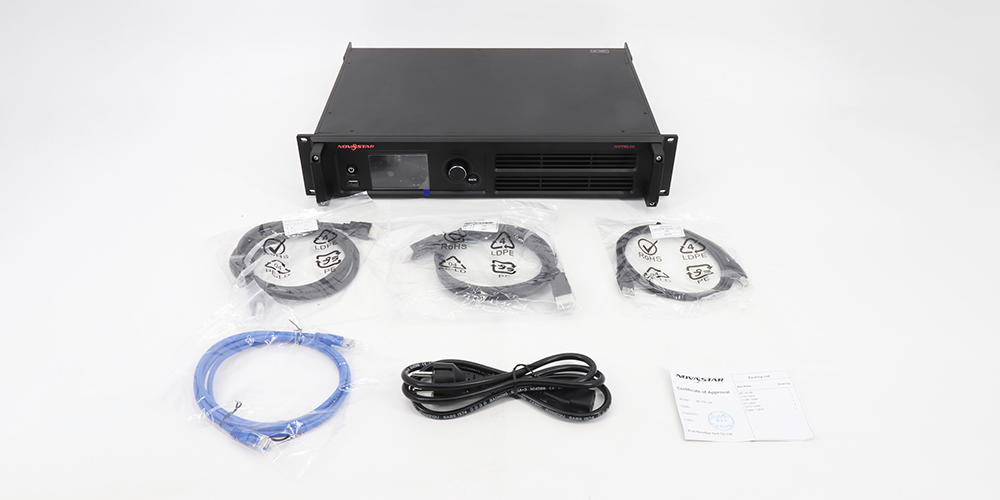
| Model | Max input resolution | Loading capacity | Input interfaces | HDR | Latency | Typical use |
| MCTRL4K | 4096×2160@60Hz | 8,800,000 px (DP/HDMI) | DP 1.2, HDMI 2.0, 2× dual-link DVI | HDR10 / HLG | <1 ms low latency mode | Large concerts, broadcast and virtual production, stadiums, ultra-wide screens |
| MCTRL660 | 1920×1200@60Hz | 2.3 million px class | DVI, HDMI 1.3a | No | Standard | Small stages, standard-resolution fixed installations |
| MCTRL660 Pro | 1920×1200@60Hz | 2.3 million px class | DVI, HDMI 1.4a | No | Low latency mode | Rental racks where low latency matters more than 4K |
| MCTRL R5 | 4096×2160@60Hz class | 4.1 million px class | 5G-SDI, dual DVI, HDMI 1.4a | HDR10 | <1 ms class | Broadcast vans and virtual production with SDI infrastructure |
How to choose: pick the NovaStar MCTRL660 when the screen is standard-resolution and cost matters; choose the MCTRL R5 when the workflow is SDI-based; choose the MCTRL4K when you need true 4K input, a 7680-pixel canvas and the largest pixel budget from a single rack unit. For projects that need an all-in-one processor with built-in video processing, compare the NovaStar VX1000 Pro, the VX400 Pro and the H series vs VX series processors.
7. MCTRL4K price: how to compare quotes
NovaStar sells the MCTRL4K through distributors and system integrators rather than at one global list price, so the number you see online can differ by thousands of dollars between channels. We deliberately do not publish a fixed “average” price, because a quotation depends on the exact configuration, and a stale figure is worse than no figure when you are budgeting a project.
What actually changes an MCTRL4K quote
- Configuration and contents: controller only, or a kit with power, DP, HDMI, USB and Ethernet cables, rack ears or a carrying case.
- Region and channel: authorised distributor pricing, local stock and duties differ from marketplace listings that ship from another region.
- Volume and project scope: single-unit spares price differently from a project order that includes receiving cards, sending cards, processors and commissioning.
- Support and warranty: local technical support, replacement units during events and warranty length are part of the price, not extras.
- Genuine versus non-genuine stock: grey-market or refurbished units can undercut a quote, but they may arrive with older firmware, no warranty or no certification for your market.
Six questions to ask before you accept a price
| Check | Why it matters |
| Is the unit new and sealed, with a serial number and warranty? | Protects you from refurbished or grey-market stock presented as new |
| Which accessories are included? | Cables and a carrying case can add a meaningful amount if they are not listed |
| Which firmware version ships with it? | Older firmware may lack HDR, low latency or phase-offset behaviour you are planning for |
| Is the price quoted in your market’s currency with duties and delivery? | Avoids surprises when the unit clears customs |
| What support is included during your event or commissioning window? | Fast replacement or remote help is what actually protects a show |
| Can the supplier verify the configuration against your screen plan? | Confirms that port count and pixel budget really cover your wall |
Send us your screen size, pixel pitch, cabinet layout, receiving-card model and input sources, and we will confirm whether one MCTRL4K is enough, then quote the controller with the correct accessories. Tell us the country and the event date so we can confirm stock and lead time. Contact us for the current MCTRL4K price and availability.
【Click to Buy】Check the current Novastar MCTRL4K price and available kits
8. MCTRL4K FAQs
What is the NovaStar MCTRL4K?
The NovaStar MCTRL4K is a 4K LED display controller made by Xi’an NovaStar Tech Co., Ltd. It accepts 4096×2160@60Hz input over DP 1.2 or HDMI 2.0, loads up to 8,800,000 pixels, outputs through 16 Neutrik Gigabit Ethernet ports and 4 × 10G optical ports, and supports HDR10, HLG, 3D, individual RGB gamma and low latency.
What is the maximum resolution and loading capacity of the MCTRL4K?
The maximum input resolution is 4096×2160@60Hz on DP 1.2 and HDMI 2.0, with a maximum width or height of 7680 pixels for custom resolutions. Loading capacity is 8,800,000 pixels with DP or HDMI sources and 8,300,000 pixels with DVI sources. Each Ethernet port carries 650,000 pixels with 8-bit sources, or 320,000 pixels with 10-bit/12-bit sources, HDR or 3D.
Where can I download the MCTRL4K manual?
The current NovaStar documents are MCTRL4K LED Display Controller Specifications V1.2.2 (31 October 2025) and MCTRL4K User Manual V1.2.0 (1 April 2022), both available from NovaStar’s own download centre under LED Control System → Processors → MCTRL 4K. Older revisions such as V1.2.1 and Rev 1.0.1 still circulate on reseller sites; check the version on page one before using a figure or a menu description from them.
Does the MCTRL4K support HDR and 3D?
Yes. HDR10 and HLG are supported, but HDR requires a 10-bit HDMI input source and HDR-capable receiving cards, and it halves the loading capacity of each Ethernet port. 3D is supported with the EMT200 3D emitter and 3D glasses; 3D also halves per-port loading and cannot be used together with low latency, Genlock or advanced screen configuration.
How many MCTRL4K units can be cascaded?
Up to 10 MCTRL4K units can be cascaded through the USB IN and USB OUT ports, using one control computer. Cascading lets several controllers drive one very large screen, and Genlock keeps their outputs synchronised with each other and with an external reference signal.
What are the MCTRL4K dimensions and weight?
The MCTRL4K measures 482.6 mm × 372.0 mm × 88.1 mm (tolerance ±0.3 mm) and weighs 4.6 kg. Its 482.6 mm width matches a standard 19-inch rack opening. The packing box measures 555 × 445 × 220 mm and the optional carrying case 535 × 430 × 199 mm. The controller must be installed horizontally.
What is the power consumption of the MCTRL4K?
The MCTRL4K runs on AC 100 V–240 V, 50/60 Hz with a rated power consumption of 30 W, and it operates between −20 °C and +60 °C at 10% to 90% relative humidity, non-condensing.
How much does a Novastar MCTRL4K cost?
There is no single global price: NovaStar supplies the controller through distributors, so quotations vary with region, channel, configuration and volume. Ask for a written quote that states whether the unit is new and sealed, which cables or carrying case are included, which firmware version ships with it and what support or warranty covers your event. We can quote the MCTRL4K together with the receiving cards and accessories your screen needs.
9. Conclusion and sources
The NovaStar MCTRL4K remains one of the most capable 4K LED display controllers for large screens: 4096×2160@60Hz input, 8.8 million pixel loading, a 7680-pixel custom canvas, 16 Neutrik Ethernet plus 4 × 10G optical outputs, HDR10/HLG, 3D and low-latency modes. Plan the port count around the per-port capacity that matches your source bit depth, check the current manual version before you configure the screen, and treat advanced modes such as HDR and 3D as capacity-halving options rather than free extras.
If you would like help specifying a controller for a specific LED screen, or you want a current MCTRL4K quotation with the right accessories and receiving cards, send us your project details through the quote form on this page. Related reading: NovaStar MCTRL300 guide, MCTRL660 guide, VX4S 4K controller guide and TU4K Pro setup guide.
Sources: NovaStar MCTRL4K LED Display Controller Specifications V1.2.2 (released 31 October 2025) and NovaStar MCTRL4K LED Display Controller User Manual V1.2.0 (released 1 April 2022), published by Xi’an NovaStar Tech Co., Ltd.; NovaStar product page for MCTRL 4K; reviewed on 20 September 2026. Specification figures are transcribed from those documents; where a newer revision exists, the newer revision takes precedence.
Related Posts
Novastar MX2000 Pro Controller: Specs, Price, Manual and Review
The Novastar MX2000 Pro is a state-of-the-art 8K LED display controller, designed…
NovaStar MCTRL600 LED Display Controller: Specs, Manual, Software and Price
The NovaStar MCTRL600 is a standalone LED display controller, also…
NovaStar MX40 Pro: User Manual, Specs and Price
NovaStar MX40 Pro, the flagship 4K independent controller in the…

No Comments