
Poster LED Display Buying Guide: How to Choose
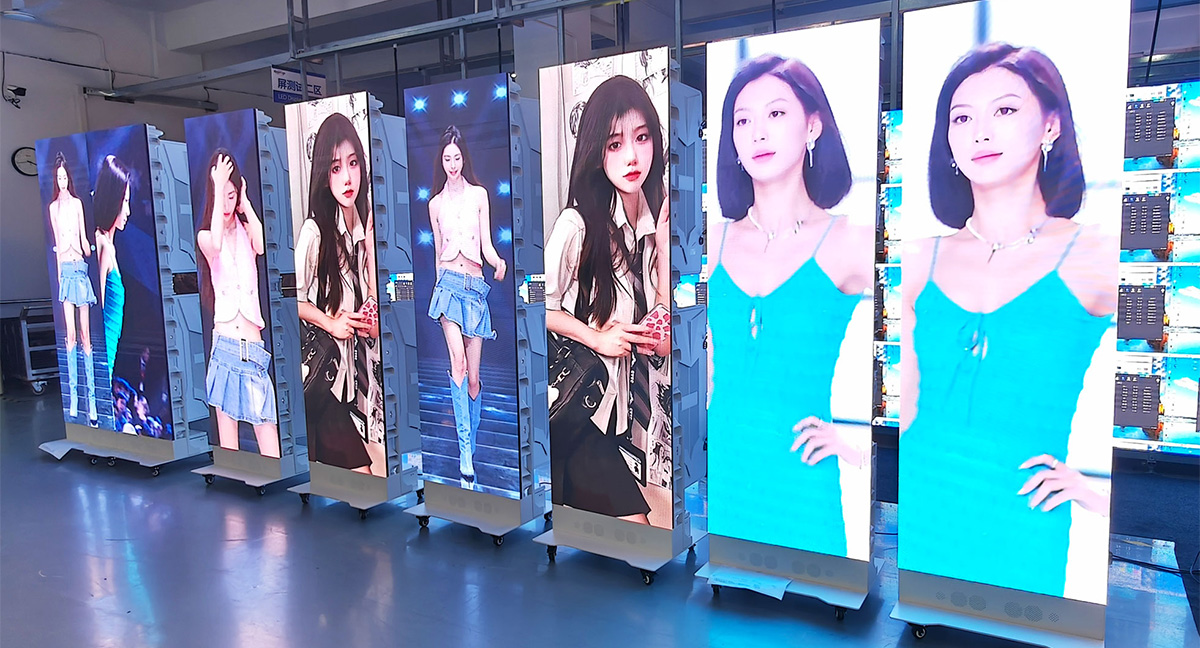
A poster LED display is a tall, freestanding LED screen built to replace printed posters and static signage. Because the LEDs emit their own light, there is no backlight layer and no light box behind the image, which is why the cabinet stays slim while still producing an image bright enough to read beside a shop window. Retailers, hotels, hospitals, exhibition contractors and AV integrators all use the format for entrances, lobbies, corridors and booth spaces where a large video wall will not fit.
Choosing one is not simply a matter of picking the cheapest cabinet. A poster LED display is a complete system: LED modules, a cabinet and frame, a power supply, a receiving card, a control card or built-in media player, and a base that may be fixed or fitted with casters. A foldable poster LED display that travels between trade shows has very different mechanical demands from a fixed unit installed in a hotel lobby for five years, even when both carry the same pixel pitch.
This guide is written for professional buyers rather than casual shoppers. It covers the main configurations, the specifications that decide image quality, how poster LED screens compare with LCD signage, where the format earns its cost and where it does not, how to run a structured selection process, what drives the quoted price, and what installation and content management involve in practice.
Use it as a procurement checklist before you send an RFQ. Ranges throughout are typical market ranges, not fixed specifications, so always confirm exact figures on the datasheet for the model you intend to buy.
Key takeaways
- A poster LED display is a slim, freestanding LED screen used indoors, and in properly rated versions outdoors, to replace printed posters.
- Pixel pitch, brightness and control method decide most of the outcome.
- Foldable models open into a double-sided screen; fixed double-sided models suit permanent venues.
- Indoor LED poster screens commonly sit between P1.25 and P2.5, with brightness matched to ambient light rather than maximised.
- Price is driven by pitch, LED lamps, driver ICs, cabinet design, control system, packaging and freight, not by screen size alone.
1. What Is a Poster LED Display?
A poster LED display is a self-contained digital sign, usually between roughly 1.6 m and 2.5 m tall, with an aspect ratio close to a printed poster. It normally ships as one cabinet on a weighted base, so it can be positioned without construction work, and it replaces a printed sheet with content that can be scheduled, updated remotely and reused across a network of screens.
01 How the Image Is Produced
A player, PC or built-in controller processes the video file and sends a data stream to the receiving card inside the cabinet. That card passes the stream to driver ICs on each module, which switch individual red, green and blue lamps fast enough for the eye to blend the switching into a stable image; grayscale comes from varying how long each lamp stays lit within a refresh cycle. The same chain is the diagnostic map: flicker points to signal or refresh settings, a single dark dot to a lamp or driver, and a dark block to a module, power supply or cable.

02 Names Used in Tenders
The product appears under several names, and mixing them in a specification causes mismatched quotations:
- Poster LED display and poster LED screen, the most common B2B terms.
- LED poster display and LED poster screen, the same product with the word order reversed.
- Digital poster display, a broader term that also covers LCD versions, so confirm the technology in writing.
- Indoor LED poster, a unit configured for interior brightness and a lighter cabinet.
- Foldable poster LED display, a hinged cabinet that folds flat for transport and opens into a two-sided screen.
- LED totem or banner display, overlapping terms that often describe larger, heavier units.
2. Poster LED Display Types and Models
Suppliers group these screens by mechanical configuration, and two units with identical pitch and brightness can differ sharply in price once the cabinet design changes.
01 Single-Sided and Double-Sided Units
The single-sided unit is a slim cabinet on a weighted base with casters and levelling feet, facing one direction, and it suits corridors and entrance positions where traffic passes on one side. Double-sided models carry modules on both faces for atriums, concourses and exhibition aisles. Because two surfaces run at once, power draw, heat and weight are higher, so confirm the power budget for the unit as a whole.
02 Foldable Models
A foldable poster LED display uses a hinged cabinet that folds flat for storage and opens into a double-sided screen, with each face able to run its own playlist. Rental companies, event contractors and distributors gain from the reduced shipping volume and faster setup. The trade-off is mechanical complexity, so ask how the hinge is specified for repeated cycles and how internal cabling is protected while folded.
03 Indoor, Outdoor, Installation and Rental
Indoor LED poster screens use moderate brightness, lighter cabinets and standard ventilation, while window-facing and outdoor units need much higher brightness plus a sealed cabinet rated for dust and water ingress; ask for the specific IP figure rather than accepting the word waterproof. Within each family, installation-grade units favour a tidy fixed appearance and predictable service access, while rental-grade units favour reinforced corners, quick locks and flight cases. A distributor intending to hire units out should specify rental-grade mechanics even for a first fixed deployment.
| Configuration | How it works | Best fit | Confirm before ordering |
|---|---|---|---|
| Single-sided floor-standing | One face on a castor base | Retail entrances, corridors, wayfinding | Base stability, cabinet depth, levelling feet |
| Double-sided fixed | Two faces in a shared cabinet | Lobbies, atriums, concourses | Power budget, heat management, total weight |
| Foldable poster LED display | Hinged cabinet folds flat, opens to two faces | Rental, exhibitions, roadshows | Hinge specification, cable protection, case design |
| Wall or column mounted | Cabinet fixed to structure, no base | Storefront windows, columns, feature walls | Fixing method, load rating, service access side |
| Outdoor or window-facing | High brightness, sealed cabinet | Plazas, station entrances, glazed facades | IP rating, solar load, temperature range |
3. Key Specs: Pixel Pitch and Brightness
Most specification disputes trace back to four numbers: pixel pitch, brightness, refresh rate and cabinet geometry. Understanding how they interact lets you compare quotations that are otherwise not comparable.
01 Pixel Pitch
Pixel pitch is the centre-to-centre distance between LED clusters, measured in millimetres. A smaller figure packs more pixels into the same area, which sharpens the image but adds lamps, driver ICs and cost. Indoor LED poster screens commonly fall between P1.25 and P2.5, with P1.5 to P1.86 a frequent compromise for retail and hospitality. The correct choice follows the closest realistic viewing distance: comfortable viewing begins at roughly one metre of distance for every millimetre of pitch, so measure the nearest point where someone will stand and specify from that figure.
02 Brightness and Camera Performance
Brightness is measured in nits, or candela per square metre. Indoor poster LED displays are commonly specified between roughly 600 and 1,200 nits depending on ambient light, while window-facing and outdoor units are specified far higher. Brighter is not automatically better indoors, where an over-driven screen is uncomfortable, washes out dark content and wastes power, so confirm that the unit can dim. Refresh rate decides how the screen behaves on camera: where filming is likely, specify at least 1,920 Hz and preferably 3,840 Hz. Grayscale depth, usually 14-bit to 16-bit, controls how smoothly shadows and gradients render.
03 Cabinet Geometry, Power and Control
Poster screens are tall and narrow, so cabinet dimensions set the proportions and the logistics. Confirm the assembled resolution, the weight including the base, and whether the aspect ratio matches your creative, since 16:9 artwork will letterbox or crop on a tall screen. Power is quoted as average and maximum consumption, and the average figure is the useful one for running costs. Control divides into synchronous playback, which locks several screens to one external player, and asynchronous playback, which gives each poster LED display its own storage and playlist; distributed retail and hospitality estates normally prefer asynchronous control with central management.
| Specification | Why it matters | Confirm with the supplier |
|---|---|---|
| Pixel pitch | Sharpness at a given viewing distance; major cost driver | Minimum viewing distance and assembled resolution |
| Brightness | Readability against ambient light | Rated nits, dimming range, calibration method |
| Refresh rate | Prevents flicker and banding on camera | Minimum refresh under normal drive conditions |
| Grayscale depth | Smoothness of gradients and shadows | Bit depth and processing pipeline |
| Cabinet size and weight | Fit, access, floor loading, lifting | Unit weight with base, footprint, packaging size |
| Power consumption | Running cost, circuit planning, heat load | Average and maximum consumption at stated brightness |
| Control mode | Content workflow and network design | Synchronous or asynchronous, storage, connectivity |
| Service access | Downtime and maintenance labour | Front or rear access, spare module availability |
4. Poster LED Displays vs LCD Signage
LCD signage looks similar from a distance but works differently: it needs a backlight, which makes the cabinet thicker, causes the image to lose legibility as ambient light rises, and leaves a bezel between units when several are combined. A poster LED display emits its own light, so colour holds across a wider viewing angle and cabinets splice edge to edge without a visible border. Degradation also differs: LCD panels fade at the backlight and can retain images when static content is held for long periods, while LED screens age at lamp level and are repaired module by module.
01 Where LCD Still Makes Sense
LCD remains a rational purchase for a single indoor unit in controlled light, on a tight budget, showing static information at moderate distance, and it has an edge where the screen sits very close to viewers, because a fine-pitch LCD can deliver smooth text at a lower cost point.
02 Where the Poster LED Display Wins
The LED format is the better choice in bright or glazed environments, where viewers approach at an angle, where several units splice into one canvas, and where the buyer wants a long-life asset repairable at module level. Mixed estates are common, with LCD carrying text-heavy internal content and LED handling the high-visibility positions.
| Comparison | Poster LED display | LCD signage |
|---|---|---|
| Light source | Self-emitting LEDs | Backlit LCD panel |
| Depth | Slim, no backlight layer | Thicker, with a backlight stack |
| Daylight use | High; outdoor and window versions exist | Limited; washes out in strong light |
| Viewing angle | Wide, minimal colour shift | Narrower, more shift off axis |
| Splicing | Seamless edge to edge | Visible bezels between units |
| Long static content | Low burn-in risk with normal rotation | Higher risk of image retention |
| Maintenance | Module and power supply replacement | Panel or backlight replacement |
| Upfront cost | Higher for comparable size and pitch | Generally lower |
5. Pros and Cons of Poster LED Displays
A balanced view matters more than a feature list, because the weaknesses of the format decide whether a project meets expectations.
01 Advantages
- Attention at eye level, in a tall format that fits narrow footprints where a video wall does not.
- Brightness that stays legible beside glazing or in a busy lobby, which printed posters and LCD panels cannot match.
- Content flexibility, including daypart scheduling, instant updates and the same creative pushed to multiple screens.
- Module-level serviceability, so faults are usually contained to a module, a power supply or a cable.
- Long service life and resale value, particularly for standard configurations used by rental operators.
02 Limitations and How to Manage Them
- Higher upfront cost than print or LCD, so the business case depends on how often content changes and how long the screen stays in service.
- Real weight in double-sided and foldable versions; check floor loading, lift dimensions and door clearances before the order is confirmed.
- Power and network planning, which is usually the largest hidden cost when cabling has to be retrofitted into a finished interior.
- Content governance, because an outdated or blank screen damages the brand; assign playlist ownership before installation.
- Heat and airflow, since power supplies in a tight recess without ventilation will age faster and fail sooner.
- Resolution discipline, because poorly prepared artwork looks worse on a fine-pitch screen than on a coarse one.
6. Top Applications for LED Poster Screens
The format performs best where a tall, bright, moving image has to attract attention in a limited footprint and content changes regularly.
01 Retail, Hospitality and Venues
Retail is the largest market: storefront windows, entrance zones and mall corridors all suit the tall format, and mall operators can resell screen time to tenants. Hotels, restaurants, dealerships and corporate lobbies use the same hardware for brand content, event schedules and wayfinding, usually with brightness tuned down in the evening.
02 Events, Transport and Public Information
The foldable poster LED display is the natural choice for exhibitions, because it transports flat, sets up quickly and can face an aisle on two sides. Airports, stations and bus terminals use the format for directional information and advertising in corridors and columns where a large wall display will not fit. Hospitals and banks use the same format for queue numbers and service information, updated centrally across branches.
| Application | Why it fits | Configuration to discuss | Watch-outs |
|---|---|---|---|
| Retail window and entrance | High visibility, frequent content changes | Fine pitch, high refresh, brightness for glazing | Artwork must suit a tall aspect ratio |
| Mall concourse | Wide viewing angles, advertising inventory | Double-sided, network control | Power and network routing to position |
| Hotel and restaurant lobby | Brand content and wayfinding | Indoor unit, dimmable, asynchronous playback | Avoid over-brightness in dim interiors |
| Exhibition and trade show | Transportable, two-sided presentation | Foldable poster LED display, flight case | Hinge life, cable protection, handling |
| Corporate lobby and showroom | Brand films and product demos | Slim cabinet, front service access | Content ownership after handover |
| Transport hub | Directional information and advertising | High brightness, fleet management | Daylight exposure, structural fixing |
| Healthcare and banking | Queue and service information | Indoor unit, central content control | Text size and contrast for accessibility |
7. How to Choose a Poster LED Display
Work through the following steps in order. They prevent the two most common errors: paying for specifications nobody will notice, and leaving the electrical and mechanical details unresolved until after delivery.
01 Define the Job and the Viewing Distance
Decide whether the unit is a brand statement, a promotional surface that changes daily, or an information board, because that answer sets the priority order for pitch, brightness and control. Then note the closest point at which someone will stand. Pitch follows that figure, so a screen viewed from three metres rarely needs the pitch required beside a queue line.
02 Match Brightness, Control and Physical Fit to the Site
Record light conditions through the day and specify for the worst case, confirming the dimming range for the best case, since indoor brightness errors usually require a hardware change. Choose synchronous playback where screens must stay locked together and asynchronous playback where each unit needs its own playlist and remote updates, then confirm footprint, assembled weight, clearances, floor loading and the position of power and data points.
03 Agree Content, Service and Compliance Terms
Settle who produces artwork, at what resolution, and how often it changes before the order is placed. Ask how a module is replaced, what spare parts ship with the order, what the warranty covers, and which certification documents the supplier can provide for your market. Treat verbal assurances as incomplete unless they are confirmed in writing.
Related reading: Poster LED Display: Features, Applications & Buying Guide and the LED Screen Buying Guide: 9 Specs to Check.
8. Poster LED Display Price Factors
Buyers often ask for a poster LED screen price as a single figure, but the same cabinet size can be built at several cost points depending on component selection and mechanical design.
Pixel pitch is normally the largest driver, because halving the pitch multiplies the lamps, driver ICs and processing channels for the same area. LED lamps and driver ICs follow closely: both are graded, both affect brightness consistency and low-brightness rendering, and both are frequently the difference between two apparently identical quotations. Cabinet construction, the base, and the hinge on a foldable poster LED display add mechanical cost, while higher brightness, refresh rate and grayscale depth add electronics cost.
Control and software also carry weight: an asynchronous controller with fleet management costs more than a basic card but removes the need for an on-site PC, and quantity, customisation, packaging, freight and warranty terms all move the landed price.
Energy, spares, service labour and the staff time spent managing content belong in the calculation too. A slightly more expensive poster LED display with efficient power supplies, accessible modules and a manageable content platform is often the cheaper asset over five years.
| Cost driver | Impact | Where to spend | Where to save |
|---|---|---|---|
| Pixel pitch | High | Positions where viewers stand close | Sites with a genuine viewing distance |
| LED lamps and driver ICs | High | Brand-critical colour and long life | Internal information screens |
| Cabinet and mechanical design | Medium to high | Rental fleets and mobile units | Fixed installations with a stable base |
| Brightness and refresh rate | Medium | Window-facing and camera-facing sites | Controlled indoor environments |
| Control system | Medium | Multi-site estates needing central updates | Single units with simple playlists |
| Packaging and freight | Medium | Rental and export shipments | Local delivery with careful handling |
9. Installation and Content Management
Installation and content operations decide whether the investment keeps performing after handover, so both should be planned during procurement rather than after delivery.
01 Site Preparation and Assembly
Confirm the position, sight lines, power point, network route and floor condition, and make sure the base does not obstruct a door swing or walking route. Floor-standing units are normally assembled by placing the base, mounting the cabinet, securing the modules and connecting power and data before the unit is raised upright, so plan for at least two people even with a slim cabinet. Where several units form one continuous display, confirm how many cabinets a single controller can drive at the intended resolution and plan the data chain so one cable failure does not darken the whole run.
02 Content Workflow
Agree who creates, approves and publishes content, and prepare templates at the native resolution so new campaigns can be produced quickly. Scheduling by daypart is one of the format’s real advantages, provided someone owns it. Confirm whether updates can be pushed to many screens from one interface, and check that playback continues locally if the network drops.
03 Maintenance and Fault Finding
Preventive work is straightforward: keep the screen and ventilation surfaces free of dust, check cable connections after any relocation, recheck brightness settings when the season changes, and hold a small stock of spare modules and power supplies. Log each fault with its screen position so recurring problems can be traced to a cable, a module batch or a power issue rather than treated as isolated incidents. Symptoms map predictably: banding on camera indicates refresh or signal settings, a single dark pixel a lamp or driver IC, a dark block a module, power supply or cable, colour differences between cabinets calibration or batch variation, and unexpected restarts a power, thermal or connection problem.
10. FAQ
01. How long does a poster LED display last, and what usually fails first?
LED lamps are commonly rated for tens of thousands of hours before brightness falls to a defined percentage of original output, but practical life depends more on cooling, power quality and handling than on the lamps. Power supplies and cable connections typically need attention first, followed by individual modules. Clear ventilation and a small stock of spares extend service life more than any single specification upgrade.
02. Can a poster LED display be used outdoors or in a shop window?
Yes, with the right configuration. Window-facing and outdoor positions need much higher brightness than an indoor unit, and an outdoor cabinet must be sealed against dust and water with a power supply suited to the local temperature range. State the exposure in the RFQ, because an indoor LED poster placed behind glazing will look washed out in daylight.
03. Do I need a computer to run one?
Many models run standalone with a built-in controller and internal storage, so content is loaded over a network or USB and played on schedule without a PC on site. Synchronous models need an external player and are chosen when several screens must stay locked frame for frame. Where nobody will operate a computer at the location, specify asynchronous playback.
04. How many screens can I manage from one interface?
That depends on the control platform rather than the screen. Asynchronous controllers with network or cloud management let one operator publish to many units, often across different cities, with per-screen or grouped playlists. Confirm licence terms, the number of screens supported and whether updates can be scheduled, since management capacity rarely appears on a product datasheet.
05. What should I check when the unit is delivered?
Inspect packaging for impact damage before signing, check the cabinet and base for deformation, confirm module count and model numbers against the order, and verify that spares, cables and documentation are present. Run a known content file at full brightness and check a few modules for colour consistency, then report discrepancies in writing on the delivery day.
06. What content resolution and format should I prepare?
Prepare artwork at the native resolution and aspect ratio of the screen, and confirm accepted codecs and bitrate limits before producing a campaign. Video upscaled from a smaller source looks soft on a fine-pitch display, and artwork made for 16:9 will letterbox or crop on a tall poster format. Ask for the exact pixel dimensions of the assembled screen.
07. Is a foldable poster LED display worth the extra cost?
It is worth it when the unit travels: the folding mechanism reduces shipping volume, speeds up setup and allows two-sided presentation from one case. For a unit that stays in a lobby for years, the hinge adds cost and complexity without benefit, so a fixed double-sided model is usually the better purchase.
08. How is a poster LED display different from a video wall?
A video wall is built into a structure and driven as one large canvas, while a poster LED display is a freestanding unit with its own base and usually its own media player and playlist. Poster units suit narrow footprints, single positions and fast deployment; video walls suit large fixed surfaces and shared content.
09. Does a unit need special power or cooling?
No special supply is needed beyond a correctly rated circuit, but the load has to be planned, because double-sided and high-brightness units draw more power and generate more heat. Enclosed positions need airflow around the cabinet, so confirm average consumption, the local voltage and frequency, and the ventilation clearance the supplier specifies.
11. Conclusion
A poster LED display earns its cost when a venue needs a bright, tall, easily updated screen in a position where a video wall will not fit and printed posters are too slow to change. The specification that matters is the one matched to the site: pitch chosen from the closest viewing distance, brightness matched to ambient light, a control method that fits how content will actually be updated, and a cabinet design that suits whether the unit stays in place or travels.
The poster LED display price follows from those decisions. Pixel pitch, LED lamps and driver ICs, cabinet and hinge design, control electronics, packaging and freight all move the quotation, which is why the cheapest quote and the lowest total cost are often not the same number. Compare landed cost, confirm spares and warranty in writing, and check that certification documents cover your market.
Plan service and content ownership before delivery as well. A screen that nobody updates, or that fails with no spare module in the building, will not deliver the return the business case promised. Shortlist two or three suppliers, put the specification in writing, and ask each one to quote against the same requirement list.
Related Posts
Flexible LED Screen Guide: Uses, Benefits and Limits
A flexible LED screen is a modular video display that…
Mobile LED Display: Important Things You Need to Know
Now we have many events that can be held outdoor…

HonghaiLED Stage Rental LED Display Introduction
Stage LED display is also called stage background LED screen…

No Comments