
NovaStar TB10 Plus: Specifications, Setup and TB20 Plus Comparison
The NovaStar TB10 Plus is an Android 10 multimedia player and LED sending device in one box. It plays 4K content from its own 32 GB storage or from a USB drive, and it drives up to 650,000 pixels of a full-color LED screen through a single Gigabit Ethernet output. Content can be published over Wi-Fi, wired network or optional 4G from a computer, phone or tablet, which is why it is widely used for chain stores, lamp-post screens, retail shelves and advertising players. Its one important limitation: the TB10 Plus has no HDMI input, so live video switching needs the TB20 Plus or a synchronous processor instead.
TB10 Plus at a glance
| Question | Straight answer |
|---|---|
| What is the TB10 Plus? | An asynchronous multimedia player with built-in LED sending, running Android 10 |
| How many pixels can it drive? | Up to 650,000 pixels per Gigabit Ethernet output – 2048 x 2048 pixels, or up to 8192 x 2048 for ultra-wide screens |
| Does it have HDMI input? | No. If you need a live HDMI source, choose the TB20 Plus or a synchronous processor |
| How is content published? | NovaStar VNNOX cloud platform, ViPlex Express / ViPlex Handy apps, or offline USB playback |
| Network options | 2.4 GHz Wi-Fi with AP + STA at the same time, 100 Mbps wired network, optional 4G module |
| Price | NovaStar does not publish a list price; the player is sold through distributors, so pricing depends on volume and configuration |
1. What the NovaStar TB10 Plus Is
2. Key Features of the NovaStar TB10 Plus
3. Full TB10 Plus Specifications
4. How to Set Up the NovaStar TB10 Plus
5. HDMI, Sync Mode and TB20 Plus Differences
6. TB10 Plus Price and Software
7. TB10 Plus FAQs and Buying Checklist
1. What the NovaStar TB10 Plus Is
The NovaStar TB10 Plus is a next-generation multimedia player built for full-color LED displays. Unlike a simple media box, it combines playback and sending in one unit: the playlist lives on the player, and the same device outputs the signal to your LED screen. That makes it an asynchronous, stand-alone controller – the screen shows what the player has stored, not what a live computer is sending.
Two things make it practical for commercial projects:
- Cloud control. Working with NovaStar’s VNNOX cloud platform, the TB10 Plus lets you publish content and monitor screens from any Internet-connected computer, phone or tablet – useful when displays are spread across several cities.
- Plug-and-play USB playback. Drop a playlist onto a USB drive and the player runs it without any network connection at all.
NovaStar lists this model in its multimedia player line together with the TB20 Plus, TB30, TB50 and TB60. You will still see it described as a “Taurus TB10 Plus” in some search results and reseller listings, because NovaStar’s Taurus-series players (TB30, TB50, TB60 and earlier TB1/TB2 models) popularized that family name; on NovaStar’s current product pages the model is simply TB10 Plus.
Typical applications include fixed commercial displays, lamp-post screens, chain store and door-head displays, retail shelf screens, advertising players and smart city installations. For security, NovaStar applies terminal authentication and player verification so that content cannot be pushed to the player from an unauthorized terminal.
2. Key Features of the NovaStar TB10 Plus
2.1 Output and Loading Capacity
- Loading capacity: up to 650,000 pixels per Gigabit Ethernet output port.
- Standard screen: maximum width 2048 pixels, maximum height 2048 pixels.
- Ultra-long screen: maximum width 8192 pixels, maximum height 2048 pixels.
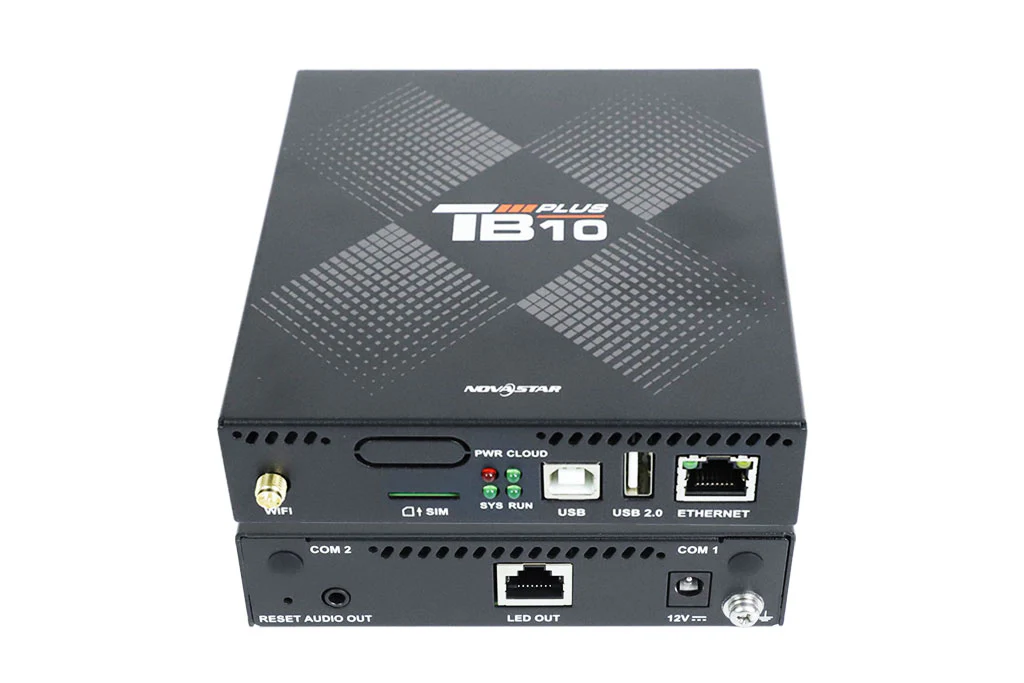
- LED output: 1 × Gigabit Ethernet (standard RJ45, no built-in indicator LEDs).
- Audio output: 1 × 3.5 mm stereo jack with a fixed 48 kHz sample rate. Three-pole plugs are supported, and there is no audio input.
In practice, 650,000 pixels is enough for a large P4 or P5 indoor wall or a mid-size outdoor advertising screen on one port. If your screen needs more loading capacity than that, step up to the TB50 (1.3 million pixels) or TB60 (2.3 million pixels), or split the screen across several players.
2.2 Control Ports and USB Rules
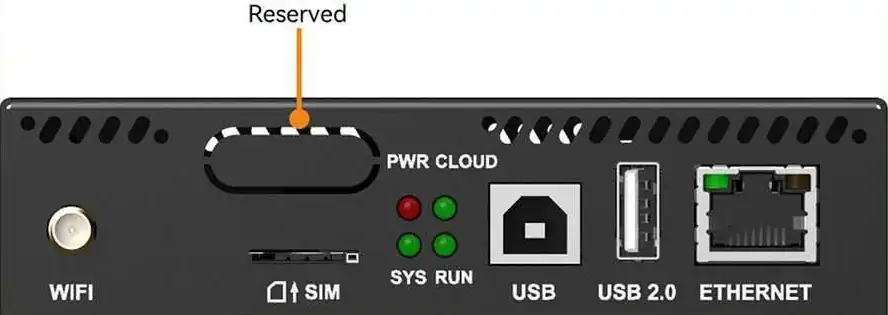
- USB 2.0 (Type-A): for USB playback, firmware upgrades and storage expansion up to 128 GB.
- USB (Type-B): connects to a control computer for publishing and screen control.
- Fast Ethernet (100 Mbps): standard RJ45 with built-in LEDs, for direct connection to a computer or to a LAN / public network.
- USB drive rules that cause most support tickets: supported file systems are FAT32 and NTFS (exFAT and FAT16 are not supported), the drive must be between 2 GB and 128 GB, and a single file must be smaller than 4 GB.
2.3 Performance and Video Decoding
- Processor: quad-core ARM A53 at 1.4 GHz with hardware decoding of 4K video.
- Memory: 2 GB RAM and 32 GB internal storage, expandable through USB.
- Multiple-video playback (current specification): 1 × 4K, 2 × 1080p, 4 × 720p, 4 × 480p or 20 × 360p videos at the same time.
- Video formats: H.264 and H.265/HEVC decoding up to 4096 × 2304 pixels, with MP4, AVI, MKV and MOV containers.
- Image formats: JPG, BMP, GIF, PNG and WEBP.
Note for budget planning: multi-screen synchronous playback uses part of the processor, so NovaStar states that enabling synchronous playback halves the decoding capability of the device.
2.4 Wi-Fi, Cloud Control and Time Synchronization
- Wi-Fi AP and Wi-Fi STA can run at the same time. The player can create its own 2.4 GHz hotspot for your phone or tablet while also joining an existing Wi-Fi network.
- Default hotspot name: the model name plus the last 8 digits of the serial number; the default password is printed on the SSID label.
- Remote publishing and monitoring: through NovaStar’s VNNOX cloud platform from a computer, phone or tablet, anywhere with an Internet connection.
- 4G support: the TB10 Plus ships without a 4G module; the module is purchased separately. When several networks are available the player follows the priority wired network > Wi-Fi > 4G.
- Time synchronization: NTP, GPS and RF options, so multi-screen installations stay in step. GPS and RF synchronization need the specified modules.
- Sensors: a reserved sensor connector supports a light sensor or a temperature and humidity sensor for automatic brightness or environmental control.
2.5 Design, Power and Operating Environment
- Housing: compact metal casing designed to be rack or cabinet mounted; IP20 rated, so it must be protected from water and dust.
- Power: DC 5 V to 12 V input with a maximum power consumption of 15 W.
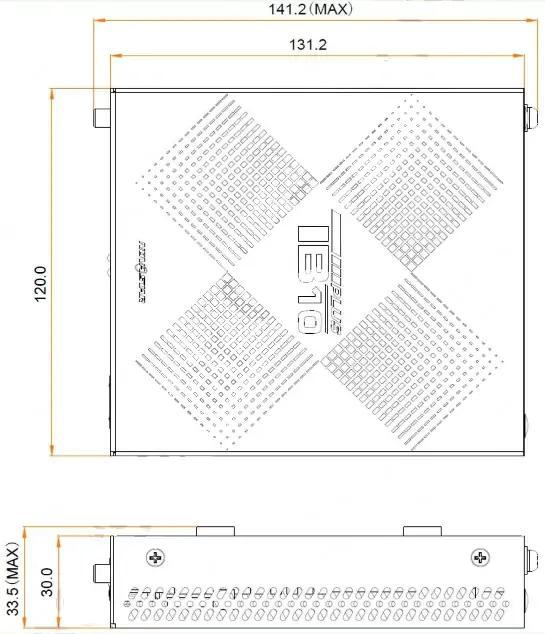
- Dimensions: 141.2 mm × 120.0 mm × 33.5 mm (L × W × H).
- Weight: 465.6 g net, 771.2 g gross.
- Operating temperature: -20 °C to +60 °C; storage -40 °C to +80 °C.
- Reset: press and hold the RESET button for 5 seconds to return the player to factory settings.
3. Full TB10 Plus Specifications
The table below summarizes the current NovaStar TB10 Plus multimedia player specification. Use it as a quick data sheet; the figures follow the current NovaStar specification document.
| Item | NovaStar TB10 Plus |
|---|---|
| Loading capacity | Up to 650,000 pixels per Gigabit Ethernet output |
| Maximum width / height | 2048 × 2048 pixels; ultra-long screen up to 8192 × 2048 pixels |
| LED output port | 1 × Gigabit Ethernet (RJ45) |
| Control network port | 1 × Fast Ethernet, 100 Mbps |
| Audio | 1 × 3.5 mm stereo output, fixed 48 kHz, three-pole; no audio input |
| USB ports | 1 × USB 2.0 Type-A (playback, firmware, expansion), 1 × USB Type-B (control computer) |
| USB drive support | FAT32 / NTFS, 2 GB to 128 GB, single file below 4 GB |
| Wi-Fi | 2.4 GHz, AP + STA dual mode at the same time |
| 4G | Supported with a separately purchased 4G module; SIM slot on the front panel |
| CPU | Quad-core ARM A53 at 1.4 GHz |
| RAM and storage | 2 GB RAM + 32 GB internal storage |
| Operating system | Android 10 |
| Video decoding | Hardware decoding of 4K video, up to 4096 × 2304 pixels (H.264 / H.265) |
| Simultaneous playback | 1 × 4K, 2 × 1080p, 4 × 720p, 4 × 480p or 20 × 360p videos |
| Multi-screen playback | Synchronous playback across multiple screens supported; halving of decoding capacity applies |
| Time synchronization | NTP; GPS and RF with the specified modules installed |
| Sensors | Reserved sensor connector for a light sensor or temperature and humidity sensor |
| Power | DC 5 V to 12 V input; maximum power consumption 15 W |
| Dimensions (L × W × H) | 141.2 mm × 120.0 mm × 33.5 mm |
| Weight | 465.6 g net / 771.2 g gross |
| Operating environment | -20 °C to +60 °C, humidity 5% to 85% RH non-condensing |
| Storage environment | -40 °C to +80 °C, humidity 5% to 95% RH non-condensing |
| IP rating | IP20 |
| Certifications | CE, FCC, IC, CQC, CB, NTRA |
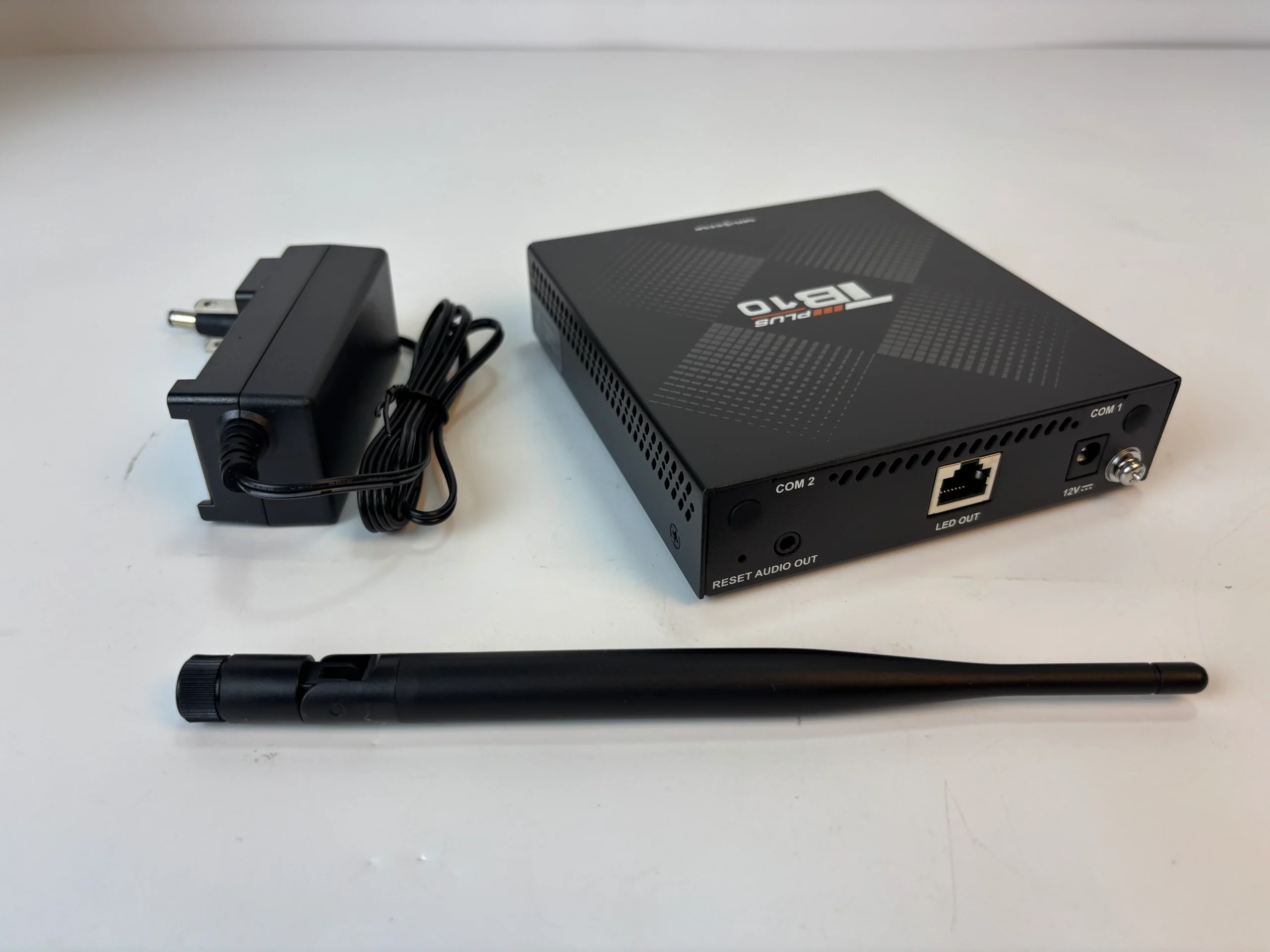
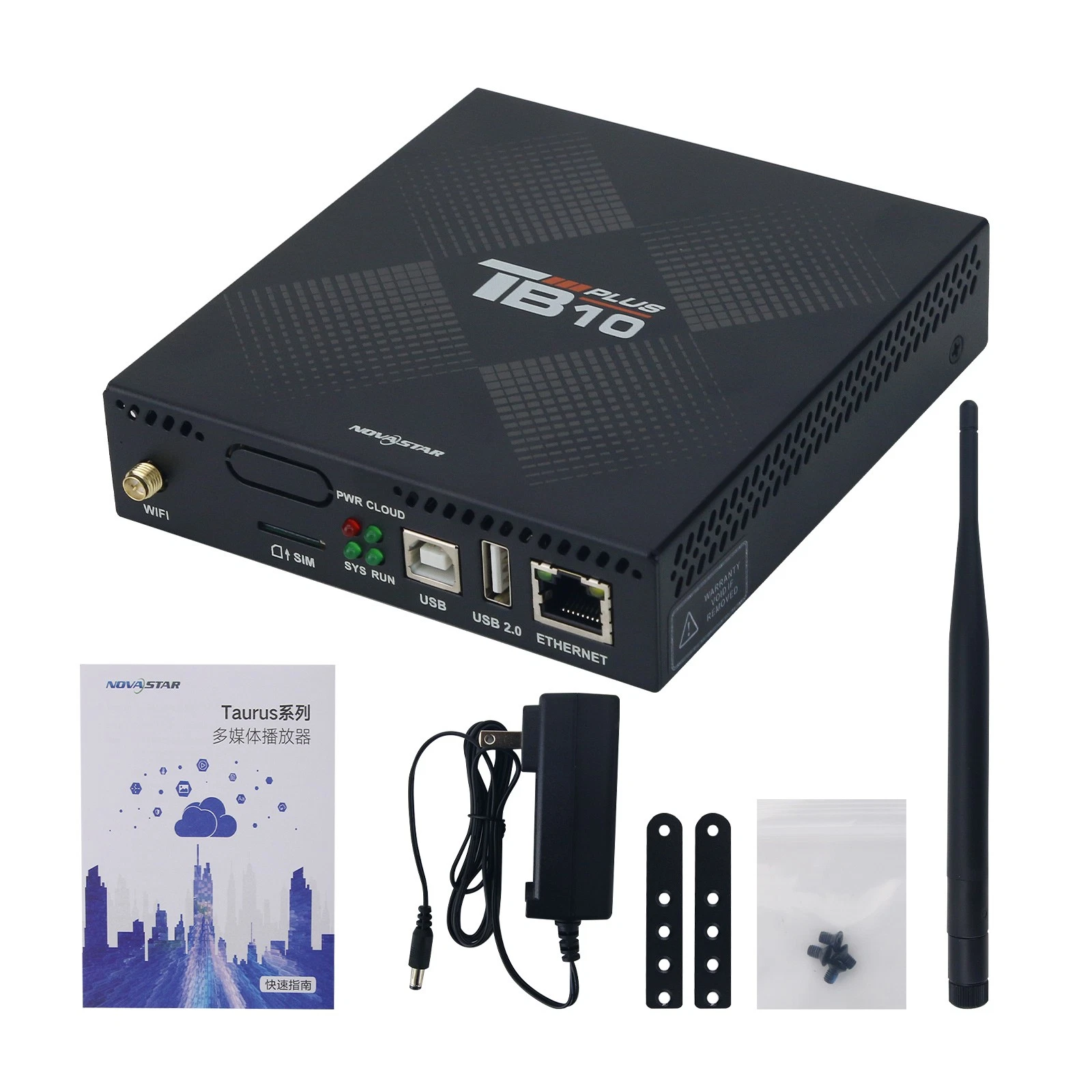
| In the box | Wi-Fi antenna, power adapter, 2 racks, 4 Phillips screws, QR code, certificate of approval |
Ports and connectors in plain language
| Connector | Panel | What it is used for |
|---|---|---|
| LED OUT | Rear | Gigabit Ethernet output to the LED receiving cards – this is the screen signal |
| ETHERNET | Front | 100 Mbps Fast Ethernet for control computer, LAN or Internet publishing |
| USB 2.0 Type-A | Front | USB playback, firmware upgrade, storage expansion up to 128 GB |
| USB Type-B | Front | Direct connection to a control PC |
| AUDIO OUT | Rear | 3.5 mm stereo output, fixed 48 kHz |
| WIFI | Front | 2.4 GHz Wi-Fi antenna connector |
| SIM | Front | SIM card slot for the optional 4G module |
| Sensor (reserved) | Front | Light sensor or temperature and humidity sensor |
| COM 1 / COM 2 | Front / Rear | 4G antenna connector (COM 1) and GPS antenna connector (COM 2) |
| RESET | Rear | Hold 5 seconds to restore factory settings |
| Power input | Rear | DC 5 V to 12 V |
Specification source: NovaStar TB10 Plus Multimedia Player Specifications, document version 1.0.3 (released 31 July 2026), and NovaStar’s own multimedia player comparison data. Where older documents differ – for example the earlier 3 × 1080p playback listing, the older 136.5 × 110.5 × 18.0 mm dimension, or RS485 sensor wiring – the current values above apply.
4. How to Set Up the NovaStar TB10 Plus
Commissioning a TB10 Plus takes about fifteen minutes once the screen is wired. Work through the steps in order.
Step 1: Mount and power the player
- Fix the player inside the screen cabinet or a dry, ventilated control box using the supplied racks and screws. The unit is IP20, so it must not be exposed to rain, wash-down or heavy dust.
- Connect the DC power adapter (5 V to 12 V). The PWR indicator stays red when power is correct.
Step 2: Connect the LED screen
- Run a network cable from the LED OUT Gigabit port to the first receiving card of the screen.
- Keep the pixel count of the screen within 650,000 pixels per port and within 2048 × 2048 pixels, or 8192 × 2048 for ultra-long screens.
Step 3: Prepare the media
- Format the USB drive as FAT32 or NTFS, with a capacity between 2 GB and 128 GB.
- Keep every file below 4 GB. Splitting a long video into parts is more reliable than using a file system the player does not read.
- Insert the drive into the USB 2.0 Type-A port for offline playback.
Step 4: Connect for control
- For Wi-Fi, turn on the player hotspot and connect your phone, tablet or PC. The default SSID is the model name plus the last 8 digits of the serial number, and the default password is printed on the SSID label.
- The hotspot (AP) and the connection to an existing network (STA) can stay on at the same time, so you can configure the player locally while it is already online.
- For a wired connection, use the Fast Ethernet port to the local network or router. When wired, Wi-Fi and 4G are all available, the player prefers wired first, then Wi-Fi, then 4G.
- If the player still shows a factory static IP after a firmware update to V5.1.0 or later, it can be discovered on the network and switched to a dynamic IP.
Step 5: Publish the first playlist
- Sign in to NovaStar’s VNNOX cloud platform with a computer, phone or tablet to publish content and monitor the screen remotely.
- Or use the local software route: NovaLCT for screen configuration, ViPlex Express on a PC or ViPlex Handy on a mobile device for media publishing.
- If the installation has no network at all, publish nothing – the USB playlist plays on its own.
Step 6: Finish the installation
- Connect a light sensor or a temperature and humidity sensor to the reserved sensor connector if the display should dim automatically or report conditions.
- Choose NTP, GPS or RF time synchronization when several screens must start and stop together. Remember that synchronous playback halves the decoding capacity of each player.
- Export the configuration after commissioning so a replacement player can be restored quickly.
5. HDMI, Sync Mode and TB20 Plus Differences
Short answer: the NovaStar TB10 Plus has no HDMI input and no HDMI output. Its connector set is a Gigabit LED output, a Fast Ethernet control port, two USB ports, a 3.5 mm audio output and the antenna or sensor connectors listed above. You cannot add an HDMI port to the TB10 Plus, because that input hardware is not part of the board.
If a project needs live video – a camera feed, a media server or a laptop on stage – plan for the NovaStar TB20 Plus instead. The TB20 Plus is the same platform with two additions that matter:
- 1 × HDMI 1.3 input, with a maximum input resolution of 2048 × 1024 @ 60 Hz, HDCP 1.4 / 1.3 support, custom EDID from 512 to 2048 pixels in width or height, and HDMI video source scaling. Interlaced signals are not supported, and embedded audio should be set to 48 kHz.
- Switching between synchronous and asynchronous modes with a front-panel button: asynchronous mode uses the internal media, synchronous mode uses the HDMI input as the live source.
Everything else – 650,000 pixel loading capacity, Android 10, the quad-core A53 processor, 2 GB + 32 GB memory, the 100 Mbps wired port, 2.4 GHz Wi-Fi AP + STA, optional 4G and the same 141.2 × 120.0 × 33.5 mm housing – is shared with the TB10 Plus. The two players are close siblings; the choice comes down to whether you need live HDMI and sync mode.
Two related decisions often come up at the same time. Screens that need more than 650,000 pixels on one player are better served by the TB50 or TB60; and if you are comparing the larger models, the TB30 vs TB50 comparison explains where each one fits.
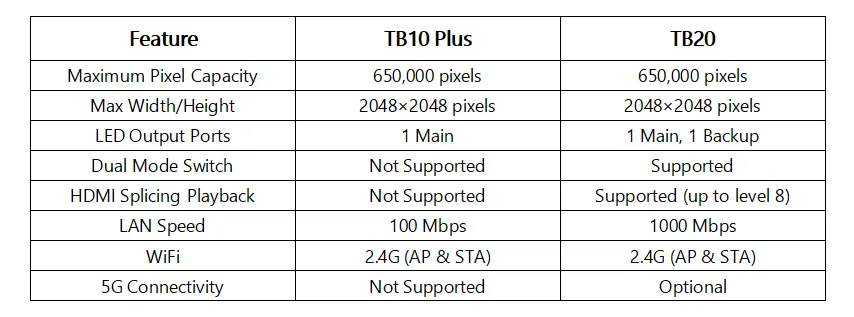
| Feature | TB10 Plus | TB20 Plus |
|---|---|---|
| Max loading capacity | 0.65 million pixels | 0.65 million pixels |
| Max width and height | 2048 × 2048; ultra-wide 8192 × 2048 | 2048 × 2048; ultra-wide 8192 × 2048 |
| HDMI 1.3 input | No | Yes, up to 2048 × 1024 @ 60 Hz |
| Sync / async mode switching | No | Yes, front-panel switch |
| CPU | Quad-core A53 at 1.4 GHz | Quad-core A53 at 1.4 GHz |
| RAM + storage | 2 GB + 32 GB | 2 GB + 32 GB |
| Operating system | Android 10 | Android 10 |
| Playback capability | 1 × 4K, 2 × 1080p, 4 × 720p, 4 × 480p, 20 × 360p | 1 × 4K, 2 × 1080p, 4 × 720p, 4 × 480p, 20 × 360p |
| Multi-screen sync playback | Yes | Yes |
| USB playback | Yes, USB 2.0 | Yes, USB 2.0 |
| Wired network | 100 Mbps | 100 Mbps |
| Wi-Fi | 2.4 GHz, AP + STA | 2.4 GHz, AP + STA |
| 4G (optional module) | Yes | Yes |
| Net weight | 465.6 g | 470.3 g |
6. TB10 Plus Price and Software
Price: what actually drives it. NovaStar does not publish a list price for the TB10 Plus. The player is sold through distributors, so the price you are quoted depends on order volume, destination country, whether a 4G module is included, and the accessories and support bundled with the order. Treat any single number you see online – especially a price far below the rest of the market – as something to verify rather than a benchmark, because the offer may be a refurbished unit, a different model, or a bare device without the power adapter or antenna.
When you request a quote, ask for these five details in writing:
- The exact model code: TB10 Plus, not TB10 or TB20, so the quote cannot be substituted later.
- Whether the 4G module, power adapter and Wi-Fi antenna are included.
- Firmware version and whether the unit is new or refurbished.
- Warranty period and the return procedure.
- Shipping method and whether the price is based on EXW, FOB or DDP terms.
If you are buying the player together with an LED screen, the control system is normally quoted as part of the screen package. Send us your screen size, pixel pitch and cabinet layout and we will confirm how many players the project needs.
Software and firmware for the TB10 Plus. The player runs Android 10 with NovaStar’s terminal application. According to the release notes for the current T10 Plus / TB20 Plus / TB10 Plus firmware V5.1.0, released 18 September 2026, the supporting software versions are:
| Software | Minimum version | What it is for |
|---|---|---|
| NovaLCT | V5.9.2 and later | Screen configuration, sending parameters and troubleshooting from a PC |
| ViPlex Express | V4.1.1 and later | Playlist publishing, device settings, diagnostics and logs on a PC |
| ViPlex Handy | V6.0.0 and later | Mobile publishing and control over Wi-Fi |
| VNNOX Care App | V2.5.0 and later | Cloud monitoring, alarms and remote management |
Keep the player, the LED screen and the control software on a compatible version before you hand a site over: most “screen shows nothing” calls after a firmware update come from a mismatched NovaLCT or publishing app. Download packages and version notes are collected on our NovaStar LED control software download page.
Quick troubleshooting checks
- SYS indicator flashing every 2 seconds: normal operation. Steady on or off means the operating system is not running correctly.
- CLOUD indicator steady: the player is online; flashing every 2 seconds means it is connected to VNNOX.
- RUN indicator flashing every 4 seconds: the FPGA has no video source, so check the playlist and the LED output cable.
- USB drive not recognised: recheck the file system (FAT32 or NTFS), the 2 GB to 128 GB capacity range and the 4 GB single-file limit.
- Cannot reach the player over the network: hold RESET for 5 seconds to restore factory settings, then reconnect and set the IP address again.
7. TB10 Plus FAQs and Buying Checklist
No. The TB10 Plus has no HDMI input and no HDMI output. If your project needs a live HDMI source or the ability to switch between sync and async modes, choose the TB20 Plus, which adds an HDMI 1.3 input up to 2048 × 1024 @ 60 Hz.
Up to 650,000 pixels through its single Gigabit Ethernet output. The normal layout limit is 2048 × 2048 pixels; for ultra-long screens the maximum width is 8192 pixels with a maximum height of 2048 pixels.
Both use the same processor, memory, Android 10 system, 650,000 pixel loading capacity, 100 Mbps wired port and 2.4 GHz Wi-Fi. The TB20 Plus adds an HDMI 1.3 input and a button to switch between synchronous and asynchronous modes. The TB10 Plus is the simpler asynchronous player.
NovaStar’s current product pages list the model simply as TB10 Plus, grouped with the TB20 Plus, TB30, TB50 and TB60 in its multimedia player line. The Taurus name comes from NovaStar’s Taurus-series media players, so you will still see “Taurus TB10 Plus” used in searches and reseller listings for the same family of products.
Use the USB Type-B port for a direct cable connection, or connect through the Fast Ethernet port on a LAN. You can also reach the player over Wi-Fi. Use NovaLCT for screen configuration and ViPlex Express for publishing and diagnostics.
FAT32 or NTFS. The drive should be between 2 GB and 128 GB, and individual files must stay below 4 GB. exFAT and FAT16 drives are not supported.
The default SSID is the model name plus the last 8 digits of the serial number, and the default password is printed on the SSID label on the player. Wi-Fi AP and Wi-Fi STA can operate at the same time.
Yes, with the specified 4G module, which is not included as standard. When wired, Wi-Fi and 4G connections are all live, the player selects them in the order wired network, then Wi-Fi, then 4G.
Yes. It supports hardware decoding of 4K video up to 4096 × 2304 pixels and can play one 4K, two 1080p, four 720p, four 480p or twenty 360p videos at the same time. If you enable multi-screen synchronous playback, the decoding capacity is halved.
There is no published list price. Quotations depend on order quantity, destination country and configuration such as the optional 4G module. Contact us with your project details for a current price and lead time.
Buying checklist before you order a TB10 Plus
- Confirm the screen pixel count is below 650,000 per player, and the layout stays within 2048 × 2048 pixels, or 8192 × 2048 for ultra-long screens.
- Decide now whether the project needs live HDMI or sync mode. If yes, the TB20 Plus is the correct model, because the TB10 Plus cannot be upgraded afterwards.
- Check the network plan: wired first, Wi-Fi second, 4G last. Order the 4G module with the player if the site has no fixed network.
- Match the USB drives to FAT32 or NTFS and keep files below 4 GB.
- Plan the power budget at up to 15 W per player and keep the enclosure dry and ventilated, as the unit is IP20.
- Decide how content will be published – VNNOX cloud, ViPlex Express or ViPlex Handy – and who will manage it after handover.
Conclusion. The NovaStar TB10 Plus is a dependable asynchronous player for commercial LED displays: 650,000 pixels of loading capacity, 4K decoding, Android 10, cloud publishing and USB playback in a 141.2 × 120.0 × 33.5 mm metal case. Its single real limitation is the missing HDMI input, and that is exactly what separates it from the TB20 Plus. Choose the TB10 Plus when the content is scheduled media, and the TB20 Plus when the screen has to follow a live source. For larger screens, compare the TB30 and the TB50, or read the step-by-step guide to connecting rental LED panels to a NovaStar media player.
Need help matching a controller to your screen? Send us your screen size, pixel pitch and installation photos and our engineers will confirm the right player, the pixel count per port and the wiring plan. If you are still choosing the display itself, start with our LED screen buying guide or browse our indoor LED display range.
Related Posts
NovaStar CVT8-5GS Fiber Converter: Specs, Setup and Manual
The NovaStar CVT8-5GS is a single-mode fiber converter for LED…
NovaStar MX6000 Pro Video Wall Controller: Specs, Price & Manual
NovaStar MX6000 Pro in one paragraph: the NovaStar MX6000 Pro…
NovaStar H5 Video Wall Splicer: Specs, Setup & Manual
The NovaStar H5 video wall splicer is a 5U, modular…

No Comments