
NovaStar MX6000 Pro Video Wall Controller: Specs, Price & Manual
NovaStar MX6000 Pro in one paragraph: the NovaStar MX6000 Pro is a 6U card-based 8K LED display controller (video wall controller) in the NovaStar COEX control system series. One unit loads up to 141 million pixels and supports 32x 4K layers, up to 8x 8K video inputs, 0-frame latency (under 1 ms), 12-bit color depth and frame rates up to 360 Hz. Its eight input slots accept six card types, and its eight output slots accept either the MX_4x10G_Fiber card for 1G solutions or the CX_1x40G_Fiber card for 5G solutions.
This guide covers the official MX6000 Pro specifications, input and output card options, 1G and 5G load capacity, monitoring and redundancy, real-world applications, what drives the price, and where to download the VMP software and manual.
On this page
- 1. NovaStar MX6000 Pro at a glance
- 2. What is the NovaStar MX6000 Pro video wall controller?
- 3. NovaStar MX6000 Pro full specifications
- 4. Image quality: 12-bit color, HDR and 360 Hz
- 5. Input cards: six card types for 4K, 8K, SDI and IP video
- 6. Output cards: building a 1G or a 5G solution
- 7. Ethernet port load capacity in 1G and 5G solutions
- 8. Control, monitoring and redundancy
- 9. Where the MX6000 Pro is used
- 10. How to choose: MX6000 Pro vs MX2000 Pro vs MX40 Pro vs H Series
- 11. What affects the MX6000 Pro price
- 12. Software, manual and downloads
- 13. FAQ
1. NovaStar MX6000 Pro at a glance
| Item | Specification |
|---|---|
| Product type | Modular 8K LED display controller / video wall controller |
| Series | NovaStar COEX control system |
| Manufacturer | Xi’an NovaStar Tech Co., Ltd. |
| Chassis | 6U, standard 19-inch rack, horizontal mounting only |
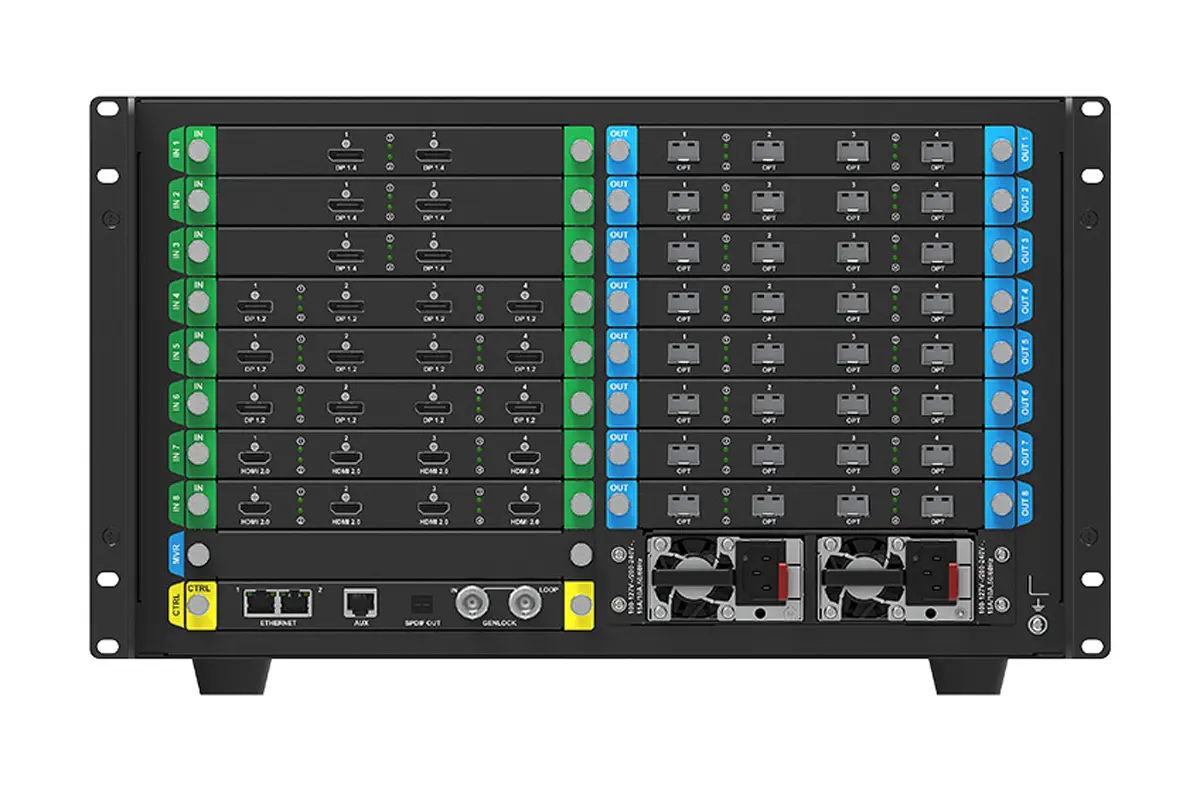
| Input card slots | 8 (six input card types available) |
| Output card slots | 8 (two output card types available) |
| Maximum load capacity | 141,000,000 pixels |
| Maximum video inputs | 32x 4K or 8x 8K |
| Maximum layers | 32x 4K layers in total; up to 4 layers per output card |
| Color depth | 12-bit, 10-bit and 8-bit |
| Frame rate | 23.98 Hz to 360 Hz (frame rate adaptive) |
| Latency | 0 frame (under 1 ms); optional 0 to 2 frames added latency |
| HDR | HDR10 and HLG, compliant with SMPTE ST 2084 and SMPTE ST 2086 |
| Output bandwidth | 1G (MX_4x10G_Fiber) or 5G (CX_1x40G_Fiber) – not both at once |
| Presets | Up to 128 customizable presets |
| Cascading | Up to 20 MX6000 Pro units over Ethernet or Genlock |
| Power supply | Dual power supply backup, 100-127V~/200-240V~, 15A/10A, 50/60Hz |
| Power consumption | 625 W |
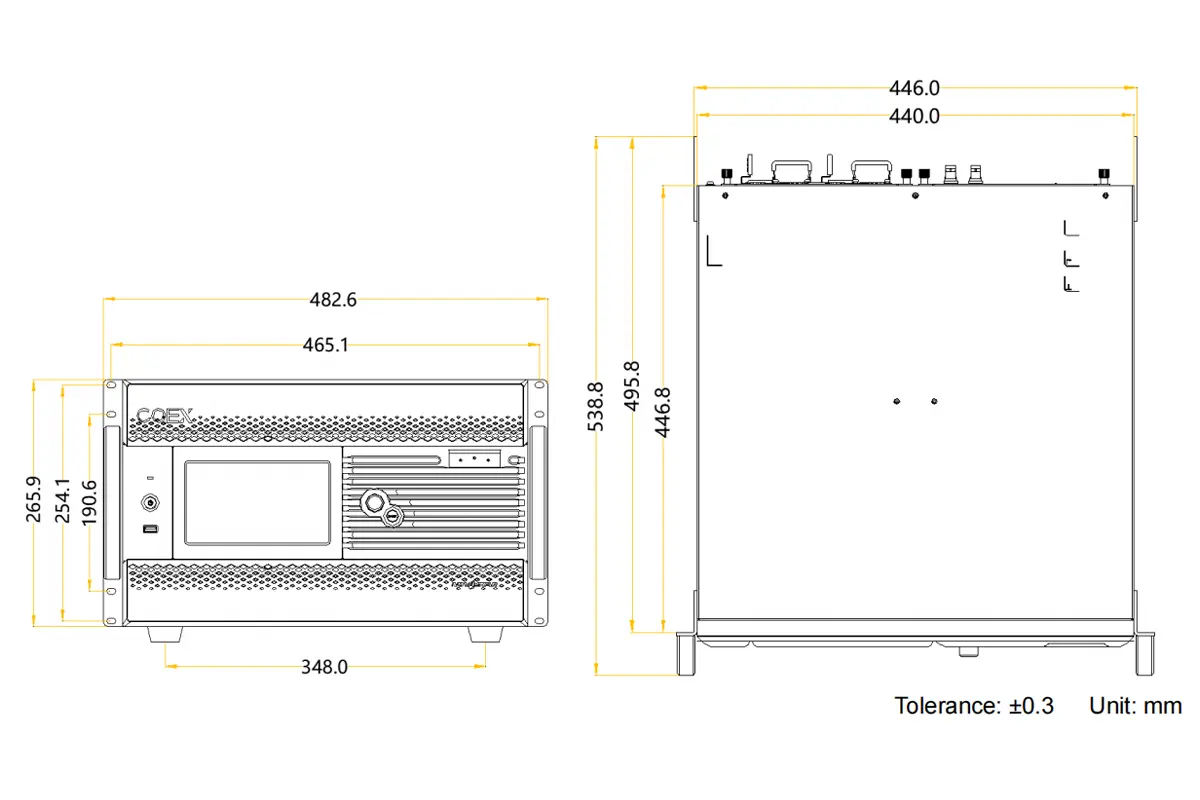
| Dimensions | 482.6 mm x 282.9 mm x 538.8 mm (height includes foot pads) |
| Net weight | 31 kg (without cards) |
| IP rating | IP20 – indoor use only |
2. What is the NovaStar MX6000 Pro video wall controller?
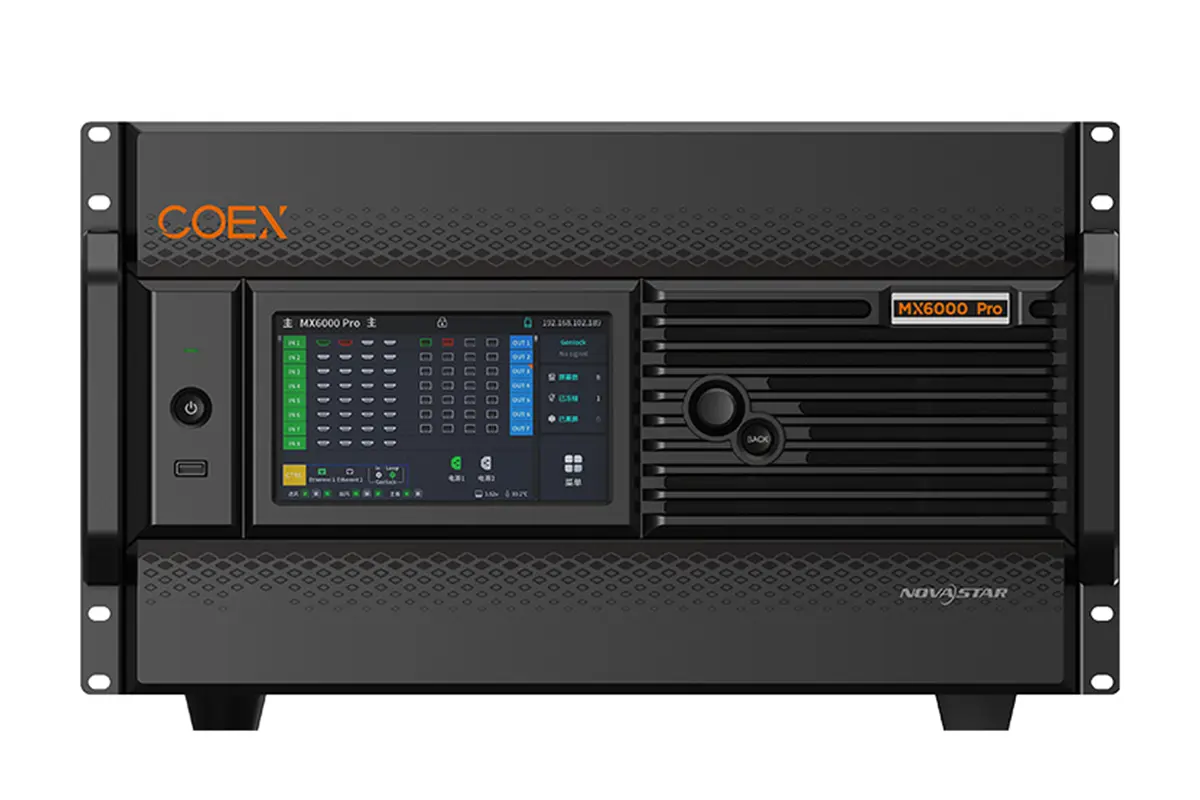
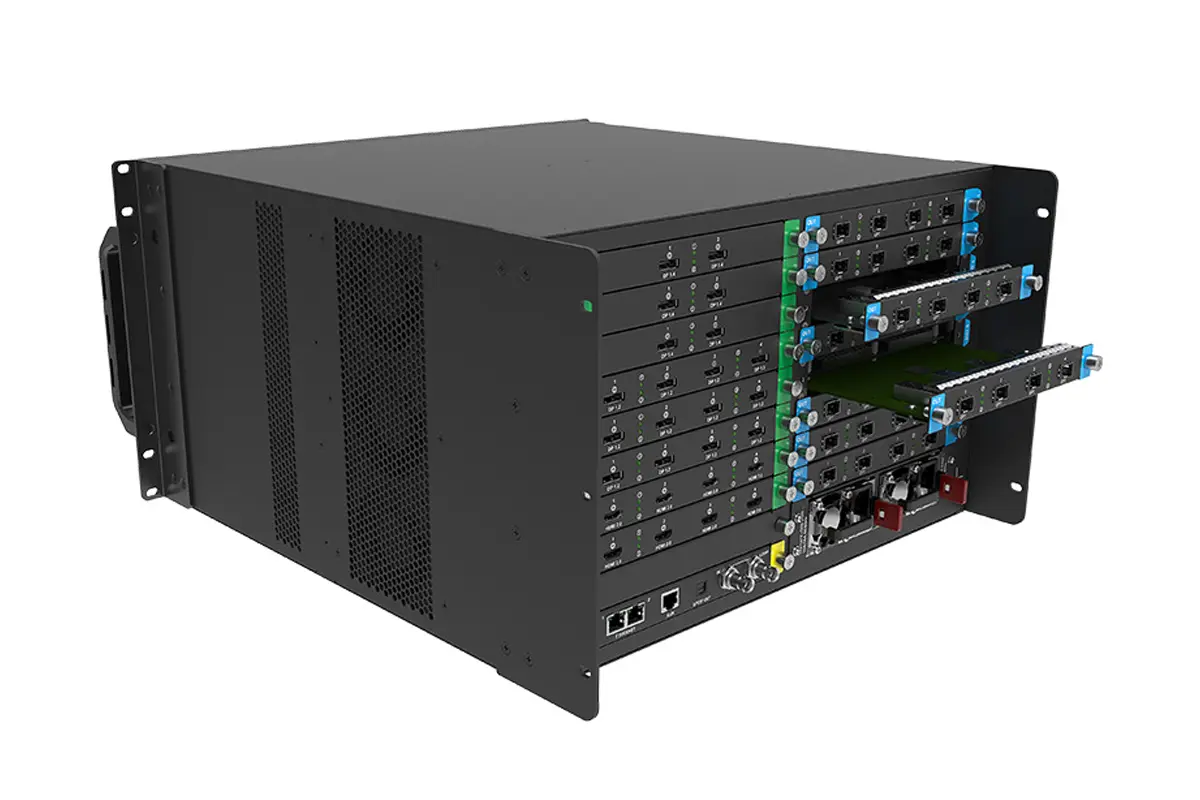
The MX6000 Pro is NovaStar’s large 8K display controller for demanding LED walls. Instead of a fixed set of ports, it uses a card-based modular architecture: you choose the input cards your signal sources need, and you choose the output card that matches the bandwidth your screen build requires. That makes one chassis suitable for a rental main stage, an xR/VP studio, a broadcast gallery or a fixed control room, with very different wiring behind it.
Three design points matter most when you specify it:
- Capacity – a single unit drives up to 141 million pixels, which is what allows large, high-density 8K walls without stacking many smaller processors.
- Flexible load calculation – there is no rectangle restriction for irregular screens, and blank pixels do not count towards the total capacity. Used port capacity is the sum of the resolutions of all cabinets that carry load.
- COEX ecosystem fit – the MX6000 Pro is part of the NovaStar COEX control system, so it is designed to work with matching fiber converters and receiving cards rather than as a standalone box.
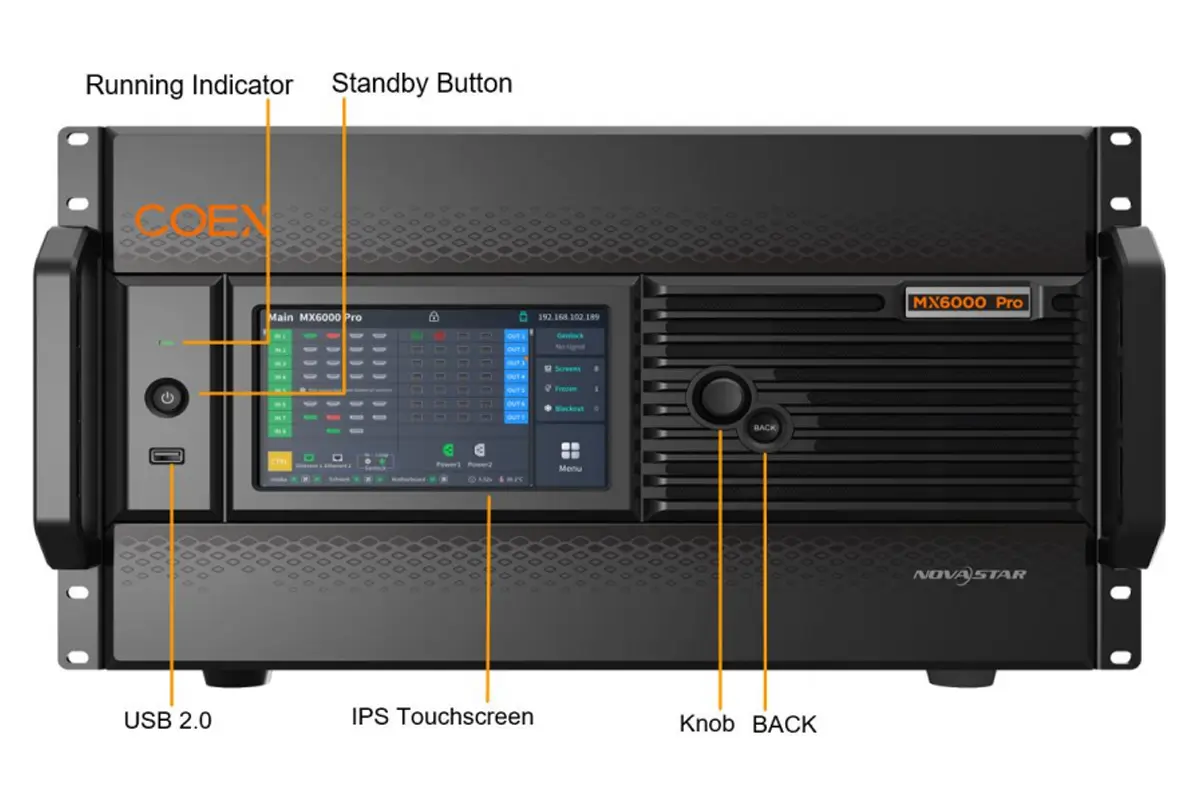
The unit is 6U and rack-mounts in a standard 19-inch rack with eight M5 screws. Eight input slots and eight output slots sit behind a front panel with a 7-inch IPS touchscreen, so basic checks and settings can be handled directly on the device without opening VMP.
3. NovaStar MX6000 Pro full specifications
The table below follows the official NovaStar MX6000 Pro LED Display Controller Specifications (document V1.1.1, released 2023-10-13). Where a value depends on the installed cards or the screen hardware, that condition is stated next to it.
| Feature | Specification |
|---|---|
| Input card slots | 8 slots, six input card types available |
| Output card slots | 8 slots, two output card types available |
| Maximum load capacity | 141,000,000 pixels |
| Maximum input resolution | 8192×4320@30Hz (8K HDMI 2.1 card); 7680×4320@30Hz (8K DP 1.4 card) |
| Maximum frame rate | Up to 360 Hz (the achievable frame rate depends on the screen’s hardware configuration) |
| Frame rate adaptive range | 23.98 Hz to 360 Hz, keeping maximum brightness and color temperature consistent |
| Color depth | Authentic 12-bit video input; 12-bit, 10-bit and 8-bit supported |
| Color processing | 14-channel color correction, RGBW color curves, color replacement, 3D LUT (.cube) at 17x17x17 accuracy |
| HDR | HDR10 and HLG, compliant with SMPTE ST 2084 and SMPTE ST 2086 |
| Latency | Minimum processing latency 0 frame (under 1 ms); layers can be assigned different latency, and 0 to 2 frames of extra latency can be added |
| Layers | Up to 4 layers per output card; up to 32x 4K layers per device; four scaling modes (custom, pixel to pixel, snap to canvas, fill screen) and layer roaming across output cards |
| Presets | Up to 128 customizable presets |
| Backup | Hot backup between devices, between output cards and between Ethernet ports; dual power supply backup |
| Control ports | 2x Gigabit Ethernet control ports (TCP/IP, star topology, built-in network switching); up to 20 units cascaded |
| Genlock | 1x Genlock pair (IN / LOOP), Bi-Level and Tri-Level; up to 20 units cascaded with a standard Genlock generator |
| Reserved ports | AUX (RS232) and SPDIF digital audio output |
| Protocols | SNMP and Art-Net supported |
| Local control | 7-inch IPS touchscreen, rotary knob, BACK and standby buttons, USB 2.0 (diagnostic export, NTFS/FAT32 only) |
| Power supply | 100-127V~/200-240V~, 15A/10A, 50/60Hz (2x AC input with switch) |
| Power consumption | 625 W |
| Operating environment | -10 degrees C to +45 degrees C, 0% to 80% RH non-condensing |
| Storage environment | -10 degrees C to +60 degrees C, 0% to 90% RH non-condensing |
| Dimensions | 482.6 mm x 282.9 mm x 538.8 mm (height includes foot pads) |
| Net weight | 31 kg (without cards) |
| Packing box | 725.0 mm x 635.0 mm x 410.0 mm, kraft paper box |
| Accessories | 1x power cord, 1x Ethernet cable, 1x Quick Start Guide, 1x customer letter, 1x safety manual, 1x certificate of approval |
| IP rating | IP20 |
| Noise level | 53 dB(A) typical at 25 degrees C / 77 degrees F |
| Certifications | CE, UKCA, FCC, IC |
4. Image quality: 12-bit color, HDR and 360 Hz
4.1 12-bit color and 14-channel color correction
The MX6000 Pro accepts an authentic 12-bit video input, which is what keeps gradients smooth and avoids banding on large, close-viewed walls. Beyond bit depth, three color tools do most of the work in the field:
- 14-channel color correction – fine adjustment of hue, saturation and brightness for black, white and the 12 standard colors derived from RGB.
- 3D LUT support – custom color mapping from .cube files at 17x17x17 accuracy.
- RGBW color curves and color replacement – dedicated curves for the RGBW mapping of the screen, plus the ability to replace any single color in the image without affecting the others.
4.2 HDR10, HLG and frame rate adaptive up to 360 Hz
HDR10 is parsed automatically, and HLG is supported, both under the SMPTE ST 2084 and SMPTE ST 2086 standards. HDR can also be set manually, which matters for 12G-SDI, DP 1.2 and non-standard HDR sources that do not carry reliable metadata.
Frame rate adaptive processing runs from 23.98 Hz to 360 Hz and holds maximum brightness and color temperature steady as the frame rate changes. For camera work, that is the feature that keeps a wall looking consistent when a shoot switches between 24, 25, 50 and 60 Hz.
4.3 Full-grayscale calibration with the C3200 camera
Full-grayscale calibration generates a separate calibration coefficient for every grayscale step, which is what removes low-gray unevenness that a single-point calibration cannot fix. It is performed with a C3200 scientific grade camera, and the required receiving cards depend on the solution you build:
- 1G solution: A10s Pro receiving card
- 5G solution: CA50E, CA50C or XA50 receiving card
4.4 xR and virtual production tools
Two features exist specifically for on-camera LED volumes. Shutter Fit automatically adjusts driver IC parameters to the camera shutter angle, removing black lines, grayscale addition and grayscale loss during capture. Frame multiplication combines frame interpolation (outputting images captured from multiple shooting angles at the same time, including solid green backgrounds for post-production) with frequency multiplication up to 360 Hz for multi-angle shooting.
These are the same requirements described in our guide to stage and virtual production LED displays.
5. Input cards: six card types for 4K, 8K, SDI and IP video
The MX6000 Pro has eight input slots and six available input card types. Mixing 4K, 8K and IP video cards in one chassis is the normal way to build a hybrid show, so the table below lists what each card actually accepts.
| Input card | Ports | Max resolution | Frame rates |
|---|---|---|---|
| MX_4xHDMI 2.0 (4K) | 4x HDMI 2.0 | 4096 x 2160 @ 60Hz or 8192 x 1080 @ 60Hz | 23.98 Hz to 240 Hz |
| MX_4xDP 1.2 (4K) | 4x DP 1.2 | 4096 x 2160 @ 60Hz or 8192 x 1080 @ 60Hz | 23.98 Hz to 240 Hz |
| MX_4x12G-SDI (4K) | 4x 12G-SDI | 4096 x 2160 @ 60Hz | Up to 60 Hz |
| MX_2xHDMI 2.1 (8K) | 2x HDMI 2.1 | 8192 x 4320 @ 30Hz | 23.98 Hz to 240 Hz |
| MX_2xDP 1.4 (8K) | 2x DP 1.4 | 7680 x 4320 @ 30Hz | 23.98 Hz to 240 Hz |
| VoIP card | 1x SMPTE ST 2110 (25G) | Depends on the IP source | Depends on the IP source |
Four practical details from the specification are easy to miss:
- The 12G-SDI card supports ST-2082 (12G), ST-2081 (6G), ST-424 (3G) and ST-292 (HD) inputs, including 3G Level A and Level B (DS mode), and can convert interlaced signals to progressive. Belden 12G SDI cables up to 50 m are recommended.
- HDCP support is card-specific: the 4K HDMI 2.0 card is HDCP 2.2 (backwards compatible with 1.4 and 1.3), the 4K DP 1.2 card is HDCP 1.3, and the 8K HDMI 2.1 and 8K DP 1.4 cards are HDCP 2.3 (backwards compatible with 2.2, 1.4 and 1.3). The 12G-SDI and SMPTE ST 2110 cards are not HDCP-protected inputs.
- HDMI 2.0 and HDMI 2.1 cards support EDID management with standard resolutions up to 3840×2160@60Hz plus custom input resolutions. Interlaced signal input is not supported on the HDMI 2.0, HDMI 2.1 or DP 1.2 cards.
- Maximum input resolution depends on bit depth and sampling format, not just the connector. For example, on the HDMI 2.1 card, 8192×4320@30Hz is available at 8-bit, 10-bit and 12-bit with RGB 4:4:4, YCbCr 4:4:4 or YCbCr 4:2:2.
6. Output cards: building a 1G or a 5G solution
There are two output cards, and the choice between them defines the rest of the signal chain. The MX6000 Pro cannot run 1G and 5G solutions at the same time, so this is a project-level decision.
| Output card (solution) | Fiber converter | Receiving cards and load per Ethernet cable |
|---|---|---|
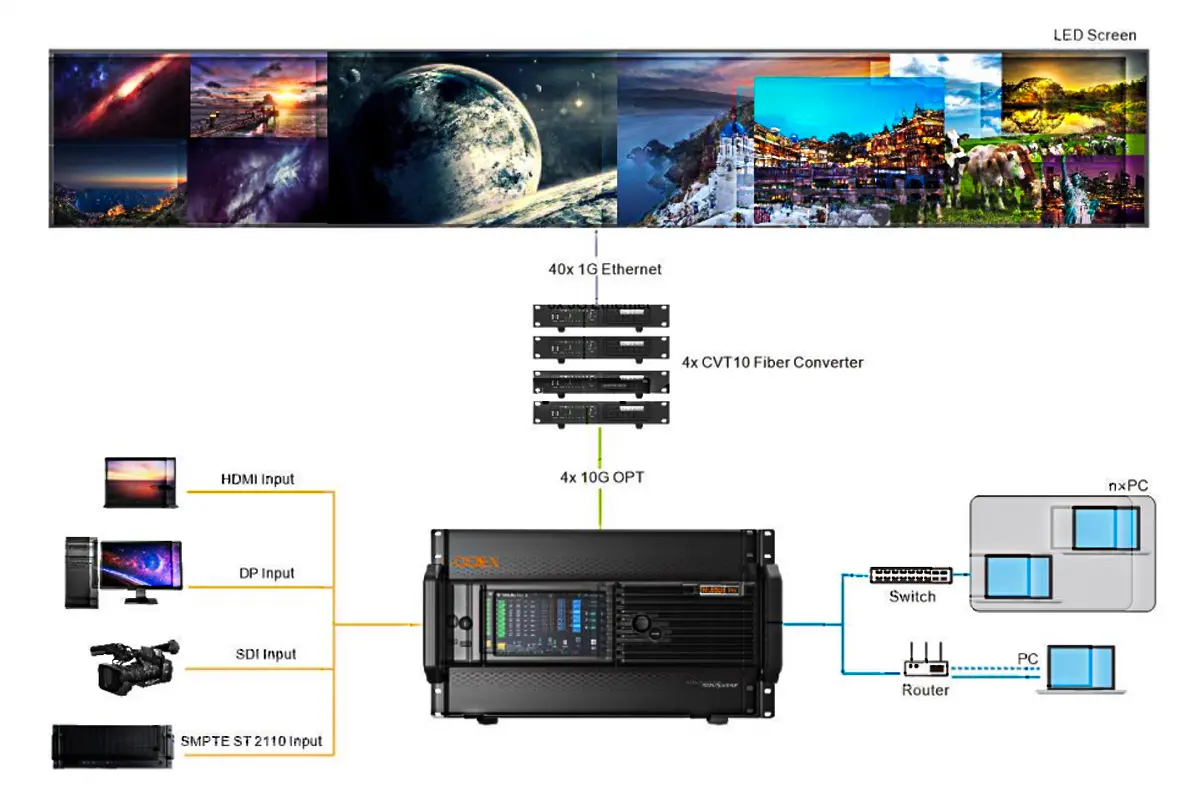
| MX_4x10G_Fiber (1G, 4x 10G optical ports) | CVT10 or CVT10 Pro | Armor series 1G receiving cards such as A10s Pro, A10 Plus-N, A8s-N, A7s Plus, A5s Plus; 650,000 pixels per Ethernet cable (about 659,722 at 8-bit / 60 Hz) |
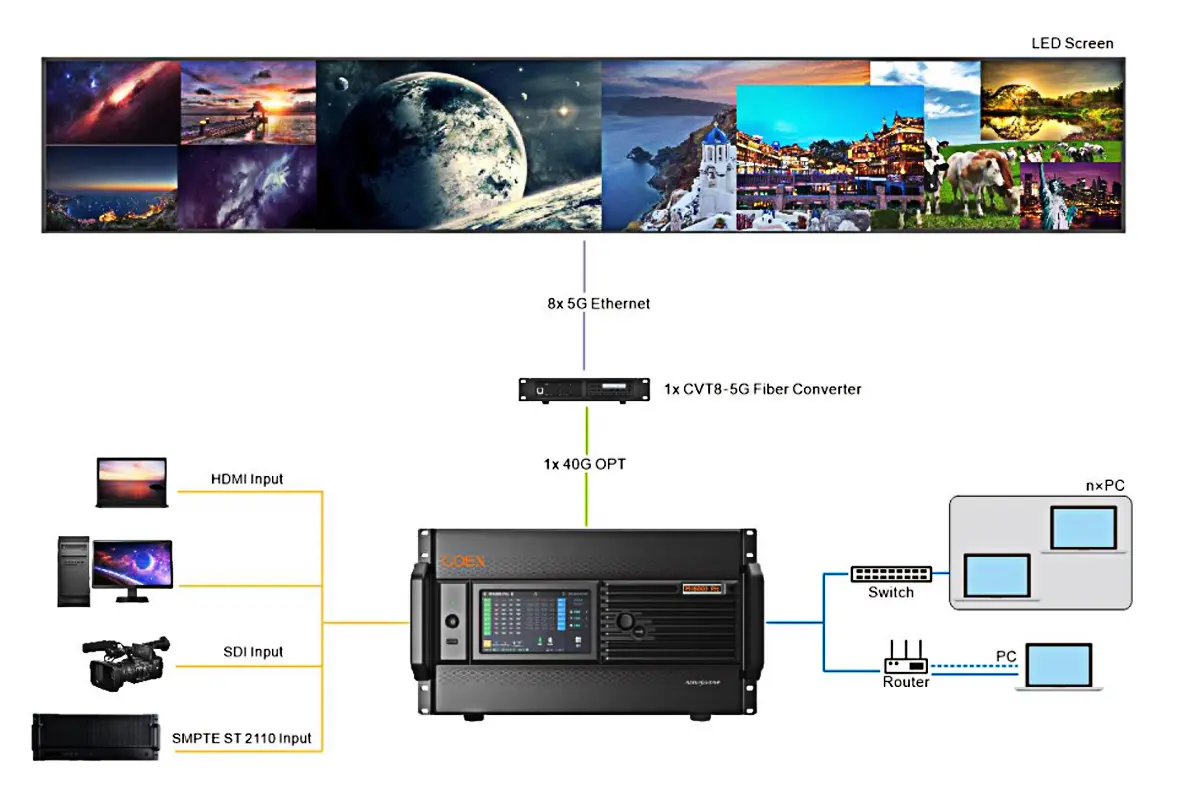
| CX_1x40G_Fiber (5G, 1x 40G optical port) | CVT8-5G | 5G receiving cards such as CA50E, CA50C or XA50; 2,600,000 pixels per Ethernet cable (2,592,000 at 8-bit / 60 Hz) |
On the 1G card, one 10G optical port carries the same capacity as ten 1G Ethernet ports, and a single card supports up to 40 Ethernet port outputs. On the 5G card, one 40G optical port or one card can load up to eight 5G Ethernet ports. Both card types accept single-mode and multi-mode optical fiber modules with a maximum transmission distance of 10 km.
The fiber converters themselves are worth reading up on before you order: see our notes on the CVT10 fiber optic converter and the CVT8-5G fiber converter.
7. Ethernet port load capacity in 1G and 5G solutions
These are the numbers that decide how many cabinets you can run per port. Note that the 10-bit column differs depending on which receiving card you use in a 1G solution.
7.1 1G solution with the A10s Pro receiving card
| Frame rate | 8-bit | 10-bit | 12-bit |
|---|---|---|---|
| 24 Hz | 1,649,306 px | 1,236,979 px | 824,653 px |
| 25 Hz | 1,583,333 px | 1,187,500 px | 791,667 px |
| 30 Hz | 1,319,444 px | 989,583 px | 659,722 px |
| 50 Hz | 791,667 px | 593,750 px | 395,833 px |
| 60 Hz | 659,722 px | 494,792 px | 329,861 px |
| 120 Hz | 329,861 px | 247,396 px | 164,931 px |
| 144 Hz | 274,884 px | 206,163 px | 137,442 px |
| 240 Hz | 164,931 px | 123,698 px | 82,465 px |
With other Armor series 1G receiving cards, the 60 Hz capacity is 659,722 px at 8-bit and 329,861 px at both 10-bit and 12-bit, so the A10s Pro card is what unlocks the higher 10-bit figure.
7.2 5G solution with CA50E, CA50C or XA50 receiving cards
| Frame rate | 8-bit | 10-bit | 12-bit |
|---|---|---|---|
| 24 Hz | 6,480,000 px | 5,182,500 px | 4,320,000 px |
| 25 Hz | 6,220,800 px | 4,975,200 px | 4,147,200 px |
| 30 Hz | 5,184,000 px | 4,146,000 px | 3,456,000 px |
| 50 Hz | 3,110,400 px | 2,487,600 px | 2,073,600 px |
| 60 Hz | 2,592,000 px | 2,073,000 px | 1,728,000 px |
| 120 Hz | 1,296,000 px | 1,036,500 px | 864,000 px |
| 144 Hz | 1,080,864 px | 864,441 px | 720,576 px |
| 240 Hz | 648,000 px | 518,250 px | 432,000 px |
Two limits apply to specific features rather than to the whole system. Frame rate adaptive requires a .ncp file generated by NovaStar’s Cabinet Tool, and on the 1G solution it additionally requires an A10s Pro receiving card. The 3D function requires specified 3D glasses from NovaStar technical support.
8. Control, monitoring and redundancy
8.1 Real-time monitoring and preview
The MX6000 Pro previews and monitors both the video source inputs and the LED screen outputs in real time, so an operator can see a problem on a source, a port or a card before the audience does. Hardware monitoring covers fan speed, module temperatures, voltage levels and operational status, and the system raises alarms automatically when something drifts.
8.2 Multi-layer control and layer roaming
Layers behave the way a show programmer expects. Each layer scales independently in one of four modes – custom, pixel to pixel, snap to canvas or fill screen – and each layer can carry a different latency setting. Layer roaming lets a layer cross output card boundaries, which is what makes irregular and multi-surface builds practical.
Preset management stores up to 128 configurations covering layers, brightness, color temperature and gamma, and each preset can be recalled in one click.
8.3 Backup and control protocols
Redundancy is handled at three levels: hot backup between devices, between output cards and between Ethernet ports, all backed by dual power supplies. If a card or a link fails, the system switches over and raises an alert instead of dropping the screen.
Control runs through NovaStar’s VMP software, or through SNMP and Art-Net for third-party control systems. Two Gigabit Ethernet control ports include a built-in network switch, so several MX6000 Pro units can be cascaded on the same LAN – up to 20 units – without adding a switch or router. Genlock keeps those cascaded units synchronized with Bi-Level or Tri-Level reference.
9. Where the MX6000 Pro is used
The MX6000 Pro is specified where a screen is large, the content is demanding, or downtime is not an option.
Large-scale events and rental
Concerts, festivals, conferences and exhibitions rely on its real-time scaling, seamless backup and multi-screen handling. Because capacity is calculated from loaded cabinets rather than from a fixed rectangle, rental builds with unusual shapes and crew-placed cabinets still load efficiently. See our rental LED display range for matching cabinets.
Broadcast and TV studios
Broadcast galleries benefit from low latency and precise color management. Support for 12G-SDI and SMPTE ST 2110 IP video inputs means the controller fits standard broadcast signal chains, while HDR10 and frame rate adaptation keep output consistent between studio and replay sources.
xR, VP and virtual production stages
Shutter Fit and frame multiplication are the two features that matter most on a virtual production volume, because they remove the artifacts a camera would otherwise capture from an LED wall. Combined with the 360 Hz frame rate ceiling, the MX6000 Pro is a practical backbone for real-time graphics on camera.
Fixed installations and control rooms
Museums, control rooms, corporate lobbies and command centres need long-term reliability rather than maximum port count. Hot backup, remote monitoring through VMP, IP20 protection and a 53 dB(A) noise figure at 25 degrees C suit equipment rooms where the controller runs continuously.
e-Sports and high frame rate content
Frame rates up to 360 Hz and frame rate adaptive processing keep fast-moving content free of tearing and stutter, which is why esports venues and simulation displays are a natural fit.
10. How to choose: MX6000 Pro vs MX2000 Pro vs MX40 Pro vs H Series
The MX6000 Pro is not the right controller for every project, and picking the wrong tier wastes budget or caps the screen. As a rule of thumb:
- Choose the MX6000 Pro when you need maximum capacity (141 million pixels), 8K inputs, IP video, or xR/VP features on one chassis.
- Compare with the MX2000 Pro when your capacity requirement and input mix are smaller – it sits below the MX6000 Pro in the same family. Our NovaStar MX2000 Pro review breaks down its specifications, price and manual.
- Consider the MX40 Pro for mid-size builds where a smaller modular processor covers the pixel count. See the NovaStar MX40 Pro guide, or the side-by-side MX20 vs MX40 Pro comparison.
- Look at the H Series if you need a video wall splicer rather than a card-based controller – for example the H5 video wall splicer or the H9 video wall splicer. The H Series vs VX Series comparison explains where each family fits.
- Compare output-side options such as the CX40 Pro LED display controller and the VX1000 Pro controller if your project is defined by output ports rather than total capacity.
If you are still mapping the whole signal chain – processor, receiving cards, cabinet layout – start from our LED video walls guide.
11. What affects the MX6000 Pro price
MX6000 Pro pricing is configuration-driven, not a single list number, because the chassis ships at 31 kg without cards and is then built to order. Four factors move the price most:
- Input card mix – a show that needs one 8K HDMI 2.1 card costs very differently from one that fills eight input slots with 4K HDMI, DP, 12G-SDI and IP video cards.
- Output card and bandwidth tier – the 1G path (MX_4x10G_Fiber with CVT10 / CVT10 Pro and Armor series receiving cards) and the 5G path (CX_1x40G_Fiber with CVT8-5G and CA50E / CA50C / XA50 cards) use different converters and receiving cards, and you cannot mix the two on one unit.
- Quantity and cascading – projects needing more than 141 million pixels use multiple units cascaded over Ethernet or Genlock, so unit count, fiber runs and converters all scale together.
- Accessories and spares – spare cards, additional power cords and Ethernet cables, and on-site support are normally quoted alongside the controller for rental and live-event work.
Because the right configuration depends on your pixel count, source list and frame rate, the practical next step is a project quote rather than a published price. Send us your screen size in pixels, required frame rate, input sources and redundancy requirement, and we will confirm the chassis, cards, converters and receiving cards that match.
12. Software, manual and downloads
Configuration and monitoring are handled by NovaStar’s VMP (Visual Management Platform) software. The controller can also be operated directly from its 7-inch touchscreen for status checks and basic parameter changes, which is useful during a load-in before the control computer is connected.
- VMP control software: download it from our NovaStar software download page, which also covers NovaLCT and related NovaStar utilities.
- Official specification: the values in this article follow the NovaStar MX6000 Pro LED Display Controller Specifications, document version V1.1.1 released on 2023-10-13. Earlier revisions differ – for example, the Dynamic Booster description was removed in version V1.0.1 and the input card information was updated in V1.1.1. Where a value depends on the receiving card or the screen hardware, we have stated the condition instead of quoting a single figure.
- Receiving cards and converters: capacity figures only hold with the matching hardware, so confirm the card model before finalising cabinet counts.
If your project uses receiving cards or converters from another ecosystem, our MX and MG series notes and HDR Master 4K processor page cover the adjacent options.
13. FAQ: NovaStar MX6000 Pro
╸What is the NovaStar MX6000 Pro used for?
The MX6000 Pro is a 6U card-based 8K LED display controller in the NovaStar COEX series. It is used to drive large, high-density LED walls in rental and live events, broadcast and TV studios, xR and virtual production stages, fixed installations, control rooms and esports venues. It handles up to 141 million pixels and up to 32x 4K layers from a single chassis.
╸How many pixels can the MX6000 Pro load?
A single MX6000 Pro loads up to 141,000,000 pixels in total. The figure that matters for wiring, however, is capacity per Ethernet port: in a 1G solution with the A10s Pro receiving card that is 659,722 pixels at 8-bit / 60 Hz, and in a 5G solution with CA50E, CA50C or XA50 receiving cards it is 2,592,000 pixels at 8-bit / 60 Hz. Blank pixels do not count towards the load, and irregular screens have no rectangle restriction.
╸Does the MX6000 Pro support 8K?
Yes. The 8K HDMI 2.1 input card accepts up to 8192×4320@30Hz and the 8K DP 1.4 input card accepts up to 7680×4320@30Hz. A fully loaded chassis supports up to 8x 8K or 32x 4K video inputs.
╸What is the difference between the 1G and 5G solutions?
The solution is set by the output card. The MX_4x10G_Fiber output card builds a 1G solution and works with CVT10 or CVT10 Pro fiber converters and Armor series 1G receiving cards such as the A10s Pro. The CX_1x40G_Fiber output card builds a 5G solution and works with the CVT8-5G converter and 5G receiving cards such as CA50E, CA50C and XA50. 5G loads roughly four times more pixels per Ethernet cable, but a single MX6000 Pro cannot run both 1G and 5G solutions at the same time.
╸How many layers does the MX6000 Pro support?
Up to 4 layers per output card and up to 32x 4K layers across the device. Each layer scales independently using custom, pixel to pixel, snap to canvas or fill screen mode, can be given its own latency setting, and can roam across output card boundaries.
╸Which software and manual does the MX6000 Pro use?
Configuration and monitoring use NovaStar’s VMP (Visual Management Platform) software, with SNMP and Art-Net available for third-party control. Basic settings can also be changed from the 7-inch front touchscreen. Our NovaStar software download page covers VMP and the related utilities.
╸Which software and manual does the MX6000 Pro use?
Not directly. The controller carries an IP20 rating and is intended for indoor, rack-mounted use in a standard 19-inch rack with an operating range of -10 degrees C to +45 degrees C. Outdoor LED screens are driven normally, but the controller itself must be installed in a suitable enclosure or equipment room.
╸Can MX6000 Pro units be cascaded?
Yes. Up to 20 MX6000 Pro units can be cascaded over the Gigabit Ethernet control ports, which include a built-in network switch, so no additional switch or router is required on the same LAN. Up to 20 units can also be cascaded with a standard Genlock signal generator for synchronized output.
╸How much does the NovaStar MX6000 Pro cost?
Pricing depends on the configuration rather than the chassis alone: the input card mix, whether you build a 1G or 5G output path, the fiber converters and receiving cards, the number of cascaded units, and spare cards for rental work. The chassis alone weighs 31 kg without cards and is built to order. Send us your pixel count, frame rate and source list and we will quote the specific configuration.
╸What is the difference between the MX6000 Pro and the MX2000 Pro?
Both sit in the NovaStar MX controller family, but the MX6000 Pro is the larger, 6U chassis with 8 input and 8 output card slots and a 141 million pixel ceiling, while the MX2000 Pro is aimed at smaller capacity and input requirements. If your wall fits the smaller tier, the MX2000 Pro costs less to build. We cover it in detail in our MX2000 Pro controller review.
Summary
The NovaStar MX6000 Pro is the controller to specify when a project needs maximum capacity, 8K inputs, IP video and on-camera features in one rack-mounted chassis. The decisive choices are the input card mix and whether the screen build follows the 1G or the 5G output path, because those two decisions set the fiber converters, receiving cards and per-port load capacity for the entire project.
Ready to size an MX6000 Pro configuration for your screen? Send us your pixel count, required frame rate and source list, and our team will confirm the chassis, cards and converters and give you a costed quote.
Related Posts
NovaStar CVT8-5GS Fiber Converter: Specs, Setup and Manual
The NovaStar CVT8-5GS is a single-mode fiber converter for LED…
NovaStar H5 Video Wall Splicer: Specs, Setup & Manual
The NovaStar H5 video wall splicer is a 5U, modular…
NovaStar TB10 Plus: Specifications, Setup and TB20 Plus Comparison
The NovaStar TB10 Plus is an Android 10 multimedia player…

No Comments