
NovaPro UHD Jr: Specs, Setup, Software and Price Guide
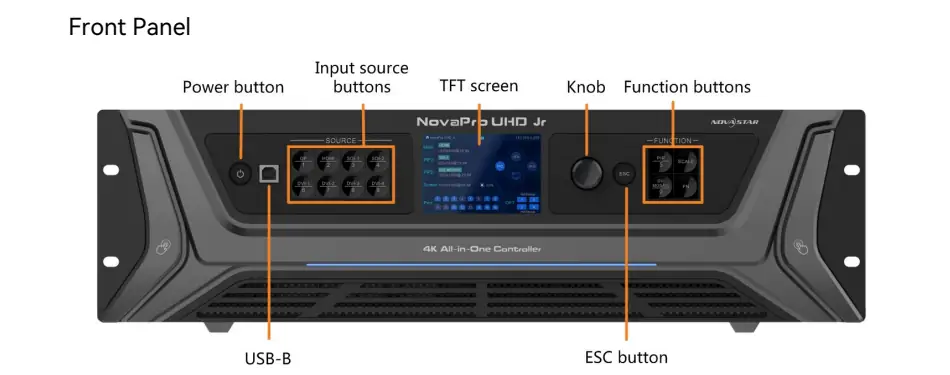
NovaPro UHD Jr is a NovaStar all-in-one LED display controller that combines video processing, scaling and sending functions. It accepts professional video sources and distributes the processed picture to receiving cards inside LED cabinets. Its headline capacity is up to 10.4 million pixels, but the usable screen size depends on bit depth, operating mode, cabinet mapping and the load assigned to each output.
This guide explains the NovaPro UHD Jr specifications, software, manual, setup workflow and price considerations for rental technicians, system integrators and display buyers. Whether you are configuring a conference backdrop or a permanent fine-pitch wall, start with the screen’s actual pixel dimensions and signal format. Those details tell you more about suitability than the “4K controller” label alone.
1. What Is NovaStar NovaPro UHD Jr?
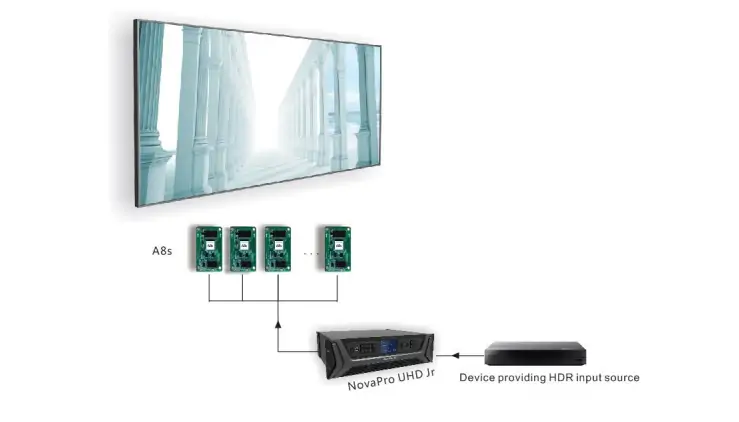
The NovaStar NovaPro UHD Jr sits between your video sources and the LED screen. A laptop, media server or production switcher supplies the picture; the controller scales and positions it; receiving cards distribute the resulting data to the LED modules. Keeping these jobs in one chassis can simplify a rack and reduce the number of settings an operator must coordinate.
An all-in-one controller still needs compatible receiving cards, correctly configured cabinets and suitable cabling. It does not replace the electronics inside the screen. Likewise, an input signal appearing on the controller’s monitor does not prove that the cabinet mapping is correct. The input path and the LED output path must both be commissioned.
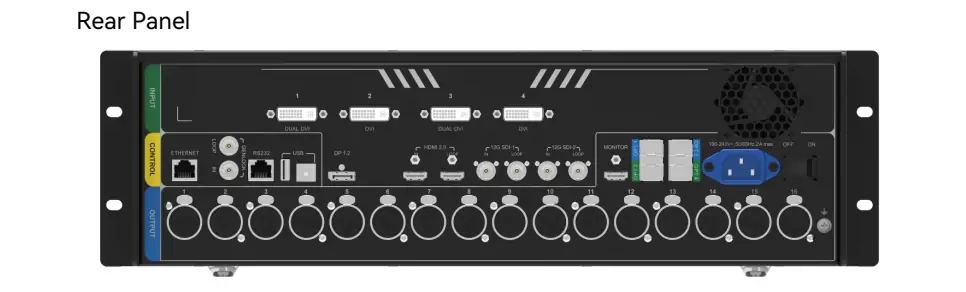
NovaPro UHD Jr is relevant to projects using a mix of HDMI, DisplayPort, DVI and SDI equipment. For an event, list every source before choosing the connection scheme: presentation computer, playback server, live camera feed and standby source. For a fixed installation, include the equipment that facilities staff will use after the integrator leaves.
A useful purchasing question is: can the complete system display the required content at the intended resolution, frame rate and color depth, with an acceptable recovery plan? That question avoids paying for unused functions while overlooking a critical input or backup requirement. Our rental LED display overview provides context for screens used in temporary installations.
2. NovaPro UHD Jr Specifications and Pixel Capacity
Read the NovaPro UHD Jr specifications as several constraints that apply together. Input resolution, total output pixels and individual port loading are different measurements. A design can pass the total-pixel check and still fail because too many cabinets are connected to one port.
01. Inputs, outputs and practical limits
| Item | Published specification | Planning implication |
|---|---|---|
| HDMI / DisplayPort | 1 × HDMI 2.0; 1 × DP 1.2; up to 3840 × 2160 at 60 Hz | Validate the complete source, adapter and cable path. |
| SDI | 2 × 12G-SDI; up to 4096 × 2160 at 60 Hz | Match the production signal format and cable capability. |
| DVI | 4 inputs; dual-link mode uses DVI 1 and 3 | Connector count does not mean eight display layers. |
| LED data outputs | 16 Gigabit Ethernet ports; 4 optical ports | Optical transmission does not add independent pixel capacity. |
| 8-bit loading | Up to 650,000 pixels per Ethernet port; 10,400,000 total | Every output must stay within its own budget. |
| 10-bit / 12-bit loading | Up to 320,000 pixels per Ethernet port | A higher bit depth changes the port allocation. |
| Dimension ceilings | Maximum width 16,384; maximum height 8,192 pixels | These are separate limits, not a supported full rectangle. |
| Monitoring | HDMI monitor output up to 1920 × 1080 at 60 Hz | Use it to inspect the signal, not as another LED output. |
Specification reference: NovaStar NovaPro UHD Jr Specifications V1.6.0 and User Manual V1.6.0. Confirm the applicable hardware and firmware before final system design.
02. Calculate the wall before selecting ports
For a rectangular display, multiply the horizontal pixel count by the vertical pixel count. A 3840 × 2160 wall contains 8,294,400 pixels. Dividing by 650,000 and rounding up gives a theoretical minimum of 13 Ethernet ports at the stated 8-bit limit. This is arithmetic, not a ready-made wiring plan: whole cabinets, cable routing and mode restrictions may require a different allocation.
For comparison, dividing the same wall by 320,000 gives 26 ports at the published higher-bit-depth limit. That exceeds the 16 physical outputs on one unit. A wall that fits the NovaPro UHD Jr at 8-bit therefore cannot automatically be assumed to fit at 10-bit or 12-bit. Recalculate when the source format changes.
Consider a cabinet with 256 × 256 pixels: it contains 65,536 pixels. Nine such cabinets use 589,824 pixels, while ten use 655,360. Ten would exceed a 650,000-pixel budget. At 320,000 pixels, four use 262,144 and five use 327,680. This example illustrates why rounding down the cabinets per port matters.
03. Separate dimensions from total capacity
A 16,384 × 8,192 rectangle contains 134,217,728 pixels, far beyond 10.4 million. The width and height figures must never be multiplied together and advertised as the controller’s supported canvas. Check the total area, each dimension, each port and the selected operating mode independently.
For an irregular wall, keep a drawing of active cabinet areas and their coordinates. Empty areas in a content canvas and physical LED pixels are not interchangeable planning concepts. Ask the system designer to validate the mapping and processing limits for the exact arrangement rather than assuming a rectangular-area calculation resolves every constraint.
3. Compatibility, HDR, 3D and Screen Setup
NovaPro UHD Jr compatibility is a system-level question. Confirm the receiving-card model and configuration, source timing, optical equipment and required operating modes together. A connector that physically fits does not establish that the complete signal path supports the intended format.
01. HDR, 3D and low latency
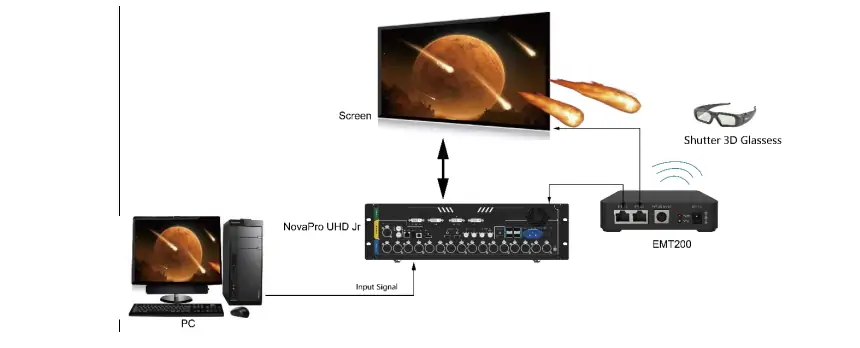
For NovaPro UHD Jr HDR operation, the manufacturer documents HDR10 and compatible A8s/A10s receiving cards. The manual states that enabling HDR reduces output loading capacity by 50%, and enabling 3D halves it. Do not assume their capacity effects can be combined by a simple formula, or that every feature can run simultaneously. Have the intended configuration checked before allocating cabinets.
Active 3D requires appropriate content, an EMT200 transmitter and compatible glasses. It is different from a glasses-free perspective illusion shown on an ordinary LED billboard. Specify which experience the project requires before buying accessories or selecting a controller mode.
Low-latency claims also need context. End-to-end delay includes the camera, production chain, controller and screen electronics. Test the complete chain for live image magnification. The NovaPro UHD Jr User Manual V1.6.0, dated August 4, 2026, removes an earlier description of a single-port width restriction for low latency; older instructions should not be applied indiscriminately to newer configurations.
02. NovaPro UHD Jr setup sequence
- Document the wall. Record cabinet pixel dimensions, rows, columns, receiving-card model and physical cable order. Keep the supplier’s validated cabinet configuration file with the project.
- Build the port plan. Calculate pixels per cable run using the actual bit depth and mode. Label both ends of each cable so the drawing can be checked against the installed screen.
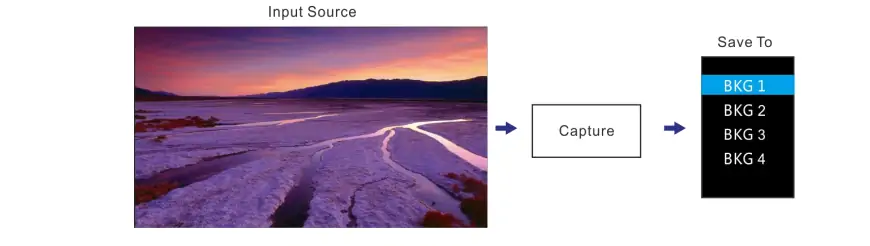
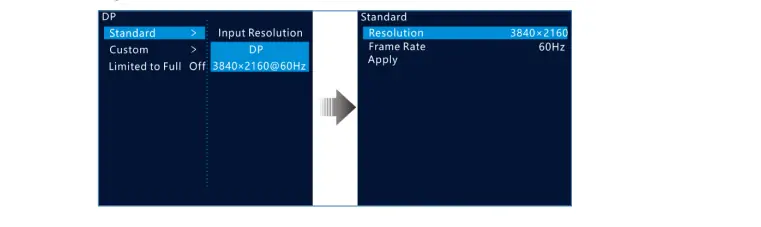
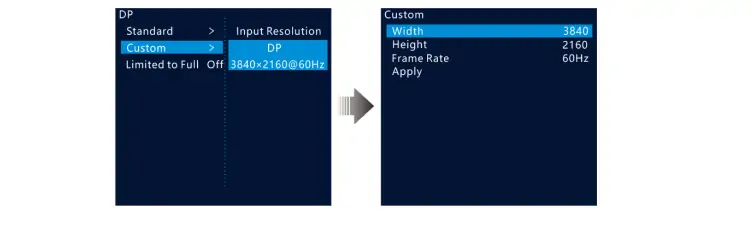
- Establish one known signal. Start with a supported standard timing from a reliable source. Confirm input detection before introducing custom resolutions, extra layers or backup switching.
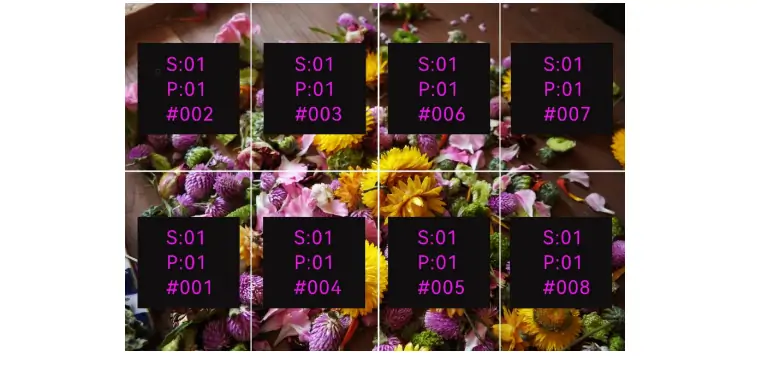
- Map the cabinets. Match the screen layout to the physical data flow. Use a grid or numbered test pattern to identify swapped rows, reversed cable paths and incorrect offsets.
- Set scaling deliberately. Use pixel-to-pixel for content authored to the canvas, or define a suitable scaled layout. Check circles, logos and text for stretching or cropping.
- Save and verify. Save the correct receiving-card configuration and controller settings. Test restart behavior, source switching and the planned backup procedure before handing over the system.
Custom EDID tells a source which timing to send; it does not create additional output bandwidth. If a laptop does not offer the requested wide resolution, check the graphics adapter, dock and cable as well as the controller. Preserve a standard-resolution fallback that the operator can select quickly.
03. Fiber, synchronization and mosaic
For NovaPro UHD Jr optical output, distinguish a longer transmission route from a larger pixel budget. Fiber carries the mapped data; it does not relieve an overloaded Ethernet-port assignment. Specify compatible optical modules, fiber type, connectors and receiving equipment, then test the actual installed link.
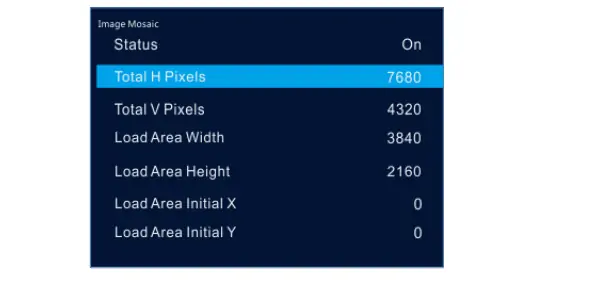
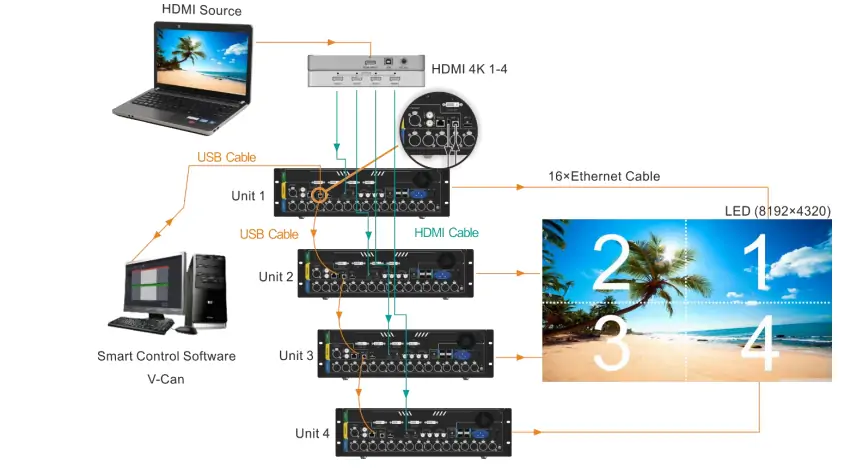
Multi-controller image mosaic requires a coordinated canvas, source distribution, offsets and synchronization. Do not equate a four-device mosaic arrangement with permission to loop HDMI through any number of devices. Treat signal distribution, control cascading and LED loading as separate parts of the drawing, and test moving content across controller boundaries.
4. NovaPro UHD Jr Software, Manual and Firmware
The right NovaPro UHD Jr software depends on the task. Operating a show layout, configuring receiving cards and updating firmware are different jobs. Keeping that distinction clear reduces the risk of changing cabinet parameters when you only intended to switch a video source.
01. Software and download selection
| Task | Tool or document | What to verify |
|---|---|---|
| Operate sources and layouts | V-Can | Controller detection, input selection and saved layouts. |
| Configure cabinet parameters | NovaLCT | Correct receiving-card file and supported hardware. |
| Plan screen mapping | SmartLCT | Device support and the actual cabinet arrangement. |
| Learn menu behavior | Model-specific user manual | Document revision and installed firmware. |
| Use browser control | Web User Manual | Supported workflow and local network settings. |
| Decide on an upgrade | Firmware release notes | Applicable hardware, changes and recovery procedure. |
Start with the HonghaiLED NovaStar software download guide, then obtain the model-specific package from NovaStar’s official support resources. Check the operating system, release notes and device compatibility before installing it. A familiar application name alone is not evidence that every release supports your controller and receiving-card combination.
As checked on October 10, 2026, NovaStar’s product page lists controller firmware V1.9.2.0.STD, V-Can V3.8.0 and NovaLCT V5.9.2. These are reference listings, not an instruction to upgrade every system. The linked NovaPro UHD Jr user manual is V1.6.0; the older web-control guide has its own revision history.
02. Firmware and configuration are different
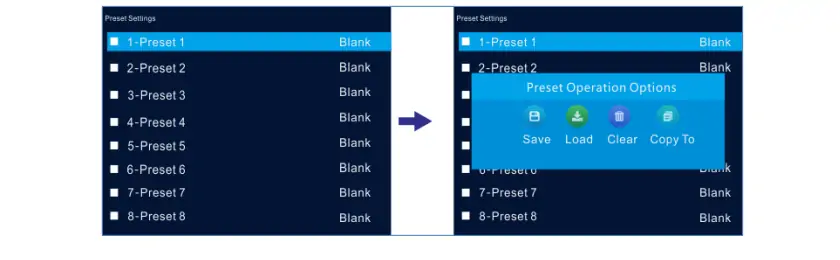
Firmware changes device behavior. A receiving-card configuration describes the cabinet electronics and scanning arrangement. A show preset describes an operating layout. Keep separate backups and clear filenames for each, including the project, hardware model and date. Avoid relying on a folder containing several files all named “final.”
Before a NovaPro UHD Jr firmware change, record the installed version, export available configuration backups and read the release notes. Confirm a recovery route with the supplier, use stable power, and allow time to recommission the wall. A working production system should not be upgraded immediately before an event simply because another version exists.
After the change, verify input formats, cabinet mapping, brightness, presets and backup behavior. Retain the prior configuration and a written record of what changed. When requesting support, include the exact version and observed symptom so the technician can distinguish a configuration problem from a software issue.
5. NovaPro UHD Jr Price and Buying Checklist
A useful NovaPro UHD Jr price is a dated quotation for a defined system. A bare controller listing is not directly comparable with a package that includes optical equipment, receiving cards, commissioning and local service. This guide does not present an unverified universal selling price.
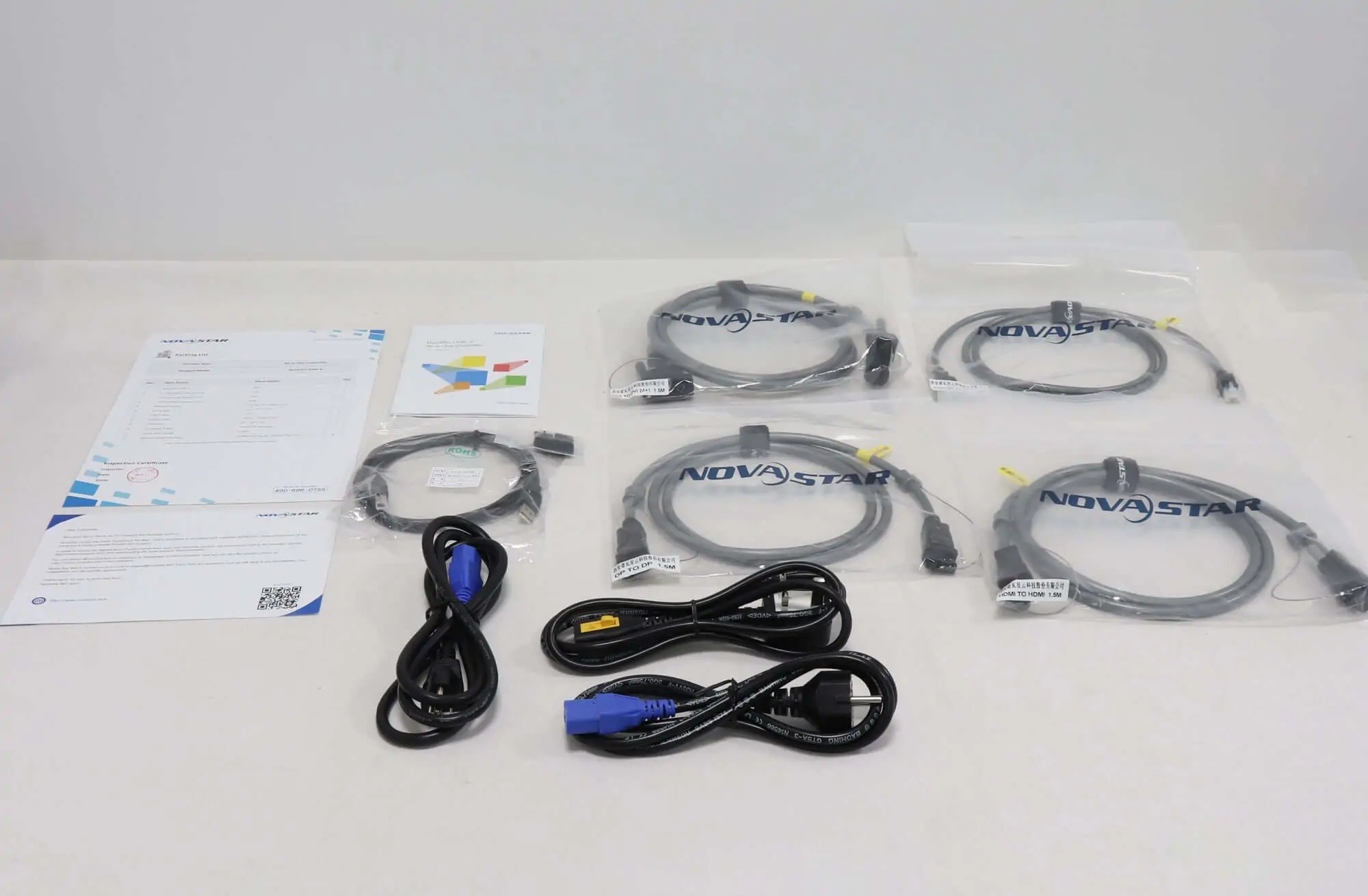
Ask for separate line items covering the controller, optical modules and converters, cabling, rack accessories, spare equipment and technical support. Confirm currency, freight, taxes, warranty coverage and the quotation’s validity period. For a used unit, request its condition, hardware revision, included accessories and a functional test using the formats you need.
Your NovaPro UHD Jr enquiry should include the finished wall resolution, cabinet count, pixel dimensions per cabinet, receiving-card model, cable distances and source list. Add the intended frame rate, bit depth, HDR or 3D requirement and redundancy expectations. These details let the supplier assess suitability rather than quote an isolated box.
Compare total project cost over the intended service period. A lower purchase price may require additional conversion equipment, a second controller or more technician time. Conversely, an expensive controller provides little benefit if the screen uses only a small fraction of its capacity and none of its specialist inputs.
For an integrated screen-and-control proposal, contact HonghaiLED with your cabinet layout and source requirements. Request written confirmation of the supported operating mode and the proposed port allocation. That creates a clear basis for acceptance testing and makes competing quotations easier to compare.
6. NovaPro UHD Jr Troubleshooting
Diagnose NovaPro UHD Jr problems from source to screen. First identify whether the fault is in input detection, processing, transmission or cabinet configuration. Changing several settings at once may hide the cause and makes it harder to restore a reliable system.
| Symptom | First checks | Next useful test |
|---|---|---|
| No input detected | Selected connector, source output and cable | Use a known working source and supported standard timing. |
| Input visible, LED wall black | Blackout, brightness, mapping and cabinet power | Display an internal test pattern to isolate the output path. |
| Part of the wall missing | Affected port, cable order and receiving-card power | Compare the failed area with the saved port map. |
| Wrong image position | Offsets, data flow and cabinet dimensions | Use a numbered grid, then correct one mapping variable at a time. |
| Washed-out or clipped picture | Source color range and HDR agreement | Compare a known SDR test image through the same path. |
| Intermittent signal | Connectors, cable quality, heat and optical link | Substitute one known working component and record the result. |
01. Check the signal path before resetting
A NovaPro UHD Jr showing a valid input but no LED image needs a different investigation from one showing no input at all. An internal test pattern helps separate these cases. If the pattern reaches the whole wall, focus on source selection and processing. If it fails in the same cabinet area, investigate the output path and mapping.
When flicker affects only one run, compare that run’s load and cabling with a working run. When a fault follows one source, investigate that source’s timing and connection. Record whether the problem is constant, temperature-related or triggered by switching. A short video of the symptom can be more useful than a vague description.
02. Password, control and recovery questions
If you searched for “NovaStar UHD Jr password,” first identify which interface is asking: the controller, a computer application or a browser login. There is no verified universal password supplied in this guide. Use the matching interface documentation or contact the system administrator or supplier with the model and firmware details.
For an unresponsive NovaPro UHD Jr, check power, boot status, communication settings and whether the control computer is on the correct network. Avoid a factory reset as the first diagnostic step. Preserve the existing configuration and understand which settings the selected reset option removes before using it.
A useful support package contains the controller version, cabinet configuration, port map, input resolution, frame rate, bit depth and a clear description of the last working state. Include the tests already performed. This helps support staff propose the next discriminating test instead of repeating basic checks.
7. NovaPro UHD Jr vs Other Controller Types
Compare NovaPro UHD Jr with alternatives by system role before comparing model numbers. An all-in-one processor, a sending controller and a video-wall splicer may all appear in an LED installation, but they solve different parts of the signal-chain problem.
01. All-in-one controller or separate devices?
An all-in-one design is convenient when one operator needs integrated source handling and LED sending. Separate processing and sending devices can be useful when the venue already owns a production processor, requires a particular switching workflow, or needs the sending hardware located elsewhere. Evaluate the complete rack and its operational requirements.
For NovaPro UHD Jr vs MCTRL 4K enquiries, begin by asking where scaling and source composition will happen. Do not assume a sending-focused device provides the same workflow as an integrated processor. For NovaPro UHD Jr vs a VX-series model, compare the exact model’s supported inputs, pixel budget, layers and receiving-card compatibility rather than relying on family names.
02. Match the controller to the operating team
A multi-window control-room installation may need a different architecture from a touring presentation screen. Our H series and VX series comparison explains those broader roles. Build a shortlist around required behavior, then request a demonstration with representative content.
Finally, test the human workflow: can the operator recover from a missing laptop signal, recall the correct layout and identify a failed cable run? Document those procedures at handover. NovaPro UHD Jr should be selected because its verified capabilities fit the project, with sufficient capacity and a workable support plan.
8. NovaPro UHD Jr FAQ
These answers cover common NovaPro UHD Jr specification, software and buying questions. Expand a question to read the answer.
01. What is the NovaPro UHD Jr used for?
NovaPro UHD Jr processes and scales video and sends it to compatible LED receiving cards. It suits installations that need those functions in one controller. Confirm the complete screen configuration before treating a model recommendation as a system design.
02. How many pixels can NovaPro UHD Jr control?
The published maximum is 10.4 million pixels under the applicable loading conditions. Individual Ethernet-port limits, bit depth and operating modes still apply. Use the calculation examples above and verify the cabinet allocation; maximum width and height are not one supported full rectangle.
03. Which NovaPro UHD Jr software should I use?
Choose by task: V-Can for operating layouts and sources, NovaLCT for relevant receiving-card configuration work, and SmartLCT for supported mapping workflows. Check device compatibility and software versions before connecting to an existing installation.
04. Where can I get the NovaPro UHD Jr manual?
Use NovaStar’s official product support resources and select the document for this exact model. The user manual, web-control manual and quick-start guide serve different purposes. Record the revision alongside the firmware version in your project documentation.
05. Can fiber increase the NovaPro UHD Jr pixel capacity?
No. Fiber provides a transmission route for the mapped output data. It does not add another independent pixel budget or cure an overloaded port assignment. Validate compatible optical equipment and the complete link separately from the loading calculation.
06. What affects the NovaPro UHD Jr price?
The quotation depends on the unit condition, included accessories, optical equipment, delivery terms and support scope. Ask for a dated itemized quote using your wall resolution and operating requirements. Compare complete systems rather than isolated advertised prices.
07. Does NovaPro UHD Jr support every 4K or 8K signal?
No. A resolution label alone is insufficient: connector, timing, bit depth and processing limits all matter. An ultrawide 8K-by-1K format is different from a full 8K television frame. Confirm the exact source format against the applicable specification.
08. Should I reset NovaPro UHD Jr if the wall is black?
First check input detection, blackout, brightness, cabinet power and the output map. Use an internal test pattern to isolate the fault. Back up the configuration before considering a reset, and obtain help if the recovery procedure is unclear.
09. What should I do if NovaPro UHD Jr asks for a password?
Identify the interface requesting access: the device, control software or browser interface. Use the documentation for that interface and contact the system administrator or supplier if necessary. Avoid assuming a password from another NovaStar product applies, and preserve the configuration before attempting recovery.
9. Conclusion
NovaPro UHD Jr combines processing and LED sending in a single system component, but a reliable result depends on the design around it. Establish the wall resolution, allocate whole cabinets within each port’s budget and verify the source format before selecting HDR, 3D or other operating modes.
For a new project, evaluate the NovaPro UHD Jr with a documented cabinet map, compatible receiving cards and a clear backup strategy. For an existing installation, retain working configurations and use the correct manual revision when making changes. Those practical checks turn specifications into a system that the operating team can understand, maintain and recover.
Technical references: NovaStar NovaPro UHD Jr Specifications V1.6.0; All-in-One Controller User Manual V1.6.0; Web User Manual V1.0.2; official product download listings checked October 10, 2026. Examples and commissioning recommendations in this guide are explanatory planning guidance, not a substitute for approval of the final cabinet and port configuration.
Related Posts
NovaStar MSD600 Sending Card: Specs, Manual & Setup
The NovaStar MSD600 sending card connects a live video source…
NovaStar MSD300 Sending Card: Specs, Wiring & Setup
The NovaStar MSD300 sending card connects a live DVI video…
NovaStar A10s Pro Receiving Card: Specs, Setup & Datasheet
The NovaStar A10s Pro is a compact LED receiving card…

No Comments