
NovaStar HDR Master 4K vs MCTRL4K: Processor or Controller?
The NovaStar HDR Master 4K processes the picture; the NovaStar MCTRL4K sends that picture to an LED wall. That is the essential difference in an HDR Master 4K vs MCTRL4K comparison. One handles video processing and dynamic-range conversion, while the other handles LED display control. Depending on your source, cabinet configuration and image requirements, your system may need a controller alone, a processor with an existing controller, or both units.
Choosing correctly requires more than comparing the words “4K” and “HDR.” A source can fit the input resolution yet exceed the available output-port capacity. A display can accept an HDR signal yet produce disappointing shadows because the receiving cards, brightness settings or source format are wrong. This guide explains the purchase decision, physical connections, pixel calculations and commissioning checks for rental stages and fixed LED installations.
Here, MCTRL4K and MCTRL 4K refer to the same NovaStar model. Specifications are identified by document version where relevant; calculated examples are planning examples, not tested project results. Start with the role comparison, then use the capacity and setup sections to check your proposed system before requesting a quotation.
1. The Short Answer: Two Different Jobs in One Chain
The NovaStar HDR Master 4K belongs upstream of the LED sending controller. Its purpose is to prepare a usable video image: choose sources, scale or crop content, arrange layers and convert between SDR and HDR formats. The NovaStar MCTRL4K belongs downstream, where a prepared video canvas must be mapped to the receiving cards inside LED cabinets.
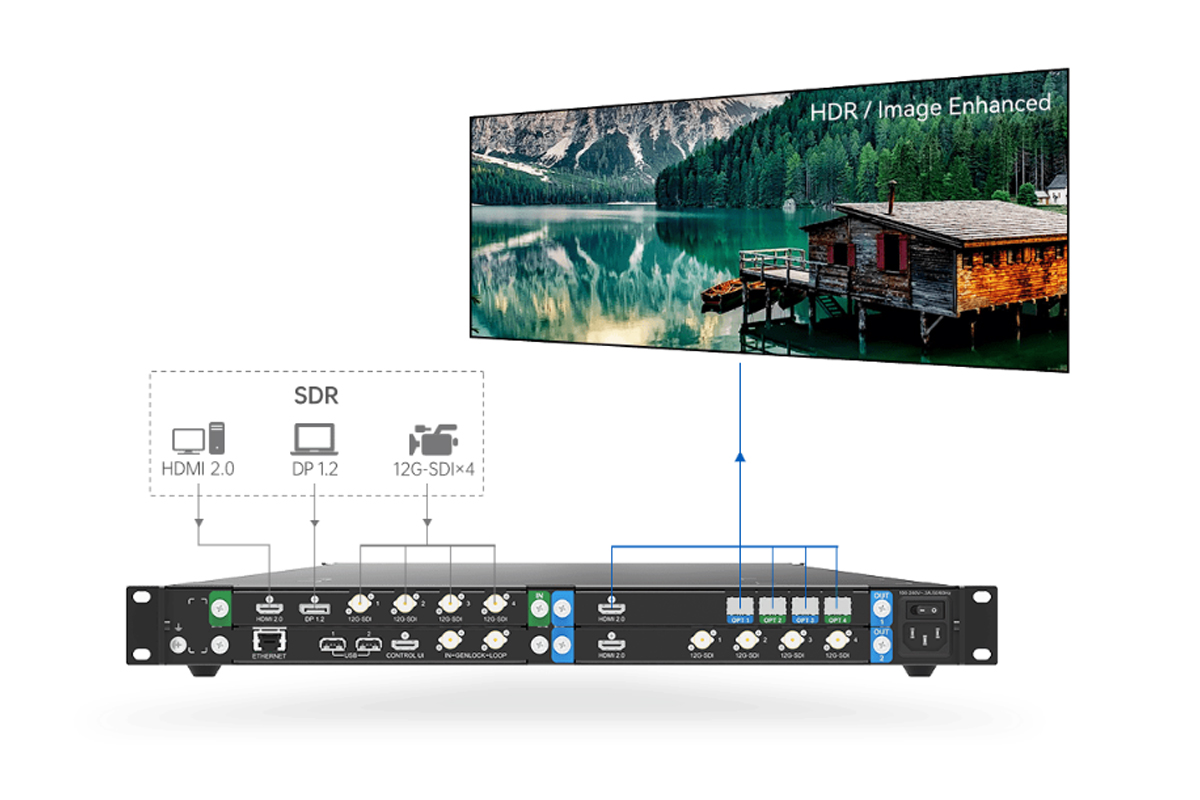
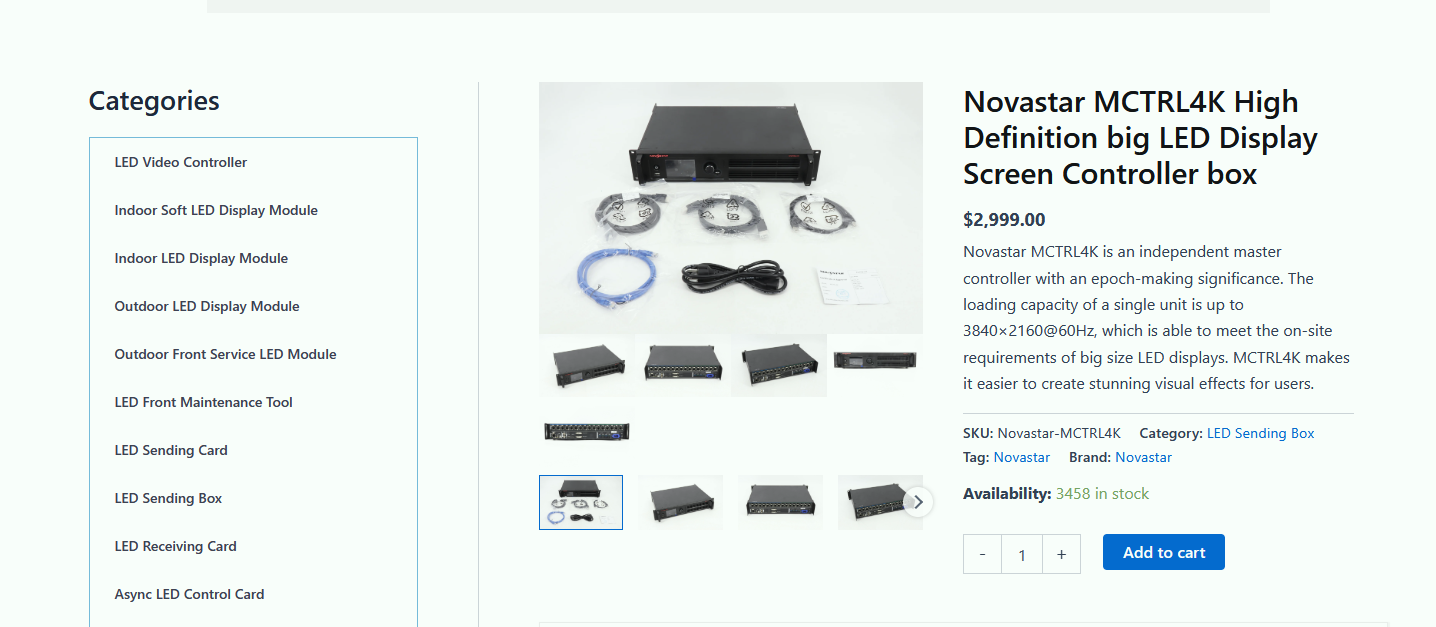
01. HDR Master 4K: prepare the video image
Think of the processor as the point where an operator decides what viewers should see. A camera might occupy the main image while a presentation fills another region. The operator may need to adjust a source rectangle or adapt content to a nonstandard screen shape. These are image-processing requirements, distinct from defining which cabinet receives each group of pixels.
02. NovaStar MCTRL4K: distribute the canvas
The controller takes the incoming image and assigns screen regions to output ports and receiving cards. A correctly configured map makes cabinet position, cable order and source coordinates agree. If those disagree, buying a more elaborate processor will not fix a reversed cabinet chain or a wrongly assigned starting coordinate.
For the HDR Master 4K vs MCTRL4K decision, identify the missing function first. If a media server already supplies the finished canvas, another processor may be unnecessary. If your current sending system works but the production needs additional processing, the controller may remain useful. An HDR upgrade still requires a fresh compatibility and capacity check.
2. Side by Side: HDR Master 4K vs MCTRL 4K
This comparison separates processing functions from sending functions. Read the resolution figures with their connector, frame-rate and bit-depth conditions; a headline maximum does not mean every operating mode can achieve it.
| Decision point | NovaStar HDR Master 4K | NovaStar MCTRL4K |
|---|---|---|
| Main role | Video processing and SDR/HDR conversion | LED sending controller and cabinet mapping |
| Video inputs | 1 HDMI 2.0, 1 DP 1.2, 4 12G-SDI | 1 HDMI 2.0, 1 DP 1.2, 2 dual-link DVI |
| Outputs | 2 HDMI, 4 optical and 4 SDI connections across two output cards | 16 Gigabit Ethernet ports and 4 optical ports |
| Image preparation | Scaling, cropping, layer masking and image adjustment | Use an upstream source or processor for composition and scaling |
| HDR purpose | Conversion between SDR and HDR10/HLG | HDR display with a compatible receiving system |
| Capacity question | Does the selected video format fit the processing path? | Does the canvas fit both the input and every cabinet output? |
| Multiple outputs | Two output cards carry the same content synchronously | Optical channels carry or duplicate Ethernet-port groups |
| Typical purchase reason | Add processing to an existing sending chain | Drive a compatible LED wall from a prepared source |
The connector inventory follows NovaStar’s HDR Master 4K Specifications V2.1.0 and MCTRL4K Specifications V1.2.2. For a purchase, confirm the installed cards and firmware on the actual equipment. A used unit, a rental inventory item and a supplier’s standard package may include different accessories or supporting hardware.
Also separate source count from layer count and program outputs. Six connected sources do not automatically mean six independently scaled pictures or six different screen feeds. Write down the exact composition you need and ask for that layout to be demonstrated.
3. The Three Differences That Decide a Quotation
01. HDR conversion versus HDR display
The HDR Master 4K can convert an SDR signal to an HDR output format. Conversion does not recreate highlight or shadow detail that was discarded during recording, grading or compression. Treat it as an adjustable presentation process: compare skin tones, gradients, white logos and dark backgrounds before deciding whether it improves your content.
The MCTRL4K HDR function instead requires an appropriate incoming HDR signal and compatible receiving cards. NovaStar’s V1.2.2 specification lists 10-bit HDMI input for HDR and reduced Ethernet-port loading. General support for a 10-bit or 12-bit source on another input is not proof that the same connection supports the HDR workflow.
02. Video interfaces versus cabinet data
The presence of an optical socket on both products does not establish compatibility. Connector shape, bandwidth and optical wavelength are only parts of the interface. The transmitted protocol and operating mode must also match. Plan the connection from a documented system diagram rather than assuming that any two 10G optical ports can be joined.
The HDR Master 4K is not a substitute for the LED sending stage. Likewise, the Ethernet connector used to manage a device from a computer should not be confused with the MCTRL4K cabinet outputs. Label control-network and LED-data cables separately to make installation and troubleshooting easier.
03. Processing cost versus complete system cost
A useful quotation compares finished systems. Include the processor, sending controllers, receiving cards, optical conversion, tested cables, spares and commissioning. If higher bit depth requires more output ports, the controller count can change even when the screen dimensions stay the same.
Ask suppliers to state the exact resolution, frame rate, sampling format and HDR mode covered by the quotation. “4K supported” is not an acceptance criterion. A full-resolution desktop with colored text and a compressed video clip can reveal very different limitations in the same signal chain.
4. Do You Need Both? Three Project Scenarios
01. Existing wall with SDR sources
Consider the HDR Master 4K when you need conversion, source handling or image shaping that your current system cannot provide. First establish why the picture looks wrong. Incorrect RGB range, excessive ambient light, poor calibration or low-quality content can cause weak contrast. Adding hardware without diagnosing these issues may leave the real problem untouched.
Before an HDR trial, record the current working configuration and check the receiving-card model and firmware. Recalculate the port map for the proposed bit depth. Retain an agreed SDR preset so operators can return to a known appearance when visiting laptops or older playback systems arrive.
02. Native HDR playback with a prepared canvas
If the source already outputs a suitable HDR10 or HLG canvas, the NovaStar MCTRL4K may provide the sending stage without a separate HDR Master 4K. Verify the actual output from the playback device, not just the file label. Operating-system settings, adapters and software can change the transmitted format.
Check every receiving-card type used in the wall, including spares. Earlier NovaStar material names A8s and A10s Plus, while newer documentation describes HDR-capable receiving cards more broadly. Do not infer compatibility for another model from brand membership or connector similarity; confirm the complete hardware and firmware combination.
03. Mixed-source events and large installations
A system combining the HDR Master 4K and MCTRL4K makes sense when image processing and cabinet distribution are both required. Build an input schedule for camera feeds, graphics, playback and emergency content. Record which sources are SDR, which are HDR and which require conversion before they enter the final canvas.
For live production, define failure behavior as carefully as normal operation. A spare cable does not protect against a failed source computer. Duplicate output connections do not protect against failure of the processor that generates both outputs. Test the specific backup path your crew will actually use.
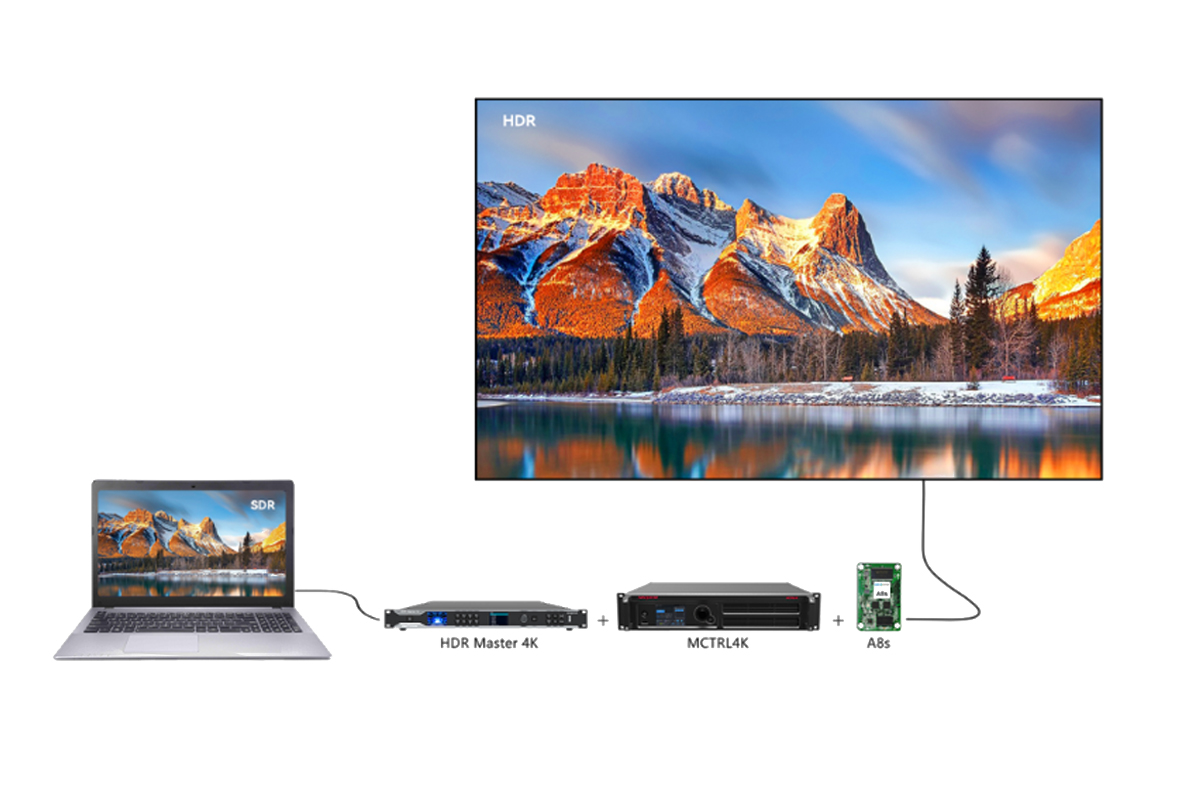
5. How the Two Units Connect in a Real Rack
A clear starting arrangement is: source → HDR Master 4K HDMI output → MCTRL4K HDMI input → mapped cabinet-data outputs → compatible receiving cards → LED modules. For HDR, agree on a supported 10-bit format at the processor-to-controller connection. For a direct-source installation, omit the processor only when the source already provides the required canvas and format.
| Stage | Check before connection | Acceptance test |
|---|---|---|
| Source to processor | Connector, timing, HDCP, bit depth and actual SDR/HDR output | Stable picture and correct format indication |
| Processor to controller | Matching supported HDMI output/input format | Correct geometry, gradients and color range |
| Controller to cabinets | Port budget, receiving-card configuration and cable order | Cabinet identification and edge-to-edge test patterns |
| Fiber transport | Supported protocol, transceivers, converter and fiber type | Stable full-load operation over the installed route |
| Backup route | What component can fail and what remains operational | Deliberate source or cable failure during rehearsal |
| System handover | Saved settings, port map, approved presets and restore instructions | Power-cycle test and repeatable recovery |
01. Commission in a controlled order
First verify cabinet configuration with test patterns. Next confirm source resolution and screen coordinates. Then check color range and grayscale. Enable HDR only after the basic route behaves predictably. This sequence separates mapping errors from image-processing errors and reduces the temptation to compensate for one fault with an unrelated adjustment.
Use representative customer material alongside patterns. Thin lines expose scaling problems; near-black ramps reveal crushed or lifted shadows; moving diagonals help reveal tearing. Save the accepted settings and photograph the rack labels so the next technician can reconstruct the route without guessing.
02. Qualify optical transport and latency
HDR Master 4K manuals have changed their optical application examples: V1.0.1 identifies MCTRL4K, while V2.1.0 identifies NovaPro UHD Jr. Consequently, obtain confirmation for the exact optical pairing instead of treating an older diagram as universal. An SDI output also needs a compatible SDI receiving device or converter; the MCTRL4K has no direct SDI input.
For the MCTRL4K, newer specifications describe one-frame source-to-receiving-card delay under stated low-latency conditions. Older marketing quotes below one millisecond using a different qualification. Neither figure is a guaranteed camera-to-screen delay. Measure the complete production chain, including camera, switcher, processor and display scanning, against your project requirement.
6. Pixel Capacity: Why 10-Bit Changes Your Controller Count
Calculate screen pixels, then calculate ports, then validate the physical map. The MCTRL4K pixel capacity headline is not sufficient on its own. NovaStar lists 650,000 pixels per Ethernet port for 8-bit input and 320,000 for 10-bit/12-bit input. The following arithmetic assumes the applicable standard operating conditions and no ports reserved for redundancy.
| Canvas | Total pixels | 8-bit minimum ports | 10-bit/12-bit minimum ports |
|---|---|---|---|
| 1920 × 1080 | 2,073,600 | 4 | 7 |
| 2560 × 1440 | 3,686,400 | 6 | 12 |
| 3840 × 2160 | 8,294,400 | 13 | 26: more than one unit’s 16 ports |
01. Apply both controller and port limits
The calculation is width multiplied by height, divided by the relevant per-port limit, rounded upward. For a UHD wall at higher bit depth, 8,294,400 ÷ 320,000 = 25.92, so at least 26 ports are needed mathematically. Two controllers may provide sufficient port count, but the input routing, canvas partition and synchronization must also be designed.
At 8-bit, sixteen ports total 10,400,000 pixels arithmetically, yet the published DP/HDMI loading limit is 8,800,000. At higher bit depth, sixteen times 320,000 gives 5,120,000. These are different constraints, not interchangeable specifications. Apply the lowest relevant limit, then account for the actual format, receiving cards and mapping rules.
02. Check cabinet-sized loads and spare capacity
Suppose one cabinet contains 256 × 256 pixels: that is 65,536 pixels. An 8-bit port can accommodate nine such cabinets by pixel count, because ten would require 655,360. At 10-bit, four fit within 320,000, while five require 327,680. Physical chain geometry and receiving-card limits may impose further restrictions.
This explains why dividing total wall pixels by a port limit gives only a lower bound. Cabinets cannot always be divided conveniently between ports. Leave practical room for the required topology and redundancy. Do not count MCTRL4K optical duplicates as extra independent screen capacity, and do not assume that cascading a control connection automatically creates a correctly partitioned video source.
7. Five Mistakes That Cost Time and Money
- Buying by product category alone. “Video processor” is sometimes used loosely in catalogs. Specify whether you need image scaling and composition, LED sending, or both. The HDR Master 4K and MCTRL4K fulfill different parts of that requirement.
- Assuming every 4K mode is equivalent. UHD is 3840 × 2160; another common 4K raster is 4096 × 2160. Frame rate, RGB versus YCbCr, sampling and bit depth also matter. Validate one complete signal tuple from source to wall, including every adapter.
- Treating HDR as a brightness button. More brightness does not fix wrong transfer-function interpretation, clipping or poor source quality. Agree on a reference image and viewing conditions, then check highlight detail and near-black visibility rather than judging only overall intensity.
- Planning capacity before choosing bit depth. An 8-bit port map may become overloaded when the workflow changes. Recalculate MCTRL4K output loading before enabling HDR, and include spare cabinets and backup routes in the design review.
- Combining features without checking exclusions. MCTRL4K low-latency operation requires the documented input and vertical cabinet arrangement; the specification lists conflicts with 3D and Genlock. Select the operating priority and rehearse it rather than assuming every advertised feature works simultaneously.
For troubleshooting, change one variable at a time. Start with a known working source and short tested cable. If the picture is stable at lower bandwidth but fails at the target format, investigate timing, adapters and transport before changing cabinet configuration. Preserve the baseline so each test has a meaningful comparison.
When text appears soft, inspect both scaling and chroma sampling. When blacks look gray, inspect range conversion and ambient light. When only part of the wall fails, inspect port loading, receiving-card settings and cable order. These observations narrow the fault without automatically blaming either the HDR Master 4K or the MCTRL4K.
8. Which Guide to Read Next
Use this article for the system-choice decision, then open the relevant product resource for detailed controls. Keeping these tasks separate helps buyers avoid confusing a comparison with a full operating manual.
- NovaStar HDR Master 4K specifications and setup guide: review processing functions, card layout and format checks.
- NovaStar MCTRL4K controller guide: review sending functions, manual references and configuration requirements.
- NovaLCT software and version archive: find configuration software appropriate to the controller workflow.
For a price request, provide cabinet pixel dimensions, cabinet quantity, total canvas, source formats, receiving-card model, cable distance and backup expectations. Ask whether the offer includes optical modules, converters, cables, configuration support and a documented recovery procedure. Compare the resulting bill of materials instead of comparing two isolated box prices.
Technical reference basis: NovaStar HDR Master 4K Specifications V2.1.0 and User Manual V2.1.0; NovaStar MCTRL4K Specifications V1.2.2, dated October 31, 2025, and User Manual V1.2.0. These manufacturer documents define the hardware conditions used here. The examples and commissioning sequence are planning guidance; confirm any revision-specific discrepancy before ordering or changing an installed system.
9. Frequently Asked Questions
01. Is the NovaStar MCTRL4K a video processor?
NovaStar classifies the MCTRL4K as an LED display controller. It sends a prepared image to receiving cards and provides display-related functions. For scaling, layered composition or SDR-to-HDR conversion, use an appropriate upstream processor or source system.
02. Can the HDR Master 4K drive LED cabinets directly?
The HDR Master 4K prepares video for a compatible downstream sending system. It does not replace the cabinet-mapping controller. Include a documented sending stage between the processed video and the receiving cards, even when the connection uses optical fiber.
03. Does the MCTRL4K convert SDR to HDR?
Its HDR display support should not be confused with SDR-to-HDR conversion. The HDR Master 4K supplies that conversion function. First decide whether your source needs conversion at all; native HDR content may already provide the required format.
04. Do I need both units for an HDR LED wall?
You need both processing and sending functions, but they do not always require these two separate boxes. A prepared HDR source can feed a suitable MCTRL4K installation directly. Mixed sources, scaling or conversion may justify adding the HDR Master 4K.
05. Can one MCTRL4K drive a complete UHD wall at 10-bit?
Using the published 320,000-pixel port limit, a 3840 × 2160 wall requires at least 26 ports before cabinet-layout allowances. One MCTRL4K has 16. Plan a suitable multi-controller partition or another verified system architecture; receiving a UHD input does not guarantee full UHD output loading in every mode.
06. Does the MCTRL4K scale content to fit my wall?
Plan scaling in the media server or video processor. Setting a custom input resolution and mapping cabinets are different from resizing an arbitrary picture to fill the wall. Check the final image coordinates and aspect ratio before commissioning.
07. Which receiving cards work with MCTRL4K HDR?
Use receiving cards explicitly confirmed for the required HDR workflow and firmware. Older documentation names A8s and A10s Plus; newer specifications refer to HDR-capable receiving cards. Verify replacements and spare cabinets too, rather than assuming all NovaStar cards support identical functions.
08. How should I compare HDR Master 4K and MCTRL4K prices?
Request a system quotation tied to the same source formats, wall resolution, bit depth and backup requirement. Include controllers, processing, receiving cards, transport accessories and setup. The cheaper individual device can still lead to the more expensive finished system if it leaves a required function uncovered.
10. Conclusion
The HDR Master 4K vs MCTRL4K choice starts with the signal chain. Select the NovaStar HDR Master 4K when you need video processing or dynamic-range conversion. Select the NovaStar MCTRL4K when you need a compatible LED sending controller for a prepared canvas. Use both when the project requires both functions and the complete format and capacity checks pass.
Before committing, verify the cabinet map, receiving cards, source timing, bit depth, optical route and failure behavior. These details determine whether the specified system can reproduce the intended image reliably. Send HonghaiLED your screen layout and source requirements through our LED display project contact page to request a configuration review and a quotation based on the complete system.
Related Posts
NovaStar A10s Pro Receiving Card: Specs, Setup & Datasheet
The NovaStar A10s Pro is a compact LED receiving card…
NovaStar MG Series Distributed Processors: 2K vs 4K Guide
NovaStar MG Series distributed processors move video, audio and control…
NovaStar EL2000 Video Wall Splicer: Specifications & Setup
The NovaStar EL2000 is a hardware video wall splicer that…

No Comments