
NovaStar MG Series Distributed Processors: 2K vs 4K Guide
NovaStar MG Series distributed processors move video, audio and control signals across an IP network for LED video walls, operator desks and control rooms. The family includes MG200 and MG420 encoders, MG201 and MG421 HDMI decoders, and MGT600, MGT1000 and MGT2000 all-in-one decoders with LED sending outputs. Choosing the right combination starts with the sources, the wall’s actual pixel count and the operators who need access.
This guide compares the NovaStar MG Series 2K and 4K models, explains network and power requirements, and provides practical setup and troubleshooting checks. It also answers an important buying question: when is an MGT2000 all-in-one decoder appropriate? Manufacturer specifications are identified separately from worked planning examples, so you can build a useful equipment brief before requesting a quotation.
1. What Is the NovaStar MG Series?
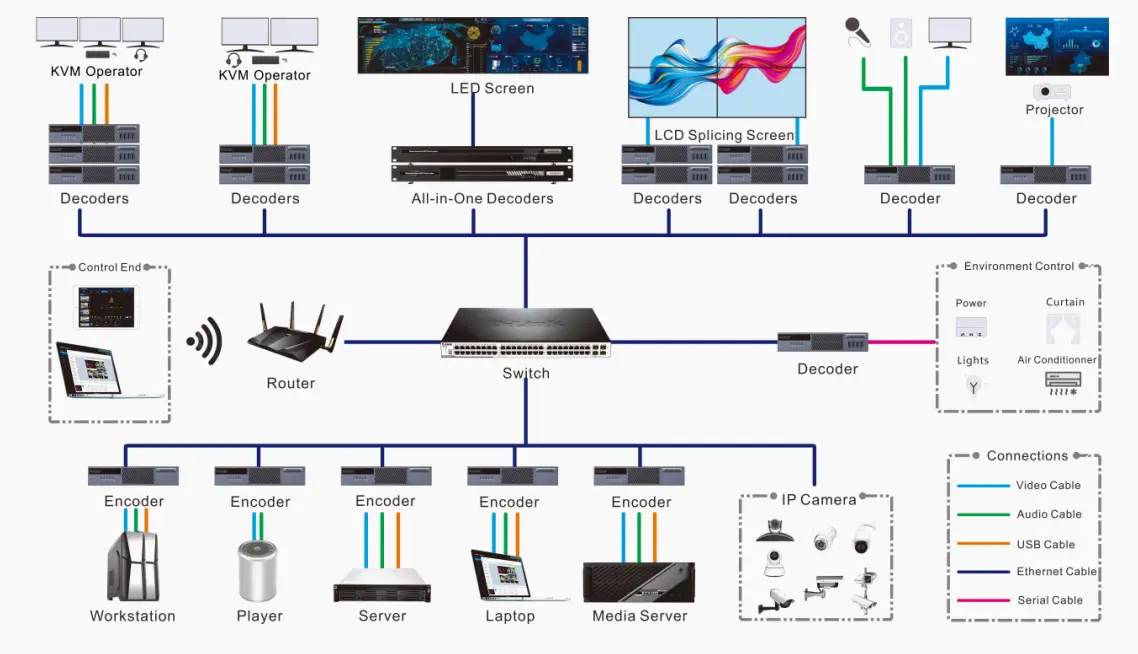
The NovaStar MG Series is an AV over IP platform: AV means audio and video, while IP describes how streams travel through a data network. An encoder sits beside a source computer or player. A decoder receives the selected stream near the display. This separates source location from screen location and makes routing changes possible without moving signal cables.
Use NovaStar MG Series distributed processors when several rooms share sources, operators need remote computer access, or a control room combines live monitoring feeds with dashboards. For a single LED wall fed by one nearby laptop, compare a conventional LED controller first; the added network design may not be necessary.
The decentralized architecture reduces dependence on a central processing chassis. However, a failed encoder still removes its source, and a shared switch or power failure can affect several nodes. Availability comes from designing the complete system, including network paths, power and recovery procedures. Adding endpoints also consumes switch ports and bandwidth, so expansion needs a capacity plan.
2. NovaStar MG Series Models and Their Roles
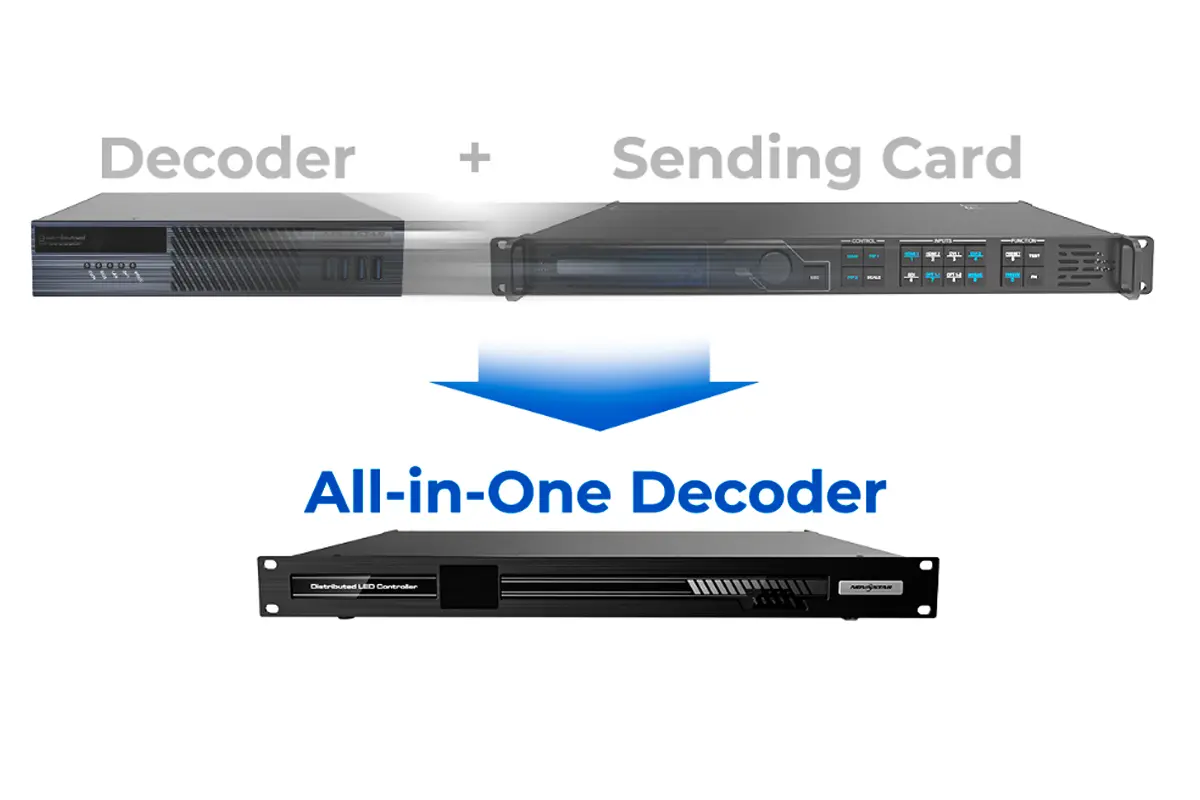
The NovaStar MG Series is built from three device types: encoders, decoders, and all-in-one decoders that combine decoding with a built-in LED sending card. The table below summarises the current model line-up and its main ports, based on NovaStar’s official MG Series specifications and product comparison.
| Model | Device type | Video ports | What it does |
|---|---|---|---|
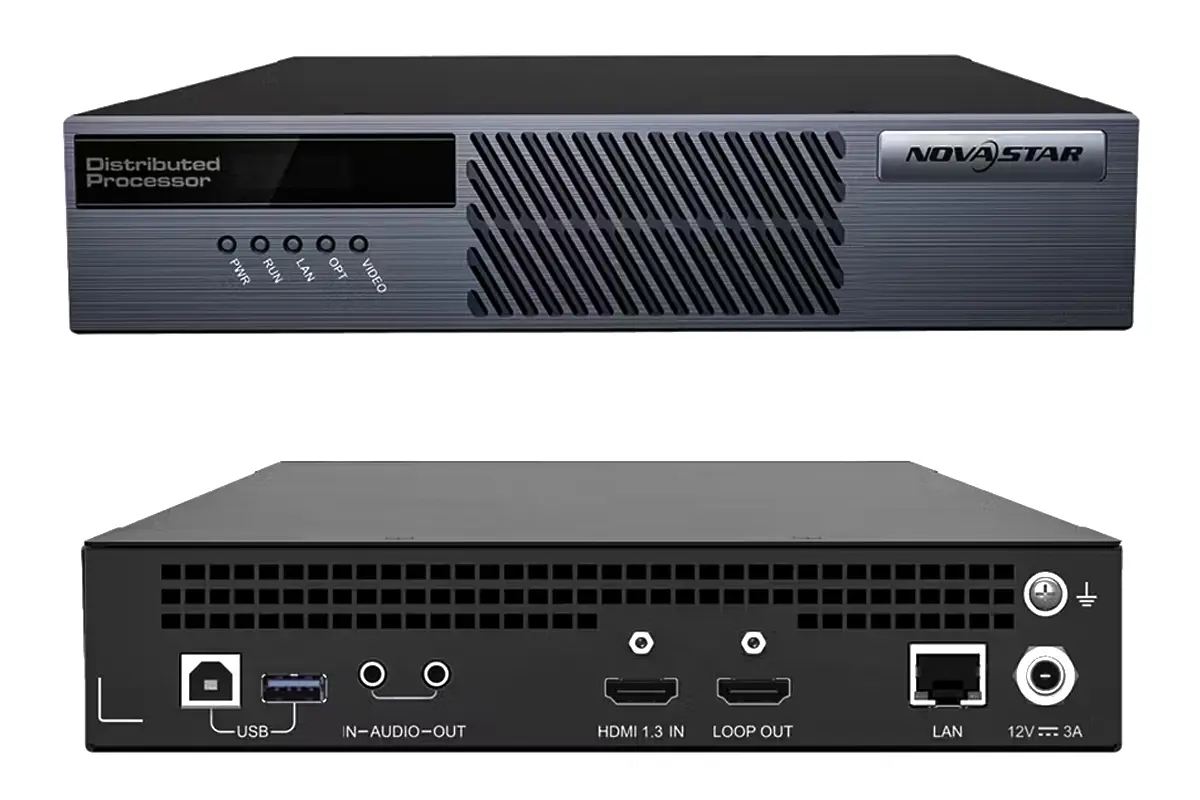
| MG200 | 2K encoder | 1× HDMI 1.3 in, 1× HDMI 1.3 loop out | Encodes sources up to 1920×1080@60Hz with up to 10-bit 4:4:4 video input and processing; USB Type-B for KVM and USB data to the source PC |
| MG201 | 2K decoder | 1× HDMI 1.3 out | Decodes to 1920×1080@60Hz; supports KVM operator control and display control |
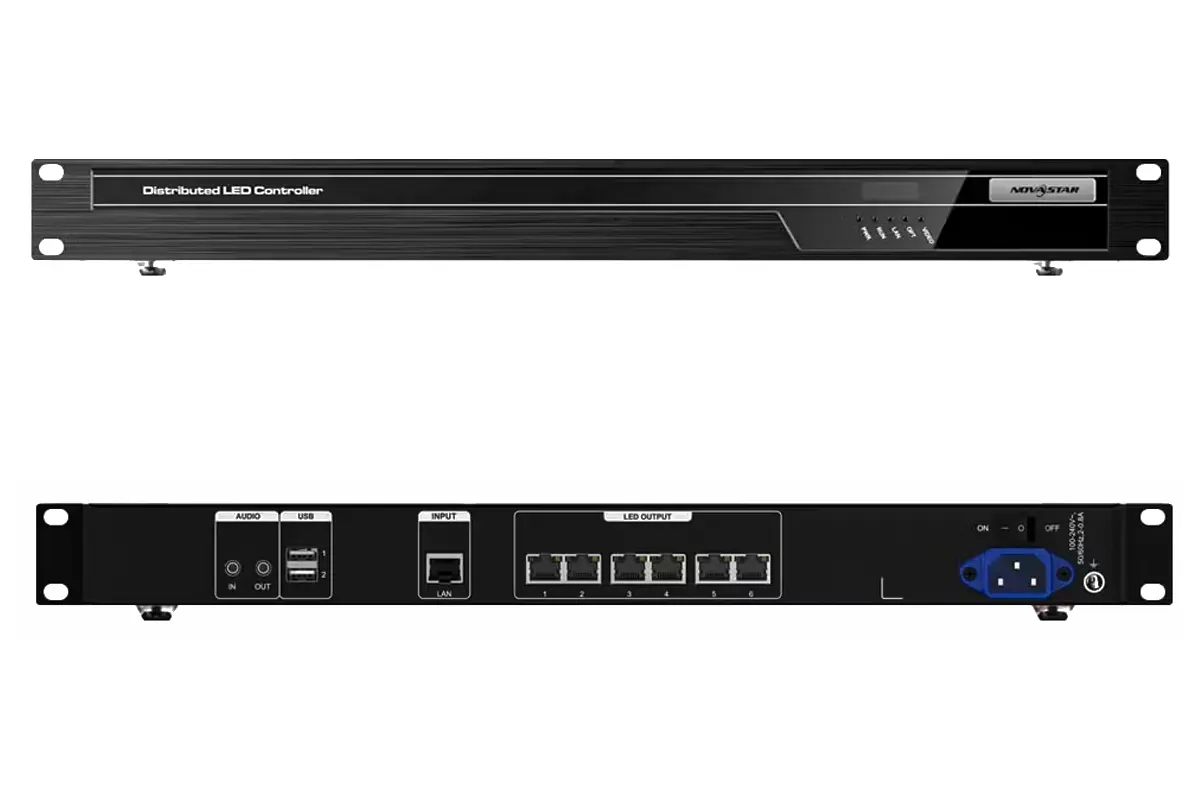
| MGT600 | 2K all-in-one decoder | 6× RJ45 LED out | Decoding, LED display control and free cabling in one unit; drives up to 3.9 million pixels, maximum width 10240 and maximum height 8192 pixels, subject to total load |
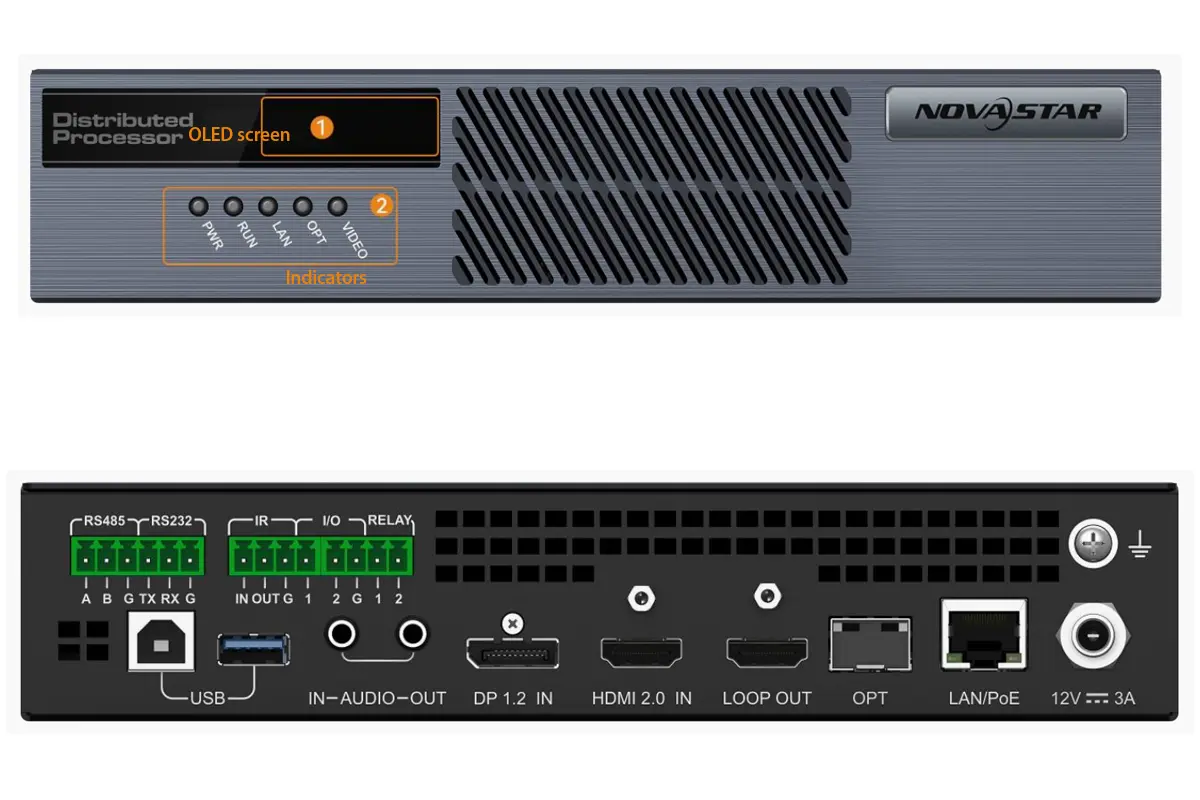
| MG420 | 4K encoder | 1× DP 1.2 in, 1× HDMI 2.0 in, 1× loop out | Encodes up to 4K×2K@60Hz; adds RS232, RS485, IR, I/O and relay control ports (only one of the HDMI and DP inputs is active at a time) |
| MG421 | 4K decoder | 1× HDMI 2.0 out | Decodes up to 4K×2K@60Hz; KVM operator control with four USB 3.0 ports for keyboard, mouse and USB drives |
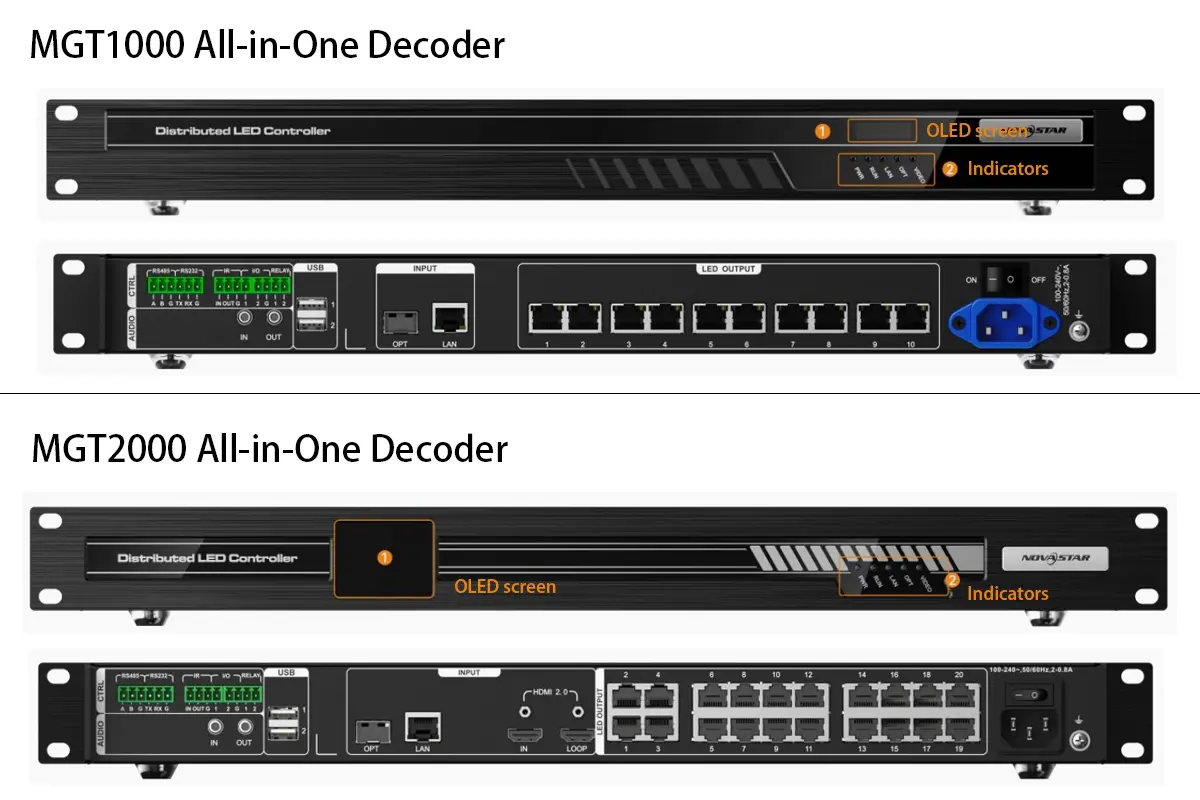
| MGT1000 | 4K all-in-one decoder | 10× RJ45 LED out | Decoding plus LED display control; drives up to 6.5 million pixels, maximum width 10240 and maximum height 8192 pixels, subject to total load |
| MGT2000 | 4K all-in-one decoder | 20× RJ45 LED out; HDMI input is marked reserved in V2.1.0 | Decoding plus LED display control; drives up to 13 million pixels, maximum width 16384 and maximum height 8192 pixels, subject to total load |
3. NovaStar MG Series 2K vs 4K: Specifications Compared
Both NovaStar MG Series tiers use H.264/H.265 compression and web-based management. They differ in resolution, LED loading capacity, layer layout, and power options.
The table summarizes headline capabilities, not every supported timing. In NovaStar MG Series specifications, input format, bit depth, chroma sampling and frame rate interact. Check the detailed supported-resolution tables for a custom source timing. Likewise, the layer arrangements below are specific published workloads: a count of eight 2K layers should not be read as eight simultaneous 4K60 layers. Confirm the busiest preset against the exact decoder and firmware before ordering.
| Specification | MG Series 2K | MG Series 4K |
|---|---|---|
| Standard signal input by encoder tier | HDMI 1.3, up to 1920×1080@60Hz | DP 1.2 or HDMI 2.0, up to 4K×2K@60Hz |
| Decoder output | HDMI 1.3, up to 1920×1080@60Hz | HDMI 2.0, up to 4K×2K@60Hz |
| Colour processing | Up to 10-bit 4:4:4 video input and processing | Up to 10-bit 4:4:4 video input and processing; transmission described in the specification as up to 4K×2K@60Hz 4:2:2 |
| Compression | H.264 (AVC) and H.265 (HEVC) | H.264 (AVC) and H.265 (HEVC) |
| System latency | As low as 60 ms or less | As low as 60 ms or less |
| LED loading (all-in-one decoder) | MGT600: up to 3.9 million total pixels | MGT1000: up to 6.5 million; MGT2000: up to 13 million total pixels |
| Layer layout per device | 4× 2K×1K@30Hz, or 2× 4K×1K@30Hz, or 1× 4K×2K@30Hz | 8× 2K×1K layers on the loaded screen; verify the required frame rates |
| Network ports | 1× Gigabit Ethernet (LAN) | 1× Gigabit LAN and 1× 1G OPT; PoE applies to MG420/MG421 |
| Power | MG200/MG201: DC 12V 3A; MGT600: 100–240V AC | MG420/MG421: PoE or DC 12V; MGT1000/MGT2000: 100–240V AC |
| Typical fit | Meeting rooms, retail signage, campus security, broadcast preview walls | Command centres, monitoring and dispatch centres, data visualisation walls, broadcast studios |
4. How a NovaStar MG Series AV over IP System Works
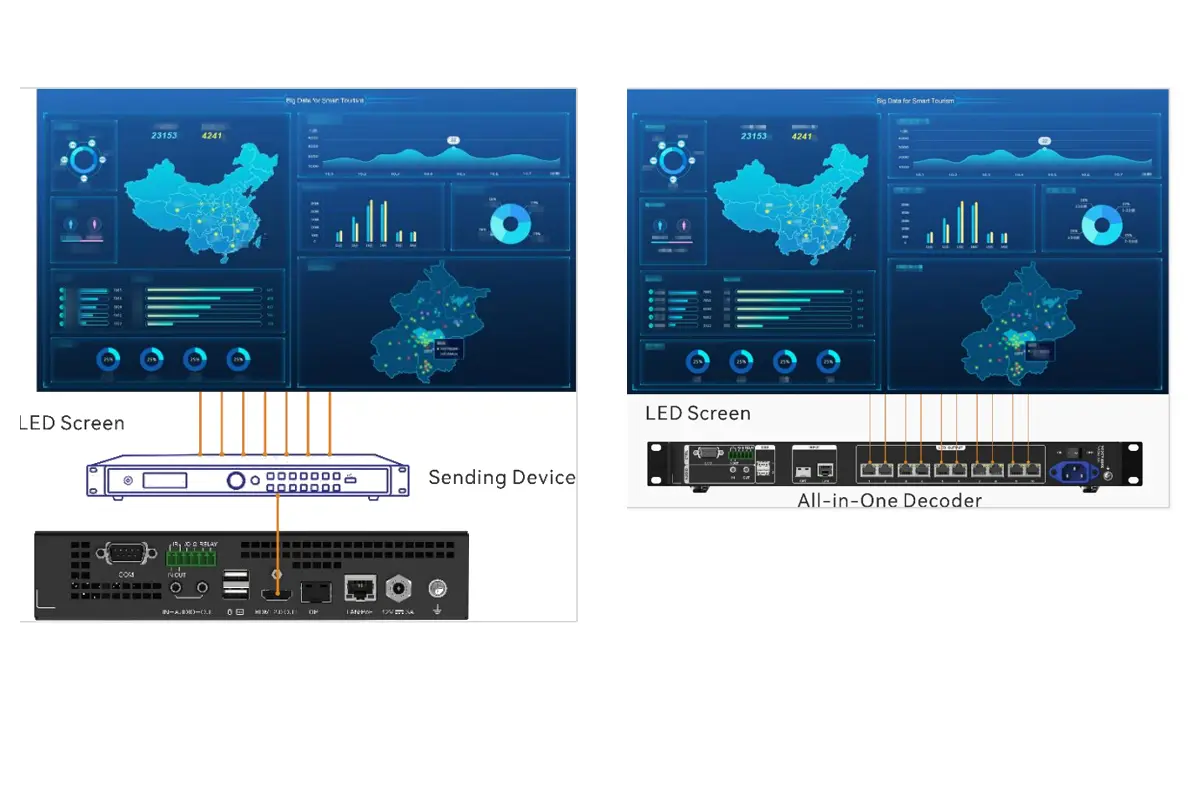
A typical NovaStar MG Series signal path is source → encoder → network switch → decoder → display. With an HDMI decoder, the display may be a monitor or an LED controller. With an all-in-one decoder, the final connection goes from dedicated LED outputs to compatible receiving cards in the cabinets.
Keep two cable functions distinct. The LAN connection carries IP traffic between the NovaStar MG Series nodes. The RJ45 sockets labelled LED OUTPUT carry the screen-driving signal. Similar connectors do not make those outputs ordinary network links: follow the approved cabinet connection diagram rather than routing them through an office switch.
For an operator station, KVM means keyboard, video and mouse. Connect the source computer’s USB interface to the encoder and the operator peripherals to the appropriate decoder. A visible video image alone does not prove that remote keyboard control is connected or authorized.
For camera feeds, the NovaStar MG Series documentation lists ONVIF and RTSP support. Validate the camera or NVR model, stream format, resolution, credentials and firmware before promising compatibility. Test the exact streams needed for the project; protocol support alone does not establish that every third-party device or stream profile will work.
5. Network and Power Requirements
NovaStar MG Series endpoints use Gigabit Ethernet for their IP connection. This describes the access port, not the required capacity of every shared uplink. Several streams crossing between switches can justify higher-capacity uplinks even though each endpoint has a 1GbE interface.
01. Size the network around simultaneous traffic
Record the configured bitrate of each stream and map which routes carry it during the busiest preset. As an illustrative calculation, twelve streams at 25 Mb/s total 300 Mb/s before overhead, other traffic and design headroom. The 25 Mb/s figure is an example, not a NovaStar default or recommendation. Check how the deployed system distributes streams before estimating traffic from the number of viewers.
Use CAT5E or better cabling as specified, verify negotiated link speeds, and label both ends. A dedicated AV VLAN or switch fabric is a useful integration practice. Ask the network engineer to validate forwarding, multicast behavior where applicable, routing and uplink capacity against the actual topology. Avoid assuming that an ordinary office network is ready because a single test stream works.
02. Match power and backup to the exact model
MG200 and MG201 use DC 12V adapters. MG420 and MG421 support PoE and DC 12V; their optical backup requires independent DC power if loss of the Ethernet cable would remove PoE. MGT600, MGT1000 and MGT2000 use AC mains power. Do not apply the small-node PoE specification to these rack-mounted all-in-one decoders.
For NovaStar MG Series redundancy, test the intended failure rather than simply connecting two cables. Confirm which signal survives a disconnected LAN cable, a switch outage and a lost power feed. Optical link backup does not, by itself, create an independent power supply or redundant switching infrastructure.
6. NovaStar MG Series Deployment Checklist
Commission a NovaStar MG Series installation in stages. Proving one source and one destination first makes faults easier to isolate than connecting the entire site at once.
- Define the source list. Record connector type, resolution, frame rate, audio and USB requirements. MG420 has HDMI and DisplayPort inputs, but only one is active at a time; do not count it as two simultaneous encoders.
- Measure the LED wall. Obtain cabinet pixel dimensions and arrangement, receiving-card type and the proposed output-port map. Calculate actual pixels before choosing an all-in-one decoder.
- Document the network. Reserve addresses through the site’s approved addressing method, record subnet settings, and label switches and node locations. Confirm the planned management connection.
- Verify power. Check the exact node’s adapter, PoE or AC requirement, plus the switch’s total PoE budget and any UPS arrangement.
- Prove the first signal path. Confirm a stable local source, then its encoder stream, then the decoder output. Add audio and USB separately.
- Configure permissions and screens. Create areas, users and roles, name devices clearly, and map the wall before building presets. Follow the matching firmware manual for login and initial setup.
- Save and test recovery. Back up configuration, record firmware versions and verify startup behavior after a planned restart. Keep a known working preset for troubleshooting.
Before handover, run the NovaStar MG Series with the busiest real layout, not just a test image. Include source switching, operator handoff, audio selection and recovery from an interrupted link in the acceptance checklist.
7. Configuration and Daily Operation
01. NovaStar MG Series first-time configuration
- Basic data: create areas and sub-areas, add video walls, then configure departments, roles and users so operators only see the screens they are allowed to control.
- Devices: search for nodes on the network, call a device to identify it (its indicators flash), rename it, and configure encoders and decoders. Encoding options include H.264 or H.265 and code-rate modes such as low latency.
- Signal sources: add and group sources, set EDID, crop inputs, attach a logo, and set input audio.
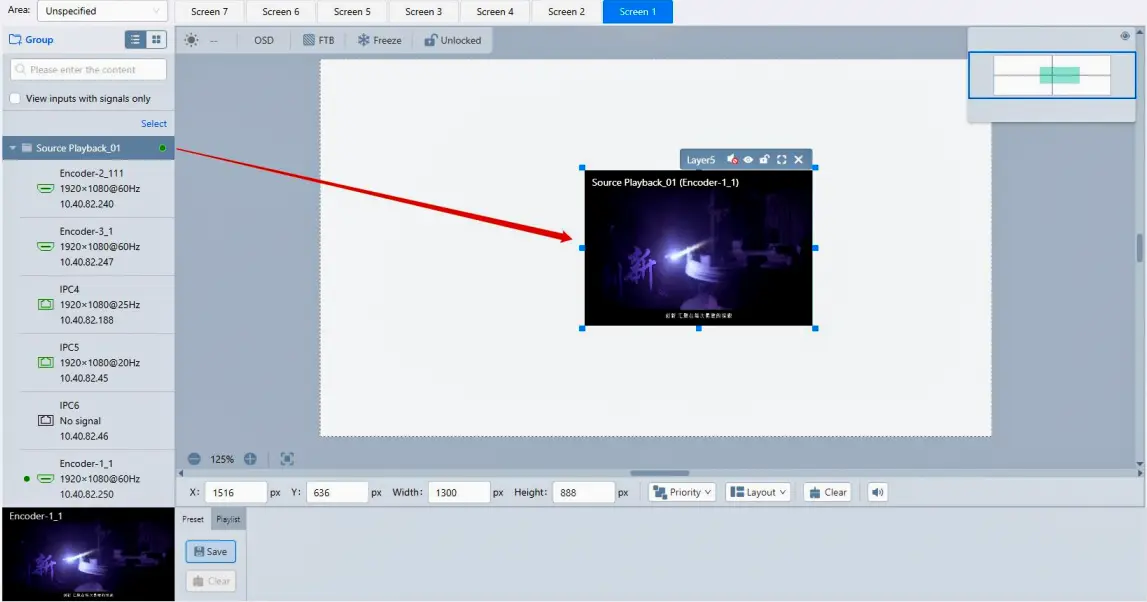
- Screens: add source groups, add layers, adjust layer position and size, switch layer inputs, and save presets. Presets can be copied, overwritten, and played back on a schedule or in a loop.
- OSD: add static or scrolling text with custom font, colour, size, background, direction, start position and speed.
02. NovaStar MG Series daily operation
- Switching sources: select the encoder stream, choose the target screen or screens, then confirm the image on the wall. There is no need to move cables.
- One source to many screens, or many sources to many screens: assign the same stream to several screens, or give each screen its own source.
- Layout changes: load a saved preset instead of rebuilding the layout manually, and only overwrite presets once the new layout has been checked on the screens.
- Routine checks: confirm all nodes are online, that each screen reports a valid signal, and that the operator’s preview matches the LED wall.
8. Latency, Synchronization, and Image Quality
NovaStar describes MG Series system latency as low as 60 ms or less. Treat that as a published performance claim, not a measured result for your project. Total source-to-screen delay also depends on the source application, encoding settings, network conditions, decoding and any downstream LED processing.
For an interactive NovaStar MG Series installation, agree on a measurement method before purchase. Test mouse response and moving content using the real source computers and intended presets. Video switching speed, keyboard responsiveness and source-to-screen latency are related experiences but different measurements.
Synchronization matters when an image crosses decoder boundaries. NovaStar describes synchronized mosaic output using its synchronization technologies. Acceptance testing should include motion across seams and the intended camera setup where the wall will be filmed. A specification claim does not replace checking the complete display chain.
Also distinguish connector capability from encoded transport. The documentation describes up to 10-bit 4:4:4 input and processing, while the transmission descriptions use 4:2:2. Do not present the NovaStar MG Series as an uncompressed 4:4:4 network pipeline. Fine colored text, maps and spreadsheet grids are useful test material because compression or scaling artifacts can be more visible than in ordinary video.
9. How to Choose Between 2K and 4K
Select NovaStar MG Series hardware using three separate limits: source format, decoding or layer workload, and LED output capacity. The label “4K” alone does not settle all three. A 1080p source may feed a large wall, while a 4K source can be scaled onto a smaller one.
01. MGT2000 all-in-one decoder: check pixel count
Total LED pixels = horizontal pixels × vertical pixels. A 3840 × 2160 wall contains 8,294,400 pixels. This exceeds the MGT1000’s published 6.5-million-pixel loading limit but falls below the MGT2000’s 13-million-pixel limit. An MGT2000 all-in-one decoder is therefore a capacity candidate for that wall, subject to port allocation, receiving-card compatibility and the required operating settings.
The maximum width and maximum height are separate constraints, not a rectangular resolution that can be fully populated simultaneously. For example, 16384 × 8192 is over 134 million pixels; it does not fit within a 13-million-pixel budget. Check total pixels, each dimension and each output port before approving a NovaStar MG Series design.
02. Compare complete project costs
Choose the 2K tier for compatible Full HD sources and modest layouts when the required functions fit. Choose 4K models for higher-resolution sources or the relevant 4K decoding capabilities. Choose MGT600, MGT1000 or MGT2000 by wall load and layout needs, rather than physical screen size alone.
A NovaStar MG Series quotation should state encoder quantity, operator decoder quantity, LED decoder quantity, network equipment, optical modules, cabling, power protection and commissioning. Request confirmation of firmware, included accessories and support. A low price for one node is not the cost of a working system, and no universal system price is reliable without a source and screen schedule.
10. NovaStar MG Series Troubleshooting Checks
| Symptom | Check first |
|---|---|
| One LED screen shows no image | Confirm the decoder or all-in-one decoder is online in the management interface, then check which stream is assigned to that screen before touching hardware. |
| A node is missing from the device list | Check power (PoE budget or DC adapter), the LAN indicator, and whether the node’s address matches the plan. |
| Picture looks soft or blocky | Review encoding mode and code-rate settings, and confirm the network is not congested. |
| A multi-decoder wall shows tearing or offset images | Verify synchronization settings are enabled for all decoders in the wall. |
| Keyboard or mouse does not reach a source PC | Check the encoder’s USB connection to the PC and the operator’s permission group. |
| Node loses connection when the Ethernet cable is unplugged | For MG420/MG421 using PoE, provide independent DC 12V power when testing OPT backup; check the configured backup path too. |
11. Integrating the MG Series with LED Displays
A NovaStar MG Series all-in-one decoder combines IP decoding and LED sending, but the cabinets still need compatible receiving cards, correct module parameters and a valid cable map. An HDMI decoder such as MG201 or MG421 instead requires a separate LED controller between its HDMI output and the cabinets. Confirm that controller’s accepted input timing and loading capability.
Prepare a cabinet schedule showing the pixels per cabinet, row and column counts, receiving-card model, output port and cable route. Distribute the load according to the device and receiving-card limits. Dividing total pixels by the advertised maximum gives only an initial capacity estimate; it does not prove that the physical port map will work.
Keep AV routing configuration separate from cabinet configuration. The MG web interface manages sources, screens and layouts; screen setup also involves the appropriate LED configuration workflow. Our NovaLCT download and version guide helps locate software, but use the version and procedure specified for the installed hardware.
If the project mainly needs centralized local processing, use our H Series vs VX Series comparison to evaluate that architecture. If cabinet selection is still open, start with the LED video wall guide. Finalize the screen resolution before finalizing the NovaStar MG Series bill of materials.
12. NovaStar MG Series FAQs
Select a question to expand its answer.
01. What are NovaStar MG Series distributed processors used for?
They route AV signals between networked sources, operator stations and displays. Typical projects include control rooms, monitoring walls and meeting facilities with shared sources. Choose a NovaStar MG Series system when distributed routing or remote operation solves a real requirement, and compare a simpler controller for one locally fed LED wall.
02. What is the difference between MG420 and MG421?
MG420 encodes a source from HDMI or DisplayPort into an IP stream; only one of those inputs is active at a time. MG421 receives a stream and outputs HDMI. They perform opposite roles in the NovaStar MG Series, so they are not interchangeable substitutes.
03. Can an MGT2000 all-in-one decoder drive a 4K LED wall?
A 3840 × 2160 wall contains 8,294,400 pixels, below the published 13-million-pixel MGT2000 ceiling. That makes it a capacity candidate, not automatic design approval. Check cabinet routing, per-port load, receiving cards, source format and operating settings. Maximum width and height must also be respected separately.
04. Do all NovaStar MG Series models support PoE?
No. MG420 and MG421 support PoE and DC 12V. MG200 and MG201 use DC 12V adapters, while MGT600, MGT1000 and MGT2000 use AC mains power. Optical backup on a PoE-powered MG420 or MG421 needs independent DC power when loss of Ethernet would remove its power feed.
05. Does the NovaStar MG Series require a 10GbE switch?
Its endpoint IP ports are Gigabit Ethernet. Shared switch uplinks must still be sized for aggregate traffic, so some larger networks can benefit from faster uplinks. Count simultaneous streams and their configured bitrates rather than assuming that either 1GbE everywhere or 10GbE everywhere is universally correct.
06. Can MG201 or MG421 connect directly to LED cabinets?
Their display output is HDMI, so an LED controller is required downstream. The NovaStar MG Series MGT models provide dedicated LED sending outputs instead. Do not confuse the network LAN port with the RJ45 LED outputs, and confirm compatibility with the receiving cards fitted to the wall.
07. Is 60 ms the guaranteed latency of every installation?
No. NovaStar describes system latency as low as 60 ms or less. Treat it as a manufacturer specification and measure the complete source-to-screen path for your project. Source software, encoding, network conditions and downstream processing can change the result; interactive control should be tested with real operators.
08. What information is needed for an accurate quotation?
Provide source quantities and formats, wall pixel dimensions, cabinet and receiving-card details, operator stations, required simultaneous windows, cable distances and backup requirements. Ask for a complete NovaStar MG Series equipment list, including switches, optical modules, power supplies, configuration work and support, rather than comparing a single-node price.
13. Sources and Verification
Technical references reviewed on October 10, 2026: Xi’an NovaStar Tech Co., Ltd., MG Series 2K Distributed Processors Specifications V1.0.0; MG Series 4K Distributed Processors Specifications V2.1.0; MG Series Distributed Processors User Manual V3.2.0; and the manufacturer’s MG Series model comparison and download page.
Published specifications describe product capabilities. The pixel-count and bandwidth examples in this guide are planning calculations, not site test results. Verify the exact hardware revision and firmware before procurement, particularly reserved connectors, supported signal formats and backup behavior.
14. Conclusion: Specify the Complete Signal Path
The NovaStar MG Series is best evaluated as a complete signal distribution system. Start with source formats and operator needs, calculate actual wall pixels, select the appropriate encoder and decoder roles, then validate the network, power and cabinet connections together.
For a project-specific NovaStar MG Series recommendation, send HonghaiLED your source list and LED wall requirements. Include wall resolution, cabinet arrangement, simultaneous windows, operator stations, cable distances and backup expectations. Those details make the proposed equipment list reviewable and help prevent a mismatch between an attractive specification and the installation you actually need.
Related Posts
NovaStar A10s Pro Receiving Card: Specs, Setup & Datasheet
The NovaStar A10s Pro is a compact LED receiving card…
NovaStar EL2000 Video Wall Splicer: Specifications & Setup
The NovaStar EL2000 is a hardware video wall splicer that…
NovaStar HDR Master 4K vs MCTRL4K: Processor or Controller?
The NovaStar HDR Master 4K processes the picture; the NovaStar…

No Comments