
NovaStar EL2000 Video Wall Splicer: Specifications & Setup
The NovaStar EL2000 is a hardware video wall splicer that arranges HDMI sources across multiple display outputs. Its compact 1.5U chassis provides nine HDMI outputs, browser-based control, and a choice between four-input HDMI 1.3 operation and two-input HDMI 1.4 operation. For an LED installation, it handles composition upstream of compatible LED sending equipment.
Choosing this processor requires more than checking a “4K” label. Source timing, simultaneous windows, output mapping, and the downstream controller must work together. This guide explains the NovaStar EL2000 specifications, practical setup checks, common integration problems, and the information needed for a reliable quotation. Product limits are distinguished from planning examples so you can evaluate a real project without assuming that every maximum applies simultaneously.
1. What Is the NovaStar EL2000 Video Wall Splicer?
The NovaStar EL2000 combines, scales, crops, and positions incoming pictures to build a video wall composition. A source might be a presentation computer, a dashboard workstation, or an external decoder delivering HDMI. The processor determines where those pictures appear; the downstream display equipment determines how the final signal reaches the physical screen.
Its FPGA architecture performs the video processing inside the chassis. The browser/server interface provides network access for configuration and operation without requiring a dedicated desktop control application. This distinction matters: a browser is the operator interface, while the connected source devices still create the content being displayed.
In a NovaStar video wall, the EL2000 should be specified by its HDMI workflow. It is not a substitute for receiving cards, cabinet calibration, or LED sending capacity. The Ethernet control connection is also not an output for driving LED cabinets. Keeping these responsibilities separate prevents an apparently complete equipment list from missing the actual sending stage.
The NovaStar EL2000 is most relevant when several coordinated HDMI destinations and repeatable layouts are required. If the project needs many independent live feeds, native high-frame-rate 4K processing, or direct LED data outputs, establish those requirements before selecting the processor.
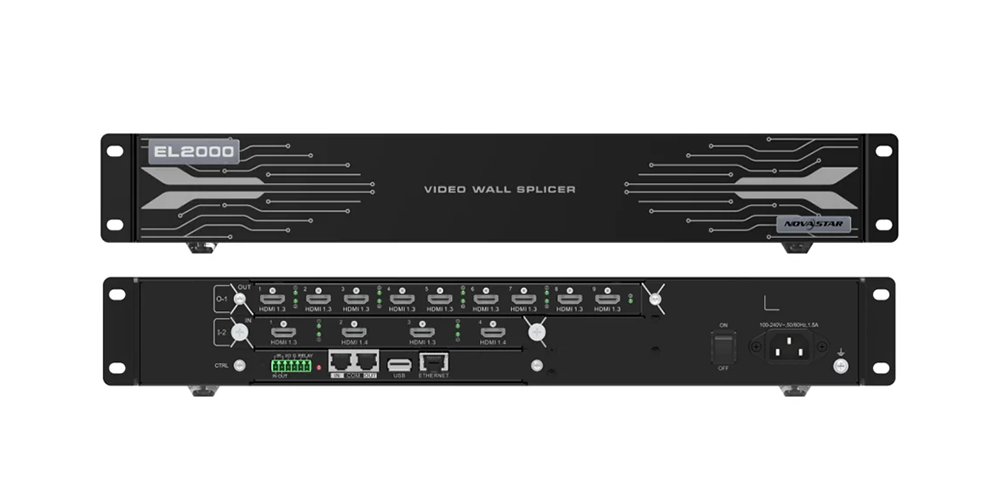
2. NovaStar EL2000 Specifications at a Glance
Use this NovaStar EL2000 specification table as a selection checklist. The custom width and height figures are separate limits; they do not establish that the maximum width and maximum height operate together at every refresh rate.
| Item | Published specification | What to check |
|---|---|---|
| Architecture | Hardware FPGA video wall splicer; browser/server control | Provide source devices and a control network. |
| Active inputs | Four in HDMI 1.3 mode, or two in HDMI 1.4 mode | Higher-resolution mode reduces active input count. |
| UHD input timing | 3840 × 2160 at 30 Hz listed in HDMI 1.4 mode | Do not assume UHD at 60 Hz. |
| HDMI outputs | Nine HDMI 1.3 outputs on one output card | Match each destination’s accepted timing. |
| Custom output limits | Maximum width 2560 pixels; maximum height 2560 pixels | Confirm the complete timing before commissioning. |
| Layer resources | Four 2K layers, two DL layers, or one 4K layer | These are alternative processing budgets. |
| Presets | Up to 2,000; preset switching under 60 ms | Switching duration is not end-to-end latency. |
| Chassis | 1.5U; 482.6 × 72.4 × 250 mm; 4.5 kg net | Allow rack support and cable clearance. |
| Power | 100–240 V AC, 50/60 Hz, 1.5 A; listed consumption 40 W | Calculate the rest of the system separately. |
The reference is NovaStar EL2000 Video Wall Splicer Specifications, V1.0.0, September 5, 2023. Its input-card section lists UHD at 30 Hz, while the separate video-source table lists 4096 × 2160 at 30 Hz for HDMI 1.4. Because the custom-width description differs, request confirmation for DCI-width or unusual timings. A specification table should support procurement decisions without concealing such qualifications.
3. Key Features of the NovaStar EL2000
01. Multi-screen management and synchronized outputs
The NovaStar EL2000 supports output mosaics and individual screen resolutions. This lets an integrator describe several display regions within a coordinated installation. Frame synchronization aligns the processor outputs, helping preserve continuity when moving objects cross a boundary. Downstream scaling and display latency still need checking because synchronized processor outputs alone cannot correct mismatched destination processing.
For an LCD wall, bezel compensation accounts for the physical gaps between panels. For an LED wall, map the active pixels and cabinet geometry accurately. Applying an LCD-style gap to a seamless LED canvas can hide content unnecessarily.
02. Layers, cropping, and source identification
A layer is a positioned picture within the composition. The NovaStar EL2000 supports up to four 2K layers, two DL layers, or one 4K layer, with cross-connector placement that does not reduce layer quantity simply because a layer spans outputs. Nine connectors therefore do not mean nine independent full-resolution windows.
Source cropping can isolate the useful part of a workstation image, such as a chart instead of its entire desktop. Name cropped sources clearly and retain an uncropped reference for troubleshooting. Cropping changes the visible region; it does not add detail absent from the original signal.
03. Presets, playlists, and scrolling text
The NovaStar EL2000 can store layouts as presets and schedule a preset playlist. Build a small operational set first: routine monitoring, presentation, incident view, and maintenance. A large storage capacity is useful only when operators can identify the correct scene quickly.
Scrolling OSD text and channel logos help identify sources and communicate notices. Keep labels concise and check their legibility at the farthest viewing position. A notification overlay should not obscure the critical values or controls that the wall is intended to show.
04. Browser control and hardware monitoring
Web control, multi-user access, self-test, and monitoring simplify operation of the NovaStar EL2000. Assign a clear owner for configuration changes so two operators do not unintentionally alter the same layout. Record approved firmware and settings during handover.
Fan speed, temperature, voltage, and status alarms are diagnostic information. They do not guarantee uninterrupted service. Design maintenance access, spare equipment, and recovery procedures around the consequences of an outage, especially when the wall supports continuous monitoring.
4. EL2000 Card and Port Details
01. HDMI input modes and 4K limitations
The NovaStar EL2000 input card has four physical HDMI connectors, but its operating mode determines which are active. In four-input mode, all connectors operate within the HDMI 1.3 mode specification. In two-input HDMI 1.4 mode, the two HDMI 1.3 connectors are unavailable. Do not order around an assumption of four simultaneous inputs with two additional 4K feeds.
| Planning question | Four-input HDMI 1.3 mode | Two-input HDMI 1.4 mode |
|---|---|---|
| Active source connections | Four | Two; remaining HDMI 1.3 inputs unavailable |
| Listed common timing | 1920 × 1080 at up to 60 Hz | 3840 × 2160 at 30 Hz; 3840 × 1080 at up to 60 Hz |
| Custom dimensions | Width up to 2048; height up to 2048 | Width up to 3840; height up to 3840 |
| Typical planning priority | Several HD source connections | A higher-resolution desktop or presentation |
| Shared checks | Progressive timing, HDCP compatibility, source EDID | Progressive timing, HDCP compatibility, source EDID |
These dimensions are not a promise of every square timing. Confirm resolution, frame rate, color format, and the selected mode as one combination. The NovaStar EL2000 does not support interlaced input, so a source configured as 1080i needs conversion or a supported progressive output setting.
02. Output card and image quality
The nine HDMI outputs distribute the composition to destination devices. Match the output timing to each LCD panel or LED sending controller, then confirm the intended crop and scaling. Use text, grid lines, and moving content during acceptance; an attractive photograph can conceal scaling softness or a misplaced seam.
Output formats include 8-bit RGB 4:4:4, YCbCr 4:4:4, and YCbCr 4:2:2. Where the whole chain supports it, a 4:4:4 path helps preserve colored text detail. Keep source and destination video-range settings consistent to avoid washed-out blacks or clipped highlights.
03. Control ports and integration boundaries
The control card provides infrared connections, programmable I/O, two relay outputs, grounding, RS232 COM control, a reserved USB 2.0 connection, and Ethernet. The specification identifies one USB 2.0 connection; it is not described as a media-player input and cannot power connected devices.
Use the Ethernet port for the control network. The COM connection must not be plugged into a router, switch, or LED receiving card. Follow the documented pinout and electrical limits for automation wiring rather than treating similar-looking connectors as interchangeable.
5. Dimensions, Power and What Is in the Box
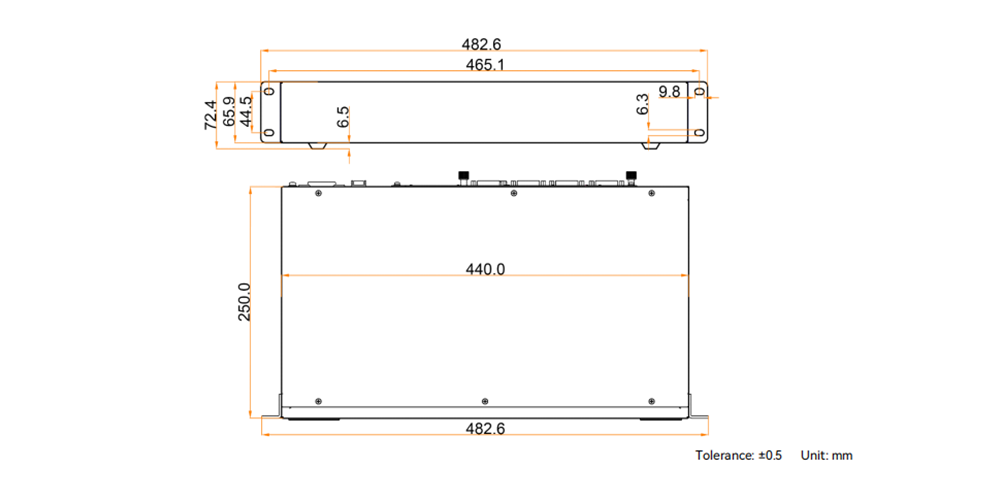
The NovaStar EL2000 measures 482.6 mm wide, 72.4 mm high, and 250 mm deep. Plan the rack around the chassis plus connector bodies, cable bend radius, ventilation, and service access. A nominal rack-unit figure alone is insufficient to prove that a crowded rack arrangement will fit.
The specified operating environment is 0–45°C and 0–80% relative humidity without condensation. Measure conditions at the equipment inlet during realistic operation. A comfortable room temperature does not necessarily represent the temperature inside a rack containing several active processors and power supplies.
The listed package includes a power cord, an RJ45 Ethernet cable, a grounding cable, an HDMI cable, a certificate of approval, and a safety manual. One supplied HDMI cable does not cover a complete nine-output installation. Include the required signal cables, mounting provisions, and compatible extension equipment in the project bill of materials.
Record serial numbers, connection labels, and configuration ownership before installation. Keep the shipping packaging until acceptance is complete, and confirm the supplied power cord and documentation suit the destination market.
6. Where the EL2000 Fits in an LED Video Wall System
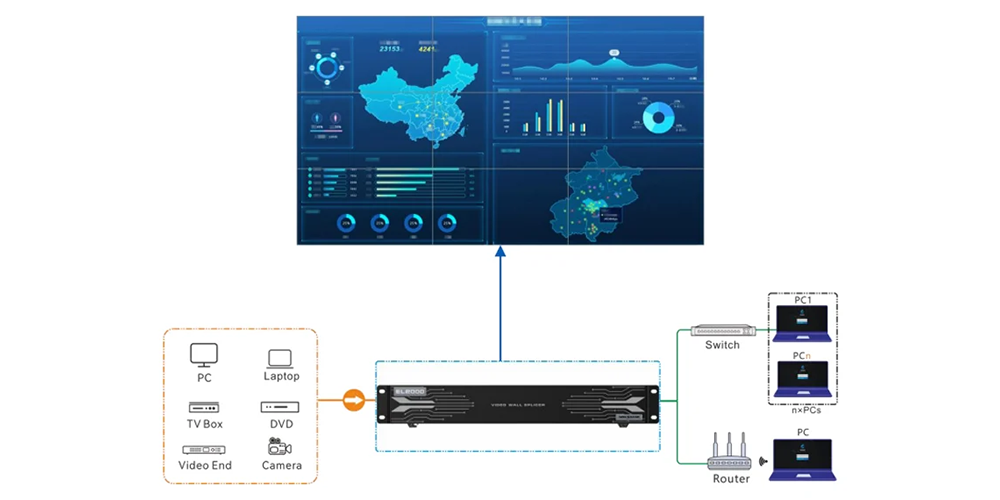
A typical LED signal chain is: HDMI sources → NovaStar EL2000 → compatible LED sending controller → receiving cards → LED cabinets. An LCD installation instead routes the appropriate HDMI outputs to its display inputs. The correct design depends on the destinations, not just the size of the visible wall.
01. Calculate the native canvas and output regions
Start with cabinet pixel dimensions and the cabinet layout. For example, eight cabinets across and four high, each containing 320 × 180 pixels, form a 2560 × 720 canvas. This is a planning example, not a tested NovaStar EL2000 configuration. The chosen output timing and sending equipment must still support that canvas.
Draw each output region with its width, height, and starting coordinates. Check for gaps, overlaps, duplicated regions, and unintended scaling. Physical cabinet seams and HDMI region boundaries need not coincide, but the complete mapping must remain consistent from composition to receiving-card configuration.
Sending capacity depends on the controller, port loading, receiving-card compatibility, frame rate, and supported operating mode. Do not calculate a guaranteed system capacity by multiplying nine outputs by the two maximum output dimensions. Those figures do not describe an unrestricted aggregate pixel budget.
02. Commission the NovaStar EL2000 step by step
- Document the signal plan. List each source, resolution, frame rate, cable route, output destination, and required simultaneous window. Include the controller model and firmware in the handover record.
- Connect a minimal system. Start with one known-good progressive HDMI source and one destination. Establish a stable picture before adding adapters, extenders, or the full output layout.
- Establish browser access. Connect through the Ethernet control port and use the addressing procedure supplied with the device. Confirm the workstation is on the intended network; do not assume a default IP address or password from another NovaStar model.
- Select the input mode. Choose the required active source count and timing. Set a known supported resolution at the source before experimenting with custom formats.
- Configure output regions. Match each destination’s accepted timing, identify outputs with a test pattern, and confirm the physical screen arrangement against the drawing.
- Create and test layouts. Add layers within the available processing budget, check crops and labels, then save the operational presets. Test source replacement and scene recall.
- Complete acceptance. Inspect fine text, gradients, moving edges, recovery after a source restart, and the agreed operating schedule. Record the tested settings and any limitations.
03. Use EDID to establish compatible timings
EDID tells a source which display formats are available. The NovaStar EL2000 supports input and output EDID management, but changing EDID does not increase physical bandwidth or the destination’s capabilities. A source can advertise or select a format that another component in the chain cannot carry.
When a laptop changes resolution after reconnection, compare the negotiated timing with the approved configuration. Keep the signal path simple during diagnosis and reconnect only after settings have been recorded. For text-heavy dashboards, verify the operating system’s scaling as well as the processor’s scaling; both affect how much useful information fits on screen.
04. Troubleshoot by isolating one stage
If the browser cannot connect to the NovaStar EL2000, check network addressing, link status, and the selected control port first. If browser control works but no picture appears, concentrate on the video path: source output, input mode, layer assignment, destination timing, and cabling.
When two sources disappear after switching modes, confirm whether HDMI 1.4 operation has disabled the other two connectors. When a protected source remains blank, check HDCP compatibility across the complete chain; the documented HDCP 1.4 support should not be read as universal support for every protected service.
For missing edges, inspect crop coordinates and destination scaling. For moving seams, compare downstream processing and timings. A camera banding problem also requires investigation of LED refresh, scanning, camera shutter, and receiving-card settings; video frame rate and LED refresh rate describe different parts of the system.
7. Applications of the NovaStar EL2000
01. Control rooms and dashboard walls
The NovaStar EL2000 can arrange workstation outputs for operations dashboards, maps, and monitoring views. Count the HDMI feeds actually required at one time. A surveillance platform may combine many cameras inside one workstation output, but that does not make those cameras independent processor inputs.
Design around operator tasks: which information must remain visible, which view takes priority during an incident, and how quickly the normal layout can be restored. Test data readability at real viewing distances. Small desktop text that looks sharp on a nearby monitor can become ineffective on a distant wall.
02. Conference rooms and education
A presentation room may need a main slide source, a remote participant view, and a demonstration computer. Check whether the desired layout fits the selected input mode and layer budget before specifying the NovaStar EL2000. Our conference LED screen guide covers the display-side planning that accompanies processor selection.
Evaluate the actual content instead of assuming that a 4K input always improves the result. A readable HD layout can be more useful than a larger desktop full of tiny labels. Conferencing audio, camera routing, and interactive control remain separate integration requirements.
03. Exhibitions and scheduled presentations
For repeatable exhibition layouts, presets and playlists provide a consistent operating routine. The NovaStar EL2000 still needs source equipment to supply the media. Confirm who starts playback, how a failed player is replaced, and what visitors see during startup. Rehearse the full sequence before handover.
8. EL2000 vs Other NovaStar Video Wall Splicers
Compare the NovaStar EL2000 with other splicers by workload and interfaces. A compact HDMI composition stage can be appropriate when compatible LED sending equipment already exists. A different architecture may make more sense when the project needs integrated LED sending, additional inputs, more layers, or a different input timing.
Use our NovaStar H Series processor guide to understand the alternative card-based approach. Compare the actual chassis and installed cards rather than assuming that every model in a family has the same connections. Require a signal-chain drawing and an explicit list of supported source formats for either choice.
For a NovaStar EL2000 price quotation, provide the native wall resolution, output-region drawing, source list, simultaneous layer requirement, downstream controller model, cable distances, destination country, and required delivery date. Request a written scope covering the processor configuration, accessories, commissioning support, warranty terms, freight, and applicable charges.
A published unit price does not establish the installed project cost. Existing controllers may be reusable, while signal conversion, extension, spares, rack work, and configuration can change the budget. Compare quotations against the same acceptance criteria so lower cost does not conceal a missing component.
Before ordering the NovaStar EL2000, ask for confirmation of availability and the precise hardware revision. Obtain the matching datasheet and operating documentation through the supplier; our LED display download center is a starting point for documentation support. Do not install firmware intended for a similarly named model.
9. Frequently Asked Questions
These answers address the most important NovaStar EL2000 compatibility and purchasing questions. Expand a question to see the practical limitation behind the specification.
01. What is the NovaStar EL2000 used for?
The NovaStar EL2000 builds multi-source compositions for video walls and distributes them through HDMI outputs. Typical projects include dashboard walls, conference displays, and exhibitions. For direct-view LED cabinets, compatible sending equipment and receiving cards are required after the splicer.
02. Does the NovaStar EL2000 support 4K at 60 Hz?
The input-card specification lists 3840 × 2160 at 30 Hz in HDMI 1.4 mode. It also lists 3840 × 1080 at up to 60 Hz, which is a different resolution. Do not treat the general 4K description as a guarantee of UHD at 60 Hz.
03. How many HDMI inputs can operate simultaneously?
The NovaStar EL2000 supports four active inputs in HDMI 1.3 mode or two active inputs in HDMI 1.4 mode. The two HDMI 1.3 connectors are unavailable in the latter mode. Choose the mode before finalizing the source list.
04. Do nine outputs mean nine video layers?
No. Output connectors distribute image regions, while layers consume composition resources. The NovaStar EL2000 supports four 2K layers, two DL layers, or one 4K layer. Cross-output placement does not create additional independent layers or source connections.
05. Can the EL2000 connect directly to LED receiving cards?
Its HDMI outputs require a compatible LED sending stage for a cabinet-based LED wall. The Ethernet connection is for network control, and COM is for serial integration. Neither should be treated as an LED data output.
06. Which software controls the NovaStar EL2000?
Normal operation uses its browser/server web interface over the control network, without a dedicated desktop application. LED cabinet mapping and receiving-card configuration belong to the downstream control system. Use the software and instructions specified for that equipment.
07. Is the preset switching figure the same as latency?
No. The published under-60-ms figure describes preset switching. It does not establish the total delay from a live camera or computer to the visible wall. Test the complete chain when lip synchronization, interactive use, or live image magnification matters.
08. Where can I get an EL2000 manual, datasheet, and quote?
Ask HonghaiLED for documentation matched to the supplied hardware and firmware, and provide your source formats and wall layout. The specification sheet is a product reference, not a complete commissioning manual. Use the contact link below to request configuration confirmation and current commercial terms.
10. Summary
The NovaStar EL2000 is a compact option for HDMI video wall composition when its active-input modes, layer resources, and output timings match the project. Its value comes from a well-planned signal chain, readable layouts, and reliable operation of the complete installation.
Before selecting the NovaStar EL2000, confirm the exact source timings, required simultaneous windows, output regions, and downstream sending capacity. Keep the distinction between UHD input, custom dimension limits, and actual supported output timings clear. Validate the intended configuration with representative content before final acceptance.
Contact HonghaiLED for an EL2000 configuration review and quotation. Send the cabinet layout, native resolution, controller model, and input list so the proposed equipment can be checked against your application.
Technical reference: NovaStar EL2000 Video Wall Splicer Specifications V1.0.0, released September 5, 2023, particularly the input/output card descriptions and physical specifications. Setup recommendations and the cabinet calculation above are integration guidance, not claims of a completed product test. Confirm revision-specific details with the supplied documentation.
Related Posts
NovaStar A10s Pro Receiving Card: Specs, Setup & Datasheet
The NovaStar A10s Pro is a compact LED receiving card…
NovaStar MG Series Distributed Processors: 2K vs 4K Guide
NovaStar MG Series distributed processors move video, audio and control…
NovaStar HDR Master 4K vs MCTRL4K: Processor or Controller?
The NovaStar HDR Master 4K processes the picture; the NovaStar…

No Comments