
What Type of Backlight Is Used in an LED Display?
An LED-backlit LCD TV or monitor uses edge-lit or direct-lit LEDs; some models add full-array local dimming (FALD) or mini-LED backlighting. A direct-view LED display, such as a modular video wall or outdoor billboard, uses no separate backlight: its pixels emit light themselves.
The phrase “LED display” can describe two different architectures. This guide explains the main LED backlight types for LCD screens, compares their tradeoffs, and separates them from the direct-view LED screens used in commercial installations.
| HonghaiLED | Updated
Key takeaways
- Edge-lit and direct-lit describe where the backlight LEDs sit.
- Local dimming describes how groups of LEDs change brightness.
- Mini-LED can be used in a full-array local dimming backlight; these are overlapping features.
- OLED, MicroLED, and commercial direct-view LED walls do not need LCD backlights.
1. What Is an LED Backlight?
An LED backlight supplies illumination for a liquid crystal display (LCD). The liquid crystals regulate light passing through the panel to create the picture; they do not generate the illumination themselves. In an “LED TV,” the word LED usually identifies the light source behind an LCD panel.
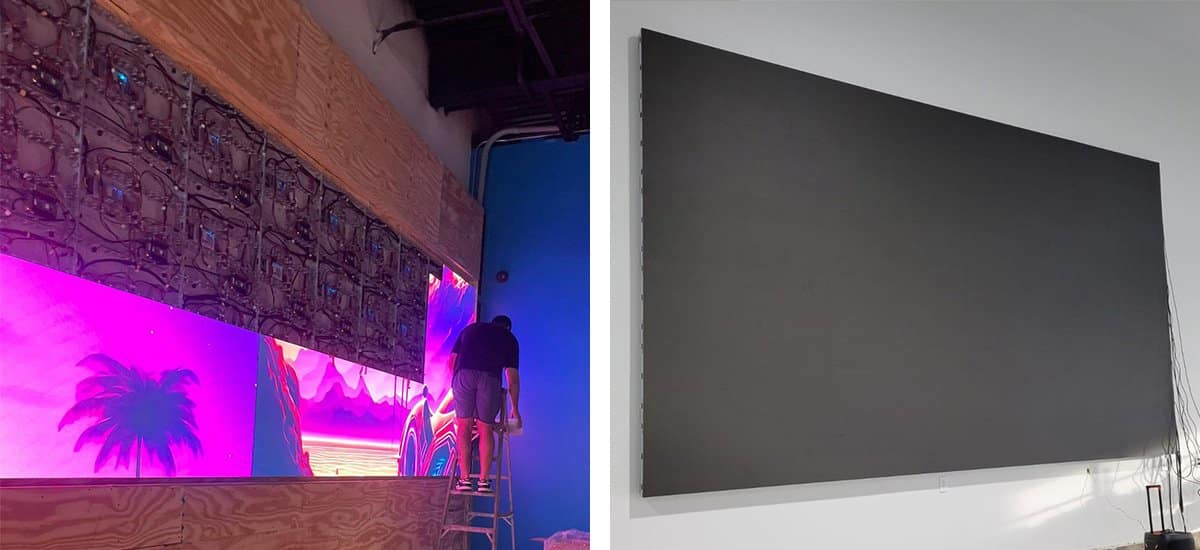
A commercial direct-view LED screen works differently. Red, green, and blue light-emitting elements form the visible pixels. It has no LCD layer and no separate backlight. Our LED screen vs LCD screen comparison explains how that distinction affects commercial display selection.
Keep three specification categories separate: panel type (such as IPS, VA, or TN), backlight placement (edge-lit or direct-lit), and brightness control (global or local dimming). A monitor can correctly be described as both IPS LCD and LED-backlit.
01. Read the display architecture before the marketing label
An LED backlight is part of an optical system: light travels through diffusion layers and the LCD panel before reaching the viewer. The liquid crystals and polarizers regulate transmission, while color filters help produce the image. Improving the backlight can improve the available illumination, but it cannot remove all limitations of the LCD layer.
QLED is another label that needs context. In conventional QLED LCD televisions, quantum dots help convert the backlight’s light into a wider range of colors. QLED alone does not identify an edge-lit, direct-lit, or mini-LED backlight. Samsung’s explanation of quantum-dot display technology describes this film within an LCD assembly. OLED uses a different, self-emissive architecture.
For purchasing, ask three separate questions: what creates the image, where does the light originate, and how is its brightness controlled? This avoids comparing an IPS panel specification with an LED backlight specification as though they were alternatives. It also prevents confusing the emitting LED modules in a video wall with illumination components inside an LCD television.
2. LED Backlight Types: Comparison Table
The four common backlight labels below describe different aspects of the system. FALD and mini-LED should not be treated as mutually exclusive alternatives.
| Backlight label | How it works | Main benefit | What to check |
|---|---|---|---|
| Edge-lit LED | LEDs at one or more edges illuminate a light-guide plate. | Supports thin screen designs. | Uniformity, edge glow, and any local dimming limitations. |
| Direct-lit LED | LEDs sit behind the LCD across the display area. | Can distribute illumination more evenly. | Whether the model has local dimming; placement alone does not establish contrast. |
| Full-array local dimming (FALD) | A rear LED array is controlled in separate brightness zones. | Improves control of dark and bright areas in the same image. | Blooming, shadow detail, zone layout, and dimming behavior. |
| Mini-LED backlight | Smaller LEDs illuminate an LCD, often with zoned dimming. | Allows finer backlight layouts and potentially finer brightness control. | Actual zone count, algorithms, brightness, and performance at the required screen size. |
Not backlight types: OLED, MicroLED, and direct-view LED walls create light at the image-forming pixels. They belong to a different display architecture.
01. Edge-Lit LED Backlighting
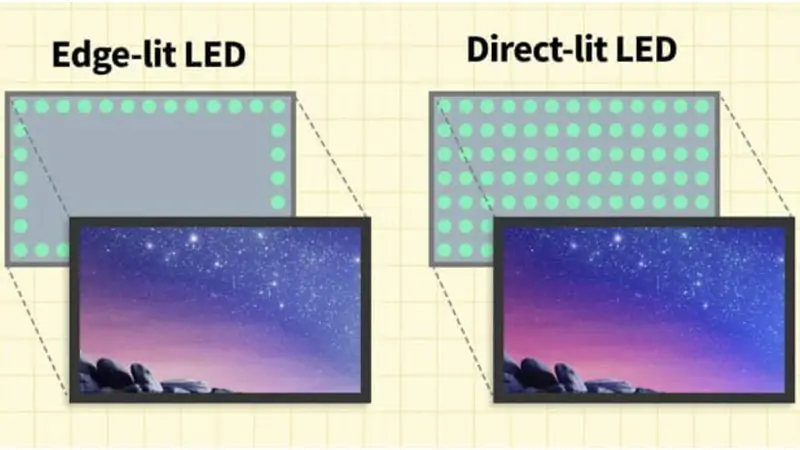
Edge-lit screens direct light from LEDs at the panel edges through a light-guide plate. This arrangement helps keep an LCD assembly thin. It can suit office monitors, laptops, and TVs where depth and price matter.
The tradeoff is control of illumination across the picture. Some models show uneven brightness or visible edge glow in dark scenes. Edge-lit local dimming exists, but its zone geometry limits how precisely the screen can dim small areas. Check the actual product rather than assuming every edge-lit screen looks alike.
02. Direct-Lit LED Backlighting
A direct LED backlight places LEDs behind the LCD rather than along its edges. It can improve illumination distribution, although the diffuser design and build quality still affect uniformity. The extra space behind the panel can make the assembly deeper.
Basic direct-lit LCDs may dim the backlight as a whole. They should not be assumed to have independently controlled zones. “Direct-lit” also does not mean “direct-view LED”: the first illuminates an LCD, while the second forms the image with emitting pixels.
03. Full-Array Local Dimming (FALD)
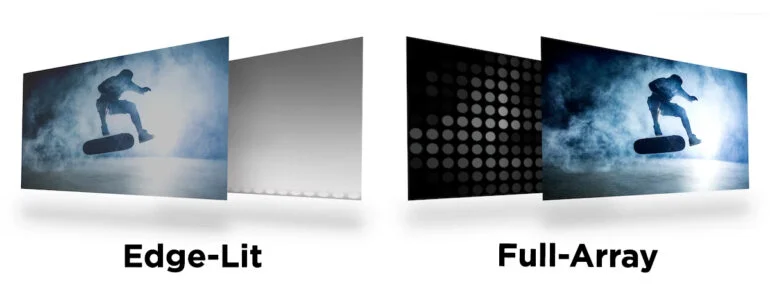
FALD divides a rear LED array into zones that can brighten or dim separately. A bright object and a dark background can therefore receive different amounts of backlight illumination. This improves contrast control compared with a backlight that changes brightness as one unit.
A zone usually illuminates multiple LCD pixels. Light can spill into neighboring dark areas, creating blooming or a halo around subtitles and bright objects. The result depends on zone size, the LCD panel, and the dimming algorithm. More zones can help, but a zone count alone is not a complete picture-quality assessment.
04. Mini-LED Backlighting
Mini-LED refers to smaller LEDs used to illuminate an LCD. Smaller light sources allow denser backlight layouts, often combined with full-array local dimming. The number of LEDs and the number of dimming zones are different specifications: several LEDs may be controlled together as one zone.
Mini-LED can be useful for high dynamic range (HDR), where bright highlights must coexist with dark areas. It remains an LCD technology and can still show blooming. Compare measured performance and the exact model specifications instead of treating “mini-LED” as a guarantee of perfect blacks.
A useful specification example is the Sony FWD-85X95L, whose published specifications separately list a full-array mini-LED backlight and local dimming. This shows why the two labels can describe the same screen. It does not establish the performance of every mini-LED model.
When comparing LED backlight types, separate LED count from dimming-zone count and pixel count. A 4K LCD has millions of picture pixels, while the backlight usually controls much larger groups. Mini-LED reduces the size of the illumination sources; it does not turn every LCD pixel into an independently emitting LED.
3. Edge-Lit vs Direct-Lit: Which Is Better?
Edge-lit favors a thin design; direct-lit places the illumination behind the panel and can improve uniformity. For stronger contrast control, check for local dimming rather than choosing by LED placement alone.
The search phrase “edge lit vs backlit” can be confusing because edge-lit is itself a form of backlighting. In TV comparisons, “backlit” sometimes means rear-lit or direct-lit. Confirm how the manufacturer uses the term before comparing specifications.
- Office work: test text clarity, white-background uniformity, and comfortable brightness.
- Dark-room movies: compare black levels, subtitle halos, and shadow detail with local dimming enabled.
- Bright-room viewing: evaluate sustained brightness and reflections, not just a peak HDR number.
- Gaming: compare response behavior, refresh rate, and input lag as well as the backlight.
Backlight bleed, blooming, and panel glow are not interchangeable. Bleed is unwanted leakage, often visible near edges; blooming is a halo associated with zone-based dimming; panel glow can vary with viewing angle. Use the same content, room lighting, and screen brightness when comparing products.
01. Compare LED backlight performance with the same test content
A useful LED backlight comparison uses matched settings and repeatable scenes. Disable exaggerated showroom modes, select the same picture mode where possible, and compare at similar visible brightness. Record whether local dimming and dynamic contrast are enabled. An unusually bright demonstration can hide black-level weaknesses or make a dimmer but more accurate display look unimpressive.
| Test material | What to observe | What the result tells you |
|---|---|---|
| White document and mid-gray image | Dark corners, patches, tint shifts, and brightness uniformity. | Whether everyday work exposes uneven illumination. |
| White subtitles over a dark scene | Halos, raised blacks, and dimming around text. | How the LED backlight handles bright details near dark areas. |
| Small moving highlight | A trailing halo or visible brightness steps. | How quickly the dimming system follows motion. |
| Dark scene with subtle texture | Missing shadow detail or crushed dark tones. | Whether aggressive dimming hides useful information. |
| Large bright image held on screen | Changes in brightness after the initial highlight. | Sustained output, which can differ from short peak brightness. |
| Normal content viewed from the side | Contrast loss, visible halos, and color changes. | Suitability for the actual seating arrangement. |
02. Interpret brightness, contrast, and energy claims carefully
Brightness is commonly stated in nits, equivalent to candelas per square meter. A peak figure measured on a small test window is different from full-screen sustained output. Ask for the test window, duration, picture mode, and local dimming setting before comparing LED backlight specifications. A contrast number is similarly incomplete without knowing whether it describes the panel’s native contrast or a dynamic dimming measurement.
An LED backlight also affects power demand, but more LEDs do not automatically mean proportionally higher energy use. Brightness settings, optical efficiency, screen size, and content all matter. Compare measured operating power under similar conditions. As a simple planning example, a display averaging 200 W for eight hours uses 1.6 kWh; this calculation is illustrative, not a rating for any particular screen.
Refresh rate, input lag, and pixel response describe different behavior from LED backlight placement. For gaming, test local dimming in the actual game mode and with variable refresh rate enabled if you use it. Processing changes can alter dimming behavior. For desktop work, check whether a moving mouse pointer or white text produces distracting fluctuations on dark backgrounds.
4. How to Choose the Right Display for Your Application
01. For TVs and Computer Monitors: Choosing an LED Backlight
Start with the content and viewing environment. An office monitor does not need the same HDR behavior as a home-cinema TV. For monitor backlight types, check the model specification alongside panel type, resolution, connectivity, and ergonomics.
- Confirm whether the display is LCD, OLED, or direct-view LED.
- For an LCD, check LED placement and whether local dimming is available.
- Compare uniformity, black levels, reflections, and dimming performance at your intended brightness.
- Check power consumption, operating-hour rating, warranty, and service arrangements for the exact model.
No backlight label establishes a universal lifespan, energy saving, or outdoor rating. Power draw changes with screen area, brightness, content, and operating settings. Request comparable measurements rather than relying on broad efficiency claims.
02. For Indoor Video Walls and Outdoor LED Billboards
For a direct-view LED installation, a backlight comparison is the wrong buying criterion. Assess pixel pitch, native resolution, brightness at the intended setting, calibration, weather protection where needed, and maintenance access.
A conventional modular LED billboard is already self-emissive; it does not need to be a MicroLED product to operate without a backlight. Outdoor-rated LCD signage also exists, but it is a different product category. Neither “direct-lit” nor “mini-LED” alone makes an LCD suitable for outdoor exposure.
For a commercial project, review our indoor LED screen options or commercial LED display solutions. Use the LED display resolution guide to relate screen size and viewing distance to image detail.
| Application | Relevant display choice | Evidence to request |
|---|---|---|
| Office documents and spreadsheets | LED-backlit LCD with suitable resolution and ergonomics. | Text demonstration, white uniformity, comfortable dimming range. |
| HDR films and games | Compare LCDs with effective local dimming, including mini-LED options. | Blooming, shadow detail, sustained brightness, and game-mode tests. |
| Close-viewed commercial LCD signage | Commercial LCD rated for the installation environment. | Duty cycle, orientation support, thermal limits, and warranty. |
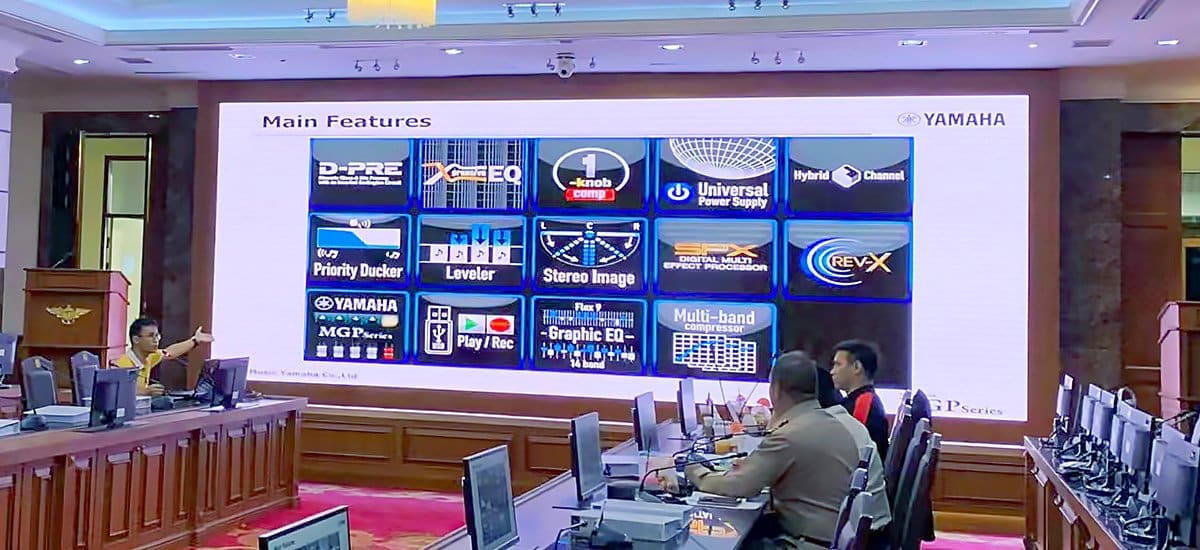
| Large indoor presentation wall | Direct-view LED with pitch and native resolution matched to content. | Cabinet layout, smallest-text test, calibration, and service access. |
| Outdoor LED billboard | Outdoor-rated direct-view LED system. | Environmental protection, structural design, brightness control, and maintenance plan. |
This selection table separates an LED backlight decision from a complete display-system decision. There is no universal “best” technology without a viewing task and installation context. A bright display with insufficient native resolution can still make small text unreadable; a detailed display without suitable environmental protection can still be unsuitable for its location.
03. Specify a direct-view LED wall using measurable requirements
For a modular wall, calculate resolution from the actual pixel matrix. As an illustrative example, a 3,840 mm wide by 2,160 mm high image area at an exact 2 mm pixel pitch contains 1,920 by 1,080 pixels. It is Full HD, despite its large physical size. Achieving 3,840 by 2,160 pixels at the same dimensions would require an exact 1 mm pitch. Actual buildable dimensions follow the chosen cabinets and modules.
Agree on the smallest text, nearest seat, farthest seat, and camera use before requesting a quotation. A front-service cabinet can suit a wall without rear access, but technicians must still be able to reach the relevant components. Include replacement modules, receiving cards, power supplies, calibration records, and controller configuration in the handover plan. These are operational requirements rather than LED backlight features.
For outdoor projects, assess sunlight, ambient temperature, rain exposure, drainage, electrical supply, and maintenance access. Brightness should be adjustable for daytime and nighttime conditions. The enclosure and installation design matter as much as the LED module specification. Ask for an itemized scope covering the screen, controller, mounting structure, power distribution, installation, and support, rather than comparing screen-area prices alone.
5. Frequently Asked Questions About LED Backlights
01. Does an LED display have a backlight?
An LED-backlit LCD TV or monitor uses a backlight. A direct-view LED display, including a modular LED video wall or billboard, emits light from its pixels and does not use a separate backlight. OLED and MicroLED are also self-emissive.
02. What are the main LED backlight types?
The common terms are edge-lit, direct-lit, full-array local dimming (FALD), and mini-LED. Edge-lit and direct-lit describe LED placement, FALD describes zoned brightness control, and mini-LED describes smaller backlight LEDs. These categories can overlap.
03. Is direct-lit better than edge-lit?
Direct-lit places LEDs behind the LCD and can provide more even illumination. Edge-lit places LEDs at the edges and supports thin designs. Neither label alone guarantees better contrast, brightness, or HDR; compare the exact models and their local dimming performance.
04. Is full-array local dimming the same as mini-LED?
No. FALD means the backlight is divided into independently controlled zones. Mini-LED refers to smaller LEDs used in the backlight. A mini-LED LCD can use full-array local dimming, so a display may have both features.
05. Which backlight type is best for a TV or monitor?
For office work, prioritize text clarity, uniformity, comfortable brightness, and ergonomics. For HDR movies or games, compare FALD and mini-LED models for local dimming quality, blooming, peak and sustained brightness, and input lag. There is no universally best backlight.
06. Which type of backlight does an OLED TV use?
OLED uses no backlight because its organic light-emitting subpixels produce light directly. MicroLED also emits light directly, using inorganic LEDs. Neither technology is an LCD backlight type.
07. Do outdoor LED billboards use direct-lit backlights?
No. A direct-view LED billboard forms the picture with light-emitting pixels. Direct-lit is a backlight arrangement for LCDs. For an outdoor LED screen, evaluate brightness, weather protection, thermal design, pixel pitch, and maintenance access instead.
08. How can I check my monitor’s backlight type?
Find the exact model number and check its manufacturer specifications or manual for edge-lit, direct-lit, local dimming, or mini-LED. IPS, VA, and TN identify LCD panel types rather than the backlight arrangement.
6. Next Steps for an LED Wall Project
Choose an LED backlight by comparing LED placement and local dimming separately. For a modular direct-view LED wall, specify the emitting pixel system and installation requirements instead of choosing a backlight.
Planning a commercial LED screen? Contact HonghaiLED with your screen dimensions, nearest viewing distance, indoor or outdoor location, content type, and operating schedule. Those details provide a useful starting point for discussing pixel pitch, brightness, installation, and service access.
Related Posts
Indoor LED Screen Buying Guide: Types, Specs & Costs
An indoor LED screen is a modular, direct-view display that…
Indoor vs Outdoor LED Displays: Differences & Price
The main differences between indoor and outdoor LED displays are…
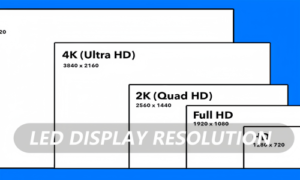
LED Display Resolution: 2K, 4K, HD & Pixel Pitch
LED display resolution is the number of physical pixels across…

No Comments