
LED Display Resolution: 2K, 4K, HD & Pixel Pitch
LED display resolution is the number of physical pixels across and down an LED screen. Full HD is 1920 × 1080 pixels; 4K UHD is 3840 × 2160. To choose a wall, match its native pixel matrix to your content, available space and nearest viewing distance. Pixel pitch determines how many pixels fit into that space.
Quick answer on 2K: the cinema 2K image container is 2048 × 1080 pixels. A 2560 × 1440 screen is QHD (1440p), although some monitor listings call it “2K.” For an LED wall quotation, specify the exact width × height in pixels rather than relying on the label.
HonghaiLED technical guide · Updated October 26, 2026
Key takeaways
- Resolution describes pixels; screen size describes metres or millimetres.
- A processor accepting 4K video does not make a lower-resolution LED wall native 4K.
- Calculate from size and pitch for an estimate, then confirm the exact cabinet matrix.
- Test your smallest text and camera settings before choosing a finer pitch.
1. What is LED display resolution?
A direct-view LED wall creates an image with physical light-emitting pixels. Its native resolution is the horizontal pixel count multiplied by the vertical pixel count. A 1920 × 1080 wall contains exactly 2,073,600 pixels.
Keep these terms separate when comparing quotations:
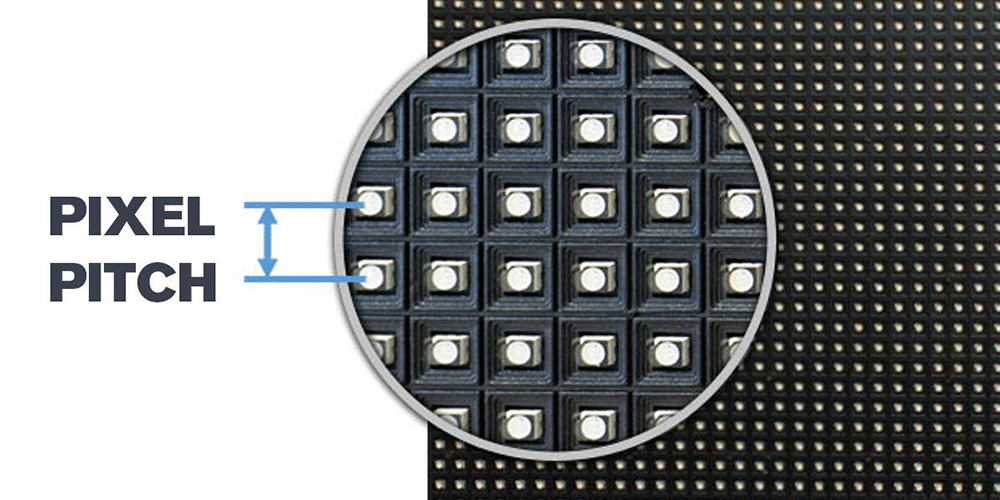
- Pixel pitch: centre-to-centre spacing between adjacent pixels, measured in mm. P2.5 means a nominal 2.5 mm pitch.
- Pixel density: pixels per square metre. For a square pixel grid, density ≈ (1000 ÷ pitch in mm)².
- Aspect ratio: width divided by height. A 1920 × 1080 canvas is 16:9; custom LED walls can have other shapes.
- Input resolution: the video format accepted by the processor. It can differ from the wall’s physical pixel matrix.
In this guide, LED display resolution refers to a direct-view LED wall, where the LED pixels form the picture. An LED-backlit LCD television uses a different display construction. Both can have a 3840 × 2160 matrix, but cabinet layout and module calculations apply to modular direct-view systems.
For a finished wall, native resolution is fixed by the installed hardware. A custom design means that the manufacturer can build different matrices from modules; it does not mean that software can create additional physical pixels after installation. Record the horizontal and vertical counts separately, because total megapixels alone do not describe the shape of the canvas.
2. Why does resolution matter for an LED screen?
More native pixels can preserve smaller text, fine lines and detailed images when the source content and viewing distance justify them. A presentation with spreadsheets needs different readability checks from a stage backdrop showing large graphics.
Resolution alone does not determine image quality. Contrast, brightness, calibration, grayscale, processing and the content itself also matter. Increasing resolution cannot restore detail that is absent from a low-quality source file.
At the same physical size, a finer pitch increases the pixel count. At the same pitch, making the wall larger increases its total pixels but does not reduce the spacing between pixels.
Think about a control-room dashboard with four equally sized video windows. On a Full HD canvas, each quadrant has at most 960 × 540 pixels before borders and interface elements. On a 4K UHD canvas, each quadrant can occupy 1920 × 1080 pixels. This arithmetic explains why LED display resolution matters for multi-window work even when the screen mainly shows familiar HD sources.
However, adding pixels does not automatically make text readable from the back of a room. If a designer uses the extra resolution to shrink labels, the physical letter height may become too small. Specify readability at both the nearest and farthest viewing positions, and test a representative slide rather than judging only a colourful demonstration video.
3. HD, 2K, QHD, 4K and 8K resolution chart
These are common image formats, not fixed physical LED screen dimensions. Pixel totals below are width × height calculations.
| Format | Width × height (pixels) | Total pixels | Meaning for your project |
|---|---|---|---|
| SD examples | 720 × 480 / 720 × 576 | 345,600 / 414,720 | Legacy video; pixel aspect ratio can differ from modern square-pixel formats |
| HD / 720p | 1280 × 720 | 921,600 | 16:9 content canvas |
| Full HD / FHD / 1080p | 1920 × 1080 | 2,073,600 | 16:9 presentation and video format |
| Cinema 2K container | 2048 × 1080 | 2,211,840 | DCI cinema format; wider than 16:9 |
| QHD / 1440p | 2560 × 1440 | 3,686,400 | 16:9; sometimes marketed as “2K” |
| 4K UHD / 2160p | 3840 × 2160 | 8,294,400 | 16:9; four times Full HD’s pixel count |
| Cinema 4K container | 4096 × 2160 | 8,847,360 | DCI cinema format; distinct from UHD |
| 8K UHD / 4320p | 7680 × 4320 | 33,177,600 | 16:9; four times 4K UHD’s pixel count |
A modular wall can also have a custom resolution such as 1920 × 1152. State that exact matrix in the content brief and controller configuration.
HD resolution terminology: 720p normally means 1280 × 720 progressive video, while 1080p means 1920 × 1080 progressive video. The letter “p” describes progressive scanning; it does not specify the LED driver refresh rate. UHD resolution commonly refers to 3840 × 2160 in 4K products, so include the complete dimensions whenever the specification could be ambiguous.
A resolution chart compares image formats, not an installation’s quality grade. For example, two walls may contain the same number of pixels but use very different brightness settings, colour calibration and cabinet sizes. Use the chart to agree on content dimensions, then verify the actual LED display resolution from the hardware schedule.
4. 2K vs QHD vs 4K: what do the labels mean?
01. What is 2K resolution size?
In digital cinema, the 2K image container is 2048 pixels wide and 1080 pixels high. QHD is 2560 × 1440. Because commercial use of “2K” varies, confirm the native matrix, aspect ratio and supported input formats with the supplier.
02. What is 4K resolution?
For 16:9 UHD video, 4K resolution is 3840 × 2160 pixels. Cinema 4K uses a 4096 × 2160 container. Both have 2160 vertical pixels, but their widths and aspect ratios differ.
03. Is 4K better than Full HD?
4K UHD has twice the pixels in each dimension and four times the total pixels of Full HD. At the same wall size, it requires a finer pitch. Whether the extra detail is useful depends on viewing distance, text size and source quality. Compare actual content at the nearest seat before deciding.
Native 4K vs 4K input: a 1920 × 1080 wall may accept a 4K source through a compatible processor, but the image is scaled to its 2,073,600 physical pixels. Ask for separate confirmation of the input format and native output canvas.
The Digital Cinema Initiatives system specification distinguishes the 2048 × 1080 and 4096 × 2160 image containers. This is why a technical quotation should avoid treating cinema 2K resolution and QHD as interchangeable.
04. How should you compare 2K resolution size with 4K?
First identify which “2K” format is intended. 4K UHD has 2.25 times as many pixels as 2560 × 1440 QHD, but cinema 4K has four times the pixels of cinema 2K. These are different comparisons. A request for “twice the resolution” is also ambiguous: it could mean twice the total pixels or twice each dimension. State the required matrix instead.
If most source material is Full HD, a 4K wall can still be useful for multiple windows or future content. Upscaling a single Full HD file, however, cannot reproduce the fine detail of a native 4K master. Check the media workflow alongside the LED display resolution before paying for additional pixels.
5. How to calculate LED display resolution
01. Method 1: estimate from screen size and pixel pitch
Use the active display area and keep both dimensions in the same units:
- Horizontal pixels ≈ active width (mm) ÷ pitch (mm)
- Vertical pixels ≈ active height (mm) ÷ pitch (mm)
- Total pixels = horizontal pixels × vertical pixels
For a 5000 × 2800 mm target area at nominal P2.6, the estimate is approximately 1923 × 1077 pixels. This is a planning estimate, not an order specification: commercial pitch labels can be rounded, and cabinets must fit as whole units.
02. Method 2: confirm from the cabinet pixel matrix
Use this method for the final configuration:
- Confirm each module’s pixel matrix and the number of modules across and down per cabinet.
- Multiply those values to obtain the cabinet’s horizontal and vertical pixels.
- Multiply cabinet pixels by the cabinet count across and down the complete wall.
- Confirm active dimensions, aspect ratio, total load and the processor mapping.
Worked example: assume a 250 × 250 mm module contains 96 × 96 pixels. A cabinet with 2 × 2 modules measures 500 × 500 mm and contains 192 × 192 pixels. Its actual pitch is approximately 2.604 mm.
Ten cabinets across and six down produce a 5000 × 3000 mm wall with 1920 × 1152 pixels, or 2,211,840 pixels in total. Six cabinets exceed a 2800 mm height limit; five cabinets would make a 2500 mm-high wall with 1920 × 960 pixels. Do not round up without checking the installation space.
For 1920 × 1080 content on the 1920 × 1152 wall, keeping the original image at 1:1 scale leaves 72 unused rows: 36 above and 36 below if centred. Filling the wall instead requires cropping or another scaling decision. Agree that choice before creating the media.
See the LED screen size and dimensions guide for physical layout planning.
03. Reverse calculation: what pitch fits a 4K wall?
To estimate the required pitch, divide active width in millimetres by the target horizontal pixels. A 4800 mm-wide wall targeting 3840 pixels requires 1.25 mm pitch. Its 2160-pixel height would be 2700 mm. Check both dimensions: a width calculation alone cannot prove that a complete 16:9 UHD canvas will fit the room.
An LED wall resolution calculator is useful for comparing concepts, but the final drawing must use whole modules and cabinets. Ask for exact pitch rather than only the rounded product name. Also distinguish active image dimensions from the outer frame, trim and maintenance space.
| Item | Example value | Verification |
|---|---|---|
| Module matrix | 96 × 96 pixels | Read the module specification |
| Modules per cabinet | 2 across × 2 down | Cabinet becomes 192 × 192 pixels |
| Cabinet layout | 10 across × 6 down | 60 complete cabinets |
| LED wall resolution | 1920 × 1152 pixels | 2,211,840 pixels total |
| Active dimensions | 5.0 × 3.0 m | Using 500 × 500 mm cabinets |
6. Pixel pitch, screen size and viewing distance
Smaller pitch increases resolution within a fixed area. Halving the pitch doubles the pixels across and down, giving roughly four times as many pixels overall.
| Pitch | Full HD: 1920 × 1080 | 4K UHD: 3840 × 2160 |
|---|---|---|
| 1.25 mm | 2.40 × 1.35 m | 4.80 × 2.70 m |
| 2.5 mm | 4.80 × 2.70 m | 9.60 × 5.40 m |
| 4 mm | 7.68 × 4.32 m | 15.36 × 8.64 m |
These dimensions are calculated as pixels × pitch; they are not a guarantee that every cabinet range can build every listed size. Frames, structure and installation clearances are additional.
01. How close will people stand?
The nearest viewer sets the most demanding pixel-visibility check. There is no universal viewing-distance rule that guarantees readability for every pitch. Test the intended fonts, graphics, brightness and viewing angles at that distance. For close indoor viewing, compare finer pitches using the indoor LED screen guide.
02. What about refresh rate and cameras?
Refresh rate is separate from resolution. Camera flicker and scan bands depend on the display drive and camera timing. Moiré also depends on the interaction between the LED pixel grid and the camera sensor, including distance, angle, lens and focus. A 4K label or high refresh specification alone does not guarantee a clean camera image.
Christie’s pixel pitch guidance describes approximately one metre of viewing distance per millimetre of pitch as an initial rule of thumb. Treat that as a starting point for a demonstration, not a guaranteed limit for invisible pixels, comfortable viewing or readable text. Different suppliers use different criteria when quoting viewing distance.
For camera-facing walls, include the intended camera, lens, shutter settings, frame rate and operating brightness in the test brief. Check wide shots and close shots, moving graphics and low-grey images. Selecting LED display resolution for an audience and selecting a wall for a camera are related decisions, but neither test replaces the other.
7. How to choose the right LED wall resolution
- Define the content. Identify your smallest text, number of dashboard windows, source formats and whether cameras will film the wall.
- Measure the site. Record active display space, nearest and farthest viewing distances, access and service clearance.
- Choose the canvas. Select Full HD, UHD or a custom matrix that fits the use case and aspect ratio.
- Compare cabinet layouts. Request exact cabinet dimensions, pixel matrices and counts for each proposed pitch.
- Validate the signal chain. Confirm input formats, output width and height limits, total pixel capacity, port loading, receiving cards and frame-rate requirements. Check HDR compatibility only if your content requires it.
- Test and price the complete system. Review your real content at the nearest position. Include processing, structure, installation, calibration, service and spares in the quotation.
Ask the supplier to document the physical dimensions and native pixel count separately. Avoid selecting a tighter pitch simply because it has a larger number on the specification sheet.
01. Confirm content mapping before ordering
Give the content creator a drawing with the exact LED wall resolution, aspect ratio and any areas reserved for logos or captions. Choose whether incoming images will be fitted with blank borders, cropped to fill, or stretched. Stretching changes proportions and is usually unsuitable for people, circles and branded artwork. Keep important text away from crop boundaries.
A one-pixel test grid can reveal unexpected scaling, incorrect mapping or missing rows. Run it through the actual playback computer, processor and wall configuration. Also test the intended presentation software, because operating-system scaling and application layouts can change the result even when the source output uses the correct resolution.
02. Compare the complete system and acceptance criteria
For each proposed LED display resolution, request the exact controller model, supported output dimensions and loading limits at the required frame rate and bit depth. A total pixel-capacity figure alone may hide a maximum-width restriction or per-port limitation. Confirm the signal layout and any redundancy arrangement with the system supplier.
Compare installed cost using the same scope: cabinets, processor, distribution, structure, power equipment, calibration, commissioning, spare modules and service access. A finer pitch can change several of those requirements; do not assume the cost rises in direct proportion to pixel count. Ask for expected and maximum power figures separately for electrical planning.
Agree on acceptance tests before delivery: native matrix and dimensions, full-screen mapping, small-text readability, cabinet alignment, colour consistency and the required camera test. Document how replacement modules will be matched and calibrated. These checks make an LED display resolution specification useful throughout installation and maintenance.
8. Resolution priorities by application
| Application | Main resolution check | Additional checks |
|---|---|---|
| Meeting rooms and education | Smallest text and laptop content at the nearest seat | Aspect ratio, brightness, source switching and service access |
| Control rooms | Legibility of multiple windows and detailed dashboards | Processor capacity, redundancy and calibration |
| Retail and museums | Detail at close viewing distance | Content quality, contrast and ambient light |
| Outdoor advertising | Readable message at the actual audience distance | Brightness, weather protection and maintenance |
| Concerts and events | Canvas size for show files and camera magnification | Refresh behaviour, rigging design and signal reliability |
| Broadcast and virtual production | Rendering and camera performance at planned positions | Camera tests, timing, colour pipeline and lens settings |
Compare LED video wall panels and selection factors once the required canvas is clear.
For outdoor advertising, start with the message and the time available to read it. Large lettering and a simple composition can be more useful than adding pixels to a crowded design. For a meeting room, test spreadsheet labels and shared laptop screens. For a museum, examine fine artwork at the closest permitted visitor position.
Each application therefore needs its own evidence. A successful LED display resolution choice for a concert backdrop may be unsuitable for a detailed control-room interface. Request a demonstration using your own sample content, and record the viewing conditions so competing proposals can be assessed fairly.
9. LED display resolution FAQs
01. What is the resolution of a large LED screen?
A large LED screen has no single standard resolution. Its native matrix is determined by cabinet pixel counts and the number of cabinets across and down. Physical size alone does not establish whether it is Full HD, 4K or a custom canvas.
02. Is 2K the same as 1440p?
No. The cinema 2K image container is 2048 × 1080 pixels. 1440p usually means 2560 × 1440 QHD. Some commercial listings use “2K” loosely for QHD, so request the exact pixel dimensions.
03. Is 2160p the same as 4K?
3840 × 2160 is the common 16:9 4K UHD format, often called 2160p. Cinema 4K is 4096 × 2160. The vertical pixel count alone does not specify the width or aspect ratio.
04. How do you calculate LED screen resolution?
For an estimate, divide active width and height in mm by pitch in mm. For the final specification, multiply cabinet horizontal pixels by cabinets across, and cabinet vertical pixels by cabinets down.
05. Does a smaller pixel pitch always mean a better screen?
A smaller pitch adds pixels within the same area, but its value depends on viewing distance and content. Compare readability, image quality, processing requirements and the complete installed cost before choosing it.
06. Can an LED wall show 4K content without being native 4K?
Yes, if its processor accepts the source and scales it to the wall’s matrix. Native 4K UHD requires 3840 × 2160 physical pixels; accepting a 4K input is a separate capability.
07. What resolution should I use for outdoor advertising?
Choose the native canvas after checking message size, audience distance, pitch and available dimensions. Full HD or a custom resolution may be sufficient. Confirm brightness and environmental protection separately from pixel count.
10. Get a resolution and pixel pitch configuration for your project
Send HonghaiLED the available width and height, indoor or outdoor location, nearest viewing distance, sample content, camera requirements and target budget. Request a proposal stating the active dimensions, cabinet layout, native resolution and processing capacity.
Contact HonghaiLED for an LED wall configuration and quotation.
Calculation basis: pixel totals and physical-size examples in this guide use the formulas shown above. They are planning examples, not measured performance claims. Product-specific matrices must be confirmed against the current specification. For a first-party cabinet reference, see the HonghaiLED EA600COB1 specification sheet.
Conclusion: choose LED display resolution by matching the content canvas to physical space, pixel pitch and viewing conditions. Confirm HD, 2K resolution or 4K resolution labels with exact pixel dimensions, then verify the cabinet layout and processing chain. A documented configuration is more useful than a resolution label alone.
Related Posts

Indoor vs Outdoor LED Displays: Differences & Price
The main differences between indoor and outdoor LED displays are…
LED Video Wall Guide: Types, Costs, Pixel Pitch & Installation
An LED video wall is a modular, direct-view display built…
Rolling LED Screen & Roll-Up LED Display Buying Guide
A rolling LED screen, also called a roll-up LED display…

No Comments