
LED Display Screen Sizes: Charts & How to Choose
Choose LED display screen sizes by active width × height, cabinet layout, viewing distance, and content resolution. There is no universal finished size: a grid of 10 × 6 cabinets measuring 500 × 500 mm creates a 5 × 3 m LED wall (16.40 × 9.84 ft). Confirm the aspect ratio, native pixels, and complete installed depth before ordering.
This guide covers direct-view LED walls for commercial venues and events. Household LED-backlit TV sizes are a separate category. Use the charts below to compare cabinet dimensions, convert millimeters to inches or feet, and calculate a buildable screen for your opening.
HonghaiLED · Updated
Quick sizing checklist
- Measure usable width, height, and depth after allowing for the mounting system and service access.
- Choose a compatible cabinet grid; calculate width, height, quantity, and area.
- Match the screen ratio to your content and confirm the manufacturer’s exact pixel matrix.
- Test the smallest text from the closest and farthest audience positions.
- Approve the installation drawing, processing capacity, power requirements, and complete quotation.
1. What is an LED Display Screen?
A direct-view LED display creates its image with individually controlled pixels containing red, green, and blue light emitters. These pixels are arranged on modules, which are installed into cabinets or a supported modular structure. The assembled screen displays video, graphics, and text without the internal backlight used by an LCD television.
Understanding this construction explains why screen dimensions are flexible but not arbitrary. A supplier can combine compatible units into many layouts, yet each layout must respect module dimensions, cabinet alignment, control electronics, and service access.
01. Main Applications for LED Display Screens
Meeting rooms need readable slides and remote-participant windows. Rental stages need portable cabinets and repeatable assembly. Outdoor advertising needs suitable brightness and weather protection. Stadium displays need visibility across their intended audience zones. The correct LED screen size depends on that viewing task, rather than the venue name alone.
02. Main Components of an LED Display
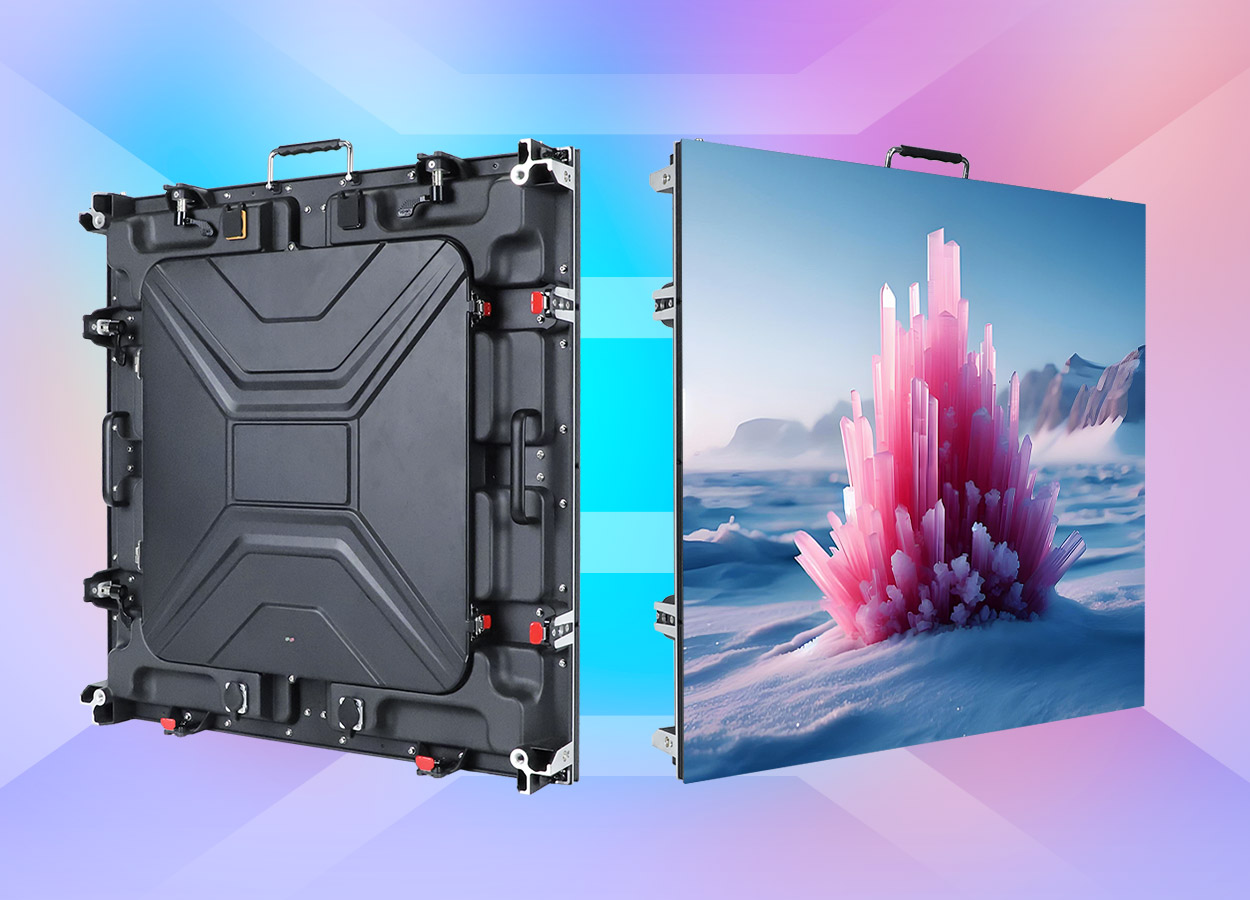
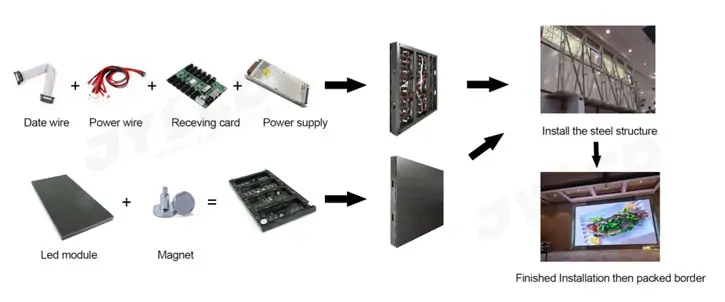
Modules produce the image; cabinets locate and support them. Power supplies convert electrical input, receiving cards distribute image data, and the video processor maps sources to the screen. For different screen dimensions, the quantity and loading of these components change. Ask for a cabinet layout and signal diagram alongside the mechanical drawing.
2. Common LED Display Sizes in the Market
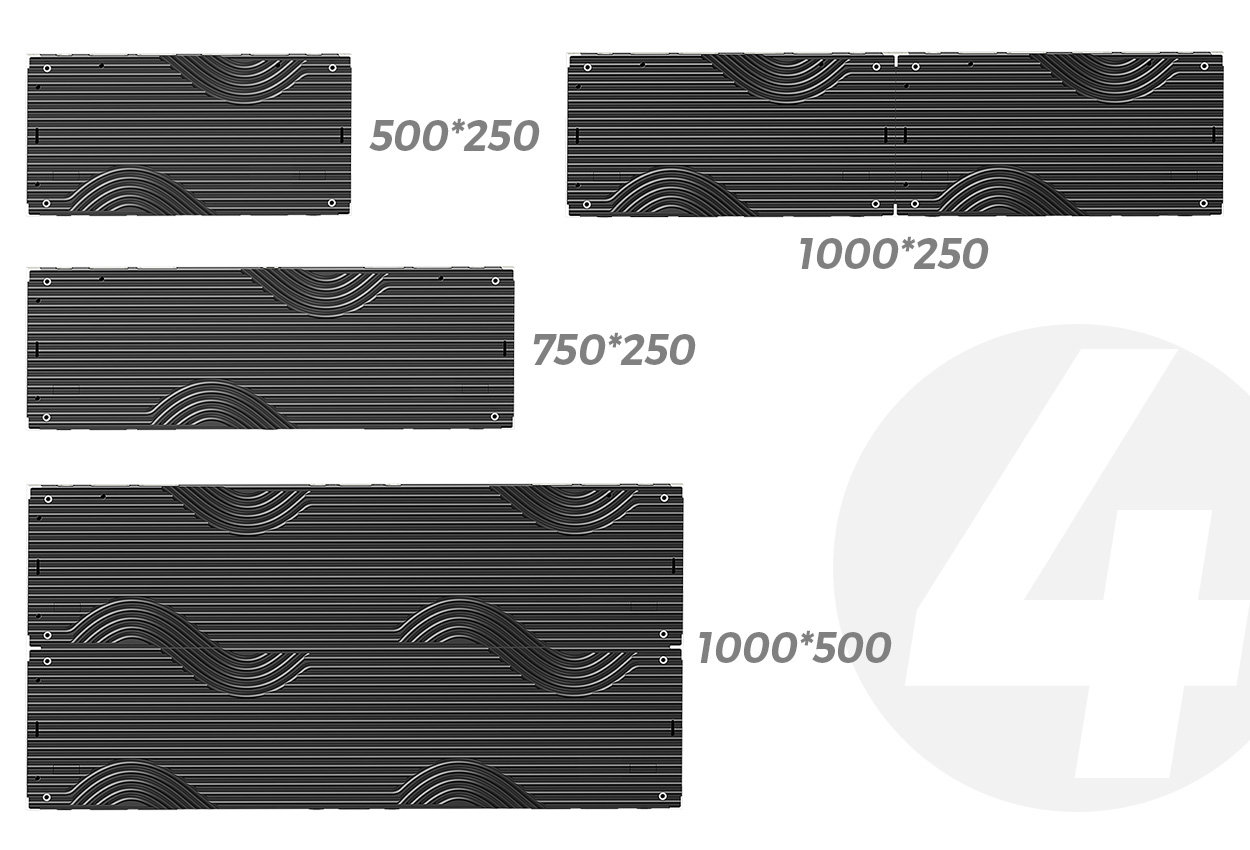
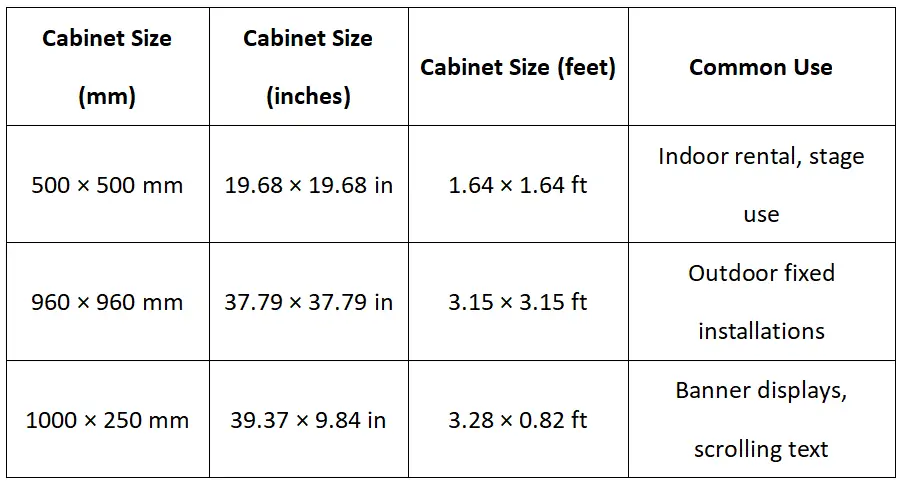
Common LED cabinet dimensions provide the starting point for a screen layout. The table compares physical dimensions used in the market; it does not imply that cabinets from different manufacturers are interchangeable. Pixel pitch, connectors, locks, calibration, and control settings must all match the selected system.
| Cabinet width × height | Shape | Typical project fit | Sizing consideration |
|---|---|---|---|
| 500 × 500 mm | Square | Rental stages and event walls | Adds 0.5 m in either direction |
| 500 × 1,000 mm | Portrait rectangle | Larger rental walls | Adds 1 m vertically per full-height row |
| 600 × 337.5 mm | 16:9 rectangle | Indoor presentation walls | Equal column and row counts preserve 16:9 |
| 640 × 480 mm | 4:3 rectangle | Indoor fixed installations | Grid proportions determine final ratio |
| 960 × 960 mm | Square | Outdoor fixed displays | Check opening against 0.96 m increments |
| 1,000 × 250 mm | Wide rectangle | Strip layouts and compatible indoor walls | Supports a shallow vertical increment |
These formats describe the cabinet face, not a guaranteed active area or complete installation envelope. Confirm the selected model’s drawing before specifying steelwork. A product family may offer several cabinet widths or mixed heights, but compatibility needs written confirmation.
When comparing screen dimensions for a repeat installation, consider spare-part availability as well as initial fit. A familiar enclosure does not guarantee replacement modules will have the same pixel matrix, driver electronics, or color calibration years later.
Verified HonghaiLED example: The HH600COB2 indoor COB LED screen uses 600 × 337.5 mm cabinets with a 16:9 face. Six columns and six rows therefore produce 3.6 × 2.025 m using 36 cabinets. This is a dimensional calculation from the published cabinet size; the selected pitch and cabinet pixel matrix determine native resolution. Confirm the current configuration in your quotation.
3. Panel vs Cabinet vs Full-Screen Size
The word “panel” is used inconsistently: some suppliers mean an LED module, while rental teams often mean a complete cabinet. Remove that ambiguity from every discussion of screen dimensions by recording both dimensions and the component name.
Module size identifies a replaceable image-producing assembly. Cabinet size identifies the unit handled and connected during installation. Full-screen size identifies the combined active image. Installed size includes the frame, trim, depth, connectors, and required access around the assembly.
For example, a quotation for “40 panels” is incomplete. Forty 500 × 500 mm cabinets arranged ten across and four high create a 5 × 2 m screen; the same quantity arranged eight across and five high creates a 4 × 2.5 m screen. Both cover 10 m², but their aspect ratios and content layouts differ.
Specify LED wall dimensions as width first, height second, with units and orientation. Review the LED module selection guide when checking replacement compatibility. A purchase order should identify the cabinet model, module model, pixel matrix, and layout, rather than relying on “panel size” alone.
4. Examples of Where Each Size Fits Best
Use screen dimensions as project candidates, then validate them against actual content. The following examples illustrate the consequences of a layout choice; they are not universal recommendations or model-specific offers.
| Cabinet format | Columns × rows | Finished width × height | Application to evaluate | Main question |
|---|---|---|---|---|
| 500 × 500 mm | 6 × 4 | 3 × 2 m | Exhibition booth | Can visitors read key messages in a short glance? |
| 500 × 500 mm | 10 × 6 | 5 × 3 m | Event stage | Will widescreen video use bars or a custom layout? |
| 600 × 337.5 mm | 6 × 6 | 3.6 × 2.025 m | Presentation room | Are slide labels readable from the rear seats? |
| 960 × 960 mm | 6 × 3 | 5.76 × 2.88 m | Outdoor advertising | Do approach angle and message duration suit the site? |
01. Standard vs Custom LED Display Screen Sizes
A standard configuration uses an established cabinet family. It can simplify assembly and maintenance, provided its increments suit the opening. A custom size LED screen may use a different module grid, several compatible enclosure sizes, or purpose-built mechanics. “Custom” does not mean cabinets can be cut to fit on site.
For curved screens, distinguish the developed surface width from the straight-line distance across the opening. Ask for the radius, viewing position, edge details, and content map. These details influence usable screen dimensions more than an approximate square-meter total does.
5. How to Measure LED Display Screen Size
Measure the usable opening at several points, including any uneven surfaces, obstructions, and access restrictions. Record width, height, and depth in millimeters. Do not use an approximate diagonal as the manufacturing measurement for an LED wall.
01. Calculate the Cabinet Grid
For identical cabinets in a rectangular grid, screen width = cabinet width × columns, and screen height = cabinet height × rows. Cabinet quantity equals columns × rows. Use active face dimensions for image calculations and enclosure dimensions for mechanical fit when those differ.
Suppose the usable image opening is 5,200 mm wide and 3,200 mm high, after installation allowances have been reserved. With 500 mm square cabinets, ten columns and six rows give 5,000 × 3,000 mm and require 60 cabinets. Eleven columns would need 5,500 mm and exceed the available width. Round down when fitting inside a maximum opening; round up only when minimum coverage is required and the larger result is acceptable.
02. Confirm the Result on a Drawing
The 5 × 3 m example leaves 200 mm in each overall direction. That is total unused space, not automatically a clearance allowance on every side. If centered, the nominal remaining space is 100 mm per side. The installer must decide whether that is adequate for the actual frame, tolerances, and service requirements.
For mixed cabinet formats, calculate each row and column separately. Include corner units, angled connections, and any inactive gaps. Before approving screen dimensions, request front, side, and plan views that distinguish active image, enclosure edges, structure, and cable routes.
Measure twice after the proposed mounting position is marked. A screen that fits the wall can still block a door, overlap a speaker, or sit too low behind seated people. Confirm those constraints before ordering the cabinet quantity.
6. LED Display Screen Sizes in Different Units
Keep millimeters as the reference unit on technical drawings, then convert for the project team. Inches = millimeters ÷ 25.4; feet = millimeters ÷ 304.8; centimeters = millimeters ÷ 10. These conversions describe the same screen dimensions without changing the cabinet grid.
| Width × height, mm | Width × height, cm | Width × height, inches | Width × height, feet |
|---|---|---|---|
| 500 × 500 | 50 × 50 | 19.69 × 19.69 | 1.64 × 1.64 |
| 500 × 1,000 | 50 × 100 | 19.69 × 39.37 | 1.64 × 3.28 |
| 600 × 337.5 | 60 × 33.75 | 23.62 × 13.29 | 1.97 × 1.11 |
| 640 × 480 | 64 × 48 | 25.20 × 18.90 | 2.10 × 1.57 |
| 960 × 960 | 96 × 96 | 37.80 × 37.80 | 3.15 × 3.15 |
| 5,000 × 3,000 | 500 × 300 | 196.85 × 118.11 | 16.40 × 9.84 |
Rounded values are for communication; retain the exact millimeter measurements for fabrication. Do not round individual cabinets in feet and then multiply the rounded numbers across a large wall, because the accumulated difference can mislead installation planning.
01. Width and Height vs Diagonal Inches
Diagonal = √(width² + height²), using identical units. A 5 × 3 m wall has a diagonal of about 5.831 m, or 229.56 inches. Its width is 196.85 inches. A diagonal label therefore cannot be substituted for width when comparing screen dimensions or checking a wall opening.
7. Understanding LED Screen Size Ratio (Aspect Ratios)
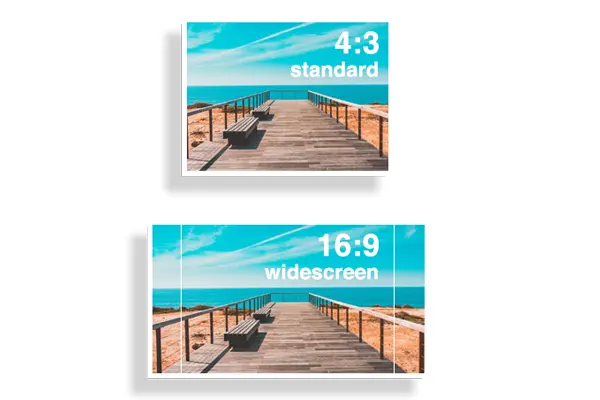
Aspect ratio is the relationship between active width and active height. A 5 × 3 m wall is 5:3, while a 3.6 × 2.025 m wall is 16:9. Screens with equal area can have very different shapes, so agree on both area and ratio.
01. Match the Canvas to the Content
Use 16:9 for conventional widescreen presentations when that suits the brief. Square and portrait layouts can work for retail content; wide canvases can hold video plus branding or several information zones. For a target ratio a:b, calculate height = width × b ÷ a. Then check whether compatible cabinets can produce that height.
A 4 m-wide 16:9 image needs 2.25 m of height. Standard 500 mm square cabinets cannot create that exact height in a uniform grid. A 4 × 2.5 m wall is a different shape, even if the processor accepts a 16:9 source. Confirm a suitable alternative cabinet format or plan how the source will fit.
02. Agree on Scaling Before Production
Fitting 16:9 content inside a 4:3 screen preserves the entire picture with unused space above and below. Filling the screen crops the sides; stretching distorts the picture. Provide the content team with exact native pixels, safe margins, and zone boundaries. Never describe screen dimensions only as “widescreen” when commissioning media.
8. General Rules for Pixel Pitch Selection
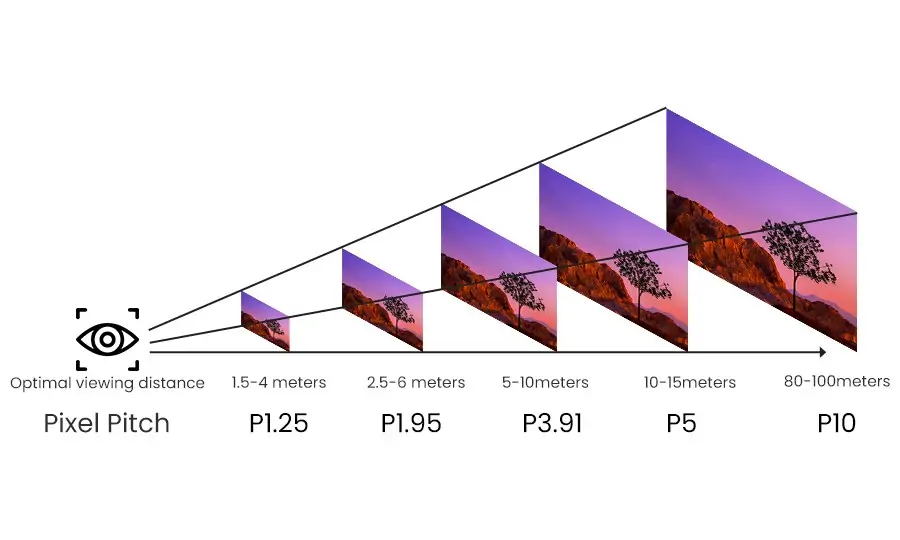
Pixel pitch is the center-to-center distance between neighboring pixels, measured in millimeters. P2.5 is a smaller pitch than P5. At identical screen dimensions, an exact 2.5 mm pitch supplies twice as many pixels horizontally and vertically as 5 mm, or four times the total pixels.
01. Calculate LED Screen Size in Pixels
For an exact pitch, horizontal pixels = active width in millimeters ÷ pitch; calculate vertical pixels the same way. For procurement, use the manufacturer’s stated cabinet pixel matrix multiplied by the cabinet grid. Marketing pitch labels can be rounded and produce misleading fractional results.
| Exact pitch | Horizontal × vertical pixels | Total pixels | Practical implication |
|---|---|---|---|
| 2.5 mm | 2,000 × 1,200 | 2,400,000 | More detail in the same physical area |
| 3.90625 mm | 1,280 × 768 | 983,040 | Example often marketed as P3.91 |
| 5 mm | 1,000 × 600 | 600,000 | Fewer pixels; assess text and viewing distance |
These are arithmetic examples, not assurances that every cabinet family offers all three configurations. A 500 mm cabinet with 128 pixels across has an exact pitch of 3.90625 mm. Ten such cabinets give 1,280 pixels across; dividing 5,000 by the rounded label 3.91 does not give the authoritative matrix.
02. Evaluate Viewing Distance with Real Content
Nearby viewers are more likely to notice pixel structure. Distant viewers still need sufficiently large text and symbols. Smaller pitch increases pixel density for a fixed image area. Treat simple distance multipliers as shortlisting aids, then demonstrate representative content at the intended positions.
Screen dimensions and pitch must be chosen together. Neither a fine pitch nor a larger surface can rescue tiny labels in an overcrowded layout. Test the smallest required text, diagrams, gradients, and moving images before approving the screen.
9. Factors That Influence Ideal LED Display Screen Size
Shortlist screen dimensions against measurable requirements. A useful proposal explains what the audience can see, what physically fits, and what the complete system costs to operate.
01. Viewing Distance
Record the closest viewer, farthest viewer, and extreme side positions. Consider the smallest important information element, not just the overall image. Assess image size against the audience positions and the detail that viewers need to recognize. Use the appropriate assessment for the viewing task rather than applying one screen-height multiplier to every venue.
02. Venue Type
In retail, reflections and a brief viewing opportunity can favor simple, high-contrast messages. In a presentation room, sustained viewing comfort and readable slides matter. At events, sightlines can be interrupted by stage equipment. Outdoors, check sunlight direction, weather exposure, operating hours, and the viewing route when comparing screen dimensions.
03. Content Type
Send actual sample files with the quotation request. A full-screen camera image, a spreadsheet, and a dashboard with eight windows impose different requirements. Specify the smallest text and the number of simultaneous sources. If the screen will be filmed, test representative camera positions and settings; pixel pitch alone cannot predict every camera artifact.
04. Budget
Compare complete installed proposals for the same brief. Include cabinets, processor, control cards, mounting, distribution, cabling, freight, commissioning, spares, and service access. Displays with similar purchase prices can have different operating or maintenance costs. Avoid selecting solely by cost per square meter without checking resolution and included equipment.
For illustration, 15 m² at an assumed average 180 W/m² consumes 2.7 kW, or 27 kWh over ten hours, excluding auxiliary equipment. This is a budgeting example, not a product specification. Replace the assumption with suitable measured consumption; electrical design must use the specified maximum demand.
10. Installation & Space Planning
Translate approved screen dimensions into an installation drawing before fabrication. Cabinet depth is only one part of the required depth: brackets, cable bend space, ventilation, and access can extend the assembly farther from the wall.
01. Mounting Options and Access
Wall-mounted systems need a suitable supporting surface and alignment method. Suspended systems need approved rigging components and load calculations. Ground-supported systems need a stable support design. Outdoor installations also require project-specific consideration of wind exposure and the complete assembly’s environmental protection. Obtain the appropriate structural and electrical design for the installation.
Front service can reduce rear access requirements, but technicians still need space to remove modules and reach the relevant components. Rear-service systems need a practical access route. Ask the supplier to identify which components are serviceable from each side; do not assume “front maintenance” covers every component.
02. Acceptance Checklist for LED Display Screen Sizes
| Check | Required evidence | Problem it helps prevent |
|---|---|---|
| Active and installed dimensions | Front, side, and plan drawings with units | Screen or structure exceeding the opening |
| Cabinet quantity and orientation | Numbered grid showing every cabinet type | Wrong quantities or incompatible mixed formats |
| Native resolution and processing | Cabinet pixel matrix and complete signal map | Confusing 4K input support with physical 4K pixels |
| Power and heat | Maximum demand and operating assumptions | Undersized distribution or inadequate cooling |
| Maintenance and spares | Access method, compatible parts, calibration records | A failed component becoming inaccessible |
| Content acceptance | Test files viewed at agreed audience positions | Readable hardware specifications but unreadable content |
Inspect alignment and seams with suitable test patterns after installation. Run the intended media at operating brightness and confirm cropping, scaling, and source switching. Document the final pixel map, processor settings, and replacement procedure. Those records keep approved screen dimensions and the delivered content canvas consistent during later maintenance.
For additional whole-project comparisons, see the LED display size planning guide. Use this article’s measurement tables to verify the dimensions on the final proposal.
11. FAQs
What are standard LED display screen sizes?
There is no universal finished screen size. Common cabinet formats include 500 × 500 mm, 500 × 1,000 mm, and 600 × 337.5 mm, depending on the product family. The finished screen dimensions follow the compatible cabinet grid and active face dimensions.
How do I calculate LED screen sizes in inches?
Calculate active width and height in millimeters, then divide each by 25.4. For diagonal inches, calculate the square root of width squared plus height squared, then divide by 25.4. Label width, height, and diagonal separately so the quotation cannot confuse them.
What size is a 16:9 LED screen?
Any width and height with a 16:9 proportion can describe the geometry. For example, 3.6 × 2.025 m is 16:9. Actual screen dimensions must also match available cabinets. A 16:9 shape does not establish whether the wall has 1,920 × 1,080 pixels.
How large is a 9 × 12 LED wall?
First confirm units and orientation. If it means 12 feet wide by 9 feet high, the nominal dimensions are 3.6576 × 2.7432 m and the ratio is 4:3. If it means cabinet counts, calculate using the chosen cabinet dimensions instead.
Can I order a custom size LED screen?
Yes, subject to available module increments and a compatible mechanical design. Request the closest buildable dimensions, any inactive border, and the final pixel map. Standard cabinets cannot simply be trimmed to an arbitrary opening; custom geometry needs a suitable engineered solution.
How thick is an LED screen panel?
Thickness depends on the module, cabinet, and mounting system. For example, the HonghaiLED HH600COB2 product page lists a 38 mm cabinet thickness; this does not include the full mounting assembly. Ask for cabinet depth and complete installed depth separately, including connectors, ventilation, and service requirements. Width and height alone cannot establish how far the finished screen projects from the supporting wall.
Does a bigger LED wall always have better resolution?
No. At the same pitch, a larger wall contains more pixels. If pitch increases too, the larger wall may have fewer pixels than a smaller, finer-pitch wall. Compare native horizontal and vertical pixel counts for every proposed LED display screen size.
Which LED display screen sizes suit an event?
Start with stage space, audience sightlines, viewing distance, and the intended content. Compare buildable grids and show where a main video, captions, and branding will appear. Audience count alone cannot determine the right dimensions; side seats and obstructed views need separate checks.
12. Conclusion
Selecting screen dimensions is a sequence of practical checks: measure the usable opening, choose a compatible cabinet grid, confirm the aspect ratio and exact pixels, and test real content from the intended audience positions. Finish by checking installed depth, access, processing, power, and complete project cost.
Bring those details together when comparing screen dimensions with HonghaiLED. Provide your opening dimensions, nearest and farthest viewers, environment, sample content, and installation method. Ask for a proposal that shows the active image, installed envelope, cabinet quantity, and native resolution on one coordinated set of documents. That makes the selection reviewable before equipment is ordered. Request an HonghaiLED screen sizing proposal with these project details.
Calculation method: Layout examples assume a rectangular grid of compatible cabinets. Unit conversions use 25.4 mm per inch and 304.8 mm per foot. Rounded imperial values are for reference; fabrication should use the exact metric drawing. Examples are planning calculations, not tested performance claims or quotations.
Related Posts
LED Video Wall Panels: Costs, Types & Buying Guide
LED video wall panels are modular direct-view displays that join…
Church Video Wall Comparison: LED vs. LCD vs. Projection
A church video wall is a large display used for…
Indoor LED Screen Buying Guide: Types, Specs & Costs
An indoor LED screen is a modular, direct-view display that…

No Comments