
NovaStar VX1000 Pro LED Controller: Specs, Manual & Price
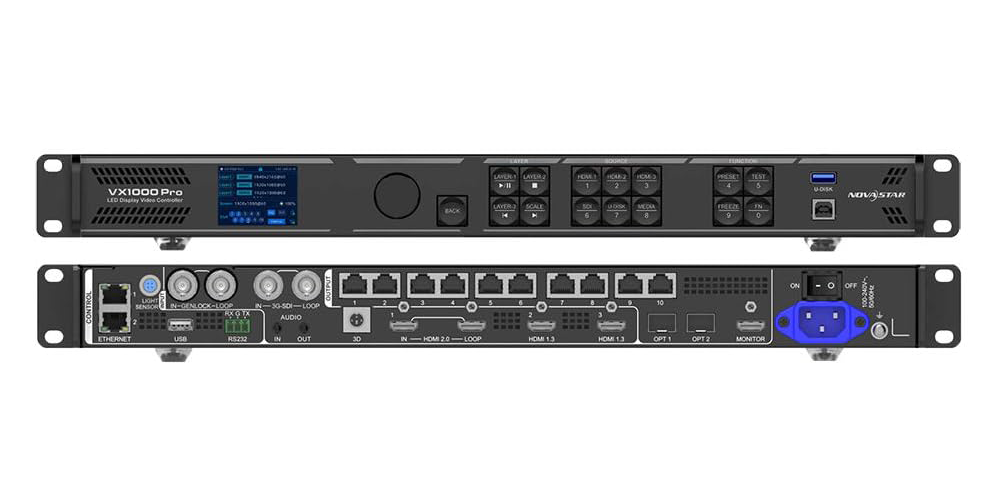
The NovaStar VX1000 Pro is an all-in-one LED display controller that combines 4K video processing and screen control in one device. It drives up to 6.5 million pixels through 10 Gigabit Ethernet ports, accepts 4096×2160@60Hz input on HDMI 2.0, and runs in three working modes: video controller, fiber converter, and ByPass. This page gives you the official VX1000 Pro specifications, working modes and latency, manual and software downloads, price factors, and installation notes.
Table of Contents
1. What Is the NovaStar VX1000 Pro?
2. VX1000 Pro Specifications at a Glance
3. Input and Output Connectors
4. Key Features Explained
5. Working Modes and Latency
6. Manual, Software and Datasheet Downloads
7. How Much Does the NovaStar VX1000 Pro Cost?
8. Which NovaStar Controller Fits Your Project?
9. Installation and Compatibility Notes
10. Applications
11. FAQ
1. What Is the NovaStar VX1000 Pro?
The VX1000 Pro is the large-format member of NovaStar’s VX Pro all-in-one controller series. Video processing and video control are combined in a single industrial-grade chassis, so a project does not need a separate video processor plus a sending card. NovaStar specifies the device for medium and high-end rental, stage control systems, and fine-pitch LED screens.
Loading capacity reaches 6.5 million pixels, with a maximum output width of 10,240 pixels and a maximum height of 8,192 pixels. Sources connect through HDMI 2.0, two HDMI 1.3 inputs and 3G-SDI, with a USB 3.0 port for direct media playback. Outputs are distributed over 10 Gigabit Ethernet ports and two 10G optical fiber ports, and the unit can be operated from the front panel knob, NovaLCT, Unico or the VICP app.
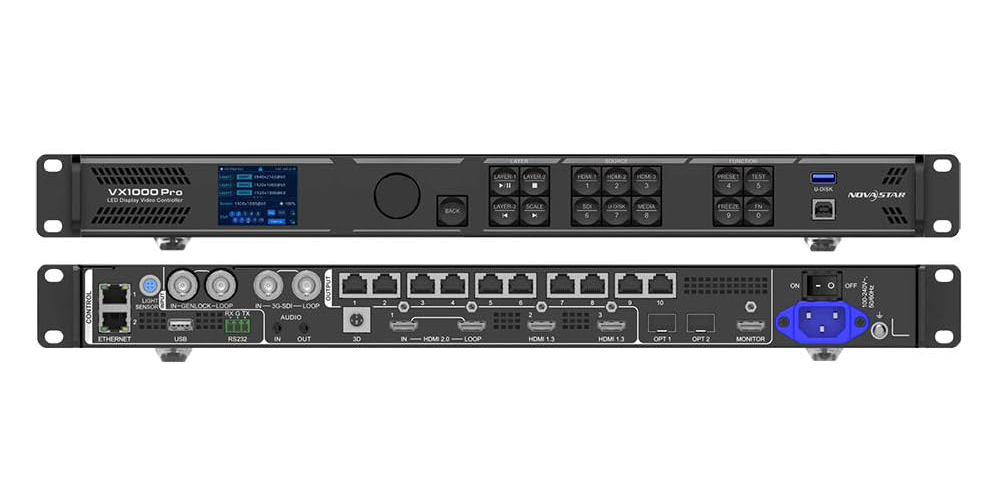
Who it is for: rental and stage companies, system integrators and fixed installations that need one rack unit to switch multiple sources, manage layers and drive a large or unusually shaped screen. If your total pixel count stays within 6.5 million and your sources are HDMI or SDI, the VX1000 Pro can replace several boxes in the signal chain.
2. VX1000 Pro Specifications at a Glance
These figures follow the NovaStar VX1000 Pro All-in-One Controller Specifications V1.2.0 released on 30 September 2025.
| Item | NovaStar VX1000 Pro |
| Device type | All-in-one LED display controller; video processing and video control in one unit |
| Maximum loading capacity | 6,500,000 pixels; maximum width 10,240 pixels, maximum height 8,192 pixels |
| Ethernet outputs | 10 × Gigabit Ethernet, up to 650,000 pixels per port at 8-bit output |
| Optical ports | 2 × 10G; OPT 1 is self-adaptive for input or output, OPT 2 copies, backs up or loops the output |
| Maximum input resolution | 4096 × 2160 @ 60Hz on HDMI 2.0 |
| Layers | 6 × 2K×1K layer resources; layers can be created as 4K×2K, 4K×1K or 2K×1K |
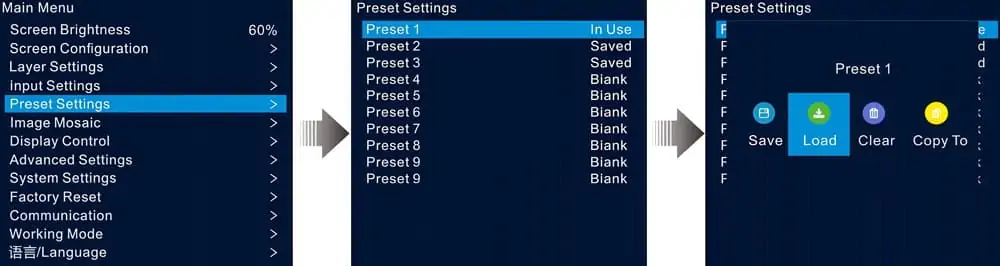
| Presets | 256 user-defined presets |
| Latency | 0 frame in ByPass and fiber converter mode; 1 to 2 frames as a video controller with low latency enabled |
| Working modes | Video controller, fiber converter, ByPass |
| Control methods | Front panel knob, NovaLCT, Unico (client software and web page), VICP app, optional remote control |
| Rated power consumption | 44 W; power connector 100-240V~, 50/60Hz, 2A-0.8A |
| Dimensions | 482.6 mm × 302.2 mm × 50.1 mm |
| Net weight | 3.9 kg; 6.5 kg packed with paper box, 9.2 kg packed with flight case |
| Operating environment | 0°C to 50°C, 5% RH to 85% RH non-condensing |
| Certifications | CE, FCC, IC, PSE, RCM, EAC, UL, CB, KC, RoHS |
3. Input and Output Connectors
3.1 Input connectors
| Connector | Qty | Key limits |
| HDMI 2.0 | 1 | Up to 4096×2160@60Hz, HDCP 1.4 and 2.2, 8/10/12-bit input, loop output supported, interlaced signals not supported |
| HDMI 1.3 | 2 | Up to 1920×1080@60Hz, HDCP 1.4, 8-bit input |
| 3G-SDI | 1 | Up to 1920×1080@60Hz, ST-424/ST-292/ST-259 sources, deinterlacing, loop output supported |
| USB 3.0 | 1 | USB playback of images and video from a USB drive |
| Optical ports | 2 | 2 × 10G; OPT 1 self-adaptive for input or output, OPT 2 for output |
| AUDIO | 2 | 3.5 mm audio input and output, sampling rate up to 48 kHz; HDMI audio also supported |
3.2 Output connectors
| Connector | Qty | Key limits |
| Ethernet ports | 10 | Gigabit Ethernet, 6.5 million pixels total, 650,000 pixels per port at 8-bit, max width 10,240 pixels and max height 8,192 pixels |
| Optical ports | 2 | 10G fiber output; single-mode twin-core modules reach up to 10 km, multi-mode twin-core modules up to 300 m |
| HDMI 1.3 | 1 | Monitoring output, fixed 1920×1080@60Hz |
| 3D | 1 | Connects a third-party 3D emitter |
3.3 Control and sync connectors
| Connector | Qty | Function |
| ETHERNET | 2 | Device control and firmware upgrade from a PC running Unico |
| USB | 1 | USB 2.0 for cascading up to 5 devices, firmware update from a USB drive, log and EDID import or export |
| RS232 | 1 | 3-pin connector (RX, TX, G) |
| GENLOCK IN-LOOP | 1 | External sync input and loop, bi-level and tri-level signals, 24 to 60Hz frame rate |
| LIGHT SENSOR | 1 | Ambient brightness sensor input for automatic screen brightness adjustment |
4. Key Features Explained
4.1 All-in-one design
Video processing and control are integrated, which removes a separate video processor and sending card from the rack. For rental work that means fewer cables, faster setup and fewer failure points to diagnose on site.
4.2 6.5 million pixels of loading capacity
Ten Gigabit Ethernet ports carry the output, with a maximum of 650,000 pixels per port at 8-bit output depth. The maximum circumscribed rectangle of the screen has to stay inside the device’s loading capacity.
4.3 Free topology without rectangle restrictions
Individual Ethernet ports do not have to carry rectangular cabinet blocks, so complex cabinet layouts can be mapped as they are actually built. Specific receiving cards are required for this mode.
4.4 Multiple layers with adjustable priority
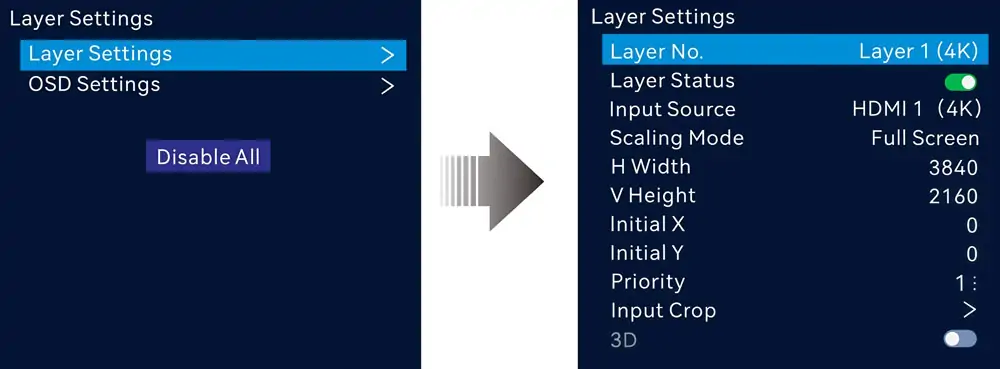
Six 2K×1K layer resources can be arranged as 4K×2K, 4K×1K or 2K×1K layers, each consuming 4x, 2x or 1x of the available resources. Layer size, position, priority and aspect ratio are all adjustable.
4.5 Low latency and Genlock synchronisation
With low latency enabled, the device delay drops to 0 frames in ByPass and fiber converter mode and 1 to 2 frames as a video controller. An input source or an external Genlock signal can be used as the sync source so that all cascaded units stay in step.
4.6 Text and image OSD
Text OSD supports up to 10 static text components, 1 dynamic text component, 2 weather components and 2 time components, with configurable font, colour, size, opacity and background. Image OSD carries logos and branding. The text OSD and image OSD cannot be used together.
4.7 3D support
A third-party 3D emitter connects to the 3D connector. When 3D is enabled with Side-by-Side or Top-and-Bottom sources, the output capacity is halved, so plan the pixel budget accordingly.
4.8 End-to-end backup and dual receiving card backup
Backup is available between devices, between input sources, between Ethernet ports, and between OPT and Ethernet ports. Dual receiving card backup protects the screen when a receiving card fails, and the Ethernet port backup test verifies the backup path without unplugging cables.
4.9 Settings survive a power failure
After a normal shutdown or an unexpected power outage, reconnecting the power restores the previously saved settings automatically.
4.10 USB playback
The USB 3.0 port plays images and video from a single-partition NTFS, FAT32 or exFAT drive. Media up to 3840×2160 is supported, and the USB source output is fixed at 1920×1080@60Hz.
4.11 Pixel-level brightness and chroma calibration
Working with NovaLCT and NovaStar calibration software, brightness and chroma can be calibrated on each LED to remove colour discrepancies across cabinets and improve overall screen uniformity.
4.12 Five ways to control the device
The front panel knob handles on-site operation, while NovaLCT, Unico and the VICP app provide software control. An optional remote control manages standby mode, screen power, brightness, output volume, presets, USB playback parameters and layer input switching. The VX1000 Pro is also compatible with Mac.
5. Working Modes and Latency
The VX1000 Pro is configured for one of three working modes. The mode you choose changes both the signal path and the latency, so it is worth deciding before the show rather than on site.
5.1 Video controller mode
This is the default mode. The device receives, processes and switches video signals and drives the screen directly, handling layer management and multiple simultaneous sources. Use it whenever the project needs scaling, layer compositing or input switching.
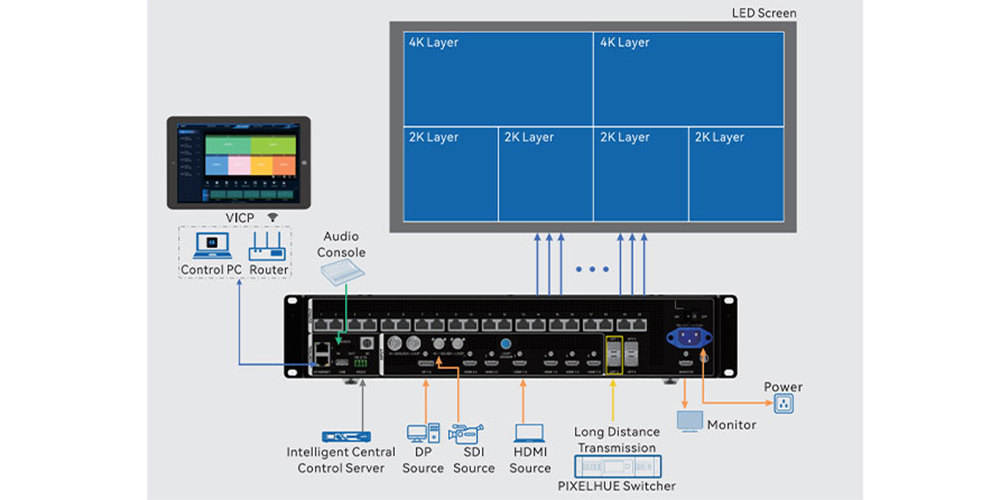
5.2 Fiber converter mode
In this mode the device transmits video over optical fiber for long-distance runs. OPT 1 acts as the primary input while OPT 2 provides backup or loop output. Because the optical modules are not installed at the factory, match the module to the run length: single-mode twin-core modules reach up to 10 km and multi-mode twin-core modules up to 300 m.
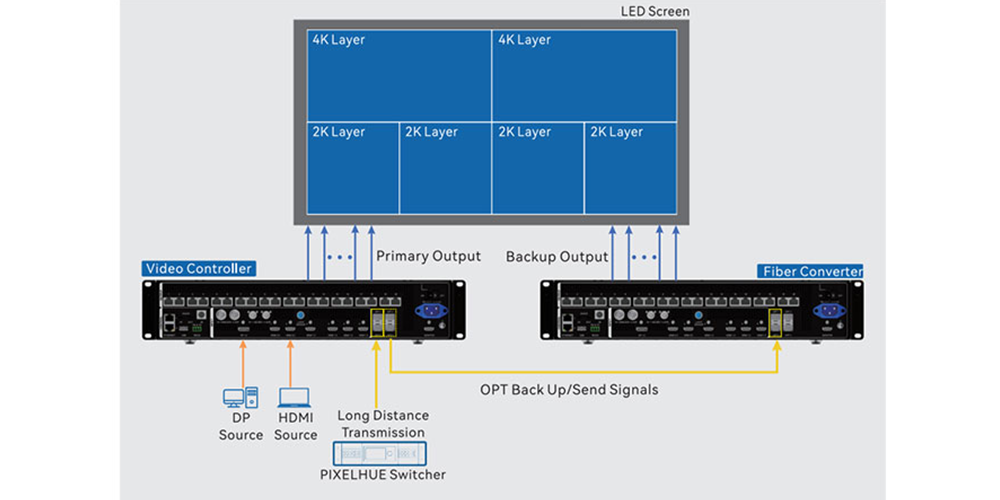
5.3 ByPass mode
In ByPass mode the VX1000 Pro passes the signal through without applying video processing. It is the mode to plan for redundancy or emergency backup, and it drops the device delay to 0 frames when low latency is enabled.
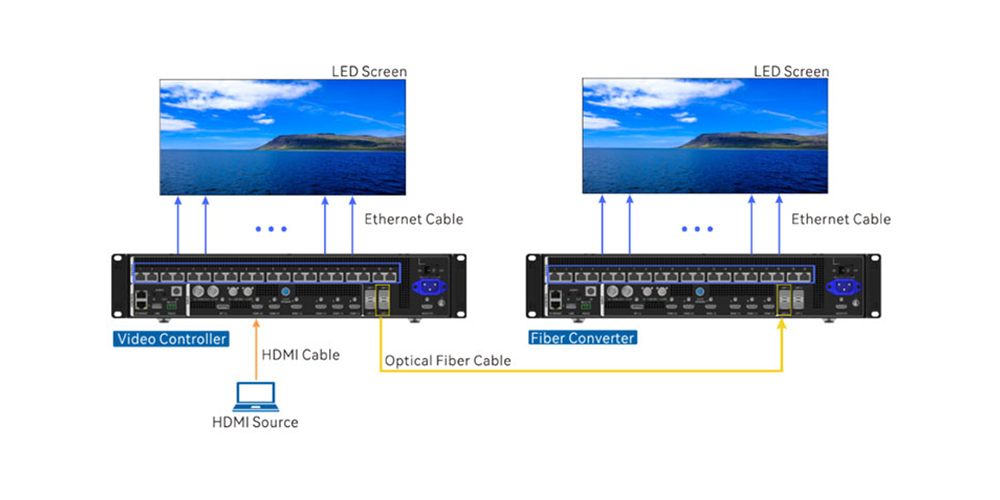
5.4 Latency by working mode
| Working mode | Low latency enabled | Low latency disabled |
| Video controller | 1 to 2 frames | 2 to 3 frames |
| ByPass | 0 frame | 1 frame |
| Fiber converter | 0 frame | 0 frame |
6. Manual, Software and Datasheet Downloads
These files are hosted on our own servers so the links stay stable and the versions match the current hardware revision:
- NovaStar VX1000 Pro Specifications (V1.2.0, PDF)
- NovaStar VX1000 Pro User Manual (V1.2.0, PDF)
- NovaStar VX1000 Pro Quick Start Guide (V1.0.1, PDF)
- NovaStar VX1000 Pro Software (V1.2.0, ZIP)
Which control software do you need?
NovaLCT handles screen configuration and pixel-level calibration, while Unico covers device control and firmware updates. Both are collected on our NovaStar LED control software download page together with the other NovaStar tools we host.
Firmware can also be updated from a USB drive through the control USB port. If you are unsure which file matches your hardware revision, send us the serial number or the version shown in Unico and we will confirm it before anything is flashed.
7. How Much Does the NovaStar VX1000 Pro Cost?
NovaStar does not publish a list price for the VX1000 Pro, and advertised prices move with region, stock and configuration, so the only figure you can rely on is a current quotation for the exact build your project needs.
What changes the price
- Optical modules: single-mode twin-core modules (up to 10 km) or multi-mode twin-core modules (up to 300 m) are not installed at the factory, so choose and price them with the controller.
- Optional remote control: item code M07020005, sold separately from the controller.
- Packing: paper box (6.5 kg packed) or flight case (9.2 kg packed) changes both cost and freight weight.
- Accessories and service: power cord, Ethernet cable, HDMI cable, USB cable, Phoenix connector, dustproof plugs, quick start guide, certificate of approval and safety manual are included; spare parts and extended service terms are not.
- Destination: freight, duties and local taxes depend on the delivery country.
Send us your screen size, pixel pitch, cabinet layout and source list and we will come back with a configured VX1000 Pro quotation, including the modules and accessories your project actually needs.
8. Which NovaStar Controller Fits Your Project?
Start with two numbers: the total pixel count of the screen and the list of sources you have to switch. The VX1000 Pro covers up to 6.5 million pixels and HDMI or SDI sources in one unit; if the screen is larger than that, the project needs more than one controller, and the pixel budget has to be split deliberately rather than by accident.
If the screen is smaller, the question becomes which VX Pro model is the better value:
- NovaStar VX1000 Pro vs VX600 Pro compares the two all-in-one controllers side by side.
- NovaStar VX1000 Pro vs VX1000 explains when the standard VX1000 is enough.
- For the smaller unit in detail, see the NovaStar VX600 Pro setup and configuration guide.
9. Installation and Compatibility Notes
- Rack mounting: fix the unit with at least 8 × M5*8 screws and use a rack that can carry at least 16 kg.
- Orientation: place the device horizontally only. Do not mount it vertically or upside down.
- Environment: 0°C to 50°C operating and 5% to 85% RH non-condensing; storage from -10°C to 60°C and 5% to 95% RH non-condensing. Typical noise level is 45 dB(A) at 25°C.
- Low latency has an alignment rule: all cabinets loaded by the Ethernet ports must be aligned at the top of the circumscribed rectangle before low latency can be used.
- Genlock and low latency: the two functions work together in video controller mode, but in ByPass mode they cannot be enabled at the same time.
- 3D: enabling 3D with Side-by-Side or Top-and-Bottom sources halves the output capacity, and 3D cannot be combined with input crop.
- OSD and remote control: these functions are mutually exclusive, so plan for one or the other.
- Fiber modules: not installed at the factory. Single-mode twin-core modules reach up to 10 km; multi-mode twin-core modules reach up to 300 m.
- HDMI 2.0 loop: up to 6 devices can be cabled in one loop.
- Interlaced sources: the HDMI inputs do not accept interlaced signals, while the 3G-SDI input includes deinterlacing processing.
10. Applications
- Rental and stage: layer compositing, multiple sources and preset recall for touring and one-off shows, paired with our stage LED display solutions.
- Fine-pitch indoor screens: consistent brightness and chroma on close-viewing installations such as the HH640H1 indoor LED wall or other indoor LED screens.
- Retail and advertising: multi-source advertising layouts for LED advertising screens.
- COB and high-definition modules: pixel-level calibration on COB LED display modules where uniformity matters most.
11. FAQ
➖ How many pixels can the NovaStar VX1000 Pro control?
Up to 6.5 million pixels. The output runs over 10 Gigabit Ethernet ports with a maximum of 650,000 pixels per port at 8-bit output depth, and the maximum output size is 10,240 pixels wide by 8,192 pixels high.
➖ Does the NovaStar VX1000 Pro support 4K input?
Yes. The HDMI 2.0 input accepts up to 4096×2160@60Hz with HDCP 1.4 and 2.2 and 8/10/12-bit colour. The two HDMI 1.3 inputs and the 3G-SDI input accept up to 1920×1080@60Hz.
➖ What is the latency of the NovaStar VX1000 Pro?
In ByPass and fiber converter mode the device delay is 0 frames. As a video controller it runs at 1 to 2 frames with low latency enabled, and 2 to 3 frames with low latency disabled.
➖ Where can I download the NovaStar VX1000 Pro manual and software?
The specifications (V1.2.0), user manual (V1.2.0), quick start guide (V1.0.1) and software (V1.2.0) are linked in section 6 above. NovaLCT and Unico are listed on our NovaLCT and LED control software download page.
➖ How much does the NovaStar VX1000 Pro cost?
NovaStar does not publish a list price. The figure depends on the optical modules, the optional remote control, paper box or flight case packing, warranty terms and delivery country, so ask for a quotation with your configuration.
➖ What is the difference between the NovaStar VX1000 Pro and the VX600 Pro?
Both are all-in-one VX Pro controllers. The VX1000 Pro is specified for up to 6.5 million pixels with 10 Gigabit Ethernet outputs; whether the VX600 Pro is sufficient depends on your pixel count and input list. We compare them in NovaStar VX1000 Pro vs VX600 Pro.
Need a VX1000 Pro price or a compatibility check?
Send us your screen size, pixel pitch, cabinet layout and source list. Our engineers will confirm whether one VX1000 Pro is enough for the pixel count and inputs you have, and come back with a configured quotation that includes the optical modules and accessories the project needs. Contact HonghaiLED or ask for the NovaStar VX1000 Pro all-in-one video controller page on our controller site.
Related Posts
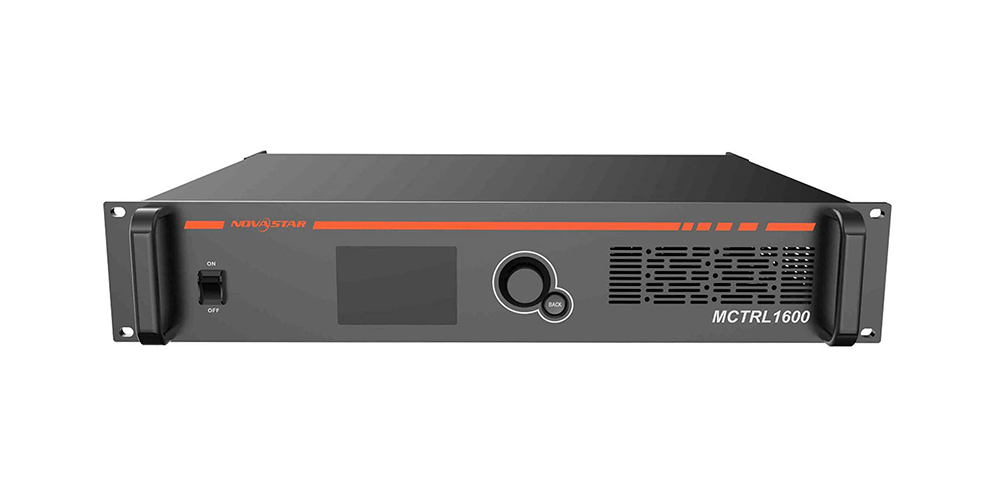
NovaStar MCTRL1600 LED Display Controller: Specs, Manual and Setup
Looking for NovaStar MCTRL1600 specifications, the manual, or a straight…
NovaStar MCTRL R5: Specs, Price, Manual & Setup Guide
The NovaStar MCTRL R5 is an independent LED display controller…
NovaStar VX600 Pro: Specs, Manual, Setup & Layer Guide
Novastar VX600 Pro isn’t just a video wall controller—it’s the…

No Comments