
NovaStar A10s Pro Receiving Card: Specs, Setup & Datasheet
The NovaStar A10s Pro is a compact LED receiving card installed inside an LED display cabinet. It receives pixel data from a compatible controller and passes the correct drive information to the modules through the hub board. Buyers typically choose it for fine-pitch screens, rental LED walls and camera-facing installations where grayscale quality, cabinet uniformity and serviceability matter.
This guide explains NovaStar A10s Pro specifications, real loading limits, image-quality functions, setup checks and purchasing considerations. The headline capacity is up to 512 × 512 pixels at 60 Hz with PWM driver ICs, but 10-bit operation requires a controller-specific check: COEX supports that maximum, while other controllers are limited to 512 × 384. Source depth, driver IC, firmware and cabinet wiring must be considered together.
Technical review: 10 October 2026. The specification baseline is NovaStar’s A10s Pro Receiving Card Specifications V2.0.0, dated 18 September 2026. The older V1.5.1 download remains available below for reference. Use the version approved for your cabinet when checking connectors, firmware and mechanical fit; this article also separates manufacturer specifications from practical commissioning advice.
Table of Contents
2. Key Features of the A10s Pro LED Receiving Card
3. A10s Pro Key Functions for Maintenance and Reliability
4. NovaStar A10s Pro Receiving Card Specifications
5. NovaStar A10s Pro vs A10s Plus
6. A10s Pro Price: What Drives the Cost
7. FAQs
8. Conclusion and Next Steps
1. What is the NovaStar A10s Pro Receiving Card?
The NovaStar A10s Pro is a compact receiving card that sits on the hub board inside an LED cabinet and turns the controller signal into the drive data your modules need. It is a small-format card — 80.0 mm × 45.0 mm × 8.2 mm and 22.8 g — built with high-density connectors that limit the effects of dust and vibration, which is why it is common in rental cabinets that are handled and re-rigged constantly.
Three NovaStar A10s Pro details to check before cabinet integration:
- Capacity. For PWM driver ICs, one NovaStar A10s Pro supports up to 512 × 512 at 60 Hz with 8-bit sources or 10-bit sources on COEX. At 10-bit with other controllers, or at 12-bit, the limit is 512 × 384 at 60 Hz. Data output is up to 32 groups of parallel RGB data or 64 groups of serial data, expandable to 128 groups.
- NCP file support. NCP packages simplify cabinet configuration, firmware deployment and image-quality settings. Obtain the package and supported software workflow from the cabinet supplier; a file for a visually similar module is not sufficient evidence of compatibility.
- Reserved pins. Spare pins on the card allow custom functions, so cabinet builders can add features without changing the receiving card.
The card is certified to RoHS and EMC Class B, and NovaStar documents it as a high-end, full-featured card for projects where image uniformity and uptime matter more than the lowest bill of materials. That normally means xR and virtual production stages, rental and fine-pitch indoor screens, broadcast studios, control rooms, and any installation where a failed cabinet is expensive.
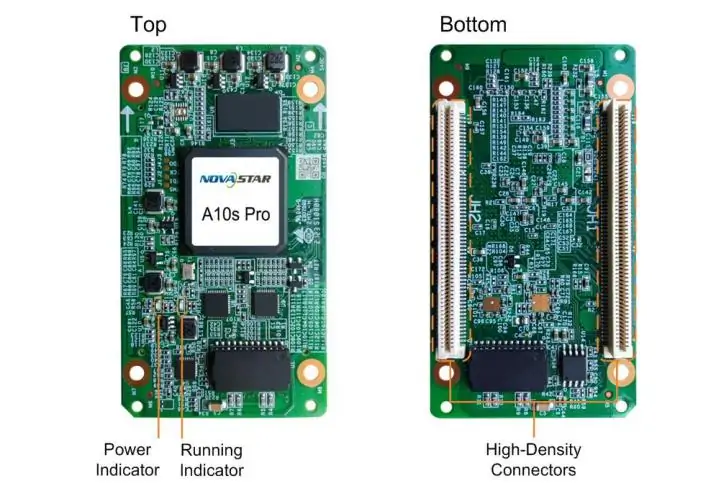
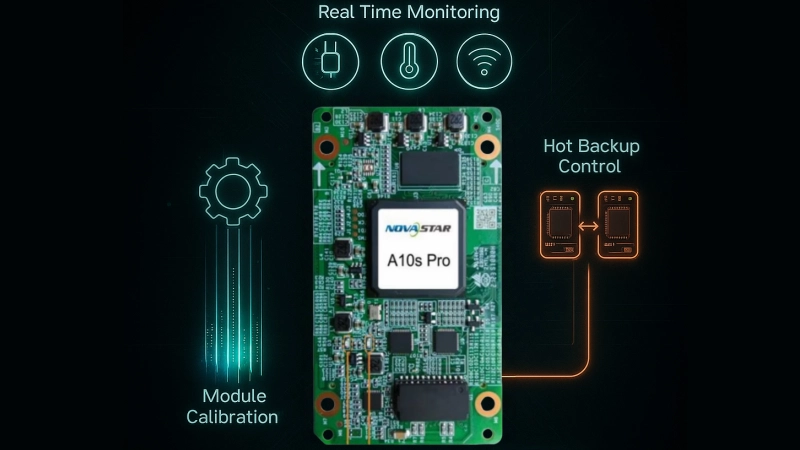
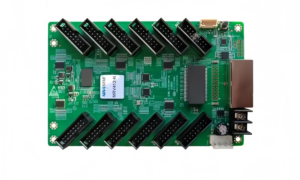
NovaStar A10s Pro receiving card. The high-density connector format requires a matching hub board; check loading conditions before using the maximum resolution.
2. Key Features of the A10s Pro LED Receiving Card
NovaStar groups the A10s Pro feature set around three outcomes: consistent colour as the cabinet heats up, more usable detail in dark and bright areas, and simpler maintenance. The subsections below cover each documented feature and what it changes on a real screen.
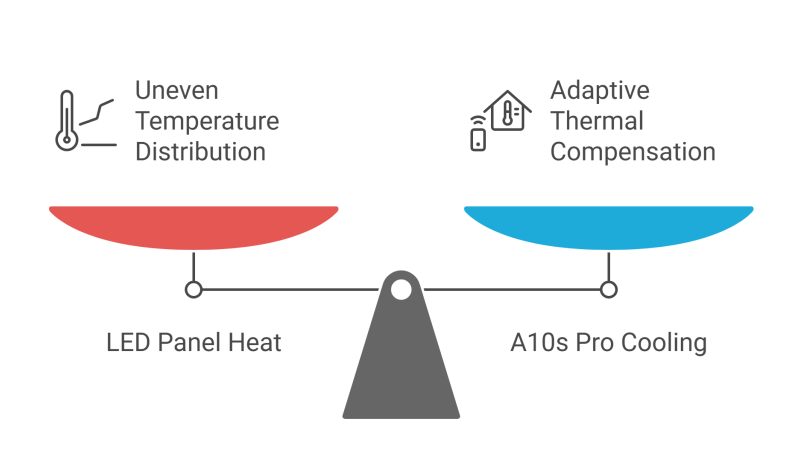
01. Adaptive Thermal Compensation
Uneven heating can change the appearance of LED modules during a long show. The NovaStar A10s Pro supports Adaptive Thermal Compensation to address resulting colour differences. Evaluate a wall after it reaches its normal operating temperature, not only immediately after power-on. Compensation cannot replace adequate ventilation, correct power distribution or a sound cabinet thermal design.
02. Dynamic Booster
Dynamic Booster analyses each frame in real time and raises contrast and detail while controlling display power consumption. Treat any energy saving as dependent on content and screen settings, not as a guaranteed percentage for your installation. NovaStar also documents Brightness Overdrive and Multi-Mode on this card: brightness overdrive raises peak brightness by balancing uniformity, and multi-mode applies different display modes for different shooting or viewing scenarios.
03. Full-Grayscale Calibration
Full-Grayscale Calibration on the NovaStar A10s Pro targets consistency across brightness levels using a compatible calibration system and measurement camera. It is especially relevant when a wall looks uniform on white but uneven in darker scenes. Commissioning should therefore include grayscale ramps and low-brightness test images, not just a bright logo or a full-white field.

04. Image Booster 3.0
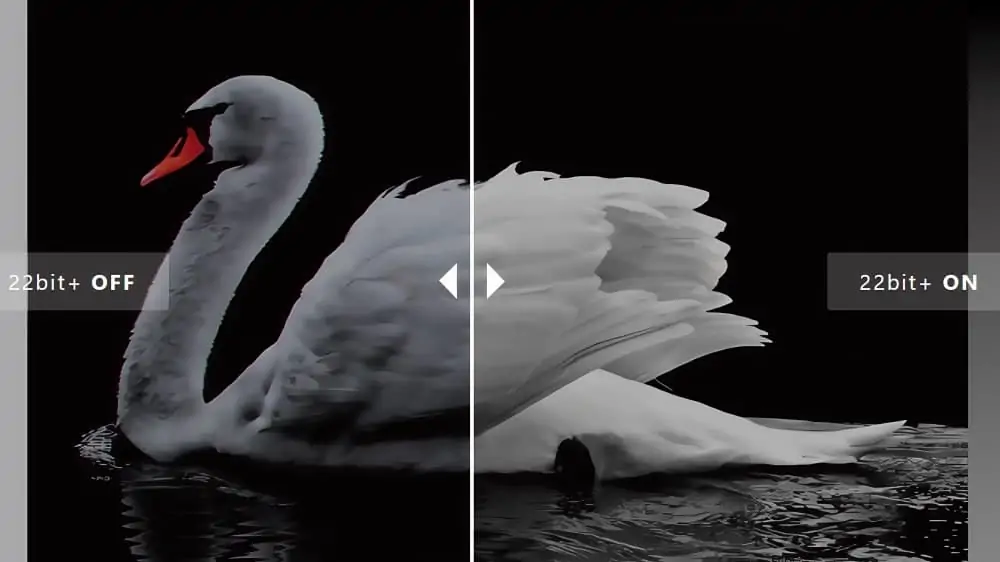
LED Image Booster 3.0 on the NovaStar A10s Pro combines three tools; results depend on the driver IC. Colour management supports the Rec.709, DCI-P3 and Rec.2020 colour spaces plus custom colour spaces, so you can match the screen to the camera or the content. Precise Grayscale corrects all 65,536 grayscale levels (16-bit) of the driver IC to remove low-grayscale brightness spikes and mottling. 22bit+ improves LED screen grayscale by up to 64× with adjustable dithering, which is what protects shadow detail during camera work and low-brightness playback.
05. HDR10 and HLG Support
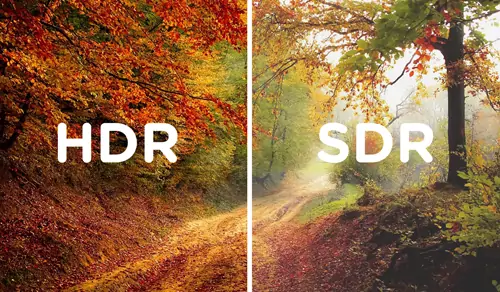
The A10s Pro supports HDR10 and complies with the SMPTE ST 2084 and SMPTE ST 2086 standards, and it also supports HLG. The complete signal chain still needs compatible HDR processing and appropriate brightness and colour settings. A receiving card does not make every LED cabinet capable of reproducing the full source gamut or highlight range. Test representative HDR material on the actual screen and verify the controller input format.
06. Pixel-Level Brightness and Chroma Calibration
Pixel-level brightness and chroma calibration helps the NovaStar A10s Pro reduce visible variation across the wall using measured correction data. Check that the correct coefficients are present and enabled. Calibration cannot repair a damaged LED, incorrect module wiring or a module whose optical characteristics fall outside the required matching range.
07. Shutter Fit for Camera and xR Work
Shutter Fit automatically adjusts driver IC parameters to the camera shutter angle. The NovaStar A10s Pro feature addresses camera-related black lines and grayscale errors when the supported system is configured correctly. If you shoot LED volumes or broadcast from an LED set, this is one of the two features (with Frame Rate Adaptive 3.0) that decides whether the A10s Pro is the right card.
08. 7-Color Multi-batch Adjustment
When you expand an existing screen, the new cabinets rarely come from the same production batch as the originals. The NovaStar A10s Pro provides seven-colour adjustment to reduce brightness and chroma differences between production batches. It does not guarantee that arbitrary cabinets become interchangeable: LED binning, ageing, optical finish and calibration quality still matter. NovaStar’s official video below demonstrates the adjustment.
Source: NovaStar official YouTube channel — “Multi-batch Adjustment” (7-color multi-batch adjustment on NovaStar receiving cards).
09. Frame Rate Adaptive 3.0, Low Latency, 3D and 90° Rotation
Frame Rate Adaptive 3.0 adjusts the card parameters in real time to the incoming frame rate so the image stays correct from 23 Hz to 240 Hz. Specific driver IC support is required. The 23–240 Hz input range is not a guarantee of maximum pixel loading at every frame rate, and input frame rate is different from the LED module refresh rate. Low latency reduces delay at the receiving-card stage to one frame only with driver ICs that have built-in RAM — relevant for live camera and interactive work. The card also supports 3D playback with a compatible controller and 90° image rotation.
One correction worth noting for buyers reading older documentation: free-angle image rotation was removed from NovaStar’s A10s Pro feature list in specifications version V1.5.0. The V2.0.0 datasheet lists rotation in 90° increments, so do not design a rotated-cabinet layout around free-angle rotation.
3. A10s Pro Key Functions for Maintenance and Reliability
Beyond image quality, the A10s Pro is designed so that a technician can find and fix a fault without pulling cabinets apart. NovaStar splits these functions into maintainability and reliability.
01. Improvements to Maintainability
Automatic Module Calibration
When a compatible replacement module contains flash memory with suitable calibration coefficients, the NovaStar A10s Pro can load that data at power-up. Inspect the result on white, primary colours and dark gray. Automatic coefficient loading does not eliminate the need to verify the replacement module’s brightness, colour and orientation.
Quick Uploading of Calibration Coefficients
Coefficients can be pushed to the receiving card quickly, or in a stable mode with acceleration support when you are commissioning many cabinets at once.
Mapping 1.1
Mapping 1.1 displays the Ethernet port number, receiving card number and controller number on the cabinet face in different colours. On a large wall that turns cable tracing from guesswork into a visual check, which is the single fastest saving during installation and fault-finding.
Temperature and Voltage Monitoring
The card monitors its own temperature and voltage in real time with no external sensor, and it detects the working status of dual power supplies when two supplies are used. Use abnormal readings as diagnostic evidence; monitoring does not guarantee advance warning of every power failure.
Detection of Ethernet Cable Disconnections
Disconnection counts are logged per card, so intermittent data problems caused by a damaged or poorly seated cable can be identified from the software instead of reproduced on site.
Stored Image in the Receiving Card
A stored image can be kept on the card and displayed without a live video source — useful for branding, test patterns and troubleshooting during setup.
02. Improvements to Reliability
Dual Card Backup and Status Monitoring
Two A10s Pro cards can be mounted on one hub board. A correctly implemented backup can take over if the primary card fails. The hub board, controller and wiring must support the intended redundancy, and both cards need matching project configuration. Test the backup path during commissioning. Indicator blink intervals are not guaranteed switchover times.
Loop Backup
The receiving card and controller form a loop through primary and backup data connections. This provides an alternative data path after a link fault when the topology is configured correctly. Check the backup route physically: two cables sharing the same vulnerable path may fail together.
Dual Backup of Firmware and Calibration Coefficients
The card stores two copies of its firmware program, configuration parameters and calibration coefficients. These backups support recovery; application and factory data are not substitutes for an external project backup. The NovaStar A10s Pro also supports LVDS transmission with dedicated firmware and compatible hardware. Do not assume a standard cabinet enables that function automatically.
03. NovaStar A10s Pro setup and fault-finding checklist
Before changing a working wall, record its controller model, firmware, cabinet resolution, driver IC, scan mode and cable order. Keep the approved configuration package and calibration files in a labelled project folder. Power down the cabinet before reseating boards or replacing cards, use antistatic handling, and verify that the replacement is the correct model.
- Validate one cabinet. Load the supplier-approved configuration using the correct controller software. Confirm RGB order, module orientation and full cabinet coverage before applying it to the rest of the screen.
- Map the wall. Match physical cable order to the screen connection map. A clear image on each cabinet does not prove that their overall positions are correct.
- Check image quality. Test white, red, green, blue, grayscale ramps and low-brightness scenes after warm-up. Save the validated settings using the supported hardware-save workflow.
- Test recovery. In a controlled commissioning window, test the intended redundant data path and restart the system. Confirm that configuration survives a power cycle and document the recovery steps.
If a NovaStar A10s Pro cabinet stays black, compare power, source status and communication with a known-good cabinet first. If colours or scan lines are wrong, check the module configuration and connections before changing calibration. If only one cabinet differs in brightness, compare coefficients and module batch. Change one variable at a time so the result identifies a cause rather than hiding it.
4. NovaStar A10s Pro Receiving Card Specifications
The table below summarizes NovaStar A10s Pro receiving card specifications using V2.0.0 as the baseline. Read the conditions alongside each number. The headline pixel count is a ceiling under specified conditions, not a promise that any module arrangement will work.
| Parameter | Specification | Planning note |
|---|---|---|
| 8-bit loading | 512 × 512 at 60 Hz | PWM driver ICs; 262,144 pixels |
| 10-bit loading | COEX: 512 × 512; other controllers: 512 × 384 at 60 Hz | Confirm the exact controller and firmware |
| 12-bit loading | 512 × 384 at 60 Hz | 196,608 pixels; PWM driver ICs |
| Data outputs | 32 parallel RGB groups or 64 serial groups; expandable to 128 serial groups | Hub routing and module design must match |
| Supply and consumption | DC 3.8–5.5 V; 5.0 V recommended; rated 0.8 A / 4.0 W | Card consumption only, not cabinet power |
| Dimensions and weight | 80.0 × 45.0 × 8.2 mm; 22.8 g | Check the structural drawing for assembly clearances |
| Operating conditions | −20°C to +70°C; 10–90% RH, non-condensing | Maintain suitable cabinet ventilation |
| Storage conditions | −40°C to +85°C; 0–95% RH, non-condensing | Protect spares against moisture and static |
| Compliance | RoHS; EMC Class B | Confirm project and destination requirements |
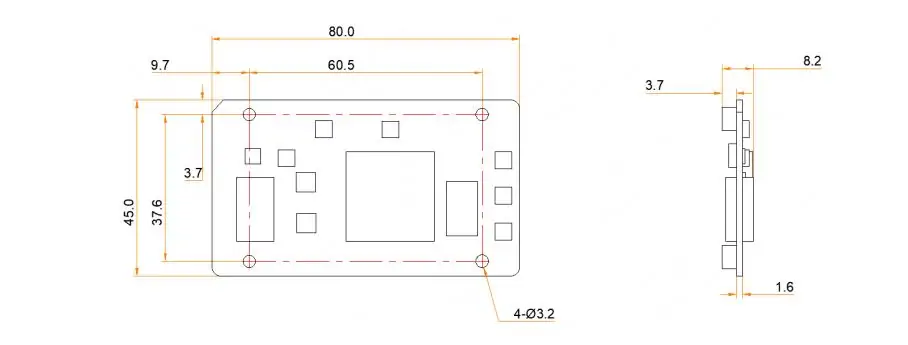
01. Calculate card loading before counting cabinets
For the NovaStar A10s Pro, start with the actual module resolution and wiring map. A 256 × 256 cabinet contains 65,536 pixels. A 512 × 512 cabinet contains 262,144 pixels, so it reaches the stated 8-bit maximum and the COEX 10-bit maximum; it exceeds the 196,608-pixel limit stated for 12-bit or non-COEX 10-bit operation. These examples assume one card serves the whole cabinet.
Do not divide the wall’s total pixels by the card maximum and stop there. Check width and height limits, scan mode, data groups, driver IC timing, frame rate and the number of cards assigned to each controller port. A controller’s total capacity, its per-port capacity and a receiving card’s capacity are separate constraints. Keep a drawing that records the final cabinet order and port assignments.
Download the datasheet: NovaStar A10s Pro datasheet V1.5.1 (PDF, archived reference) — hosted on HonghaiLED’s file server. The technical baseline reviewed here is V2.0.0, dated 18 September 2026, whose change history updates the pins section. Request that revision for new hub-board work; do not use the archived download as the latest pinout.
Software you will need: use the software supported by your controller and cabinet package. COEX commissioning uses VMP and an approved NCP cabinet-library file for this card; other supported workflows may use NovaLCT. Our NovaStar LED control software download page provides a starting point for software resources. Confirm the required release and cabinet package with the supplier before installation.
5. NovaStar A10s Pro vs A10s Plus
People searching for “NovaStar A10s Pro vs A10s Plus” should first confirm the full model name. The comparison here uses A10s Plus-N, the model in NovaStar’s referenced documentation. Do not treat an A10s Plus, Plus-N or another regional listing as identical without checking the label and supplier documentation.
| Decision point | A10s Pro | A10s Plus-N |
|---|---|---|
| 8-bit maximum at 60 Hz | 512 × 512 | 512 × 512 |
| 10-bit maximum at 60 Hz | 512 × 512 with COEX; 512 × 384 otherwise | 512 × 384 |
| 12-bit maximum at 60 Hz | 512 × 384 | 512 × 384 |
| HDR and pixel calibration | Supported | Supported |
| Shutter Fit, Dynamic Booster, Full-Grayscale Calibration | Listed | Not listed in the referenced Plus-N specifications |
| Dual-card and loop backup | Supported with suitable system design | Supported with suitable system design |
| Multi-batch adjustment | Seven-colour brightness and chroma adjustment | Brightness adjustment |
| Reference document | V2.0.0, 18 September 2026 | V1.1.5, 20 May 2025 |
Maximum loading values in this comparison assume PWM driver ICs. Feature support also depends on the controller, firmware and module electronics. A product-family comparison is useful for a shortlist, but it does not establish electrical interchangeability or approve a receiving-card replacement.
01. Which receiving card fits your project?
The NovaStar A10s Pro is worth evaluating when camera behaviour, low-gray uniformity or the larger COEX 10-bit loading envelope solves a specific problem. Ask for a demonstration at your intended brightness, frame rate and shutter setting. A feature enabled in a showroom may behave differently with your content and module driver IC.
For a fixed screen with straightforward playback, compare the complete configured cabinet cost against the Plus-N option. HDR and redundancy alone are not exclusive reasons to select the Pro. For a replacement, retain the original approved combination unless the cabinet manufacturer validates the alternative, including hub pinout, loading, calibration and firmware.
Our NovaStar MRV412-N receiving-card guide explains another connection format. Use it to understand installation differences, not as evidence that an MRV card is a drop-in substitute.
6. A10s Pro Price: What Drives the Cost
There is no single list price for the A10s Pro receiving card, and any “from” figure you find online is usually a card-only price for one batch in one market. Four things decide what you actually pay:
- Quantity tier. Receiving cards are quoted per order batch. Ten spare cards for maintenance and a full wall of cabinets land in different price tiers.
- Hub board and cabinet configuration. Confirm whether the quotation includes only the card or also the matching hub board, connectors and configuration service.
- Region and channel. Duty, freight and distributor margin move the landed cost, which is why the same card is advertised at different prices in different countries.
- Configuration and calibration. A card delivered with your project NCP file and pre-loaded calibration coefficients is a different line item from a bare card.
One caution when comparing quotes: check the datasheet version behind any price. NovaStar changed load-capacity information and updated the current and power consumption figures during the life of this document (V1.3.0 and V1.4.0 both list such changes), so do not assume an old listing describes the supported operating conditions. A document revision alone does not prove that the hardware has changed.
Send us your cabinet model or hub board, the number of cards you need, the delivery country and whether you want calibration and NCP configuration loaded, and we will quote the A10s Pro with the matching accessories. If you are still comparing suppliers, our 12 factory checks for vetting an LED screen supplier explain what to verify before you place the order.
7. FAQs
01. What is the NovaStar A10s Pro used for?
The NovaStar A10s Pro is an LED receiving card mounted inside a cabinet on a compatible hub board. It handles the cabinet’s pixel data and supported image corrections. It is not a standalone media player or an HDMI video processor; it forms part of a complete LED control system.
02. What resolution does the NovaStar A10s Pro support?
With PWM driver ICs at 60 Hz, the stated maximum is 512 × 512 for 8-bit sources and for 10-bit sources with COEX controllers. Non-COEX 10-bit and 12-bit operation are limited to 512 × 384. Check the controller, module and firmware before approving a cabinet layout.
03. Where can I download the NovaStar A10s Pro datasheet?
The specifications section links HonghaiLED’s archived V1.5.1 PDF. This article was checked against NovaStar’s V2.0.0 document dated 18 September 2026. Request the current approved document and cabinet package before wiring a hub board or installing firmware. A datasheet PDF is not a firmware file.
04. Which software configures the NovaStar A10s Pro?
Use the workflow supported by the sending controller and cabinet package. COEX systems use VMP; NovaLCT is used in other supported NovaStar configurations. Ask the cabinet supplier for the matching configuration package, software release and recovery procedure instead of loading a file intended for another module.
05. Does the NovaStar A10s Pro support HDR and camera work?
The card supports HDR10 and HLG, and its camera-oriented features include Shutter Fit. Actual results depend on the controller, driver IC, firmware, source format and camera settings. Test the complete screen at the intended frame rate, shutter angle and brightness before accepting it for production.
06. Is the NovaStar A10s Pro compatible with every LED cabinet?
No. Matching pixel count or connector appearance is insufficient. Check the hub-board pinout, driver IC, scan mode, module data routing, supply, mechanical clearance and approved firmware. Keep a known-good cabinet configuration available when evaluating any replacement card.
07. What is the difference between A10s Pro and A10s Plus-N?
The most useful differences are the Pro’s COEX 10-bit loading advantage and features such as Shutter Fit, Dynamic Booster and Full-Grayscale Calibration. Both referenced models support HDR and redundancy. Compare the complete model names and project requirements using the table above.
08. What is the NovaStar A10s Pro price?
The project price depends on quantity, supply channel, included hub board, configuration work, warranty, freight and taxes. Ask for a dated quotation that identifies the exact model and included services. Compare delivered, configured cost rather than treating a card-only marketplace listing as a complete system price.
09. Can a replacement module match automatically?
The NovaStar A10s Pro can load stored calibration data from a compatible module with flash memory. Correct data must be present, and the replacement still needs a visual check. Automatic loading does not guarantee a match between unrelated LED batches or compensate for damaged components.
8. Conclusion and Next Steps
The NovaStar A10s Pro is a strong candidate when an LED project needs controlled low-gray performance, camera-oriented adjustment and a documented maintenance workflow. The selection should start with cabinet compatibility and real source requirements. Confirm loading at your bit depth and controller type before deciding how many cards or output ports the wall requires.
For a useful quotation or replacement check, send HonghaiLED the cabinet model, module resolution, driver IC, hub-board photos, controller model and required quantity. Include the intended frame rate, bit depth, camera use and delivery country. Our team can then discuss the NovaStar A10s Pro configuration against the actual application. Contact HonghaiLED for a cabinet compatibility check and quotation.
Technical references: NovaStar A10s Pro Receiving Card Specifications V2.0.0 (18 September 2026), especially the loading conditions and feature requirements; A10s Plus-N Receiving Card Specifications V1.1.5 (20 May 2025) for the comparison. The existing V1.5.1 PDF download is retained as an archived reference. Practical setup recommendations and pixel-count examples are HonghaiLED editorial guidance, not claims of independent laboratory testing.
Related Posts
NovaStar CVT8-5GM Fiber Converter: Specifications, Setup and Manual
The NovaStar CVT8-5GM is a multimode LED display fiber converter…
NovaStar MRV416-N Receiving Card: Specs, Setup & Manual
The NovaStar MRV416-N receiving card connects a compatible LED controller…
NovaStar MRV412-N Receiving Card: Specs, Firmware and Setup Guide
The NovaStar MRV412-N receiving card connects a compatible LED display…

No Comments