
Colorlight Z5 LED Video Processor: Specs, Manual & Setup Guide
The Colorlight Z5 is a professional 4K LED video processor. It accepts HDMI 2.0, DisplayPort 1.2 and 12G-SDI inputs, drives LED walls through 20 × 1G Ethernet ports, and supports up to 13 million pixels of load capacity with a minimum of one frame of delay.
This guide covers verified Z5 specifications, the Z5 vs Z4 Pro difference, iSet software and manual access, step-by-step setup, price factors and troubleshooting. If you are still choosing hardware, start with our commercial LED display buyer’s checklist.
Contents
1. Colorlight Z5 at a glance
2. Colorlight Z5 specifications
3. Where the Z5 fits in an LED system
4. Key features of the Colorlight Z5
5. Colorlight Z5 vs Z4 Pro
6. Colorlight Z5 manual, software and firmware
7. How to set up the Colorlight Z5
8. Colorlight Z5 price and what drives it
9. Troubleshooting common Z5 problems
10. FAQs about the Colorlight Z5
1. Colorlight Z5 at a glance
If you only need the short version, this table answers the questions most buyers search for first.
| Item | Colorlight Z5 |
| What it is | 4K LED video processor / LED display controller (Z5/Z4 Pro family) |
| Inputs | HDMI 2.0 + DisplayPort 1.2 + 12G-SDI (full 4K inputs) |
| Maximum input resolution | 4096 × 2160 @ 60 Hz |
| Outputs | 20 × 1G Ethernet (Neutrik etherCON) + optical output with Colorlight H10FN transceiver |
| Load capacity | Up to about 13 million pixels; maximum canvas 16384 × 8192 pixels |
| Layers | Up to 3 layers with cropping, scaling, splicing and window roaming |
| Latency | Minimum 1 frame |
| HDR and color | HDR10 / HLG, wide color gamut, 8-bit and 10-bit processing |
| Sync | Genlock input and loop for strict synchronization between processors |
| Control | Web control from a browser (no software install) plus Colorlight iSet software |
| Typical use | Live events, broadcast and film/XR stages, control rooms, large fixed walls |
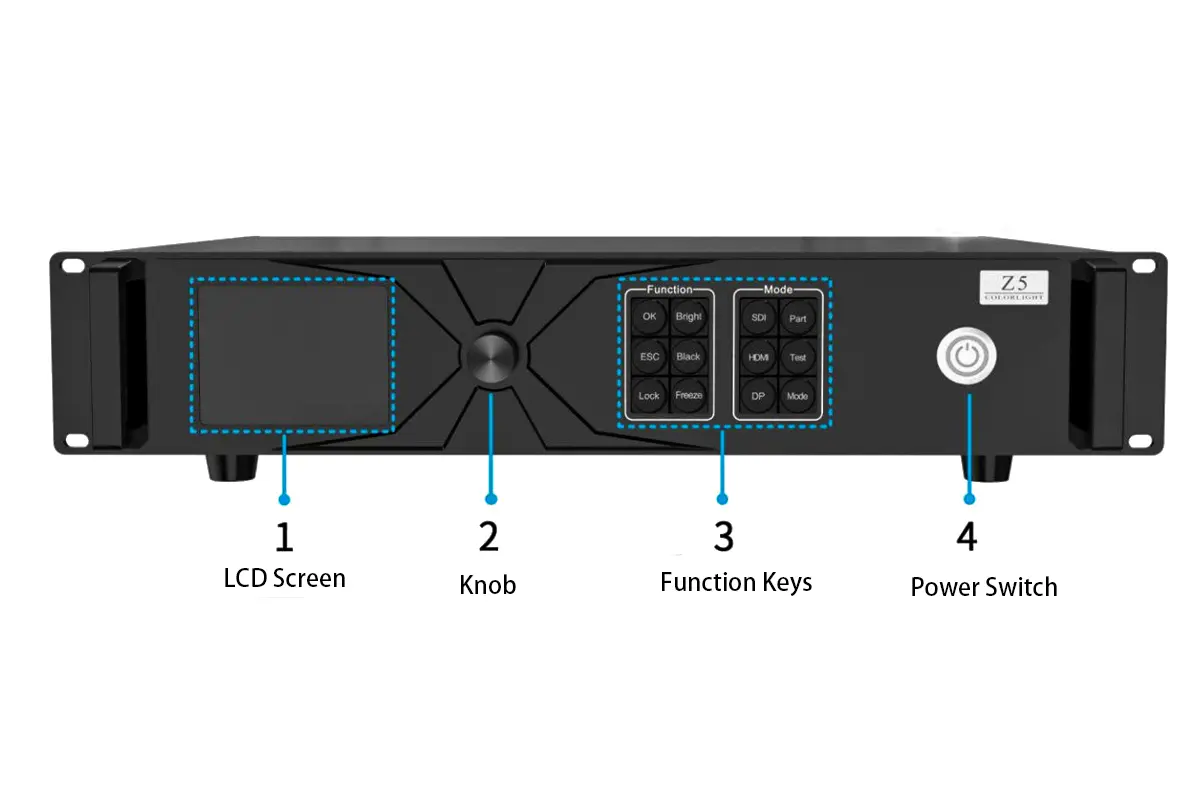
Colorlight Z5 front panel
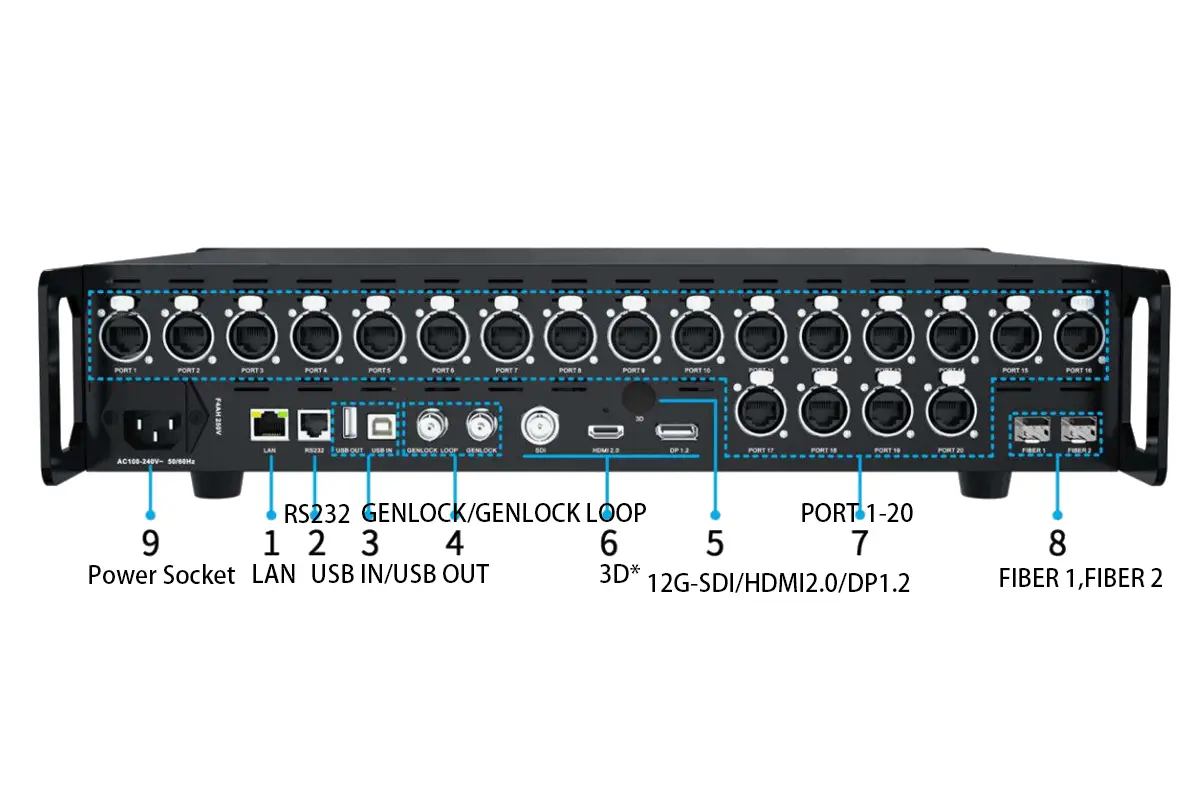
Colorlight Z5 rear panel
2. Colorlight Z5 specifications
The table below follows Colorlight’s published Z5 / Z4 Pro specification. Hardware revisions and production batches can change details, so confirm the current datasheet with your supplier before you buy.
| Specification | Colorlight Z5 |
| Video inputs | HDMI 2.0, DisplayPort 1.2, 12G-SDI |
| Maximum input resolution | 4096 × 2160 @ 60 Hz |
| Maximum load capacity | About 13 million pixels (published figure for 8-bit / 60 Hz operation) |
| Maximum canvas size | 16,384 pixels wide × 8,192 pixels high |
| Output ports | 20 × 1G Ethernet, Neutrik etherCON connectors |
| Per-port load (published) | Roughly 655,000 pixels at 60 Hz / 8-bit, or about 327,000 pixels at 120 Hz — 20 ports support the 13-million-pixel total |
| Optical output | Optical transmission using the Colorlight H10FN optical transceiver for long cable runs |
| Layers and windows | Up to 3 layers, with cropping, scaling, splicing and window roaming |
| Latency | Minimum 1 frame delay |
| HDR and color | HDR10 / HLG display, wide color gamut, 8-bit / 10-bit processing |
| Synchronization | Genlock input and loop |
| Control | Browser-based web control (no software installation) and Colorlight iSet software |
| Frame rate range (published) | Approximately 23.98 Hz to 240 Hz, depending on resolution and load |
| Chassis and power (published) | 2U rack unit, 482.6 × 88.0 × 407.1 mm, about 5.85 kg, rated around 75 W, operating range about -20 °C to 55 °C |
Specification source: Colorlight official Z5 / Z4 Pro product documentation (Colorlight Cloud Tech Ltd.). Figures such as per-port load, frame-rate range and mechanical data come from the published Z5 specification sheet; treat them as reference values and confirm your unit’s hardware revision before designing a wall around them.
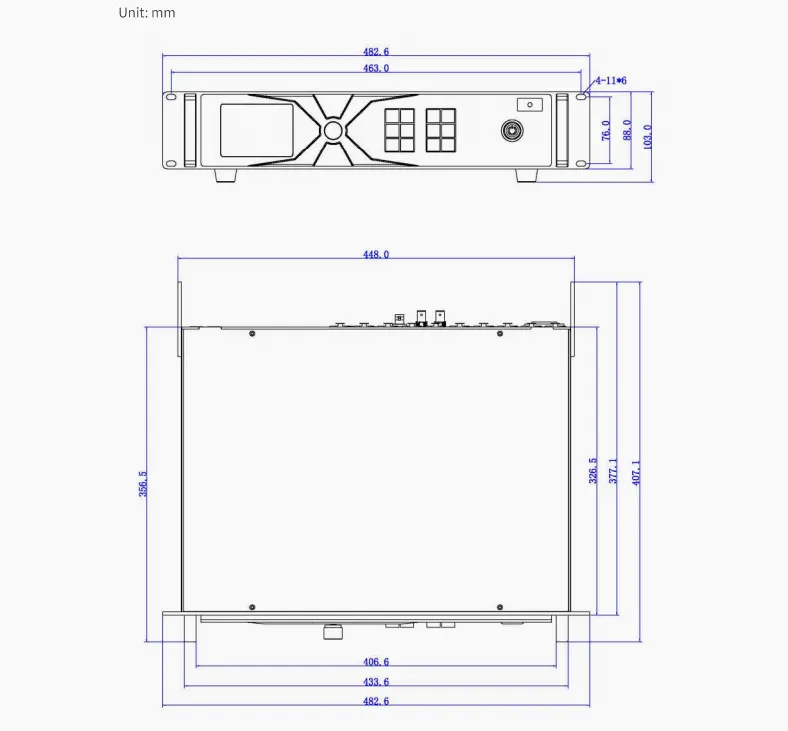
Colorlight Z5 reference dimensions
3. Where the Z5 fits in an LED system
In a typical LED wall, the Colorlight Z5 sits between the video sources and the receiving cards that drive the cabinets. It takes a high-resolution signal, processes and scales it, then distributes pixel-mapped data over Ethernet to Colorlight receiving cards, which control the LED modules inside each cabinet.
That position is what makes the processor critical: timing, color consistency and layout integrity for the whole LED wall are decided here, not at the cabinet.
The Z5 is not a switcher or matrix router. It is a dedicated processing node built for real-time, high-fidelity output — which is also why it is paired with receiving cards rather than with another brand’s control system.
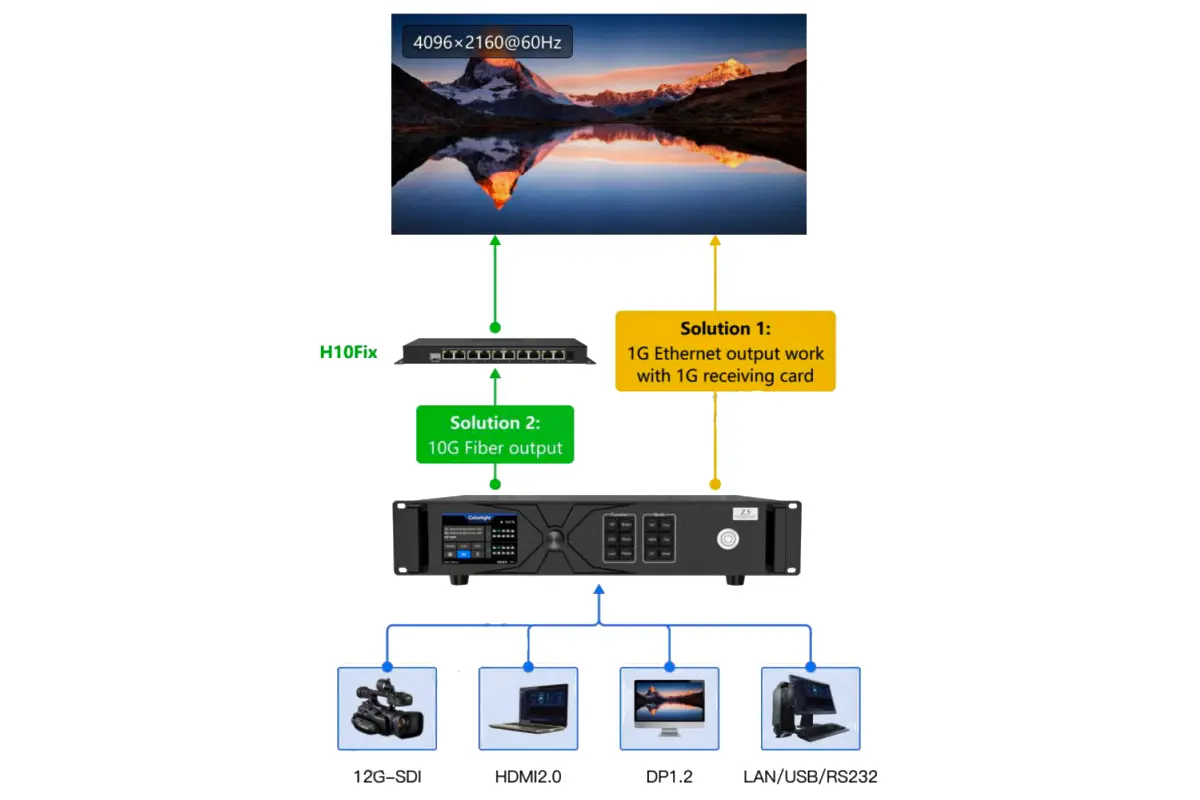
Colorlight Z5 application: live events, broadcast and control rooms
Projects that usually specify a Z5-class processor:
- Live events and touring: a one-frame delay keeps IMAG and playback in sync with the stage, and 20 output ports let one processor cover a wide stage backdrop.
- Broadcast and virtual production: Genlock input and loop keeps multiple processors frame-locked, which matters when cameras see the wall.
- Control rooms and command centers: a 4K canvas of up to 16,384 × 8,192 pixels supports composite layouts and window roaming across large surfaces.
- Fixed installations: optical output over Colorlight H10FN transceivers carries data over long distances when the rack is far from the wall.
4. Key features of the Colorlight Z5
Full 4K inputs, not just HDMI
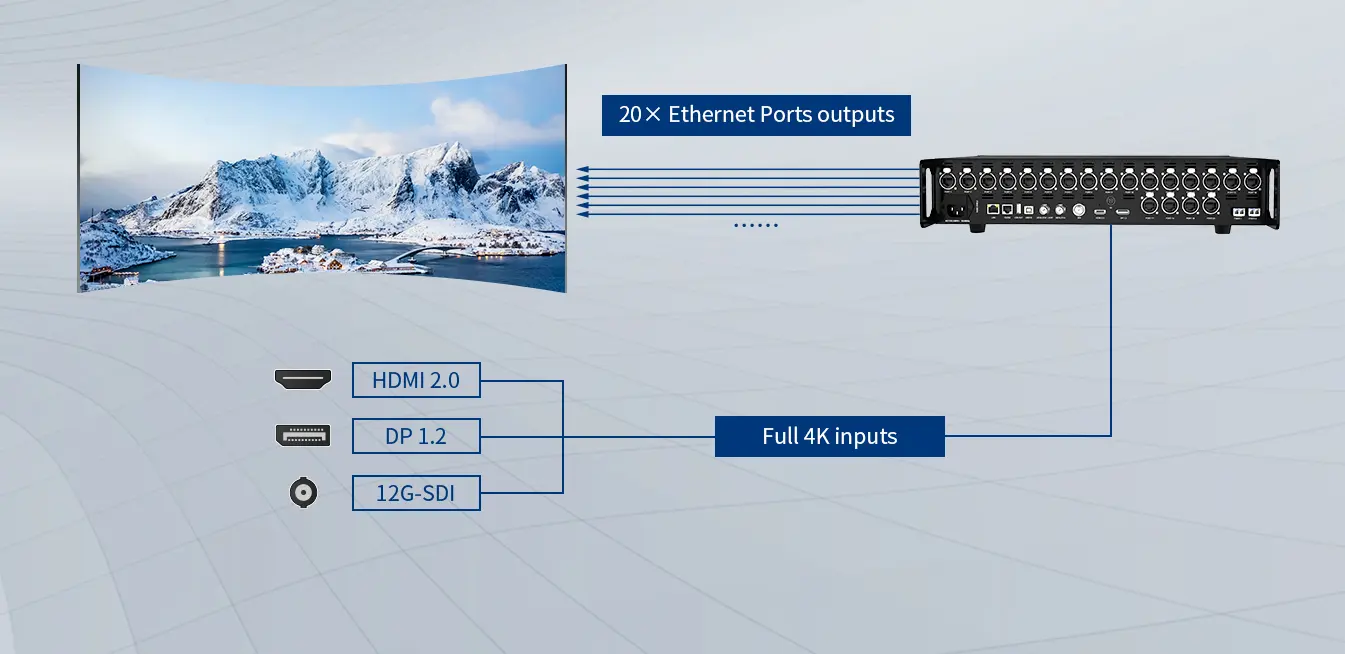
The Z5 accepts HDMI 2.0, DisplayPort 1.2 and 12G-SDI natively, so cameras, media servers, switchers and broadcast gear can connect without external converters. Maximum input resolution is 4096 × 2160 @ 60 Hz.
- HDMI 2.0 for media servers, PCs and playback systems
- DisplayPort 1.2 for graphics workstations
- 12G-SDI for broadcast and camera chains — a differentiator for live production
20 × 1G Ethernet plus optical output
Twenty Neutrik etherCON ports give the Z5 a 13-million-pixel load capacity, and the rugged connectors resist vibration on touring and outdoor jobs. Where the distance between rack and wall is too long for copper, Colorlight’s H10FN optical transceiver carries the same data over fiber.
Up to 3 layers with window roaming
The Z5 displays up to three layers on a single canvas and supports cropping, scaling, splicing and window roaming. In practice that means a 4K source plus PIP windows, camera feeds or sponsor graphics on one processor without adding a separate switcher.
- Crop unused areas of a source instead of masking them on the wall
- Scale and splice sources across output ports
- Move windows during a show without rebuilding the layout
One-frame latency for real-time work
The published minimum delay is one frame. That keeps presenter tracking, gaming-style interaction and IMAG on large rental LED displays responsive, and it keeps audio in sync without adding delay elsewhere in the chain.
HDR10 / HLG, wide color gamut and 10-bit processing
The Z5 supports HDR10 and HLG with 8-bit and 10-bit processing. 10-bit processing reduces banding in gradients and skies; wide color gamut keeps saturated content looking natural on fine-pitch panels.
Two practical notes: HDR rendering also depends on the receiving cards and the LED panels in the chain, and HDR should be validated with test patterns rather than by eye alone.
Genlock for multi-processor walls
Genlock input and loop let several processors run in strict synchronization. On a wall split across multiple Z5 units, this removes tearing and frame drift between sections — essential when a camera is filming the LED volume.
Web control plus iSet software
Day-to-day operation can be done from a browser without installing anything: brightness, input switching and layouts are managed over the network, and the interface works across operating systems. For commissioning and cabinet mapping, Colorlight’s iSet software is the tool used with this generation of processors.
For cabinet-level details of a Colorlight system, see our guide to choosing an indoor LED display and the P2.5 LED panel notes that apply to HDR grading work.
5. Colorlight Z5 vs Z4 Pro
The Z5 and Z4 Pro share the same design generation, the same inputs and the same processing functions. They differ mainly in load capacity and output ports, which is exactly what decides which one a project should use.
| Item | Colorlight Z5 | Colorlight Z4 Pro |
| Load capacity (published) | About 13 million pixels | About 6.55 million pixels |
| 1G Ethernet output ports | 20 | 10 |
| Optical output | Yes, H10FN optical transceiver | Fewer optical outputs than the Z5 |
| Inputs | HDMI 2.0, DP 1.2, 12G-SDI | HDMI 2.0, DP 1.2, 12G-SDI |
| Layers and latency | Up to 3 layers, minimum 1 frame | Same generation functions |
| Control | Web control and iSet | Web control and iSet |
| Chassis (published) | 2U, about 5.85 kg, rated about 75 W | 2U, about 5.40 kg, rated about 70 W |
Choose the Z5 when the wall is large, when you need all 20 output ports, or when several processors must be genlocked with room to grow. Choose the Z4 Pro when the pixel count and port count fit in roughly half the capacity and you prefer a slightly lighter unit.
Published mechanical and per-port figures are reference values — confirm the current datasheet for your hardware revision before finalizing a design.
6. Colorlight Z5 manual, software and firmware
Three things are usually needed on site: the user manual, the control software, and the correct firmware for your hardware revision.
- Control software: Colorlight iSet is the processor control application used with the Z5 generation. Basic operation can also be done from the browser interface without installing software.
- User manual: the Z5 user manual covers panel layout, menu structure, network configuration, iSet commissioning and troubleshooting. It ships with the unit; if the copy in your flight case has gone missing, ask your supplier for the current version.
- Firmware and specification sheet: firmware is matched to the hardware revision. Do not flash a file from an unrelated revision or from a file-sharing site.
When you buy a Colorlight processor from HonghaiLED, we supply the matching software, manual and specification sheet for your unit’s revision, and we can walk your technician through iSet commissioning. If you are comparing processors in the same class, our notes on the Colorlight X8m controller and the Colorlight VX20 4K video processor explain where each model sits in the range.
7. How to set up the Colorlight Z5
Setup follows a fixed order: power and signal first, then network, then canvas and cabinet mapping, then image checks. Work through the steps below before the first rehearsal rather than during it.
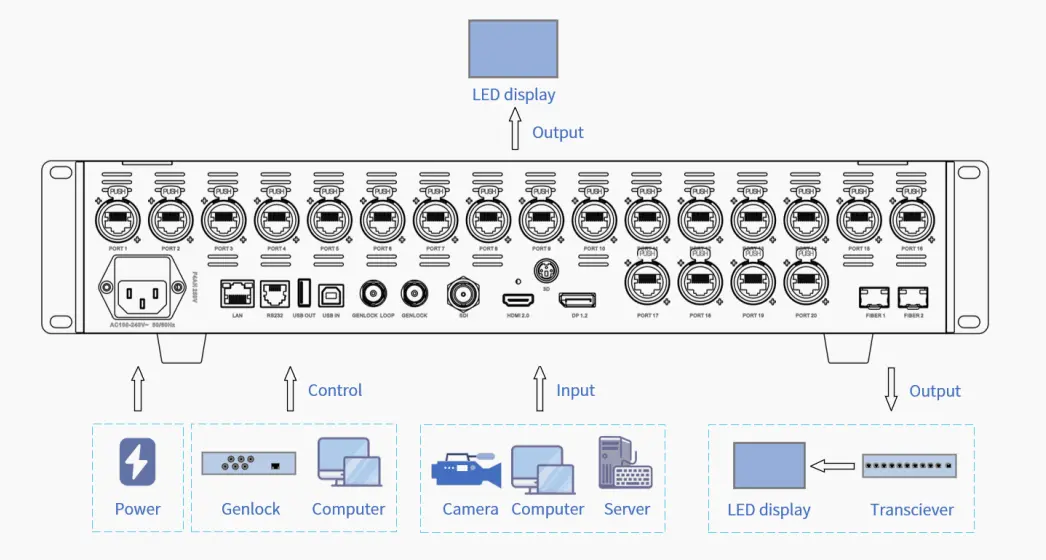
Step 1: Connect inputs and outputs
- Connect sources to HDMI 2.0, DisplayPort 1.2 or 12G-SDI inputs. Use certified cable for 12G-SDI runs.
- Connect receiving cards to the 20 × 1G Ethernet output ports, or use optical output with Colorlight H10FN transceivers where runs are long.
- Confirm the mains supply and grounding before switching on, then power the processor up.
Colorlight Z5 connection overview
Step 2: Put the processor and control PC on the same network
Set the processor and the control computer to addresses in the same subnet, and keep the LED network separate from general office or guest traffic. Most “iSet cannot find the device” cases are IP, VLAN or firewall problems rather than hardware faults.
Step 3: Detect the device and set the canvas
- Open the web interface or start iSet and detect the Z5.
- Enter the canvas size that matches the wall: total width and height in pixels, up to 16,384 × 8,192.
- Add windows or layers inside the canvas — up to three layers are supported.
Step 4: Map the cabinets in iSet
- Select each output port and add the cabinets it drives, in the order data flows through them.
- Match the mapping to the physical cabinet layout so images do not appear in the wrong position.
- Save the mapping, then check the screen with test patterns.
Step 5: Set HDR, color and Genlock
- Enable HDR on the source and confirm the receiving card settings; the processor passes HDR10 / HLG content, and the receiving side renders it.
- Adjust brightness, contrast, saturation and RGB gain per output only after the gray-scale and color-bar tests look correct.
- When several processors drive one wall, connect Genlock input and loop so all units share timing.
Step 6: Validate before the show
Run a low-gray test for uniformity, a color-bar test for color handling, and a moving pattern for tearing. Check that every port carries no more than its share of pixels, then save the project file so the configuration can be restored quickly.
If the wall is part of a complete outdoor or rental build, our outdoor LED screen technical standards list covers the structural and environmental checks that sit around the processor.
8. Colorlight Z5 price and what drives it
The Z5 is a professional rack-mounted processor, so a single list price rarely reflects what a project actually pays. The quotation depends on how the unit is configured and shipped:
- Optical or copper output: H10FN optical transceivers and fiber add cost but remove distance limits.
- System scope: receiving cards, hubs, cables and spare parts change the total, even though the processor price itself stays the same.
- Shipping and import costs: duties, taxes and freight depend on destination and order size.
- Quantity and service: multi-unit projects, spares holdings and on-site commissioning support are quoted per project.
To get an accurate Z5 price, send us the wall size in pixels, the cabinet quantity, the pixel pitch, the refresh requirement, whether HDR is needed, and the distance between the rack and the wall. With those five figures we can confirm the correct processor model and configuration rather than quoting a processor that is either oversized or short of ports.
You can also compare this class of processor with the NovaStar VX600 Pro and the NovaStar VX1000 Pro — but remember that a processor and its receiving cards must belong to the same ecosystem. Moving from NovaStar to Colorlight means changing the receiving cards as well.
9. Troubleshooting common Z5 problems
| Symptom | What to check first |
| iSet or the web interface cannot find the Z5 | Processor and PC in the same subnet, no IP conflict, LED network isolated from office traffic, firewall or VLAN blocking device discovery |
| No signal on the wall | Input cable and connector grade (especially 12G-SDI), EDID and HDCP negotiation, source resolution above 4096 × 2160 @ 60 Hz |
| Image appears on the wrong part of the wall | Canvas size versus cabinet mapping mismatch, cabinets mapped in the wrong order, output port grouping |
| Tearing or drift between sections | Genlock input and loop wiring on multi-processor walls, and frame-rate mismatch between sources |
| HDR content looks flat or clipped | HDR handling in the receiving cards and panels, tone mapping settings downstream, SDR elements in the signal chain |
| Flicker, banding or dropped content at high refresh | Per-port pixel load above the port budget — redistribute cabinets across the 20 ports and recalculate |
If you are commissioning a Colorlight system for the first time, the connection logic in our processor-to-control-computer guide applies to processor networks in general, and the same subnet rules decide whether configuration software can see the device.
10. FAQs about the Colorlight Z5
What is the Colorlight Z5?
The Colorlight Z5 is a professional 4K LED video processor in Colorlight’s Z5 / Z4 Pro family. It accepts HDMI 2.0, DisplayPort 1.2 and 12G-SDI inputs, outputs to LED receiving cards over 20 × 1G Ethernet ports, and supports up to about 13 million pixels of load capacity with a minimum of one frame of delay.
How many pixels can one Colorlight Z5 control?
Colorlight publishes a load capacity of up to about 13 million pixels for the Z5, with a maximum canvas of 16,384 × 8,192 pixels. In practice you split that load across 20 output ports, so the usable pixel count depends on your refresh rate and bit depth as well as the total.
What inputs does the Colorlight Z5 have?
HDMI 2.0, DisplayPort 1.2 and 12G-SDI, with a maximum input resolution of 4096 × 2160 @ 60 Hz. Because SDI is built in, broadcast and camera chains do not need an external converter.
Which software does the Colorlight Z5 use?
Colorlight iSet is the control software used with this generation of processors, and simple operations can also be handled from the browser-based web interface without installing software. Match the software version to the firmware revision of your unit.
Where can I get the Colorlight Z5 manual?
The Z5 user manual ships with the processor and is also available through Colorlight’s official support channels. If your manual has been lost, order the processor from HonghaiLED and we will send the manual, specification sheet and matching software for your hardware revision.
Does the Colorlight Z5 support HDR and Genlock?
Yes. The Z5 supports HDR10 and HLG, wide color gamut and 8-bit / 10-bit processing, and it provides Genlock input and loop so several processors can run in strict synchronization. HDR rendering also depends on the receiving cards and panels in the chain.
How much does the Colorlight Z5 cost?
Z5 pricing is quoted per project because optical modules, receiving cards, spare parts, shipping and import duties change the delivered cost. Send us your wall size in pixels, cabinet quantity, pixel pitch, refresh requirement and rack-to-wall distance, and we will confirm the correct configuration and price.
What is the difference between the Colorlight Z5 and Z4 Pro?
Both are 4K processors from the same generation with the same inputs, layers and control methods. The Z5 is the larger unit: about 13 million pixels of load capacity and 20 × 1G Ethernet ports, against roughly 6.55 million pixels and 10 ports on the Z4 Pro. Choose the Z5 for bigger walls and more output ports.
Can I use Colorlight Z5 with NovaStar, Linsn or Huidu receiving cards?
No. A processor and its receiving cards have to belong to the same ecosystem, because the data protocol between them is proprietary. If you switch the Z5 in, the receiving cards must be Colorlight models too — plan that change into the project budget and schedule.
Related Posts
LED Screen vs LCD Screen: Differences & How to Choose
LED screen vs LCD screen is a comparison of two…
How to Choose the Best LED Lamp Beads for LED Displays
Choosing the best LED lamp beads for LED displays starts…
LED Packaging Technology: SMD, COB, GOB & MIP Guide
LED packaging technology determines how light-emitting chips are connected, supported,…

No Comments