
NovaStar ET1S-G Review: Media Server Specs, Setup and Price
The NovaStar ET1S-G is a compact media server that prepares and plays content for LED and LCD installations. It supplies a video signal to the display system; a compatible LED processor or sending device handles the connection to LED cabinets. For showrooms, exhibition spaces and conference rooms, the main buying question is whether its output capacity, software edition and playback workflow match the actual screen.
This NovaStar ET1S-G review explains specifications, connections, setup, price considerations and alternatives without treating connector count as independent screen capacity. It also addresses a crucial documentation change: older ET1S-G material describes AMD hardware and Kompass FX1, while NovaStar’s specification V1.3.2, dated September 7, 2026, lists Intel hardware and Kompass FX3 Pro Basic Edition. Confirm the supplied revision before ordering or upgrading.
This is a specification-based buying and integration guide, not a hands-on performance benchmark. Manufacturer statements are separated from practical planning advice. The original product and software images remain for reference; older interface screenshots may differ from the software supplied with a current unit.
1. What Is the NovaStar ET1S-G?
The NovaStar ET1S-G belongs to NovaStar’s ET media-server family. Its purpose is to organize media into programs and output a finished image for a screen. Think of it as the source at the beginning of the display chain, with dedicated playback software and a rack-oriented hardware package.
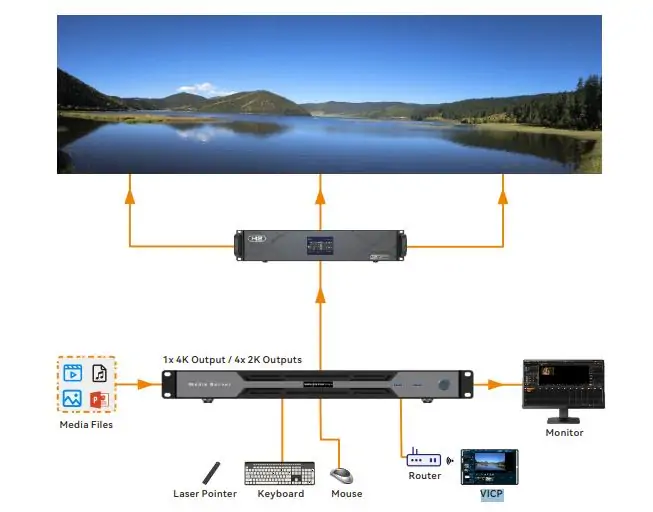
A typical LED installation follows this path: media files or network sources → NovaStar ET1S-G → compatible video processor or sending device → receiving cards → LED modules. An LCD installation may accept the server’s video output through a suitable display input or distribution system. The equipment after the server must support the selected resolution and timing.
The distinction matters when preparing a quotation. A NovaStar media server does not replace every control component behind an LED wall. Its network socket provides networking, not a direct LED-cabinet data output. Budget separately for the processor, receiving system, signal transport and installation work.
The ET series comparison identifies the NovaStar ET1S-G as a 1U model. However, the latest specification gives overall dimensions of 482.6 × 407.5 × 50.1 mm. Use the actual dimension drawing and mounting instructions when checking rack clearance rather than assuming every physical projection fits inside the nominal rack height.
Choose by the content requirement first. A single scheduled showroom canvas is a different workload from multiple independent high-resolution screens or a live camera production. Writing down those requirements before comparing model names prevents expensive changes after the rack has been assembled.
2. What the ET1S-G Actually Does
01. Playback, composition and output
The NovaStar ET1S-G combines media into a program and sends the resulting canvas through DisplayPort or HDMI. A canvas may contain several items, such as a background video, logo and text. A software layer is one element in that composition; it is not automatically an additional physical video output.
Likewise, supported layer count is not a promise that every layer can decode a full-resolution video simultaneously. Codec, bitrate, frame rate, scaling and network sources affect the workload. Ask for a demonstration using your actual media and the exact software edition instead of relying on a promotional maximum.
02. HDMI mosaic and the control monitor
The NovaStar ET1S-G has several connectors serving different purposes. The four HDMI 1.3 outputs collectively reproduce the DisplayPort canvas through mosaic layouts. They should not be specified as four independent 4K feeds. HDMI 2.0 copies the DisplayPort output, and selecting HDMI 2.0 disables HDMI 1.3 ports 2, 3 and 4.
The CONTROL UI connector is for the operator monitor. Keep the software interface on that display and the presentation canvas on the intended program output. Label these connections during commissioning so another technician can restore the system without guessing.
03. Match pixels to the LED wall
For example, a wall built from ten cabinets across and six cabinets high, with 320 × 180 pixels per cabinet, contains 3200 × 1080 pixels. This is a planning example, not a tested ET1S-G configuration. It illustrates why cabinet pixel dimensions matter more than a screen’s width in metres.
Prepare content for the intended canvas, then confirm that the server timing, processor input and receiving-card mapping all agree. Avoid unnecessary scaling when sharp text and diagrams matter. The VX1000 Pro and VX1000 comparison explains downstream processor choices; verify the chosen input’s limits separately.
 100vw, 930px” data-dt-location=”https://www.eagerled.com/novastar-et1s-g-review/novastar-et1s-g/” data-lazy-src=”https://www.eagerled.com/wp-content/uploads/2026/06/Novastar-ET1S-G.webp” /></div>
</figure>
</div>
</div>
</div>
</div>
</div>
<div id= "Novastar ET1SG LED Display Manufacturer in China EagerLED")
3. NovaStar ET1S-G Technical Specifications
NovaStar ET1S-G specifications should always include a document version. NovaStar’s current downloadable specification and its older comparison table are not fully aligned. The following table distinguishes the published revisions instead of combining their best numbers into a configuration that may never have shipped.
| Item | Earlier documentation | Specification V1.3.2 |
|---|---|---|
| Processor | V1.0.0: fifth-generation AMD Ryzen | Intel Core i3-1215U |
| Memory | 16 GB DDR4 | 16 GB DDR4 |
| SSD capacity | V1.0.0: 250 GB | 256 GB |
| Playback software | Kompass FX1 | Kompass FX3 Pro Basic Edition; license activation |
| Listed layers | FX1: four plus one audio | Up to 20; workload still requires testing |
| Custom width limit | V1.0.0: 8192 pixels | 7680 pixels |
| Overall dimensions | V1.0.0: 482.6 × 43.6 × 400 mm | 482.6 × 407.5 × 50.1 mm |
Source: NovaStar, ET1S-G Media Server Specifications V1.0.0, V1.2.0 and V1.3.2, especially the hardware, connector and physical-specification sections. V1.2.0 already lists Intel hardware and a 256 GB SSD. An older AMD unit is not necessarily mislabeled, and a 256 GB listing is not necessarily an error.
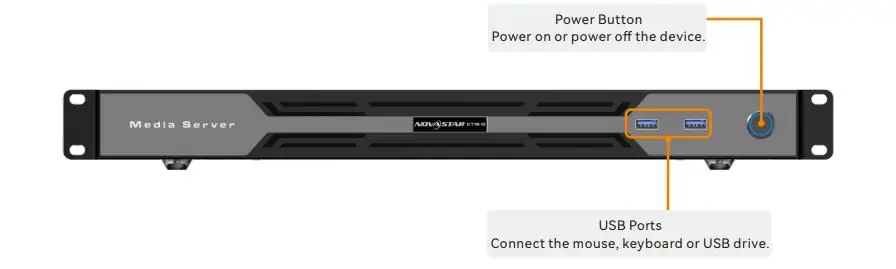
For connection planning, the latest document lists one DP 1.2 output, one HDMI 2.0 output, four HDMI 1.3 outputs and a separate CONTROL UI connection. It specifies a single 4K × 2K at 60 Hz output capacity, with the copying and mosaic relationships explained above.
The NovaStar ET1S-G also provides front USB 3.0 ports, rear USB 2.0 ports, Gigabit Ethernet and analogue audio connections. Published maximum consumption is 80 W; the internal power-supply rating is 120 W. These describe different quantities and should not be substituted for one another in a power budget.
Do not multiply the maximum custom width by the maximum custom height and assume that full rectangle is supported at 60 Hz. Width, height, total pixels, timing and downstream compatibility must be considered together. Have the supplier confirm the exact custom timing in writing.
4. Kompass FX1 and Current Kompass Software
01. Identify the installed software first
Kompass FX1 remains relevant to existing NovaStar ET1S-G installations and older stock. Its manual covers media libraries, programs, layers, scheduling, output settings and external control. Current V1.3.2 hardware documentation instead names Kompass FX3 Pro Basic Edition. Record the installed application, version and license status before following a tutorial.
Do not assume that installing a newer package grants a new license or increases hardware decoding performance. Request the approved upgrade path for the serial number, preserve the existing project and keep a recovery copy. A software download and permission to use its full feature set are separate matters.
02. Build and verify a playback project
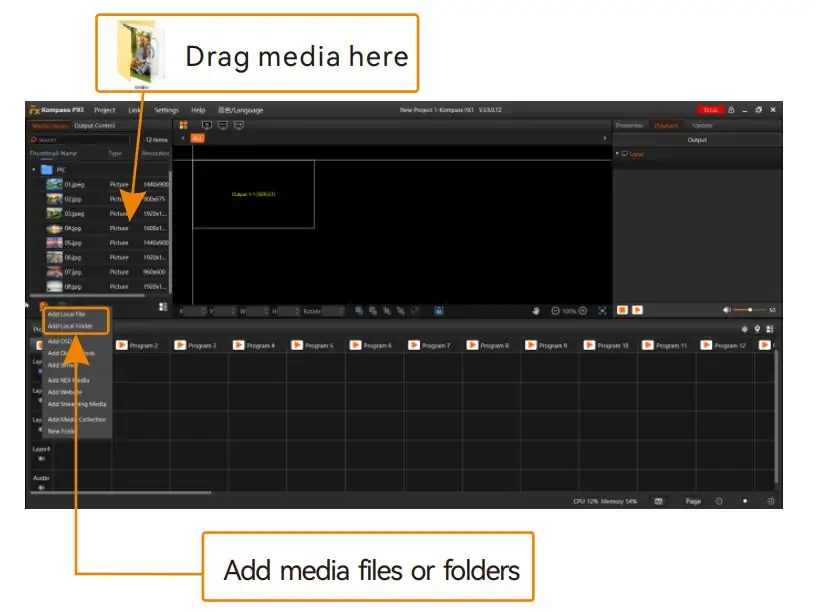
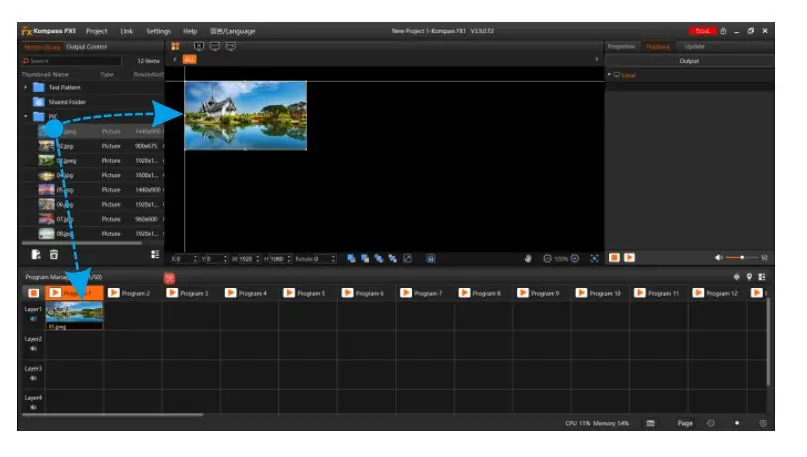
For a NovaStar ET1S-G setup, begin with one local video and a simple test image. Configure the output canvas, place the media, confirm its size and crop, and check the image on the physical wall. Once this works, add the remaining layers and programs incrementally.
Use descriptive program names and a predictable media folder structure. Keep a clean handover copy that includes the project and its required assets. Test the opening program, transitions, the last item in a loop and the return to the first item; a loop that looks correct for thirty seconds may still fail at its boundary.
For scheduled playback, verify the computer clock, time zone, start conditions and restart behaviour. Test a cold start during commissioning rather than assuming that the software reopening also guarantees the correct program resumes. Include a clearly identifiable idle or fallback screen for periods without scheduled content.
03. Separate playback control from screen configuration
NovaStar documentation lists VICP control for the NovaStar ET1S-G. Confirm the supported control functions and network arrangement for the installed release. Remote control does not, by itself, establish an internet-based content distribution service, automatic failover or unlimited multi-site management.
Kompass manages content playback. Tools used to configure the receiving system perform a different job. HonghaiLED’s NovaLCT download and version guide is relevant when the connected control hardware uses NovaLCT; choose a compatible release for that hardware.
5. Where the ET1S-G Fits in NovaStar’s ET Series
The NovaStar ET1S-G is the entry point for projects whose playback requirements fit a single 4K-class canvas. Moving up the ET range can provide more output capacity and more demanding playback options, but the exact hardware and software generation still matter.
The following comparison is a selection guide, not a substitute for current model specifications. NovaStar’s online ET-series table lists one 4096 × 2160 at 60 Hz loading capacity for the ET1S-G and two for the ET2S-G. It lists frame-sync mosaic and device backup on higher models, with sync-card conditions on the ET4S-G.
| Requirement | Starting point | What to verify |
|---|---|---|
| One 4K-class canvas | NovaStar ET1S-G | Actual media workload, output timing and software license |
| Two 4K-class output paths | ET2S-G | Current output specifications and simultaneous playback needs |
| Larger multi-output system | ET4S-G or ET16S-G | Graphics configuration, decoding capacity and synchronization hardware |
| Automatic backup operation | Supported higher-tier configuration | Failover trigger, compatible licenses, signal routing and recovery procedure |
| Playback and LED sending in one device | Suitable integrated playback controller | Pixel load, receiving-card compatibility and supported inputs |
For a fair NovaStar ET1S-G versus ET2S-G comparison, start with the number of independently managed canvases and the content workload. Extra SSD space alone does not answer whether a second output or a different graphics subsystem is required. See the HonghaiLED ET2S-G overview for related project context.
If uninterrupted operation is a contract requirement, describe the failure scenario explicitly. A spare server that a technician manually connects is different from automatic device backup. Neither arrangement is complete until the downstream processor, switching path and recovery procedure have been tested together.
6. ET1S-G vs Alternatives
01. NovaStar ET1S-G versus a general-purpose PC
A general-purpose computer can be a suitable playback source when its outputs, software and support arrangements meet the project. The NovaStar ET1S-G offers a defined product and software path, but that does not prove a universal cost or reliability advantage. Compare the complete installation, including licenses, rack mounting, configuration, operator training and recovery support.
Run the same acceptance playlist on both options. Include the highest bitrate clip, the busiest layout and the longest expected operating period. Check whether a replacement computer can restore the project and license quickly. This produces a more useful comparison than comparing CPU names alone.
02. NovaStar ET1S-G versus an integrated controller
An integrated playback controller may combine functions that require separate devices in an ET1S-G system. That can simplify a small installation, especially when the LED sending capacity and input requirements match the selected controller. The trade-off is that content workflow, operating system and output flexibility may differ.
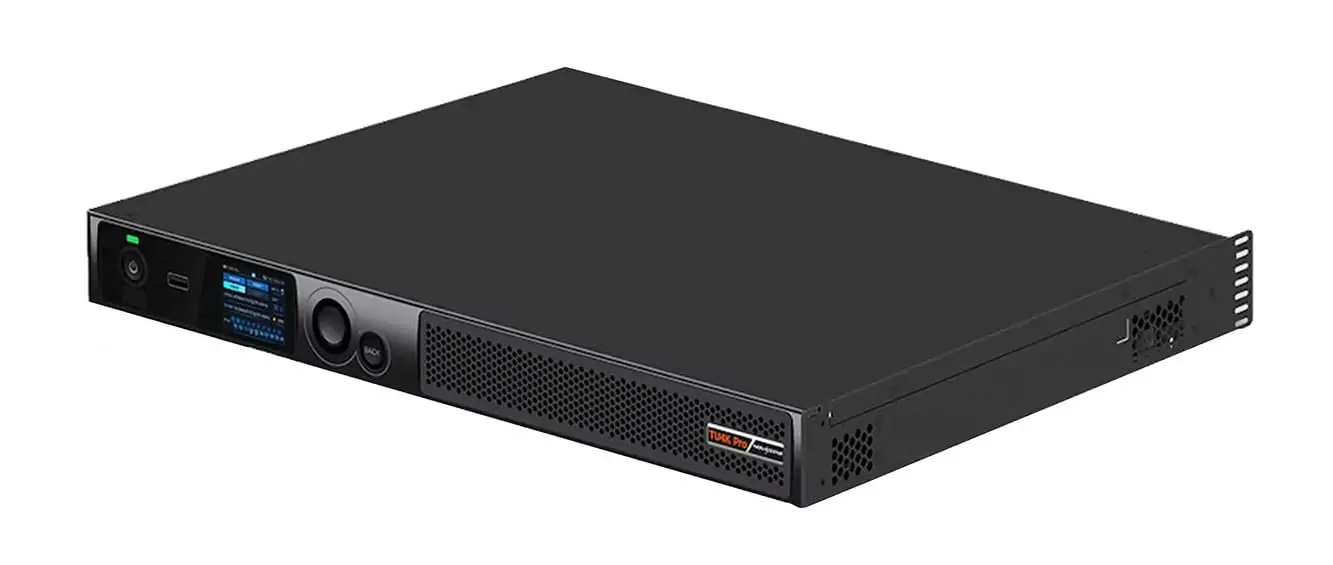
The NovaStar ET1S-G is particularly relevant when a suitable processor already exists and only the playback source needs replacement. For a new system, compare the whole signal chain. HonghaiLED’s TU20 Pro review discusses an integrated approach. The TU4K Pro image retained below illustrates another product category, not an interchangeable ET1S-G specification.
03. NovaStar ET1S-G price and quotation checks
There is no single universal NovaStar ET1S-G price established by this review. Public listings can represent different stock revisions, software bundles, regions and service terms. Obtain a dated quotation specifying the processor, SSD, application edition, activation method, included cables, warranty provider and delivery terms.
Compare the delivered system cost rather than the server price alone. Include the downstream processor, operator monitor, signal transport, network setup, backup arrangements and commissioning time. A low headline price is less useful if the software license or required integration work is missing.
For listings using labels such as ET1S-500G, request a matching manufacturer document and a written configuration. Do not conclude that the configuration exists or does not exist solely because an older comparison table omits it. Treat the label as something to verify before payment.
7. Limitations and Troubleshooting
01. Output and media limits
The NovaStar ET1S-G should be evaluated as a 4K-class playback source. An ultrawide custom timing does not establish full 8K video decoding capability. Similarly, a 20-layer software limit does not mean twenty simultaneous 4K video streams. Test the combination of media, effects and outputs that the installation actually needs.
For media preparation, distinguish file containers from codecs. An MP4 extension does not tell you every encoding parameter inside the file. Use a consistent export profile, keep original masters separately and test playback before distributing the final files to the installation.
Storage planning should include the operating system, applications, temporary files and project backups. As an illustrative calculation, a 60 Mbps video consumes about 27 GB per hour before allowing for audio and container overhead: 60 × 3600 ÷ 8 ÷ 1000. Available media space will be lower than the advertised SSD capacity.
02. Troubleshoot the signal chain in order
| Symptom | First checks | Next useful test |
|---|---|---|
| No picture on the wall | Power, selected processor input, program playback and output cable | Try a known-good timing and local test image |
| Some HDMI outputs disappear | HDMI 2.0/1.3 software mode and mosaic selection | Compare the wiring with the documented port-sharing behaviour |
| Video stutters | Codec, bitrate, active layers and storage access | Run one local clip, then restore complexity step by step |
| No sound | Selected audio device, mute status and audio route | Use a supported audio output; HDMI 1.3 carries no audio |
| Image is cropped or soft | Canvas dimensions, scaling, processor mapping and EDID | Display a pixel grid with corner labels |
| Network source disappears | Source availability, network path and software compatibility | Compare local-file playback with the network source |
Keep a simple local test file on the NovaStar ET1S-G. If that file plays correctly while a network source fails, investigate the network and source before changing the LED receiving configuration. Record one change at a time so the original cause remains identifiable.
03. Plan maintenance and recovery
Windows LTSC still requires an appropriate maintenance plan. Schedule approved updates and reboots outside display hours, retain project backups and document the recovery process. Avoid promising automatic remote recovery, redundant power or frame synchronization unless the supplied system explicitly supports and passes those requirements.
8. Who Should Buy the NovaStar ET1S-G?
The NovaStar ET1S-G is worth evaluating for showrooms, museums, exhibition spaces and conference rooms needing organized media playback within its capacity. It can also be considered for a venue that already owns compatible LED processing equipment and wants a dedicated source instead of a staff member’s laptop.
Start by documenting screen width and height in pixels, frame rate, content formats, audio destination, daily operating hours and who will update programs. If the screen design is still undecided, use the indoor LED screen planning guide to connect pixel pitch and viewing distance with the required canvas.
Before accepting a NovaStar ET1S-G system, ask the integrator to demonstrate these practical tasks:
- Start from power off and load the intended program.
- Play the busiest layout and every scheduled transition.
- Verify image edges, small text, colour range and audio synchronization.
- Disconnect and restore an expected signal path under controlled conditions.
- Restore the project from the supplied backup and confirm license status.
For live camera work, request an end-to-end latency test and an appropriate switching design. Network-source support alone does not establish suitability for image magnification at an event. For multiple synchronized screens or automatic backup, compare a higher-capacity system before committing to the entry model.
Send the screen pixel dimensions, processor model, sample media and required operating workflow when requesting an HonghaiLED system quotation. Those details allow a supplier to confirm compatibility and quote the complete installation rather than a disconnected list of equipment.
9. NovaStar ET1S-G FAQs
01. What is the NovaStar ET1S-G used for?
The NovaStar ET1S-G organizes and plays media for LED and LCD display installations. For an LED wall, it normally supplies a video signal to compatible processing or sending equipment. It is useful when the project needs a dedicated playback workflow and its canvas fits the server’s capacity.
02. Is the NovaStar ET1S-G a sending card?
No. The NovaStar ET1S-G is a media server. Its Ethernet connection is for networking, and its program image leaves through video outputs. The downstream LED control system sends display data to the cabinets. Confirm that complete signal chain when choosing equipment.
03. Does the ET1S-G use AMD or Intel hardware?
Both descriptions appear in manufacturer documentation from different periods. V1.0.0 lists AMD Ryzen and a 250 GB SSD; V1.2.0 and V1.3.2 list Intel Core i3-1215U and 256 GB. Match the quotation and delivered hardware to the relevant document rather than treating every older specification as incorrect.
04. Does the NovaStar ET1S-G include Kompass FX1?
Earlier documentation names Kompass FX1. Specification V1.3.2 names Kompass FX3 Pro Basic Edition with software license activation. Ask which edition and license are included with the actual unit. Do not assume an older FX1 installation automatically receives the newer software entitlement.
05. Can it output four independent 4K screens?
No. Multiple physical connectors do not provide four independent 4K program feeds. The four HDMI 1.3 outputs form a mosaic of the DisplayPort content, while HDMI 2.0 copies that content. Confirm the supported layout and connector mode before planning a multi-screen installation.
06. How many rack units is the ET1S-G?
The ET-series comparison classifies the NovaStar ET1S-G as 1U. Current specifications list overall dimensions of 482.6 × 407.5 × 50.1 mm and a net weight of 5.2 kg. Check the drawing, mounting hardware and ventilation clearance, and follow the horizontal-mounting instructions.
07. Does the NovaStar ET1S-G support NDI and web content?
Manufacturer documentation lists NDI, website and streaming-media sources. Test the required source format, software version and network environment before deployment. Keep suitable local fallback media available; support for a source type does not guarantee that every network stream or website will work identically.
08. How much does the NovaStar ET1S-G cost?
Request a current quotation for the exact hardware and software bundle, region and support terms. Include any processor, monitor, signal transport and installation work in the comparison. This guide does not present a reseller price as a universal manufacturer list price.
09. Where should I find the ET1S-G manual?
Use NovaStar’s official ET-series downloads and select the document for your hardware and installed application. Useful references include ET1S-G Specifications V1.3.2 and, for existing FX1 systems, the Kompass FX1 User Manual V3.13.0. Record document versions in the handover file.
10. Conclusion
The NovaStar ET1S-G can provide a focused playback source for a compatible LED or LCD installation. The strongest purchasing decision starts with the screen’s pixels, the media workload and the operator’s daily tasks, then checks the supplied hardware, software license and downstream equipment.
For this NovaStar ET1S-G review, the key correction is version awareness: older AMD and Kompass FX1 information must not be presented as the only current configuration. Verify the actual unit, test the complete program and retain a usable recovery package. When more outputs, synchronization or backup are required, compare the appropriate ET-series configuration before installation.
Technical references checked September 28, 2026: NovaStar ET1S-G Media Server Specifications V1.3.2 (September 7, 2026), V1.2.0 (May 6, 2025), V1.0.0 (July 26, 2024); NovaStar ET Series comparison; Kompass FX1 Multimedia Playback Software User Manual V3.13.0. This review does not claim measured playback benchmarks or guaranteed performance improvements.
Related Posts
NovaStar NovaPro HD Review: Specs, Setup and Manual
The NovaStar NovaPro HD combines video processing and LED display…
NovaStar VX2000 Pro vs VX2000: Specs & Price Guide
NovaStar VX2000 Pro vs VX2000 is a comparison that starts…
NovaStar H2 Review: Specs, Cards, Price & Setup Guide
The NovaStar H2 is a modular, 2U video wall splicer…
Leave a Reply

No Comments