
NovaStar VX2000 Pro vs VX2000: Specs & Price Guide
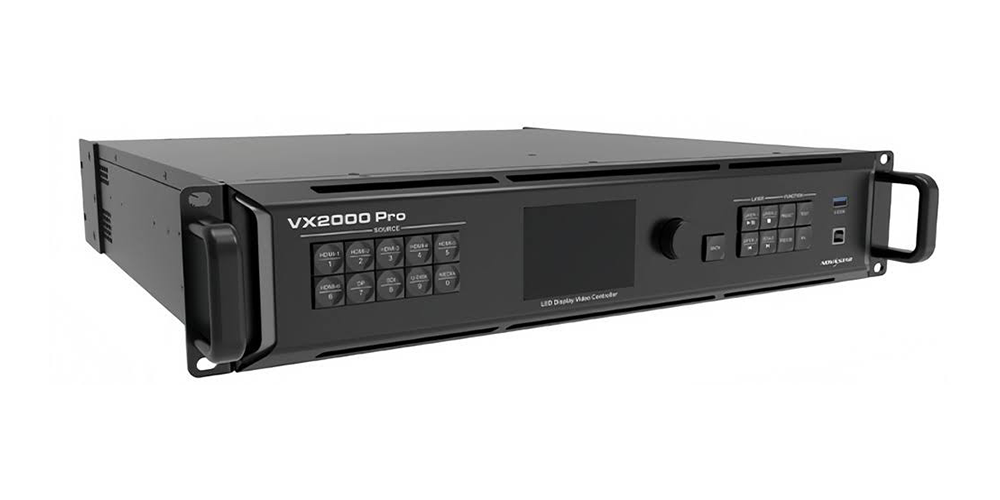
NovaStar VX2000 Pro vs VX2000 is a comparison that starts with a naming check. NovaStar documents the VX2000 Pro as a 20-port all-in-one LED controller with a headline capacity of 13 million pixels. A separate non-Pro VX2000 was not identified in the official VX Pro materials reviewed for this guide. If a quotation says only “VX2000,” ask which exact model will be supplied before comparing specifications or prices.
For a useful, verifiable alternative, this guide compares the NovaStar VX2000 Pro with the VX1000 Pro, a documented 10-port model rated at 6.5 million pixels. These are different capacity tiers within the same family. Neither the older VX1000 nor an unidentified VX2000 listing should inherit the VX1000 Pro specifications simply because some numbers look similar.
The right choice depends on cabinet resolution, output bit depth, source connections, simultaneous video layers and the required backup arrangement. Below you will find practical comparison tables, worked pixel calculations, price considerations and an acceptance checklist. The aim is to help you specify a complete LED system that fits your content and operating workflow, rather than choose from model names alone.
1. NovaStar VX2000 Pro vs VX2000: model names explained
01. Verify what “VX2000” means on your quotation
When researching NovaStar VX2000 Pro vs VX2000, do not turn an abbreviated seller description into an official product specification. Request the exact model designation, a rear-panel photograph and the matching manufacturer document. A product page title alone cannot establish the port count, processing features or supported configuration.
For an installed system, record the model displayed in its control interface as well as the label on the chassis. Compare those details with the purchase record. If the names disagree, resolve the discrepancy with the supplier before ordering a spare. This avoids receiving a controller that needs different cabling or commissioning when the intention was a quick replacement.
02. Keep VX1000 and VX1000 Pro separate
The NovaStar VX2000 Pro belongs to the VX Pro family. VX1000 Pro is a legitimate smaller comparison; VX1000 is an earlier model with its own documentation. Shared loading figures do not prove identical video inputs, layer resources or control software. This article uses the complete VX1000 Pro name wherever that specific model is intended.
NovaStar’s published VX Pro family includes VX400 Pro, VX600 Pro, VX1000 Pro and VX2000 Pro. Treat the absence of a separate VX2000 entry in the reviewed materials as a reason to verify an ambiguous offer, not as proof that every abbreviated listing is fraudulent. Clear identification is the first purchasing requirement.
2. NovaStar VX2000 Pro specifications compared with VX1000 Pro
The comparison below separates model identity from measurable capacity. The headline pixel ratings are starting points; an actual design must also satisfy output format, individual port loading, receiving-card and topology limits. A larger controller does not automatically improve an already correctly configured screen.
| Specification | NovaStar VX2000 Pro | NovaStar VX1000 Pro |
|---|---|---|
| Headline pixel capacity | 13 million | 6.5 million |
| Gigabit Ethernet outputs | 20 | 10 |
| Optical ports | 4 × 10G | 2 × 10G |
| Maximum width / height | 16,384 / 8,192 pixels | 10,240 / 8,192 pixels |
| Shared layer resources | 12 × 2K | 6 × 2K |
| Presets | 256 | 256 |
| HDMI video inputs | 2 × HDMI 2.0; 4 × HDMI 1.3 | 1 × HDMI 2.0; 2 × HDMI 1.3 |
| DisplayPort input | 1 × DP 1.2 | Not listed in family connector comparison |
| SDI input and loop | 12G-SDI | 3G-SDI |
Specification basis: NovaStar VX Pro family documentation and VX2000 Pro Specifications V1.2.0, dated September 30, 2025, reviewed September 28, 2026. Maximum width and maximum height are separate limits: multiplying them does not produce the controller’s supported pixel capacity. Confirm the document and firmware supplied with your unit.
The NovaStar VX2000 Pro has twice the headline loading capacity and twice the 2K layer resources of VX1000 Pro. However, both models offer HDMI 2.0 input and 256 presets. A comparison that says only the larger Pro model accepts 4K60 or that the smaller Pro model has ten presets misrepresents this particular pair.
For a closer look at the smaller model, see our VX1000 Pro specifications and setup guide. Keep that product-level information separate from the purchasing decision here: first establish the minimum requirements, then select the least complicated configuration that satisfies them.
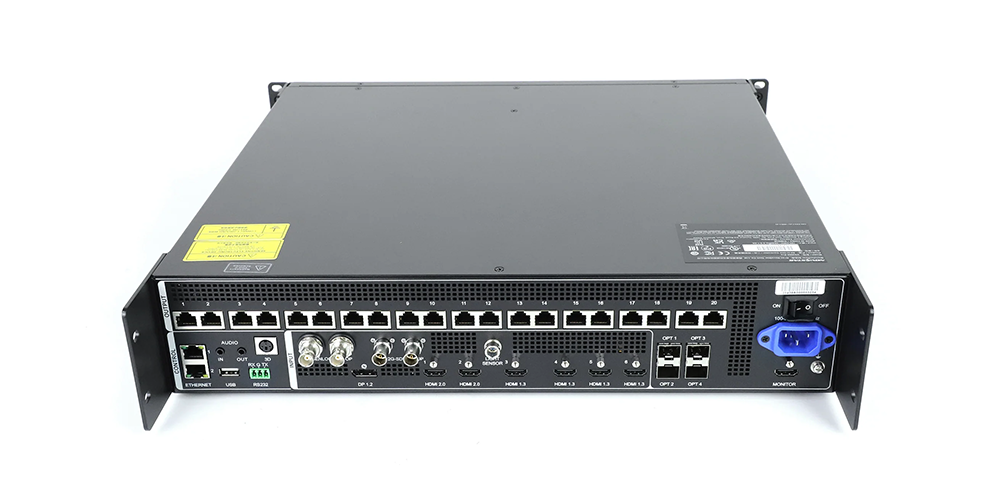
3. 4K inputs, outputs and fiber connections
01. Match each source to the correct input
Choose a NovaStar VX2000 Pro when its additional connections solve a real requirement: a DisplayPort workstation, two HDMI 2.0 sources or a compatible 4K SDI feed. Do not count every HDMI socket as equivalent. Source resolution, frame rate, color sampling and bit depth must fit the particular connector and its configured capacity.
Write a source schedule before purchase. Include the media server, presentation laptop, camera switcher, confidence monitor and emergency content source. Record the output format of each device, the cable length and any adapter. This often reveals a more important difference than the advertised maximum resolution: whether the required sources can be connected simultaneously without repeated repatching.
02. Distinguish fiber transport from extra processing
The NovaStar VX2000 Pro optical connections transport or duplicate assigned video data according to the working mode. They do not multiply its pixel budget. Confirm which optical ports carry input, output or backup traffic, and specify compatible converters and modules at both ends of the link.
A fiber quotation should name the module type, connector, fiber type, run length and spare provision. Inspect the route for shared failure points: two fibers in one vulnerable cable do not provide the same protection as physically separate routes. Label the Ethernet output banks and their corresponding optical paths so an operator can identify them during troubleshooting.
Separate control-network connections from LED data outputs in your wiring drawing. Similar-looking network connectors do not have interchangeable roles. For the NovaStar VX2000 Pro, the installation handover should identify the control connection, each screen data connection and the monitor connection in plain language.
4. Layers, HDR and real-world latency
01. Budget layers by resource use
The NovaStar VX2000 Pro uses a shared layer budget. Twelve 2K resources should not be read as twelve unrestricted 4K windows. Plan the actual source formats and layout, including the background, live camera windows and presentation content, before deciding whether the available resources are sufficient.
A 4K × 2K layer consumes four 2K resources, while a 4K × 1K layer consumes two. The twelve-resource budget can therefore support three full 4K layers or six 4K × 1K layers, subject to connector configuration and other limits.
Build your most demanding scene first, not the simplest opening slide. A show may start with one background and later require multiple camera views. Test that maximum layout with the intended source formats, then save and recall it. Allow for changes requested during rehearsal rather than assuming every future scene will resemble the demonstration.
02. Assess HDR across the full LED system
HDR is a system requirement, not a guarantee attached to the controller name. The NovaStar VX2000 Pro documentation supports HDR10 and HLG with compatible receiving cards. Verify the installed firmware, receiving-card support, source configuration and display calibration before promising an HDR result to a client.
For acceptance, use representative highlights, dark gradients, skin tones and text. Compare the agreed SDR and HDR operating modes at the venue’s normal brightness. Record the settings that produce the approved image. A controller upgrade cannot by itself correct mismatched LED batches, incorrect cabinet parameters or poor calibration.
03. Read latency together with operating restrictions
The NovaStar VX2000 Pro zero-frame claim applies to specified device operating conditions. It is not a promise of zero delay from camera sensor to LED light. Camera processing, switching, transport, receiving cards and the panel all contribute to the complete delay.
The manufacturer lists 1–2 frames of device latency in video-controller mode with low latency enabled, compared with 2–3 frames when disabled. ByPass can reach zero frames with low latency enabled, but video processing is unavailable in that mode.
ByPass also changes which processing functions are available. The specification lists restrictions involving low latency, cabinet alignment and Genlock. Choose the required processing and synchronization workflow first, then measure the complete chain. For live camera magnification, test speech and movement on the actual screen from the audience position.
5. NovaStar VX2000 Pro price and total project cost
01. Compare complete quotations
A useful NovaStar VX2000 Pro price comparison starts with identical scope. This guide does not assign a universal selling price or an assumed price to an unidentified VX2000. Request a dated quotation specifying the complete model, condition, accessories, delivery terms and support. Without that information, a cheaper number may describe a different purchase.
Ask whether optical modules, converters, flight case, signal cables, setup assistance and a spare controller are included. Record warranty coverage and the procedure for obtaining a replacement. Taxes, freight and local support can change the delivered cost, so compare quotations in the same currency and on the same delivery basis.
Searches for “VX2000 Pro price” and “NovaStar VX2000 price” can lead to unlike offers. The first may identify a documented model; the second still needs clarification. If two suppliers use the same shortened name, request the full designation from both before comparing totals. Do not interpret the price difference as a Pro upgrade premium until the hardware is identified.
02. Decide what the larger controller saves
The NovaStar VX2000 Pro may reduce the number of controllers or external conversion steps in a suitable design. Quantify that benefit using your wiring plan. Compare the complete system cost, including configuration time and backup equipment, instead of considering only the purchase price of one chassis.
For a small fixed screen, extra unused ports may offer little immediate value. For a rental package with changing layouts, additional inputs and capacity may simplify repeated setup. Put expected expansion in the brief: define the future cabinet count and source requirements rather than paying for an unspecified idea of future-proofing.
6. Calculate LED wall capacity before choosing
01. Calculate from cabinet resolution
Use actual cabinet pixels for the final design. Multiply the number of cabinet columns by cabinet pixel width, and cabinet rows by cabinet pixel height. Multiply those two totals to obtain the screen pixels. Physical dimensions divided by pitch are useful estimates, but nominal pitch labels can be rounded and should not replace cabinet specifications.
For example, sixteen cabinets across and nine high, each with 200 × 200 pixels, produce 3,200 × 1,800 pixels: 5,760,000 in total. That is below the VX1000 Pro headline rating. It still needs a valid port map. The NovaStar VX2000 Pro is not required purely because the screen is physically large.
| Screen resolution | Total pixels | Initial selection | Required follow-up |
|---|---|---|---|
| 3,200 × 1,800 | 5,760,000 | VX1000 Pro may fit | Check every output port and operating format |
| 4,800 × 2,000 | 9,600,000 | Evaluate NovaStar VX2000 Pro | Bit depth and distribution may limit headroom |
| 10,400 × 500 | 5,200,000 | Evaluate NovaStar VX2000 Pro | Width exceeds the smaller model’s 10,240-pixel limit |
| 10,400 × 1,600 | 16,640,000 | Neither single unit meets the headline load | Redesign the system or select another solution |
02. Check output format and each port
The NovaStar VX2000 Pro specification lists a maximum of 650,000 pixels per Ethernet port at 8-bit output and 480,000 at 10-bit output. Multiplying the latter by twenty gives an arithmetic ceiling of 9.6 million pixels before other design constraints. A 13-million-pixel headline therefore should not be reused as an unconditional 10-bit loading promise.
Divide the cabinets into practical cable chains, then calculate the load on each chain. A screen can fit the total rating while one port is overloaded. Cabinet dimensions, receiving-card limits, spare routes and screen shape can leave some outputs less fully used than others. Do not solve an overloaded chain by assuming unused capacity on another port automatically transfers to it.
Also distinguish video frame rate from the LED panel’s driver refresh rate. A panel advertised with a high refresh rate does not imply that the whole source chain accepts the same number of video frames per second. Validate the selected frame rate and bit depth together with the actual mapping. Our LED display resolution guide explains the underlying pixel calculations.
7. Which controller suits your LED display project?
Choose by workload rather than venue label. A conference screen can have more pixels than a concert wall, while a large outdoor display with a coarser pitch can have fewer. NovaStar VX2000 Pro selection should follow measurable requirements rather than a blanket recommendation for every premium project.
| Requirement | Model to evaluate | Decision evidence |
|---|---|---|
| Moderate pixel load and one main HDMI source | VX1000 Pro | Valid port map, source format and sufficient layer resources |
| Load above 6.5 million within the larger unit’s operating limits | NovaStar VX2000 Pro | Format-specific capacity and receiving-card confirmation |
| Direct DisplayPort or compatible 12G-SDI source | NovaStar VX2000 Pro | Connector format test with the actual source |
| Existing installation needing an emergency spare | Verified compatible replacement | Model identification and successful configuration restore |
| Camera-facing studio or live IMAG | Complete system assessment | Measured delay, synchronization and camera test |
For rental LED displays, document several repeatable cabinet arrangements and rehearse the busiest show layout. For fixed installations, prioritize reliable startup, an understandable control procedure and recovery after power loss. These operational requirements remain important whichever controller is selected.
A NovaStar VX2000 Pro can be a candidate for studio work, but the model name alone does not establish suitability for every XR workflow. Test the camera, shutter settings, synchronization, LED scan behavior and content system together. Record the conditions under which the image is acceptable so that the production team can reproduce them.
8. Software, receiving cards and replacement planning
01. Prepare the configuration before replacement
Before installing a NovaStar VX2000 Pro into an existing system, back up the working configuration and photograph the cabling. Record the receiving-card model, cabinet resolution, data order, firmware versions, brightness settings and source formats. Keep a copy outside the control computer so the recovery plan survives a laptop failure.
Do not assume a project file from another controller or software generation will transfer unchanged. Verify the supported workflow, then commission a representative cabinet group before connecting the entire wall. This is especially useful when a system contains several cabinet batches or has been modified since its original installation.
02. Match software to the task
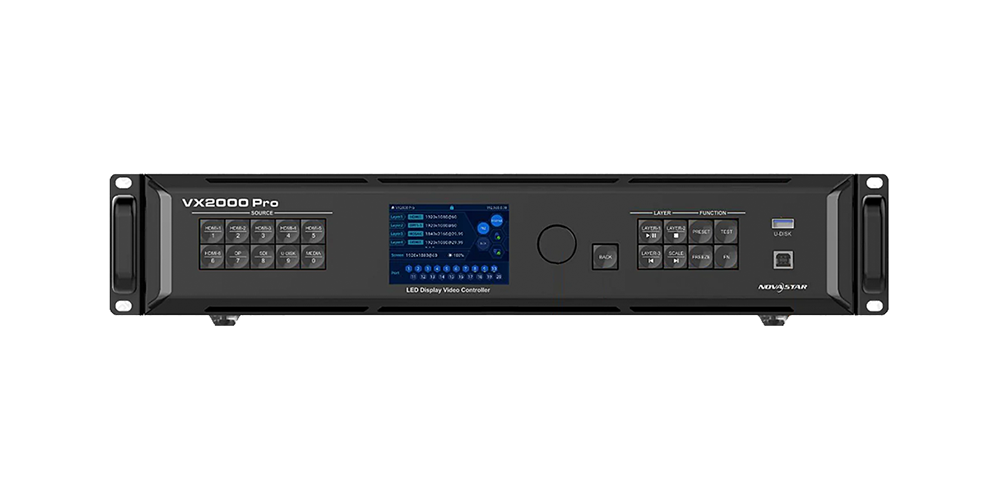
NovaStar VX2000 Pro documentation names NovaLCT, Unico and VICP among its control options. Establish which tool handles screen configuration, which handles everyday operation and which versions the supplier has tested. A familiar interface is useful, but successful discovery of the controller is only the first step of commissioning.
Use the NovaLCT download and version archive to locate relevant resources, and verify compatibility before changing software. Keep a known working installer and configuration with the handover package. Avoid introducing a firmware change immediately before an event unless the change has been tested and a recovery path is available.
Our NovaStar VX2000 Pro specifications and downloads guide provides further product information. This comparison focuses on selection and verification; detailed operating steps should follow the manual for the installed revision.
9. Commissioning and acceptance checklist
Make the acceptance test part of the purchase brief. For a NovaStar VX2000 Pro installation, agree what must work before delivery: the final pixel map, each input format, the most demanding layer layout and the intended backup arrangement. A successful single-source demonstration is not evidence that the whole production setup has been validated.
- Identify the hardware. Match the quotation, chassis model and supplied documents.
- Verify every cabinet chain. Use test patterns to find swapped order, missing areas and incorrect orientation.
- Exercise every source. Test reconnecting cables, source switching and laptop restart behavior.
- Recall the saved layouts. Check cropping, aspect ratio, layer order and visible text at the final resolution.
- Test the agreed failure paths. Confirm what happens when an input or data path fails, using a controlled procedure.
- Check restart and handover. Confirm saved settings return and another operator can follow the recovery instructions.
For NovaStar VX2000 Pro backup planning, define the failure being protected against. A duplicate data route does not necessarily protect against loss of power or the source computer. Draw the primary and backup paths, identify shared equipment and test the actual transition. Record whether interruption is acceptable for the application.
Keep a short acceptance record containing the configuration version, tested source formats, port map, test date and unresolved items. That record is more useful to the next technician than an unsupported claim that the system is suitable for every broadcast or rental task. Resolve outstanding limitations before describing the installation as fully commissioned.
10. NovaStar VX2000 Pro vs VX2000 FAQ
01. Is there a separate NovaStar VX2000 without Pro?
A separate non-Pro VX2000 was not identified in the official VX Pro materials reviewed for this guide. Ask the supplier to identify any quotation using that shortened name. Do not assign VX1000 or VX1000 Pro specifications to an unidentified unit.
02. What is the main NovaStar VX2000 Pro vs VX2000 difference?
The first difference is certainty about the model. NovaStar VX2000 Pro has identifiable manufacturer documentation; “VX2000” needs clarification. Once the intended hardware is known, compare its supported load, input formats, layer budget and compatibility with the planned LED wall.
03. How much does the NovaStar VX2000 Pro cost?
Obtain a current, itemized quotation for your destination and configuration. A NovaStar VX2000 Pro price should state whether modules, converters, shipping, taxes, commissioning and warranty support are included. There is no verified like-for-like non-Pro VX2000 price in this guide.
04. Can the NovaStar VX2000 Pro drive 13 million pixels at every setting?
No. The headline rating must be checked against output bit depth, frame rate, topology and receiving-card requirements. The documented per-port maximum changes between 8-bit and 10-bit output. A screen that fits the total rating can still fail an individual port or width limit.
05. Does maximum width mean a full 16,384 × 8,192 screen?
No. Width and height are separate limits and must also satisfy the total loading capacity. For example, 10,400 × 1,600 equals 16,640,000 pixels, which exceeds the NovaStar VX2000 Pro headline capacity even though both dimensions are below the separate maximums.
06. Is VX1000 Pro limited to 4K30 input?
Do not assume that. The documented VX1000 Pro includes an HDMI 2.0 input, and the Pro family supports 4K60 input workflows. Evaluate the exact source format and output load. Input acceptance and the number of physical LED pixels driven are different questions.
07. Does zero-frame latency make the NovaStar VX2000 Pro an automatic XR choice?
No. The claim describes device delay under specified operating conditions, not the entire camera-to-screen chain. Processing, low-latency and synchronization requirements must be checked together. Test the complete camera-facing system before committing it to a production workflow.
08. Where should I find the VX2000 Pro manual and datasheet?
Use the manufacturer document matched to the exact hardware and firmware, and retain its revision number with your project record. HonghaiLED’s linked product guide provides a route to further specifications and downloads. Avoid a generic VX-family document when confirming a model-specific limitation.
11. Conclusion: choose verified hardware
The useful outcome of a NovaStar VX2000 Pro vs VX2000 comparison is a verified equipment choice. Resolve an abbreviated VX2000 description first. Then compare the documented NovaStar VX2000 Pro against the actual alternative, such as VX1000 Pro, using the screen map and source requirements.
Evaluate NovaStar VX2000 Pro when its capacity, wider canvas, additional inputs or layer resources solve a defined requirement. Evaluate a smaller model when the complete design fits its limits. In either case, validate output format, individual ports, receiving cards and backup behavior before ordering.
For a project quotation, contact HonghaiLED with cabinet pixel dimensions, cabinet layout, source list, preferred operating format and backup expectations. Those details allow a meaningful equipment recommendation and a price comparison with clearly stated scope.
Reference note: Technical checks use NovaStar VX Pro family materials and VX2000 Pro Specifications V1.2.0. This is a specification-based selection guide, not a claim of independent laboratory testing. Worked calculations are illustrative; final mapping requires validation on the intended hardware.
Related Posts
NovaStar NovaPro HD Review: Specs, Setup and Manual
The NovaStar NovaPro HD combines video processing and LED display…
NovaStar ET1S-G Review: Media Server Specs, Setup and Price
The NovaStar ET1S-G is a compact media server that prepares…
NovaStar H2 Review: Specs, Cards, Price & Setup Guide
The NovaStar H2 is a modular, 2U video wall splicer…

No Comments