
NovaStar VX2000 Pro: Specs, Manual, Price & Downloads
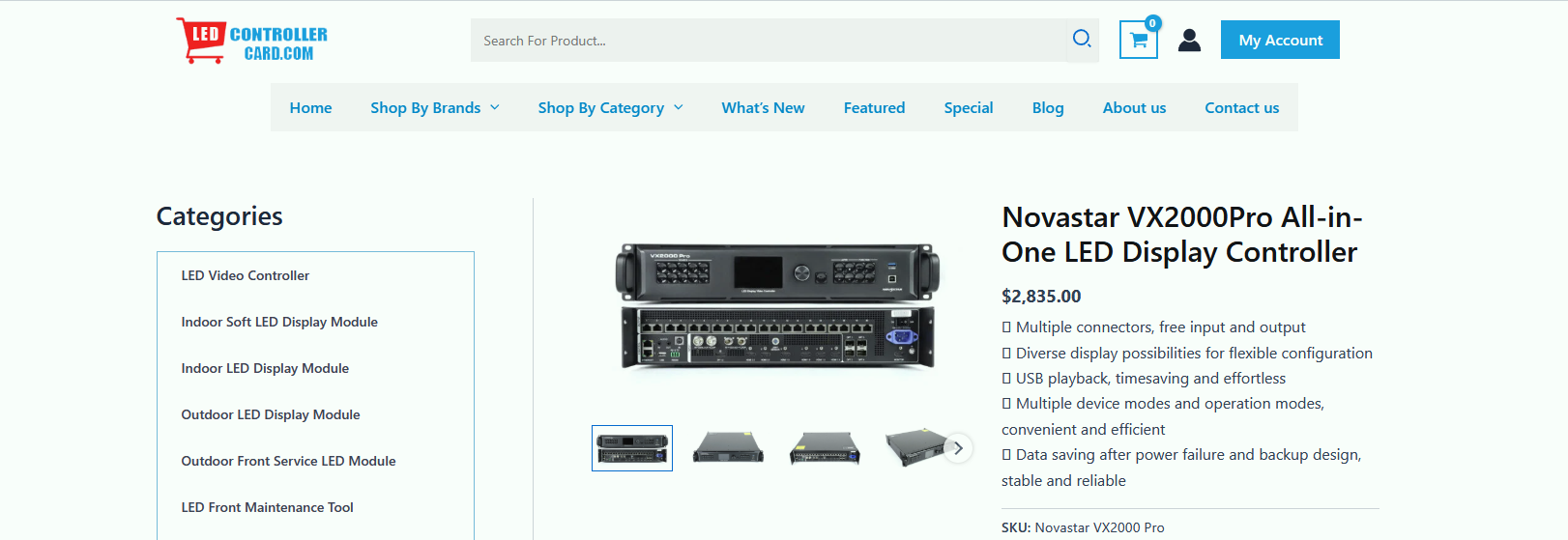
The NovaStar VX2000 Pro is NovaStar’s 20-port all-in-one 4K LED display controller. It combines video processing and screen control in one device and supports up to 13 million pixels, so a large rental or fixed screen no longer needs a separate video processor plus sending-card rack.
Quick answer: the VX2000 Pro accepts up to 4K×2K@60Hz video, provides 12 × 2K×1K layer resources, 256 user-defined presets and three working modes (video controller, fiber converter and ByPass). NovaStar documents the model in VX2000 Pro All-in-One Controller Specifications V1.0.3 (19 June 2025), and US retail listings in September 2026 advertised the standard configuration at about US$4,064.
NovaStar VX2000 Pro Key Facts
- Pixel capacity: up to 13,000,000 pixels; maximum output 16,384 × 8,192 pixels
- Video inputs: 1× DP 1.2, 2× HDMI 2.0, 4× HDMI 1.3, 2× 10G optical (self-adaptive), 1× 12G-SDI with loop output, 1× USB 3.0
- Outputs: 20× Gigabit Ethernet, 4× 10G optical fiber, 1× HDMI 1.3 monitoring, 1× 3D connector
- Layers and presets: 12 × 2K×1K layer resources and 256 user-defined presets
- Working modes: video controller, fiber converter and ByPass (0-frame latency)
- Power and size: 83 W rated power, 482.6 × 493.0 × 94.6 mm, 7 kg net (19.9 kg packed in the flight case)
Sources: NovaStar VX2000 Pro All-in-One Controller Specifications V1.0.3 (19 June 2025), NovaStar VX Pro Series product page and VX Pro Series All-in-One Controller User Manual. Last verified 20 September 2026.
1. What Makes the NovaStar VX2000 Pro Special?
2. Key Advantages and Features of NovaStar VX2000 Pro
3. Detailed Technical Specifications of NovaStar VX2000 Pro
4. Control and Operation of NovaStar VX2000 Pro
5. NovaStar VX2000 Pro vs VX1000 Pro and VX400 Pro
6. Applications and Use Cases of NovaStar VX2000 Pro
7. NovaStar VX2000 Pro Manual, Datasheet and Downloads
8. NovaStar VX2000 Pro Price in 2026
9. FAQs
10. Conclusion
1. What Makes the NovaStar VX2000 Pro Special?
The VX2000 Pro stands out because it combines video processing and screen control in one unit. Conventional setups need a separate processor plus sending devices; the VX2000 Pro consolidates both, which saves rack space and cable runs and removes failure points during a live show.
Its architecture supports three working modes:
- Video Controller Mode: full video processing with layer management and scaling
- Fiber Converter Mode: OPT 1–4 work as inputs and the Ethernet ports become outputs, for optical signal conversion and transmission
- ByPass Mode: 0-frame latency operation for time-critical applications
That versatility suits rental stages, XR stages and fixed installations where signal integrity and processing power matter more than the smallest possible port count. For an overview of how NovaStar’s processor families differ, see NovaStar H Series vs VX Series.
2. Key Advantages and Features of NovaStar VX2000 Pro
2.1 Processing Power and Pixel Capacity
The VX2000 Pro drives up to 13 million pixels with a maximum output of 16,384 pixels wide by 8,192 pixels high, and accepts up to 4K×2K@60Hz (4096×2160@60Hz) through its DP 1.2 and HDMI 2.0 connectors. NovaStar’s SuperView III processing provides stepless output scaling, one-click full-screen display and free input cropping, so a single controller can serve ultra-wide stages and unusually tall screens.
2.2 Layer Management
The controller provides 12 × 2K×1K layer resources. Because a larger layer consumes more of that pool, the same hardware can run 12 × 2K layers, 6 × DL layers or 3 × 4K×2K layers. Size, position, priority and aspect ratio are all adjustable, which supports picture-in-picture, side-by-side and overlay compositions.
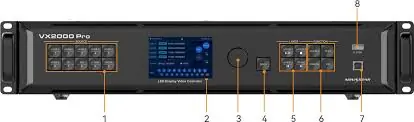
2.3 Connectivity: Inputs and Outputs
Input connectors:
- 1× DP 1.2 (max 4096×2160@60Hz, 8/10/12-bit)
- 2× HDMI 2.0 (max 4096×2160@60Hz, 8/10/12-bit, HDCP 2.2)
- 4× HDMI 1.3 (max 1920×1080@60Hz)
- 2× 10G optical fiber ports (OPT 1 and OPT 2, self-adaptive input or output)
- 1× 12G-SDI with loop output (4096×2160@60Hz, deinterlacing supported)
- 1× USB 3.0 for media playback
Output connectors:
- 20× Gigabit Ethernet ports
- 4× 10G optical fiber ports (OPT 1–4)
- 1× HDMI 1.3 for monitoring display (fixed 1920×1080@60Hz)
- 1× 3D connector for a third-party 3D emitter
Two details matter in practice: OPT 1 and OPT 2 can act as either video input or output depending on what is connected, and OPT 3/OPT 4 copy or back up the output on Ethernet ports 1–10 and 11–20 respectively.
2.4 Operational Excellence
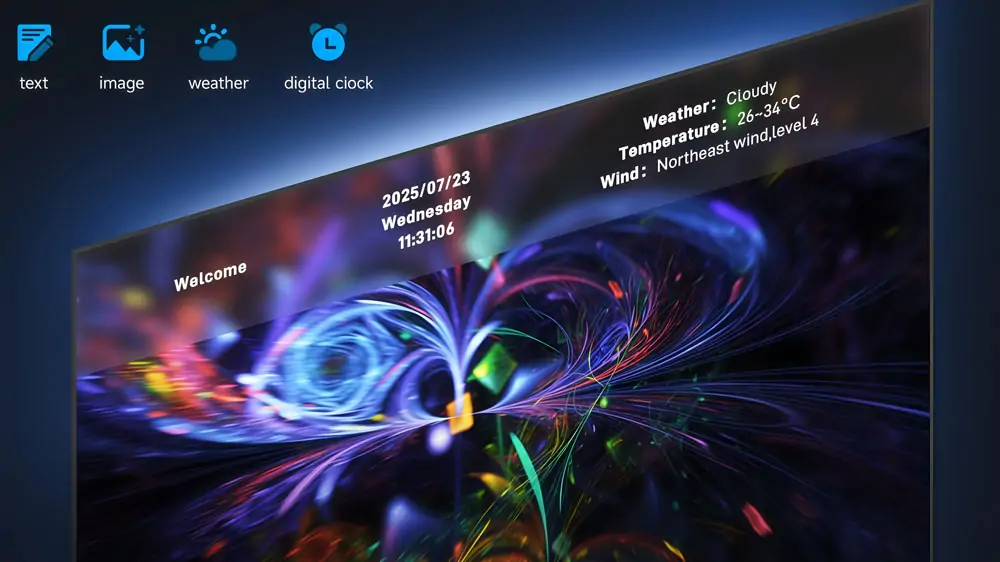
The controller stores 256 user-defined presets with one-button recall, so a show can move between scenes without rebuilding the screen configuration. USB plug-and-play adds direct media playback (H.264/H.265 MP4 video and JPG/PNG/BMP images) without an external computer, and the built-in OSD system supports text, image, weather and time overlays without extra hardware. Front panel buttons can be locked to prevent accidental changes during a live production.
3. Detailed Technical Specifications of NovaStar VX2000 Pro
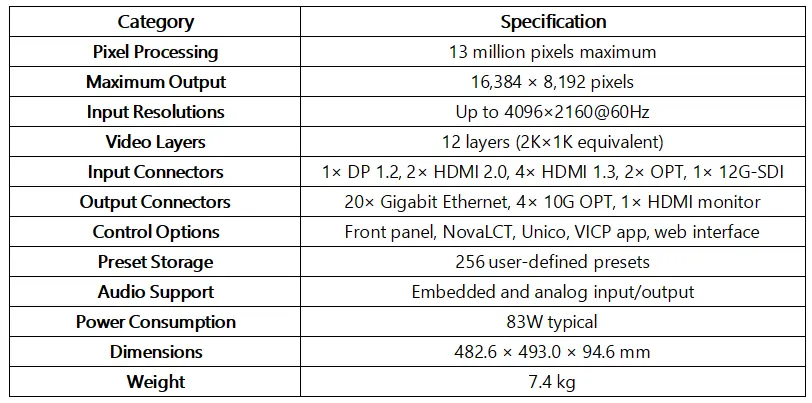
The table below summarises every figure in this section against NovaStar’s official documentation, so you can check a configuration without opening the PDF:
| Item | NovaStar VX2000 Pro |
|---|---|
| Pixel capacity | Up to 13,000,000 pixels |
| Maximum output | 16,384 (width) × 8,192 (height) pixels |
| Video input | Up to 4K×2K@60Hz (4096×2160@60Hz) via DP 1.2 and HDMI 2.0; HDMI 1.3 up to 1920×1080@60Hz; 12G-SDI up to 4096×2160@60Hz |
| Input connectors | 1× DP 1.2, 2× HDMI 2.0, 4× HDMI 1.3, 2× 10G optical (self-adaptive), 1× 12G-SDI (IN & LOOP), 1× USB 3.0 |
| Output connectors | 20× Gigabit Ethernet, 4× 10G optical fiber, 1× HDMI 1.3 monitoring, 1× 3D |
| Load per Ethernet port | Up to 650,000 pixels per port |
| Layer resources | 12 × 2K×1K (usable as 12 × 2K, 6 × DL or 3 × 4K×2K) |
| Presets | 256 user-defined presets |
| Latency | Video controller: 1–2 frames with low latency, 2–3 frames without. ByPass: 0 frames with low latency. Fiber converter: 0 frames |
| Optical transmission | Single-mode twin-core module ≤ 10 km; multi-mode twin-core module ≤ 300 m (modules are not factory-installed) |
| HDR | HDR10 / HLG on HDMI 2.0 or 12G-SDI, layer 1 only, 10-bit output recommended, HDR receiving cards required; cannot be combined with 3D |
| Control options | Front panel knob, NovaLCT, Unico web page, VICP mobile app |
| Power | 100–240 V~, 50/60 Hz, 83 W rated power consumption |
| Dimensions and weight | 482.6 × 493.0 × 94.6 mm; 7 kg net, 19.9 kg with flight case |
| Certifications | CE, FCC, IC, PSE, RCM, EAC, UL, CB, KC, RoHS |
Source: NovaStar VX2000 Pro All-in-One Controller Specifications V1.0.3 (19 June 2025) and VX Pro Series All-in-One Controller User Manual.
3.1 Input Capabilities
HDMI 2.0 and DP 1.2 accept 8-bit, 10-bit and 12-bit colour with RGB 4:4:4, YCbCr 4:4:4 and YCbCr 4:2:2 sampling, and both support custom resolutions up to 8192 × 1080@60Hz. The four HDMI 1.3 ports are intended for 1080p sources, and the self-adaptive optical ports configure themselves for input or output based on the connected device, which simplifies integration on site.
3.2 Output Performance
The 20 Gigabit Ethernet ports can each be loaded with up to 650,000 pixels, and because free topology removes the rectangle restriction per port, loading capacity can follow the physical cabinets instead of a forced rectangular layout. The optical outputs carry the same signal over single-mode modules up to 10 km, which is why the VX2000 Pro is often used on stadiums, façades and other installations where copper runs are impractical.
4. Control and Operation of NovaStar VX2000 Pro
4.1 Four Control Methods
The VX2000 Pro can be operated in four ways, and all of them can be used on the same device:
- Front panel knob: menu navigation and confirmation directly on the unit, with a lock function for live shows
- NovaLCT: Windows configuration and monitoring software for screen setup, calibration and layer control
- Unico web page: browser-based control from any network-connected device, with no software installation
- VICP mobile app: iOS and Android app for remote monitoring and basic control
For day-to-day work most integrators configure the screen in NovaLCT once and then use presets or the Unico web page on site; see NovaStar control software downloads for the current NovaLCT and Unico installers.
4.2 Front Panel Operation
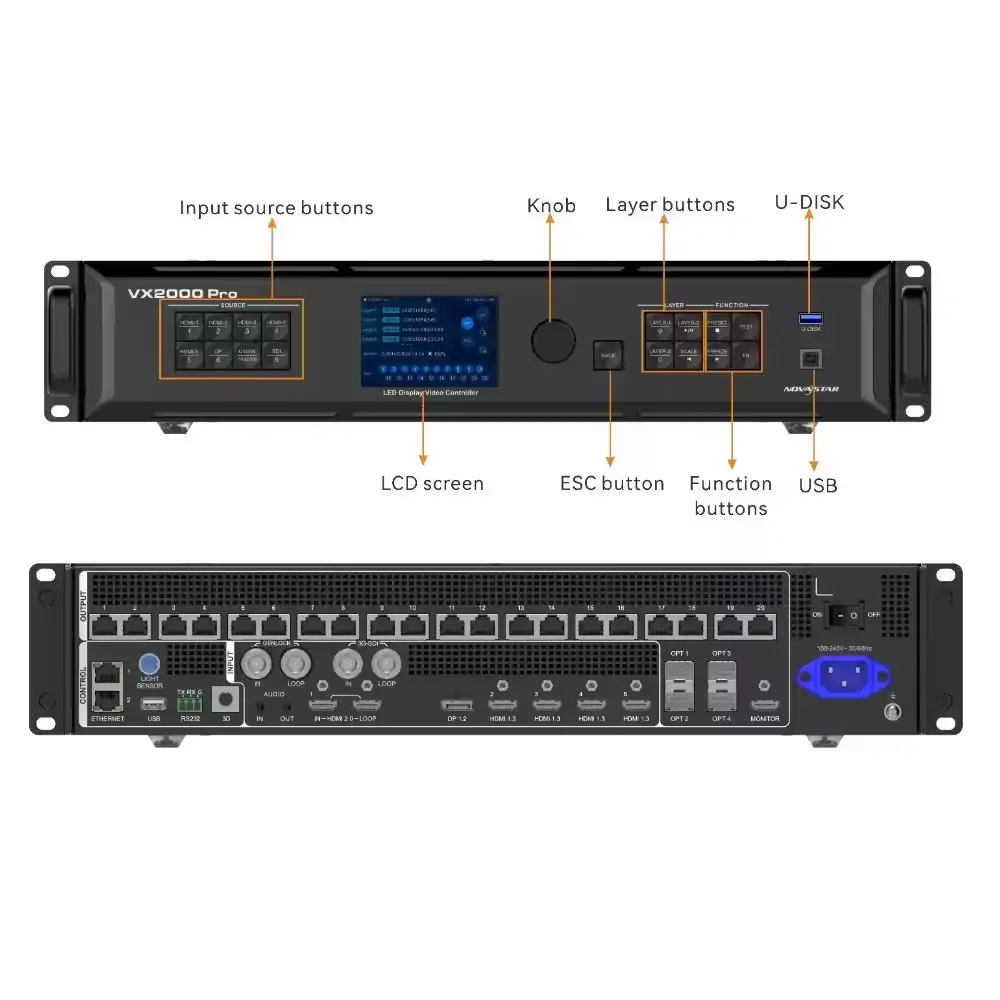
The front panel combines a rotary knob with push-to-confirm, dedicated layer buttons (LAYER 1–3), input source buttons with status indicators, and function keys for PRESET, TEST, FREEZE and a custom function. The LCD screen shows device status, menus and messages. Holding the knob and the BACK button together for three seconds locks or unlocks the front panel buttons.
4.3 Software Control
NovaLCT covers device detection, screen configuration, brightness and chroma calibration and firmware updates on Windows. Unico adds a browser-based workflow so a phone, tablet or laptop on the same network can control the device, and VICP provides app-based monitoring. NovaStar also supports pixel-level brightness and chroma calibration for each LED when used with the calibration software, which removes colour discrepancies across large screens.
4.4 Practical Operation Guide
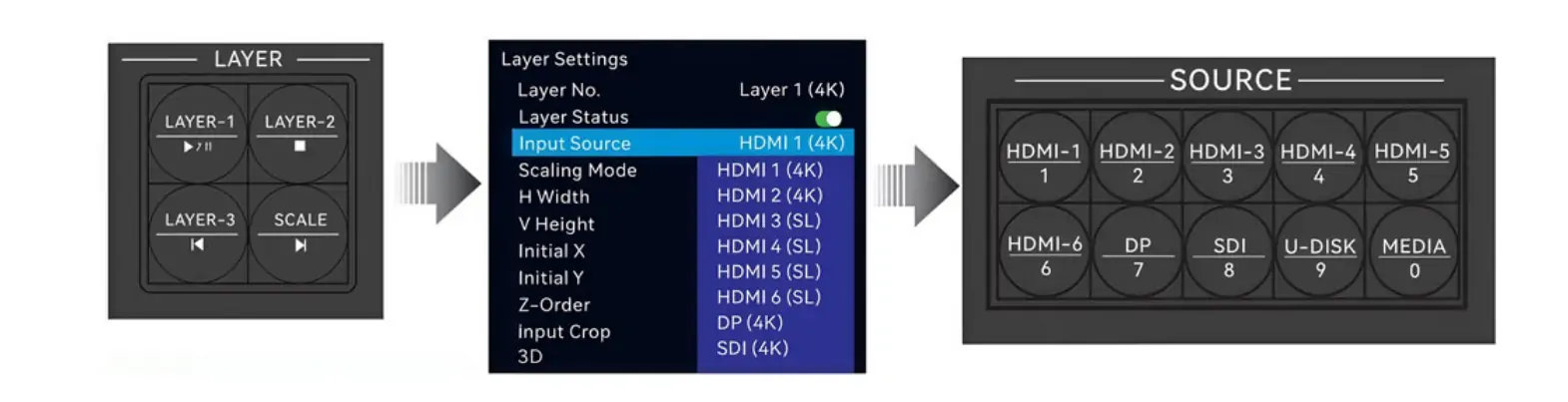
1. Switching input sources
Rotate the front panel knob to highlight the input menu, select the source (HDMI, DP, SDI, OPT or USB) and press the knob to confirm; the selected source appears on the screen immediately.
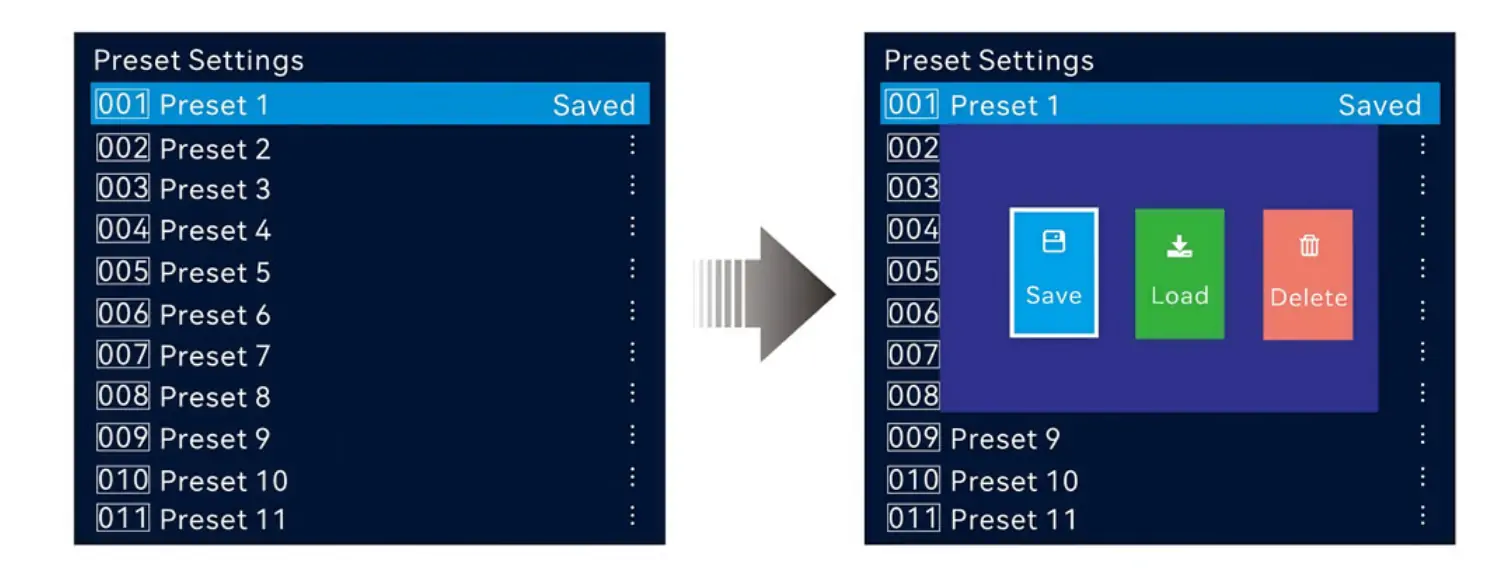
2. Saving and recalling presets
Configure layers, inputs and display parameters, open the preset menu, choose an unused preset number from 1–256 and save. Recall a preset later with a single button press, which is the fastest way to move between scenes in a show.
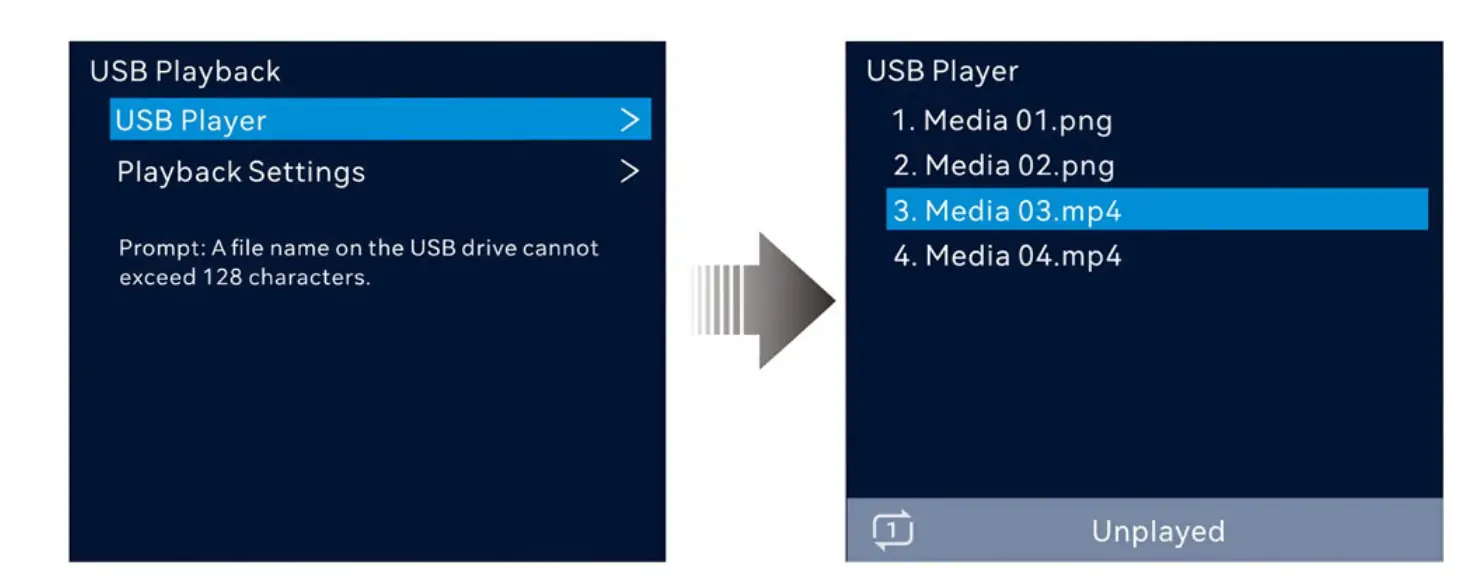
3. USB media playback
Insert a single-partition USB drive (NTFS, FAT32 or exFAT), open the USB player and browse the files. On the VX2000 Pro a USB source runs at 3840×2160@60Hz, and the layer buttons control play/pause, previous and next during playback.
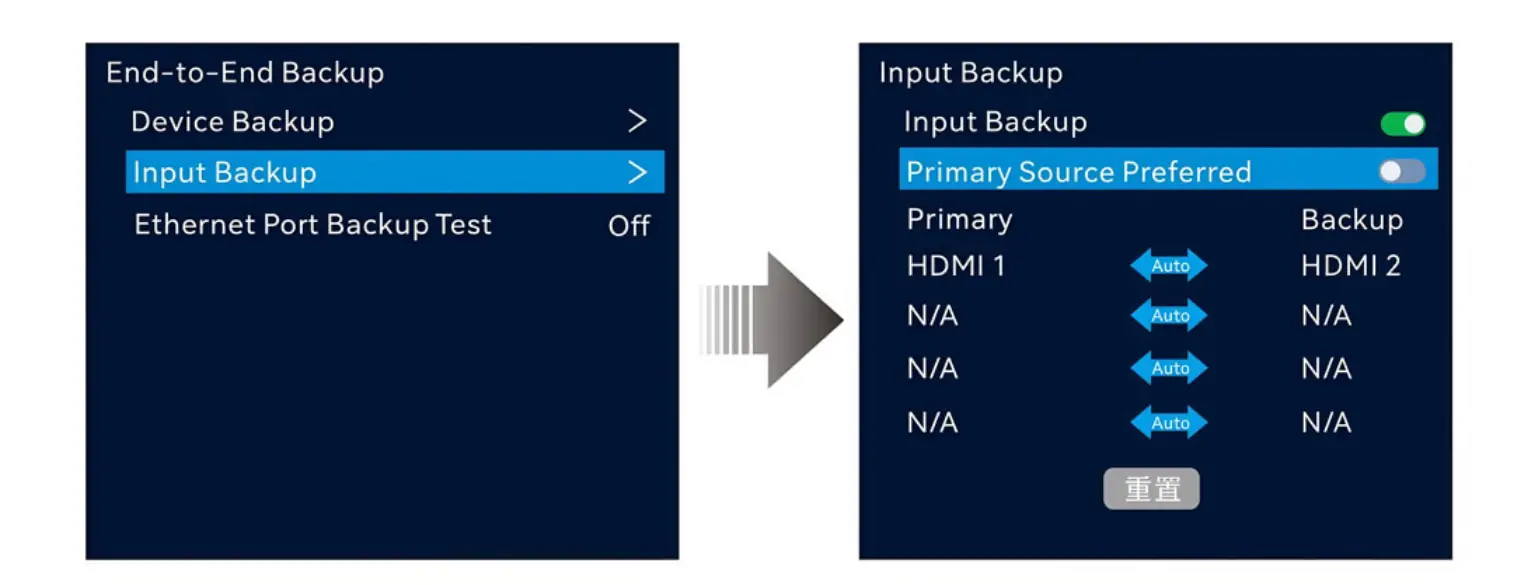
4. Backup configuration
Connect the primary and backup sources, define the backup relationship in the menu, and enable the preferred source if required. The device supports backup between devices, between input sources, between Ethernet ports and between optical and Ethernet ports, and it switches automatically when a signal is lost.
5. Loading and firmware checks
Before an event, confirm the loaded firmware version in the device menu and verify the preset list. A quick Ethernet port backup test in NovaLCT checks that pre-stored images, backup ports and backup devices respond without unplugging cables.
5. NovaStar VX2000 Pro vs VX1000 Pro and VX400 Pro
Short answer: the VX2000 Pro is the largest model in NovaStar’s VX Pro series. VX400 Pro, VX600 Pro and VX1000 Pro share the same 4K@60Hz platform and the same 256 presets, but they offer 6 × 2K×1K layer resources and fewer Ethernet ports, while the VX2000 Pro provides 12 × 2K×1K layers, 20 Ethernet ports and a 13-million-pixel ceiling.
| Feature | VX2000 Pro | VX400 Pro / VX600 Pro / VX1000 Pro |
|---|---|---|
| Layer resources (2K×1K) | 12 | 6 |
| 4K×2K@60Hz input | Yes (DP 1.2, HDMI 2.0) | Yes |
| Self-adaptive optical inputs | OPT 1 and OPT 2 | OPT 1 only |
| USB source resolution | 3840×2160@60Hz | 1920×1080@60Hz |
| OSD single image limit | Up to 4096×2160 (max 16384 × 8192) | Up to 4096×1080 (max 10240 × 8192) |
| Presets | 256 | 256 |
| Working modes | Video controller, fiber converter, ByPass | Video controller, fiber converter, ByPass |
| Ethernet ports | 20 | The series is offered in 4-, 6-, 10- and 20-port configurations; check the model datasheet |
| Typical use | Ultra-wide and very large screens, multi-layer live shows, XR stages | Standard-size screens and shows with fewer simultaneous layers |
Source: NovaStar VX Pro Series product page and VX Pro Series All-in-One Controller User Manual (VX2000 Pro specification V1.0.3).
For deeper HonghaiLED comparisons, see VX1000 Pro vs VX600 Pro, VX2000 Pro vs VX2000, and the individual guides for the VX1000 Pro and the VX400 Pro.
6. Applications and Use Cases of NovaStar VX2000 Pro
The VX2000 Pro is aimed at medium-to-high-end rental, stage control systems and fine-pitch LED screens. Four typical deployments:
6.1 Live Events and Concerts
Preset recall moves a large screen between looks in seconds, and the backup options (device, input source, Ethernet port and optical) reduce the risk of a dark screen mid-show. Rental companies usually pair it with rental cabinets and media players; see connecting rental LED panels to a NovaStar Taurus media player for a typical signal chain.
6.2 XR and Virtual Production
Low latency and Genlock synchronisation matter on camera, and 12 layer resources allow several video sources to be composited and positioned on an XR stage wall without extra hardware.
6.3 Broadcast and Command Centers
The unit runs continuously with automatic data recovery after power loss, EDID management for source switching and a monitoring output for a control-room display, which suits 24/7 operation in control rooms and broadcast studios.
6.4 Architectural and Large-Scale Installations
A 13-million-pixel capacity, free topology loading and 10 km optical transmission support long, curved and unusually shaped displays where a rectangular port layout would waste pixels.
7. NovaStar VX2000 Pro Manual, Datasheet and Downloads
Short answer: the VX2000 Pro user manual and quick start guide are downloadable below, and NovaStar publishes the technical datasheet as VX2000 Pro All-in-One Controller Specifications, currently version 1.0.3 dated 19 June 2025. The user manual covers the menus, screen configuration, layer settings, HDR settings, backup and firmware updates for the whole VX Pro series, including the VX2000 Pro.
- VX Pro Series All-in-One Controller User Manual (V1.2.0, PDF) – full operation and configuration guide for the VX2000 Pro
- VX Pro Series Quick Start Guide (V1.0.1, PDF) – rapid setup instructions for time-critical situations
- NovaStar control software (NovaLCT and Unico) – configuration, calibration and monitoring software for Windows, macOS and web
- Firmware updates: install the current firmware through NovaLCT or a USB drive, and always check the version before an event rather than during one
Tip: keep the user manual version and the device firmware version matched. A controller running older firmware can behave differently from the menus shown in the latest manual, so confirm both before you configure a screen.
8. NovaStar VX2000 Pro Price in 2026
Short answer: US retail listings in September 2026 advertised the standard NovaStar VX2000 Pro at about US$4,064. That figure is a street-price reference rather than a fixed manufacturer price, and dealer pricing varies with region, configuration, stock and the level of technical support included.
Four factors change the quotation you receive:
- Port configuration and accessories: the VX Pro series is offered in 4-, 6-, 10- and 20-port configurations, and optional items such as optical modules are not installed at the factory
- Packing: the unit weighs 7 kg on its own and 19.9 kg in the flight case, which affects freight on rental fleets
- Project scope: receiving cards, calibration, spare parts and on-site commissioning are usually quoted separately from the controller
- Region and lead time: duties, local warehousing and delivery deadlines all move the final price
For a current quotation for a specific configuration, contact HonghaiLED. The specification figures used throughout this page come from the official NovaStar documentation listed above.
9. FAQs
Does the NovaStar VX2000 Pro support HDR content?
Yes. HDR10 and HLG are supported when the HDR source is connected to an HDMI 2.0 or 12G-SDI connector and layer 1 is used as the HDR source. A receiving card that supports HDR is required, 10-bit output is recommended, and the HDR function cannot be combined with 3D.
Can the VX2000 Pro handle non-standard display shapes?
Yes. Free topology removes the rectangle restriction on a single Ethernet port, so loading capacity follows the physical cabinets instead of a forced rectangular layout. That is useful for curved walls, columns and irregular architectural screens, provided the overall circumscribed rectangle stays within the device’s 13-million-pixel capacity.
How does the backup system work in practice?
The device supports backup between devices, between input sources, between Ethernet ports, and between optical and Ethernet ports. If a primary signal or port fails, the controller switches to the backup automatically. NovaLCT also includes an Ethernet port backup test that verifies pre-stored images and backup ports without unplugging cables.
What is the real-world latency of the VX2000 Pro?
In video controller mode the delay is 1–2 frames with low latency enabled and 2–3 frames without it. ByPass mode reduces the delay to 0 frames with low latency, and the fiber converter mode also runs at 0 frames. Latency and Genlock cannot be enabled together in ByPass mode.
Where can I download the VX2000 Pro manual and datasheet?
The user manual and quick start guide are linked in section 7 of this page. The official datasheet is NovaStar’s VX2000 Pro All-in-One Controller Specifications, version 1.0.3 dated 19 June 2025, which contains the full connector, latency, optical and certification data summarised in the specification table above.
How much does the NovaStar VX2000 Pro cost?
US retail listings in September 2026 advertised the standard configuration at about US$4,064. Final pricing depends on the port configuration, optical modules, receiving cards, flight case or carton packing, regional duties and the support package, so request a quotation for the configuration you need.
10. Conclusion
The NovaStar VX2000 Pro is the top of NovaStar’s VX Pro series: 20 Ethernet ports, 13 million pixels, 12 × 2K×1K layer resources and three working modes in one unit. Its value lies in replacing several devices in a rack, simplifying the signal chain and holding a show together with presets and automatic backup. If your screen is ultra-wide, very large or needs several simultaneous video layers, it is the natural choice in this series; for smaller or less complex screens, the VX1000 Pro or VX400 Pro will usually be enough.
Every technical figure on this page was checked against NovaStar’s official specification and user manual on 20 September 2026. For project planning, send us the screen size, pixel pitch and layer requirements, and we will confirm the correct controller and receiving card combination: contact HonghaiLED.
Related Posts
NovaStar TB60: Full Introduction and User Manual
The NovaStar TB60 represents the pinnacle of multimedia player technology…
NovaStar VX4S LED Controller: Specs, Setup, Manual and FAQs
Quick answer: The NovaStar VX4S is an all-in-one LED display…
NovaStar TB30: Specifications, Manual, Software & Setup
NovaStar TB30 is a Taurus-series LED multimedia player that stores…

No Comments