
NovaStar H2 Review: Specs, Cards, Price & Setup Guide
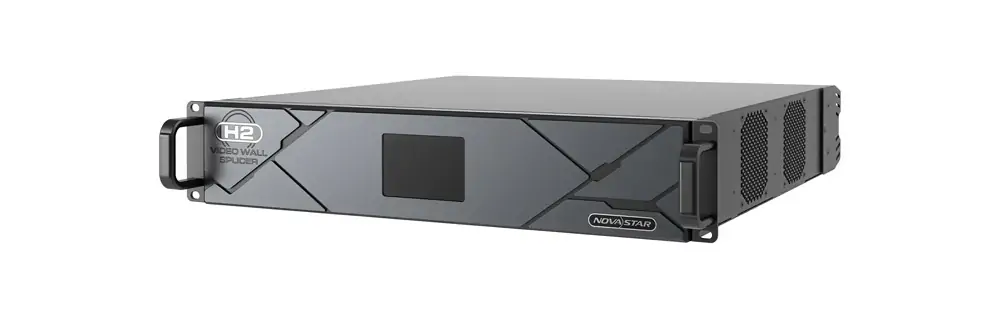
The NovaStar H2 is a modular, 2U video wall splicer that combines video processing with LED display control when fitted with suitable sending cards. It suits projects that need several sources, flexible layouts, and a compact rack installation. Selecting a NovaStar H2 means choosing a complete combination of chassis, input cards, output cards, receiving cards, and cabling; the chassis name alone does not define the finished system.
This NovaStar H2 review explains specifications, card selection, price considerations, commissioning, and troubleshooting for LED display buyers and integrators. The most useful buying questions are practical: can the selected cards accept every source, can each port carry its assigned cabinets, and can the system deliver the required layouts with appropriate backup?
Quick answer: The NovaStar H2 offers up to four input cards, two output cards, and 32 layers, with actual capability depending on configuration. Manufacturer figures range from 26 million pixels with H_20xRJ45 cards to 52 million with enhanced fiber cards. Newer documentation also includes an optional HDMI 2.1/DP 1.4 input card with 8K modes. This is a documentation-based selection guide, not a claim of independent laboratory testing.
1. What Is the NovaStar H2 Video Wall Splicer?
A video wall splicer takes incoming pictures and positions them across a display canvas. An LED sending card converts the resulting output into data for compatible receiving cards inside the cabinets. The NovaStar H2 can combine these roles, or act as a splicing processor with appropriate conventional video outputs. That distinction explains why buyers encounter the terms H2 processor, H2 LED controller, and H2 video wall processor.
Its modular design is useful when a project mixes presentation computers, camera feeds, signage players, and control-room sources. However, four input cards do not mean only four sources: a card may provide multiple channels, while some multi-connector cards allow only one connector in a group to operate at a time. Count simultaneous signals and their formats before counting connectors.
For a fine-pitch indoor LED wall, start with native cabinet resolution and viewing requirements. Pixel pitch describes the physical spacing between LEDs; processor loading is determined by total pixel dimensions. Two walls with the same physical size can therefore require very different processing and port capacity. The broader NovaStar H-Series overview helps place the H2 within the modular range.
2. NovaStar H2 Specifications That Matter in Real Installs
01. NovaStar H2 dimensions, power, and rack planning
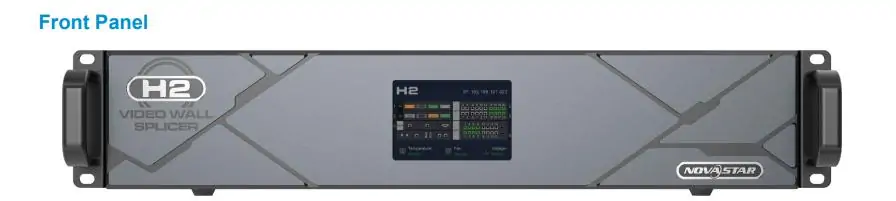
The NovaStar H2 specifications below are planning references, not a substitute for checking the exact delivered configuration. Allow rear clearance for connectors and cable bends, airflow around the chassis, and access for servicing. A 2U height does not guarantee that a shallow rack will accommodate the unit.
| Item | Documented specification | What to check |
|---|---|---|
| Rack and dimensions | 2U; 482.6 × 529.8 × 88.1 mm | Confirm rack depth, supports, and cable clearance. |
| Chassis weight | 11 kg net | Include cards and cables in the installed rack load. |
| Power | 100–240 V AC, 50/60 Hz; listed consumption 210 W | Size the complete rack power and cooling plan. |
| Input/output capacity | Up to 4 input cards / 2 output cards | Confirm physical card occupancy and simultaneous combinations. |
| Loading examples | 26M pixels: H_20xRJ45; 41.6M: H_4xfiber; 52M: enhanced fiber | These are chassis maxima for corresponding configurations. |
| Layers and presets | Up to 32 layers; 2,000 presets | Layer capacity varies with connector mode and resolution. |
| Operating environment | 0–45 °C; 0–80% RH, non-condensing | Measure conditions inside the rack. |
| Noise | Below 45 dB(A), typical at 25 °C | Assess acoustics in the actual room. |
Keep the NovaStar H2 power specification separate from the much larger power demand of the LED wall. Likewise, its fan-noise figure is a stated test condition, not a promise of inaudibility beside a conference table. A ventilated equipment room may be preferable for quiet presentation spaces.
02. Input cards, 4K formats, and the 8K question
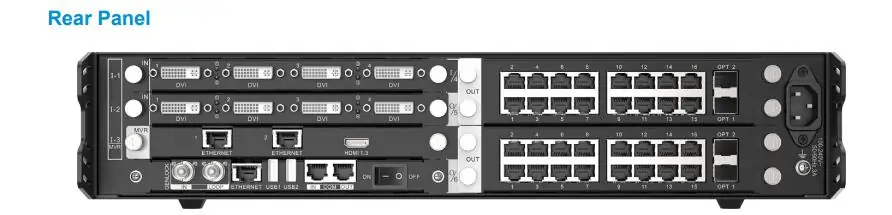
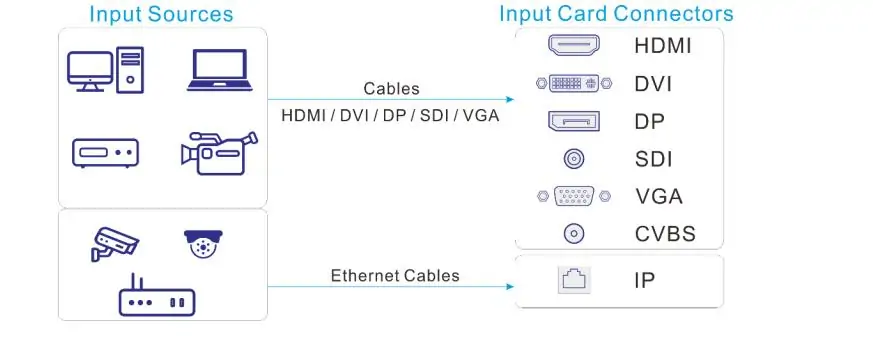
NovaStar H2 input cards cover different workflows. HDMI and DisplayPort suit computers and media players; SDI supports compatible camera and broadcast signals; IP-oriented cards require matching stream formats and network design. A loop connector repeats a signal and should not be counted as another independent input.
Does the NovaStar H2 support 8K input? The current H2 Specifications V1.17.0, dated May 30, 2026, lists the H_1xHDMI2.1+1xDP1.4 card and an HDMI 2.1 mode up to 8192 × 4320 at 30 Hz. That does not make an older HDMI 2.0 card an 8K input, or establish 8K at 60 Hz. Verify connector, frame rate, bit depth, chroma format, and firmware together.
For detailed desktop text, test chroma handling as well as resolution. A source format that works for video may make fine colored lettering less clear. Confirm the source computer actually outputs the agreed timing; a monitor setting or EDID label alone is insufficient acceptance evidence.
03. Output cards and practical pixel loading
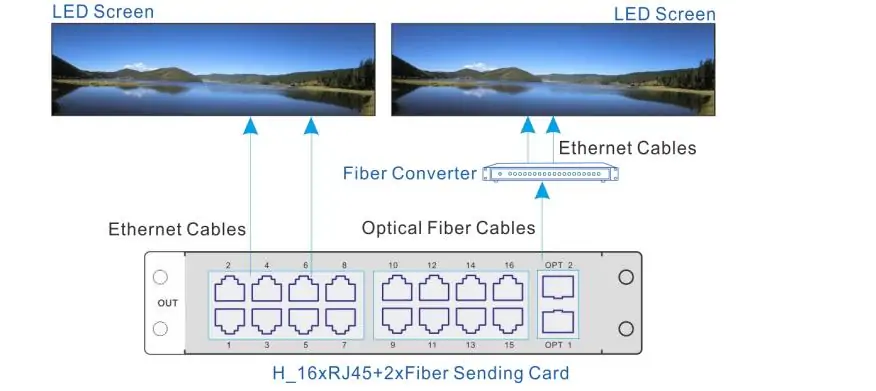
The NovaStar H2 output card determines how data reaches the display. Electrical Ethernet outputs can simplify a nearby installation. Fiber paths can suit longer runs, but require the correct converters, optical modules, fiber type, and port mapping. Optical connectors used for copies or backup do not automatically increase independent display capacity.
| Sending card | Listed capacity per card | Planning distinction |
|---|---|---|
| H_16xRJ45+2xfiber | 10.4 million pixels | The optical outputs copy groups of Ethernet outputs. |
| H_20xRJ45 | 13 million pixels | Twenty electrical outputs; account for its two-slot physical size. |
| H_4xfiber | 20.8 million pixels | Capacity depends on independent, copy, or backup operation. |
| H_4xfiber enhanced | 26 million pixels | Two appropriately configured cards underpin the 52M chassis figure. |
Ask for a rear-panel slot drawing with the quotation. Maximum input-card and output-card counts are headline limits; do not assume every maximum can be achieved simultaneously with every card size. Also obtain written confirmation before mixing sending-card types on one screen, because the manufacturer’s combination restrictions apply.
Worked example: A wall of 20 × 10 cabinets, each 192 × 192 pixels, is 3840 × 1920 pixels, or 7,372,800 pixels. At a planning limit of 650,000 pixels per Ethernet port, dividing the total suggests at least 12 ports. Yet each cabinet has 36,864 pixels, so a port can carry at most 17 whole cabinets under that limit. Cable routing and rectangular mapping can require additional ports.
The newer H2 specification lists 325,000 pixels per standard 10-bit Ethernet output on the H_20xRJ45 card. In the same example, that allows only eight whole cabinets per port and at least 25 ports for 200 cabinets. This illustrates why a NovaStar H2 design that fits at 8-bit may require a different output arrangement at 10-bit. These calculations assume the cited operating limits; recheck capacity for the chosen refresh rate, receiving cards, and mode.
3. NovaStar H2 Core Features
01. Layers, presets, and daily operation
The NovaStar H2 can arrange sources into layers for full-screen presentations, picture-in-picture layouts, and multi-window monitoring. The advertised maximum is not a promise of 32 simultaneous 4K windows. Prepare a list of the busiest layouts and validate the layer resources required by each input connector’s configured capacity.
Presets help operators recall established layouts without rebuilding them. Give them functional names such as Presentation, Two Presenters, and Standby Logo. Test transitions between the most demanding presets; successful static playback does not prove that every transition effect is available under the same resource load.
02. Image quality, HDR, and latency
HDR10, HLG, and 10-bit processing can benefit appropriate content and compatible displays. They do not correct a mismatched color pipeline. Source encoding, processor settings, receiving-card capability, panel calibration, and operating brightness all influence the result. For ordinary SDR presentations, establish a stable SDR reference before introducing HDR.
NovaStar describes latency as low as one frame from input to receiving card. Treat that as a qualified device-path figure. A camera, encoder, network, scaler, and LED scan process can add delay. For live camera magnification or interactive use, measure the complete installed chain with the actual source and chosen settings.
03. Modular maintenance and web control
Hot-swappable cards make service more flexible, but removing a card carrying an active feed can interrupt that feed. Serviceability and redundancy are different design questions. A NovaStar H2 installation needing continuous operation should have documented backup paths, spare parts, and a tested recovery procedure.
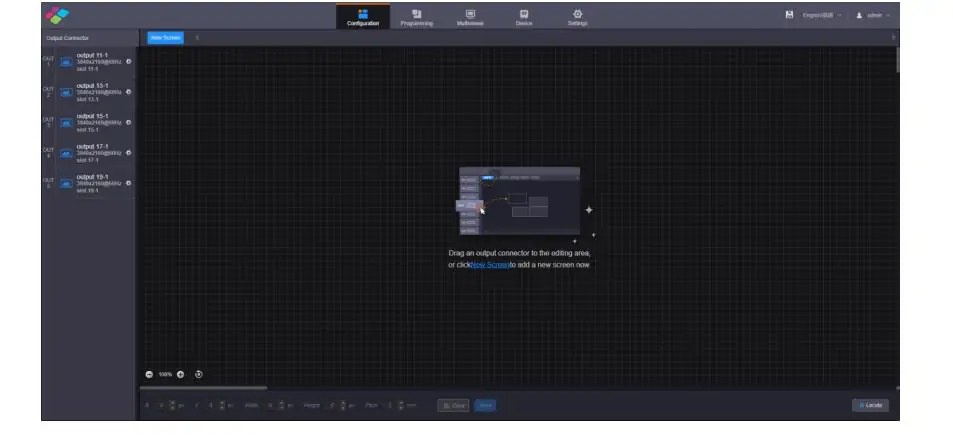
Browser control is convenient for routine operation across supported platforms. Initial LED cabinet setup may still involve NovaLCT. Define who can alter screen mapping, who can recall presets, and where configuration backups are kept. Remote access also needs an agreed network path; browser control does not automatically mean access from outside the building.
4. NovaStar H2 Price: What a Complete System Costs
The useful answer to “What is the NovaStar H2 price?” is a price for an identified configuration. A bare-mainframe listing cannot be compared directly with a package containing input cards, sending cards, optical converters, and commissioning. Request an itemized quotation rather than treating a search-result price as the cost of a working LED system.
For a comparable NovaStar H2 quotation, supply the cabinet model, total pixel dimensions, desired refresh rate and bit depth, source list, cable distances, and backup requirements. Specify whether installation, freight, taxes, training, and onsite support belong in the same budget. Confirm currency and quotation validity.
| Budget item | Information to request |
|---|---|
| Chassis | Exact model, supplied power arrangement, warranty, and delivery time. |
| Input cards | Part numbers, quantities, and simultaneous source formats. |
| Output path | Sending cards, converters, optical modules, and usable primary ports. |
| LED compatibility | Receiving-card models and approved cabinet configuration files. |
| Commissioning | Mapping, calibration checks, preset creation, and operator training. |
| Support and spares | Replacement process, spare cards, backup files, and service coverage. |
A low initial figure can become expensive if the selected cards cannot support the real sources, or if a fiber conversion stage was omitted. Conversely, a small installation with one stable feed may not need extensive modular capacity. Compare complete proposals against the same requirements and include the labor required to commission and maintain them.
To obtain a project-specific NovaStar H2 configuration quotation, send HonghaiLED the screen resolution and signal schedule. This article does not present an unverified fixed system price: card selection and regional delivery terms materially affect the total.
5. How It Stacks Up Against Alternatives
01. NovaStar H2 vs H5 and larger H-Series models
The NovaStar H2 is a compact option when the required card arrangement fits and the operational requirements are satisfied. The NovaStar H5 video wall splicer provides more expansion space. Larger models can accommodate more sources and outputs, but a larger chassis should solve a defined requirement rather than substitute for a clear system design.
Choose the expansion allowance around likely additions: another presentation position, camera chain, confidence display, or independent LED canvas. Record which unused slot and which spare output capacity will support each addition. A purchase described merely as “future-proof” is difficult to evaluate.
Power resilience also needs explicit attention. The manufacturer comparison does not list the H2 with the optional power-supply provision shown for larger models. Where interruption is unacceptable, evaluate the full backup architecture, including source, processor, transmission, cabinet power, and recovery behavior.
02. NovaStar H2 vs a fixed-configuration processor
A fixed-configuration processor may be appropriate when its connectors, loading, and layer resources already match the job. A modular NovaStar H2 becomes more attractive when source formats vary, card replacement matters, or several layouts need centralized control. Neither approach is automatically better for every wall.
Compare the exact models on native wall resolution, simultaneous sources, backup paths, rack requirements, operator workflow, and total installed cost. Use the H-Series versus VX-Series comparison to frame those questions. Avoid choosing from a single maximum-pixel figure: it does not describe input compatibility or daily usability.
6. How to Set Up the NovaStar H2
01. NovaStar H2 network access and first login
Before powering the display, obtain the approved cabinet settings and a wiring diagram. Connect the control computer to the control Ethernet port, not an LED output or serial-control connector. The documented default NovaStar H2 IP address is 192.168.0.10; read the front-panel address first because a previously configured unit may use another address.
For a direct connection, place the computer on the same subnet with a different address. The documented initial username and password are both admin, subject to the unit’s existing settings and current security configuration. Use the site’s authorized credentials where these have changed. On a managed network, coordinate addressing with the administrator; a basic Ethernet switch alone does not provide DHCP.
02. Receiving cards and screen mapping
NovaStar H2 configuration has two connected tasks: defining the processor’s screen canvas and configuring how receiving cards address the actual modules. Obtain the correct .rcfgx file from the cabinet supplier. Match the receiving-card model, driver IC, scan arrangement, and cabinet resolution before applying a file.
Back up existing settings before making changes. Where practical, verify one cabinet with the approved file, then extend the mapping to the wall. Assign outputs according to physical cable order and check every cabinet with identification patterns. A receiving-card configuration guide can explain the concepts, but it cannot confirm compatibility for a different hardware combination.
03. EDID, source timing, and presets
Set the input timing to a supported format and confirm the source’s detected resolution, frame rate, bit depth, and color format. EDID communicates display capabilities to the source; changing it may require the source to renegotiate. Keep a known-good timing available while testing a custom canvas.
Then position layers on the native screen canvas, checking aspect ratio and cropping with test graphics. Use text and one-pixel patterns where appropriate to reveal scaling issues. Save the intended NovaStar H2 presets and test them with all real sources connected, including the normal sequence of turning devices off and on.
04. Manual, software, firmware, and handover
Use the NovaStar H2 manual and specification revision appropriate to the installed hardware and firmware. The manufacturer’s H-Series downloads distinguish specifications, the shared user manual, quick-start information, firmware, and release notes. These documents serve different purposes; a firmware package is not a cabinet configuration file.
Schedule firmware changes during a maintenance window and retain a configuration backup plus the supplier’s recovery instructions. At handover, record card part numbers, firmware versions, IP settings, port loading, cable labels, presets, and the tested source formats. Include an operator guide for standby, normal playback, and fault reporting.
7. Common Issues and Troubleshooting
01. No picture or an unstable input
When a NovaStar H2 produces no picture, isolate the signal chain. Check whether the processor detects the source and whether the required layer is visible on the correct screen. Confirm that the screen is not frozen or faded to black. A missing input and a correctly detected input that is not placed on the canvas require different investigations.
Test a known-good cable and a supported source timing, then check EDID and HDCP compatibility. If the input monitor looks correct but cabinets remain dark, move downstream to output assignment, link status, converters, receiving-card configuration, and cabinet power. Record what changes after each test rather than changing several settings together.
02. Flicker, incorrect mapping, or color problems
Flicker can arise from a source, transmission, configuration, synchronization, or display-power problem. Check whether it affects the entire wall or one cable chain. Recalculate port loading using the actual bit depth and refresh settings. Inspect connections and cabinet status before assuming a processor feature is responsible.
For incorrect cabinet order, compare the software connection map with the physical route. For color differences or low-gray artifacts, confirm source range, gamma, calibration data, and receiving-card settings against an approved baseline. Do not apply an arbitrary compensation percentage to every panel type. Escalate with photographs, firmware versions, card models, and a reproducible test.
03. Browser control or automation does not respond
If the NovaStar H2 web interface cannot be reached, verify the current IP address, subnet, cable path, and network policy. A working LED image does not prove that the control-network connection is healthy. Avoid restoring factory settings before preserving the existing configuration.
For NovaStar H2 API integration, obtain the manufacturer’s current H-Series OpenAPI documentation and verify the supported firmware. Test authentication, command responses, preset identifiers, and reconnection behavior on the installed unit. Do not assume that an old serial command example or a third-party driver supports every firmware release.
8. NovaStar H2 FAQs
01. What is the NovaStar H2 used for?
The NovaStar H2 combines multiple video sources into layouts for LED walls and other supported display systems. With suitable LED sending cards, it also delivers data to compatible receiving cards. Its usefulness depends on the fitted cards and the screen design.
02. What is included in the NovaStar H2 price?
Inclusions vary by quotation. A chassis-only offer is different from a configured system. Confirm the mainframe, input cards, sending cards, converters, optical modules, commissioning, freight, taxes, and warranty before comparing totals.
03. Does the NovaStar H2 support 8K?
Newer H2 documentation includes the optional H_1xHDMI2.1+1xDP1.4 card with 8K input modes. Check the required frame rate and color format against the current card specification. This capability does not apply automatically to every installed H2 or to older input cards.
04. How many pixels can the NovaStar H2 control?
The manufacturer lists up to 26 million pixels with H_20xRJ45 sending cards, 41.6 million with H_4xfiber cards, and 52 million with enhanced fiber cards. These are configured chassis limits. Individual card, port, mapping, and operating-mode limits still apply.
05. What are the NovaStar H2 dimensions and power requirements?
The listed chassis dimensions are 482.6 × 529.8 × 88.1 mm, and the rack height is 2U. Listed power consumption is 210 W with 100–240 V AC input. Allow additional space for cables and ventilation, and budget LED cabinet power separately.
06. What are the default IP address and login?
The documented NovaStar H2 default IP address is 192.168.0.10, with initial username and password admin. Check the current front-panel address and site credentials first. Previously commissioned equipment may have different network and account settings.
07. Can I operate the NovaStar H2 from a Mac or tablet?
The H2 provides browser-based control across supported platforms. That supports routine operation, but does not remove every commissioning requirement. Confirm which receiving-card tasks need NovaLCT and provide an appropriate setup computer for those tasks.
08. How many input sources and layers can it handle?
Count active channels on the selected cards, not just visible connectors. The H2 lists up to four input cards and 32 layers, but connector modes and source resolutions affect available resources. Validate the busiest preset before accepting the design.
09. Can cards be replaced without a screen interruption?
Hot-swap support allows supported card service while the chassis remains powered. It does not guarantee that a source or display connected through the removed card will remain visible. Continuous service requires a tested backup arrangement.
10. Should I choose the NovaStar H2 or H5?
Choose the H2 when the agreed card layout, pixel loading, source formats, and operating requirements fit. Consider the H5 when you need more expansion or a different power-resilience arrangement. Compare complete configurations and planned growth, not chassis prices alone.
9. Conclusion
The NovaStar H2 is a strong candidate when a compact modular processor matches the actual LED wall and operating workflow. A sound selection starts with native pixel dimensions, simultaneous source formats, card occupancy, port loading, and a clear plan for service and recovery.
Before ordering a NovaStar H2, obtain an itemized configuration, check the current documentation, and agree on acceptance tests. The practical goal is a display that shows the intended content clearly, recalls layouts reliably, and can be maintained by the people responsible for it.
Technical reference note: This guide was checked against NovaStar’s H2 Video Wall Splicer Specifications V1.17.0 (May 30, 2026), the H-Series Video Wall Splicers User Manual V1.15.0, and the manufacturer’s H-Series comparison. Earlier specifications may show different input options or port capacities. Worked examples are planning calculations, not measured performance results. Request the matching documents with your equipment quotation.
Related Posts
NovaStar NovaPro HD Review: Specs, Setup and Manual
The NovaStar NovaPro HD combines video processing and LED display…
NovaStar VX2000 Pro vs VX2000: Specs & Price Guide
NovaStar VX2000 Pro vs VX2000 is a comparison that starts…
NovaStar ET1S-G Review: Media Server Specs, Setup and Price
The NovaStar ET1S-G is a compact media server that prepares…

No Comments