
NovaStar VX400 Pro vs VX400: Specs, Price & Buying Guide
NovaStar VX400 Pro vs VX400 comes down to input flexibility and production workflow: both controllers have a rated maximum LED output capacity of 2.6 million pixels, but the Pro adds a 4K HDMI 2.0 input, more layer resources, USB media playback, and expanded preset storage. Choose the Pro when those capabilities solve a real requirement; keep a working VX400 when its sources, layouts, and screen capacity already meet the job.
A controller purchase should start with the LED wall’s actual pixel dimensions, receiving cards, signal sources, and backup plan. A 4K input does not make a controller capable of driving a complete 4K LED wall. Likewise, a zero-frame device specification does not mean a camera-to-screen system has no delay. Those distinctions matter for rental stages, conference rooms, churches, and fixed installations.
This NovaStar VX400 Pro vs VX400 guide compares the specifications, explains the limits behind the numbers, and provides practical checks for an upgrade or quotation. Specifications are checked against NovaStar documentation identified below; worked examples are planning illustrations, not measured performance tests. Confirm firmware and receiving-card compatibility for the equipment being supplied.
1. NovaStar VX400 Pro vs VX400 specifications
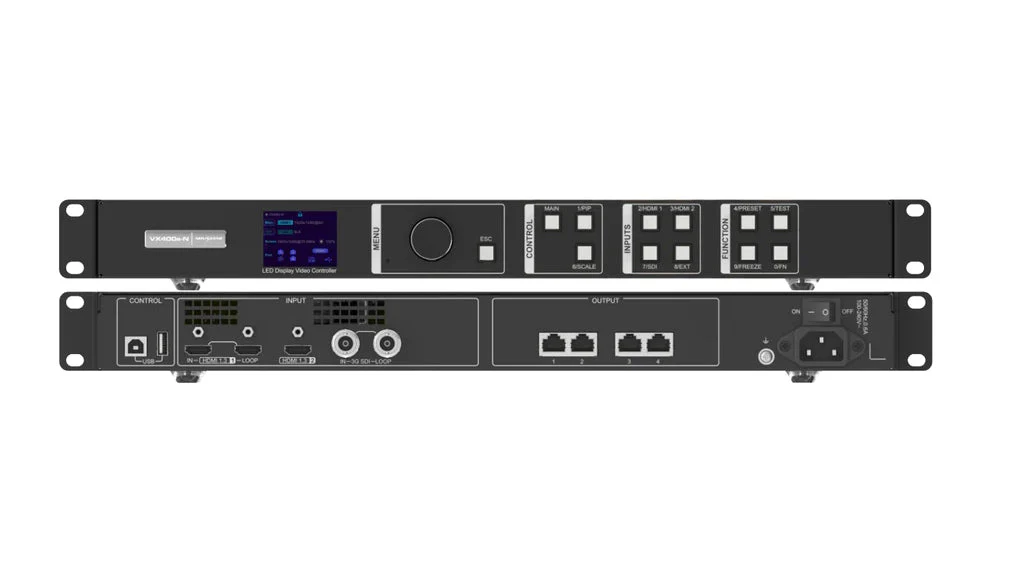
The NovaStar VX400 and NovaStar VX400 Pro combine video processing with LED sending functions. They receive a video signal, prepare an image for the screen, and send display data to compatible receiving cards. Their numbered LED output ports should not be confused with the separate network connections used for computer control.
| Specification | NovaStar VX400 | NovaStar VX400 Pro |
|---|---|---|
| Rated LED output capacity | 2.6 million pixels | 2.6 million pixels |
| Gigabit LED outputs | 4 | 4 |
| Maximum output dimensions | Width 10,240 pixels; height 8,192 pixels, separately | Width 10,240 pixels; height 8,192 pixels, separately |
| Main HDMI input capability | HDMI 1.3; standard 1920 × 1200 at 60 Hz | HDMI 2.0; up to 4096 × 2160 at 60 Hz |
| Video layers | 2 | Six 2K × 1K resource units; configuration dependent |
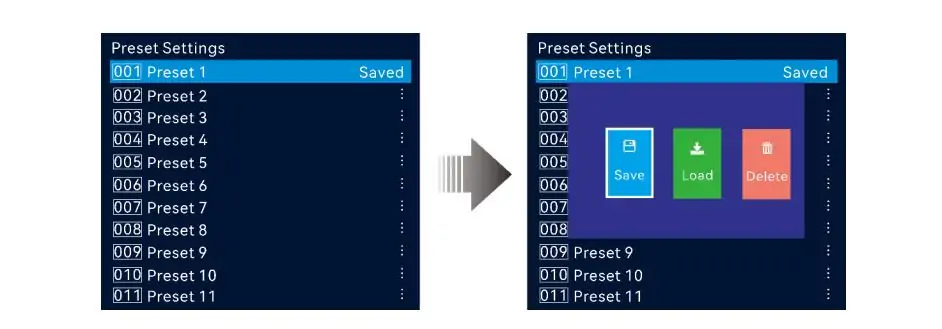
| User presets | 10 | 256 |
| USB media source | Not supported | Supported; USB source is 1920 × 1080 at 60 Hz |
| Optical connections | 2; roles depend on operating mode | 2; roles depend on operating mode |
| Control tools | Front panel, NovaLCT, V-Can | Front panel, NovaLCT, Unico, VICP |
| Rated power consumption | 28 W in specifications V1.1.0 | 42 W in specifications V1.4.0 |
Read the capacity limits together. Neither controller can drive a 10,240 × 8,192-pixel screen: those are separate dimensional limits, and their product is far above 2.6 million pixels. Port loading, output timing, topology, and receiving-card limitations must also be satisfied.
Technical references: NovaStar VX400 All-in-One Controller Specifications V1.1.0; VX400 Pro All-in-One Controller Specifications V1.4.0, dated July 30, 2026; and VX Pro Series All-in-One Controller User Manual V1.4.1. The manufacturer’s VX-series comparison pages provide the model and preset overview. For related configuration guidance, see our NovaStar VX400 Pro specifications and setup guide.
2. Eight practical differences between VX400 Pro and VX400
These eight differences translate the NovaStar VX400 Pro vs VX400 specifications into purchasing questions. A feature earns its place in your budget when it removes equipment, operator effort, or a documented production limitation. Ask for a demonstration using your actual sources before treating a feature list as a complete system design.
- 4K source acceptance. The Pro’s HDMI 2.0 connection accepts a full 4K source. This can simplify laptop and media-server connections, although adapters, EDID settings, and cable quality still matter.
- More composition resources. The Pro offers more room for multiple windows. The resource allocation depends on the input connector’s selected capacity, so six layers does not mean six independent 4K feeds.
- Different low-latency behavior. NovaStar specifies zero-frame device delay for the Pro with low latency and ByPass enabled. The older VX400 specification describes 20 lines with its corresponding low-latency ByPass configuration.
- More stored layouts. Moving from 10 to 256 presets helps operators prepare multiple sessions, screen layouts, and source arrangements. Presets still need rehearsal and clear names.
- USB media playback. The Pro can use files on a USB drive as a source. This is useful for a holding slide or straightforward playback, but it is not equivalent to a synchronized production media server.
- A newer control workflow. Unico gives the Pro client and browser control options, alongside VICP mobile operation. Choose software according to the task and supported operating system, rather than assuming every tool provides identical functions.
- Independent audio connections. The Pro includes 3.5 mm audio input and output. Plan levels, routing, and synchronization with the audio engineer; a physical audio socket does not replace a mixing console.
- Dedicated 3D connection. The Pro can connect a compatible third-party 3D emitter. This concerns stereoscopic content with glasses, not the perspective illusion used by an ordinary naked-eye 3D billboard.
For many buyers, the first two differences decide the comparison. For a production company with repeat events, saved configurations and easier control can matter just as much. The NovaStar VX400 Pro is therefore best assessed against the complete operating routine, including the people who will set it up and recover it after a fault.
3. VX400 pixel capacity and LED wall sizing
01. Calculate pixels before comparing processors
Calculate screen width in pixels multiplied by screen height in pixels. For a modular wall, multiply each cabinet’s actual pixel resolution by the number of cabinets across and down. Use the cabinet specification rather than a rounded marketing pixel pitch, which can introduce small errors when converted from physical dimensions.
For example, a wall with ten cabinets across and six down, each containing 192 × 192 pixels, has a resolution of 1920 × 1152. Its 2,211,840 pixels fall below the rated ceiling of both controllers. That is only the first check: the proposed cable routes must keep each output port within its permitted load.
As an illustrative distribution, five cabinets across and three down on each of four ports gives 552,960 pixels per port. This fits below a 650,000-pixel planning limit for an applicable 8-bit configuration. However, the lower groups start at a different vertical position, so low-latency topology requirements need a separate check. Passing the arithmetic does not validate every operating mode.
| Screen resolution | Calculated pixels | Initial capacity assessment |
|---|---|---|
| 1920 × 1080 | 2,073,600 | Below 2.6 million; verify port mapping |
| 1920 × 1152 | 2,211,840 | Below 2.6 million; verify topology and timing |
| 2560 × 1080 | 2,764,800 | Above the rated ceiling of both models |
| 3840 × 2160 | 8,294,400 | A full UHD wall exceeds either controller |
02. Allow for the entire LED signal path
Pixel pitch describes LED spacing; it does not directly tell you controller capacity. A smaller fine-pitch wall can contain more pixels than a larger outdoor wall. Similarly, an LED panel refresh-rate specification is not the video input frame rate. Keep cabinet resolution, video timing, output capacity, and panel refresh rate separate in the project worksheet.
If the NovaStar VX400 Pro cannot carry the required load, moving from VX400 to VX400 Pro will not solve that problem. Compare a larger processor, a properly engineered multi-controller system, or revised screen dimensions. Our NovaStar VX600 Pro guide covers the next capacity class, but even that model must be checked against the complete pixel total and redundancy requirement.
4. NovaStar VX400 Pro layers and source planning
01. Understand what a layer represents
The NovaStar VX400 offers two video layers, useful for a main presentation and a picture-in-picture window. An external switcher or media server can also deliver a finished composition as one source. Therefore, a complex-looking screen does not always require the LED controller itself to generate every visible element.
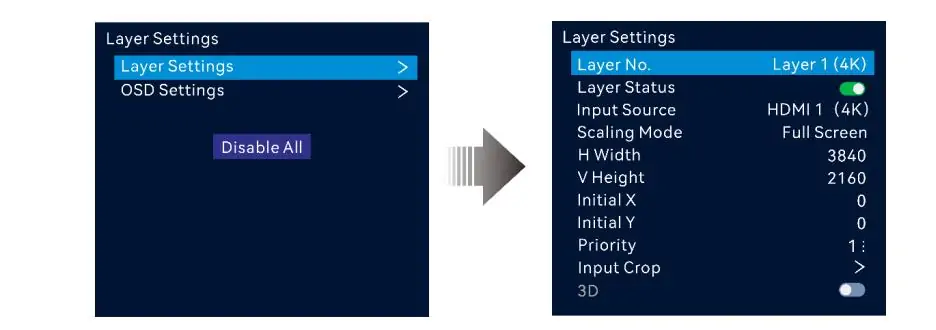
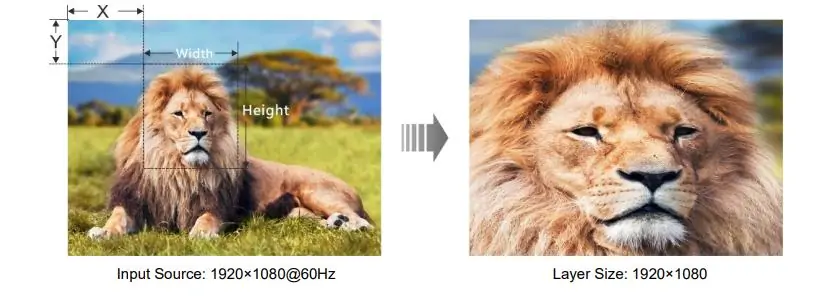
On the NovaStar VX400 Pro, six 2K × 1K resource units are available. A 2K × 1K layer consumes one unit, a 4K × 1K layer consumes two, and a 4K × 2K layer consumes four. NovaStar ties this allocation to the capacity of the connector used to open the layer. Shrinking a window on screen should not be assumed to free its input resource allocation.
A supported resource combination is one 4K layer plus two 2K layers: four plus one plus one equals six. Another is six 2K layers. Neither example means the controller has six separate physical HDMI inputs. List both the number of physical sources and the layers opened from them when planning a show.
02. Design the show before choosing the hardware
For a conference, sketch the main slides, presenter camera, sponsor artwork, timer, and announcements. Decide which elements arrive from an external graphics source and which use the processor’s OSD functions. OSD has its own feature restrictions; it should not be treated as an unlimited set of extra video inputs.
Then rehearse the largest layout, not just the simplest welcome screen. Check text readability after scaling, camera aspect ratio, overlapping windows, and transitions between presets. A successful NovaStar VX400 Pro vs VX400 comparison should identify the exact layout that the older processor cannot deliver conveniently, rather than assuming a higher layer count always improves the picture.
5. VX400 Pro low latency and ByPass mode
01. Distinguish device latency from system latency
The NovaStar VX400 Pro specification lists 1–2 frames in video-controller mode with low latency enabled, compared with 2–3 frames without it. In ByPass, it lists zero frames with low latency and one frame without it. These are device figures under the stated configuration, not a guarantee about the delay through an entire live-video system.
A camera, switcher, converter, receiving card, and LED scanning process can each contribute delay. At 60 frames per second, one frame lasts approximately 16.7 milliseconds. Measure the complete camera-to-display path and coordinate the result with the sound system. Do not describe zero-frame processing as proof of perfect lip synchronization or literally zero elapsed time.
02. Check what ByPass removes
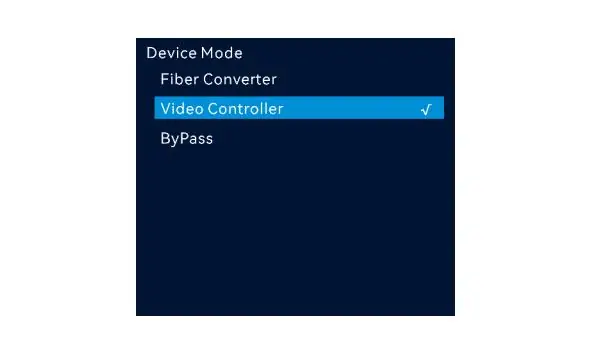
ByPass makes sense when an upstream device has already prepared the correct image. The controller’s video-processing functions are unavailable in this mode, so layouts that rely on its scaling and composition need reconsideration. It is a device operating mode, not a promise that one camera can bypass processing while other layers simultaneously retain the normal processing path.
The current VX Pro user manual also describes an Auto low-latency setting governed by screen topology. Manually enabling low latency with unsuitable vertical mapping can reduce loading capacity. Verify the cabinet arrangement, firmware, and selected mode in the actual project file. For rental LED display projects, include this check in the standard setup sheet so another technician can reproduce the tested result.
6. NovaStar VX400 Pro price and upgrade decisions
A useful NovaStar VX400 Pro price comparison needs two quotations with the same currency, tax treatment, warranty, delivery terms, and accessories. A retailer’s temporary price difference is not a universal upgrade cost. Ask whether optical modules, fiber conversion equipment, cables, commissioning, and a spare controller are included.
| Project requirement | Likely direction | Check before ordering |
|---|---|---|
| Working HD installation with a simple layout | Keep the VX400 if it meets the requirement | Condition, support, spare equipment, future changes |
| New system using full 4K HDMI sources | Consider VX400 Pro | HDMI port, source timing, adapter and cable compatibility |
| Several controller-generated windows | Consider VX400 Pro | Layer resource budget and physical input count |
| Screen above 2.6 million pixels | Choose a higher-capacity design | Per-port limits, topology, receiving cards, backup load |
| Critical live-camera production | Validate the whole signal chain | Measured latency, synchronization and required processing |
01. When keeping the VX400 is sensible
Keep the NovaStar VX400 if it reliably handles the existing screen and all required sources. A fixed lobby display or a straightforward presentation wall may gain little from additional composition resources. Replacement also involves configuration, testing, training, and downtime, so those costs belong in the decision.
For a used or discounted unit, check every required connector, fan operation, saved configurations, and the seller’s support terms. Run a sustained test with the intended wall rather than accepting a front-panel power-on demonstration. A lower purchase price is useful only if the hardware meets the job and recovery arrangements are adequate.
02. When the Pro upgrade earns its cost
The NovaStar VX400 Pro is a stronger candidate when 4K input, more internal layouts, USB playback, or newer control tools remove a recurring obstacle. Estimate the adapters eliminated, setup time saved, and layouts enabled. Treat these as project-specific benefits; avoid assigning an invented payback period or claiming that every buyer must upgrade.
For a firm NovaStar VX400 Pro vs VX400 price recommendation, request a controller and LED wall quotation with cabinet resolution, cabinet count, input sources, required frame rate, and destination country. Include the planned backup behavior. That information supports a comparable system quotation instead of an isolated box price.
7. Setup, USB playback, and compatibility checks
01. Confirm sources, ports, and software
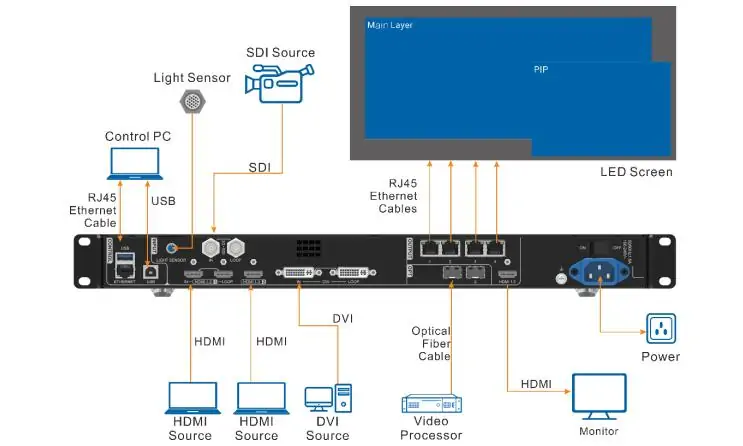
Check the model label first. VX400, VX400 Pro, VX400S-N, and VX4S-N should not be treated as interchangeable names. Photograph the rear panel and record the firmware version before using a setup guide. Existing cables that fit a socket may still carry a signal format that the selected input cannot accept.
Connect a full 4K source to the NovaStar VX400 Pro HDMI 2.0 input. Its 3G-SDI input is specified up to 1920 × 1080 at 60 Hz, so a camera’s 4K SDI signal is not accepted merely because the controller advertises 4K HDMI. Check the source’s output menu, EDID, color format, and timing as one combination.
Use NovaLCT for the relevant screen-configuration tasks and the supported control software for layouts and operation. The NovaStar VX400 uses V-Can, while the Pro supports Unico and VICP workflows. Unico’s Mac support should not be presented as a blanket claim that every NovaStar application runs natively on macOS. Our NovaStar control software guide helps identify the appropriate tools; verify the current release and device compatibility before installation.

02. Test USB playback as an actual source
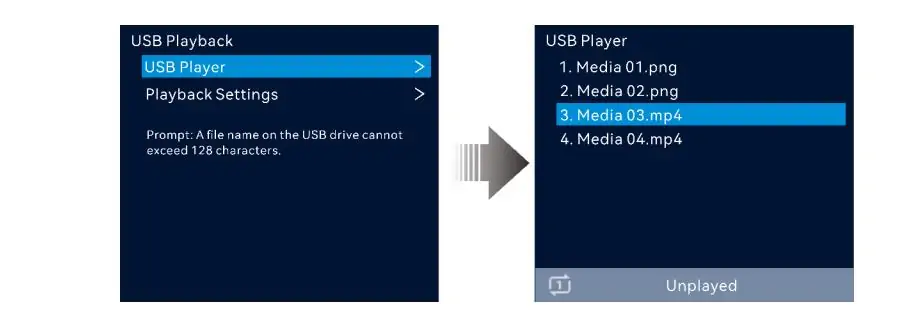
The NovaStar VX400 Pro can decode supported media files up to 3840 × 2160, but its USB source resolution is fixed at 1920 × 1080 at 60 Hz. File decoding resolution, source resolution, and LED wall resolution are different stages. A 4K file on a USB drive therefore does not establish a native 4K playback chain.
Prepare a representative playlist and test the exact files, drive, transitions, audio, and behavior after power restoration. A supported file extension alone does not confirm the codec and encoding profile. For precisely timed multi-screen playback, live graphics, or complex cueing, evaluate a dedicated playback system instead of assuming USB replaces one.
03. Rehearse failover and final commissioning
Back up the existing receiving-card configuration, screen mapping, and processor settings before a change. Label the control network separately from LED data outputs. Load test patterns to verify cabinet order, then check real content for cropping, fine text, grayscale, and brightness consistency. Use a known-good source to isolate input problems from screen-mapping problems.
Test the complete backup path deliberately during commissioning. A spare NovaStar VX400 cannot automatically reproduce a Pro configuration that depends on unsupported inputs or extra layers. Even two identical processors need appropriate cabling, compatible settings, and tested switching behavior. Optical backup also does not add independent screen capacity: the optical connection may copy or back up the same output data.
Finally, document the successful signal timing, cable labels, active preset, brightness setting, and restart procedure. Give the operator a recovery sheet with a known-good configuration and a contact for technical assistance. This practical handover often contributes more to dependable daily operation than a longer list of unused features.
8. NovaStar VX400 Pro vs VX400 FAQs
These answers address common buying and setup questions. Expand each question for the relevant limit or practical check.
01. What is the main difference between NovaStar VX400 Pro and VX400?
The main difference is processing and source flexibility. The NovaStar VX400 Pro adds full 4K HDMI input and more layer resources, while both models retain a rated 2.6-million-pixel output ceiling. Select by source format, composition requirements, and operating workflow after confirming the LED wall fits.
02. Can the NovaStar VX400 Pro drive a full 4K LED wall?
No. A 3840 × 2160 UHD wall contains 8,294,400 pixels, which exceeds the controller’s rated capacity. The NovaStar VX400 Pro can accept a 4K HDMI input and scale or use that source for a smaller display. Receiving 4K and sending every pixel to a native 4K wall are separate capabilities.
03. How many layers can the VX400 Pro display?
The NovaStar VX400 Pro provides six 2K × 1K resource units. A 4K × 2K layer uses four units, leaving two for 2K layers. Check connector capacity and source allocation; six available layer resources do not imply six 4K windows or six independent physical inputs.
04. What is the NovaStar VX400 Pro price?
Obtain a current quotation for the exact equipment package and destination. Compare the NovaStar VX400 Pro price with the VX400 using the same tax, freight, accessories, and support assumptions. There is no verified universal price gap that applies to every seller, region, or procurement date.
05. Does VX400 Pro zero-frame latency remove all video delay?
No. The figure describes the device in its specified low-latency ByPass configuration. Camera acquisition, upstream processing, receiving cards, and panel scanning can still add delay. Confirm that ByPass suits the required image processing, then measure the complete live-video system rather than relying only on a processor specification.
06. Can the VX400 Pro play 4K files from USB?
The NovaStar VX400 Pro supports decoding certain 4K media formats, subject to the documented codec, frame-rate, and bitrate limits. Its USB source remains 1920 × 1080 at 60 Hz. Test the intended files before an event, particularly when audio, looping, transitions, or automatic restart matter.
07. Is the VX400 Pro the same as the VX400S-N?
No. These are distinct model names, and their specifications must be checked separately. Search results sometimes mix VX400, VX400S-N, and VX4S-N. Use the exact label on the device and the matching manual when checking pixel capacity, connectors, firmware, or replacement compatibility.
08. Does the VX400 Pro have external Genlock?
The VX400 Pro does not provide an external Genlock connector. Synchronizing output to an input source is different from accepting a dedicated external reference signal. If that reference is part of the production design, verify a suitable higher model and the complete synchronization chain before buying.
09. Does a better receiving card automatically add HDR?
No. Receiving-card capability alone does not establish an HDR workflow. The source, processor, receiving system, and display must support the intended format together. Do not infer HDR processing from HDMI bit-depth support or assume that changing one downstream component adds missing upstream functions.
10. Where should I check the VX400 Pro manual and datasheet?
Use the model-matched NovaStar specifications and VX Pro Series user manual, checking their version against the installed firmware. Our VX400 Pro setup guide is a useful starting point. Keep a copy of the confirmed configuration and relevant manual with the project handover documents.
9. Conclusion: which LED controller should you choose?
The best NovaStar VX400 Pro vs VX400 decision starts with a screen calculation and a source list. Keep the NovaStar VX400 when its existing capabilities meet the job reliably. Choose the NovaStar VX400 Pro when its input formats, layer resources, playback options, or control workflow provide a specific operational benefit.
Before ordering, confirm total pixels, per-port loading, receiving cards, required layouts, and the backup plan. Compare complete quotations and request a demonstration of the most demanding configuration. If output capacity is the limitation, choose a larger system instead of expecting the Pro badge to increase the pixel ceiling.
For an HonghaiLED project, share the cabinet layout and source requirements with our team so the controller, screen, and commissioning plan can be assessed together. A documented configuration and rehearsed recovery process turn the specification comparison into a system the operator can use confidently.
Related Posts
NovaStar NovaPro HD Review: Specs, Setup and Manual
The NovaStar NovaPro HD combines video processing and LED display…
NovaStar VX2000 Pro vs VX2000: Specs & Price Guide
NovaStar VX2000 Pro vs VX2000 is a comparison that starts…
NovaStar ET1S-G Review: Media Server Specs, Setup and Price
The NovaStar ET1S-G is a compact media server that prepares…

No Comments