
Huidu B6L (HD-B6L): Specs, Setup and LED Poster Guide
The Huidu B6L, officially identified as HD-B6L, is a multimedia control card for LED poster screens. It combines stored-content playback with HDMI input, so a poster can run scheduled advertising and also display an external video source. Its published loading capacity is 1.3 million pixels per card; HDMI LOOP splicing supports a combined canvas of up to 2.6 million pixels within the supported cascade configuration.
Choosing the right controller requires more than matching a model name. Your screen resolution, receiving cards, cabinet wiring, content format, and management workflow must work together. This Huidu B6L guide explains the specifications that affect a real installation, how to plan and commission a poster, when to compare other controllers, and how to investigate common faults without replacing working hardware unnecessarily.
1. What Is Huidu B6L?
01 Product definition and the signal path
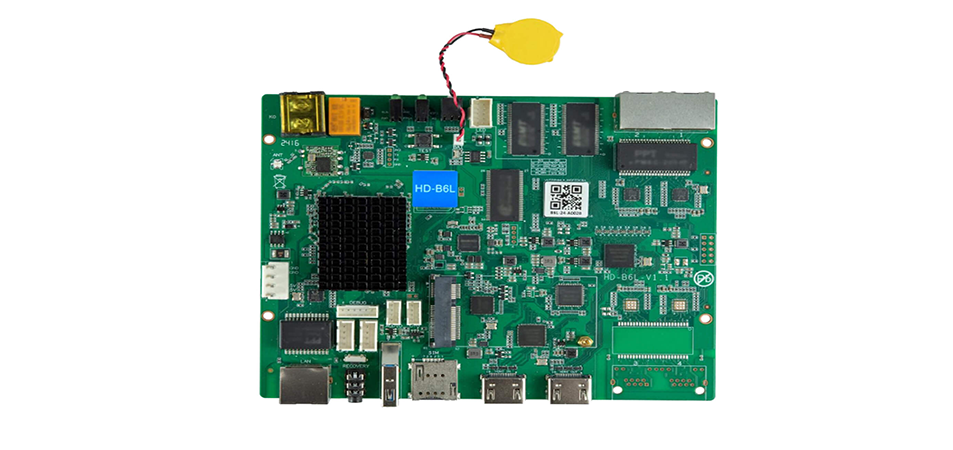
The Huidu B6L sits between the content source and the receiving cards inside an LED display. It sends display data to those receiving cards, which drive the modules. It is therefore different from a receiving card, an LED module, or a conventional computer monitor adapter. Buying the controller alone does not provide a complete screen.
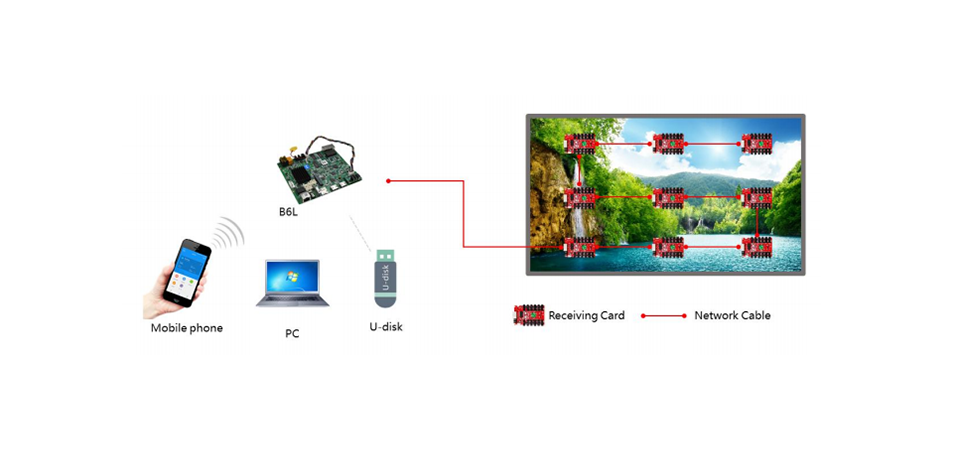
A typical installation follows this path: stored media or HDMI source → Huidu B6L → compatible receiving cards → LED modules. A separate management connection carries programs and configuration commands. Distinguish that management network from the controller’s LED output connections, even though both use familiar RJ45 connectors.
02 Asynchronous and synchronous playback
In asynchronous operation, a saved program plays from local storage. A continuously connected laptop is unnecessary after configuration and transfer. This suits a store running the same campaign throughout the day, with scheduled changes between breakfast, lunch, and evening offers.
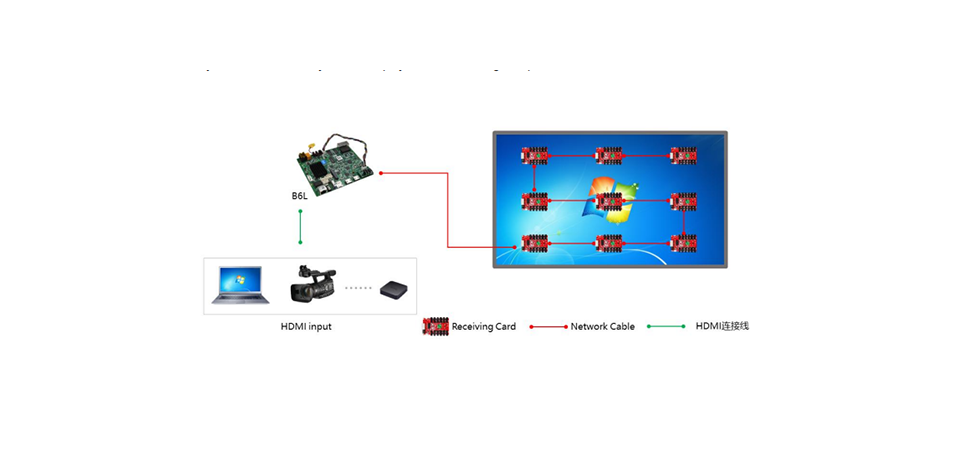
In synchronous operation, the Huidu B6L displays the incoming HDMI picture. The source must remain connected and active. This suits a presentation, demonstration, or event feed. Automatic scaling helps fit that picture to the configured display, but the source aspect ratio still matters: a landscape slide can become unreadable when squeezed onto a narrow portrait poster.
Test the transition between modes before an event. Do not assume uninterrupted switching, automatic recovery after every source failure, or a particular fallback image unless those behaviors have been demonstrated on the installed firmware.
2. Why Huidu B6L Gets Used in LED Poster Projects
01 Local playback and simpler daily operation
Huidu B6L combines content playback and LED output in one board. For a single poster, that can reduce the number of separate playback devices, adapters, and cables that staff must manage. The practical benefit depends on a clear operating procedure: who publishes content, which playlist is active, and how the installation restarts after a power interruption.
Prepare media for the actual display canvas. Place short messages, prices, and calls to action where they remain readable at the intended viewing distance. A technically playable file can still be unsuitable if it contains tiny text, excessive motion, or important details near a cabinet seam.
02 Multiple ways to update content
The Huidu B6L supports Wi-Fi, wired management, and USB program updates. Choose the connection that matches the site. A temporary exhibition may need local phone control, while several stores may need internet-based management with assigned accounts and a repeatable publishing process.
A successful upload is only one part of the check. Confirm that the intended screen received the complete program, that its clock and schedule are correct, and that the new content actually appears. Keep the previous approved program available so staff can restore normal advertising if a new media file causes problems.
03 Installation limits still matter
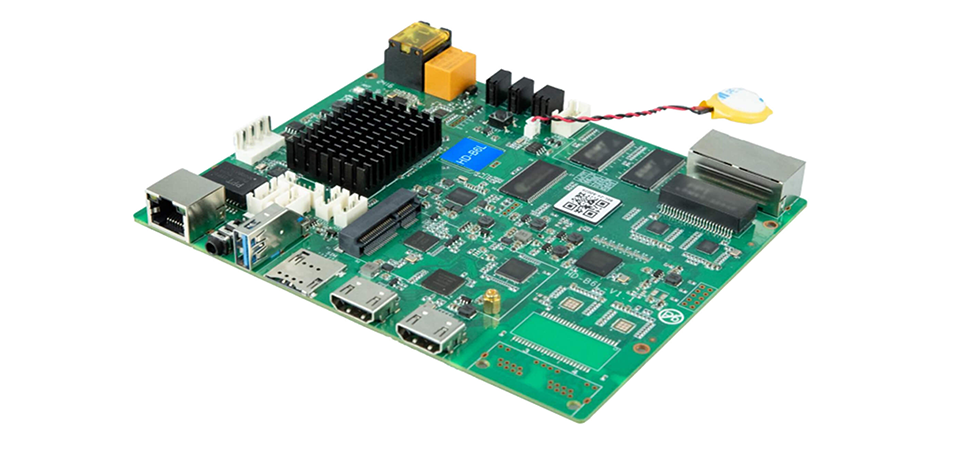
Huidu B6L is a bare electronic control board, not a weatherproof enclosure. Protect it from water, condensation, conductive dust, and contact with metal cabinet surfaces. A wide component temperature rating does not prove that a complete poster can operate in direct sunlight or outdoors.
Evaluate the entire cabinet, including power supplies, ventilation, grounding, connectors, and the LED modules. For an outdoor project, require the display integrator to approve the complete environmental design. Choosing a controller with a larger pixel capacity does not by itself solve moisture or cooling problems.
3. Technical Specifications and Architecture
01 Huidu B6L specifications that affect selection
The table separates controller output capacity from media decoding and management features. These are different limits. Specifications below reflect Huidu’s published B-series model comparison; confirm the exact board revision, firmware, and matching specification sheet before final engineering approval.
| Item | Published specification | Planning implication |
|---|---|---|
| Single-card load | 1.3 million pixels | Calculate width × height for the assigned screen. |
| HDMI LOOP splicing | Up to 2.6 million pixels; up to 10 cascade levels | Check combined canvas and cascade count separately. |
| Maximum width | 16,384 pixels | The total pixel budget still applies. |
| Internal storage | 16 GB | Allow room for programs and system use. |
| Video decoding | Up to 2 × 4K, 6 × 1080p, 10 × 720p, or 20 × 360p windows | These are alternative decoding configurations, not native screen resolutions. |
| Management | Wi-Fi, USB, cloud management; optional 4G | Confirm accessories and connectivity for the installation. |
Specification note: Huidu’s HD-B8H/B8L/B6L comparison, reviewed September 24, 2026, is the basis for these headline values. Earlier and later HD-B6L documents circulating online give different maximum-height figures. Obtain the specification matching the supplied unit before approving an unusually tall canvas; do not combine limits from different document revisions.
02 Pixel calculations and port allocation
For Huidu B6L sizing, use the actual module matrix rather than rounded cabinet dimensions. If a cabinet contains four modules across and six down, multiply each module’s horizontal and vertical pixel counts by those quantities. Repeat for every cabinet assigned to the controller.
| Canvas | Calculated pixels | Against 1.3 million | Decision |
|---|---|---|---|
| 320 × 960 | 307,200 | 992,800 remaining | Within total budget; check mapping. |
| 640 × 1,920 | 1,228,800 | 71,200 remaining | Within total budget; verify each output load. |
| 768 × 1,920 | 1,474,560 | 174,560 over | Exceeds one card’s stated capacity. |
| 1,280 × 1,920 combined | 2,457,600 | Exceeds one card | Assess a supported multi-card splicing design. |
The Huidu B6L has two Gigabit LED output ports, but total capacity does not establish the allowed load on either port. Verify the supported per-port budget, receiving-card chain, scan configuration, and timing. An approximately equal split can be a useful starting point; it is not proof that every layout will work.
03 Media resolution is not LED resolution
4K decoding describes processing a media source. It does not mean one Huidu B6L can drive a native 3,840 × 2,160 LED wall: that canvas contains 8,294,400 pixels. Likewise, a 60 Hz video output description is different from the LED modules’ refresh-rate specification. Camera performance depends on the complete display configuration.
4. How to Configure Huidu B6L: Step-by-Step Setup
01 Record the hardware before connecting it
Start a Huidu B6L setup record with the controller model, firmware, receiving-card model, module dimensions, driver IC, scan ratio, and cabinet wiring order. Obtain the supplier’s tested receiving-card configuration. Keep a backup before changing a working screen; a photograph of the cabinet wiring is useful during later service.
Power down before changing internal wiring. Identify the management LAN connector, LED output connectors, HDMI input, and HDMI LOOP output by their labels and the matching manual. Verify supply voltage and polarity against the actual board documentation. Never assume that a supply from another Huidu model is interchangeable.
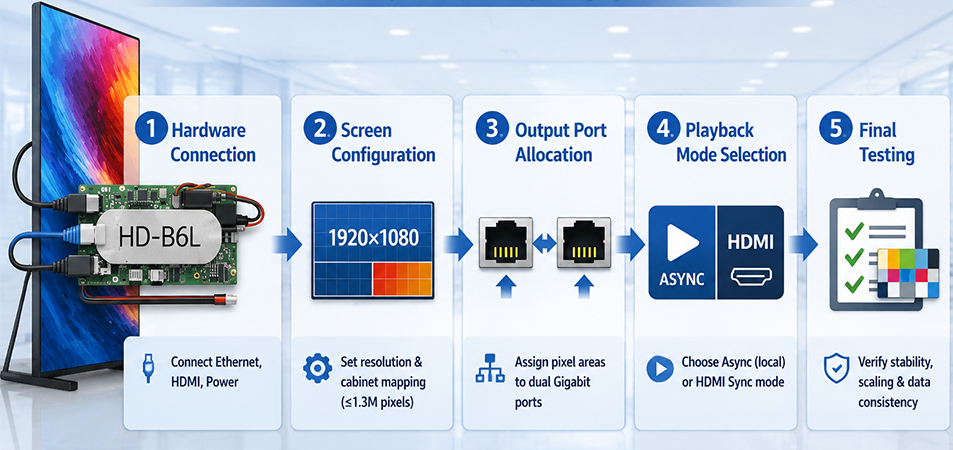
02 Configure the screen and receiving cards
Use a supported HDPlayer release for the Huidu B6L. The HonghaiLED Huidu software and documentation page is a starting point for finding the relevant software resources. Match software and firmware requirements before installation rather than relying on an old installer saved on a service laptop.
Enter the real screen dimensions and receiving-card arrangement. Map each receiving card to its physical position and cable order. A serpentine cable route must be reflected in the mapping; simply listing cabinets from left to right can create repeated or displaced image sections.
Apply the supplier-approved module parameters, then check solid red, green, blue, white, and a coordinate grid. Color errors, missing rows, and mirrored modules can indicate different configuration problems. Change one parameter group at a time and retain the last known working file.
03 Allocate outputs and prepare a program
Assign each receiving-card chain to the correct Huidu B6L output. Record the pixel area carried by every port and verify it against the supported configuration. Do not connect LED data outputs to an office network switch merely because the plugs fit; management networking and LED signal distribution serve different purposes.
Create a simple program at the display’s configured aspect ratio. Begin with a still image and one ordinary video file before adding multiple windows, clocks, or overlays. Send the program, wait for transfer completion, and verify playback on the physical display. This isolates basic mapping faults from media-complexity problems.
04 Test HDMI and poster splicing
Connect a known working HDMI source to Huidu B6L input and select a timing supported by the matching manual. Start with a conventional source mode, then inspect scaling, cropping, image orientation, and text readability. Source resolution can differ from LED resolution when supported scaling is active.
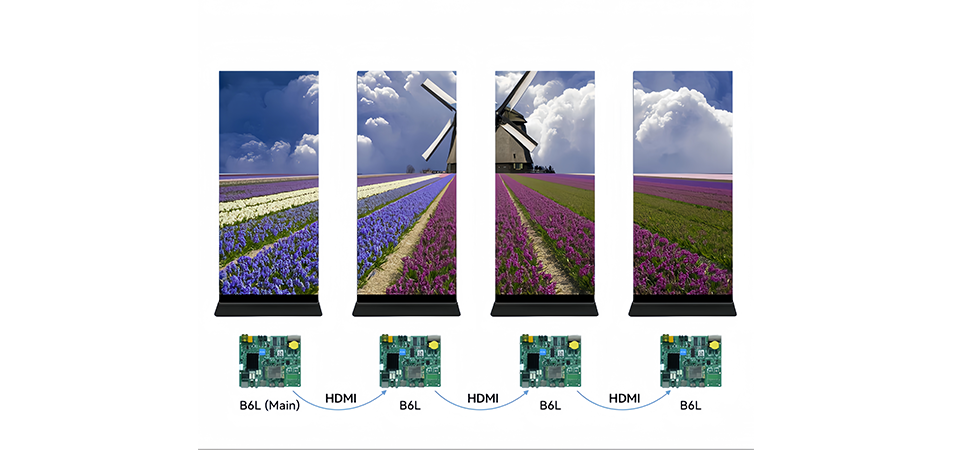
For a spliced installation, document the complete canvas and each poster’s assigned region. Connect the HDMI chain in the prescribed order and check that the image crosses cabinet boundaries correctly. Ten cascade levels do not imply ten times the single-card capacity; the combined splicing limit still governs the design.
Our three-poster connection overview illustrates a physical multi-poster application. Follow the manual for the actual controller rather than assuming every poster product uses identical wiring or settings.
05 Complete acceptance testing
Test the final playlist, HDMI mode, scheduled changes, and restart behavior under normal operating conditions. Confirm that local content remains usable when the management network is disconnected, where that is the intended workflow. For cloud installations, test a remote update and verify the correct screen identity.
Record acceptance results with the configuration backup, port map, approved media samples, and recovery instructions. A brief successful playback test is useful, but it cannot establish long-term reliability or replace the integrator’s burn-in and thermal checks.
5. Huidu B6L vs B6 vs B8L: Which Controller Fits Your Project?
01 Compare capacities before extra features
Huidu B6L, HD-B6, and HD-B8L share similar names, but their limits and hardware should not be treated as interchangeable. Compare the exact model on the board and quote. An advertisement that groups several models together can display the strongest specification from the family rather than the specification of the unit you are buying.
| Selection factor | HD-B6 | Huidu B6L | HD-B8L |
|---|---|---|---|
| Single-card capacity | 1.3 million pixels | 1.3 million pixels | 1.3 million pixels |
| Published HDMI splicing capacity | 2.3 million pixels | 2.6 million pixels | 5.24 million pixels |
| Published storage | 8 GB | 16 GB | 64 GB |
| Main reason to assess it | Support for an existing B6 installation | Standalone posters and supported small splicing layouts | Larger combined poster canvases |
| Before choosing | Check legacy wiring and software | Check port loads and complete canvas | Check that the larger cascade limit solves the actual requirement |
Comparison basis: Huidu’s HD-B6 Specification V1.0 and its published B-series model table. These headline figures do not establish interchangeable firmware, receiving-card files, power connections, or accessories.
02 When upgrading changes the result
A move from Huidu B6L to B8L may help a larger spliced canvas, but it does not increase the listed single-card load above 1.3 million pixels. If one physical screen exceeds that limit, review its controller allocation and signal architecture instead of assuming a higher model number solves the problem.
Read the HonghaiLED B8H, B6L, and B8L comparison when evaluating a broader controller range. Keep the selection tied to a measurable requirement: total pixels, number of screens, required inputs, media workload, or control integration. Avoid paying for capabilities the operating team will never use.
6. Who Should Choose Huidu B6L?
01 Suitable Huidu B6L applications
Huidu B6L is worth assessing for retail posters, hotel information displays, exhibition signage, and indoor promotional totems. The best fit is a project that needs scheduled local content, occasional HDMI playback, and a pixel matrix within the verified controller and receiving-card limits.
For a moving poster, also check connector strain relief, service access, transport protection, and how staff identify the correct screen in the control software. For a permanent installation, prioritize recoverable configuration files and reliable access for content updates. These practical details often determine operating effort more than a feature list.
The HH1920iP5 foldable poster LED screen illustrates a complete cabinet format. Confirm the controller supplied with any particular screen order; a cabinet product page is not proof that every configuration uses Huidu B6L. The poster LED display buying guide covers wider display-selection considerations.
02 Huidu B6L price and quotation checklist
A useful Huidu B6L price comparison requires the same scope on every quote. A bare board price is not comparable with a configured controller package that includes receiving cards, cables, a cellular module, commissioning, and after-sales support. Shipping, taxes, currency, and quantity also affect the delivered cost.
Request an itemized quotation identifying the exact controller revision, included accessories, compatible receiving cards, optional 4G hardware, warranty terms, and configuration assistance. Ask whether cloud services or mobile data introduce ongoing charges. Do not assume every item shown in a promotional photograph is included.
For a replacement, provide photographs of the existing controller and wiring, the screen’s pixel dimensions, and its saved parameters. For a new system, provide the cabinet arrangement, required playback modes, and any planned expansion. Contact HonghaiLED with that information to request a project-specific configuration and quotation.
7. Common Huidu B6L Issues and Troubleshooting
01 Diagnose the signal stage before changing settings
When a Huidu B6L installation fails, first identify whether the problem affects the entire display, one output chain, one cabinet, or only one media file. A whole-screen failure suggests a different starting point from a single module showing incorrect colors. Compare a known working still image with HDMI playback to separate mapping faults from source or decoding problems.
| Symptom | Possible causes | First useful check |
|---|---|---|
| Whole screen black | Power, inactive program, wrong mode, or signal path | Confirm power indicators and try a known working local program. |
| One cabinet or region missing | Cable, receiving-card power, mapping, or module connection | Compare the missing area with the documented wiring map. |
| Repeated or displaced image | Wrong coordinates, chain order, or canvas dimensions | Display a numbered grid and check each receiving-card region. |
| HDMI picture absent | Inactive source, cable, unsupported timing, or input selection | Test the source and cable separately, then use a documented timing. |
| Video stutters | Media encoding, window workload, storage, or output configuration | Try one simpler local video before changing port allocation. |
| New content missing | Incomplete transfer, wrong device, schedule, or active playlist | Verify screen identity, upload completion, and playback schedule. |
| Intermittent restart | Supply instability, loose connection, heat, or firmware fault | Record timing and inspect power and cabinet temperature. |
02 Make the fault reproducible
Change one variable at a time. If a replacement cable fixes the problem, reconnecting several other devices simultaneously makes the result difficult to interpret. Record the original state, the change, and the outcome so another technician can repeat the test.
For Huidu B6L support, provide firmware and software versions, a wiring diagram, the failing program or source timing, and photographs of the display pattern. Avoid repeated factory resets or speculative firmware updates before backing up the configuration and confirming the correct recovery procedure.
8. Huidu B6L FAQs
01. What is the maximum Huidu B6L resolution?
A single Huidu B6L is rated for 1.3 million output pixels. The published maximum width is 16,384 pixels, but total load and individual dimension limits must all be satisfied. Confirm the maximum height against the specification for your board revision, particularly when designing an unusually tall display.
02. Can Huidu B6L play 4K video?
Huidu lists 4K hardware decoding among the supported media capabilities. That does not turn the connected LED poster into a native 4K display. The video is processed for the configured LED canvas, whose output remains subject to the controller pixel budget. Test the actual encoding and playback layout.
03. What software does Huidu B6L use?
HDPlayer is the PC software used for relevant screen and program tasks; LedArt provides mobile control, and XiaoHui Cloud supports internet management. Check the supported software release and connection method for your firmware. A local phone connection and a cloud-connected device are different operating arrangements.
04. Does Huidu B6L need a permanent internet connection?
Stored local programs can play independently after setup and transfer. Internet access is required for internet-based remote management and content that depends on online services. Confirm expected restart and offline behavior during acceptance testing instead of assuming every playlist element remains available without a network.
05. How many Huidu B6L controllers can be cascaded?
Huidu lists up to 10 cascade levels and a combined HDMI LOOP splicing capacity of up to 2.6 million pixels. Those limits apply together. Each controller also remains within its own load limit; connecting additional units does not automatically create an unrestricted larger canvas.
06. Is Huidu B6L compatible with NovaStar receiving cards?
Do not assume cross-brand compatibility from the RJ45 connector or a Gigabit label. Use receiving-card models explicitly approved for the controller and firmware by the system supplier. A replacement must match the display protocol and module configuration as well as its physical connection.
07. Can Huidu B6L be installed outdoors?
The exposed controller board should not be subjected to rain or condensation. Outdoor suitability is a property of the engineered cabinet and complete display system, including environmental protection and thermal design. Obtain integrator approval for that installation; a larger controller model does not provide weatherproofing by itself.
08. Where should I get Huidu B6L firmware and manuals?
Start with the manufacturer documentation or the HonghaiLED Huidu download resource linked in the setup section. Match the model, board revision, and software requirements before applying firmware. Back up working parameters and schedule a maintenance window; firmware installation should not be used as an unplanned first troubleshooting step.
9. Conclusion
Huidu B6L is a practical controller to evaluate when an LED poster needs independent advertising playback and an HDMI source option. A successful choice starts with the actual pixel matrix, verified receiving-card compatibility, the output-port plan, and a clear content-management workflow.
Before ordering, confirm the specification revision and quote scope. Before handover, test the final programs, mapping, splicing arrangement, restart behavior, and installation environment. Those checks turn the Huidu B6L specification into a usable display system and give the operator a reliable basis for updates and future troubleshooting.
Related Posts
LED Screen vs LCD Screen: Differences & How to Choose
LED screen vs LCD screen is a comparison of two…
How to Choose the Best LED Lamp Beads for LED Displays
Choosing the best LED lamp beads for LED displays starts…
LED Packaging Technology: SMD, COB, GOB & MIP Guide
LED packaging technology determines how light-emitting chips are connected, supported,…

No Comments