
Huidu HD-A7 vs HD-A8: 4K Controller Specs & Setup
Huidu HD-A7 and Huidu HD-A8 are dual-mode LED display controllers for projects that need live video and stored content on the same screen. The essential HD-A7 vs HD-A8 difference is loading capacity: the smaller model serves a lower pixel budget, while the larger model supports a full UHD asynchronous canvas and more cabinet output routes.
Choosing between these Huidu controllers requires more than matching a “4K” label. You need the native screen resolution, receiving-card configuration, playback mode, and a workable cable map. This guide compares the specifications, explains calculated screen examples, and provides a commissioning and quotation checklist so you can discuss a complete system with your supplier.
1. HD-A7 vs HD-A8: quick answer
Choose the Huidu HD-A7 for a screen that fits its pixel budget and eight output routes; choose the Huidu HD-A8 for more pixels, sixteen routes, or a full UHD asynchronous canvas. The practical decision starts with native screen resolution and playback mode. A larger physical wall does not necessarily need the larger controller: coarse-pitch outdoor cabinets can contain fewer pixels than a smaller fine-pitch indoor wall.
Think of the controller as the bridge between your content and the receiving cards inside the cabinets. It does not replace those cards, the LED modules, or their power supplies. For an existing installation, identify the receiving-card model and configuration before choosing either replacement. An RJ45 connector alone does not establish compatibility.
The Huidu HD-A7 vs HD-A8 comparison therefore has three separate questions: does the complete canvas fit, can the cabinets be divided into supported output loads, and can the intended media run in the selected mode? Passing only the first check is insufficient. Ask your supplier to approve a cabinet map showing the complete signal path, especially where the wall has irregular sections or long cable runs.
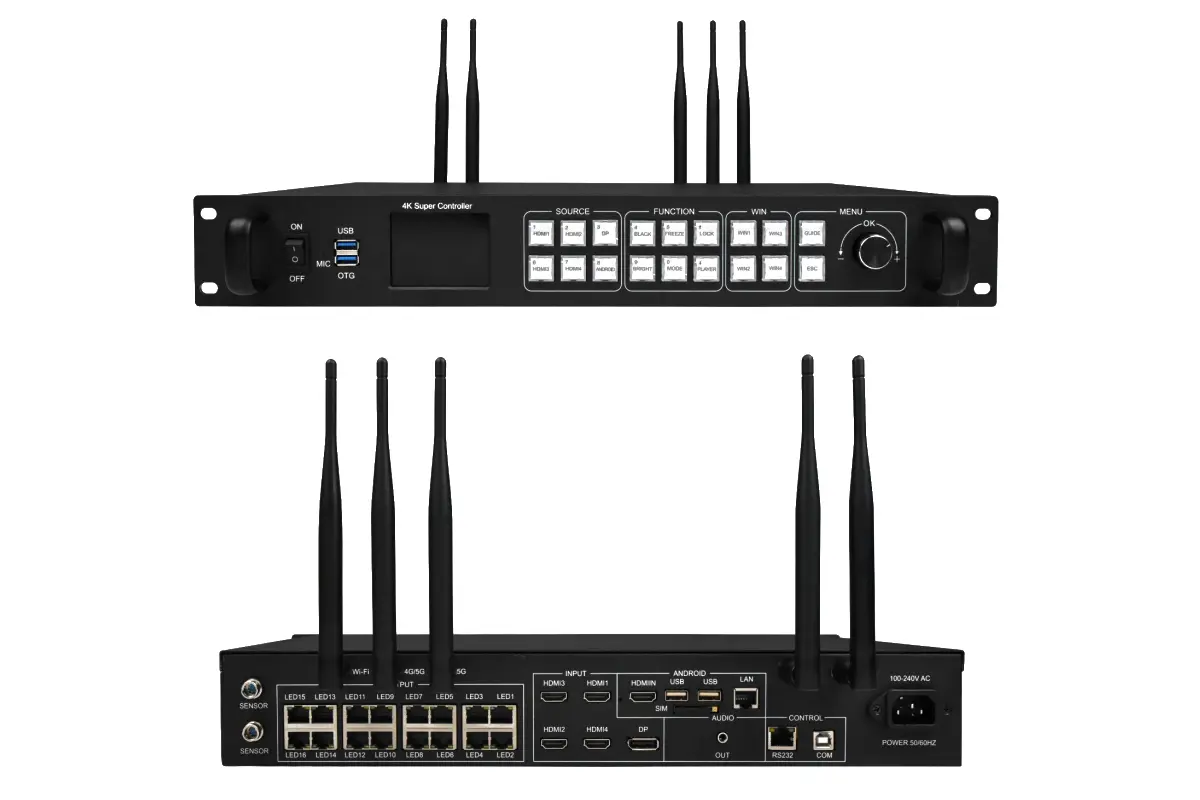
2. Huidu HD-A7 and HD-A8 specifications compared
The following comparison separates the published loading figures from the checks needed for a real installation. M means million pixels. These are maximum specification figures, not a promise that every cabinet layout or media combination will work at the limit.
| Specification | Huidu HD-A7 | Huidu HD-A8 |
|---|---|---|
| Synchronous total load | 5.2 million pixels | 10.4 million pixels |
| Asynchronous total load | About 5.16 million pixels | About 8.29 million pixels |
| Reference asynchronous canvas | 3840 × 1344 | 3840 × 2160 (UHD) |
| Gigabit display outputs | 8 RJ45 outputs | 16 RJ45 outputs |
| Current listed memory | 32 GB | 32 GB |
| Playback choices | Live, stored, mixed | Live, stored, mixed |
| Project approval | Verify exact revision and port map | Verify exact revision and port map |
Revision note: Huidu’s English HD-A8/A7 product table checked on October 9, 2026 lists 32 GB memory and a maximum width of 65,536 pixels. Older V2.0 documentation lists different width limits, including 15,360 for asynchronous layouts and 16,000 for synchronous layouts. Do not combine a width from one revision with a height or operating mode from another. Confirm the exact hardware, firmware, width, height, and total load together before approving an unusually wide screen.
The Huidu HD-A7 and Huidu HD-A8 share a software ecosystem, but that does not mean their firmware files are interchangeable. Match downloads to the model and revision. Storage space available for programs may also be lower than the nominal memory figure because system files and existing programs occupy space.
3. Calculate LED screen resolution and controller capacity
01. Start with cabinet pixels
Use the cabinet specification, rather than a rounded marketing pitch, for the final calculation. Multiply horizontal cabinet count by pixels per cabinet across. Repeat vertically, then multiply the two results. This gives the screen’s native pixel count and avoids rounding errors on products described with approximate pitch labels.
For preliminary planning, horizontal pixels equal screen width in millimeters divided by pitch in millimeters. Vertical pixels use the same calculation for height. A hypothetical 6.4 m by 3.2 m P2.5 screen has 2,560 by 1,280 pixels: 3,276,800 in total. That falls below the published Huidu HD-A7 total load, although the receiving-card map and selected operating mode still require approval.
02. Compare actual canvases
The examples below are calculated planning cases, not tested HonghaiLED installations. “Within budget” means only that the total pixels fit the relevant published capacity. It does not confirm width limits, port loading, receiving-card support, or media performance.
| Native resolution | Total pixels | HD-A7 sync | HD-A7 async | HD-A8 sync | HD-A8 async |
|---|---|---|---|---|---|
| 2560 × 1280 | 3,276,800 | Within budget | Within budget | Within budget | Within budget |
| 3840 × 1344 | 5,160,960 | Within budget | Reference canvas | Within budget | Within budget |
| 3840 × 2160 | 8,294,400 | Exceeds budget | Exceeds budget | Within budget | Reference UHD canvas |
| 4096 × 2304 | 9,437,184 | Exceeds budget | Exceeds budget | Pixel total only; dimensions need approval | Exceeds budget |
A UHD canvas contains 3840 × 2160 = 8,294,400 pixels. This explains why a Huidu HD-A7 can be described as a 4K decoding controller without driving a full native UHD wall: decoding a source and loading a physical display are different operations. The Huidu HD-A8 has the larger output budget required for that example.
03. Check every output route
Draw the cabinet chains and assign pixels to each output. An even division is a starting point, not a substitute for a supported wiring plan. A cabinet may not divide neatly at a port boundary, and one overloaded chain can fail even when unused capacity remains elsewhere. Include receiving-card loading, scan configuration, and the intended display settings in the calculation.
For a new LED video wall, settle the cabinet grid before selecting the controller. For an upgrade, obtain the existing connection file and photographs of cable routing. These records make the Huidu HD-A7 vs HD-A8 decision more reliable than estimating from screen area alone.
4. Shared features and receiving-card compatibility
Both models are designed for installations that combine stored programs with live sources. Their common control options can simplify operator training across a group of displays. However, purchasing two models from the same family does not remove the need to test each screen configuration separately.
For the Huidu HD-A7, ask which receiving-card models, driver ICs, scan patterns, and cabinet resolutions are supported by the supplied firmware. Ask the same questions for the Huidu HD-A8. Reusing an existing display is easiest when the supplier can provide a known working parameter file for the exact modules. A file for a visually similar cabinet may produce wrong colors, missing rows, or unstable output.
Keep a record of controller model, serial label, software version, receiving-card model, parameter file, and wiring diagram in the project handover. Store an untouched copy before experimenting with settings. This provides a recovery point if a future update changes behavior or a replacement cabinet arrives with different electronics.
Also distinguish the controller’s capabilities from the display’s capabilities. Brightness, viewing angle, outdoor protection, and LED refresh performance depend on the selected cabinets and their electronics. Buying a Huidu HD-A8 does not by itself make an indoor display weatherproof or improve the native pixel pitch. Evaluate the complete system using the LED screen buying guide alongside this controller comparison.
5. Synchronous, asynchronous and mixed playback
01. Synchronous mode for live sources
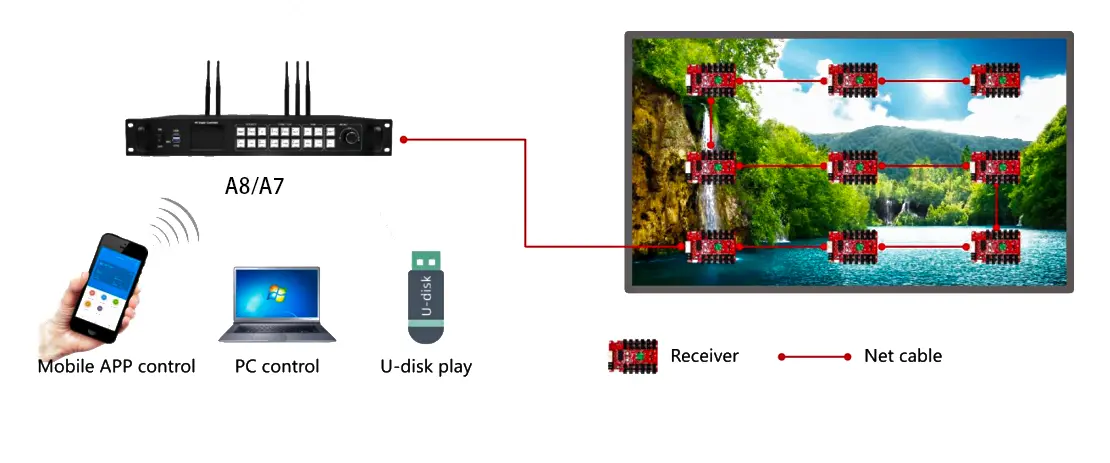
Use synchronous playback when the displayed image must follow a connected source, such as a presentation computer. Confirm the source resolution, refresh setting, cable type, and selected input before adjusting screen parameters. A computer desktop appearing on the wall proves the signal path works; it does not prove that small text is mapped sharply or that moving content meets the project requirement.
For the Huidu HD-A7 and Huidu HD-A8, test the actual source equipment during commissioning. Check scaling with a grid and circles so cropping, stretching, or overscan becomes obvious. Where presentations and camera feeds share the display, rehearse switching with the exact equipment the operator will use.
02. Asynchronous mode for scheduled content
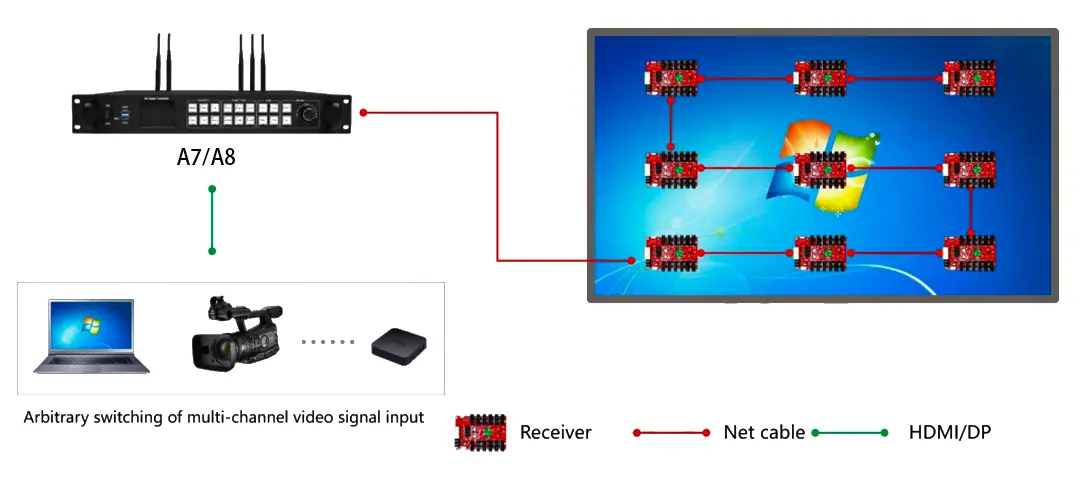
Asynchronous playback uses a program stored at the player, which is useful for advertising loops and information screens. Build the program for the wall’s native aspect ratio. A standard widescreen video placed on a long banner either needs cropping, empty space, or a redesigned layout; changing the player cannot resolve that content-design decision.
After transferring a program, disconnect the publishing computer and verify playback continues. Check start and end dates, daily time windows, and the device clock. For the Huidu HD-A7, keep the complete asynchronous canvas within its smaller budget. For the Huidu HD-A8, a full UHD program is within the published asynchronous capacity, subject to the approved configuration.
03. Mixed mode for live and stored content
Mixed playback combines a live input with stored content, for example a presentation window beside an information panel. Specify which area has priority and what should happen when the live source disappears. Test this behavior rather than assuming an automatic fallback. A useful acceptance test includes disconnecting and reconnecting the source, restarting the player, and checking the scheduled return to normal content.
6. 4K decoding, frame rate and multi-window planning
“4K support” can describe input handling, video decoding, or output canvas size. Those specifications answer different questions. When comparing Huidu HD-A7 and Huidu HD-A8, ask the supplier to identify which one is being quoted. A compatible video file can still need scaling to fit the LED wall, and a supported connector does not guarantee every signal timing.
Huidu’s HD-A8 V2.0 function list describes two 4K, six 1080p, or eight 720p video playback windows, with output up to 60 Hz. These are documented operating cases, not numbers to add together. They also should not be treated as a guarantee for every codec, bitrate, or combination of live and stored layers. Request a model-specific demonstration for the Huidu HD-A7 instead of assuming all limits are identical.
Prepare a test playlist using the files intended for daily operation. Include the highest bitrate clip, the smallest text, transitions, and the most complex multi-area layout. Let the playlist repeat and watch for dropped frames, audio mismatch, missing fonts, or delayed transitions. A short promotional demonstration may not expose those problems.
For filmed events, test with the actual camera and shutter settings. Source frame rate, controller output timing, and LED refresh rate are separate parameters. A larger Huidu HD-A8 pixel budget alone does not guarantee flicker-free footage or lower latency. Request measured performance when camera synchronization or immediate response is a contractual requirement.
7. Ports, HDPlayer software and commissioning
01. Separate management and display connections
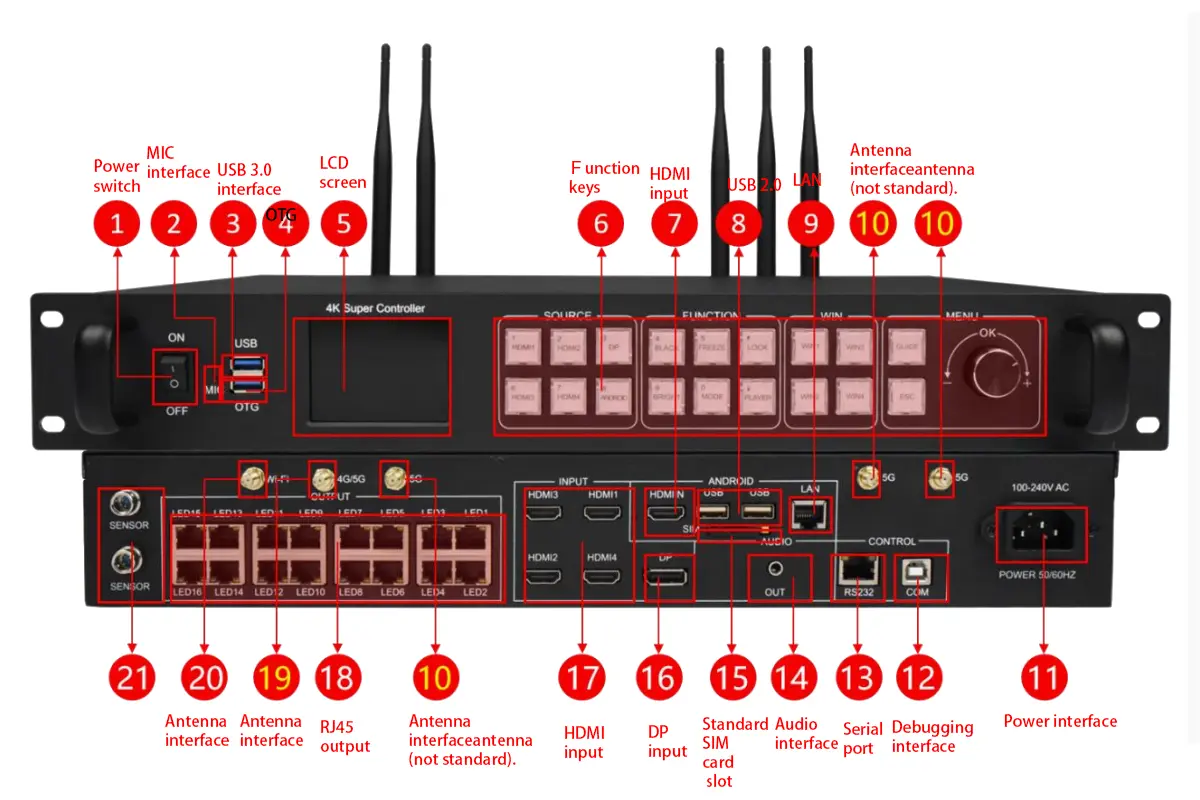
Identify the management LAN socket separately from the numbered receiving-card outputs. Connect the computer or site network to the designated management interface, and connect cabinet chains to the display outputs. Label both ends of every cable with its function and route. This avoids confusing a network communication fault with an LED signal fault during maintenance.
The Huidu HD-A7 provides eight display outputs; the Huidu HD-A8 provides sixteen. More outputs give additional routing options, but spare sockets do not establish a redundancy feature. If backup operation is required, have the supplier document the supported topology and demonstrate what happens when the active cable or controller fails.
02. Prepare software and screen parameters
Use HDPlayer for program creation and publishing, and the appropriate Huidu configuration workflow for screen setup. Huidu’s A7/A8 setup tutorial also demonstrates HDSet. Our Huidu software and manual download page separates content software from configuration tools. Choose the release compatible with the supplied controller rather than updating a working project simply because a newer installer exists.
Commission the system in stages: verify communication, apply the supplier-approved receiving-card parameters, map cabinet connections, and display a simple test pattern. Check red, green, blue, white, black, and a numbered cabinet grid before loading a complex playlist. Confirm both the physical cabinet order and its orientation; a correct overall resolution can still contain swapped or rotated sections.
03. Test publishing and restart behavior
Send a short program to the Huidu HD-A7 or Huidu HD-A8, confirm transfer completion, and inspect the entire wall. Test the required wired, wireless, or USB publishing route independently. Use the USB format and export procedure specified for the installed firmware; copying a video file is not always equivalent to exporting a complete screen program.
Finally restart the player during an agreed maintenance period. Confirm the correct program returns, the clock is correct, and scheduled behavior survives the restart. Give the operator a short procedure for selecting inputs, changing a playlist, and recovering the approved configuration. Leave experimental parameter files clearly separated from production files.
04. Diagnose faults by their location
Before changing parameters, record what still works. If the controller is reachable but the wall is black, focus on playback selection and the display signal path. If stored content plays correctly but the live input fails, preserve the working cabinet configuration while testing the source. Changing several settings at once removes useful evidence.
| Observed symptom | First checks | Useful evidence for support |
|---|---|---|
| No controller discovery | Power, management connection, local network access | Connection method and software version |
| One cabinet chain is dark | Output route, cable, first receiving card | Port number and affected cabinet positions |
| Image is shifted or repeated | Cabinet order and connection mapping | Numbered test-pattern photograph |
| Stored video stutters | File encoding and layout complexity | Original file and program layout |
| Program runs at the wrong time | Clock, date range and daily schedule | Device time and schedule screenshots |
Use a known working cable or simple test file to isolate one variable at a time. Avoid replacing the entire Huidu HD-A7 or Huidu HD-A8 configuration for a fault affecting a single cabinet. After resolving the issue, save the corrected project with a clear date and record what changed. This gives the next technician a useful starting point.
8. Choose a Huidu controller and compare quotations
01. When the Huidu HD-A7 fits
The Huidu HD-A7 is a candidate when your approved screen map fits its loading limits and eight output routes. It can suit a fixed retail or meeting-room installation where the cabinet layout is known and expansion is unlikely. Specify the content workflow as carefully as the resolution: daily advertising and live presentations place different demands on operators.
Do not select it solely because a screen is described as “medium size.” Write the exact horizontal and vertical pixels on the quotation. If the installation will move between venues, include the largest planned cabinet configuration and the most demanding source layout in the acceptance test.
02. When the Huidu HD-A8 fits
The Huidu HD-A8 is the candidate when the project exceeds the smaller model’s pixel budget, needs a full UHD asynchronous canvas, or benefits from more output routes. Future expansion should be a defined cabinet plan, not an unspecified allowance. Confirm that the expanded resolution, cabling, receiving cards, and operating mode remain supported.
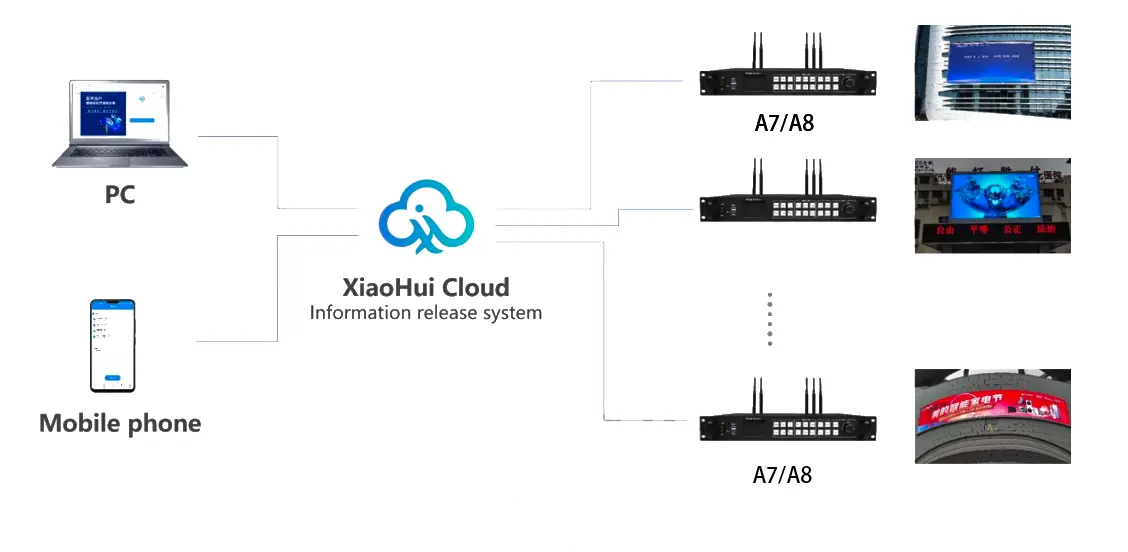
Remote installations also need an operating plan. Decide who updates content, who approves schedules, and how a technician obtains a backup configuration. Where mobile connectivity is required, identify the optional module, antenna arrangements, network coverage, and ongoing data costs in the quote. Local playback and remote publishing are different requirements.
03. What an HD-A7 or HD-A8 price should include
Compare dated quotations for the same configuration. Ask for the exact controller revision, accessories, optional communications hardware, receiving cards if needed, commissioning, shipping terms, warranty, and support scope. A bare player price cannot be compared directly with a configured system price. This guide does not publish an unverified market price.
Send your supplier the cabinet resolution, cabinet count, receiving-card model, signal source, daily schedule, and any expansion drawing. Request written approval of the port map and representative media. Those details make a Huidu HD-A7 vs HD-A8 recommendation testable and reduce the risk of discovering a limitation after installation.
9. Huidu HD-A7 and HD-A8 FAQs
01. What is the main HD-A7 vs HD-A8 difference?
The main differences are pixel loading and display-output count. The Huidu HD-A7 has the smaller canvas budget and eight output ports. The Huidu HD-A8 provides sixteen outputs and supports a full UHD asynchronous canvas. Choose from the exact cabinet map rather than physical screen size alone.
02. Can the Huidu HD-A7 drive a full 4K LED wall?
A native 3840 × 2160 wall has 8,294,400 pixels, which exceeds the HD-A7 loading budget. Its 4K decoding description does not mean it can drive that many native display pixels. Use the larger model or another approved system for that canvas.
03. Does the Huidu HD-A8 need a computer all day?
Stored asynchronous content can play at the controller after publishing. A live computer source is needed when the displayed content comes from that computer in synchronous mode. Verify offline playback and restart behavior with the production program before handing over the screen.
04. Which HD-A7 and HD-A8 software should I download?
Start with the Huidu software page linked in section 7. HDPlayer handles content programs, while HDSet is used in the manufacturer setup workflow for configuration. Match software and firmware to the exact model and retain a backup of the working parameters before making changes.
05. Why is part of my LED screen black or scrambled?
First locate the fault boundary. A whole inactive chain suggests checking its output connection and first cabinet; a repeated pattern or incorrect colors suggests checking mapping and module parameters. These are diagnostic starting points, not a remote diagnosis. Record the affected cabinets and ask the supplier to compare them with the approved connection file.
06. Are Wi-Fi access and software administrator passwords the same?
Treat these as separate credentials. Identify whether the prompt belongs to the controller network, configuration software, or cloud account. Consult the matching manual or installer record rather than applying a password from another model. Avoid resetting a commissioned system without a backup and a recovery procedure.
07. Do sixteen outputs automatically provide redundancy?
No. Output count indicates available connections, not a verified backup design. Require documentation of the supported backup topology and a demonstration of failure recovery. Confirm which cable, receiving-card, source, or controller failures the proposed system actually covers.
08. What should I send when requesting an HD-A7 or HD-A8 quote?
Provide horizontal and vertical cabinet counts, cabinet pixel resolution, receiving-card model, live inputs, stored-content requirements, and expansion plans. Add the intended installation environment and remote-management needs. Ask the supplier to return a controller revision, approved port map, accessories list, and commissioning scope.
10. Conclusion and specification notes
The best Huidu HD-A7 vs HD-A8 choice follows the screen map and playback requirement. Start with native pixels, verify each output route, then test the intended media and operating modes. Choose the Huidu HD-A7 when the approved configuration fits its capacity; choose the Huidu HD-A8 when the larger canvas or additional outputs are required.
For a project review, provide the cabinet grid and receiving-card details together with the content plan. This allows the controller, screen, and publishing workflow to be evaluated as one system. Keep the approved configuration and acceptance results with the handover documents so future maintenance starts from a known working setup.
Evidence and scope: Capacity and current memory figures were checked against Shenzhen Huidu Technology’s English HD-A8/A7 product table on October 9, 2026. Historical width and multi-window references are identified as HD-A8 Specification V2.0, dated April 8, 2022. The manufacturer now lists V2.4 specification downloads; obtain the document matching the supplied unit before engineering approval. The sizing examples are calculations, and the commissioning checks are practical planning guidance, not claims of laboratory testing or guaranteed performance.
Related Posts
LED Screen vs LCD Screen: Differences & How to Choose
LED screen vs LCD screen is a comparison of two…
How to Choose the Best LED Lamp Beads for LED Displays
Choosing the best LED lamp beads for LED displays starts…
LED Packaging Technology: SMD, COB, GOB & MIP Guide
LED packaging technology determines how light-emitting chips are connected, supported,…

No Comments