
HUIDU HD-VP210C 3-in-1 LED Video Processor: Specs, Manual and Setup
It suits indoor LED walls that stay inside a 1.3 MP pixel budget. A P4 screen 5.12 m wide and 2.56 m high, for example, is 1,280 x 640 px = 819,200 px – comfortably within range. If your wall is larger, or you need 4K scaling or multi-window layout, step up to a higher-capacity processor such as the HD-VP410C or a 4K-class video processor.
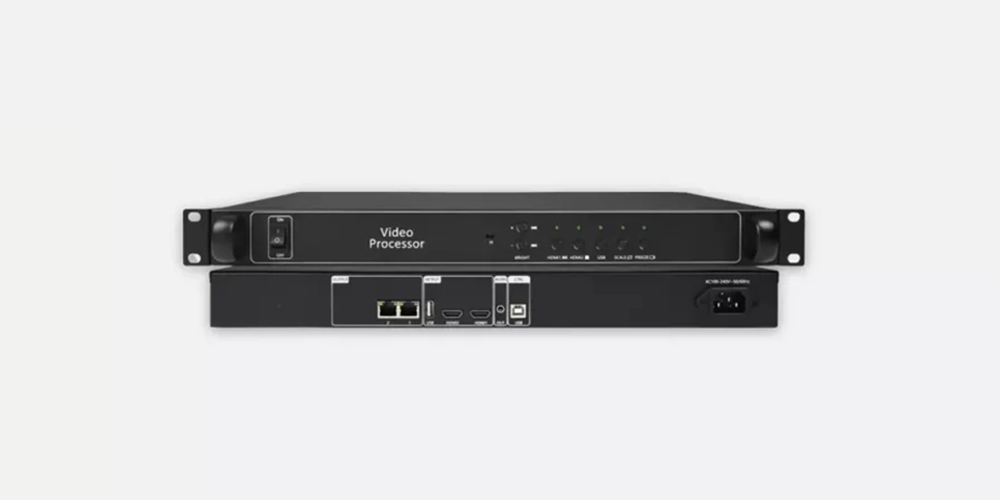
HD-VP210C at a glance
- Loading capacity: 1,300,000 pixels; up to 3,840 px wide and 1,920 px high
- Inputs: 2 x HDMI (HDMI 1.3, up to 1920x1080p@60Hz) plus 1 x USB for U-disk playback
- Outputs: 2 x Gigabit network ports (1 Gbps), cascaded directly to the receiving cards
- Audio: HDMI audio input (one of the two sources) plus a TRS 3.5 mm dual-channel audio output
- Control: Front-panel buttons, key lock, one-button brightness, optional IR remote
- Configuration: HUIDU HDSet software through the USB-B port
- Power: AC 110-240 V, 50/60 Hz
Table of Contents
1. Overview: What the HD-VP210C Is
2. HD-VP210C Technical Specifications
3. Key Features Explained
4. HD-VP210 vs HD-VP210C
5. Setup: HDSet, Screen Configuration and U-Disk Playback
6. Typical Applications
7. FAQs About the HUIDU HD-VP210C
8. Manuals, Downloads and Sourcing
1. Overview: What the HD-VP210C Is
Shenzhen Huidu Technology Co., Ltd. describes the HD-VP210C as an ultra-cost-effective 3-in-1 video processor. HUIDU’s own specification for the HD-VP210 platform says the unit integrates single-picture video processing and a sending card in one chassis – which is why the processor can feed receiving cards directly from its own network ports instead of needing an external sending box. It handles one picture at a time; it is not a multi-window switcher.
Where it sits in the range: the HD-VP210C and the original HD-VP210 share the same 1.3-million-pixel loading capacity and the same 2 Gigabit network outputs, but they differ in their input sets. Pick the C version when your sources are HDMI and USB only. Pick the HD-VP210 when you still need DVI, VGA or CVBS inputs on the same wall.
Because the processor is a fixed-capacity, single-picture device rather than a scaling switcher, the buying decision comes down to three numbers: total pixels, the widest single run of cabinets, and the number of sources you need to switch between. Everything else – audio, brightness, key lock – is handled from the front panel or from HDSet.
2. HD-VP210C Technical Specifications
The table below lists the documented parameters for the HD-VP210C. The figures come from HUIDU’s HD-VP210C user manual and HUIDU’s published product feature list; anything that is not documented in those sources has been left out rather than estimated.
| Parameter | Documented value |
| Loading capacity | 1,300,000 pixels (1.3 million) |
| Maximum width | 3,840 pixels |
| Maximum height | 1,920 pixels (see note below) |
| HDMI inputs | 2 x HDMI-A, HDMI 1.3 backward compatible, up to 1920x1080p@60Hz |
| USB input | 1 x USB 2.0 Type-A for U-disk video and picture playback |
| Signal switching | Arbitrary switching between HDMI 1, HDMI 2 and USB |
| Network outputs | 2 x Gigabit Ethernet, 1 Gbps, cascaded to receiving cards |
| Audio | HDMI audio input (one of the two sources) and 1 x TRS 3.5 mm dual-channel audio output |
| Media playback | Video: MP4, AVI, MPG, MKV, MOV, VOB, RMVB. Image: JPG, JPEG, PNG, BMP. Up to 1080P HD |
| Configuration port | USB-B, used with HUIDU HDSet software |
| Front panel | Power, IR receiver, brightness +/-, HDMI 1/HDMI 2 select, USB select, full/partial-screen toggle, one-key pause |
| Power supply | AC 110-240 V, 50/60 Hz |
Note on the maximum height. HUIDU’s published feature list for the HD-VP210C quotes a vertical maximum of 1,920 pixels, while some HUIDU materials quote 2,500 pixels for the same model. Always confirm the figure against the datasheet supplied with your hardware revision before you finalise a cabinet layout.
3. Key Features Explained
3.1 1.3-million-pixel control range
The 1,300,000-pixel capacity is the ceiling for everything the processor drives. Multiply your wall width in pixels by its height in pixels and keep the total below 1.3 million, with the width no more than 3,840 px and the height no more than 1,920 px. A 4.8 m x 2.4 m wall at P3 works out to 1,600 x 800 = 1,280,000 px, which is inside the limit; the same wall at higher resolution is not.
3.2 Two HDMI inputs with arbitrary switching
The HD-VP210C accepts two HDMI synchronous signals and one USB signal, and lets you switch between them at any point in a show. HDMI inputs are HDMI 1.3 backward compatible and accept up to 1920x1080p at 60 Hz, which covers standard media players, laptops and cameras.
3.3 U-disk playback up to 1080P
You can run a wall without a player at all. Put the media files in the root directory of the U-disk, insert it in the USB port and press the USB button. Video formats include MP4, AVI, MPG, MKV, MOV, VOB and RMVB, with encoding support for MPEG4 (MP4), MPEG_SD/HD and H.264 (AVI, MKV), plus FLV. Images can be JPG, JPEG, PNG or BMP, and playback is supported up to 1080P HD. In U-disk mode the front-panel buttons are remapped: the HDMI 1 key pauses or plays, the HDMI 2 key stops, and the brightness keys step to the previous or next file.
3.4 Audio routing
Audio is taken from the HDMI inputs – one of the two HDMI sources at a time – and output through a TRS 3.5 mm dual-channel socket for an external amplifier. There is no separate analogue audio input on this model, so plan on embedded HDMI audio or an external audio path if your source is not HDMI.
3.5 Two Gigabit network outputs
The unit ships with two standard Gigabit network ports that cascade directly to the receiving cards at 1 Gbps, carrying the RGB data stream. Because the sending card is built in, the wiring between the processor and the wall is a single network run per output rather than a separate sender plus a signal cable.
3.6 One-button brightness adjustment
Brightness is raised or lowered with the two front-panel keys, with no menu dive, which is useful when a venue darkens for a presentation or when a wall faces a glass frontage. In normal mode the same keys control brightness; in U-disk mode they become previous and next file shortcuts.
3.7 Key lock and front-panel control
The key lock prevents accidental operation – the most common cause of an LED wall going to a black or badly scaled picture mid-event. The front panel also carries a full-screen/partial-screen toggle and a one-key pause, so an operator can freeze a picture without touching the source device.
3.8 Optional infrared remote
An infrared receiver is built into the front panel. With the optional IR remote you can switch programs and set brightness from across the room, which saves a walk to the rack during an event.
4. HD-VP210 vs HD-VP210C
The two models are often quoted interchangeably, but the input sets are different. If your signal chain is already HDMI-only, the HD-VP210C is the simpler buy; if you are still feeding DVI, VGA or composite video, the original HD-VP210 keeps those ports.
| Feature | HD-VP210 | HD-VP210C |
| Control range | 1,310,720 px (1280 x 1024) | 1,300,000 px |
| Maximum width | 3,840 px | 3,840 px |
| Maximum height | 1,920 px | 1,920 px (2,500 px quoted in some HUIDU materials) |
| Video inputs | HDMI, DVI, VGA, CVBS, USB (5 signal types) | HDMI 1, HDMI 2, USB (3 signal types) |
| Network outputs | 2 x Gigabit | 2 x Gigabit |
| Key lock | Yes | Yes |
| User templates | Up to 7 saved scenarios | Not documented in the HD-VP210C user manual |
| Referenced document | HD-VP210 product specification V1.0, 27 February 2019 | HD-VP210C user manual (current release) |
5. Setup: HDSet, Screen Configuration and U-Disk Playback
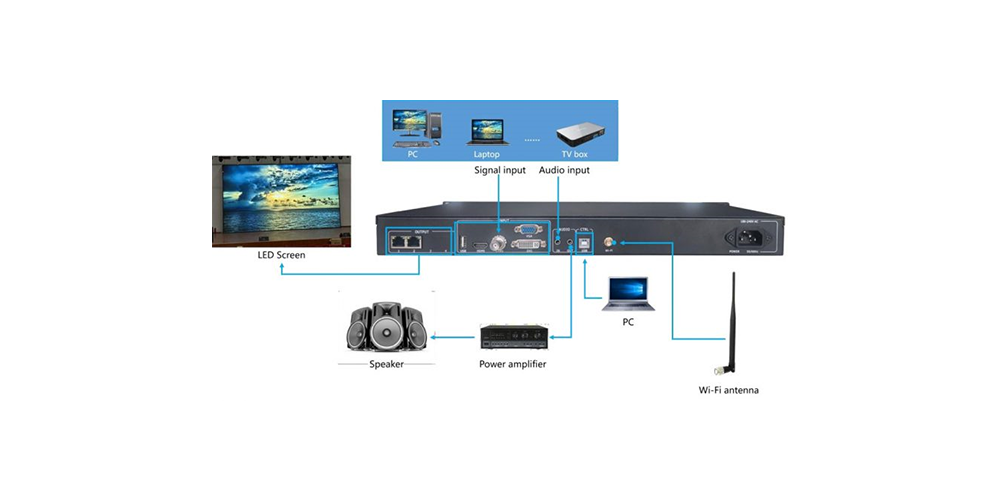
Commissioning the HD-VP210C follows the sequence in HUIDU’s user manual: wire the wall, configure the receiving cards in HDSet, then set up the processor itself.
5.1 Connect the wall and the sources
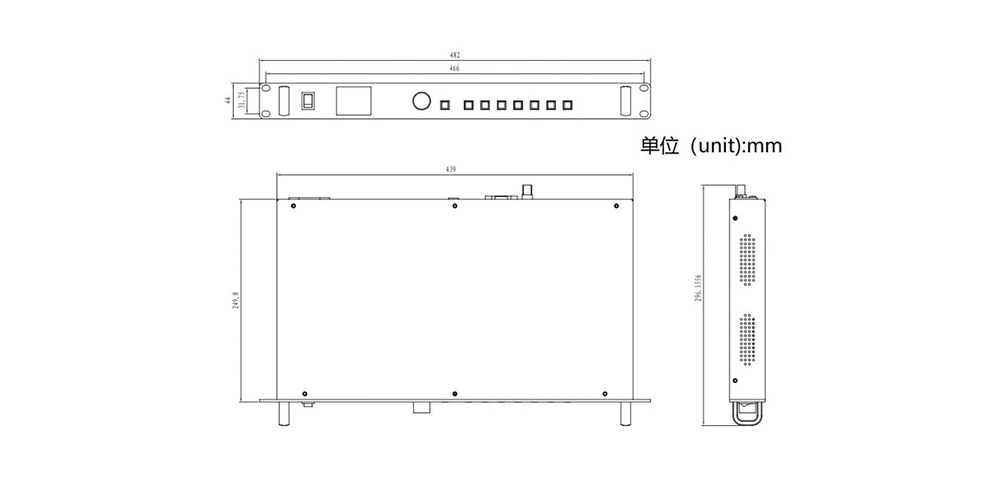
Power the display, then connect a playable source to the HD-VP210C – HDMI 1, HDMI 2 or a U-disk. Use the two Gigabit network ports to reach the receiving cards, and check every RJ45 connector is fully seated before you start configuring.
5.2 Configure the receiving cards with HDSet
Connect the processor to a PC with a USB-B cable, install HUIDU HDSet, then open Screen Configuration and debug the receiving cards. HDSet is also where you load the cabinet map, so the processor knows how many pixels the wall actually contains.
5.3 Set the video processor options
In the processor section of HDSet you select the signal source and issue the Scale, Black Screen and Freeze commands, set fixed brightness and fixed volume, and use functions such as Layout Setting and Display Cut. Because the HD-VP210C handles a single picture, layout work is limited to positioning and cropping that one image rather than building windows.
5.4 Play media from a U-disk
Copy the video and picture files into the root directory of the U-disk – files inside sub-folders are not found – insert the U-disk into the USB port, then press the USB button on the front panel. In playback mode the HDMI 1 key pauses or resumes, the HDMI 2 key stops, and the brightness keys move to the next or previous file. Press the USB button again to return the keys to their normal functions.
6. Typical Applications
6.1 Retail and shopping malls
Promotional loops and product films run from HDMI or straight from a U-disk, and the built-in sending card means a single processor can sit behind a wall without extra rack space.
6.2 Meeting rooms and conference spaces
Two HDMI inputs cover a room PC and a guest laptop, and the one-button brightness keys let staff dim the wall for a presentation without opening a menu.
6.3 Exhibition stands and showrooms
Behind glass at a trade show, the key lock is the feature that matters most: once the wall is running, visitors and cleaners cannot change the picture by brushing the panel.
6.4 Studios and broadcast walls
In a studio the processor is usually fed an HDMI signal from a playback system, with the optional IR remote used to switch between programme loops. Because HDMI audio is passed through to the TRS output, audio and picture stay in step without a separate de-embedder.
6.5 When to choose a bigger processor
Above 1.3 million pixels, or as soon as you need window layouts, 4K input scaling or more than two HDMI sources, the HD-VP210C runs out of headroom. At that point, look at higher-capacity models in the same family or a 4K-class LED video processor, and compare them the same way: pixels, width, height, and source count.
7. FAQs About the HUIDU HD-VP210C
What is the pixel capacity of the HUIDU HD-VP210C?
The HD-VP210C controls up to 1,300,000 pixels (1.3 million), with a maximum width of 3,840 pixels and a maximum height of 1,920 pixels. Multiply the wall width in pixels by the wall height in pixels to check whether a layout fits.
How many HDMI and USB inputs does the HD-VP210C have?
It has two HDMI inputs and one USB input for U-disk playback. The HDMI ports are HDMI 1.3 backward compatible and accept up to 1920x1080p at 60 Hz, and you can switch between HDMI 1, HDMI 2 and USB at any time.
How many Gigabit network outputs does the HD-VP210C have?
Two. Both are standard Gigabit ports that cascade directly to the receiving cards at 1 Gbps, which is why the HD-VP210C does not need a separate sending card.
How do I play video from a U-disk on the HD-VP210C?
Copy the files into the root directory of the U-disk, insert it into the USB port and press the USB button on the front panel. Playback supports up to 1080P HD, with video files in MP4, AVI, MPG, MKV, MOV, VOB or RMVB and images in JPG, JPEG, PNG or BMP.
What software does the HD-VP210C use?
HUIDU HDSet. Connect the processor to a PC with a USB-B cable, then use HDSet for screen configuration, receiving-card debugging, signal source selection, scaling, brightness and the other processor settings.
What is the difference between the HD-VP210 and the HD-VP210C?
The HD-VP210 offers five signal types (HDMI, DVI, VGA, CVBS and USB), while the HD-VP210C offers two HDMI inputs plus USB. Both share a 1.3-million-pixel control range, a 3,840-pixel maximum width and two Gigabit network outputs.
Where can I download the HD-VP210C user manual?
The English HD-VP210C user manual and the HUIDU software packages are available on our HUIDU manuals and software download page, and the HDSet and HDPlayer packages are also listed in our HUIDU software download centre.
8. Manuals, Downloads and Sourcing
Before you specify the HD-VP210C, download the documentation for the exact hardware revision you are buying:
- HUIDU HD-VP210C user manual and HDSet/HDPlayer downloads
- HD-VP210 product specification V1.0 and user manual (PDF)
- HUIDU software download centre
- HD-VP210C product page and current availability
Related reading on this site: the HUIDU HD-A7 and HD-A8 asynchronous controllers, our comparison of the HUIDU HD-B8H, B6L and B8L control cards, and a larger 4K LED video processor for bigger walls. If you are choosing the screen itself, start from our guide to indoor LED displays.
Sources. Shenzhen Huidu Technology Co., Ltd. – HD-VP210C user manual (official PDF, HDSet installation, interface and parameter-setting chapters). Shenzhen Huidu Technology Co., Ltd. – HD-VP210 product specification V1.0, 27 February 2019. Shenzhen Huidu Technology Co., Ltd. – HD-VP210C published product feature list. Figures that could not be verified in those documents are not stated on this page.
In short, the HUIDU HD-VP210C is the right processor when an indoor wall stays inside 1.3 million pixels and your sources are HDMI and USB. Fix the pixel budget and the maximum width first, confirm the height figure against the datasheet for your revision, then let the input list decide between the HD-VP210C and the HD-VP210. If you would like the capacity checked against your own cabinet layout, send us the wall dimensions and pixel pitch and we will confirm the configuration.
Related Posts
LED Screen vs LCD Screen: Differences & How to Choose
LED screen vs LCD screen is a comparison of two…
How to Choose the Best LED Lamp Beads for LED Displays
Choosing the best LED lamp beads for LED displays starts…
LED Packaging Technology: SMD, COB, GOB & MIP Guide
LED packaging technology determines how light-emitting chips are connected, supported,…

No Comments