
NovaStar VX1000 Pro vs VX600 Pro: Specs, Ports & Price
NovaStar VX1000 Pro vs VX600 Pro is primarily a choice about LED wall capacity and output wiring. The VX600 Pro provides six Gigabit Ethernet sending ports and a maximum load of 3.9 million pixels. The VX1000 Pro provides ten sending ports and up to 6.5 million pixels. Both accept a 4K60 HDMI source, so buying the larger model does not automatically improve the picture on a screen that already fits the smaller controller.
The useful comparison starts with cabinet resolution, cable routes, source formats and backup requirements. A physically large screen with a coarse pixel pitch may fit the VX600 Pro, while a smaller fine-pitch wall may require the VX1000 Pro. This guide explains the specifications, shows worked pixel calculations, and identifies the questions to settle before requesting a price or approving a system design.
This comparison covers the Pro models, not the original VX600 and VX1000. Technical checks use NovaStar’s VX600 Pro and VX1000 Pro specifications V1.4.0, dated July 30, 2026, and the VX Pro Series user manual V1.4.1 available when reviewed on September 28, 2026. Firmware, receiving cards and operating modes must still match the proposed installation.
1. NovaStar VX1000 Pro vs VX600 Pro Overview
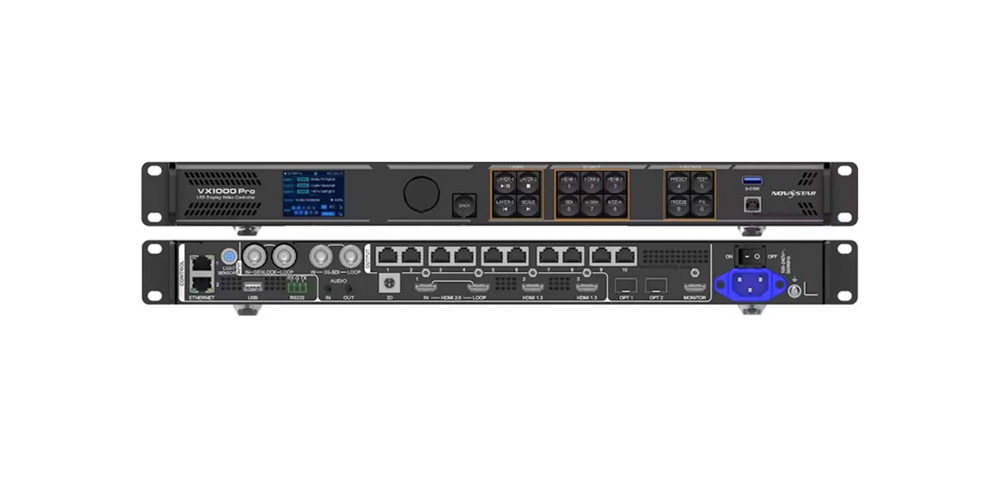
01. What does the NovaStar VX1000 Pro do?
The NovaStar VX1000 Pro LED controller combines video processing with the sending functions that deliver image data to compatible LED receiving cards. It suits projects that need more than six output routes or exceed the smaller model’s pixel budget. Its ten outputs are useful when cabinet groups occupy separate parts of a stage, even when the total screen resolution is below its maximum.
For example, a main backdrop and two side displays may need separate cable routes for practical installation. Extra outputs can reduce the number of cabinets assigned to each route. They do not remove receiving-card limits or guarantee that every proposed layout works. The final connection drawing remains the deciding document.
02. What does the NovaStar VX600 Pro do?
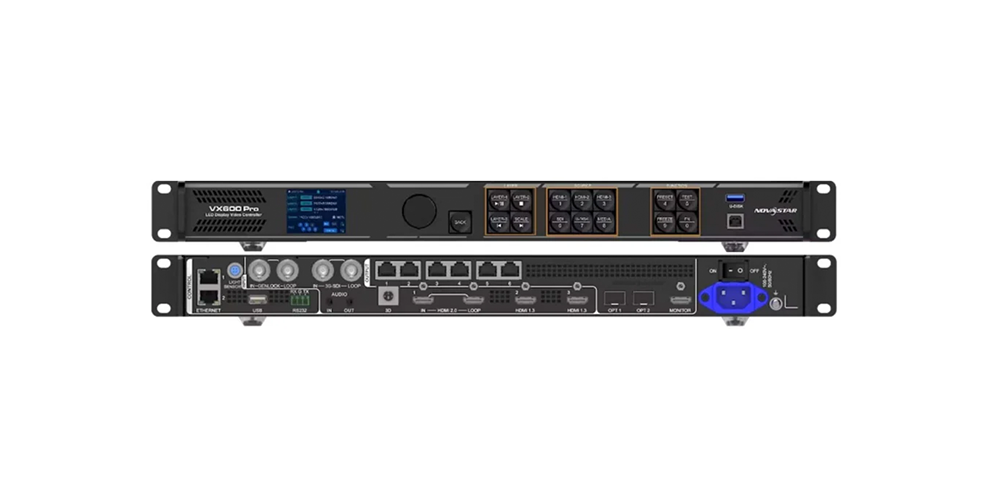
The NovaStar VX600 Pro provides the same general processing workflow with fewer sending outputs. It is a sensible starting point for one presentation wall, a worship venue or a rental screen whose cabinet map fits six ports. Budget saved on unused capacity can instead support spare receiving cards, tested cables or a backup controller.
Neither product should be selected from screen diagonal alone. A controller handles pixels, while the building or stage plan describes metres. Two screens with equal physical dimensions can have very different resolutions. Moving to a finer pixel pitch can change the controller requirement without making the screen any larger.
03. What actually changes between them?
The VX1000 Pro adds four sending ports and 2.6 million pixels of nominal capacity, approximately 66.7% more than the VX600 Pro. Shared processing features include SuperView III scaling, a pool of six 2K layer resources and 256 presets. There is no basis for assuming the larger model will make an otherwise identical, correctly configured wall sharper.
Picture quality also depends on the LED modules, calibration, receiving-card settings, source quality and scaling ratio. When comparing NovaStar VX1000 Pro vs VX600 Pro quotations, keep those variables constant. Otherwise, a difference attributed to the controller may actually come from the screen or signal configuration.
2. VX1000 Pro vs VX600 Pro Specifications Comparison
| Specification | VX600 Pro | VX1000 Pro |
|---|---|---|
| Maximum device pixel load | 3.9 million | 6.5 million |
| Gigabit Ethernet sending ports | 6 | 10 |
| Published single-port maximum | 650,000 pixels at 8-bit | 650,000 pixels at 8-bit |
| Maximum output width | 10,240 pixels, subject to total load | 10,240 pixels, subject to total load |
| Maximum output height | 8,192 pixels, subject to total load | 8,192 pixels, subject to total load |
| HDMI source inputs | 1 × HDMI 2.0; 2 × HDMI 1.3 | 1 × HDMI 2.0; 2 × HDMI 1.3 |
| SDI source input | 1 × 3G-SDI with loop | 1 × 3G-SDI with loop |
| Optical connections | 2 × 10G; mode-dependent roles | 2 × 10G; mode-dependent roles |
| Layer resource pool | 6 × 2K×1K | 6 × 2K×1K |
| User presets | 256 | 256 |
| Device dimensions | 482.6 × 302.2 × 50.1 mm | 482.6 × 302.2 × 50.1 mm |
| Net weight | 3.9 kg | 3.9 kg |
The width and height figures are separate limits. They do not mean either controller drives a 10,240 × 8,192 screen. Multiplying those dimensions gives 83,886,080 pixels, far above both device capacities. Any design must satisfy total pixel load, the individual dimensions, each port’s load and the compatible receiving-card configuration together.
Likewise, accepting a 4K source does not mean driving a full native UHD wall. A 3840 × 2160 LED screen contains 8,294,400 physical pixels, exceeding even the VX1000 Pro’s 6.5-million-pixel limit. Both controllers can scale suitable 4K input content to a smaller screen. A native UHD output project needs a different capacity plan.
Specifications are limits for defined conditions, not a promise that every maximum works simultaneously. Higher frame rates, 3D operation, topology and low-latency settings can affect the usable configuration. Have the supplier validate the intended mode and cable map instead of simply multiplying port count by a headline number.
3. Key Feature Differences
01. VX1000 Pro and VX600 Pro scaling and image quality
Both controllers offer full-screen, pixel-to-pixel and custom scaling. For presentation text and diagrams, start with content designed for the actual LED canvas. Scaling an unrelated aspect ratio to fill the screen can distort graphics, while cropping can remove important content near the edges. The right setting depends on whether preserving the entire source or filling the screen matters more.
Use a pixel grid, fine text and a familiar test image during commissioning. Check for clipping, unexpected borders and uneven colour before judging the processor. A larger controller cannot recover detail that is missing from the source, and a high-resolution source cannot create more physical LEDs in the wall.
02. Six layers means shared processing resources
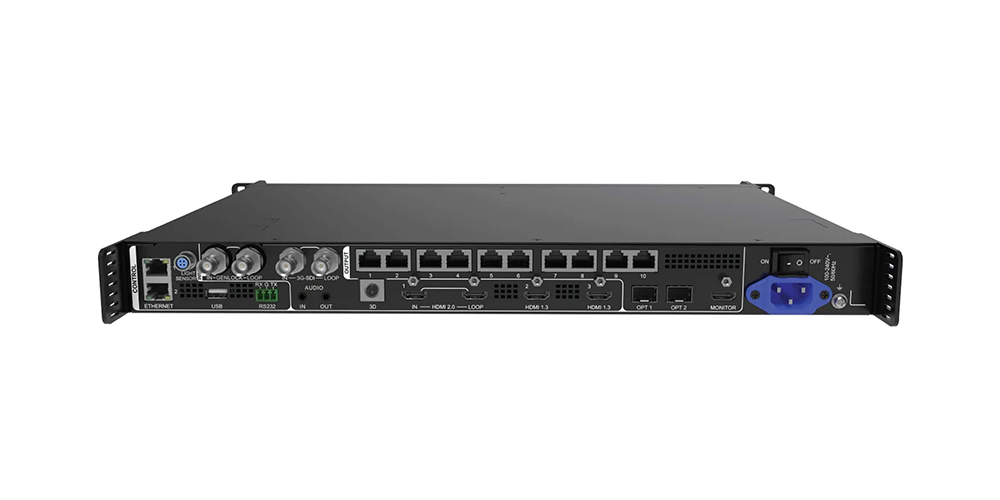
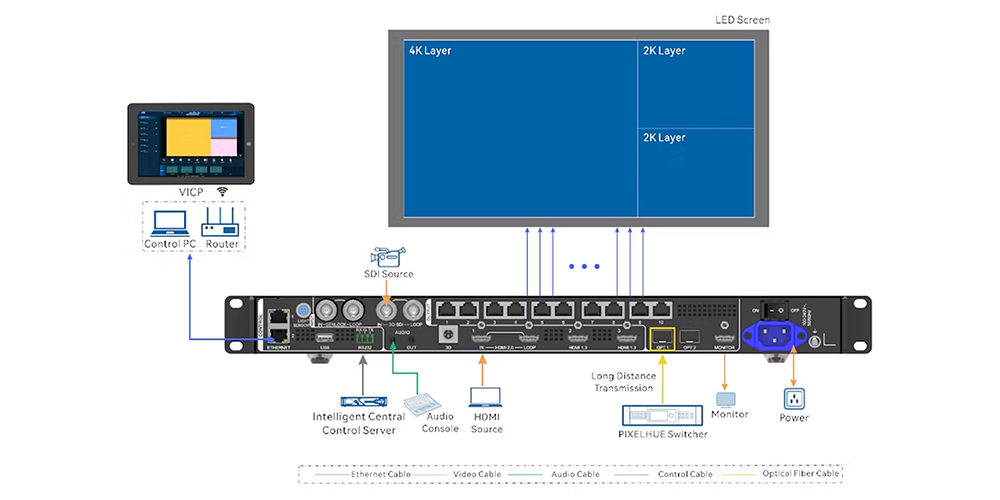
The NovaStar VX1000 Pro and VX600 Pro each have six 2K×1K layer resources. Larger layer formats consume more of that pool. The examples below describe resource arithmetic, not six independent 4K inputs or a guarantee that any combination of connectors can supply the proposed sources.
| Planned composition | Resources used | Planning result |
|---|---|---|
| Six 2K×1K layers | 6 × 1 = 6 | Uses the complete pool |
| One 4K×2K plus two 2K×1K layers | 4 + 1 + 1 = 6 | Uses the complete pool |
| Three 4K×1K layers | 3 × 2 = 6 | Uses the complete pool |
| Two 4K×2K layers | 4 + 4 = 8 | Exceeds the six-resource pool |
List every live element before selecting hardware: slides, camera, playback, sponsor graphics and any picture-in-picture view. Distinguish video layers from supported OSD functions. Then check connector capacity and input allocation in the configuration software. Switching from VX600 Pro to VX1000 Pro increases output capacity but does not increase this layer budget.
03. HDR, colour depth and calibration
Neither the VX600 Pro nor VX1000 Pro provides the native HDR function described for the VX2000 Pro in the series manual. Accepting a 10-bit or 12-bit HDMI signal is not the same as processing HDR10 or HLG. If HDR delivery is required, specify the complete colour pipeline and confirm the required equipment before ordering.
For SDR work, agree on source colour space, quantization range and screen calibration. Incorrect range settings can crush shadows or wash out blacks. Calibration improves consistency between modules; it cannot compensate for a wrong signal format. Avoid assuming maximum resolution, frame rate, chroma sampling and bit depth are available in every combination.
04. Latency and Genlock require a mode decision
The published device-delay figures are 1–2 frames with low latency in video-controller mode, versus 2–3 frames without it. ByPass can reach zero frames of controller delay when low latency is enabled, but video processing is unavailable in that mode. Genlock and low latency cannot be enabled together in ByPass; the same exclusion does not apply in video-controller mode.
Those figures do not describe total camera-to-screen delay. Cameras, switchers, converters and receiving electronics also contribute. At 60 frames per second, one frame is about 16.7 milliseconds. For live image magnification, test the complete chain and confirm that the topology permits the intended low-latency setting. Do not promise lip synchronization from the controller specification alone.
4. NovaStar VX1000 Pro vs VX600 Pro: Input and Output Comparison
01. HDMI, DisplayPort and SDI source planning
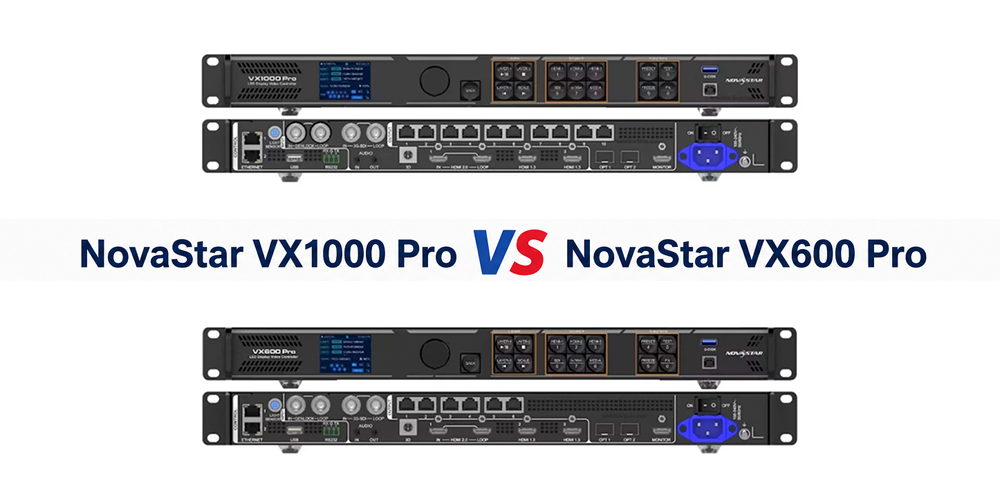
Both models provide one HDMI 2.0 input supporting up to 4096 × 2160 at 60 Hz, plus two HDMI 1.3 inputs with a standard 1920 × 1080 at 60 Hz maximum. Both also have 3G-SDI input and loop output for compatible HD production sources. Neither model has a native DisplayPort input or a 12G-SDI input.
For a DisplayPort workstation, specify a converter or adapter that supports the required HDMI timing, colour format and cable length. Test it with the actual computer rather than assuming every adapter behaves identically. For a UHD SDI source, plan appropriate conversion or different processing hardware; a 3G-SDI socket is not a 4K60 SDI input.
The HDMI monitoring output is for checking the image. It should not be counted as another LED sending output. Similarly, HDMI and SDI loops repeat their associated source path; they do not add independently processed screen capacity. Label source, loop, monitor and sending connections clearly on the system diagram.
02. Ethernet ports and cabinet routing
The NovaStar VX1000 Pro has ten Gigabit Ethernet sending ports; the NovaStar VX600 Pro has six. Their control-network connections serve a different purpose. Count sending outputs when calculating LED wall capacity, and keep control-network cabling separate in the documentation so technicians do not connect cabinets to the wrong sockets.
Prepare a schedule listing each sending port, its first cabinet, cabinet quantity, pixel load and cable destination. A total below 3.9 million pixels can still require more than six practical routes. Conversely, ten outputs do not solve an overloaded individual route. Ordinary network switches should not be assumed to distribute LED sending data or increase controller capacity.
03. Fiber and backup planning
Both controllers include two 10G optical connections. Their roles depend on mode: OPT 1 can act as input or output, while OPT 2 can provide the relevant copy, backup or loop function. Fiber transports the assigned data; it does not double the number of unique pixels that the processor can drive.
Specify the compatible fiber converter, optical modules, fiber type and connector arrangement as part of the bill of materials. Include a spare cable strategy and physical protection for the route. A second fiber socket alone is not a complete backup system: source redundancy, controller redundancy and receiving-card backup address different failure points.
If Ethernet outputs are allocated in primary-and-backup pairs, the backup paths carry duplicated content rather than additional independent screen area. Recalculate the usable primary capacity from the actual scheme. The VX1000 Pro’s additional ports can be valuable here, but a single controller still represents a common point of failure.
5. NovaStar VX1000 Pro vs VX600 Pro: Which LED Video Processor Fits Your Project?
01. Calculate actual pixels before choosing
For a rectangular wall, multiply horizontal pixels by vertical pixels. With cabinets, first multiply the number of cabinet columns by the horizontal resolution of one cabinet; do the same for rows and vertical resolution. Use the cabinet manufacturer’s exact pixel matrix rather than dividing metres by a rounded marketing pitch.
As an illustrative example, a 500 × 500 mm cabinet with 192 × 192 pixels contains 36,864 pixels. A wall of 12 columns and six rows has 72 cabinets, measures 6 × 3 metres and contains 2304 × 1152 = 2,654,208 pixels. Both models pass the initial total-capacity check, although the port map still needs validation.
At the published 650,000-pixel single-port maximum, 17 such cabinets contain 626,688 pixels, while 18 contain 663,552 and exceed that limit. This shows why dividing the wall’s total pixels by the controller’s total capacity is insufficient. Cabinet groups must also fit individual ports without exceeding the receiving-card or operating-mode limits.
| Screen arrangement | Pixel calculation | Initial model assessment |
|---|---|---|
| 12 × 6 cabinets, each 192 × 192 px | 2,654,208 pixels | Either model; verify six-port routing |
| 16 × 8 cabinets, each 192 × 192 px | 4,718,592 pixels | VX1000 Pro; exceeds VX600 Pro total |
| 20 × 10 cabinets, each 192 × 192 px | 7,372,800 pixels | Neither single unit at headline capacity |
| 3840 × 1080 LED canvas | 4,147,200 pixels | VX1000 Pro; exceeds 3.9 million |
| 3840 × 2160 native UHD LED canvas | 8,294,400 pixels | Requires a different capacity plan |
These are calculations, not tested installations or universal wiring recommendations. They assume the stated pixel matrix and do not reserve ports for backup. For unusual shapes, check the selected topology: free topology and non-free topology calculate port loading differently, and free topology needs compatible receiving cards. Validate the software result for the exact layout.
02. Rental, corporate and fixed installations
For rental LED display projects, compare the largest regularly booked configuration with the smaller everyday layouts. VX600 Pro can be a practical fleet choice where jobs fit its capacity. VX1000 Pro is more useful when confirmed bookings require additional routes or larger canvases. Avoid buying solely for a hypothetical expansion with no cabinet plan.
For permanent venues, record the final wall resolution, service access and intended source equipment. A controller replacement may require downtime and reconfiguration, so modest planned expansion can justify spare capacity. For independent rooms or simultaneous events, separate controllers may offer more operational independence than one larger unit shared between unrelated users.
The existing customer video below illustrates an LED display application. It is not a benchmark proving either controller’s performance or capacity. Choose the processor using the receiving-card configuration and engineering requirements of your own screen.
03. Broadcast backgrounds and demanding workflows
A broadcast or studio label does not automatically make VX1000 Pro the right choice. Check camera frame rate, synchronization, shutter behaviour, source switching and the screen’s scanning characteristics. More outputs do not by themselves establish suitability for virtual production, high-speed shooting or colour-critical work.
Before signing off NovaStar VX1000 Pro vs VX600 Pro for a live camera workflow, request a demonstration with the intended cabinets and signal chain. Include the actual camera and representative content. If the project needs more layer resources, native HDR or capacity above 6.5 million pixels, evaluate a different system rather than forcing either model into the specification.
6. NovaStar VX1000 Pro vs VX600 Pro: Price and Value Comparison
01. How to compare VX1000 Pro and VX600 Pro prices
The VX600 Pro is normally positioned below the VX1000 Pro in price, but a reliable comparison requires current quotations with matching terms. This article does not present a universal street-price range or an HonghaiLED selling price. Currency, tax, shipping, packaging and support can make apparently similar online offers materially different.
Ask for both models in one quotation, with the exact Pro model names and the same delivery destination. Identify whether optical modules, a fiber converter, flight case and commissioning support are included. A low controller-only price can be misleading when the project also needs long-distance transmission hardware or local technical assistance.
| Quotation item | What to confirm | Why it affects value |
|---|---|---|
| Hardware identity | VX600 Pro or VX1000 Pro; condition and exact package | Prevents comparison with original non-Pro models |
| Optical transmission | Modules, converter and fiber included or separate | Makes the long-distance system cost visible |
| Support and warranty | Responsible service provider, coverage and turnaround | Helps plan downtime and spare equipment |
| Delivery costs | Currency, freight, taxes and delivery terms | Enables a like-for-like landed-cost comparison |
| Commissioning | Cabinet mapping, settings backup and operator training | Reduces uncertainty during installation |
| Expansion and redundancy | Future cabinet map and primary/backup routing | Shows whether extra outputs will be used |
02. When is the VX1000 Pro upgrade worth paying for?
Compare the additional purchase cost with a specific operational benefit. If a confirmed project needs eight sending routes, the VX600 Pro’s six outputs may create a real constraint. If every scheduled wall fits comfortably on six routes, the VX1000 Pro’s unused outputs may deliver little immediate return.
For an illustrative rental calculation, divide the upgrade premium by the additional contribution earned per qualifying booking. If the premium were $600 and an eligible job contributed $150 after its extra operating costs, four such bookings would recover the premium. These are hypothetical planning figures, not product prices, rental rates or a profit forecast.
Also compare the cost of carrying a spare controller. Extra pixel capacity and equipment redundancy solve different problems. A production that fits VX600 Pro may benefit more from a tested spare than from one larger controller with no recovery plan. The preferred purchase depends on both the screen design and the consequences of interruption.
03. Software, manuals and handover
Use NovaStar LED software downloads to locate the relevant tools, then confirm compatibility with the exact firmware and receiving cards. NovaLCT and Unico have different roles in configuration and operation. Do not assume software used with the original VX series is the correct workflow for the Pro series.
At handover, retain the cabinet map, receiving-card configuration, source timing, presets and software versions. Demonstrate normal startup, source loss and the planned backup response. Keep a known-good configuration before changing firmware. A repeatable setup procedure is more valuable than a specification table that nobody has checked against the installed wall.
7. NovaStar VX1000 Pro vs VX600 Pro FAQ
Open a question for a concise answer. The capacity statements below refer to the Pro models and must be checked against the intended operating configuration.
01. What is the main difference between NovaStar VX1000 Pro and VX600 Pro?
VX1000 Pro has ten Gigabit Ethernet sending ports and up to 6.5 million pixels of capacity. VX600 Pro has six sending ports and up to 3.9 million pixels. Choose using the total screen load, individual port map and backup scheme; the larger model does not add more shared layer resources.
02. How many ports does NovaStar VX1000 Pro have?
The NovaStar VX1000 Pro has ten Gigabit Ethernet LED sending ports and two 10G optical connections. Control-network ports are separate from these sending outputs. When researching “how many ports does NovaStar VX1000 have,” check whether the source describes the original VX1000 or the VX1000 Pro before applying its other specifications.
03. How many pixels can VX1000 Pro drive per port?
The published maximum is 650,000 pixels per sending port at 8-bit. VX600 Pro has the same published single-port limit. Actual design approval must also account for frame rate, topology, low-latency operation and receiving-card compatibility; the headline value is not an unconditional allowance for every configuration.
04. Can VX600 Pro and VX1000 Pro handle 4K?
Both accept up to 4096 × 2160 at 60 Hz through HDMI 2.0. Neither single unit has enough headline pixel capacity for a native 3840 × 2160 LED wall. A 4K input can be scaled to a smaller canvas, so distinguish input resolution from physical output pixel count.
05. Do VX600 Pro and VX1000 Pro support HDR10 or HLG?
No native HDR function is specified for these two models in the reviewed VX Pro Series manual; that function is identified for VX2000 Pro. HDMI input bit depth alone does not establish HDR support. For HDR content, confirm a suitable conversion or processing path and test the resulting image.
06. Which is cheaper, VX600 Pro or VX1000 Pro?
VX600 Pro is normally the lower-priced option. Obtain current, comparable quotations before deciding, including warranty, shipping, tax and required accessories. VX1000 Pro is worth the additional cost when its extra capacity or outputs solve a documented project requirement, rather than simply because the model number is higher.
07. Can either controller run six 4K layers?
No. Each controller has six shared 2K×1K resources. A 4K×2K layer uses four resources, leaving two for smaller layers. Confirm source-connector allocation as well as resource arithmetic. More sending ports on VX1000 Pro do not increase the shared processing pool.
08. What are the dimensions and weight?
Both devices measure 482.6 × 302.2 × 50.1 mm and weigh 3.9 kg net in the reviewed specifications. Shipping weight depends on packaging. Use the mechanical drawing and the supplied rack hardware when planning installation, and leave space for connectors, cable bends and ventilation.
8. Conclusion: Choose the Controller That Fits Your LED Wall
The NovaStar VX1000 Pro vs VX600 Pro decision becomes straightforward once the cabinet map is complete. Choose VX600 Pro when the screen fits its 3.9-million-pixel budget, six sending routes and intended operating mode. Choose VX1000 Pro when the verified layout needs its additional four outputs or capacity up to 6.5 million pixels.
Both models share the main processing workflow, so pay for capacity that the project can use. Before ordering, confirm source formats, layer allocation, per-port loads, receiving-card compatibility and backup behaviour. For a project-specific recommendation, send HonghaiLED the cabinet pixel matrix, cabinet quantity, layout and source list alongside your delivery requirements.
Technical basis: NovaStar VX600 Pro and VX1000 Pro All-in-One Controller Specifications V1.4.0, and VX Pro Series All-in-One Controller User Manual V1.4.1, reviewed September 28, 2026. The linked VX1000 Pro guide and VX600 Pro guide provide further model information. The sizing and payback examples here are explicitly illustrative; they are not measured product tests or binding quotations.
Related Posts
NovaStar NovaPro HD Review: Specs, Setup and Manual
The NovaStar NovaPro HD combines video processing and LED display…
NovaStar VX2000 Pro vs VX2000: Specs & Price Guide
NovaStar VX2000 Pro vs VX2000 is a comparison that starts…
NovaStar ET1S-G Review: Media Server Specs, Setup and Price
The NovaStar ET1S-G is a compact media server that prepares…

No Comments