
16:9 Aspect Ratio vs 4:3: LED Display Sizes and Resolutions
16:9 vs 4:3 describes screen shape: 16:9 is wider, while 4:3 is closer to square. Choose the 16:9 aspect ratio when your main content is widescreen video, presentations or live camera feeds. Choose the 4:3 aspect ratio when an existing installation or essential content genuinely requires it. Neither shape automatically delivers better resolution, brightness or image quality.
For an LED video wall, this choice also affects cabinet quantities, usable picture area and content production. A screen can have a 16:9 aspect ratio without containing enough pixels for native Full HD or 4K. This guide compares the two formats, explains screen dimensions and resolutions, and shows how to specify an LED display that fits both your content and your building.
1. What Is Aspect Ratio?
Aspect ratio is the relationship between a screen’s active width and active height. Divide width by height to find its numerical value. The 16:9 aspect ratio equals approximately 1.778:1; the 4:3 aspect ratio equals approximately 1.333:1. Both are landscape formats. A 4:3 screen is not a square, which would be 1:1.
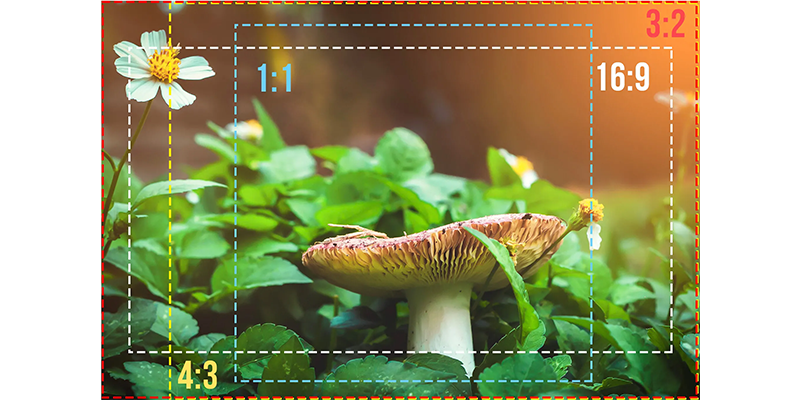
01. Aspect ratio, screen size and resolution
These specifications answer different questions. Aspect ratio describes shape. Physical dimensions describe the illuminated area in millimetres, metres or inches. Resolution describes the number of addressable pixels across and down. Pixel pitch describes the distance between adjacent pixel centres, usually in millimetres.
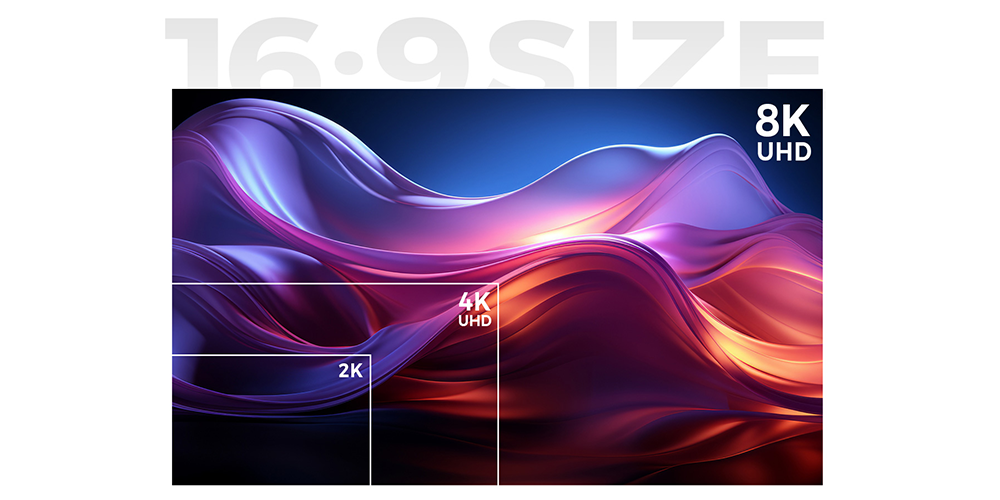
For example, 1920 × 1080 and 3840 × 2160 share the 16:9 aspect ratio, but the second contains four times as many pixels. A 4:3 aspect ratio display can also have a high pixel count. Comparing only the ratio tells you nothing about how clearly either wall will reproduce small spreadsheet text.
02. Compare screens using the same measurement
Statements such as “16:9 is bigger” need a reference. At equal height, a 16:9 screen is one-third wider than a 4:3 screen. At equal width, a 4:3 screen is one-third taller than a 16:9 screen. At equal diagonal, their widths, heights and areas all differ. LED quotations should therefore show active width and height, not just a diagonal label.
03. Other useful screen shapes
A 16:10 layout offers more height than 16:9 at the same width. Portrait signage often uses 9:16. Panoramic walls may use 32:9 or a custom ratio. These are valid design choices when the content supports them; a control room does not inherently need the 4:3 aspect ratio.
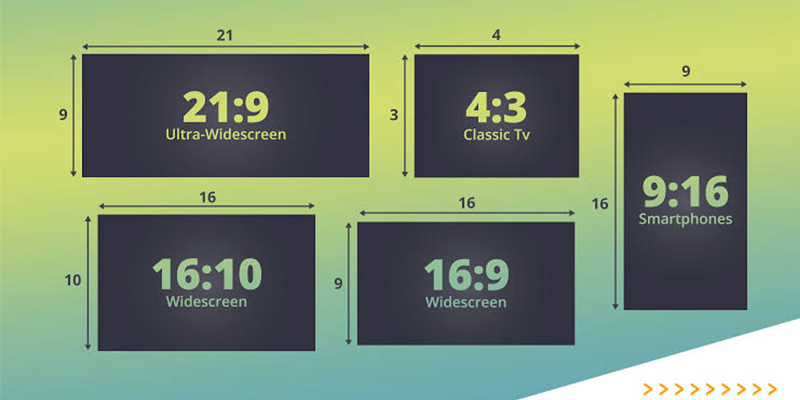
2. What Is a 16:9 Aspect Ratio LED Display?
A 16:9 aspect ratio LED display is a direct-view LED screen whose active width is 16 units for every 9 units of height. The LEDs form the image directly. Multiple cabinets create the complete wall, so its final proportions depend on both cabinet dimensions and the number of columns and rows.
A 3200 × 1800 mm wall has the 16:9 aspect ratio regardless of whether it displays a video, a slide or a dashboard. However, its physical dimensions alone do not establish its resolution. To calculate that, request the pixel matrix per cabinet and multiply it by the cabinet arrangement.
Consider an illustrative wall made from 640 × 360 mm cabinets, each containing 320 × 180 pixels. A five-column, five-row array measures 3200 × 1800 mm and contains 1600 × 900 pixels. It has the right shape for widescreen video but must scale a 1920 × 1080 source. This distinction prevents “HD compatible” from being mistaken for native Full HD.
The same principle applies to the 4:3 aspect ratio. Its shape does not make it low definition. Ask separately for the physical size, native pixel resolution, accepted input formats and processor output configuration.
3. Why Is the 16:9 Aspect Ratio the Industry Standard?
01. A practical match for common content
The 16:9 aspect ratio is widely used because many production and presentation workflows already use it. Google’s YouTube guidance on video resolution and aspect ratios identifies 16:9 as the standard desktop format while explaining that its player adapts to other video shapes. This makes widescreen a useful starting point, rather than a requirement for every installation.
Microsoft also offers Standard 4:3 and Widescreen 16:9 slide formats. When a venue distributes a consistent widescreen template, presenters can prepare material for the intended canvas before arriving. This reduces last-minute layout changes and makes the 16:9 aspect ratio convenient for recurring conferences.
02. Cabinet families can simplify planning
Some indoor LED cabinets have a 16:9 aspect ratio themselves. Equal numbers of cabinet columns and rows preserve that ratio: four across and four high, for example. Such cabinet families can provide straightforward paths to larger walls and standard pixel canvases, provided the pitch and cabinet matrix also match the required resolution.
Square rental cabinets work differently. Their column-to-row count must create the desired shape. A 16:9 aspect ratio cannot be assumed simply because a supplier describes the product as suitable for widescreen events.
03. Know what the ratio cannot improve
The 16:9 aspect ratio does not independently lower latency, increase refresh rate, widen the LED viewing angle or improve colour accuracy. Those depend on hardware, processing and configuration. Spare-part availability depends on the product family and service agreement. Neither 16:9 nor the 4:3 aspect ratio guarantees a lower lifetime cost.
4. Technical Requirements for Designing a 16:9 LED Display
01. Calculate the cabinet grid before ordering
For identical cabinets, wall width equals cabinet width multiplied by columns; wall height equals cabinet height multiplied by rows. Use the active display dimensions consistently. Frames, trim and service clearances belong in the installation drawing but should not change the calculated image ratio.
| Cabinet size, W × H | Columns × rows | Active wall size | Result |
|---|---|---|---|
| 600 × 337.5 mm | 4 × 4 | 2400 × 1350 mm | Exact 16:9; 16 cabinets |
| 600 × 337.5 mm | 3 × 4 | 1800 × 1350 mm | Exact 4:3; 12 cabinets |
| 500 × 500 mm | 16 × 9 | 8000 × 4500 mm | Exact 16:9; 144 cabinets |
| 500 × 500 mm | 8 × 6 | 4000 × 3000 mm | Exact 4:3; 48 cabinets |
| 500 × 500 mm | 8 × 5 | 4000 × 2500 mm | 8:5, or 16:10; not 16:9 |
These are geometry examples, not installation approvals. For a single layer of uncut 500 mm square cabinets, the smallest exact 16:9 grid is 16 columns by 9 rows. Smaller practical rental walls often approximate widescreen. Agree on the resulting margins or crop before approving the order.
02. Match pixel pitch to detail and distance
For uniform square pixels, horizontal pixel count is approximately active width in millimetres divided by pitch in millimetres. Use the manufacturer’s actual module or cabinet matrix for the final calculation because marketed pitch values may be rounded. Repeat the calculation vertically.
Do not treat “pitch in millimetres equals viewing distance in metres” as a guaranteed readability standard. A viewer may accept a video image while struggling with small text at the same distance. Test representative slides, labels and diagrams from the nearest and farthest seats. The 16:9 aspect ratio defines their canvas, not their legibility.
03. Verify the whole signal chain
Check input resolution, frame rate, supported colour format, processor loading capacity, output-port limits and receiving-card configuration. A processor accepting a 4K input may still send a scaled image to a lower-resolution wall. Confirm the final pixel map and whether the design needs one-to-one mapping, scaling or multiple content windows.
Brightness, electrical capacity, heat management, mounting loads and maintenance access must be specified for the actual environment. These requirements apply equally to a 16:9 aspect ratio wall and a 4:3 aspect ratio wall. Outdoor weather protection and structural design cannot be inferred from screen shape.
5. How to Calculate 16:9 Screen Dimensions?
01. Calculate width, height and diagonal
For a 16:9 aspect ratio screen, height = width × 9 ÷ 16, and width = height × 16 ÷ 9. For a 4:3 aspect ratio screen, height = width × 3 ÷ 4, and width = height × 4 ÷ 3. Keep every dimension in the same unit throughout the calculation.
If only diagonal D is known, a 16:9 screen has width D × 16 ÷ √337 and height D × 9 ÷ √337. For 4:3, width is D × 0.8 and height is D × 0.6. These describe the active rectangle, excluding enclosures.
| Diagonal | 16:9 width × height | 4:3 width × height |
|---|---|---|
| 100 inches | 87.16 × 49.03 inches | 80.00 × 60.00 inches |
| 150 inches | 130.74 × 73.54 inches | 120.00 × 90.00 inches |
| 200 inches | 174.32 × 98.05 inches | 160.00 × 120.00 inches |
Values are rounded to two decimal places. Multiply inches by 25.4 to obtain millimetres. For modular LED walls, treat these figures as targets: the available cabinet grid determines the buildable dimensions. Do not round a dimension and then describe the result as an exact ratio without checking it again.
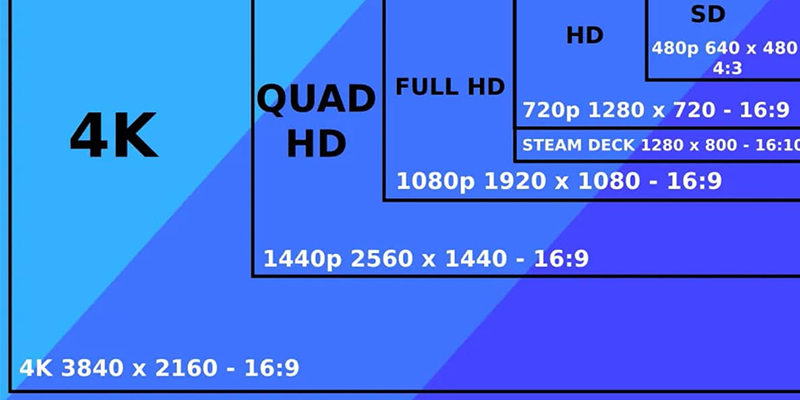
02. Check 16:9 resolutions and 4:3 resolutions
Divide pixel width by pixel height to identify the ratio for square-pixel content. A 1920 × 1080 frame is 16:9, while a 1440 × 1080 square-pixel frame is 4:3. Some legacy video uses non-square pixels, so its display aspect ratio also depends on pixel-aspect metadata and playback interpretation.
| Format | Resolution, width × height | Pixel count | Aspect ratio |
|---|---|---|---|
| VGA | 640 × 480 | 307,200 | 4:3 |
| XGA | 1024 × 768 | 786,432 | 4:3 |
| UXGA | 1600 × 1200 | 1,920,000 | 4:3 |
| HD | 1280 × 720 | 921,600 | 16:9 |
| Full HD | 1920 × 1080 | 2,073,600 | 16:9 |
| QHD | 2560 × 1440 | 3,686,400 | 16:9 |
| 4K UHD | 3840 × 2160 | 8,294,400 | 16:9 |
“4K 4:3” is ambiguous. A 3840 × 2880 canvas is mathematically 4:3, but it is not the 3840 × 2160 UHD format. Always request both dimensions. Likewise, avoid relying on the label “2K” alone: different workflows use it for different pixel widths.
03. Work through a native 4K LED example
At an exact 1.25 mm pitch, a 4800 × 2700 mm wall contains 3840 × 2160 pixels. With 600 × 337.5 mm cabinets, each cabinet contains 480 × 270 pixels; an eight-by-eight array uses 64 cabinets. This produces both the 16:9 aspect ratio and the native 4K UHD pixel matrix.
HonghaiLED’s EA600COB3 indoor COB LED screen uses this cabinet format. Confirm the selected pitch, current specification and processor configuration when requesting a quotation. A smaller wall using the same cabinet family does not automatically retain native 4K resolution.
6. Aspect Ratio 4:3 vs 16:9 in LED Display
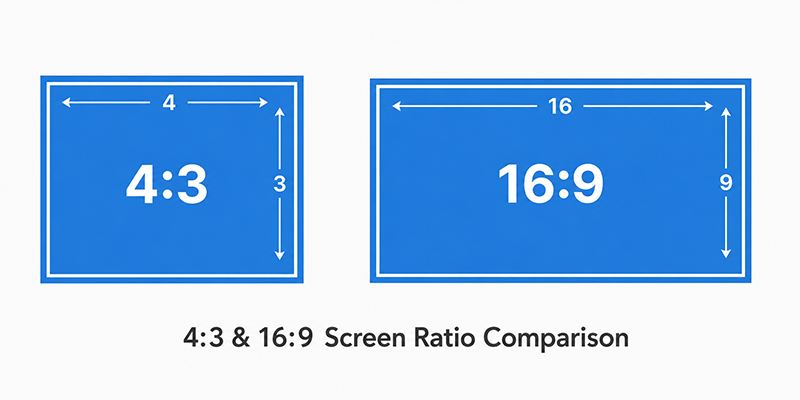
The practical 16:9 vs 4:3 decision is about the image you need to preserve and the space you can use. Neither format is universally superior. Compare the formats under a stated constraint, then decide how the system will handle material with a different shape.
01. Understand letterboxing and pillarboxing
When an entire 16:9 image fits inside a 4:3 screen without distortion, horizontal bars appear above and below it. This is letterboxing. When an entire 4:3 image fits inside a 16:9 screen, vertical bars appear at the sides. This is pillarboxing. The bar direction depends on the source-to-screen mismatch.
In either of these two exact combinations, the picture occupies 75% of the screen area and the remaining 25% becomes bars, assuming proportional fit and no additional margins. On a 1920 × 1080 canvas, a centred 4:3 image occupies 1440 × 1080 pixels, leaving 240-pixel bars on each side.
02. Decide between fitting, cropping and stretching
Fitting preserves the complete image and its proportions. Cropping fills the screen but removes information. Converting a 4:3 image to 16:9 by filling the width removes 25% of its original height. Converting a 16:9 image to 4:3 by filling the height removes 25% of its original width. A centred crop divides that loss equally between opposite edges.
Stretching fills the screen by changing proportions. Faces, circles, logos and technical drawings become distorted, so it is usually unsuitable for business communication. If bars are undesirable, redesign the composition or use the extra area for a deliberate background. Do not crop essential captions or safety information just to fill the wall.
03. Compare useful area and project cost fairly
| Constraint | 16:9 aspect ratio | 4:3 aspect ratio |
|---|---|---|
| Same active width: 4 m | Height 2.25 m; area 9 m² | Height 3 m; area 12 m² |
| Same active height: 3 m | Width about 5.33 m; area 16 m² | Width 4 m; area 12 m² |
| Main source: 16:9 video | Can fill the wall proportionally | Fit with top and bottom bars, or crop sides |
| Main source: 4:3 content | Fit with side bars, or crop top and bottom | Can fill the wall proportionally |
| Image-quality comparison | Check pitch, pixel count and processing | Check the same specifications |
At equal width and comparable specifications, a 4:3 wall has more active area to purchase. At equal height, the reverse is true. Cabinet prices, supporting structure, power distribution and processing also matter. Obtain comparable quotations rather than assuming that the 16:9 aspect ratio is always cheaper.
7. How to Choose the Right LED Screen Ratio?
01. Audit the content that actually matters
List the sources used each week: presentations, broadcast feeds, camera outputs, dashboards, advertising videos and archived material. Record their dimensions and identify anything that must never be cropped. A 16:9 aspect ratio is a sensible starting point for a video-led venue, but a fixed legacy interface may justify keeping the 4:3 aspect ratio.
For mixed material, specify a main canvas and handling rules for every source. A museum might preserve historic 4:3 footage within a widescreen layout containing explanatory text. A monitoring room may prioritise window arrangements and readable alarms over either standard ratio.
02. Survey the room and assess the audience
Measure clear wall width, usable height, mounting depth, access routes and service space. Check sightlines from the sides and rear of the room. A wide wall can still be difficult to read if the content is too small or partially obstructed. Compare actual layouts at the intended text size.
A width-limited opening may accommodate a taller 4:3 aspect ratio display. A low ceiling may favour the 16:9 aspect ratio at the same width. Include trim and mounting clearances in the drawing, and confirm that the installation team can replace modules and access electrical equipment after completion.
03. Request comparable specifications
Ask the supplier to state cabinet model, grid, active dimensions, native resolution, precise pixel pitch, processor model and supported input timing. Request typical and maximum power figures with their measurement conditions, the service method, spare-module quantities and warranty scope. The ratio should be one line in a complete specification.
Compare indoor LED screen options for permanent installations and rental LED displays for events. The appropriate cabinet format depends on transport, handling, assembly frequency and maintenance as well as the final screen proportions.
04. Test before accepting the system
Use a test pattern containing circles, a square grid and a visible border. Circles reveal stretching; the border reveals cropping or overscan. Follow it with real slides, small text, moving video and every required input source. Confirm the processor recalls the approved settings after a restart and after switching sources.
Record which device performs scaling. Unnecessary scaling at both the media player and processor can soften detail. The acceptance document should state whether each source fills the 16:9 aspect ratio canvas, occupies a window or appears with bars.
8. When Should You Choose a 16:9 LED Display?
Choose a 16:9 aspect ratio LED display when most essential material is widescreen, the installation can accommodate a suitable cabinet grid, and the selected pitch provides enough pixels for the required detail. This commonly fits conference rooms, presentation spaces and video-focused event screens. Validate the content instead of relying on the venue category alone.
For a presentation project, set the template before designing slides. Microsoft’s instructions for changing PowerPoint slide size explain the Standard and Widescreen options and the fitting choices offered when resizing. Review every slide afterwards because changing the canvas can alter object placement and readability.
For a rental event, give the content team the confirmed pixel canvas, not simply “16:9.” A near-widescreen wall may need a custom composition. Keep essential text inside an agreed safe area, and rehearse with the actual media server, switcher and processor.
Keep the 4:3 aspect ratio when critical legacy content or a fixed architectural opening makes it the better fit. Consider portrait or panoramic formats when the communication goal requires them. For orientation changes, confirm manufacturer-approved mounting, cooling, service access and processor rotation support; rotating the content alone does not approve the hardware installation.
The existing HonghaiLED demonstrations below show cabinet and indoor-display products that can inform your equipment discussion. Verify the configuration for your own project rather than treating a demonstration as a guarantee of screen size or native resolution.
9. FAQs
01. Is 4:3 the same as 16:9?
No. The 4:3 aspect ratio is approximately 1.333:1, while the 16:9 aspect ratio is approximately 1.778:1. At equal height, 16:9 is one-third wider. The formats can display each other’s content through fitting or cropping, but their shapes are different.
02. Which is better for an LED wall: 16:9 or 4:3?
Choose according to content, available space and required detail. A 16:9 aspect ratio suits widescreen production workflows. A 4:3 aspect ratio may suit an existing opening or legacy application. Neither ratio alone guarantees sharper pictures, lower cost or wider viewing angles.
03. Is 1920 × 1080 a 4:3 resolution?
No. With square pixels, 1920 × 1080 is 16:9. Examples of 4:3 resolutions include 640 × 480, 1024 × 768 and 1600 × 1200. Always divide width by height and check whether legacy footage uses non-square pixels.
04. What resolutions have a 16:9 aspect ratio?
Common examples include 1280 × 720, 1920 × 1080, 2560 × 1440, 3840 × 2160 and 7680 × 4320. These share a shape but have different pixel counts. An LED wall must physically contain the required pixels to reproduce a source at native resolution.
05. Can a 16:9 LED display show 4K video?
It can show a 4K source if its signal chain accepts that format. Native UHD reproduction requires a 3840 × 2160 display matrix and appropriate mapping. A lower-resolution wall can show a scaled version, but it will not reproduce every source pixel individually.
06. How do I convert 4:3 to 16:9 without stretching?
Preserve proportions and add side bars, or redesign the content for a widescreen canvas. Cropping the top and bottom can fill the screen but discards information. For slides and diagrams, adjust the layout manually and check every label rather than automatically stretching objects.
07. Can 500 × 500 mm cabinets make an exact 16:9 wall?
Yes. With identical uncut square cabinets, use 16 columns by 9 rows or an integer multiple of that grid. The smallest such wall measures 8 × 4.5 m. An eight-by-five grid is 16:10, so specify how a widescreen source will fit.
08. Does 16:9 vs 4:3 change LED viewing distance?
Not directly. Viewing distance depends on physical image size, pixel pitch, content detail and the viewer’s needs. Test the smallest necessary text from the actual seating positions. A wider aspect ratio does not make tiny text readable or change the LED package’s optical viewing angle.
10. Conclusion
The best answer to 16:9 vs 4:3 starts with your content. The 16:9 aspect ratio is a practical choice for widescreen video and presentations; the 4:3 aspect ratio remains useful where legacy material or installation constraints justify it. Confirm physical dimensions, cabinet grid and native resolution separately.
Before ordering, agree on fitting and cropping rules, test real material, and obtain a complete pixel map. Share your available wall size, viewing distances, source formats and target resolution with HonghaiLED’s display team to compare buildable configurations. A clear specification helps ensure the installed screen shows the information your audience needs.
Related Posts
LED Screen vs LCD Screen: Differences & How to Choose
LED screen vs LCD screen is a comparison of two…
How to Choose the Best LED Lamp Beads for LED Displays
Choosing the best LED lamp beads for LED displays starts…

LED Packaging Technology: SMD, COB, GOB & MIP Guide
LED packaging technology determines how light-emitting chips are connected, supported,…

No Comments