
NovaStar H Series Video Splicing Processors: Models, Cards and Setup
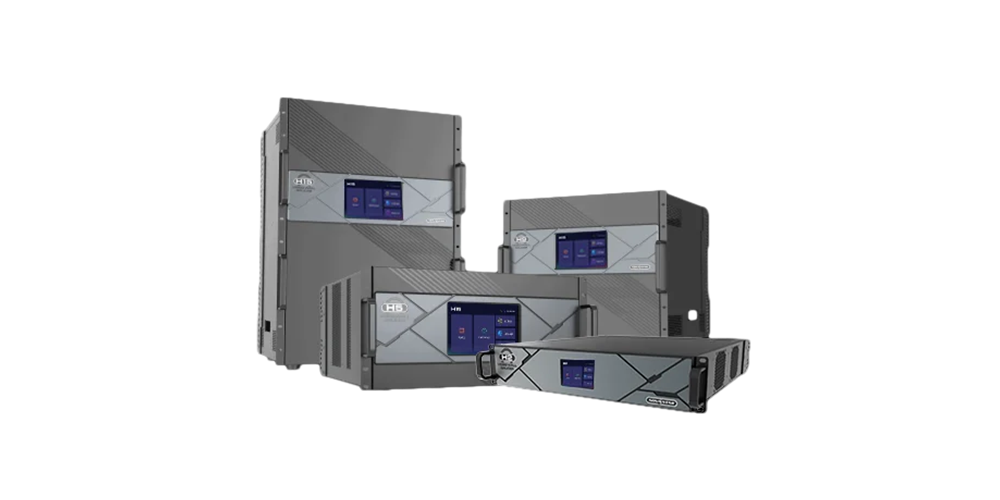
The NovaStar H Series is a modular family of LED video splicing processors for combining multiple sources across one or more display surfaces. The range includes H2, H5, H9, H15 and H20 chassis, with Enhanced versions of H9 and H15. A properly configured system can combine video processing and LED sending, making it useful for fine-pitch displays, conference spaces, control rooms and large venue installations.
Choosing a NovaStar H Series processor requires more than comparing the largest pixel number. Input formats, simultaneous layers, output-card types, receiving cards and backup requirements determine whether a proposed configuration will work. This guide explains those decisions, compares the chassis, and gives you a practical checklist for requesting a complete quotation.
Specifications below distinguish the standard H_4xfiber sending card from the enhanced fiber card. These are different products with different capacities. Treat published maximums as configuration limits to verify against your exact hardware and operating mode, rather than guaranteed performance for every signal format.
1. What is a NovaStar H Series video splicing processor?
A NovaStar H Series processor receives video, arranges it on a display canvas and delivers the resulting image through the installed outputs. Splicing means distributing that canvas across multiple output regions so the audience sees a coordinated image. LED sending is the separate task of delivering mapped display data to compatible receiving cards inside the cabinets.
The modular design lets an integrator choose the connectors and output architecture for the installation. An empty chassis, a chassis with video outputs and a complete LED sending configuration are therefore different purchases. Confirm the installed cards before comparing prices or assuming the unit can connect directly to an LED wall.
01. Where the NovaStar H Series fits
Consider the platform when several computers, cameras or media servers must share a wall, or when multiple screens need coordinated layouts. A control room may prioritize readable data and operational continuity. A conference venue may need predictable presentation changes. An exhibition may require unusually wide canvases. The required workflow, rather than the venue label, should determine the specification.
For fine-pitch LED displays, native resolution and text readability deserve particular attention. Scaling a low-resolution presentation to a dense wall cannot restore detail missing from the source. Agree on content dimensions, viewing distance and font sizes before the system is commissioned.
02. What modular hardware does and does not solve
NovaStar H Series input and output cards are designed for replacement and reconfiguration. That flexibility can simplify maintenance, but hot-swappable hardware does not mean a live image will survive removal of an active card. Service continuity requires a working backup path and a tested recovery procedure.
Likewise, synchronized outputs do not correct every camera, source or receiving-card problem. Keep processing, signal transport, cabinet mapping and display calibration separate in the test plan. This makes a failure easier to locate and avoids replacing functioning hardware to solve a configuration issue.
2. NovaStar H Series comparison: H2, H5, H9, H15 and H20
The table compares chassis size and slot capacity. Figures describe maximum expansion, not the cards included in a quotation. The NovaStar H Series model number is not a pixel count, and an Enhanced chassis must be identified explicitly on the order.
| Model | Rack size | Maximum input cards | Maximum output cards | Selection consideration |
|---|---|---|---|---|
| H2 | 2U | 4 | 2 | Limited rack space and a modest card list |
| H5 | 5U | 10 | 3 | More input slots without a large chassis |
| H9 / H9 Enhanced | 9U | 15 | 5 / 10 | More outputs or independent screen regions |
| H15 / H15 Enhanced | 15U | 30 | 10 / 16 | Large source inventory and expansion |
| H20 | 20U | 40 | 20 | Largest chassis in this comparison |
Specification basis: NovaStar H Series product comparison, checked 8 October 2026. Actual card combinations and supported operating modes must be confirmed in the model-specific specification.
01. NovaStar H2
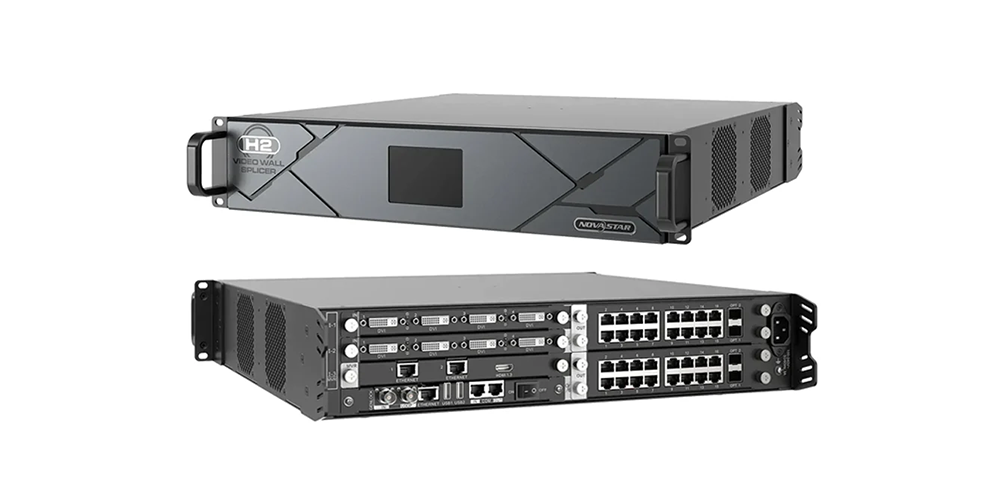
The H2 is the smallest NovaStar H Series chassis. Start here when the required inputs and outputs fit its slots, then verify layer resources and cable distribution. Do not select a larger processor solely because the physical screen looks large; pixel pitch and cabinet resolution determine the actual pixel load. See the NovaStar H2 configuration guide for model-focused information.
02. NovaStar H5
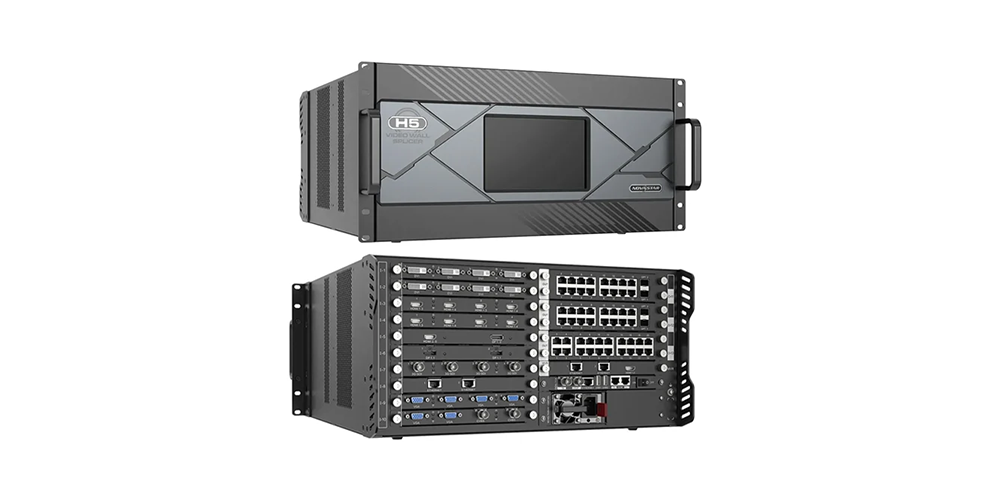
The H5 provides substantially more input-card space than H2, while its output expansion remains more limited than H9. It can be a useful candidate when a project has many source connections but fewer output regions. Count simultaneous sources separately from the number of plugged-in devices, because those requirements affect different parts of the design.
03. NovaStar H9 and H9 Enhanced
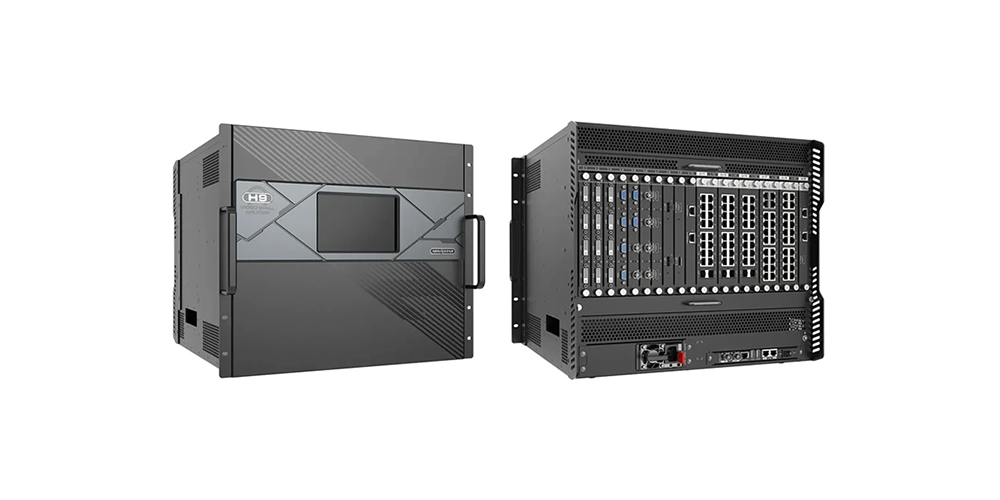
The H9 expands the available output slots, while H9 Enhanced increases them further. Use the precise version in drawings, quotations and spare-parts records. The NovaStar H Series name alone is insufficient for procurement. Our H9 specifications and setup guide covers this model in more detail.
04. NovaStar H15 and H15 Enhanced
The H15 suits configurations that need a large input inventory. Enhanced output expansion does not imply every resource increases proportionally. Layer resources, power requirements and supported card combinations still need individual checks. Consult the H15 card and capability guide alongside the proposed bill of materials.
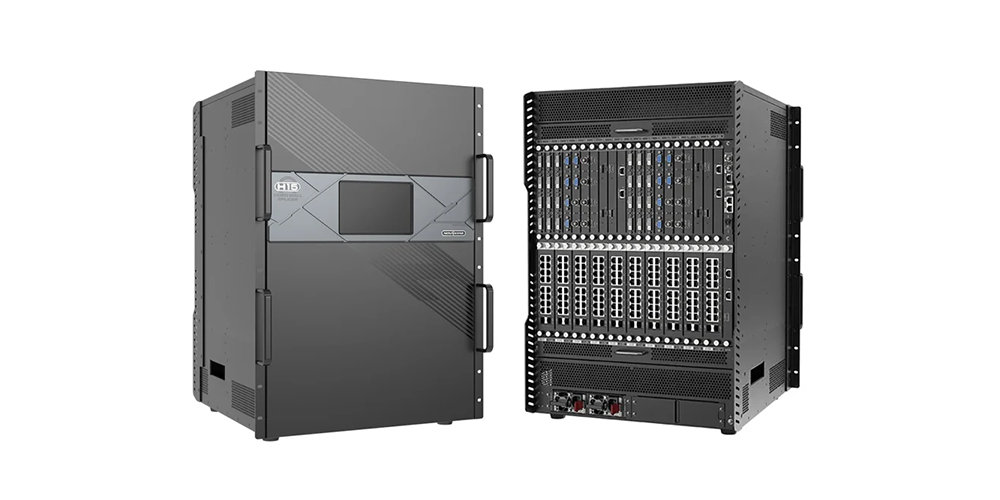
05. NovaStar H20
The H20 offers the most slots in this NovaStar H Series comparison. Before choosing it, assess rack access, ventilation, service clearances and the consequences of centralizing many screens in one unit. A large chassis is useful when the installation needs its resources; it should not replace an explicit availability and maintenance plan.
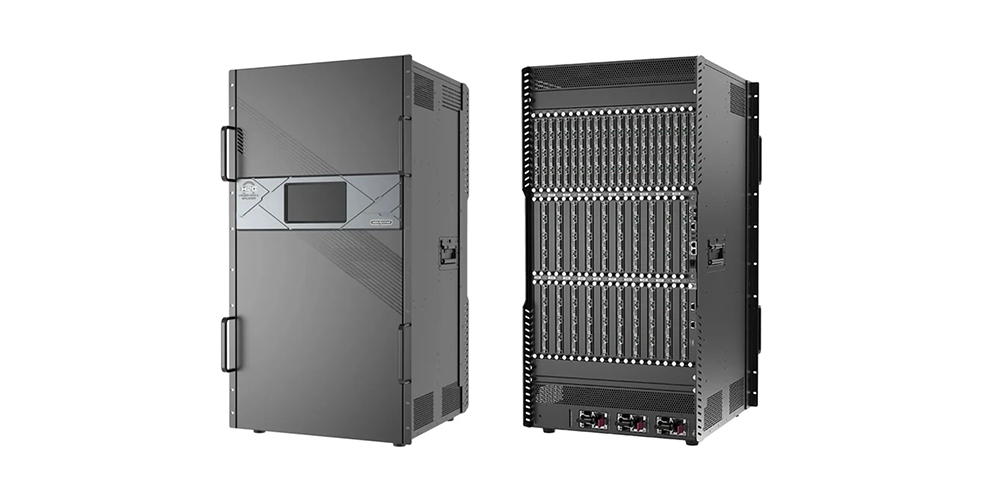
3. Sending cards, fiber outputs and pixel capacity
NovaStar H Series loading capacity depends on the installed sending card. Keep the card name attached to every capacity figure in a proposal. A published total for enhanced fiber hardware cannot be assigned to an older standard fiber card just because both use optical connectors.
| Sending card | Published maximum per card | Important distinction |
|---|---|---|
| H_20xRJ45 | 13 million pixels | 20 Ethernet outputs; verify load per port |
| H_16xRJ45+2xfiber | 10.4 million pixels | Optical outputs copy Ethernet output data |
| H_4xfiber | 20.8 million pixels | Standard fiber sending card |
| H_4xfiber sending card (enhanced) | 26 million pixels | Different hardware from standard H_4xfiber |
Source: NovaStar H2 Video Wall Splicer Specifications V1.17.0, sending-card descriptions. These are upper limits under supported conditions. Output bit depth, frame rate, receiving-card capability and backup mode can change the usable capacity. Confirm the matching table in the specification for the supplied hardware.
01. Distinguish standard and enhanced fiber capacity
With standard H_4xfiber cards, the published H20 maximum is 416 million pixels. With enhanced fiber cards, the current published H20 maximum reaches 520 million pixels. Both figures can be valid because they describe different configurations. The same distinction matters throughout the NovaStar H Series family.
Do not multiply every optical socket by a nominal pixel allowance. Some sockets copy or back up other outputs. They do not automatically create additional unique display capacity. The card operating mode and the screen connection diagram must show which paths carry distinct image regions.
02. Match receiving cards and fiber conversion
For a NovaStar H Series installation, specify the receiving-card model, optical modules, fiber type and converter equipment together. A connector that physically fits is not proof of a compatible signal path. Check the supported combinations and transmission requirements before ordering cables or allocating rack space.
Do not assume different sending-card types can jointly load one screen. NovaStar documents restrictions on mixing standard fiber, enhanced fiber and Ethernet sending cards for the same screen. Resolve the screen boundaries and card types during design, then record them in the commissioning drawings.
4. How to size a NovaStar H Series processor
Size the NovaStar H Series around the complete display system. Total pixels are the first calculation; port loading, canvas dimensions, sources, layers and backup resources are separate checks. Passing one check does not guarantee the others will pass.
01. Calculate the native canvas
Use the cabinet pixel resolution and cabinet arrangement whenever possible. For a rectangular wall, multiply the pixel width by the pixel height. For several independent screens, calculate each separately and record the total. A rough estimate from physical dimensions and pixel pitch should be replaced with the exact cabinet specification before procurement.
For example, a wall measuring 3,840 × 2,160 pixels contains 8,294,400 pixels. Two such walls contain 16,588,800 pixels. These arithmetic examples describe the required canvas only; they do not establish how many outputs or cards the installation needs.
02. Build the port and layer budgets
Divide the canvas into practical cable runs and check every output against its permitted load and dimensions. Leave room for routing constraints, uneven cabinet groups and the required backup topology. A NovaStar H Series card with enough total capacity can still fail a design if too many pixels are assigned to one port.
Next, draw the busiest real layout: presentation, camera windows, confidence feeds and other simultaneous content. Count the processing resources for the actual input formats. Do not treat a headline layer count as a promise that the same number of full-resolution 4K sources will fit.
On H15, NovaStar distinguishes standard and Enhanced per-card layer budgets. Source connector capacity can also affect the resources consumed by a layer. Verify the busiest preset and its transition to the next preset, especially where a fade is required. A static layout test alone is insufficient.
03. Allow deliberate expansion
Reserve slots for identified future sources or screen extensions rather than buying arbitrary spare capacity. Ask whether a future upgrade needs an additional card, a different card type or a larger chassis. Include preview and control requirements in this discussion, so essential operating features are not discovered after all usable slots are allocated.
5. Inputs, HDR and image-quality checks
The NovaStar H Series card library includes options for HDMI, DisplayPort, SDI and network-based video. Availability of a connector family does not guarantee every resolution, refresh rate or color format. Specify the exact input card and signal timing, including whether the source uses 50, 59.94 or 60 Hz.
For 4K or 8K workflows, verify the complete signal tuple: width, height, frame rate, bit depth and chroma sampling. An “8K” label alone is incomplete. Confirm the source computer, adapter, cable and input card can carry the chosen mode together, then test that mode before installation.
NovaStar H Series HDR support should be evaluated as part of the entire display chain. Source encoding, processor settings, output depth and receiving-card behavior must agree. A mismatched HDR workflow can look less accurate than a correctly configured SDR system. Use known test material and confirm brightness and grayscale behavior on the actual LED cabinets.
For small text and spreadsheets, check readability at the intended viewing distance. For live cameras, assess total delay from camera capture through processing to the display. Output synchronization and low processing latency are related engineering considerations, but neither is a substitute for measuring the complete installed path.
IP camera and network-video projects need their own bandwidth and decoding checks. Do not interpret an advertised camera-input count as an unlimited number of simultaneous full-resolution live windows. Document the codec, stream resolution, frame rate, network design and actual concurrent layout before choosing the input cards.
6. NovaStar H Series setup, software and API integration
A NovaStar H Series processor offers browser-based control, while LED screen configuration may also require compatible NovaLCT software. These tasks serve different purposes: arranging sources on the canvas is not the same as configuring how receiving cards map pixels to cabinets.
01. Commission the system in stages
- Record the hardware. List chassis version, card models, firmware and receiving cards. Photograph labels and retain the approved wiring diagram.
- Establish control access. Confirm the processor address and the control computer’s network settings. Use the documented login process and appropriate access permissions.
- Verify individual sources. Check resolution, frame rate, EDID negotiation and a stable image before constructing complex layouts.
- Map and test the wall. Use cabinet identification, grids and color patterns to check order, orientation, seams and missing regions.
- Test operational presets. Rehearse the actual presentation changes, source losses and recovery actions, then export the completed configuration.
For NovaStar H Series handover, provide named presets and a short operator procedure. Include a known-good fallback layout and explain who may change system settings. Keep the source-resolution schedule with the rack so a visiting laptop can be configured without guesswork.
02. NovaStar H Series API and central control
NovaStar documents OpenAPI support in current H Series specifications, alongside other control methods. For a NovaStar H Series API integration, obtain the official H Series OpenAPI documentation matching the installed firmware. Do not reuse a command example from a different processor family without checking compatibility.
Define the integration around specific actions: selecting a preset, checking status or handling a failed request. Validate authentication, supported operations, responses and recovery behavior in a test environment. Keep manual browser control available during commissioning. A connection that succeeds once is not proof that retries and interrupted sessions behave correctly.
03. Manuals and firmware management
Use the model-specific specification for electrical and card limits, the H Series user manual for operating procedures, and release notes for firmware changes. A NovaStar H Series datasheet summarizes capabilities; it does not replace a setup manual. Keep the documents and software versions used for acceptance with the project records.
Obtain current packages from NovaStar’s official download service or request the correct package through HonghaiLED. Back up the configuration and confirm compatibility before an upgrade. Schedule upgrades for a maintenance window and repeat the critical acceptance checks afterward, rather than changing firmware immediately before a live event.
7. NovaStar H Series vs VX Series
Compare a NovaStar H Series configuration with a specific VX model, rather than comparing two family names as if they represented fixed specifications. The H Series provides modular card selection and broader expansion options. VX models offer predefined connection and processing resources that may already meet a simpler installation’s needs.
A smaller fixed configuration can be appropriate when the source list, pixel load and operating layout are stable. The NovaStar H Series becomes more attractive when those requirements demand additional slots, varied input types or centralized management of several screens. Consider staff familiarity, maintenance access and spare equipment alongside purchase cost.
For a closer comparison, read our H Series vs VX Series guide. The VX1000 Pro overview and VX600 Pro guide provide alternative model information. Verify the current model’s limits before using any family-level recommendation.
8. NovaStar H Series price and quotation checklist
A meaningful NovaStar H Series price must identify the complete configuration. Chassis-only listings and populated systems are not directly comparable. Input cards, sending cards, preview hardware, optical modules, converters, backup components and support can materially change the total. Request an itemized quotation instead of relying on a generic starting price.
| Provide | Why it matters | Ask the supplier to confirm |
|---|---|---|
| Each screen’s pixel dimensions | Defines canvas and loading requirements | Card and port allocation |
| Sources and simultaneous layouts | Determines input and layer resources | Exact input-card models |
| Receiving cards and cable distances | Defines output compatibility and transport | Converters, optics and cable types |
| Backup and expansion requirements | Reserves equipment and slots | Included backup hardware and test scope |
| Destination and delivery requirements | Affects logistics and total cost | Lead time, freight, warranty and exclusions |
Separate equipment cost from configuration, onsite commissioning and operator training. Also confirm whether optical modules and spare cards are included. For a NovaStar H Series replacement project, supply the existing card list and receiving-card details so reusable equipment can be assessed before a new configuration is proposed.
For continuous-operation installations, distinguish multiple power supplies from a fully redundant power arrangement. In particular, the H15 specification requires both standard power connectors during use and describes additional redundant supplies separately. Confirm the supplied arrangement and rehearse loss-of-feed behavior under a controlled acceptance procedure.
Send the checklist with your inquiry through the site’s contact form. Request a written bill of materials and a configuration drawing that can be reviewed together. That provides a much stronger basis for comparing NovaStar H Series quotations than a single model name and headline pixel capacity.
9. NovaStar H Series FAQ
01. What does a NovaStar H Series processor do?
It combines and positions video sources across a display canvas, then outputs the image through the installed cards. With compatible LED sending cards, it can also deliver mapped data to LED receiving cards. Confirm the supplied card configuration; a chassis alone does not establish the complete signal path.
02. Which NovaStar H Series model should I choose?
Start with exact screen resolutions, the input list, simultaneous layers and backup requirements. Select a chassis with sufficient compatible slots and processing resources, then verify every output region. Physical screen size or a venue description is not enough to choose between H2, H5, H9, H15 and H20.
03. Why do H Series capacity figures differ between websites?
Figures may refer to different sending cards, standard or Enhanced chassis, or different operating conditions. Standard H_4xfiber and enhanced fiber cards have different limits. Compare the full card name, output depth and relevant specification revision before treating a published pixel total as applicable to your installation.
04. Can I use a NovaStar H Series API?
Current manufacturer specifications document H Series OpenAPI support. Obtain the official documentation for the installed firmware and confirm the operations your control system needs. Test command results, status handling and reconnection behavior before relying on automated control during an event or continuous-operation deployment.
05. Does browser control replace NovaLCT?
Browser control and receiving-card configuration are different jobs. The NovaStar H Series web interface manages processor functions, while supported LED screen configurations may require NovaLCT. Follow the relevant sending-card documentation for software compatibility and retain the completed configuration files for maintenance.
06. Is the NovaStar H Series suitable for outdoor screens?
An outdoor LED display does not make the processor weatherproof. Install the processor in an appropriate protected environment and design the signal route to the screen. Verify rack ventilation, operating conditions, fiber equipment and service access as part of the installation, rather than assuming the display enclosure protects the control equipment.
07. How much does a complete NovaStar H Series system cost?
The price depends on the chassis and installed hardware, plus delivery and service requirements. Ask for a quotation listing input cards, sending cards, optics, converters and backup equipment. Compare the same scope across offers and confirm whether commissioning, training and spares are included.
10. Conclusion: specify the complete NovaStar H Series system
The NovaStar H Series offers a flexible route from a compact H2 configuration to a large H20 installation. The best choice is the smallest complete configuration that meets the project’s actual requirements with justified expansion space. Specify native pixels, sources, layers, sending cards and backup behavior before comparing quotations.
Use the comparison tables as a starting point, then verify the exact hardware against current manufacturer documents. A clear card list, cabinet map and acceptance procedure make a NovaStar H Series installation easier to purchase, commission and maintain.
Technical references: NovaStar H Series product comparison; H2 and H9 Specifications V1.17.0; H15 Specifications V1.15.0; H20 Specifications V1.8.0; H Series User Manual V1.15.0. References checked 8 October 2026. Manufacturer specifications describe supported configurations; this guide’s selection examples are planning guidance, not measured performance results.
Related Posts
NovaStar NovaPro HD Review: Specs, Setup and Manual
The NovaStar NovaPro HD combines video processing and LED display…
NovaStar VX2000 Pro vs VX2000: Specs & Price Guide
NovaStar VX2000 Pro vs VX2000 is a comparison that starts…
NovaStar ET1S-G Review: Media Server Specs, Setup and Price
The NovaStar ET1S-G is a compact media server that prepares…

No Comments