
NovaStar Vunit 3000: Specifications, Setup and Buying Guide
NovaStar Vunit 3000 is a programmable professional control processor for coordinating AV equipment and room systems. Its plug-in cards provide device-control connections, while the HDMI card routes four sources to three outputs. In an LED installation, it can coordinate source selection, lighting and other equipment; a suitable downstream LED processor and sending system still handle the screen.
This guide explains the NovaStar Vunit 3000 specifications, card choices, BCTools setup, software workflow and purchasing checks that matter to integrators and buyers. It separates documented product capabilities from practical design recommendations, so you can plan a conference room, exhibition or command-center installation without confusing central control with LED pixel processing.
1. NovaStar Vunit 3000 at a Glance
The NovaStar Vunit 3000 control processor brings commands for multiple devices into a programmable system. Serial communication, infrared, I/O, relays, CAN and Ethernet serve different control tasks. The benefit is repeatable operation: a configured room scene can coordinate several actions that otherwise require separate controls.
The NovaStar Vunit 3000 uses a modular card design. Its HDMI matrix capability belongs to the video card, so confirm the supplied card configuration before specifying available connections. A product photograph or a general model description is not a substitute for the bill of materials.
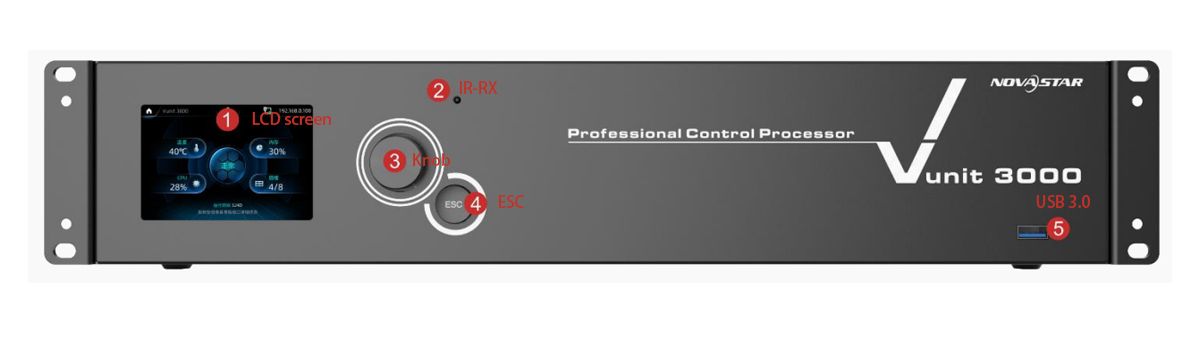
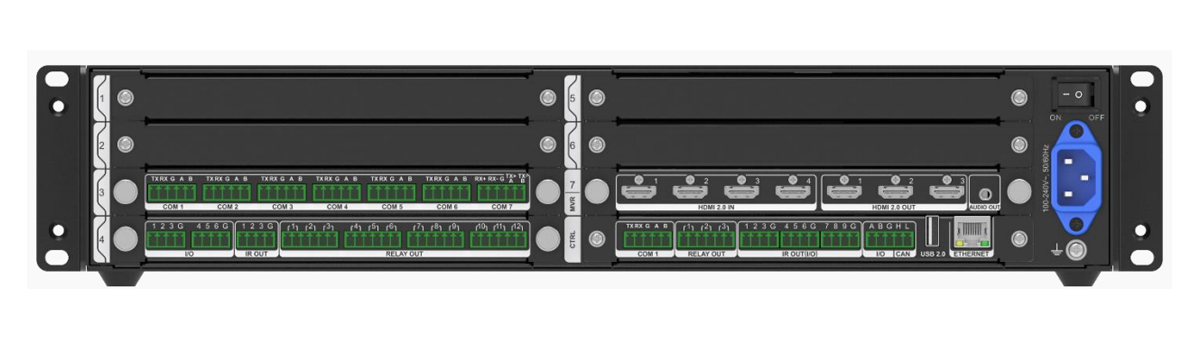
The front and rear panel images show the control interface and connector arrangement. The front display, knob and ESC key support local operation; the IR receiver supports command learning. Label installed cards and connected devices before commissioning so the physical ports match your software configuration.
2. How the Vunit 3000 Fits an LED Display System
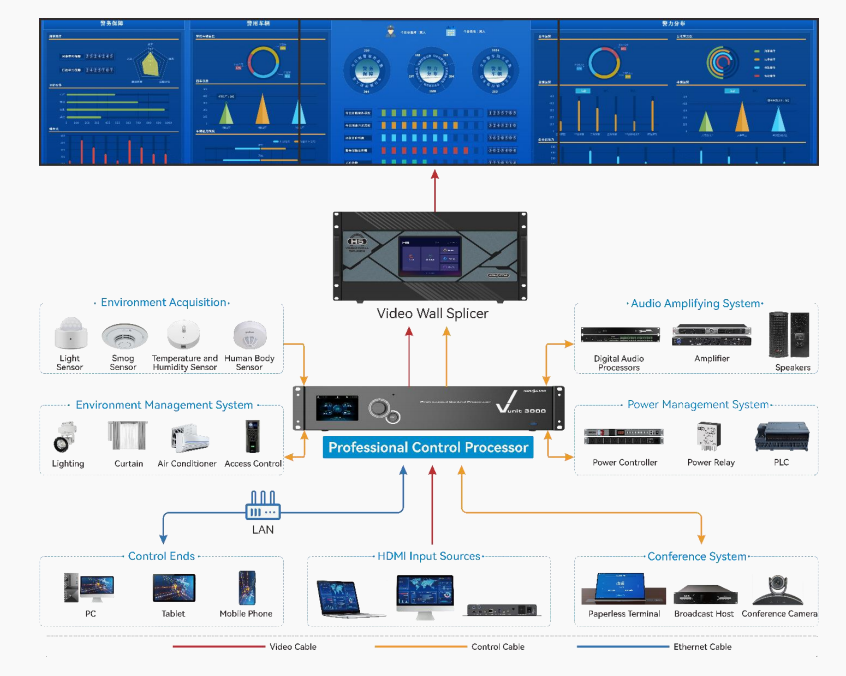
The NovaStar Vunit 3000 works at the control layer of an installation. HDMI routing selects which source reaches a destination. LED processing determines how that image fits the LED canvas, while the sending and receiving system distributes image data to the cabinets. These jobs must be specified separately.
A typical signal path is: laptop or media source → Vunit 3000 HDMI card → compatible LED video processor → LED receiving cards and modules. Control wiring follows another path, from the central controller to supported equipment interfaces. An Ethernet connector used for management should not be mistaken for an LED sending output.
For example, a wall with an unusual pixel canvas may need scaling or cropping even when the source is a standard 1920 × 1080 signal. The NovaStar Vunit 3000 HDMI output follows the selected input resolution; plan that image adjustment in the downstream processor. Its 4K input capability does not describe an LED pixel-loading capacity.
Compare the NovaStar H Series video splicing processors when choosing the processing stage. Check the exact model and installed cards: different NovaStar product families do not all offer the same scaling, splicing, playback or sending functions.
3. NovaStar Vunit 3000 Specifications
The following NovaStar Vunit 3000 specifications summarize NovaStar’s Specifications V1.1.0. Connector functions depend on the installed card. Confirm the supplied hardware and current documentation when producing a final system design.
01. Connectors and interfaces
| Connector | Specification |
|---|---|
| HDMI IN | 4 × HDMI 2.0; input resolutions up to 3840×2160@60Hz; backward compatible with HDMI 1.4a and HDMI 1.3; accompanied audio input supported; 8-bit and 10-bit processing; EDID adjustment supported |
| HDMI OUT | 3 × HDMI 2.0; output resolutions up to 3840×2160@60Hz; accompanied audio output; 8-bit and 10-bit processing; verify the supported color-format and resolution combination; output resolution follows the selected input resolution |
| Audio Out | 3.5 mm independent audio output; supports independent audio switching between input sources |
| COM | RS-232 / RS-422 / RS-485 availability varies by card and port; Modbus RTU, ASCII and TCP; all RS-485 ports support DMX512 protocol output; programmable full-duplex communication connectors |
| I/O | Programmable trigger inputs and outputs; input voltage 5V, output voltage 5V |
| RELAY OUT | Light-current relay connectors; voltage DC 30V, current 3A |
| IR OUT and IR OUT (I/O) | IR emission connectors for emitters below 5V; commands triggered and sent in base16 encoding; the IR OUT (I/O) connector can also be used as an I/O connector |
| ETHERNET | Gigabit Ethernet port, 10/100/1000Mbps, TCP and UDP; used to configure and update devices from a control PC |
| CAN | Supports access and control of devices using the CAN protocol |
| Front panel | LCD status screen, IR-RX receiver for IR learning, control knob, ESC key, USB 3.0 for firmware updates and project file import/export |
02. Electrical and physical specifications
| Parameter | Value |
|---|---|
| Input voltage | 100–240V~, 50/60Hz |
| Maximum power consumption | 60W |
| Operating temperature | 0°C to 45°C |
| Operating humidity | 0% RH to 80% RH, non-condensing |
| Storage temperature | −10°C to +60°C |
| Storage humidity | 0% RH to 95% RH, non-condensing |
| Dimensions | 482.6 × 360 × 94.6 mm (specification table; verify installation drawing) |
| Net / gross weight | 11 kg / 12 kg (full configuration) |
| Noise level | 45 dB(A) typical at 25°C |
| Packing box | 660.0 mm × 570.0 mm × 210.0 mm |
| Accessories in the box | 1 × power cable, 1 × Ethernet cable, 1 × DC power cable, 3 × IR emitters, safety manual, certificate of approval |
Do not assume the listed maximum resolution, bit depth and color sampling are available simultaneously in every signal combination. Check the source, HDMI transport and destination together. For rack planning, verify the current mechanical drawing, connector clearance and ventilation; the datasheet’s dimension drawing and specification table need to be checked together.
4. Vunit 3000 Cards and Connectivity
A NovaStar Vunit 3000 quotation should identify the installed cards and quantities. Use the following card-level table to map your device list to actual ports. Confirm supported slot placement with the supplier before treating a proposed combination as a complete system.
| Card | Connectors | Notes |
|---|---|---|
| VIT_Control Card | 1 × COM, 3 × RELAY OUT, 2 × I/O, 9 × IR OUT (I/O), 1 × CAN, 1 × USB 2.0, 1 × ETHERNET | Main control card; the Ethernet port is used to configure and update the device from a control PC |
| VIT_7xCOM Card | 7 × COM | COM1–COM6 are RS-232 / RS-485; COM7 is RS-422 / RS-485; Modbus RTU, ASCII and TCP supported; RS-485 ports support DMX512 output |
| VIT_12xRELAY + 6xI/O + 3xIR Card | 12 × RELAY, 6 × I/O, 3 × IR OUT | Relay: 30V DC, 3A, output only, two pins per group; I/O pins can each be configured as input or output |
| VIT_4xHDMI2.0 IN + 3x HDMI2.0 OUT Card | 4 × HDMI 2.0 in, 3 × HDMI 2.0 out, 1 × 3.5 mm audio output | Single card works as the video matrix; when installed in the slot marked MVR it can also monitor inputs and outputs |
Count connections by endpoint and function. A serial-controlled projector, a relay-triggered device and an infrared-controlled display require different interfaces. Check each third-party device’s command protocol as well as its electrical interface. Having an RS-485 connector alone does not establish application-level compatibility.
For the NovaStar Vunit 3000, keep a port schedule showing card, connector number, device name, protocol and tested command. Reserve capacity for expected additions, but avoid buying cards simply because unused chassis space is available. Ask the supplier to confirm whether the required video routes stay within one card.
5. NovaStar Vunit 3000 Setup with BCTools
Commission the NovaStar Vunit 3000 in stages: verify wiring, establish network access, test individual commands, and only then create complete scenes. The steps below follow the BCTools workflow described in User Manual V1.0.0; labels may differ in later releases.
01. Hardware connections
- Connect video sources and displays to the HDMI 2.0 input and output ports on the video card.
- Wire controlled devices — projectors, screens, lighting, curtains and sensors — to the COM, I/O, relay and IR connectors on the rear panel.
- Keep the Vunit 3000 and the control PC on the same network segment; the unit is normally configured over Ethernet rather than a serial link.
02. Network configuration from the front panel
- Power on the device. The LCD screen displays device status, and the current IP address appears at the top right of the screen. The factory default IP address is 192.168.0.10.
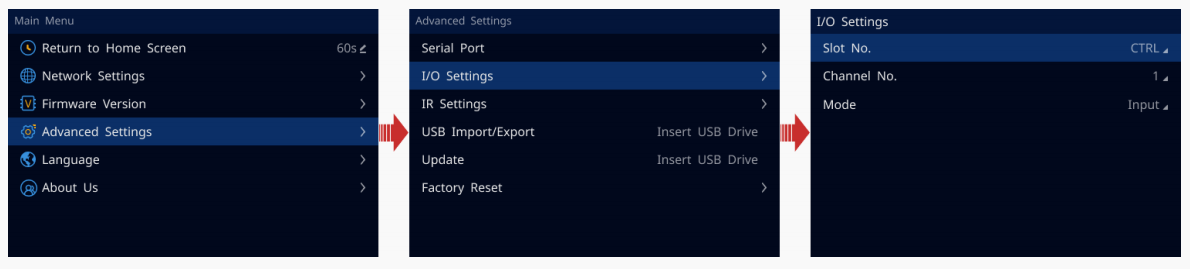
- Rotate the knob to move through the menu, press the knob to confirm, and press ESC to leave the current menu or cancel an operation.
- To change the address, press the knob to open the main menu, select the network settings screen, set the IP address, subnet mask and gateway, then apply the change. The new address must not conflict with other devices on the same segment.
03. Device discovery in BCTools
- Install the compatible BCTools release on a supported Windows PC. The original manual lists Windows 7 or later; confirm current operating-system requirements with the supplied software.
- Select the network card that is connected to the device and confirm; if only one network card can reach the device, no selection is required.
- Scan the segment and identify the NovaStar Vunit 3000 by its address and device information. If discovery fails, check the selected adapter, subnet and network access before changing hardware.
04. Serial, I/O and IR parameters
- On the Central Control Configuration page, set the serial port parameters to match the controlled device. Baud rate, data bits, stop bits and parity must match the third-party device; also verify command encoding and terminators.
- Configure I/O pins individually as input or output — use input for sensors and switch contacts, output for control signals.
- Use the IR page and the IR Learning function to capture remote-control commands: select the product type, manufacturer and model, add the command, then start learning and press the key on the original remote when prompted.
05. Video matrix and presets
- Open the matrix configuration, select the HDMI video card slot, then set the relationship between each input and output. One-to-one and one-to-many routing are both supported, and audio can be switched independently from video.
- Check EDID settings when a source will not output the resolution you expect — input EDID is adjustable per connector and can be exported to other connectors of the same type.
- Save the routing as a preset. Presets load with one click and can later be called by events, conditional triggers or a schedule, making room operation repeatable. Do not assume a preset guarantees seamless video switching.
Before scene programming, test the NovaStar Vunit 3000 with one source and one destination using a known-good cable. Then test every required route and independent audio selection. Record the working source resolution and EDID settings, rather than leaving a successful test dependent on an undocumented laptop configuration.
Keep relay and I/O wiring within the published ratings. The relay specification is 30V DC, 3A, and I/O is specified at 5V; these connections are not direct mains-power outputs. Use appropriately rated interfacing equipment when the controlled load requires it, and have wiring checked by the responsible installer.
6. Automation: Events, Timelines and Triggers
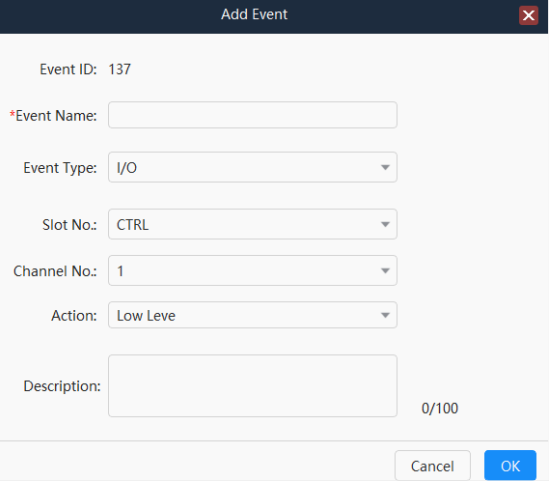
NovaStar Vunit 3000 automation combines individual commands into repeatable operation. In BCTools you build events — a defined action such as sending a serial command, pulsing a relay, transmitting an IR command, or switching a matrix preset — and then decide what fires them.
| Mechanism | How it is used |
|---|---|
| Events | Single actions over serial, Modbus, I/O, IR, relay, Ethernet or CAN, plus delays |
| Timeline | Runs multiple tasks in a defined sequence within a set duration, for staged start-up and shutdown sequences |
| Conditional triggers | Execute an event or preset when a signal arrives — a serial command, an I/O input or another condition |
| Scheduled triggers | Execute daily, weekly or once at a set date and time; daily and weekly patterns require start and end dates |
| Presets | Saved input-to-output and audio states that can be recalled manually or triggered automatically |
Because time-based schedules depend on the device clock, synchronize the device time — by server or manually — before relying on scheduled events.
A practical meeting-start sequence might select the presentation input, recall the downstream processor’s approved preset, set compatible lighting and enable the audio path. This is a design example, not a factory scene. Implement only commands that the connected equipment supports, with delays or feedback checks appropriate to that equipment.
Test the NovaStar Vunit 3000 when a device is already on, already off or unavailable. Repeated power-toggle commands can leave a room in the wrong state; explicit on/off commands and feedback are preferable where supported. Also test shutdown and manual recovery, not just the successful startup sequence.
7. VICP, VI Designer and Operator Control
BCTools configures and maintains the NovaStar Vunit 3000. VI Designer is used to create a visual control project, while VICP, the Visual Intelligent Control Platform, provides the operator interface in a compatible system. NovaStar’s solution documentation lists these components together; confirm their versions and project requirements before deployment.
For the NovaStar Vunit 3000 operator interface, use clear room actions such as Presentation, Video Conference and Shutdown. Keep detailed port settings in the engineering workflow. A good interface should distinguish a requested action from confirmed equipment status when feedback is available.
Validate the intended tablet or computer, software release and network before promising a particular operating platform. Wireless operation depends on the surrounding network; it does not mean the chassis automatically supplies wireless connectivity. Confirm access, licensing if applicable, project-file delivery and training in the quotation.
For multiple rooms, reuse an approved design carefully. Review each unit’s addresses, device commands and physical port mapping before importing a copied project. Keep dated backups and identify which project file belongs to each NovaStar Vunit 3000 installation.
8. Vunit 3000 Applications and Project Planning
01. Conference rooms and presentation spaces
A NovaStar Vunit 3000 can coordinate source routing, compatible lighting and display commands around a meeting workflow. Start with the actual sources: visiting laptops, conferencing equipment and fixed playback devices. Test source changes and recovery after unplugging a laptop, because those transitions often reveal problems that a static image test misses.
02. Exhibitions and visitor centers
In an exhibition, the NovaStar Vunit 3000 can support programmed sequences and visitor-triggered actions. Plan the opening schedule, closing sequence and a staff override. Test what happens after power restoration, and keep the media playback system’s responsibilities separate from the central-control tasks.
03. Press rooms and command centers
For a press room, map video and audio destinations before programming. Independent audio switching selects an audio source; it does not replace a mixer, echo canceller or other required audio processing. For a command center, define monitoring and recovery procedures across the entire system rather than assuming one controller guarantees continuous service.
NovaStar lists firefighting and command applications among the product’s use cases. That positioning should not be interpreted as a certification for life-safety functions. Specify any required emergency or safety system independently, and use the NovaStar Vunit 3000 for the approved AV and room-control scope.
9. Vunit 3000 Troubleshooting Checklist
Troubleshoot the NovaStar Vunit 3000 by isolating one layer at a time. A reachable controller does not prove that an HDMI source is valid, and a working picture does not prove that serial commands are correct. Record the symptom and the last configuration change before resetting anything.
| Symptom | First checks | Useful next test |
|---|---|---|
| BCTools cannot discover the unit | Power, displayed IP, PC adapter and subnet | Use a known network path; check for duplicate addresses |
| HDMI output has no picture | Selected input, source format, cable and destination | Test one source and one display, then reintroduce the processor |
| Picture works but audio is wrong | Audio source selection and downstream mute state | Verify embedded and independent audio paths separately |
| Serial device ignores commands | Port protocol, pinout, baud rate and command syntax | Test one documented command before running a scene |
| IR operation is intermittent | Learned command and emitter position | Repeat the same command with the receiver unobstructed |
| Scheduled scene runs incorrectly | Device clock, date range and trigger conditions | Run the underlying event manually and inspect its sequence |
For NovaStar Vunit 3000 video faults, distinguish transport resolution from the final LED canvas. If a source works directly on a monitor but fails through the complete chain, compare supported formats and EDID along that chain. Changing the LED cabinet mapping will not repair an upstream source-negotiation problem.
Export the working project before experimenting. Change one parameter at a time, record the result and restore the known state when a test fails. A factory reset should follow a documented recovery plan, especially on an installed room with custom commands and schedules.
10. NovaStar Vunit 3000 Manual, Firmware and Price
01. Manual PDF and firmware selection
The NovaStar Vunit 3000 manual used for this guide is Professional Control Processor User Manual V1.0.0; hardware details were checked against Specifications V1.1.0. Use the manual for menu operation and BCTools workflows, and the specifications for connector capabilities and environmental limits.
For a NovaStar Vunit 3000 download request, specify whether you need the manual PDF, BCTools installer, firmware or a project backup. These are different files. The English product page checked on October 8, 2026 lists V3.3.0, while regional listings may differ. Confirm the package appropriate to your unit rather than assuming a version number is universally the newest release.
Use the HonghaiLED download center or request the model-specific documents from your supplier. Before updating a NovaStar Vunit 3000, export the project, record device and card versions, read the release notes and allow a maintenance window. Verify routes and control commands after the device restarts.
02. Price and quotation checklist
A useful NovaStar Vunit 3000 price comparison starts with equal scope. Public prices can describe different card sets, regions or service packages. This guide does not quote an unverified HonghaiLED selling price; request a current offer for your actual configuration.
- Identify the chassis, card models, quantities and required connectors.
- List controlled device models, supported commands and the required HDMI routes.
- Separate hardware, interface design, commissioning and training in the offer.
- Confirm any software licensing, supplied project files, warranty and support scope.
- Confirm delivery terms and destination-specific documentation requirements.
Ask who will own the editable control project and who will maintain it after handover. A low hardware price does not establish the cost of a complete working room. Supply your device schedule, LED processor model and expected user actions when requesting a NovaStar Vunit 3000 quotation.
11. NovaStar Vunit 3000 FAQs
Select a question to read the answer.
01. What is the NovaStar Vunit 3000?
The NovaStar Vunit 3000 is a programmable professional control processor for AV and room equipment. Its available cards provide control interfaces and HDMI matrix routing. Specify the installed cards and supported device commands when deciding whether it suits a project.
02. Can the NovaStar Vunit 3000 drive LED cabinets directly?
No. Its HDMI matrix outputs feed compatible downstream equipment. A suitable LED processor or sending system is still needed to deliver image data to the receiving cards. Choose that hardware for the wall resolution, processing needs and receiving-card compatibility.
03. Does the Vunit 3000 support 4K at 60Hz?
The HDMI card is specified for input and output resolutions up to 3840 × 2160 at 60Hz. The output resolution follows the selected input. Verify the complete signal format and downstream compatibility; do not interpret this as independent scaling or a guarantee for every bit-depth and color-sampling combination.
04. What is the Vunit 3000 default IP address?
The original manual lists 192.168.0.10. Check the actual address on the front-panel display because an installed unit may have been reconfigured. Use a unique address and a compatible PC subnet, then select the correct network adapter in BCTools.
05. Which software is used for NovaStar Vunit 3000 setup?
BCTools is the configuration and maintenance tool described in the user manual. A compatible visual-control deployment can also use VI Designer and VICP. Confirm software versions, supported operating systems and project requirements with the supplier before installing or importing files.
06. Where can I get the Vunit 3000 manual and firmware?
Request the model-specific manual PDF, specifications, compatible software and release notes through the download or support channel. Keep document versions with the project records. A firmware listing is not proof that the package is appropriate for every hardware or regional configuration.
07. How should I reset a NovaStar Vunit 3000?
Back up the project and record the network settings first. The manual describes factory-reset options under Advanced Settings, including a partial reset that keeps user data and Reset All. Read the selected option carefully and arrange a recovery window before applying it to an installed system.
08. Can the Vunit 3000 control lighting?
The documented RS-485 ports support DMX512 output. Actual lighting control still requires suitable wiring, fixture addressing and programmed commands. Confirm the exact interface and lighting workflow; protocol support alone does not establish a complete lighting console or a ready-made scene library.
09. Can the relay outputs switch mains-powered equipment?
The documented relay rating is 30V DC, 3A. Do not connect mains loads directly on that basis. The installer must select a suitable rated interface or power-control device for the load and verify the complete wiring arrangement.
10. How much does the NovaStar Vunit 3000 cost?
Request a quotation that specifies the cards, delivery region and services. Include interface design, configuration, training and support where required. Compare the same scope across offers; a chassis price or a search-result price is not a reliable total for a commissioned room.
12. Conclusion: Specify the Complete Control System
The NovaStar Vunit 3000 is most useful when a project needs coordinated equipment control alongside HDMI routing. Start with the device list and user workflow, map each connection to an installed card, and test video, audio and commands independently before combining them into scenes.
Successful NovaStar Vunit 3000 integration also depends on the downstream LED processor, the network and a maintainable control project. Keep an approved configuration, documented recovery steps and clear handover instructions. To discuss a suitable system, send HonghaiLED your room layout and equipment list, including the required source-to-display routes and daily operating tasks.
Related Posts
NovaStar NovaPro HD Review: Specs, Setup and Manual
The NovaStar NovaPro HD combines video processing and LED display…
NovaStar VX2000 Pro vs VX2000: Specs & Price Guide
NovaStar VX2000 Pro vs VX2000 is a comparison that starts…
NovaStar ET1S-G Review: Media Server Specs, Setup and Price
The NovaStar ET1S-G is a compact media server that prepares…

No Comments