
NovaStar HDR Master 4K Video Processor: Specs and Setup Guide
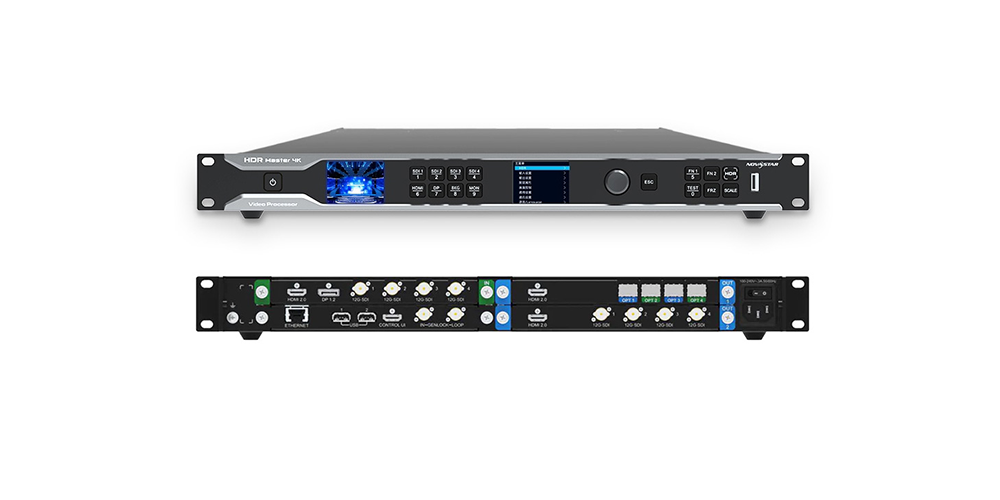
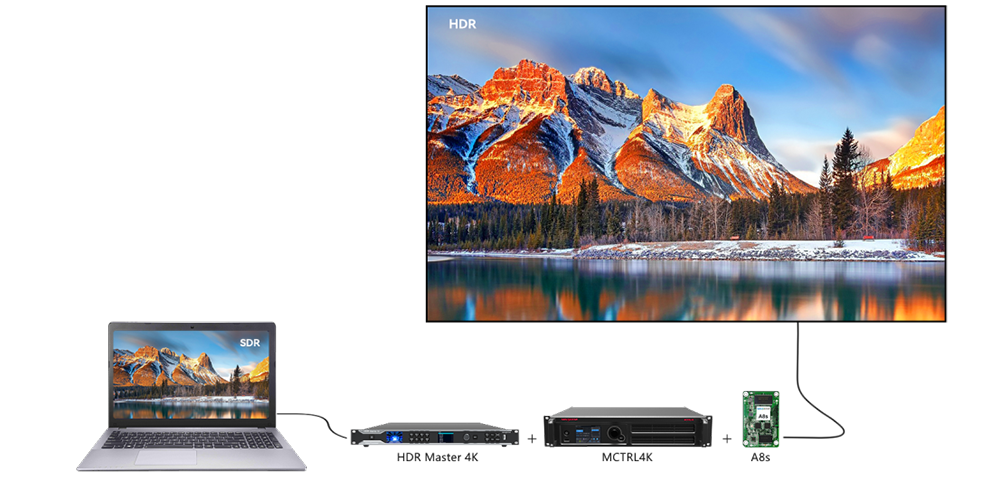
The NovaStar HDR Master 4K is a video processor for SDR-to-HDR conversion, scaling and video signal preparation before an LED display controller. It supports conversion between SDR and HDR10/HLG, helping teams work with mixed source material. A successful installation depends on the complete signal chain: the source, processor, controller, receiving cards and LED cabinets must support the intended operating format.
This NovaStar HDR Master 4K guide explains the specifications that affect a purchase, the difference between input and output capabilities, and a practical setup workflow. If you are comparing a NovaStar 4K processor for a rental event, fine-pitch wall or permanent installation, start with your actual signal format and screen pixel count. The following checks help turn a product specification into a configuration that can be tested before delivery.
1. What Is the NovaStar HDR Master 4K?
The NovaStar HDR Master 4K prepares video; a sending controller distributes pixel data to the receiving cards inside LED cabinets. These are different jobs. Adding an HDR processor does not replace cabinet mapping, receiving-card configuration or screen calibration. It also does not increase the physical resolution of an existing LED wall.
Think of the processor as a stage between playback and display control. A source may need resizing, dynamic-range conversion or a different connection route before the downstream equipment can use it. The HDR Master 4K addresses those preparation tasks, while the screen system determines how the resulting image is reproduced.
For example, a conference operator might receive SDR presentations and video from several suppliers. The operator needs a repeatable way to fit that content to the screen and preserve readable text, natural skin tones and consistent brightness. Purchasing equipment should follow that requirement, rather than an assumption that every source benefits from stronger contrast.
To compare the two device roles, see our HDR Master 4K vs MCTRL 4K comparison. This article concentrates on specification interpretation, commissioning and purchasing checks.
2. Key Specifications at a Glance
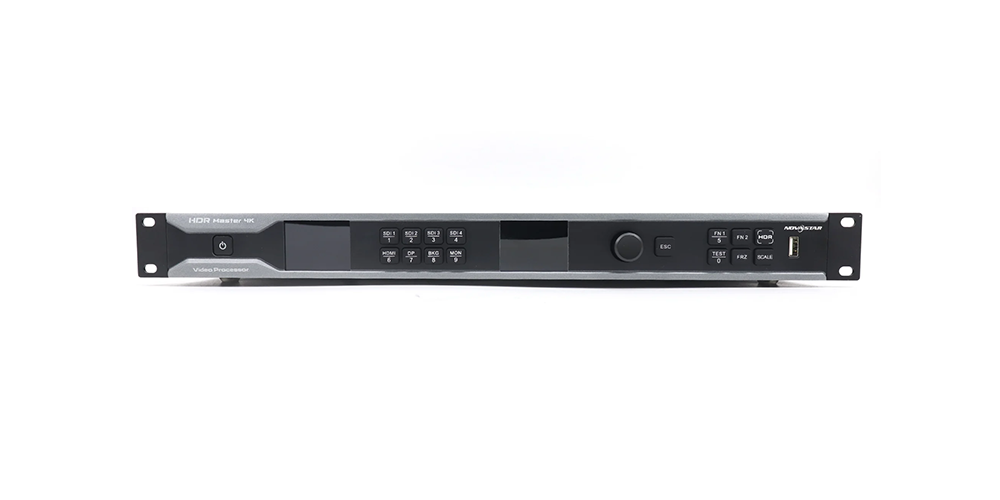
Use these NovaStar HDR Master 4K specifications as a starting point for a project brief. The connector inventory and physical figures are referenced to NovaStar’s Specifications V2.1.0. Confirm the supplied hardware and firmware against the quotation.
| Item | Published specification | Project check |
|---|---|---|
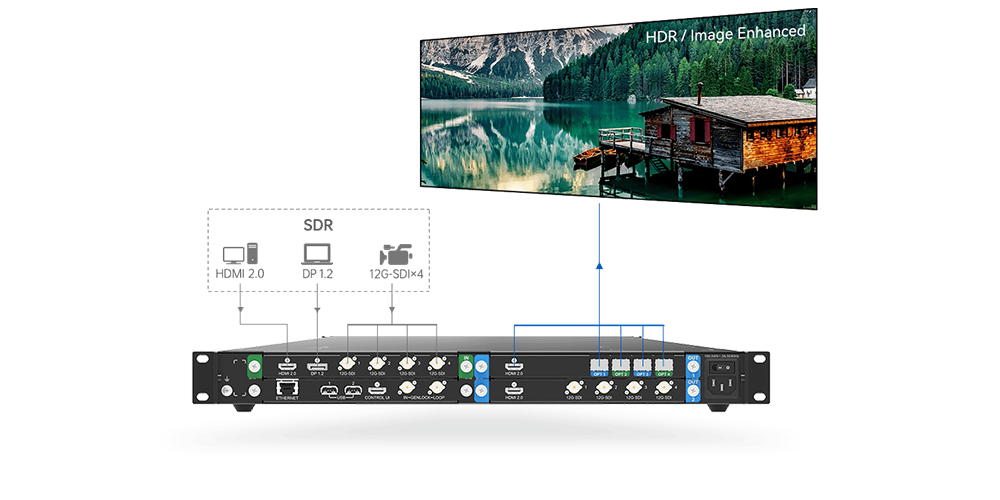
| Input card | 1 HDMI 2.0, 1 DP 1.2, 4 12G-SDI | List the format from every source. |
| Output cards | HDMI + four 10G optical ports; HDMI + four 12G-SDI | Confirm both cards and compatible downstream equipment. |
| Output behavior | Both cards carry the same content synchronously. | Do not budget for independent programs. |
| Electrical supply | 100–240 V AC, 3 A, 50/60 Hz; maximum 120 W | Include the whole rack in power planning. |
| Dimensions and mass | 482.6 × 442.5 × 50.5 mm; net 7.5 kg | Allow connector depth, support and ventilation. |
| Operating environment | 0–45°C; 10–85% RH, non-condensing | Check conditions inside the rack. |
Do not describe the 50.5 mm chassis as fitting a standard 44.45 mm 1U opening without checking the installation drawing. Rack mounting also needs room for cable bends, airflow and access to service connections. A case that closes over the front panel may still press against rear connectors.
For the HDR Master 4K, output canvas dimensions and LED loading capacity are separate specifications. Calculate the wall’s width and height in pixels first, then confirm that the controller can carry that canvas at the required bit depth and refresh conditions.
3. What SDR-to-HDR Conversion Really Does
01. NovaStar HDR Master 4K conversion and native HDR
SDR-to-HDR conversion changes how a limited-range source is represented for an HDR workflow. It cannot recover information that the original recording or encoding discarded. Clipped highlights, crushed shadows and compression damage remain limitations of the source, even when the displayed picture looks more vivid.
Judge the NovaStar HDR Master 4K with representative customer content. Include faces, gradients, small captions, dark clothing and bright graphics. A demonstration clip can look impressive while concealing the artifacts that appear in low-quality event footage. Compare at the intended screen brightness and normal viewing distance.
02. Choosing an appropriate output
HDR10, HLG and SDR are different signal interpretations. Select a format that the entire receiving chain can handle. An HDR label on the source file does not prove that the computer is transmitting HDR, and an HDR-capable controller does not prove that every installed receiving card is configured correctly.
The HDR Master 4K supports conversion between SDR and HDR10/HLG, but the appropriate choice is a system decision. For an SDR destination, use an agreed SDR workflow and verify tone reproduction. For an HDR destination, confirm both the transmitted format and the actual appearance on the wall.
Keep an approved reference setting for client review. Excessive contrast can make noise more visible, while excessive shadow lifting can make black backgrounds appear gray. Good commissioning produces a predictable image rather than simply selecting the strongest enhancement.
4. Ports and Swappable Cards
The NovaStar HDR Master 4K has multiple video inputs, but connector quantity should not be confused with independent output programs. Its two output cards share the same content. If a project needs different images on several destinations, map the complete routing and composition requirement before selecting equipment.
Use HDMI or DisplayPort where they match the source equipment, and SDI where the production chain already uses compatible SDI formats. Verify adapters as part of the route. An adapter that works at a lower resolution may fail when frame rate, color sampling or bit depth increases.
For optical transmission, a matching connector and a “10G” label are not sufficient evidence of compatibility. The NovaStar HDR Master 4K requires a supported receiving endpoint and appropriate optical components. NovaStar’s User Manual V2.1.0 illustrates NovaPro UHD Jr in its long-distance OPT connection example. Confirm the current supported combination before buying fiber equipment.
Label every cable by source, destination and format. Record which routes carry the primary program, backup source and monitoring feed. This avoids treating a duplicated output as an independent recovery path when both routes still depend on the same processor.
Pluggable cards should be handled according to the manufacturer’s service instructions. Do not infer hot-swapping permission from the word “pluggable.” Before deployment, check the installed card labels against the order and test each connection that the production will actually use.
5. Bit Depth vs. Resolution: The Spec Most Buyers Miss
For the NovaStar HDR Master 4K, resolution, frame rate, sampling and bit depth must be checked together. “4K60” alone is an incomplete specification. A useful signal description includes the exact pixel dimensions, frame rate, RGB or YCbCr sampling, bit depth and dynamic-range format.
| Requirement | What to verify | Why it matters |
|---|---|---|
| UHD playback | 3840 × 2160, exact frame rate and output encoding | “4K” can also mean other pixel dimensions. |
| Higher bit depth | Supported timing for the chosen RGB or YCbCr mode | More color precision changes the transport requirement. |
| Fine text | Inspect text edges using the selected chroma sampling. | Colored text can expose sampling artifacts. |
| Wide stage canvas | Check input and output timing tables separately. | A wide output is not proof of matching input support. |
| HDR screen loading | Controller capacity at the selected HDR mode and depth | The SDR capacity figure may be insufficient. |
The manufacturer lists 8192 × 1080 among HDMI/OPT output timings. This is a wide canvas, not a full 7680 × 4320 UHD 8K image. Do not turn that output entry into a general claim that every input accepts an 8K source.
When specifying the NovaStar HDR Master 4K, ask for a tested format matrix rather than combining maximum numbers from separate rows. NovaStar’s V2.1.0 documents distinguish connector timings and color formats; some summary and detailed tables require careful reconciliation. Unusual custom timings deserve a source-to-screen test and written supplier confirmation.
6. Building a Full-Link HDR Chain
A full HDR chain requires more than the NovaStar HDR Master 4K. The processor output, controller input, sending capacity, receiving-card firmware and LED cabinet performance all influence the result. Matching the brand names is not a substitute for checking the exact models and operating modes.
Typical path: playback source → HDR Master 4K → compatible LED sending controller → receiving cards → LED modules.
01. Check capacity and compatibility
NovaStar’s User Manual V2.1.0, section 5.3.7, warns that the connected device’s loading capacity is halved in its described HDR10/HLG 10-bit or 12-bit output workflow. Verify the applicable controller specification rather than using its headline SDR capacity. For background on the sending stage, read our MCTRL 4K controller guide; compatibility still depends on the chosen connection and configuration.
Calculate the total number of screen pixels from the cabinet layout. Then check per-port distribution, the receiving-card arrangement and any redundancy requirement. A screen that fits within a total pixel limit can still have an overloaded port or an unsuitable cable layout.
02. Commission in a controlled order
Start with a known source and a supported SDR format. Confirm a stable picture, correct cabinet mapping, complete image boundaries and normal color. Record this baseline before introducing HDR conversion or more complex routing.
Next, configure the intended NovaStar HDR Master 4K output and matching downstream HDR settings. Inspect a grayscale ramp, highlight detail and natural content. Choose output peak brightness with reference to the screen’s usable calibrated brightness, not simply its advertised maximum. Save the accepted settings and repeat the test after reconnecting the source.
7. Image Quality and Operational Features
The NovaStar HDR Master 4K includes scaling and image controls, but adjustment should follow diagnosis. A source-format mismatch, cabinet calibration problem or damaged cable will not be reliably fixed by increasing brightness or saturation.
01. Evaluate image adjustments
Compare the same scene before and after adjustment on the actual display. Check whether faces remain natural, logos retain their intended color and dark gradients stay smooth. Keep the viewing environment consistent so that changing room light does not distort the comparison.
Use the NovaStar HDR Master 4K front-panel status information to separate input problems from downstream problems. A valid input image helps narrow the investigation, but it does not prove that the wall is receiving the same format correctly.
02. Troubleshoot by symptom
| Symptom | First checks | Useful test |
|---|---|---|
| No picture | Source selection, input lock, cable and supported timing | Use a known source and short tested cable. |
| Washed-out image | Dynamic-range interpretation and full/limited range | Compare a grayscale pattern with the baseline. |
| Missing bright detail | Source clipping, contrast and output brightness mapping | Use a reference clip with visible highlight steps. |
| Soft text | Scaling ratio, source raster and chroma sampling | Display a pixel grid and small colored text. |
| Intermittent signal | Cables, adapters, connectors and exact format | Substitute one component at a time. |
Input backup is useful only when the standby source is ready and tested. It does not protect against every processor, controller or power failure. For the HDR Master 4K, document the recovery route and rehearse the failure that the system is expected to survive.
8. Where the HDR Master 4K Fits Best
The NovaStar HDR Master 4K is most relevant when a project has a defined video-preparation problem. Assess the source material, required output and operating conditions before deciding whether a separate processor earns its place in the rack.
Rental and live events: mixed customer sources create a need for repeatable format handling and a tested backup plan. Prepare a short intake form covering laptop outputs, media dimensions, frame rates and content format. This reduces surprises when a presenter arrives immediately before rehearsal.
Fine-pitch installations: close viewing makes scaling errors, uneven grayscale and text softness more noticeable. Test the NovaStar HDR Master 4K with the smallest text and most demanding gradients that the installation will display. Evaluate the result from the audience’s actual position.
Broadcast and camera-facing walls: synchronization is part of a wider camera, display and processing workflow. Genlock support alone does not prove acceptable latency or freedom from camera artifacts. Measure the complete path with the intended camera frame rate and shutter settings.
Corporate and exhibition projects: consistency may matter more than maximum visual intensity. Approve a setting that protects brand colors and presentation readability. If the existing system already handles the required formats well, establish a measurable benefit before adding another processing stage.
A demonstration should end with a record of the tested configuration, not only a visual impression. That record gives the purchasing and installation teams a shared definition of success.
9. How to Choose: Buyer Checklist
Before ordering a NovaStar HDR Master 4K, write a one-page acceptance brief. It should describe what the installed system must display and how the result will be checked. The brief is more useful than a list of maximum specifications copied from several products.
- Define the screen canvas. Record cabinet count, cabinet pixel dimensions and the final width and height. Our LED display resolution guide explains the relationship between physical size, pixel pitch and pixel count.
- Describe every source. Include connection type, resolution, frame rate, bit depth, sampling and SDR/HDR format. Mark which sources must remain available during a show.
- Specify the downstream route. Name the controller, receiving cards, firmware versions and optical endpoints. Ask the supplier to validate the complete configuration.
- Define the quality test. Include real customer clips, small text, grayscale ramps and highlights. State the viewing distance and operating brightness.
- Define failure behavior. Identify which faults require automatic recovery and which can be handled manually. Test the standby source with the same care as the primary source.
- Confirm installation needs. Check rack space, rear clearance, airflow, transport protection and access for troubleshooting.
- Agree on handover records. Request a connection diagram, settings record and acceptance results that another technician can understand.
The HDR Master 4K should be accepted against that brief before dispatch or installation completion. If a required format is unavailable during testing, record it as an open item instead of assuming that a similar format proves compatibility.
10. Price: What Actually Drives the Cost
NovaStar HDR Master 4K price should be requested against a confirmed configuration. This guide does not state a fixed selling price or stock promise. A useful quotation identifies the supplied cards, accessories, condition, warranty, delivery terms and technical support.
Compare the full system cost. A low processor price may exclude optical components, the controller, receiving-card changes or commissioning. Conversely, an existing compatible control system may reduce the amount of new hardware required. Ask for a bill of materials that separates the processor from these additional items.
For the HDR Master 4K, availability should be confirmed when ordering. Ask whether the quoted unit is physically available, what lead time applies to its configuration, and what happens if a specified component cannot be supplied. Avoid substituting a different controller without repeating the compatibility check.
Support scope also affects value. Clarify whether the quotation includes remote setup assistance, format testing, configuration records and assistance after delivery. For a touring fleet, the ability to reproduce a working setup can matter as much as a small purchase-price difference.
Send HonghaiLED the source formats, screen pixel dimensions, existing controller and cable distances through our project quotation contact page. Request a NovaStar HDR Master 4K proposal tied to those requirements so that price comparisons refer to the same deliverable.
11. Manual, Firmware and Software
Use the NovaStar HDR Master 4K manual that corresponds to the installed firmware and hardware. This guide references NovaStar’s User Manual V2.1.0 and Specifications V2.1.0. Document version numbers and firmware version numbers are different identifiers; matching their digits is not a compatibility test.
01. Prepare the documentation
Before commissioning, record the device version information and obtain the appropriate manual, firmware instructions and release notes from the manufacturer or supplying support team. Keep copies with the project’s connection diagram. Do not assume that an old download filename identifies the latest supported release.
The HDR Master 4K front-panel menus provide a direct way to inspect and change operating settings. Separate these processor settings from the downstream LED controller’s screen configuration. NovaLCT may be relevant to compatible receiving-card and controller setup; its presence in the system does not establish it as the processor’s dedicated control application.
02. Plan changes and recovery
Before a firmware change, document working settings and confirm the correct package and recovery procedure. Schedule the change with time to retest the complete source-to-screen route. A successful installation message is not the same as a successful show test.
Our NovaLCT version archive is a separate resource for applicable LED control tasks. For the NovaStar HDR Master 4K itself, ask support to confirm the correct firmware package and operating instructions for the unit in hand.
12. Frequently Asked Questions
01. What is the NovaStar HDR Master 4K used for?
The NovaStar HDR Master 4K prepares video through conversion, scaling and signal processing before LED sending. It is useful when source formats and the intended display workflow do not align. A separate compatible sending and receiving system is still required to operate the LED cabinets.
02. Does the HDR Master 4K replace an MCTRL 4K?
No. The HDR Master 4K and an LED sending controller perform different functions. Decide which processing and sending tasks your system needs, then validate the connection between the selected devices. Do not infer direct optical compatibility from the fact that both products have optical ports.
03. Can the NovaStar HDR Master 4K create native HDR detail from SDR?
Conversion can change the brightness and color presentation of SDR material, but it cannot recreate highlight or shadow information that was never retained in the source. Evaluate the result with representative content and describe it as converted material rather than a new native HDR master.
04. Does the HDR Master 4K support every 4K60 10-bit signal?
Do not assume that it does. Confirm the exact input and output timing, color sampling, bit depth and dynamic range together. The existence of separate 4K60 and 10-bit settings does not guarantee every combination. Request a verified format matrix for the proposed source and controller.
05. Is the HDR Master 4K a full UHD 8K processor?
An 8192 × 1080 wide output is not the same as 7680 × 4320 UHD 8K. Match the pixel dimensions to the application and inspect input and output capabilities separately. A wide stage canvas can be useful without implying a full UHD 8K signal path.
06. Why does HDR change the screen loading calculation?
Higher-depth HDR operation can reduce the connected controller’s available loading capacity. NovaStar’s V2.1.0 manual describes a halving for its HDR10/HLG 10-bit or 12-bit workflow. Recalculate the cabinet and port layout using the applicable controller specification instead of its maximum SDR figure.
07. How much does the NovaStar HDR Master 4K cost?
Request a current quotation with the exact card configuration, accessories, warranty, support and delivery terms. Include any controller or receiving-card changes in the comparison. A processor-only figure cannot show the full cost of delivering the required HDR workflow on an existing LED wall.
08. What should I test before accepting an HDR Master 4K system?
Test the agreed sources, native screen mapping, small text, gradients, highlights and normal program content. Confirm restart behavior and the required backup route. Record settings and test results, including any untested formats, so that installation and future troubleshooting start from a known configuration.
13. Conclusion
The NovaStar HDR Master 4K is worth evaluating when an LED project needs deliberate source conversion, scaling or signal preparation. Its value depends on how well those functions solve the project’s requirements and how reliably the complete system reproduces the intended image.
Before purchasing, confirm the exact video format, distinguish input limits from output limits, and calculate downstream capacity for the selected HDR mode. Preserve a tested baseline and judge the result with customer content on the actual screen. These checks turn a feature list into a repeatable operating workflow.
For a project-specific recommendation, send HonghaiLED your source formats, screen pixel dimensions, controller model and transmission distance. A matched NovaStar HDR Master 4K configuration should include clear compatibility checks, an itemized quotation and an acceptance plan that your installation team can verify.
Related Posts
NovaStar NovaPro HD Review: Specs, Setup and Manual
The NovaStar NovaPro HD combines video processing and LED display…
NovaStar VX2000 Pro vs VX2000: Specs & Price Guide
NovaStar VX2000 Pro vs VX2000 is a comparison that starts…
NovaStar ET1S-G Review: Media Server Specs, Setup and Price
The NovaStar ET1S-G is a compact media server that prepares…

No Comments