
NovaStar VX1000 Pro vs VX1000: Specs & Buying Guide
NovaStar VX1000 Pro vs VX1000 comes down to source handling and operation: both offer up to 6.5 million pixels through ten Gigabit Ethernet outputs, while the Pro adds HDMI 2.0 input, more layer resources, and more presets. Choose the VX1000 Pro when your project needs a direct 4K60 input or more flexible compositions. A working VX1000 can remain a sensible choice for a proven installation whose sources, screen map, and show layouts already fit.
This guide compares the NovaStar VX1000 Pro and VX1000 for LED rental companies, integrators, and display buyers. It explains the specifications that affect a real system, how to calculate screen loading, what to check before replacing a controller, and how to compare quotations. Recommendations are based on documented capabilities and practical design checks; they are not claims that every project needs the newer model.
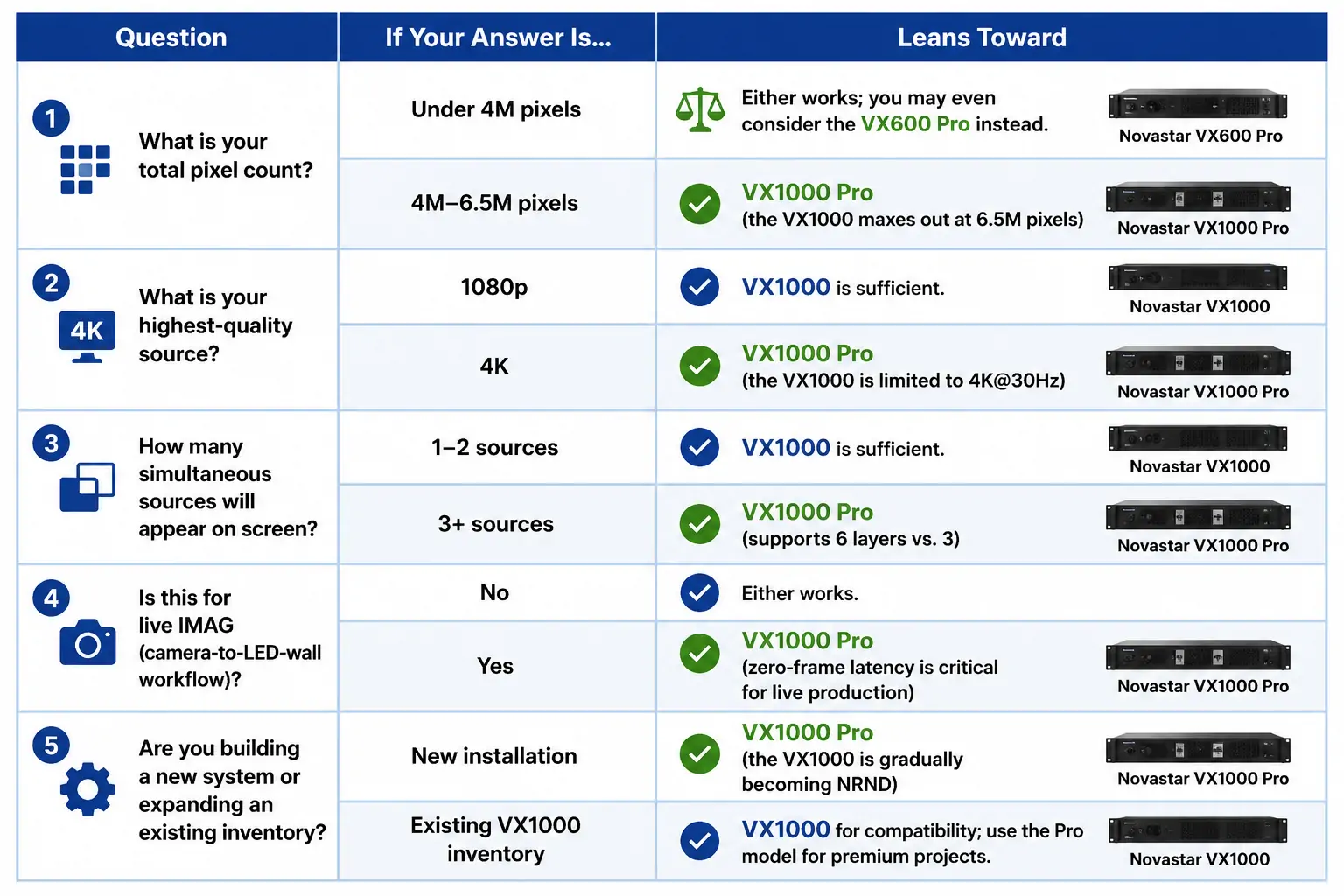
1. How to Decide: A 5-Question Framework
Start the VX1000 Pro vs VX1000 decision with the complete signal path: source, processor, transmission, receiving card, and LED cabinet. The same controller can be suitable for one show and unsuitable for another using the same screen.
- What is the actual screen resolution? Obtain cabinet pixel dimensions and the cabinet arrangement. Multiply width by height, then check each Ethernet cable route. Physical size in meters and pixel pitch alone are insufficient for a final port map.
- What signal must enter the controller? Write down resolution, frame rate, connector, and color format for every laptop, camera, switcher, and playback server. A requirement for 3840 × 2160 at 60 Hz points toward the Pro’s HDMI 2.0 input.
- How many windows must appear together? Draw the busiest show layout. A finished composition from an upstream switcher may need only one controller layer; independently positioned sources consume separate resources.
- Which operating functions matter? Consider preset changes, local playback, control software, backup paths, and acceptable camera delay. Evaluate these in the mode you will actually use.
- What must remain compatible? Record receiving-card models, firmware, cabinet files, fiber equipment, and existing spare controllers. Confirm the replacement workflow before committing to an order.
Do not decide by counting how many answers favor the Pro. One mandatory requirement can determine the choice. Equally, a higher specification has little value if the installation never uses it. Give your supplier a written system brief so that the controller recommendation can be checked against measurable requirements.
2. VX1000 Pro vs VX1000: Head-to-Head Comparison
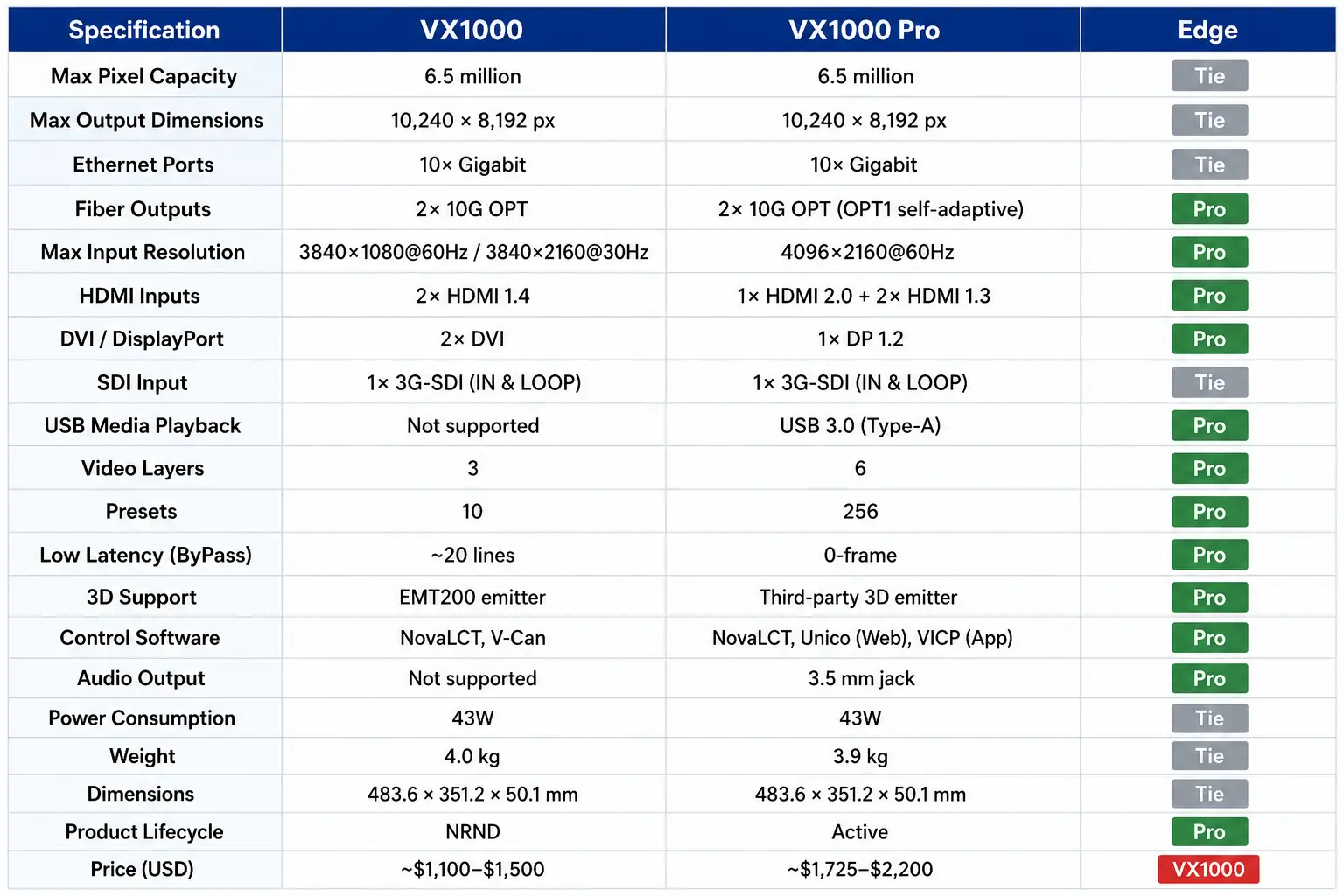
The following NovaStar VX1000 Pro specifications comparison separates input capability from LED output capacity. Values refer to the identified manufacturer documents; firmware, enabled functions, and receiving-card compatibility can introduce additional restrictions.
| Specification | VX1000 | VX1000 Pro |
|---|---|---|
| Maximum advertised pixel load | 6.5 million | 6.5 million |
| LED Ethernet outputs | 10 Gigabit ports | 10 Gigabit ports |
| Independent dimension limits | Width 10,240; height 8,192 pixels | Width 10,240; height 8,192 pixels |
| Main HDMI input capability | HDMI 1.4: 3840 × 1080 at 60 Hz or 3840 × 2160 at 30 Hz | HDMI 2.0: up to 4096 × 2160 at 60 Hz |
| Video input connectors | 2 HDMI 1.4, 2 DVI, 1 3G-SDI, OPT 1 | 1 HDMI 2.0, 2 HDMI 1.3, 1 3G-SDI, OPT 1; USB media input |
| Layers | 1 main layer + 2 PIP layers | 6 × 2K resources, or 1 × 4K + 2 × 2K |
| User presets | 10 | 256 |
| USB media playback | Not provided by its control USB ports | USB 3.0 media playback |
| Documented control tools | Front panel, NovaLCT, V-Can | Front panel, NovaLCT, Unico, VICP |
| Low-latency qualification | 20 lines with low latency and ByPass enabled | 0 frames in low-latency ByPass; 1–2 frames in low-latency video-controller mode |
Source references: NovaStar’s VX1000 specifications V1.6.0, VX1000 Pro datasheet V1.2.0, and VX Pro series overview. These are the editions checked for this comparison, not a guarantee that no newer edition exists.
01. Calculate the screen before choosing a controller
Screen pixels = horizontal pixels × vertical pixels. A 3200 × 1800 wall contains 5,760,000 pixels, so it passes the initial 6.5-million-pixel check for either model. A 3840 × 2160 wall contains 8,294,400 pixels and exceeds that ceiling. Accepting a 4K source does not mean a single VX1000 Pro can drive a full UHD wall pixel for pixel.
The maximum width and maximum height are separate boundaries. They do not describe a supported 10,240 × 8,192 canvas. Also check the selected frame rate, bit depth, special modes, receiver limits, and individual port loads. Passing the total-pixel check is necessary but does not prove that a proposed cable layout will work.
02. Check pixels per port and cabinet routing
The VX1000 Pro datasheet lists 650,000 pixels per port at 8-bit output. For an illustrative cabinet containing 200 × 200 pixels, fifteen cabinets total 600,000 pixels; seventeen total 680,000. The latter exceeds that stated port figure. This arithmetic is a starting point, not a complete approved configuration. Validate timing and topology in the configuration software and reserve the required backup paths.
For a more complete sizing example, imagine a wall built from sixteen cabinets across and nine cabinets high, with each cabinet containing 200 × 200 pixels. The resulting 3200 × 1800 canvas has 144 cabinets. Dividing those cabinets among ten ports gives an average of 14.4 cabinets per port, but an average is not a wiring plan. Draw each actual route and verify its load, dimensions, and permitted arrangement.
If the intended route puts eighteen cabinets on one output, that route contains 720,000 pixels even though the overall screen remains below 6.5 million. Redistribute the cabinets or redesign the outputs within the supported configuration. For backup operation, repeat the checks for the failure state as well as normal operation. A backup connection is useful only when the receiving system and the alternate path support the required recovery behavior.
3. Which Is Better? A Category-by-Category Verdict
The useful question in a VX1000 Pro vs VX1000 comparison is which difference removes a limitation in your production. Evaluate the following categories against actual content and operator tasks.
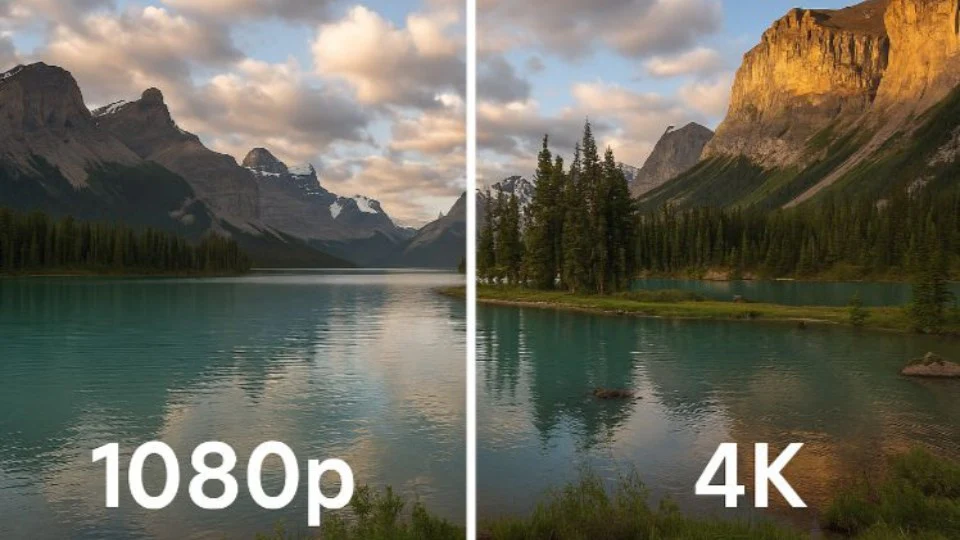
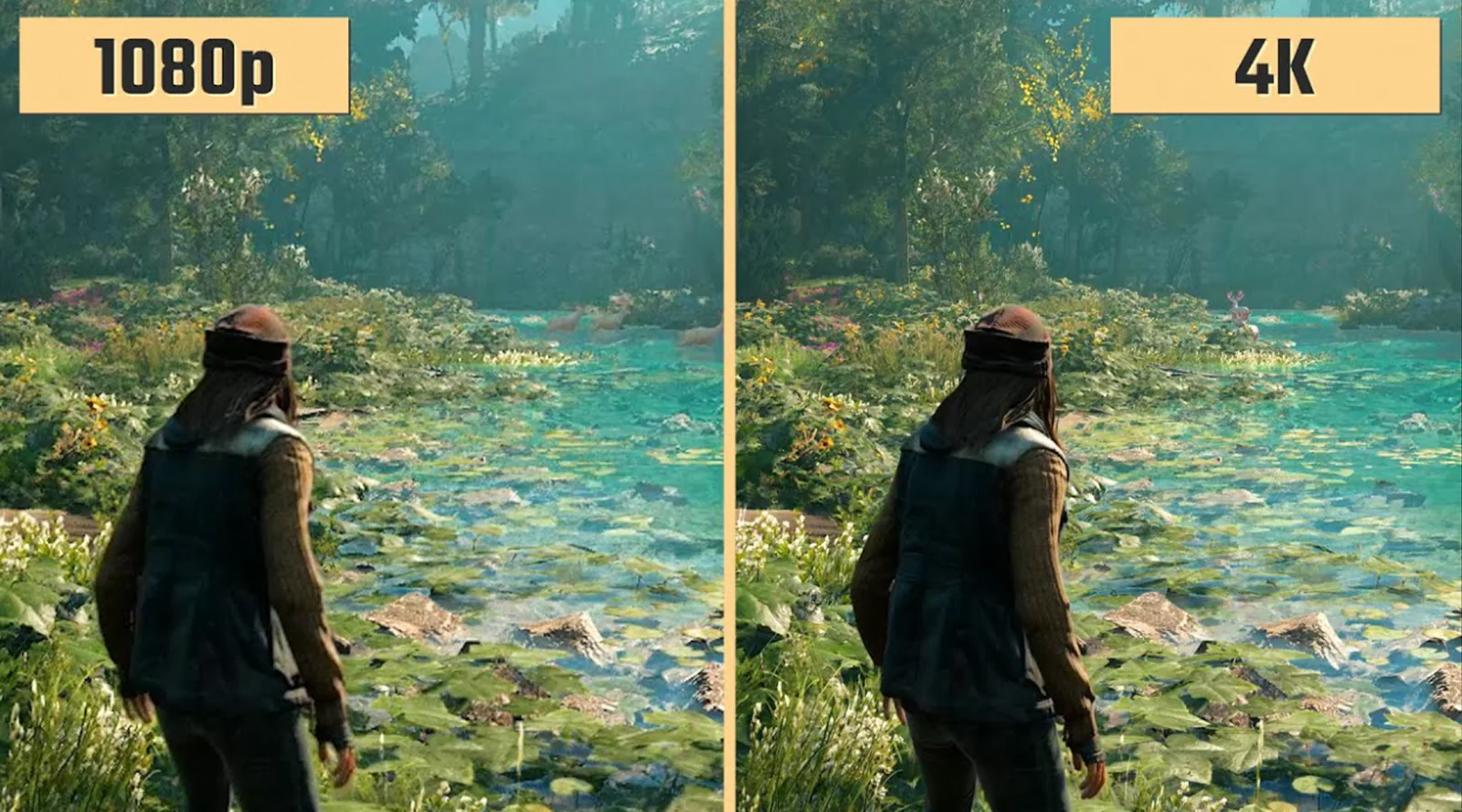
01. VX1000 Pro 4K60 input versus VX1000 4K30
The Pro’s higher-bandwidth input benefits a laptop or media server delivering UHD at 60 frames per second. It can avoid an upstream conversion just to make that source acceptable to the controller. Use the HDMI 2.0 connector for this requirement; the additional HDMI 1.3 inputs do not have the same maximum input capability.
The standard model’s 3840 × 1080 format is a valid ultrawide raster, not inherently stretched 1080p. It can be appropriate for a wide, shallow LED banner with correctly authored content. Likewise, 4K30 can be suitable for still graphics or content produced at that rate. Choose the required motion cadence deliberately instead of treating every signal labeled 4K as equivalent.
02. Compare layer resources, not just layer counts
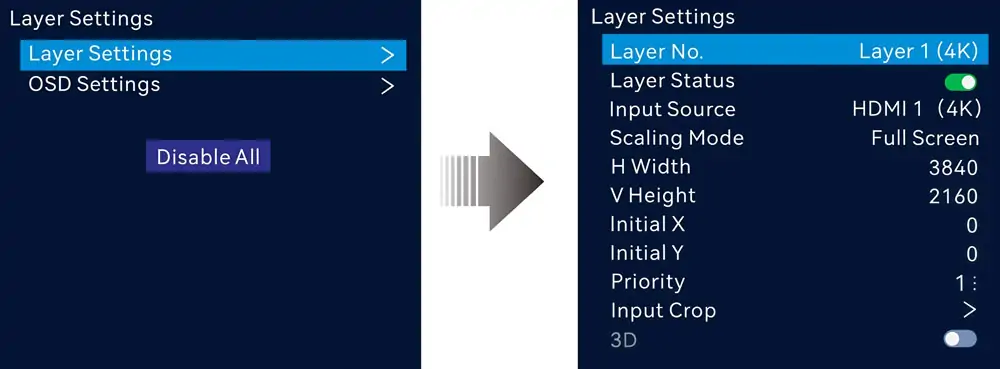
NovaStar describes the VX1000 Pro as supporting six 2K layers, or one 4K layer plus two 2K layers. It does not promise six independent full-resolution 4K windows. Draw the size and position of each window and identify its source before using the advertised layer count as a purchasing argument.
For a keynote, the operator might combine slides with a speaker camera and a second video window. A separate production switcher could instead deliver that complete layout as a single input. In the second arrangement, the LED controller needs less composition work. More layers help when the controller itself must arrange those windows; they do not create additional physical camera connectors.
03. Understand VX1000 Pro latency in the selected mode
For image magnification, measure delay from the live subject to the displayed image. Camera processing, switchers, converters, the LED controller, and receiving cards all contribute. A zero-frame figure for one device mode cannot eliminate latency elsewhere in the chain or guarantee perfect lip synchronization.
The low-latency ByPass figures in the table are conditional. ByPass removes video-processing functions, so it is not interchangeable with a scaled, multilayer workflow. NovaStar also documents restrictions involving cabinet alignment and Genlock. Test the exact operating mode and screen map; do not promise zero-frame processing while simultaneously specifying functions unavailable in that mode.
04. Presets and playback for repeatable operation
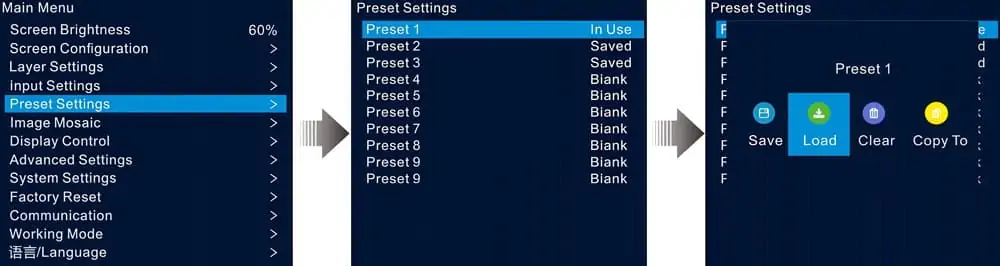
VX1000 Pro preset capacity is useful when operators need many named layouts. Establish a naming scheme such as main presentation, camera focus, sponsor loop, and holding screen. Rehearse transitions and verify which settings are stored. A layout preset should not be treated as a substitute for a separate backup of the receiving-card configuration.
USB playback can provide a practical holding graphic or simple video source. Before a show, test the actual file, encoding, resolution, drive, and playback behavior on the supplied unit. Keep a known-good copy with the show package. Do not assume every video file that plays on a computer will play identically through the controller.
05. Software, network control, and operator handover
The VX1000 uses NovaLCT and V-Can for documented configuration and control tasks. The VX1000 Pro adds the Unico workflow, including client and web control, and VICP. Verify the software version supported by the controller firmware before deployment. Existing V-Can habits and saved show files should not be assumed to transfer automatically.
Keep a documented control-network address plan and distinguish control-network connectors from LED data outputs. At handover, demonstrate source selection, brightness adjustment, preset recall, and recovery from an absent input. HonghaiLED’s NovaLCT download and version archive is a useful starting point for locating software, followed by confirmation of the required version.
06. VX1000 Pro price and total system cost
A reliable VX1000 Pro price comparison requires quotations with the same scope. Record currency, tax, shipping, accessories, warranty provider, lead time, and commissioning support. A headline controller price from another region does not establish your delivered cost or a universal price premium over the VX1000.
Include any necessary source conversion, fiber equipment, spare controller, training, and setup labor. For example, avoiding an extra converter can simplify troubleshooting, but its financial value depends on your existing equipment. Ask for an itemized quote through the NovaStar VX1000 Pro controller overview and compare the complete solution.
4. When the VX1000 Still Makes Sense
A VX1000 that already runs a tested system does not become unusable because a newer controller exists. Retention can be the strongest option when it avoids unnecessary changes and meets the project’s documented requirements.
01. Existing installations with stable sources
If the display uses one reliable playback source and a small number of layouts, the operational benefit of replacing it may be limited. Check source compatibility, spare availability, and maintenance history first. An upgrade is easier to justify when it solves an observed issue, such as an unsupported source timing or insufficient composition resources.
02. Matching spares and familiar workflows
A tested matching spare can shorten recovery because technicians already understand its connections and configuration process. Keep an inventory of firmware versions and backed-up files. A different model should undergo a replacement rehearsal before becoming the emergency spare, even when both models advertise the same pixel capacity.
03. Lifecycle claims need a current confirmation
Do not equate NRND, meaning Not Recommended for New Design, with a confirmed end-of-life date. Distributor terminology alone does not establish a manufacturer’s support commitment. Ask NovaStar or the supplying dealer for current availability, service arrangements, and replacement guidance in writing. This comparison does not promise future firmware releases or spare-part availability for either controller.
5. Decision Matrix: Which One Should You Pick?
Use this matrix after completing the screen-load and compatibility checks. These are conditional recommendations for VX1000 Pro vs VX1000, not guarantees based only on the venue type.
| Project requirement | Starting recommendation | Verify before ordering |
|---|---|---|
| New installation needing direct UHD60 input | VX1000 Pro | HDMI 2.0 source timing and actual wall load |
| Working installation with unchanged HD sources | Retain VX1000 if it meets requirements | Condition, support, configuration backup, and spare strategy |
| Frequent layout changes in rental work | Evaluate VX1000 Pro | Layer sizes, preset workflow, and operator training |
| Camera feeds for live image magnification | Test the complete chain with the proposed model | Measured delay, synchronization, and required processing mode |
| Full 3840 × 2160 physical LED canvas | Neither as one controller at the advertised 6.5M ceiling | Larger capacity or an engineered multi-controller design |
| Smaller wall with modest port requirements | Compare a smaller controller too | Total pixels, individual cable routes, and backup allocation |
| Irregular cabinet arrangement | Evaluate Pro topology features | Receiving-card support, bounding dimensions, and mode restrictions |
If a smaller controller might fit, review the VX1000 Pro vs VX600 Pro comparison. Select capacity from the port map, not from the model number alone. For a larger installation, request a design showing controller boundaries, source distribution, synchronization, and failure recovery.
Fine pixel pitch is also not a standalone reason to choose the Pro. Two screens of different physical sizes can have the same pixel count. The receiving cards, driver ICs, scan configuration, calibration, and content all influence the result. Ask to see representative text, gradients, and camera material on the proposed cabinet system.
6. Common Mistakes When Choosing Between These Two
01. Confusing source resolution with screen resolution
A controller may accept a larger source and scale it to a smaller LED canvas. That is different from displaying every source pixel on a matching physical LED pixel. Specify whether you need scaling, cropping, or pixel-to-pixel mapping, especially for spreadsheets, fine text, and control-room interfaces.
Also distinguish video frame rate from the LED panel’s refresh specification. An advertised panel refresh rate does not increase the number of unique frames delivered by a 30 Hz video source. Review motion with actual footage rather than comparing isolated numbers from different parts of the system.
02. Treating the VX1000 Pro as a drop-in replacement
Before swapping a VX1000, record the full cabinet map, receiving-card model, firmware, calibration data, and source settings. Save the correct configuration files and photograph the cable labels. Test the proposed Pro with representative cabinets before changing a commissioned wall.
Compatibility with a product family does not establish support for every card, firmware version, or advanced feature. Request confirmation for the exact hardware combination. Check brightness, color, gray levels, port order, and recovery after a restart. Keep the original controller available until the replacement passes acceptance testing.
03. Overlooking fiber and backup design
Fiber links extend transmission; they do not automatically increase the controller’s unique output-pixel budget. Match converters, optical modules, fiber type, connectors, and port assignments. A copied output and an independent additional canvas serve different purposes. Put both the normal and backup paths on the system drawing.
Rehearse failure recovery under controlled conditions before an event. Determine what happens when a source disappears, a data route fails, or the primary controller loses power. Define who performs recovery and how the operator confirms that the correct image has returned. Avoid discovering an untested backup arrangement during a live show.
04. Ordering before the acceptance criteria are agreed
Provide the supplier with cabinet resolution, rows and columns, receiving-card details, source timings, desired layouts, cable distances, and a backup requirement. Request a port map and a statement of supported operating conditions with the quotation. This makes the VX1000 Pro vs VX1000 decision reviewable before delivery.
At commissioning, display a pixel grid and readable text to check mapping and scaling. Run camera motion and the intended playback files. Recall every required preset, verify brightness limits, and test a controlled restart. Archive the accepted configuration with the project name and date so another technician can reproduce the setup.
7. VX1000 Pro vs VX1000 FAQ
These answers address the most common specification, price, and upgrade questions about NovaStar VX1000 Pro vs VX1000.
01.Does the VX1000 Pro support 4K at 60 Hz?
Yes. The VX1000 Pro accepts up to 4096 × 2160 at 60 Hz through its HDMI 2.0 input. Confirm the source format and cable path. This input capability does not increase its advertised LED output load beyond 6.5 million pixels.
02.Is the NovaStar VX1000 a 4K controller?
Its HDMI 1.4 inputs support 3840 × 2160 at 30 Hz or 3840 × 1080 at 60 Hz. State the resolution and frame rate together when specifying a VX1000. A requirement for a direct full UHD60 input favors the Pro.
03.How many pixels can a VX1000 Pro drive per port?
The referenced VX1000 Pro datasheet specifies a maximum of 650,000 pixels per Ethernet port at 8-bit output. Check the applicable timing, receiver configuration, and enabled features before using that figure for a final cable route. Unused capacity on one port does not fix an overloaded route elsewhere.
04.What is the VX1000 Pro price compared with VX1000?
There is no single reliable price difference across regions and purchase channels. Request current itemized quotations for the VX1000 Pro and VX1000 with equivalent warranty, accessories, freight, and support. Include any extra conversion or playback equipment needed by the proposed system.
05.Can a firmware update turn VX1000 into VX1000 Pro?
No. These are different hardware models. A firmware update cannot add the Pro model’s HDMI 2.0 input hardware or USB media connector to a VX1000. Install only firmware intended for the exact controller and follow the applicable manufacturer procedure.
06.Will existing receiving cards work with the Pro?
Confirm the exact card model, firmware, cabinet configuration, and requested features. Do not assume universal compatibility from the NovaStar name alone. A successful basic image test also does not verify every advanced function, backup mode, or topology feature required for the final installation.
07.Does zero-frame latency mean the entire LED wall has no delay?
No. The VX1000 Pro figure applies to specified operating conditions, including low-latency ByPass. Cameras, upstream processing, and the receiving system still contribute delay. Measure the complete video chain with the same settings and equipment that will be used during the event.
08.Where are the VX1000 Pro datasheet, manual, and software?
Use the manufacturer specification links in Section 2 and the HonghaiLED controller overview linked in Section 3. Match the manual and software to the supplied hardware and firmware. Keep the accepted versions in the project documentation rather than relying on an undated downloaded file.
09.Can VX1000 and VX1000 Pro be mixed in one system?
Do not assume that control cascading, source loop-through, saved layouts, or synchronization are interchangeable. A mixed system needs a documented signal and control design plus testing. For an emergency spare, demonstrate the actual replacement procedure before describing the units as interchangeable.
10.Which is better for an existing LED installation?
Keep the VX1000 when it reliably meets the installation’s requirements and support arrangements remain acceptable. Choose the VX1000 Pro when its input handling, layer resources, playback, or control workflow solves a documented need. Neither model can overcome a screen load beyond its supported capacity.
8. Conclusion: Choosing VX1000 Pro or VX1000
The VX1000 Pro is the stronger candidate for direct 4K60 sources and more flexible show operation; the VX1000 remains useful in compatible, proven systems. Both belong to the same advertised 6.5-million-pixel output class, so upgrading to the Pro does not solve an oversized LED canvas.
Make the final NovaStar VX1000 Pro vs VX1000 choice from a verified screen map, source list, required layouts, and a complete quotation. Check receiving-card compatibility and rehearse backup operation before deployment. For project advice, send HonghaiLED the cabinet resolution, screen arrangement, source timings, and operating requirements so the proposed controller can be matched to the actual display.
Related Posts
NovaStar NovaPro HD Review: Specs, Setup and Manual
The NovaStar NovaPro HD combines video processing and LED display…
NovaStar VX2000 Pro vs VX2000: Specs & Price Guide
NovaStar VX2000 Pro vs VX2000 is a comparison that starts…
NovaStar ET1S-G Review: Media Server Specs, Setup and Price
The NovaStar ET1S-G is a compact media server that prepares…

No Comments