
NovaStar MCTRL500 Independent Controller: Specs & Setup
The NovaStar MCTRL500 is an independent LED display controller built by Xi’an NovaStar Tech Co., Ltd. It accepts one single-link DVI video input and one audio input, and drives up to 2,600,000 pixels across four Gigabit Ethernet ports rated at 650,000 pixels each, with four matching 1.25G optical ports for fibre links up to 10 km. Input resolution reaches 1920×1200@60Hz, and the unit carries FCC, CE, EAC, IC and PFOS certification.
Because the MCTRL500 processes video and outputs it on its own, you do not need a sending card inside the control computer. NovaStar’s NovaLCT software is used to configure the screen, not to play content, which is exactly what makes this an “independent” controller for rental and fixed installations.
1. What Is the NovaStar MCTRL500 Independent Controller?
2. MCTRL500 Key Specifications (Official Data)
3. Key Features of the MCTRL500 Controller
4. How Many Pixels Can One MCTRL500 Drive?
5. NovaStar MCTRL500 vs MCTRL600
6. How to Set Up the NovaStar MCTRL500
7. Common MCTRL500 Problems and Fixes
8. NovaStar MCTRL500 Price & Value
9. FAQs
10. Conclusion
1. What Is the NovaStar MCTRL500 Independent Controller?
The MCTRL500 is an LED display controller developed by Xi’an NovaStar Tech Co., Ltd. It is a standalone (independent) controller: the box receives a video signal, processes it and sends it straight to the receiving cards inside an LED display panel over Ethernet or optical fibre. No sending card has to be installed in the control computer.
It supports input resolutions up to 1920×1200@60Hz and does not accept interlaced signal input, so the source device must be set to a progressive signal (1080p rather than 1080i).
NovaStar positions the MCTRL500 as a cost-effective controller for rental and fixed installations. Typical applications are concerts and live events, security monitoring centres, sports venues, and any project where the controller has to run without a dedicated PC attached.
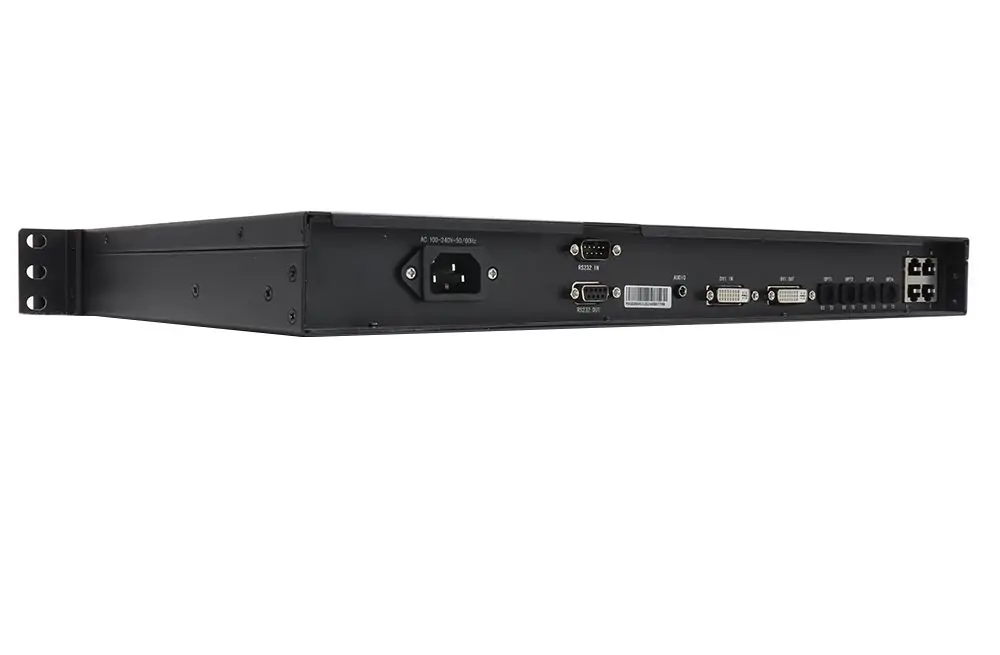
2. MCTRL500 Key Specifications (Official Data)
The table below is copied from NovaStar’s own MCTRL500 specification document rather than from reseller listings, so the figures can be checked line by line against the hardware you buy.
| Item | MCTRL500 specification |
|---|---|
| Video input | 1x SL-DVI |
| Audio input | 1x audio input |
| DVI output | 1x SL-DVI output |
| Ethernet outputs | 4x RJ45 Gigabit Ethernet, up to 650,000 pixels per port |
| Total pixel capacity | 2,600,000 pixels (4 x 650,000) |
| Optical outputs | 4x 1.25G optical ports; OPT1 maps to OUT1, OPT2 to OUT2, OPT3 to OUT3, OPT4 to OUT4 |
| Max input resolution | 1920×1200@60Hz |
| Custom resolutions | Max width 3840 px (3840×600@60Hz); max height 2560 px (800×2560@60Hz) |
| Interlaced input | Not supported |
| Control ports | 2x RS232 (RS232 IN, RS232 OUT) for cascading |
| Power | AC 100V-240V, 50/60Hz; rated power consumption 10 W |
| Operating temperature | -20°C to +60°C |
| Humidity | 10% RH to 90% RH, non-condensing |
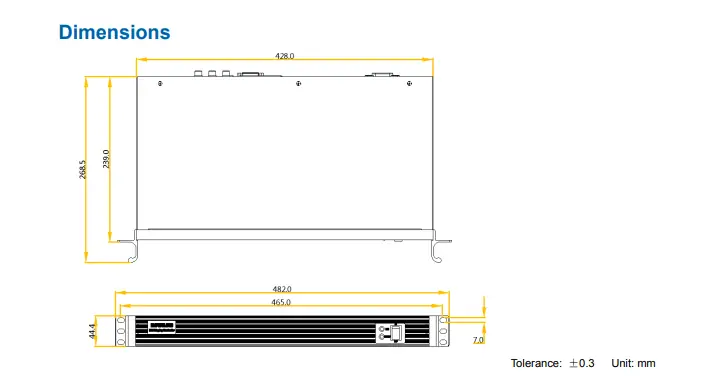
| Dimensions | 482.0 mm x 268.5 mm x 44.4 mm (tolerance ±0.3 mm) |
| Net weight | 2.9 kg |
| Certifications | FCC, CE, EAC, IC, PFOS |
| Included accessories | 1x power cord, 1x USB cable, 1x DVI cable |
Source: NovaStar MCTRL500 LED Display Controller Specifications, document V2.3.2, released 22 August 2024. Figures are quoted from that document; NovaStar has not published a price list or a list price for this model.
3. Key Features of the MCTRL500 Controller
Four capabilities decide whether the MCTRL500 fits a project: input and output flexibility, redundancy, calibration, and live monitoring.
3.1 Input and Output Flexibility
- Inputs: 1x SL-DVI and 1x AUDIO. Custom input resolutions are supported up to a maximum width of 3840 pixels (3840×600@60Hz) or a maximum height of 2560 pixels (800×2560@60Hz). There is no HDMI input.
- Outputs: 4x RJ45 Gigabit Ethernet ports and 4x 1.25G optical ports. Each Ethernet port carries up to 650,000 pixels, and the four optical ports mirror the four Ethernet ports one-to-one.
- Fiber options: single-mode twin-core fibre with LC connectors runs 1310 nm up to 10 km (OS1/OS2 recommended); multi-mode twin-core fibre runs 850 nm up to 300 m (OM3/OM4 recommended).
- DVI loop output: a SL-DVI output lets you monitor or pass the source signal on to another device.
3.2 Redundancy and Reliability
- Ethernet port redundancy: if one Ethernet link fails, the controller switches to the backup link automatically, which keeps a live screen running instead of dropping content.
- RS232 control ports: a RS232 IN and RS232 OUT pair lets you cascade several controllers for integrated control of a large installation.
- Rugged build: the controller is rated for -20°C to +60°C and 10% to 90% relative humidity (non-condensing), so it survives cold loading docks and hot equipment rooms.
3.3 Advanced Calibration Technology
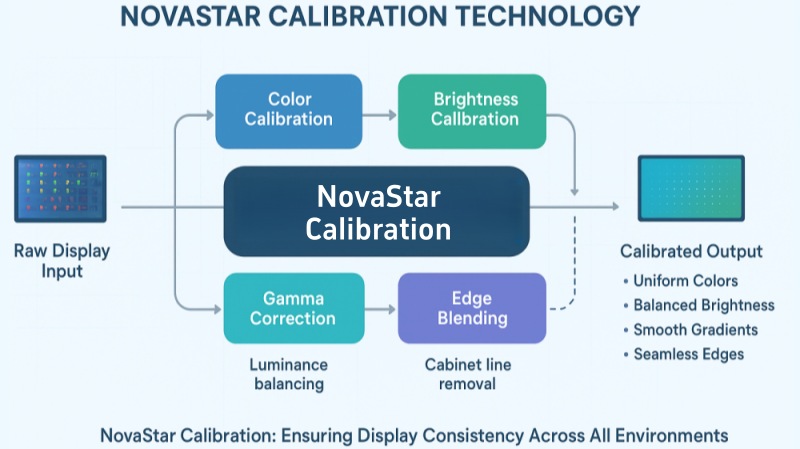
The MCTRL500 performs pixel-level brightness and chroma calibration. Working with NovaStar’s calibration platform, it corrects each LED individually, which removes colour discrepancies and evens out brightness and chroma across a wall. On rental screens built from several batches of LED display panels this is usually the difference between a visibly patched screen and a uniform one.
3.4 Monitoring and Diagnostics
Input monitoring keeps an eye on whether a valid video source is present. The front panel reports the state of the box on three indicators, which is the fastest way to diagnose a dead screen on site: STA (red) for power, RUN (green) for video and redundancy status, and DVI (green) for the DVI input. Section 7 lists what each indicator pattern means.
4. How Many Pixels Can One MCTRL500 Drive?
A single MCTRL500 drives up to 2,600,000 pixels. NovaStar rates each of the four Gigabit Ethernet outputs at 650,000 pixels, and 4 x 650,000 = 2,600,000.
In practice the limit rarely lands on the exact number, because LED walls divide into cabinets that are not sized to arbitrary pixel counts. The useful checks are:
- Add up the resolution of every cabinet in the wall, not just the advertised wall width and height.
- Split the load roughly evenly across the four ports instead of filling one port before starting the next.
- Leave headroom for the redundancy pairs you plan to use, since a redundant port normally carries the same data as its partner.
- If the total resolution is above 2,600,000 pixels, choose a controller with a higher pixel capacity or cascade units, rather than overloading one box.
5. NovaStar MCTRL500 vs MCTRL600
The MCTRL600 is the model most often compared with the MCTRL500, because both are four-port independent controllers with the same 482 mm wide chassis. The table below compares the two using NovaStar’s own specification documents.
| Feature | MCTRL500 | MCTRL600 |
|---|---|---|
| Video inputs | 1x SL-DVI | 1x SL-DVI + 1x HDMI 1.3 |
| Audio input | 1x | 1x |
| Ethernet outputs | 4x Gigabit, 650,000 pixels/port | 4x Gigabit, 650,000 pixels/port |
| Total pixel capacity | 2,600,000 pixels | 2,600,000 pixels |
| Optical outputs | 4x 1.25G optical | None |
| DVI loop output | 1x SL-DVI output | Not listed |
| Cascading | 2x RS232 (IN/OUT) | 2x UART (IN/OUT), up to 20 devices |
| Control interface | USB cable supplied for PC configuration | 1x USB Type-B |
| Light sensor input | No | Yes |
| Max custom height | 2560 px (800×2560@60Hz) | 3840 px (548×3840@60Hz) |
| Rated power | 10 W | 6.6 W |
| Net weight | 2.9 kg | 2.5 kg |
| Certifications | FCC, CE, EAC, IC, PFOS | CE, FCC, IC, CB, PSE |
Source: NovaStar MCTRL500 specifications V2.3.2 (22 August 2024) and NovaStar MCTRL600 specifications V2.3.4 (5 June 2025).
5.1 The Correction Most Comparison Pages Get Wrong
A lot of reseller copy claims the MCTRL600 “supports higher pixel loads” than the MCTRL500. NovaStar’s documentation does not support that: both controllers are rated at 650,000 pixels per Ethernet port and both have four ports, so both top out at 2,600,000 pixels.
The differences that do matter are these:
- Choose the MCTRL500 when the screen sits far from the controller (the four optical ports and 10 km single-mode reach matter), when you want a DVI loop output for monitoring, or when the source is DVI only.
- Choose the NovaStar MCTRL600 when the source is HDMI, when you need the light sensor input for automatic brightness, or when you need a custom resolution taller than 2560 pixels.
- Watch the certification list: the MCTRL500 ships with EAC and PFOS in its certification set, while the MCTRL600 lists CB and PSE. If a tender asks for a specific approval, check that line first.
6. How to Set Up the NovaStar MCTRL500
Setup follows the same three stages as other NovaStar independent controllers: wire it, configure it in NovaLCT, then test and calibrate.
Step 1: Hardware Connections
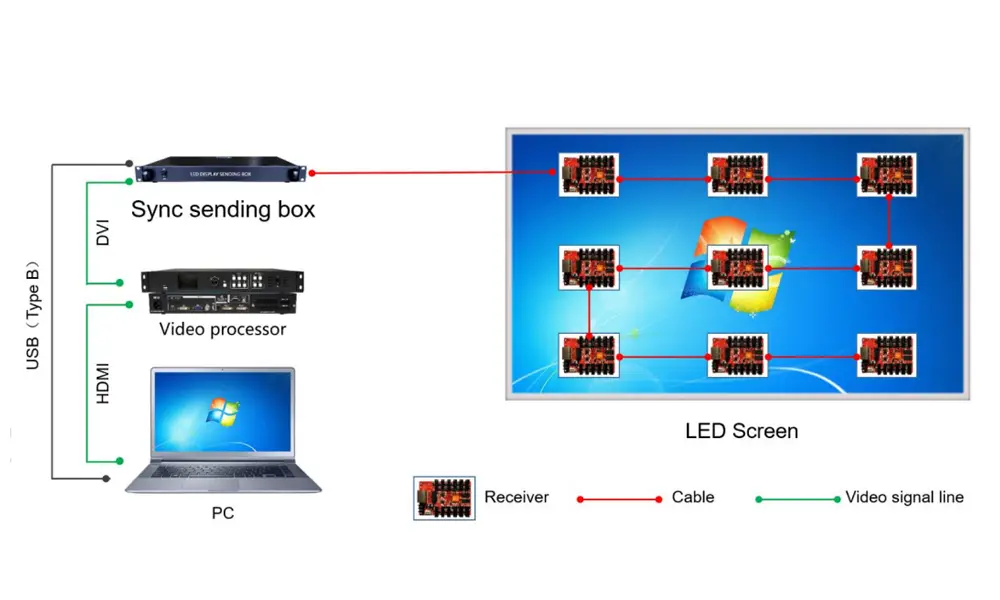
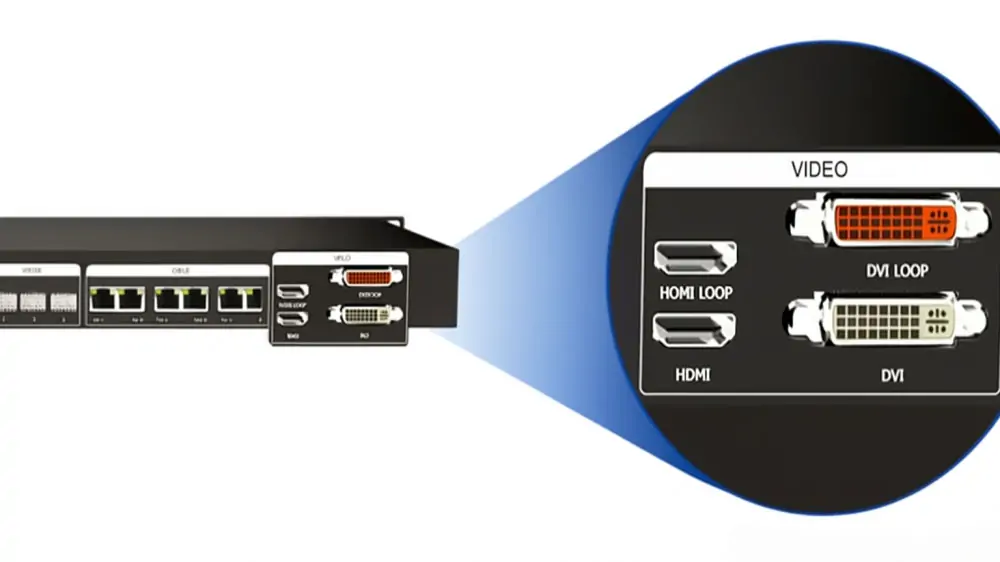
- Connect the DVI output of the source device (media player, switcher or PC) to the DVI IN port.
- Plug the audio source into the AUDIO input if the show carries sound through the controller.
- Run Ethernet cables from OUT1-OUT4 to the receiving-card chains in the wall. For long runs, use OPT1-OPT4 with the matching LC fibre instead.
- Use RS232 IN and RS232 OUT to cascade additional controllers when one box cannot cover the whole installation.
Step 2: Power On and Configure with NovaLCT
- Power the controller from the supplied power cord on AC 100V-240V, 50/60Hz. The rear panel takes a standard mains lead, and rated draw is only 10 W.
- Connect the control computer to the controller with the supplied USB cable.
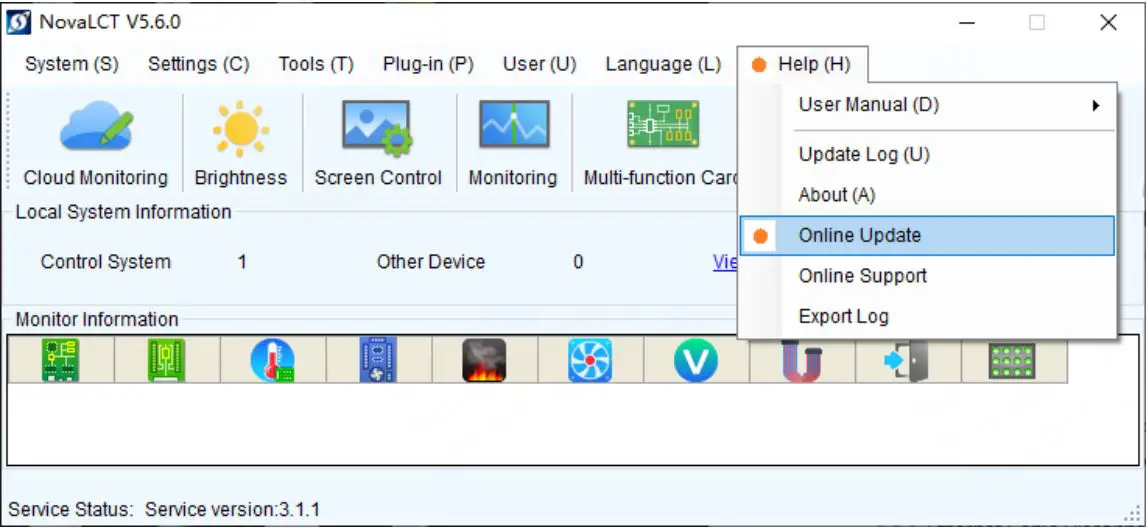
- Open NovaStar’s NovaLCT software and set the screen connection, resolution, brightness and calibration parameters. Keep the NovaLCT version in step with your receiving-card firmware; a current version list is kept in our NovaLCT software download list.
- Load the receiving card configuration file for the cabinets you are using before you send content, so the mapping matches the physical layout.
Step 3: Test and Calibrate
- Check the front panel before you look at the screen: the DVI light should be on and the RUN light should be flashing normally.
- Send test patterns to confirm every cabinet is mapped, in the right order and the right way up.
- Run pixel-level brightness and chroma calibration on the finished wall, then re-check with real content.
- Record the final NovaLCT configuration so a replacement controller can be loaded from file if a unit fails on site.
If you have not connected a NovaStar controller to a control computer before, our step-by-step walkthrough of connecting a NovaStar controller to the control computer covers the network and USB side in more detail.
7. Common MCTRL500 Problems and Fixes
Most MCTRL500 faults show up on the front panel before they show up in NovaLCT. The indicator behaviour below is taken from NovaStar’s document, so you can read the fault off the box itself.
| Indicator | Status | What it means |
|---|---|---|
| STA (red) | Always on | Power supply is normal |
| STA (red) | Off | No power, or the power supply is abnormal |
| RUN (green) | Slow flashing (once every 2 s) | No video source input |
| RUN (green) | Normal flashing (4 times per second) | Video source available |
| RUN (green) | Fast flashing (30 times per second) | The screen is displaying the startup image |
| RUN (green) | Breathing | Ethernet port redundancy has taken effect |
| DVI (green) | Always on | DVI video input is available |
| DVI (green) | Off | DVI input is unavailable or abnormal |
- Screen is black and RUN flashes slowly. The controller sees no video source. Check the source output is live, then confirm it is a progressive signal, because the MCTRL500 does not accept interlaced input.
- Source works on a monitor but not on the wall. The resolution is probably outside the supported envelope. Bring it back to 1920×1200@60Hz or below, or stay inside the 3840 pixel width / 2560 pixel height custom limits.
- One section of the wall drops out. If RUN is breathing, redundancy is active and has covered a failed Ethernet link. Trace the cable on the paired OPT/OUT port.
- Colours drift between cabinets. Run pixel-level brightness and chroma calibration again after the cabinets are mapped correctly; calibration applied before mapping has to be redone.
- Cascade does not respond. Check RS232 OUT on the first controller feeds RS232 IN on the next, and re-scan devices in NovaLCT.
For faults that follow a single cabinet rather than the whole screen, the problem is usually in the NovaStar MRV412-N receiving card or its cabling rather than the controller.
8. NovaStar MCTRL500 Price & Value
NovaStar does not publish a list price for the MCTRL500, and its official documentation covers specifications and certifications only. Any price you see is set by the dealer, the region, the shipping terms, and whether the unit is new or a refurbished spare, so quoted prices for the same model can differ substantially between suppliers.
What can be said objectively is where the MCTRL500 sits in the range: it is the lower-cost option when compared with controllers that add HDMI input or a higher custom-resolution ceiling, and its 10 W rated draw and 2.9 kg chassis keep freight and rack cost low. For a rental fleet that already standardises on DVI sources and fibre runs, that combination is usually enough.
- Ask for the document version. Specification sheets are revised; the current MCTRL500 sheet is V2.3.2. Ask which revision the stock you are buying matches.
- Confirm what is in the box. A standard MCTRL500 ships with a power cord, a USB cable and a DVI cable. Fibre modules and receiving cards are separate items.
- Check the certification set against your market. FCC, CE, EAC, IC and PFOS cover a wide range, but not every country.
- Price the whole signal chain, not just the box. Controller, receiving cards, fibre and cabling together decide the real cost per square metre.
If you would rather compare the whole family before you commit, start with the NovaStar MCTRL600, the MCTRL300 guide and the MCTRL R5, or look at the wider LED control system range.
9. FAQs
➖ What are the key differences between the MCTRL500 and MCTRL600?
Both controllers have four Gigabit Ethernet ports rated at 650,000 pixels each, so both are limited to 2,600,000 pixels per unit. The MCTRL600 adds an HDMI 1.3 input and a light sensor connector, and accepts custom resolutions up to 3840 pixels high. The MCTRL500 adds four 1.25G optical ports for fibre runs up to 10 km and a DVI loop output, and is certified to FCC, CE, EAC, IC and PFOS.
➖ How many pixels can a single MCTRL500 drive?
2,600,000 pixels, because each of the four Ethernet ports carries up to 650,000 pixels. Split the load across all four ports rather than filling one first, and remember that redundant ports reduce the pixels available for content.
➖ Does the MCTRL500 support fiber optic connections?
Yes. It has four 1.25G optical ports. With single-mode twin-core fibre and LC connectors the reach is up to 10 km at 1310 nm (OS1/OS2 recommended), and with multi-mode fibre it is up to 300 m at 850 nm (OM3/OM4 recommended). OPT1 mirrors OUT1, OPT2 mirrors OUT2, and so on.
➖ Can I cascade multiple MCTRL500 units?
Yes. The two RS232 ports (RS232 IN and RS232 OUT) are designed for cascading controllers so several units can be controlled as one installation. For multi-controller projects it also helps to check the MCTRL4K and MX2000 Pro options before you commit to a cascade design.
➖ What is the maximum resolution supported by the MCTRL500?
Standard input resolution goes up to 1920×1200@60Hz. Custom resolutions are supported up to a maximum width of 3840 pixels (3840×600@60Hz) or a maximum height of 2560 pixels (800×2560@60Hz). Interlaced signals are not supported.
➖ Does the MCTRL500 support HDMI input?
No. The only video input is single-link DVI, plus one audio input. If your source is HDMI, use a DVI converter or choose a controller with a native HDMI input such as the MCTRL600.
➖ What software does the MCTRL500 use?
NovaStar’s NovaLCT software on a Windows PC, connected over USB. NovaLCT is used for configuration, screen mapping, calibration and firmware work; it is not needed during playback, which is what allows the MCTRL500 to run as an independent controller.
➖ Is the MCTRL500 suitable for outdoor use?
It is a controller box, not an outdoor-rated enclosure. NovaStar rates it for -20°C to +60°C and 10% to 90% relative humidity, non-condensing, so it suits a dry, sheltered control position or a weatherproof cabinet. Do not expose the unit to rain or direct water ingress.
10. Conclusion
The NovaStar MCTRL500 is a four-port independent LED display controller with 2,600,000 pixels of capacity, four matched optical outputs for fibre runs up to 10 km, pixel-level brightness and chroma calibration, and a front panel that tells you what is wrong before you open NovaLCT. For DVI-based rental and fixed installations, it does the job without a PC sending card in the chain.
The decision against the MCTRL600 is narrower than most reseller pages suggest. Both controllers drive the same pixel load; the MCTRL600 wins on HDMI input, light-sensor support and taller custom resolutions, while the MCTRL500 wins on fibre output, a DVI loop output and cost.
If you are specifying a controller for a specific screen, send us the display resolution, cabinet size and distance from the control position, and we will confirm the pixel load and whether the MCTRL500 covers it. You can also compare our current LED display projects or check the NovaStar MCTRL500 controller in our module and controller store.
Sources: NovaStar MCTRL500 LED Display Controller Specifications V2.3.2 (22 August 2024); NovaStar MCTRL600 LED Display Controller Specifications V2.3.4 (5 June 2025). All specifications and indicator behaviour in this article are quoted from those documents.
Related Posts
NovaStar A10s Pro Receiving Card: Specs, Setup & Datasheet
The NovaStar A10s Pro is a compact LED receiving card…
NovaStar MG Series Distributed Processors: 2K vs 4K Guide
NovaStar MG Series distributed processors move video, audio and control…
NovaStar EL2000 Video Wall Splicer: Specifications & Setup
The NovaStar EL2000 is a hardware video wall splicer that…

No Comments